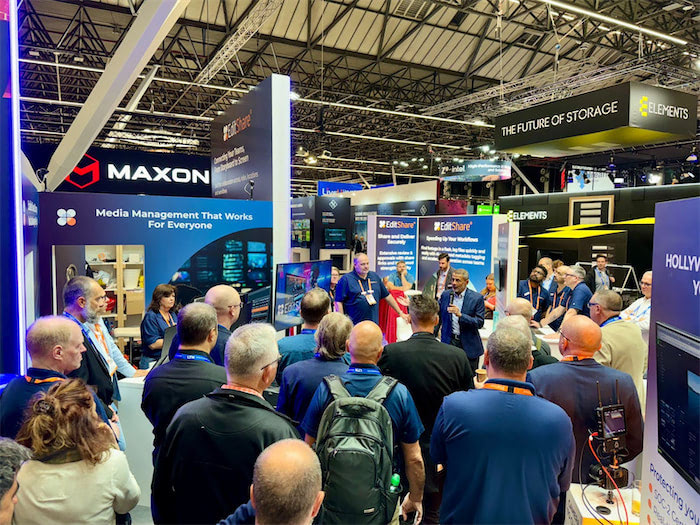
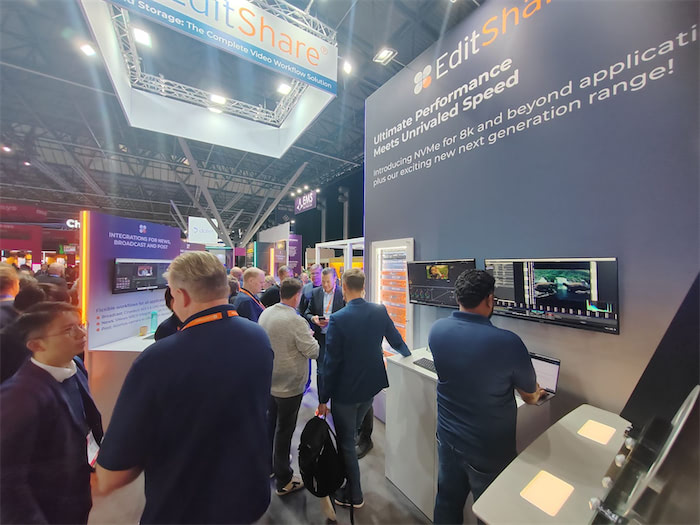
That’s a wrap on another successful year in Amsterdam at IBC, the show that always brings game-changing innovation to the industry. Hall 7 was the exciting place to be. Pulling off a show of this size takes effort, and our team did an excellent job setting up the booth with eye-catching workflows . We couldn’t be more grateful to them, because it allows us to connect with creative professionals and have workflow discussions with so many customers and partners. This year marked our 20th year exhibiting at IBC, a milestone that reflects two decades of bringing innovation to the M&E industry—many of which have since become integral to mainstream workflows. 2024 was no different, as we continue to push the boundaries of technology and shape the future of production. It also allowed us to introduce our latest product innovations – the all new EFS Ultimate Series and EFS Field Unit.
Here’s a look back at some exciting highlights from this year’s show.
AI Still Dominates the Conversation, but Remote Workflows Are Redefining Collaboration
As more companies adopt generative AI, it continues to dominate discussions at industry events. While the full impact of AI and machine learning in the creative process is still emerging, many see these tools as ways to explore new ideas, techniques, and styles. Some view AI as a radical shift in creative technology, while others see it as an efficient way to speed up their work. As one keynote speaker noted, “AI may generate an image, but it’s people who are guiding the tools.”
At the same time, the rise of remote workflows is reshaping how media is produced. Cloud-based tools like MediaSilo and technology like our own Swiftlink are allowing teams to work together across distances, transforming post-production, editing, and even live broadcasts into remote-friendly processes. This shift enables greater flexibility, faster response times, and lower costs, creating a more agile industry.
Unveiling our latest portfolio of storage nodes sparked lively conversations at the booth this year. Designed to streamline workflows and reduce the cost of shared collaborative storage, the Ultimate Series offers 2U, 3U, and 4U form factors, along with an exciting new addition: a portable field unit that delivers unparalleled flexibility for on-set and remote production.
The Ultimate Field portable unit, built on cutting-edge NVMe architecture, provides exceptional bandwidth for on-location work. Featuring integrated SwiftSync technology, it ensures the secure, high-speed transfer of media, allowing teams to instantly send dailies to global facilities for faster collaboration. Whether for boutique post-production houses or national broadcasters, the Ultimate Series enables users to work faster, more efficiently, and from anywhere.
Security was a big discussion at the show and protecting sensitive or valuable content is critical. EditShare is fully aligned with TPN (Trusted Partner Network) security protocols, ensuring compliance with industry-leading standards. Our solutions provide robust real time auditing , secure access controls, and reliable data protection to safeguard media assets throughout the production and post-production process.
Pushing the Boundaries of What’s Possible
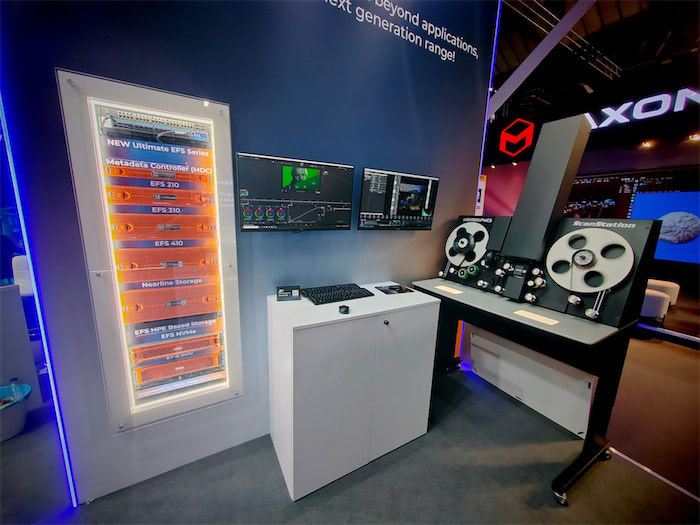
We wanted to showcase what is possible and set up an entire film restoration and archive workflow on the booth. We demoed an NVMe node connected to a gorgeous Lasergraphics Film Scanner, showcasing its ability to capture into an EFS mediaspace concurrently in stunning 5K DPX 4K 16-bit, 4K DPX 10-bit all at 30fps and concurrently playing back within Resolve at 8K 16-bit DPX— pushing the boundaries of high-resolution film restoration and archiving. This was showing what is possible. We still had so much more bandwidth left and this was all being produced on a single 2U Node.
“From the beginning, our mission has been to equip media professionals with practical, powerful, and cost-effective tools,” said Tara Montford, Co-Founder and EVP of Sales at EditShare. “The innovations we’re launching at IBC give users more power, speed, and capacity without sacrificing security—all at a price point that’s truly groundbreaking.
“With these advances, we’re delivering a revolution in content and workflow management that empowers the creative industry to do what they do best: tell great stories,” Montford added.
Got any questions, reach out to us right here, we are happy to talk workflow with anyone that wants to!
Remote production workflows for video editing are getting a lot of attention. The technology for remote production kept improving, but the pandemic really sped development up. Within the first week of the pandemic, the video team I led started deploying remote workflows. The technology was almost there then, but within weeks, we got it dialed in.
The biggest challenge our team faced was latency. We learned that every link in the chain matters (Including open ports on cable internet coax splitters outside of your house! As crazy as that sounds.) Remote post-production workflow development accelerated to meet the challenge. The basics of addressing latency, permissions, and cloud-based proxy workflows have been addressed. So the next question is, “How do you scale it?”
What is remote post-production and cloud-based production?
Traditionally, an entire post-production team would be together in a “post-house.” Editors, colorists, and sound could work together on a centralized server known as a SAN. Cloud-based workflows move the storage to a cloud service provider instead of a local centralized server. This allows for post-production members to be distributed throughout the nation or the globe.
Why is scaling workflows important for post-production?
Post-production teams need to be able to scale to deliver multiple projects for multiple clients. If a team relies on shipping hard drives back and forth in the mail, there is only so fast you can deliver your work to clients.
On-set technology has also improved. New Camera to Cloud technologies have been released like the Atomos + MediaSilo integration where footage is delivered right into MediaSilo from an on-board monitor/recorder.
Understanding workflows in production workflow
Now that you don’t have to wait for footage to be brought back to base to start editing, why not have a distributed post-production team? Editors can get right to work with low-resolution proxies as soon as they are uploaded to the cloud. Another advantage of cloud-based post-production is that editing teams worldwide can work in shifts.
There are a couple of kinds of remote workflows. On one end of the spectrum is ingesting everything to the cloud. This requires a significant amount of bandwidth if you are putting raw camera files onto a cloud storage provider. You need to make sure that your upload speed isn’t a bottleneck that negates the efficiencies of remote post-production.
Another approach is hybrid. In this remote video workflow, you can keep your raw files local and upload proxy files to a cloud storage provider. Project files can also be synced to the cloud so that editors can check in and out projects without stepping on each other toes.
Key factors for scalability
Cloud-based services for remote video editing workflows allocate a specific amount of storage to an account. This could range from 3TB – 10TB for starters. Users can add additional storage as they need it. It is worth thinking through how much “active” storage your team needs at any one time. If you have 3 editors who work with projects from 2-3TB each, 10TB would be a good amount to have in your “active” cloud storage.
If your team is just using the cloud for proxies, you could probably accomplish the same amount of editing with 4TB of cloud storage. However, when you are ready to finish the final files, you’ll want to conform back to your raw camera files. If that is happening where you keep your raw files, then you are all set. If the person doing the color grade is remote, you might need to ship them an SSD. This is the limitation of a hybrid/proxy remote workflow. There is enough available storage and bandwidth for working with proxy files, but not RAW.
Another challenge to scalable video production is having the right space for building a stock video library. Many clients want to accumulate footage that can be reused in multiple videos.
Using cloud-based tools & software to scale workflows
One solution to the challenge of needing space for active projects and space for “stock” footage is to use a review and approval application, like MediaSilo, as a cloud-based asset manager for finished assets. These could be stock video clips, or they could be graphic assets, or project files for After Effects, Photoshop or Illustrator project files (I know of an insurance company that does this). Review and approval tools are good places for frequently accessed files because they are easily searchable, and you don’t have to worry about permitting external users to access the primary “active” video storage.
Managing post-production assets in the cloud
If you are running a remote post-production workflow, you will learn quickly that the file management tools in Google Drive or Dropbox aren’t designed for media production. That’s why EditShare FLEX. Its a suite of tools to facilitate your entire cloud-based post-production workflow.
Cloud-based media management tools will help you to view assets while they reside on the cloud service without downloading them to your local machine. You can search your assets, make notes, create proxies, and organize projects.
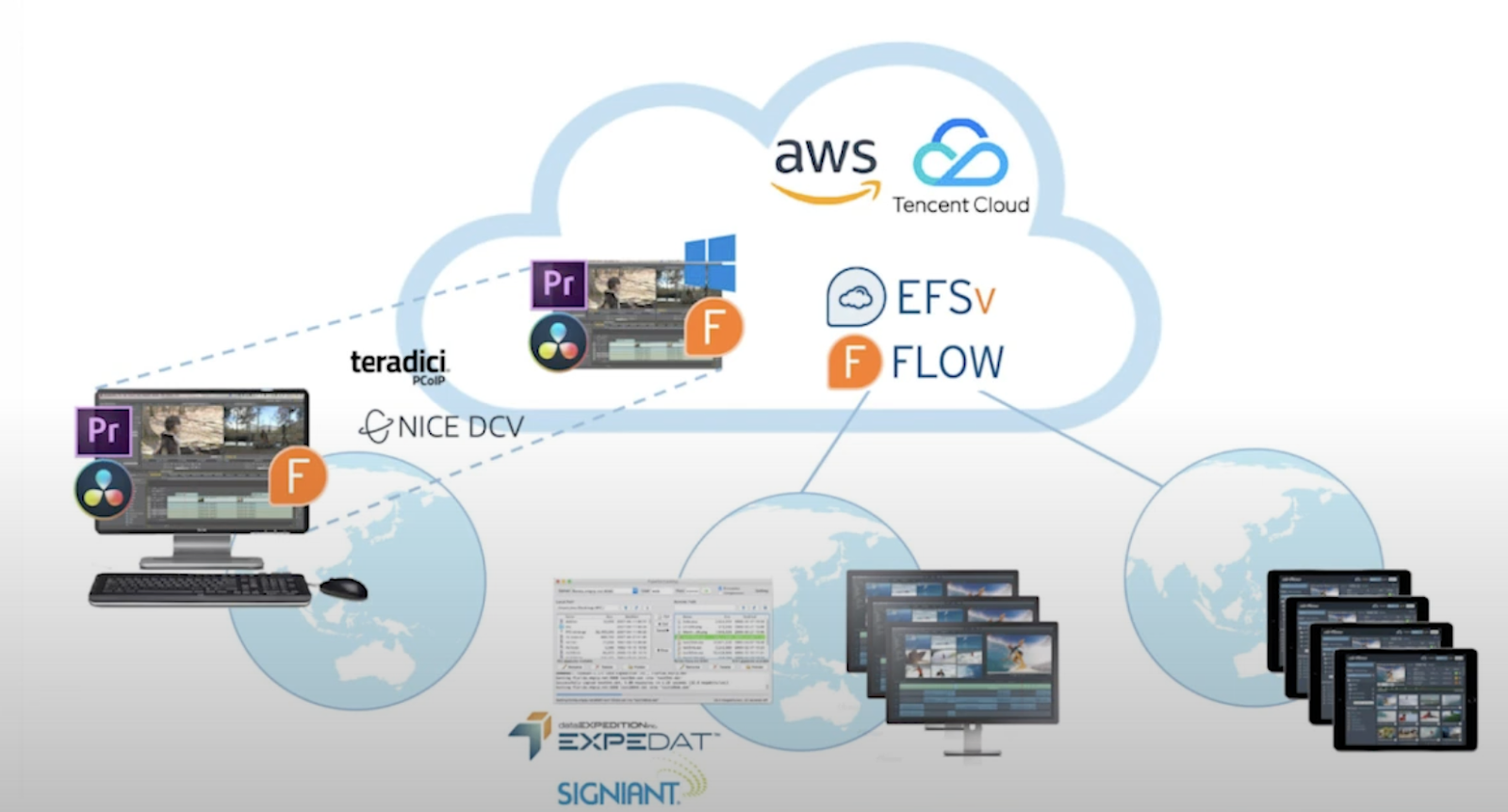
Getting files to the cloud efficiently takes more than just a fat pipe from your ISP. Technologies from companies like Data Expedition optimize uploads to maximize your bandwidth.
Another area to consider is data archival. Many teams have used LTO tape as a long-term storage solution. However, using LTO also means barriers to retrieving old footage. A smart cloud-storage strategy (like one using FLEX Cloud Sync) employs cloud-based archival solutions to store older projects on less expensive storage tiers.
Editing from the cloud
Once all your footage is in the cloud (whether raw or proxy), it is time to edit. Most remote editors download the proxies to local storage and start editing with their powerful computers. But there are a couple of other options.
Technologies like EditShare FLEX Cloud Edit and Cloud Edit+ enable users to log into a remote server and edit with their favorite NLE without having to download footage locally. The NLE runs on a remote server but behaves as responsively as a locally installed copy. This wizardry is accomplished through technology like HP Teradici PCoIP (it just rolls off the tongue, doesn’t it?). Your local machine is essentially just a window into a responsive remote workstation.
Another approach allows editors to access on-prem storage as efficiently as cloud storage. EditShare Swift Link delivers this for EditShare FLOW users. Swift Link ensures latency is addressed for remote editors and that their editing experience is optimized for the network conditions between their workstation and your on-prem storage.
Automation in the cloud
If you are evaluating a cloud-based remote post-production, don’t forget about transcoding and quality control workflows. If you are accustomed to a local workflow, you probably don’t give a second thought to batch transcoding a bunch of clips from a mezzanine codec like ProRes to a delivery codec like h.264. However, if that transcode takes place on a local client and the ProRes files are on a server, you’d have to download the ProRes files, transcode locally, and then upload the h.264 versions.
If your cloud service provides the ability to automate transcodes in the cloud you can eliminate the upload and download times. Its even better if you can setting up multiple steps and rules so that the work of transcoding for various deliverables is automated. With the right tools, QC can also be done in the cloud as well.
Scaling for remote production
Cloud-based workflows scale easily because additional resources can be added instantly. Scaling on-prem hardware solutions does take more planning, but if you make a good plan, it isn’t hard to add a unit to your local storage.
If you need higher performance, consider all NVMe shared storage. NVMe storage eliminates the bottlenecks of spinning disk storage. It is more expensive, but it also consumes less power and
Recent trends in remote production
It is helpful to know that post-production standards are moving to the cloud. Today’s cutting-edge products are the result of years of careful planning and a deliberate industry-wide plan to take advantage of cloud-based post-production workflows.
Choosing to deploy remote video workflows now means your team will be prepared for all the latest technological advancements that are coming along every day.
Conclusion
The time has finally arrived for scaling remote production workflows. Teams have options between hybrid and cloud-based workflows. Cameras and recorders can send files straight to the cloud. Media asset management apps can be deployed in the cloud. Remote cloud-based workstations can be accessed anywhere in the world. Solutions for archival, transcoding, QC and review/approval now integrate with each other. All the pieces are now in place to create efficient remote post-production teams.
EditShare, paired with MediaSilo, offers a complete solution that incorporates the latest technologies with the flexibility of your choice of hybrid or fully cloud-based workflows.
What do you think of remote video production workflows? If you have questions about the right setup for your team, send us a message!
When you want to scale your video production capabilities, people first think about buying another camera. But for many teams, the bottleneck isn’t in production; it exists in post-production. However, storage for video assets falls into a strange in-between category for many organizations. It feels like an extension of video production, but camera experts usually aren’t IT experts. Seasoned IT pros are often slow to discover that the needs for video editing are fundamentally different from your typical workgroup.
The experts in the storage needs for video teams often arise from technically-minded video editors and post-production experts. This is because they had to figure out the challenges for themselves and explain the difficulties of post-production to their bosses and the IT staff. That’s my story, at least. Over the past few months, I’ve observed several cases where teams are willing to invest in expensive cameras and lenses but shy away from investing in the necessary post-production infrastructure to truly break the log jams in their workflow.
I found that an efficient post-production shared solution is the best foundation you can give to your team. It lets you keep all your most relevant footage at your fingertips. It provides the ability for quick collaboration between editors and motion graphics designers, and it enables you to scale. So, if you want to lay a foundation for real growth, let’s dig into how digital media production can quickly scale.
Free yourself from the sneakernet
If you’ve ever found yourself grabbing a hard drive off a shelf and passing it in between team members, only to run back over to the shelf to find the right drive, you’ve used the “sneakernet” to manage your projects. This process is fraught with difficulties, and you always have the sinking feeling, “I think I still have that footage.”
A shared storage solution keeps your most relevant assets “online” instead of “offline.” It connects to multiple workstations at the same time as well. This means that as you scale your production capability, editors and motion graphics artists have immediate access to all their work instead of having to hunt down a drive. Additionally, editors can access the same footage simultaneously since the shared storage is accessible to everyone. Finally, you don’t have to worry about wasting space by duplicating the same footage on multiple computers. Freeing yourself from the sneakernet is reason enough to deploy scalable storage like EditShare EFS.
Choose specialized storage
When it becomes evident that a video team needs a server for their footage, inevitably, somebody from IT pulls up a webpage from Dell or HP and starts to calculate the costs. This is the decision moment. If we were in a movie, this moment is the equivalent of the villain’s entrance. I’m serious. If this moment isn’t handled well, a video team can get saddled with an underperforming server solution that is worse than Sneakernet.
Consider the difference between an interstate and a main street downtown. Shared storage for media allows for sustained, smooth playback of raw video files, like an interstate. Normal servers are designed more like the traffic signals of a downtown, allowing for lots of little pieces of data to come and go. But if you have ever been stuck in traffic, looked over to a carpool lane, and seen cars zooming by, you have a good indication of the difference between a normal server and a shared storage solution. Video production storage allows for multiple video files to be played from the server to multiple workstations without interruption, and you can think of these files as big semi-trucks. These trucks need protected lanes to be able to go fast and move without hitting the breaks
If you can help your IT team understand this fundamental distinction in “traffic,” you can turn them into your biggest supporters. Why? Practically speaking, if they master this new area of IT for media, they will become more valuable to their organization, and their career will take on a level of specialization.
So why not optimize a generic server for “interstate highway mode?” Editors not only need the bandwidth for sustained “reads” of data, but they also need to write to project files on the server. Those project files require fast write speeds. If video files are like semi-trucks, project files are like mini coopers. This means that the shared storage solution has to be optimized for two ends of the spectrum, sustained reads and fast writes, while handling the different kinds of traffic going to and from the server. Video files aren’t PDFs.
I believe that if a video team can communicate this metaphor well, it can vault them into new levels of productivity. Video teams and IT teams can then collaborate effectively and understand each other’s needs much better.
Online, Nearline, and Cold Storage
When we talked about sneakernet, we learned about the difference between offline and online data. But what about footage that you need to access occasionally? We call this storage “nearline.” It doesn’t need to be on your high-performance storage, but it doesn’t belong on the shelf.
Active storage
You can save money when building your shared storage solution by identifying a specific capacity for your “online” or “active” storage. You might want this storage to be on SSDs or NVMe drives. These solid-state drives are lightning quick and work exceptionally well with high-resolution 4K, 8K, and VFX files. While this storage is quick, it is also the most expensive. (Some of that cost is offset by the fact that these drives use less power) Remote users can access an EditShare EFS volume with Swift Link, delivering remote performance that used to be available only in-house.
Nearline storage
If your most accessed files live in your online storage, place your infrequently accessed files on your nearline storage. This unit typically uses mechanical spinning disk hard drives. They work together in a configuration to ensure that you won’t lose your data if one, or even two, of them fail. This configuration is called a RAID configuration. A nearline storage unit with a group of hard drives won’t be as fast as your active storage, but it will be cost-effective. And if you have an intense project, you can always move data between your nearline and active storage.
Cold Storage
At a certain point, you can determine that you probably won’t be going back to the original footage for a project. But you don’t want to delete it all. This means your project is ready to move from nearline storage to cold storage. Some organizations may upload footage to the cloud or archive it on LTO tape.
I recently had to pull footage from Google Drive. My former team used Google Drive as cold storage. Man, was this a mistake! When you download large amounts of data from Google Drive it rearranges the folder hierarchy and appends suffixes to the file names. What a headache! I spent hours reconstructing the file structure of the REDCODE RAW files. I had to delete the suffixes that Google Drive appended on hundreds of files.
A much better approach to cold storage would have been to use LTO tape with a solution like Editshare ARK. This approach does take your files offline, but it also keeps track of those LTO tapes so you can know what is online, what is offline, and where to find what you need.
Specialized hardware calls for specialized software
Having a place to put your data doesn’t necessarily mean people can easily find what they need. Many teams use their senior editor’s brain as an “index” for project files. A much better solution is to have software do that for you. A media asset manager is an application that organizes your footage and lets anyone find what they need without Slacking the senior editor again. Editshare FLOW works with your shared storage to keep track of all your assets. Those could be online or offline. It will track data in your active, nearline, and cold storage. EditShare FLOW becomes the brain for your entire post-production operation.
Editors want to spend time in their NLE, not in the media asset manager. Editors want to edit. That’s why integration with editing apps (Known as NLEs, non-linear editing applications) is critical. EditShare provides panels in both Adobe Premiere Pro and Blackmagic DaVinci Resolve. These panels allow you to spend more time in your NLE so that you aren’t leaving your native environment. If you use a different NLE, EditShare is still perfectly compatible with any NLE (but Premiere and Resolve getting in-app panels sure is nice).
Integrate your workflow from pitch to prep to post
Post-production can feel like its own little world. It doesn’t have to be that. EditShare EFS now integrates with MediaSilo. An integration resulting in an end-to-end workflow. When you are shooting, Atomos recorders will deliver your footage right to the cloud via MediaSilo when you are shooting. Then your project can go through post on EFS and then get securely delivered to outside stakeholders via MediaSilo. This is an unprecedented level of integration and security from script to screen.
Conclusion
Deploying an EditShare EFS shared storage solution will revolutionize your post-production workflow, solve problems for your team, and deliver the foundation for scale. Reach out to an EditShare rep today to learn more.
In my favorite opening to any filmmaking book, Edward Dmytryk, in his classic On Editing, tells this story:
It was the early 1930s. A very important guest, Baron Rothschild, was being given Paramount’s version of the Grand Tour. One of his stops was my cutting room, where I was asked to say a few words by way of defining my craft.
I was young and enthusiastic. Some twenty minutes later, as I paused for breath, the Baron smiled.
“It would appear,” he said, “that film editing is the art of filmmaking.”
I agreed, trying to ignore the twinkle in his eyes. Of course, I was then a film editor. A few years later, when I became a director, I would have probably changed my pitch-but not too much.
After working on nearly every part of the filmmaking process, I must say that “editing is making the movie.” Everything up to that is assembling the raw materials. But if filmmaking is akin to building a house, it is in the edit bay where the film is built.
Fundamental Editing Techniques
After over a decade of experience editing everything from 15-second social videos to narrative shows and feature-length documentaries, I wanted to write this article on the fundamentals of editing. The marketplace is full of jobs for “video editors,” but so many editors have never had the opportunity to study their craft in-depth. Many rely on graphic transitions and social trends without ever mastering the art of the invisible cut.
But if there’s one thing I know about editors, it’s that they love to learn. So this article attempts to lay a foundation for the fundamentals so that you can go beyond editing by feel and have a deep knowledge about why a cut is working.
#1 Cutting on action
The most basic technique of editing is cutting on action. An actor starts a motion in one frame, like lunging with a sword in a medium shot at :38, and a cut is made. The action is completed in the next shot which is a close up.
This technique works well because the viewer anticipates the action will be completed in the next shot. The edit can feel stunted and stagey if your cuts happen before or after the action. When you cut on action, the sequence will feel fluid, and the cut will be “invisible.”
A great book on this subject is The Invisible Cut, by Bobbie O’Steen. Sometimes you have large movements like the thrust of a word. Other times, you have to take advantage of more subtle movements like the turn of a head or shifting of an eyeline.
#2 J and L cuts
The concept of cutting on action can even be extended to audio. To smooth out a cut, you can have the audio of an incoming clip begin just before the video does. This produces a “J” cut. The incoming audio gives the viewer a little heads-up that they should expect to see a speaker in the next clip.
Think about a dialogue scene. If you were standing in a group with two other people having a conversation and one person was speaking, your attention would be on the speaker. If the other person spoke up, you’d hear their voice and then turn your head. This is a natural “J” cut, where you hear the audio before adjusting your view of the scene.
When editing an interview with two angles, cutting between them at the very tail end of the sentence can be helpful rather than waiting for the speaker to complete their final word to cut away.
The reverse of the J cut is the “L” cut. Sometimes, you want to cut away to some footage before the speaker finishes their line. This is especially helpful if the talent makes a funny expression or if you need to cut the line mid-sentence. An L cut can also do a good job of setting up the next scene or visual.
#3 Match Cut
Match cuts use a similarity between two shots to connect them. Match cuts are often planned in pre-production, but sometimes you can discover them in editing as well. This video by StudioBinder does an excellent job of showcasing many different kinds of match cuts. One of the most famous match cuts is in 2001: A Space Odyssey, where a bone is tossed into the air, and then the film cuts to a space station that is similar in shape.
Another match cut focuses on the audio. Music or a sound effect from one shot may continue into another, and it takes on a new meaning in that new context.
Motion match cuts take advantage of cutting on action (Technique #1) to connect two shots so that the action seems continuous, but the incoming clip takes place in a different location or is completed by a different character. Edgar Wright uses this technique in his films.
#4 Eye Trace
If you are watching an interview, your eyes are typically focused on the eyes of the subject. If you cut away to something else, your focus will start in the place where the subject’s eyes were. If the main subject of the new shot is in another part of the frame, your eyes take a moment to hunt around the screen for what they should pay attention to. This can result in a “jump cut,” If the incoming clip has the main subject in the same place on screen as the outgoing clip, you will have taken advantage of “eye trace.” Take a look at this video from Jay Lippman, who shows different ways to employ eye trace to produce smooth cuts.
As you can see, eye trace is an effective tool for combining cutting on action and match cuts. When you start layering techniques as an editor, you can really separate yourself from the pack. These kinds of edits are fun to watch and keep viewers engaged.
Eye trace is especially useful when you need to insert a cut into an interview that was shot on a single camera. If you punch from a medium angle to a close up you can line up the subject’s nearest eye in the same spot on screen. If you punch in over 30% it will not look like jump cut. You can hide the cut even more by doing it on a word, combining eye trace and an audio match cut.
If you punch in on an interview, it is helpful if the camera’s resolution is higher than the resolution for the final deliverable. For instance, shooting 4k for a 1080p deliverable. Or shooting 8K for a 4k deliverable. This will prevent a drop in quality in the final piece.
#5 Cutting on Blinks
Every editor should read Walter Murch’s classic book, “In the Blink of an Eye.” In this book, Murch (Editor for Apocalypse Now, The Godfather III, Particle Fever) dives into his philosophy of editing. And while you should read the book, I can summarize it by saying, cut on the frame just before someone blinks. Don’t cut while they are blinking, and don’t cut after the blink. This is because blinks seem to coincide with the completion of thoughts.
Murch theorizes that editing works precisely because people blink. We are producing little “cuts” all the time.
YouTube Channel This Guy Edits demonstrates the technique of cutting on blinks.
Murch has also pointed out that the audience will often synchronize their blinks with the blinks of actors. Using this method causes the edit, the actors, and the audience to all sync up to the same rhythm.
Conclusion
These five fundamental techniques are important for every editor to master. As you can see in the examples, they flow into one another and build on each other. Sometimes, you edit by feel and end up in a “happy accident” of a nice cut. But videos rely on dozens of cuts, and you’ll be more effective if you know why each cut is working or not. This knowledge becomes even more important if you are sitting side-by-side (or over a remote connection) with a director.
A director can ask for a cut and then wonder out loud why it isn’t working. When you have a working vocabulary of visual grammar, you’ll be able to instantly identify when a cut works and why it is awkward. This skill set can flow backward into more effective directing, storyboarding, and even screenwriting.
When you know the craft of editing, not just using an NLE, you become an incredibly valuable contributor at every step of the filmmaking process. You’ll be able to write for the edit, storyboard for the edit, direct for the edit, and shoot for the edit. And of course, you’ll be an absolute pro at the edit.
In high-end film and TV production, where valuable media assets are the lifeblood of every project, security control is a top concern for everyone involved. As technology workflows evolve, including review and approval processes, the risks associated with handling and transferring media also evolve.
Companies, such as VOD suppliers, invest heavily in theater productions or TV programs. They aim to ensure their content remains secure and does not end up on the dark web before they can monetize it. They seek a return on their investment. Implementing strong security measures has become essential for conducting business in this industry.
Security solutions for media production
At the forefront of security solutions for media production is EditShare’s EFS (EditShare File System), complemented by its Risk Auditing layer, which provides real-time tracking of every file from inception through to delivery. It records an audit of every time someone touches, moves, copies or modifies a file. It’s like the big brother watching over your facility.
Keeping this auditing trail on its own dedicated drive is important, and that’s exactly what EFS provides. However auditing is only one layer of the security approach that facilities need to take.
Ensure the security of your media
Let’s delve into what you should be aware of to ensure the safety of your media production workflow.
Access management and control: The first line of defense in cybersecurity is access management and control. Managing who or what can access your organization’s media assets is crucial. With unauthorized access often being the starting point of security breaches, effective access control strategies form the bedrock of a secure system.
Make sure you facility has a SIEM platform, controlling people’s access to the facility and craft editing and comms rooms
Control who has access to your media assets by implementing strict user authentication and authorization protocols such as AD and SSO
Utilize role-based access control to assign specific permissions based on job roles and responsibilities in the production process.
Regularly review and update access privileges to ensure only authorized individuals have access to the valuable content content.
Auditing and Monitoring: Having a powerful auditing and monitoring system is an easy way to identify weaknesses in your workflow. And if a breach does occur, detailed access logs can serve as crucial evidence during forensic investigations. They can unravel an attacker’s path, providing invaluable insights that can help fortify the security infrastructure.
Leverage EditShare’s EFS auditing layer to track every interaction with your media files in real-time.
Monitor user activities, file modifications, and access attempts to identify and mitigate security threats.
Generate comprehensive audit logs and reports for compliance purposes and forensic analysis.
Visible and Forensic Watermarking: Video piracy costs companies billions of dollars a year. Visible and forensic watermarking acts as a fingerprint for your media so that if the worst happens, you can trace it back to the leak and minimize the damage. Take advantage of the most effective theft-deterrent measures using MediaSilo and Screeners’ tamper-resistant, user-specific SafeStream™ watermarks.
Deter piracy and trace leaks through visible watermarks, including custom text, graphic elements and invisible forensic watermarks.
Create and share watermark templates for an entire team or user group to unify your security efforts.
Expand brand identity marketing and keep reviewers mindful of who is making the content with logo watermarking.
Malware Ransomware: Ransomware attacks have risen by 13% in the last five years, costing nearly $1.85 million per incident. Statistics predict a ransomware attack every two seconds by 2031.
Work collaboratively with Ransomware or Malware software platforms such as Falcon Crowdstrike
Data Backup and Disaster Recovery: Professionals in the media and entertainment industry invest countless hours and resources in producing intellectual property. Without a robust backup strategy, these creations are at risk of loss or corruption. A powerful backup and disaster recovery solution provides the means to protect, preserve, and recover critical media assets.
Establish backup and disaster recovery mechanisms to protect against data loss or corruption. This is where clients should deploy a HA cluster similar to EFS 450
Regularly backup your media files to secure off-site locations or AWS cloud storage platforms Via the EditShare Flex Sync Node
Test your backup and recovery procedures regularly to ensure they are effective in restoring data in the event of a disaster.
Employee Training and Awareness: A highly trained team is an underrated security strategy. Awareness training can significantly decrease human errors, which are a leading cause of data breaches. Training, simulations, and testing train new and safer employee behaviors, reducing the likelihood of human errors.
The best defense is a good offense
Threat assessments are a standard IT security practice for a reason. A thorough threat assessment helps identify gaps in your security posture before hackers do. Regular, ongoing assessments and vulnerability scans help ensure your current measures are effective while helping you make more informed choices around security, expense and performance.
Thanks to the Motion Picture Association’s Trusted Partner Network (TPN), those in the media and entertainment space can easily obtain a third-party assessment that evaluates your system. TPN evaluates your system to ensure you’re up to date on cybersecurity best practices and requirements.
In conclusion
By implementing these security measures and using EditShare’s EFS auditing layer for real-time tracking and monitoring, you can significantly enhance the security of your media production workflow. Remember, protecting sensitive data and your valuable media assets is not just a priority—it’s a necessity when dealing with today’s media conglomerates.
The variety of editing that goes on at a broadcaster would amaze you. There are promos, documentaries, news stories, specials and more. Some projects take weeks, and some projects take hours. The technical infrastructure is imposing, but it’s also mobile. Add to that a changing landscape of viewers’ tastes, outside consultants and inside pressures.
To get an inside look at the world of broadcast video editing, we interviewed Gregg Ginnell, former senior editor and post-production supervisor at the CBS affiliate Kiro 7 in Seattle, WA. He’s had a career spanning more than two decades and was keen to share his insights.
Meet a broadcast editor
“I worked in broadcast for a large number of years. I did a lot of documentaries. I did a lot of promotion. I didn’t do a lot of news,” relates Grinnell. “I did do news for a couple of years after leaving Kiro when I worked for Al Jazeera America. That was a completely different news experience.” When an interview opens with that breath of experience, you know that you are going to get some interesting insights into the world of video editing for broadcast.
Video editing for film, corporate and broadcast is all storytelling. But Gregg pointed out that there’s a vast difference between a “three-and-a-half minute story” and a “six-shot” news segment. While working at Kiro, the work got split up between team members who were good with quickly putting together a series of shots and moving on and those who spent days crafting a story.
He related a story of a colleague comparing the cutting of short segments to “making sandwiches.” That kind of edit had to be put together quickly to meet deadlines. Gregg focused on pieces that involved interviews and promotional spots for the station.
Film vs broadcast editing
I asked Gregg what the biggest difference was in the mindset of an editor working on a film vs. one working in broadcasting. His reply was, “Consultants.”
I didn’t expect that answer. He explained that every 12-18 months, a consultant would be brought into the station to give their perspective on trends in broadcast and how to gain market share. Each time, there was a different person, but they were all from the same firm. Sometimes their guidance would directly contradict each other or go back and forth between recommending a trend, advising against it, and then recommending it again.
Gregg shared that the advice of one consultant was to focus on the local news talent for their promo spots. So they went out and shot footage and tied that in with graphics to create a personal connection between the talent and the audience. Eighteen months later, another consultant from the same firm came in. This person advised that they need to drop the focus on talent and emphasize the news itself. Gregg’s team went to work on the new direction and crafted a whole new set of promos.
A year or so went by, and, you guessed it, the next consultant from the firm said to highlight the talent. At this point, Gregg’s team showed them the promo package from the prior campaign and simply asked, “Like this?”
Running decisions through the lens of outside consultants also led to feedback around everything from how many shots should be in a story to the content of the promotional packages. This dynamic leads to a balancing act for broadcast editors between their instincts on telling a story and outside feedback based on market research.
For instance, a story might go off for review, and the feedback would come back as “We love this story, but your shot count is too low.” Gregg recalled thinking, “Well, actually, it has just the right number of shots.” But at the end of the day, you do your best work and try to balance those competing interests.
This is in contrast to the work that Gregg did for the broadcaster Al-Jazeera America. In his experience, they deferred to the editor to determine the dynamics of the edit, even if it meant a piece was a few seconds longer than initially planned.
Editing three-and-a-half-minute packages that took the editor’s lead feels more like a documentary filmmaker’s approach than working in a typical newsroom.
Grinnell made an interesting comparison between documentary and news editors, saying, “I love news editors. I can’t do their job. I’m a little too frenetic. But I know news editors who became documentary editors. I don’t know any documentary editors who became news editors.”
It appears that once you’ve had a chance to tell long form stories, you just keep coming back for more.
Promo Editing
Gregg spent much of his time crafting “promos.” These spots air during commercial breaks and promote the news programming of the local station.
A lot more effort goes into editing promos than your evening news stories. This demonstrates the broad spectrum of talent that needs to be brought to the table at your local broadcaster. Some editors need to be fast. Gregg mentioned an editor who cut 62 packages in eight hours!
On the flip side, Gregg would spend half a day dialing in the color grade for a single promo spot. The message, visuals, motion graphics and sound would all be coordinated to reinforce the brand message for that season.
That difference in editing jobs perfectly illustrates Gregg’s comparison of editing a documentary vs a last-minute promo. He went on to describe it, “If I’m working on a documentary, I’m working directly with the producer, and we’re working every day together, and we are creating it from whole cloth. And that is a completely different experience than how [if] somebody comes in and drops a script down and going, [and says] ‘we got to promote this thing and we got to do it in the next two hours.’ And those are all really different, almost different jobs.”
Learning to shoot helps you edit better
As an editor, you are always looking to grow your storytelling skills. Gregg related, “I’ve always told everybody that I didn’t become a good editor until I became a better shooter. Go out and have to shoot your own stuff, and [when] you get back into the bay, there’s no one else you can blame.”
Many shooters who started off as editors develop strong skills as interviewers. “Where you’re sitting there listening and you go,” Gregg recounted, “Oh, my story’s changing now! There’s nothing I love more than editing in my head.”
You can see from Gregg’s career how the disciplines of editing, shooting and interviewing all work together in the head of the filmmaker to produce a better story. It’s a good reminder that in this age of specialization, there’s still value in combining the skills of a generalist with an area of specialization.
Working remotely
Working remotely was a shock to many industries, but post-production had already laid in place much of the infrastructure to go remote. This preparation allowed editors to remote into their AVID workstations from home and crank out edits. Google docs, Slack and Zoom provided other means for collaboration. Broadcasters all over the world also began to use advanced tools like MediaSilo.com for review/approval, tracking versions and managing assets. These tools combined to really remake the landscape of post-production.
Gregg shared about a campaign he edited for an app that focused on the footwear market. The shooters were in NYC, the graphic designer was in Utah, motion graphics were in California, and he was editing from Seattle. With the proliferation of mobile video capture and distributed teams, we’re going to see more and more of this kind of collaboration.
But along with the ability to work from anywhere comes the importance of security. MediaSilo helps broadcasters secure their assets with SafeStream technology. SafeStream enables visible watermarks and invisible forensic watermarking so that you can track any leaks back to their source.
Conclusion
Getting to know this legendary Seattle broadcast editor, Gregg Grinnell, was an honor. He has a passion for editing that is still burning strong after decades in the business.
Grinnell’s experiences remind us that being an editor is an act of service. Sometimes, you serve a client, a consultant, or a director, but you always serve the story.
It’s inspiring to see how even though consultants come and go and technology changes, the need for crafting compelling stories only increases. It causes us to ask ourselves, “How will I adapt to a shifting landscape? What core skills can I continue to develop that will remain relevant no matter what the future holds?” Those questions will help editors remain sharp and stay in demand in this ever-changing landscape.
As a video production professional, choosing the right video storage solution for your media assets is a crucial decision. While file and project sizes continue to grow exponentially, deadlines are continuously shrinking, so having a video storage system that can keep up with capacity demands while remaining fast, secure and cost-effective is essential.
In this article, we’ll examine the pros and cons of the two main options – cloud video storage and on-premise video storage – and look at the benefits of the hybrid solutions that combine both.
What is the difference between on-prem and cloud storage?
On-premise video storage is locally connected media storage such as individual hard drives and RAIDs, network-attached storage (NAS) or storage area networks (SANS) that are physically located at your facility and managed by your own IT staff.
The benefits of on-premise storage include the potential for air-gapped security, predictable costs and reliable performance. The downside to this kind of video storage is that the full expenditure is incurred upfront, your internal IT or creative teams must manage, backup and repair the system, and significant expansion requires additional costs and expertise.
Cloud video storage, however, is offsite, internet-connected media storage managed by an external third-party vendor. One of the main benefits of working with cloud storage for video production is that the cost is limited to a monthly subscription for the capacity used, negating the requirement for a lot of up-front cash.
That capacity can be rapidly expanded or constrained in tandem with current project requirements, leading to cost savings and overall efficiencies but also a more unpredictable monthly spend. Furthermore, the third-party vendor bears all management, servicing and infrastructure costs, which is often preferable for teams without this in-house expertise.
Hybrid video storage solutions aim to combine the best of both worlds into one integrated system. Fast, high-bandwidth local storage is used for active projects and workflows, while completed projects and non-urgent media are sent to the cloud for archiving. This combines the performance and simplicity of on-premise storage with the scalability and cost savings of the cloud.
What about remote access? For both on-premise and cloud video storage, remote access is possible, depending on the security and performance requirements of the video production team.
The Pros and Cons of On-Premise Video Storage
While there are many benefits to having all of your video storage on-premise, cloud storage is designed to overcome limitations and challenges. Let’s consider some of the pros and cons of on-premise video storage in more detail.
Pro – Full control over all hardware and software
One of the advantages of on-premise vs cloud storage is that you design and control the entire hardware and software architecture, selecting a system that best meets your specifications and overseeing maintenance and upgrades. You’re not at the mercy of an external vendor’s roadmap, business changes or downtime.
Pro – Predictable high-speed performance
Local hard drives and network-attached storage provide fast, reliable connectivity for high-bandwidth processes like multi-stream video editing. Unlike cloud storage for video editing, your read/write performance doesn’t suffer due to internet congestion, server loads or bandwidth limitations.
Pro – Enhanced security
Keeping your storage on-premise protects sensitive media files from being erroneously or maliciously accessed while on shared cloud infrastructure. Restricting physical access and air-gapping (disconnected from the internet) your media storage adds a further layer of protection.
Pro – No hidden costs
While on-premise storage comes with larger upfront costs than a cloud storage subscription, it also negates any hidden or unexpected expenses, such as egress fees, which occur when you move your data out of the cloud or surcharges enforced when you over-step your subscription limits.
Pro – Integration with legacy systems
Existing edit bays, asset management software and established video production workflows can often more easily connect to new on-premise storage without the need to re-construct the whole system, as everything is under your control and most often is largely plug-and-play.
Con – High upfront costs
Purchasing substantial video storage capacity as well as the switches, servers, and management software required to make it all function comes with a large capital expenditure. You’re also paying for all unused capacity from the start.
Con – Complex configuration and management
Even a medium-scale video storage solution requires some IT staff time for the initial design and integration, not to mention the ongoing administration and daily troubleshooting. This staff skill set also needs regular updating as technology and workflows evolve.
Con – Separate disaster recovery site required
A system for backing up and storing all of your media in a second physical location is needed to replicate and recover all of your data in the event of a disaster at your main premises. This necessitates purchasing yet more storage capacity and connectivity.
Con – Scaling requires overprovisioning
While you can work within the constraints of your initial storage capacity, adding further storage capacity requires purchasing it in large chunks and planning for the upgrade downtime. Running out of storage space will obviously impact the efficiency and productivity of your creative team!
Con – Dependence on locality
To get the best out of the system, users must be physically on-premise to access the media, while remote users often have comparatively limited connectivity and bandwidth. Even when remote access is established, staff are still required onsite to manage the physical devices.
Pros and Cons of Cloud Video Storage
While we are all used to working with cloud storage on a daily basis, from our Dropbox accounts to our iCloud photo backups, cloud storage that is capable of storing, managing and streaming or downloading large video files with the performance for real-time playback is a different beast altogether.
Here are some pros and cons to consider when using cloud video storage for modern video production workflows.
Pro – No infrastructure to manage
As part of your subscription fee, the cloud storage provider handles all of the necessary hardware, component upgrades, system maintenance and offsite backups, and instead, your team focuses on their creative work.
Pro – Scalability on demand
Adding further capacity to your cloud video storage account is as simple as clicking ‘upgrade.’ This has the added benefit of only paying for what you need when you need it and allows you to respond quickly to unexpected growth or capacity requirements.
Pro – Global availability
Storing your media in the cloud means it’s instantly available to authorized users anywhere in the world with an internet connection. This gives you access to a global talent pool, the efficiency of single-source asset management, and the potential for a creative team to work around the clock from different time zones—all without the need for setting up remote access VPNs for your on-premise storage.
Pro – Reduced disaster recovery costs
As cloud providers replicate their data storage globally by default, there’s no need to build and maintain a second offsite backup in case of disaster recovery. This is already done for you.
Pro – Lower initial costs
With no upfront expenditure on expensive hardware, there are no large CapEx purchases to wait and plan for. Costs move to OpEx, where subscription fees based on usage, storage capacity, and the number of seats needed are much more manageable from a cash flow perspective month-to-month.
Cons – Vendor dependence and lock-in
Once you choose a cloud video storage provider, you have no real control over that vendor’s policies, service charges, fee increases or business stability. Once a workflow has been established and a lot of media is stored online, switching cloud providers is more complicated.
Con – Variable performance
While most cloud video storage providers offer some form of performance guarantee, internet outages or service congestion are unpredictable. Also, each end-users experience relies on a range of factors, including their local internet connection strength and stability, proximity to the data center and local system spec.
Con – Limited integration options
While using cloud storage does open up the potential for some newer automated workflows and remote production capabilities, it is not always possible to integrate legacy apps with cloud storage or even with other online services and storage providers.
Con – Security risks
No matter how tight your security procedures, storing your valuable media online, especially in a shared cloud storage server you don’t control brings a level of exposure to a greater number of threats.
Con – You may end up paying more in the long run
If you store and maintain a substantial amount of video media in your cloud storage over a long period of time, your total cost of ownership (TCO) may end up exceeding that of on–premise storage. Services often charge egress fees for downloading data, for example, when making room online or moving it to cheaper archival storage like AWS Glacier.
The Pros and Cons of Hybrid Video Storage
If you decide to use a hybrid cloud and on-premise storage solution, you can get the benefits of both and avoid some of the limitations of either one, yet you will create some new challenges to consider.
Let’s examine the pros and cons of a hybrid video storage workflow.
Pro – Best of both worlds
The most obvious benefit of a hybrid video storage solution is that you’re set up to enjoy the strengths of both models, gaining the performance and security of on-premise video storage with the scalability and global reach of the cloud.
Pro – Elastic Capacity Management
Having your media stored in the cloud gives you the buffer to absorb the unexpected variable demands of different projects and the flow of projects over time, while your local storage can handle anticipated project requirements.
Pro – Reduced disaster recovery costs
By setting up an automatic cloud backup of your on-premise video storage, you can more affordably and easily manage both archiving and disaster recovery by creating an offsite duplicate.
Pro – Greater workflow possibilities
Modern video productions require a wide range of workflow capabilities, from high-performance local storage for demanding processes like color grading final high-resolution media or combing through terabytes of archival material to enabling a globally distributed creative team to manage assets and artistic responsibilities through shared media stored in the cloud.
Pro – Gradual transition path
Developing a hybrid storage model can be a simple and gradual process that doesn’t require wholesale reinvestment or scrapping existing workflows or hardware. When starting with local storage, it’s easy to add cloud storage for archiving. Or, when starting from a cloud platform, it’s easy to add local storage for more demanding tasks. This makes it easier to test the benefits of either solution before fully committing to either or both.
Con – Added complexity
One consideration of combining on-premises and cloud storage is that it does add a further layer of complexity to managing media files, user access permissions and deciding where files should live and for how long. Further complexity arises if files live in multiple locations at once rather than having a ‘single source of truth’ for all uses.
Con – Potential replication lag
If you have to move media files from local storage to cloud storage (or vice versa), a lot of data must be copied between locations, which can create a delay. This also requires the on-premises storage to have access to adequate bandwidth.
Con – Two sets of storage to purchase and pay for
With the costs of a cloud subscription, on-premise infrastructure and software, the hybrid model may be more expensive in combination than leveraging a single platform.
Con – File management training
Having worked at a few facilities that had their own unique way of doing things when it comes to file management, and sometimes, in fast turn-around environments, management goes out the window – educating your users on where to store their files or where to look for the right files becomes all the more important – otherwise you end up wasting either time or storage capacity.
Con – Partial vendor dependence remains
While there are many benefits to a hybrid workflow, one consideration when choosing a cloud storage provider for that workflow, is that you will be locked into a dependence on them.
How to choose the best cloud video storage solutions for your needs
Determining the ideal storage solution for your video workflows depends on several key factors:
Bandwidth needs – High-speed on-premise storage is best for multi-stream 4K editing, while remote teams will need cloud or VPN connections.
Scalability requirements – The cloud offers the most flexibility for rapid growth.
Budget – While the cloud has lower startup costs, on-premise storage can offer TCO savings at larger capacities.
Security – Contractual requirements may require on-premise storage for sensitive footage and projects.
Team skills – The cloud reduces the need for dedicated storage admins and IT professionals.
Disaster recovery – The cloud’s built-in redundancy makes backups easier to manage.
Growth plans – A Hybrid solution can future-proof on-premise expansion with cloud filling in the gaps.
The best way to evaluate your needs is to take an in-depth look at your current infrastructure, workflows and pain points, then calculate the total cost of ownership for an on-premise vs cloud video storage solution over a 3-5 year timeframe. Ask your creative team for their opinions and try to road test potential solutions in a small way where possible.
With the right strategy tailored to your situation, you can build a storage setup that keeps your creative work flowing while staying within budget and IT constraints. The goal for the optimal solution will be to transform how your team collaborates and unlocks greater productivity and business potential.
FAQ about on-premise storage vs cloud storage
Which storage solution is better for you?
How much do storage solutions cost?
How secure is each solution?
How reliable is each solution?
How scalable is each solution?
How easy is it to manage your storage?
How easy is file-sharing or real-time viewing?
What are the potential drawbacks of relying solely on one storage for a business?
What are the key considerations for implementing a hybrid storage solution, and how does it address the limitations of both on-premises and cloud storage models?
Which video storage solution is better for you?
The best storage solution is a hybrid cloud and on-premise storage model for performance-intensive workloads with cloud storage for scalability and broader access. The high-speed local area network would enable smooth video editing and collaboration, while the cloud side would allow remote team members to access files from anywhere. The cloud capacity would also help manage spikes in storage demand. This hybrid approach delivers a solid mix of control and reliability with on-premise along with the flexibility and global availability of cloud.
How much do the storage solutions cost to use?
Cloud storage has a lower startup cost since it avoids major capital expenditures on hardware and software. Monthly subscription fees based on limited usage are more predictable. On-premise storage requires large upfront investments in storage, servers, networking equipment and more. But at scale the ongoing costs of cloud data egress fees can make on-premise more cost effective in the long run.
How secure is each solution?
On-premise storage keeps data isolated within a controlled environment, reducing exposure to external threats like hackers or ransomware. Control over physical access and air-gapped networks ensures high security. Cloud storage, however, involves some additional risks since data resides in a multi-tenant environment while being stored on a shared server. Most cloud providers offer robust security measures, vetted by the media industry, but security is always a concern when data leaves the premises. A hybrid solution provides strong isolated security for the most sensitive files, along with the convenience of cloud access for low-risk assets.
How efficient is each solution?
Cloud storage enables great access efficiency by allowing authorized users to access files from anywhere with an internet connection, avoiding the need for remote access VPNs back to the local network.
However, the performance efficiency of cloud storage can suffer from variability based on internet traffic levels. On-premise storage offers consistent and predictable high-speed performance thanks to dedicated local networks, especially valuable for bandwidth-heavy video editing work. A hybrid configuration puts performance-sensitive workflows on reliable on-premise storage while leveraging the global accessibility of the cloud.
How reliable is each solution?
On-premise storage has higher reliability since its performance depends on a controlled local network rather than the open internet. Latency and congestion on the public and local internet connection can inhibit access to cloud video storage. However, cloud services tend to have very durable underlying infrastructure with lots of redundancy to minimize downtime risk, as this is an essential part of their business offering.
How scalable is each solution?
The cloud is extremely scalable, allowing storage capacity to be increased essentially instantly through a web dashboard rather than waiting for fresh hardware deliveries. Cloud services are designed for massive scale to handle demand spikes and growth surges that would overwhelm on-premise infrastructure.
On-premise storage requires purchasing and installing larger capacity systems in chunky increments to scale up gradually. The combination of the two enables core consistent storage needs to be handled on-premise while leveraging the cloud to absorb surges in requirements.
How easy is it to manage your storage?
Cloud services are much easier to manage since the provider takes care of all hardware, software, troubleshooting and maintenance behind the scenes. So your creative team can focus on creative work rather than storage infrastructure.
On-premise storage requires dedicating skilled IT staff to architect, integrate, administer, optimize, and upgrade storage systems on an ongoing basis.
How easy is file sharing or real-time viewing?
Cloud video storage’s global accessibility makes sharing and collaboration very straightforward for distributed teams. It allows access from anywhere with credentials as long as the video storage platform supports this functionality.
However, the ability to view high-resolution media files in pristine quality, smoothly in real-time, such as in a color grading suite, depends heavily on having consistent high network bandwidth, something on-premise storage excels at.
What are the potential drawbacks of relying solely on one storage for a business?
Depending on only cloud or only on-premise storage increases vulnerability. If the cloud goes down, all workflows halt without the backup of a local system. Disaster recovery becomes very difficult if local hardware fails or is destroyed without off-site backups.
Blending the two provides contingency options to mitigate risk – essential data is protected on-premise through RAID-level redundancy, with archives and overflow capacity stored in the cloud. A hybrid solution means an outage in one environment won’t cripple overall operations thanks to the redundancy and flexibility cloud and on-premise storage can provide each other.
What are the key considerations for implementing a hybrid storage solution, and how does it address the limitations of both on-premises and cloud storage models?
The keys to an effective hybrid implementation are ensuring adequate bandwidth between environments, thoughtfully integrating workflows and applications across cloud and on-premise boundaries, and designing cost-effective disaster recovery.
The hybrid approach helps overcome the inherent limitations of a single storage model. The cloud side provides scalability and geographic diversity missing from pure on-premise. The local side offers reliability, performance and control lacking in pure cloud deployments.
Together they can complement each other and side-step the weaknesses of either standalone option.
At first glance, video storage for post-production seems so simple. Just buy a big external hard drive and start editing. (Of course, we know professional post-production storage solutions need to be more robust than that.) For a lot of editors, when the project is done, they just put the hard drive on the shelf. Rinse and repeat. Many shops have used this method and end up accumulating a closet full of hard drives. The lead editor has the inventory of what was shot and when it was shot in his or her head. So, if a junior editor needs a clip, they just ask their lead. As long as there wasn’t a disaster, teams would keep going with this system.
But then remote work became a thing. Post-production teams became distributed and immediately encountered the shortcomings of the “closet full of hard drives” approach. Scalable storage infrastructure was needed. Granted, dedicated post-production facilities had “SAN” (Storage area network) systems connected by fiber channel for their post-production data storage. Some teams even deployed a NAS to help them share projects in the office along with various other post-production workflows. However, a typical NAS setup will quickly come up short for a team of distributed video editors, and it is vulnerable to a single point of failure.
We’re seeing more and more cloud storage systems come online today, but many of them have unpredictable fees and complex systems of per-seat licenses, storage tiers, and even fees for accessing your data.
At the end of the day, you know your footage is valuable. For data to remain valuable it has to be accessible. And it has to be quickly accessible. Data also needs to remain accessible if there is a malfunction or a hard drive goes bad.
This is why your video team needs a shared video storage solution.
Why do I need a video storage solution?
It isn’t uncommon for a video shoot to produce 2-4TB of data in a single day of shooting. If you have just a single editor on your team, storage is pretty straightforward. You need a primary copy of your footage and a backup copy. If you are smart, you’ll make another copy and put it in an offsite location.
When you add a second editor things get a little bit more complicated. Both editors may need to access the same footage. Duplicating footage is wasteful. So the answer is to use a NAS (network attached storage) device. This enables a couple editors to access the same data at the same time.
It doesn’t take much to max out the performance of a typical NAS. Video editors need to playback timelines with multiple tracks of 4K video. That kind of demand can cause a NAS to slow down and stutter during playback.
If your team has a remote editor, you need flexible storage that can be accessed securely and remotely. The moment you start working remotely, content security is at the top of everyone’s mind.
If you have multiple people who need to access the same footage, you’ll need video storage and infrastructure that allows your storage silos to be accessed securely (Content is valuable. You want to keep it safe), remotely, and without getting bogged down.
What is infrastructure for post-production?
A post-production infrastructure is a hardware and software solution. The hardware is designed to facilitate delivering uninterrupted playback to multiple video editors. The software handles the organization of clips and efficiently manages the traffic on your system. Shared video storage isn’t like other kinds of servers. Video files have different demands than PDFs.
EditShare EFS is a simple, yet powerful open storage platform designed to work with all creative applications in the VFX and post environment. It works on Windows, Mac, and even Linux. The hardware and the software applications work together to deliver the performance that will keep your team cranking away without costly delays.
How is shared video storage different from a regular server?
You might have the unpleasant experience of trying to upload large files to a cloud service like Google Drive only to run into slowdowns and failed uploads. That’s because it just isn’t designed to handle those kinds of files well. Why is that? There are different ways to format a file system. Some favor speed, others favor stability, and so on. Video editors and VFX artists need both. They need performance and bandwidth. The system needs to be fast, not just for one computer but for multiple users.
Typical storage solutions are often designed like the streets through downtown with a lot of stoplights. Data comes and goes in starts and stops. However, editors need their data to flow like an interstate. If your video starts and stops, you can’t feel for the edit. This video does a wonderful job of explaining the difference between a NAS and a SAN.
Active Storage
EditShare EFS simplifies storage by putting everyone on the interstate. Editors can get uninterrupted performance while working off the same system at the same time. The software that comes with the system can also serve remote editors as well.
When working on an active project, you want the highest performance available for your footage. That is why the part of your infrastructure that supports the fastest performance is called “Active Storage.” It uses an underlying technology called “block storage.” This helps everything to perform at its peak.
Nearline Storage
Your team probably has a bunch of older footage that needs to be available, but it doesn’t necessarily need to be on the fastest hardware. Stock clips would be a good example of this. You might have a stock library that you go to every now and then.
“Nearline storage” can utilize “object storage” instead of “block storage.” This technology is great for long-term archival or parking media long term. If you want to learn more about the difference between these kinds of storage, check out this video.
Archive Storage
The third tier of storage to consider is “archive storage.” When you are storing footage long term, it is crucial that you can find what you need when you are looking for it in the years to come. Archive storage can be slower than nearline storage. This is for projects that may not be accessed, except once in a blue moon. You don’t want to delete it, but it might be accessed very infrequently. Some teams might want to use an online service for their archive storage, and EditShare’s software can handle that whole process of archival for you.
Backup Storage
If you have ever lost data, then backup storage is a prerequisite for you. If you haven’t been through data loss you might be tempted just to skip this section. Backup storage is critical because files can be lost in two different ways. You might experience mechanical failure, or it can be caused by human error. A robust, reliable, redundant storage solution will not protect you against someone accidentally deleting the wrong files. EditShare EFS features different hardware tiers for each of these storage needs. EditShare’s software can automate your backup process as well.
Organizing Footage
Video files use obscure naming conventions that aren’t helpful when you are searching for a clip. Some cameras, like ones on drones, always name the files in the same way, which can cause serious organizational issues. EditShare helps you organize all your data by project instead of folder. This is also important if your team members have permission to access certain media but not others.
EditShare’s software effectively replaces the “file system” in the head of your lead editor with an interface that everyone can search. Now, team members can find favorite clips and even a specific moment that has been marked on a clip.
EditShare EFS is agnostic to which video editing app you use. If you like to edit in Premiere, there is an integration. If you prefer DaVinci Resolve, you’ll find that it works seamlessly with it as well.
Remote Editing
Some teams are fully local. Some teams are hybrid, with local editors and remote collaborators. We’re now seeing the rise of fully remote teams, where there is no physical “post-house.” That’s where EditShare FLEX comes in.
You can set up the ability to remotely access instances of these NLEs in the cloud. This is cutting-edge technology that became critical during the early days of lockdown. It does require a few more pieces of gear and software, but the ability to edit from anywhere with a solid internet connection is now a reality.
Conclusion
Now, you have an overview of how EditShare EFS can benefit your team. It removes the most significant roadblock to the growth of your post-production business: your storage. Editshare automates the tedium of data management, enabling editors to be in their NLE editing, instead of wading through files systems, passing around hard drives, or wondering which hard drive a certain clip lives on.
Your team can collaborate locally, remotely, or even in a hybrid environment. Your data retains its value because it is organized, accessible, and backed up.
Producers, directors, editors, and VFX artists can now collaborate without friction or wasted time. This is the flow that you want your team to be in, and it’s why EditShare goes “Beyond Storage.”If you are ready to see if EditShare is a good fit for your team, just reach out here.
It’s hard to believe we participated in our 20th National Association of Broadcasters (NAB) show in Las Vegas last week! As always, NAB provided a fantastic opportunity for us to showcase our latest innovations, like the new NVMe unit, EFS swift link technology and the new review enhancements for MediaSilo. It’s a lot of work, but it allows us to connect with industry experts, bring together our globally distributed team and gather valuable feedback from our esteemed customers and partners. We had a terrific show, and we appreciate everyone who made time to visit the booth.
NAB reports that more than 61,000 people attended the show this year, with more than 27 percent coming from outside the United States.
“We’re blown away to see over half of our attendees this year experiencing NAB Show for the first time,” said Karen Chupka, incoming executive vice president and managing director of NAB Global Connections and Events. “This, and the strong international attendance, proves that NAB Show is where global storytellers come to find the tools and technologies needed to create, distribute and monetize content.”
From AI-powered production tools to immersive virtual reality experiences to the evolving creator economy, seeing the innovation in tech for broadcast and delivery and everything in between is always inspiring. Here are a few highlights that we noticed at this year’s NAB.
AI is everywhere
Artificial intelligence is on everyone’s mind, from production to sports to the newsroom. Touching every industry, AI dominated the conversation at this year’s NAB, where cutting-edge technology and innovative strategies are redefining how we create, share, and consume content. These are a few trends in conversation:
Decreasing costs and increasing efficiency: When automating repetitive tasks and business processes, AI frees up employees’ time to focus on more strategic and creative tasks. Most people believe AI can also help businesses make data-driven decisions, leading to more accurate forecasts and reduced risk.
Language translation technology: Translation tools and software are more refined than ever, making it easier for individuals and businesses to communicate effectively.
Metadata: Tagging and logging assets is tedious, time-consuming and prone to human error. AI-powered capabilities open doors to innovative possibilities, propelling our productions at an accelerated pace
Learn more about how FLOW’s AI solutions can help you work more efficiently.
Virtual production
Vegas, where the ridiculously cool Sphere shines brightly in the sky at all hours of the day and night, is perhaps the perfect place to promote virtual production.
The 360 / virtual video industry continues to grow, with more channels for consuming immersive content than ever before. Combine these advancements with new, affordable and evolved spherical cameras that simplify how you capture footage, and you have an industry on the verge of exploding.
Showcasing its evolution into a mature and immersive technology, companies showed off their seamless synergy between cameras, lights, and screens in real-time, revolutionizing the creative process for professionals and enthusiasts alike. LED walls drew audience members in like flies. We particularly enjoyed this display by YesTech.
Creator economy
In response to the thriving creator economy, NAB launched the Creator Lab and expanded show programming to include more pioneering creators to share their insights with the next generation. Covering topics from streaming and television to global distribution, AI, shifts in the media landscape and innovative audience-building methods, sessions offered insights from digital disruptors influencing and directing the movement.
Inside the Creator Economy editor and publisher Jim Louderback confirmed for attendees that “short form [content] is not going anywhere,” despite some articles proclaiming a return to long-form media. “People will be consuming a lot of it in those gaps of time between when they’re living their real life,” he says.
See how EditShare can help small teams in the creator space get more done with EFS storage solutions and our new FLOW + MediaSilo integration.
Everyone needs faster storage
Audiences are demanding higher resolution, which means creators need more storage. Luckily, our new NVMe node does just that, which led to great conversations on its impressive performance and stats – three times more bandwidth and throughput compared to traditional SSD storage solutions, which, by definition, were 5-times faster than HDD nodes. Specifically designed for high-end finishing work and file-per-frame workflows in the post-production and VFX market, EFS NVMe enables creative editors to stay in their creativity zone without any limitations on codec, frame rate or plate size.
While the MovieLabs 2030 vision is still a ways off from reaching its goal of a fully cloud-based workflow, attendees at this year’s conference were still interested in integrating the cloud in some fashion in the future. A study of NAB attendees found that while current usage and interest varies, there’s a clear path towards considering or planning for increased cloud-based storage and hybrid workflows, driven by the need for greater efficiency, scalable resources and the creative influence of real-time collaboration.
One of the biggest perks of NAB is getting to spend time with our channel partners! The night before the show, we had a wonderful meeting with partners from around the world, where we awarded Key Code Media as Channel Partner of the Year! Thank you to everyone who came out to learn about the latest EditShare news.
Review workflows can be tiring and confusing. On most projects, numerous reviewers and stakeholders share, review and comment on any number of assets from pre-production to distribution. Even when all feedback is contained in a single platform, comments can get lost among the different versions and people can easily miss questions in different threads. While stacking versions is helpful for organization, toggling between screens makes it difficult to track what changes are pending and what you can mark complete.
These problems might sound insignificant, but they all add up to time and money wasted, and you cannot afford delays. MediaSilo aims to provide users with a way to collaborate with their team and clients more efficiently with new features to our review tools.
Range-based commenting
Sometimes feedback on a single timecode doesn’t say it all. With range-based commenting, you can select a range of time on your video content to leave a comment.
Drag in and out points and use keyboard shortcuts to make your comment frame accurate.
Ranged comments highlight on the timeline during playback.
Easily edit your in and out points on your comments.
Loop a comment range to hone in on the changes made.
Side-by-Side Review
When making changes during the editing process, it’s helpful to see edits all in one place. With side-by-side version review, you can compare versions of the same file to ensure the feedback is properly implemented.
Playback two versions of the same file at once.
Select which version’s audio track you’d like to listen to.
@user mentions
The review process is all about collaboration and, more importantly, prompt responses to notes. With @user mentions, you can tag your team in comments to send them an email notification that something requires their attention. By clicking on the notification, they are brought right to the file and comment to take the next step.
Tag team members in Review Mode who are a part of your workspace or who you share a project with, depending on workspace privacy settings.
Get email alerts when you’re tagged in a new comment so you never slow down the workflow.
Simply tag and add users who don’t currently have access to a file to seamlessly continue communication