Hong Kong Metropolitan University Expands its Investment in EditShare
EditShare versatility supports the university’s esteemed science studies
Boston, MA – March 1, 2022–EditShare®, the technology leader that enables storytellers to create and manage collaborative media workflows, today announced that Hong Kong Metropolitan University has expanded its investment in EditShare, installing FLOW media management and EFS shared storage as the core content platform for its Nursing Simulation program.
EditShare’s integration with the program’s SimCapture, which is used to record and assess student performance, provides a centralized repository and archive that educators can easily access, share learning outcomes and proof of performance. The innovative workflow was designed and deployed by EditShare Channel Partner Viewcon.
“Video is one of the core components of our high-quality training and education. It helps us track trends, improve learning and document methods and time spent on practical training,” said Wilson Yau, AV Technology Manager (ALTO), Hong Kong Metropolitan University.
Prior to the installation of EditShare, Hong Kong Metropolitan University stored the files on standard storage, using Windows Explorer to search and locate videos. Yaucontinued, “For audits and official records, our university keeps its videos for seven years which equate to hundreds of thousands of video files. EditShare worked well in our AV Production Studio and we knew it would automate many of the manual processes that come with storing and sharing video at this scale.”
The innovative workflow features EFS tiered storage with integrated production, nearline and archive capabilities. FLOW serves as the control layer, automatically migrating video content, including simulation records, from the SimCapture to EFS. Metadata is automatically added to the video and includes key information such as teacher, student, session and other notes. Staff can log into the web-based FLOW dashboard, search videos on a number of angles, add further notes, share, and playback practical sessions.
Yau explained, “Prior to EditShare, staff would manually put all this information into the file and then drag and drop it into the storage. There are roughly 140 files recorded per day so this task was incredibly time-consuming, tedious and prone to human error. EditShare was able to build a custom workflow that automated all of the manual tasks, ensuring these were accurately documented and available for viewing moments after they were made.”
EditShare’s Chief Revenue Officer, Said Bacho comments, “EditShare has deep expertise in the education market. Our systems are used by educational institutions all over the world which speaks volumes of its agility to adapt to specialized environments like Hong Kong Metropolitan University’s Nursing Simulation program.”
EditShare is a technology leader that enables collaborative media workflows on-premise, in the cloud, or in a hybrid configuration. With customer and partner success at the heart of EditShare’s core values, our open software solutions and robust APIs improve workflow collaboration and third-party integrations across the entire production chain, ensuring a world-class experience that is second to none. The high-performance software lineup includes media optimized shared storage management, archiving and backup, and media management, all supported with open APIs for extensible integration.
Remote production has become an attractive proposition, with multiple benefits. The challenge, though, is to provide sufficient connectivity to allow the production and post production teams access to content in a timely manner.
In this short blog piece, EditShare’s CTO, Stephen Tallamy, runs through some of his top tips for making remote editing more productive.
1 – Get Organized Remotely
In a remote editing set-up, the editing software is on your computer but the raw footage is on a server at a remote location. It might be the broadcaster or production company’s headquarters, in the cloud, or if you’re involved in fast turnaround editing it might still be at the location of the shoot.
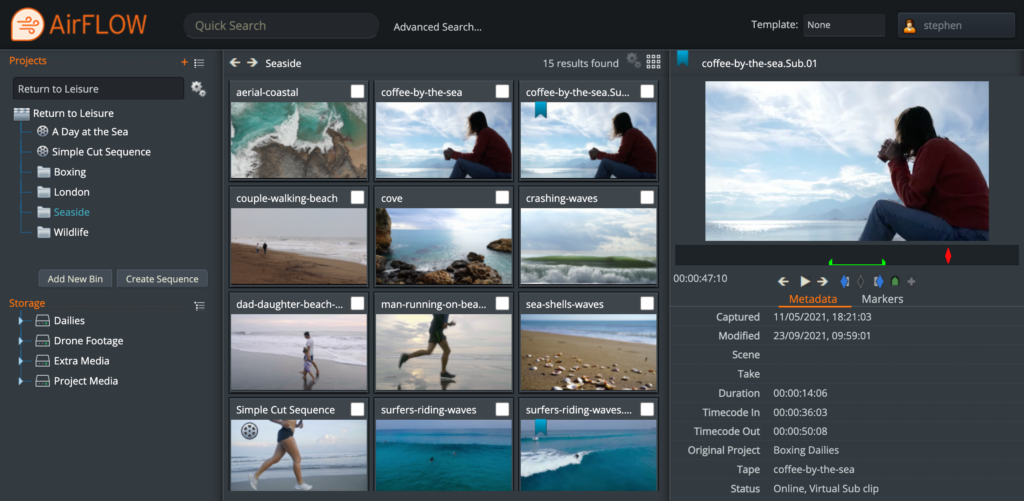
To minimize the download time, I recommend your first task is to organize the clips and decide what you need directly on the server. To make this easy you’ll ideally use a web-based tool to start building up your project structure. EditShare’s award-winning FLOW software has built-in web tools that allow you to easily drag and drop material into bins, create sub-clips and even create a rough timeline and cuts-only edit before you start downloading.
This will have two benefits. First, you get your material and can start working faster. Second, you have fewer clips to download to your computer, so you can be more productive. Especially if you already have a rough timeline mapped out.
Organize your footage using AirFLOW to save time in the edit.
2 – Embrace the Proxy
What are proxies? They are reduced resolution versions of clips, which make it easier for the editing software to run seamlessly on your computer. We all use them every single day, without even thinking about it. It’s what we generally look at when we are in the edit software – a scaled rendering of the original media.
Unless you’re working on the finest details of the image, you don’t need to worry about the full resolution versions.
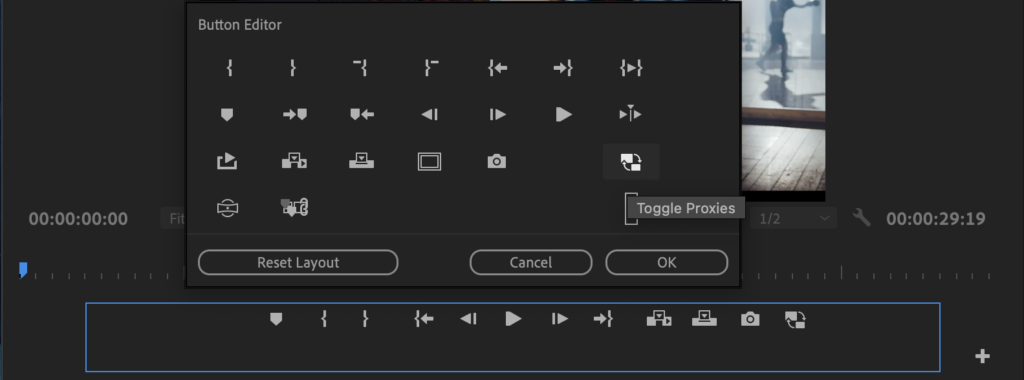
If you do have full resolution content available in your editor, then don’t forget that Premiere Pro allows you to toggle between looking at the proxy and the full resolution with a single click of the mouse. If the toggle proxy button is not there, below the source or the program monitors, then click on the + button to reveal it. Once you have the toggle control, you can switch instantly into full resolution to check a detail, then back to the proxy for smooth playback.
Add the Toggle Proxies button to your Button Editor to switch between proxies and original media.
3 – Centralize the Proxy Creation
This is the logical extension of tips 1 and 2. In standalone editing, you import the full resolution material and your software creates the proxies. This takes time and processing power.
But if you organize your material in advance on the server, you only need to download the proxies, saving even more bandwidth and download time.
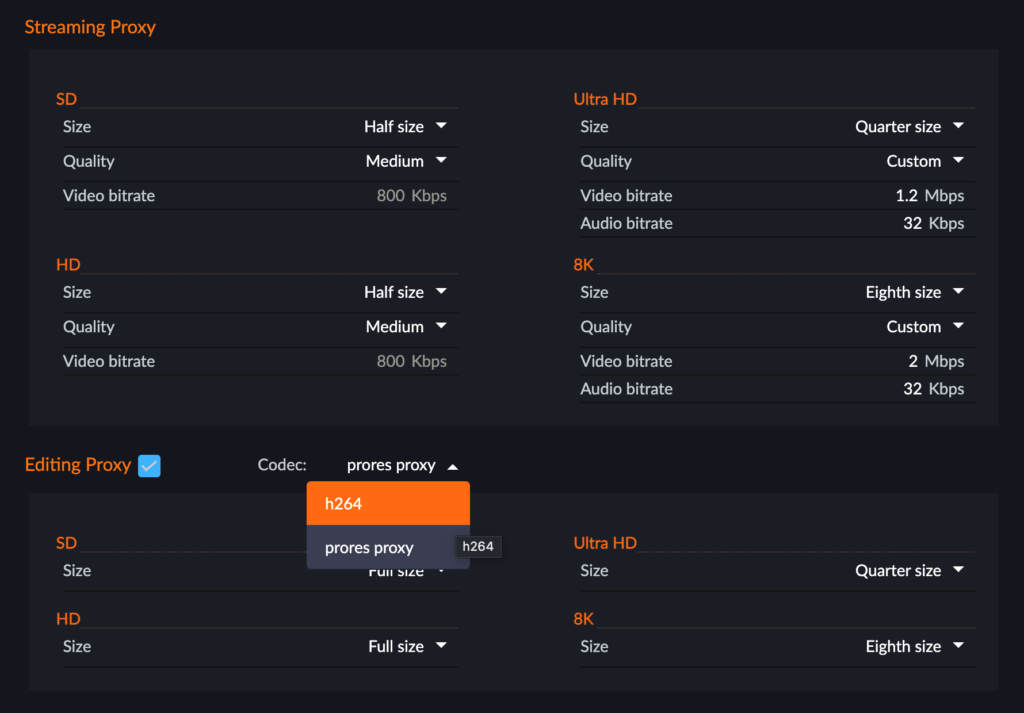
FLOW actually has two types of proxies. You can determine whether you want one or both, and set parameters, on a project by project basis.
The first is what we call the “streaming proxy”, which is an MPEG-4 file designed to be lightweight for internet delivery. It can start with a 4K or 8K file and still deliver a compact proxy.
The second is an “editing proxy”, which is in H.264 or ProRes, and supports multiple audio tracks, in a wrapper recommended by Adobe for seamless use of the proxy toggle feature. But while it is designed for maximum flexibility in editing, you can work perfectly well with streaming proxies if you have a simple audio layout in your original media.
Set your proxy format once and automatically create both streaming and edit proxies.
4 – Plug In To Adobe® Premiere® Pro
Working in a web tool can be great during the organization stage, when it gets down to the edit you really want all your focus on the job in hand. You want to stay inside your editing software.
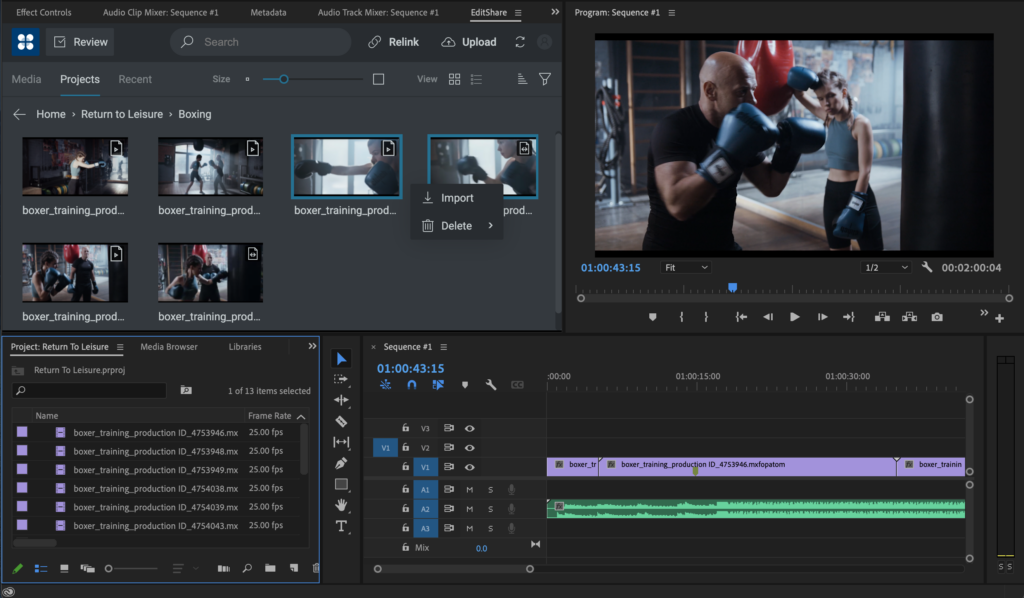
One of the great benefits of using Premiere Pro is that Adobe actively encourages open interfaces, which in turn means that developers like EditShare can provide very tight integration. We’ve put a FLOW panel into Premiere Pro, so all the things I have talked about, like organization in advance and selecting what proxy to use, can be done within the familiar user interface.
The EditShare panel also allows you to send your work in progress, as a proxy, to a producer, who can make comments tagged to markers in the timeline. It’s a fast and seamless way to work towards approval.
Use the FLOW panel to select media, import markers, rough cuts and publish for review
Finally, that same panel gives you relinks to the original footage, should you need it, which leads naturally to…
5 – Finishing the Job
At the end of the project you need to conform it: finalize the edit with all its transitions and effects using the full resolution originals, and output to the final format.
If it’s a prestige project, the editor will want to check the final output. So, you relink to the original footage and download only the parts of the project you need for the edit.
But if speed is of the essence, then you upload the EDL to a remote renderer or Adobe Media Encoder hosted on the server. You upload a very lightweight file, and the heavyweight processing power of the server speeds the rendering. This is ideal, for example for sports highlights packages.
These are just a few thoughts on how remote editing can be smooth, seamless and productive. For a glimpse of how it works in practice, you can watch our short YouTube video at: https://www.youtube.com/watch?v=DahAtBLMZbg
GBH is the leading multiplatform creator for public media in America. See how they securely moved their editing workflows to the cloud with EditShare and AWS.
For this next step in our journey we review cloud video storage as it can be one of the biggest sources of confusion and costs when it comes to post-production storage. All major cloud providers offer a range of storage solutions, all optimized for different uses and price points.
In this article we’ll review some of the primary cloud storage options for editing in the cloud as well as the tradeoffs and associated costs.
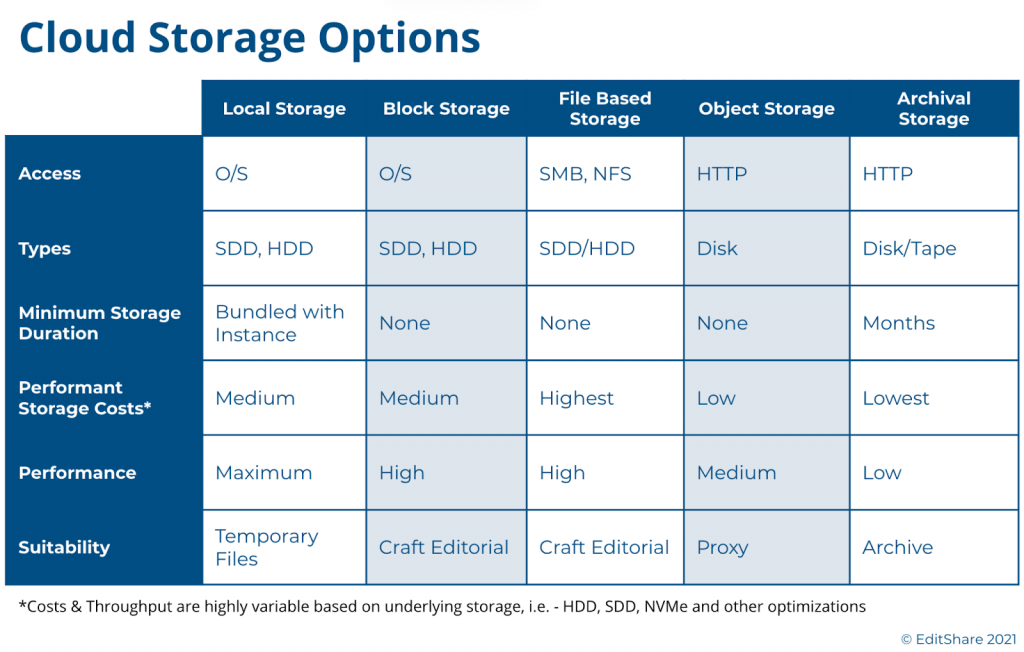
A Look into Cloud Based Storage Much like the traditional storage models, cloud-based storage options fall into one of five major categories:
Local Storage: Analogous to a local computer configuration, this is an HDD or SSD physically attached to the cloud compute instance.
Block Storage: This is network attached storage that must be provisioned against a compute instance during deployment time. Similar to local storage, it relies on the compute instance operating system to make it useful to applications. For those familiar with SAN’s (Storage Area Networks), block storage is similar in concept.
File Storage: These are storage systems that act similar to a NAS (Network Attached Storage), and provide higher-level file-based access to a shared network of computers, typically using NFS.
Object Storage: In this tier, files are stored as data objects referenced using an ID. The benefit is that there is no structural scale inhibiting storage growth. HTTP is the protocol for access.
Archive Storage: A type of object-based storage, this is a lower-cost tier that is typically less accessible and requires a commitment of storage duration for several months or longer.
With the exception of local storage, these storage tiers can be highly scalable and extend dynamically during run-time or via deployment scripts. All of the storage tiers have trade-offs between costs, performance, scalability, and availability. We explored a bit of this in our prior Journey to the Cloud blog, where we focused on backup and archival storage.
For the purposes of video editing, one must focus on the usefulness of these storage types to the needs of the application as well as the costs. This requires a storage layer with low-latency, that can ideally scale to multi-TBs, and can be used by the editing application in a cost effective manner. A general rule of thumb is the further down in the above list you go the cheaper the storage, but that is not always the case. Offerings of SSD, NVMe, HDD, highly-performant file systems, and other permutations offered in each of these tiers make price/performance reviews a very complex analysis.
While costs are generally based on storage sizes and performance, other factors typically apply. As an example, depending on the vendor and storage tier, transferring content out of a tier may incur a fee and so will the actual I/O calls themselves, such as an HTTP GET and PUT, which read and write the data.
Video Editing Storage Choices These considerations leave us with three choices for editing: Local Storage, Block Storage, and File Storage. Let’s review the usefulness of these choices.
Local storage has long been the tried and true means for editing workstations. These local disks come in a variety of sizes and speeds, and while they may be useful for a single, stand-alone editor, there are a few drawbacks. First, they can’t be resized dynamically so as a project grows you could find yourself short on space. Perhaps more importantly in this virtualized cloud world, once you shutdown the system you lose all your data, applications, and settings. This is not a factor in the on-premise world, but in a virtual environment the cost of running virtual workstations full-time is significant and you will want to shut-down these instances when not in use. Unless you can finish your project in one sitting or you have money to spare, this may not be the best option.
Block-based storage is a far more effective solution for video editing environments. In a virtual environment, you can provision the exact amount of low-latency storage you require and attach it to your editing environment when you spin up your system. Done correctly, you can even expand it as your needs grow. In addition, all of the public cloud vendors provide various types of block storage optimized for different performance and cost points so you can dial in exactly what you need for your editing applications.
From a cost point of view, block storage can have a permanence distinct from the compute instances. When you shutdown your cloud compute instances, whether that’s a virtual editing workstation or an asset manager, you can continue to maintain your storage so you don’t lose anything. Yes it’s not free, but it is far more economical than having to keep your entire environment running all of the time.
File storage is another possible option for video editing environments. Much like your NAS in the office, these systems provide a shared storage pool to multiple clients. They typically rely on NFS as the protocol. These file-based storage systems are sometimes offered with different performance characteristics, some optimized for higher throughput, but at a cost. These NAS-like systems, however, have limited storage capacity and performance. They are fine for IT applications, but video production environments can quickly run into issues.
Finally, object storage is a popular and cost-competitive storage tier, and you only pay for what you use, however for video editing it has its drawbacks due to latency and native application support. And while there are solutions for translating object storage to file-system calls, these gateways will continue to be hampered by the latency issues and often require caching workarounds. This is not ideal for professional or collaborative editing purposes.
The Best of all Worlds For many teams exploring cloud production for the first time, the choices are overwhelming. Between the major cloud vendors, there are hundreds of choices of cloud storage tiers, performance choices, and tradeoffs. Too many choices can result in analysis-paralysis and leave organizations behind in the technology curve.
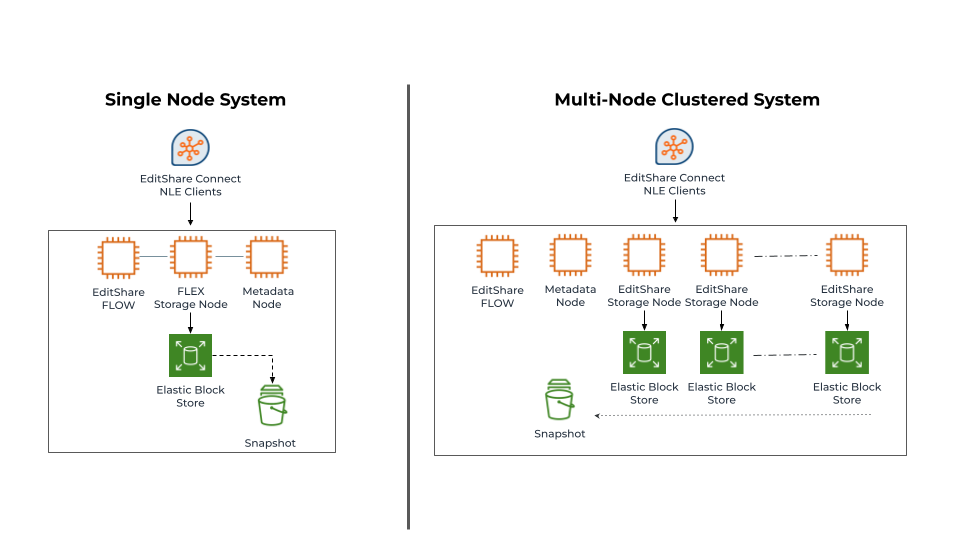
EditShare developed FLEX Storage as a software-defined-storage layer to abstract these complexities and provide high-performance, cost-optimized, video production storage. FLEX uses a mix of both block storage and object storage to provide that balance between storage performance and costs, and this mix can be altered to meet any workflow or budget. We’ve also benchmarked and tested the various storage performance types within these tiers – such as SSD, HDD, etc – to find the right balance for different application mixes.
As many of our customers require editing libraries of 10’s or 100’s of TBs of media, often captured at high bit-rates, we found a need to be more clever about storage cost optimizations. In 2020 we began offering FLEX Seamless Proxy Editing, which provides a cost optimized workflow that leverages proxy editing, but in a unique simple workflow. For those interested in learning more, you can read more here.
EditShare offers FLEX as both a standalone node or a cluster of nodes. Both configurations can be scaled out or scaled up to meet different performance requirements. The important thing to note, is FLEX is not a one size fits all solution. At EditShare we focus on openness and choice, giving our customers the ability to deploy what’s right for them, as well as the ability to adapt their environments as their needs change.
EditShare Q4 FLOW and EFS Update – Capabilities at a Glance
FLOW High Availability FLOW’s high availability is achieved by giving its central database multiple points of redundancy to mitigate against hardware or network failures that would affect MAM client accessibility during active productions. Consistent with this, FLOW’s services are scalable and presented as multi-instance, redundant elements within the overall system.
FLOW Panel Enhancements – Adobe® Premiere® Pro and DaVinci Resolve EditShare’s NLE panel integrations bring the benefits of FLOW directly into Premiere Pro and DaVinci Resolves user interfaces, enabling users to access FLOW’s features without leaving the familiar NLE environment.
Users can now exchange FLOW sequences directly with Adobe Premiere Pro and Blackmagic Design DaVinci Resolve thanks to the new FLOW Cuts List sequence import function. Extended Metadata support lets team members add metadata information to sequences, including custom fields. This improves and enriches metadata associated with sequences. AirFLOW now shows sequence metadata in its user interface. Improved media relinking logic automatically imports and relinks Hi-Res source footage located within a project’s complex folder structure after completion of a proxy edit.
Support for Multiple Proxy Formats Per Clip In addition to standard streaming proxies, FLOW can now generate additional high quality ProRes Proxy and H.264 files. This simplifies relinking to complex clips with multichannel audio track layout in remote workflow scenarios.
Storage DNA Archive Support FLOW now fully supports the latest version of DNA Evolution by Storage DNA. Users can easily archive and restore FLOW assets from third-party LTO/LTFS and disk-based tiers.
In-App Messaging & Guides EditShare is building on the momentum of bringing better web-based user experiences to customers through the use of in-app guides and feedback messaging capabilities. As the company brings more and more features to the browser-based experience it is their aim to guide these users to the new capabilities and solicit feedback directly within EFS Control and FLOW.
EditShare Telemetry EditShare Telemetry makes it easy for administrators to share Audit and Monitor data with EditShare’s secure network operations center. Through Telemetry, EditShare can work with customers to ensure systems are running optimally through pro-active monitoring and event alerting. Please contact EditShare technical support or your account representative for more information and to participate in the trial program for this service.
EFS Control Maintenance Mode New controls allow maintenance users to manage files in certain media spaces while restricting other users to read-only access.
Active Directory Single Sign On (ADSSO) enhancements Multiple improvements to ADSSO to enhance enterprise-level user management.
Major improvements to FLOW MAM as well as enhancements to EFS shared storage system expand high availability and scalability and streamline video editing workflows
Boston, MA – November 23, 2021 – EditShare®, the technology leader that enables storytellers to create and manage collaborative media workflows, announced significant updates to its FLOW media asset management (MAM) and EFS shared storage systems. Available today, the new release brings enterprise-level availability and redundancy to FLOW, ensuring continuous, outstanding system performance and uptime from ingest to archive. The high-availability FLOW platform also introduces a slew of user-centric updates including new Adobe Premiere Pro and DaVinci Resolve panel capabilities and proxy support that further simplify working remotely. Complementing the enhanced creative experience are time-saving EFS administrative features that provide smart shortcuts, system transparency, and automation, bringing even more efficiencies to the workflow.
“This release builds on the road-tested success of the high-availability capabilities in EditShare’s award-winning EFS media file system and the company’s commitment to delivering open systems that optimize the integration of innovative 3rd-party solutions,” states Sunil Mudholkar, vice president of product management, EditShare. “With a new enterprise-level high availability architecture in FLOW for both cloud and on-premises, we enable greater scale & resiliency and provide customers with an end-to-end workflow solution that maximizes uptime using the wide range of tools they already know and love.”
“Like many markets, the media industry embraces cloud platforms to enable better remote working and collaboration, trends that are here to stay,” states Frank Della Rosa, research director SaaS, business platforms, and ecosystems IDC. “The EditShare platform is a key technology enabler that facilitates collaboration and secure content management from anywhere. The company’s continued push towards developing open solutions is a major benefit for customers who want to expand beyond the traditional media workflows.”
FLOW High Availability FLOW’s high availability is achieved by giving its central database multiple points of redundancy to mitigate against hardware or network failures that would affect MAM client accessibility during active productions. Consistent with this, FLOW’s services are scalable and presented as multi-instance, redundant elements within the overall system.
FLOW Panel Enhancements – Adobe® Premiere® Pro and DaVinci Resolve EditShare’s NLE panel integrations bring the benefits of FLOW directly into Premiere Pro and DaVinci Resolves user interfaces, enabling users to access FLOW’s features without leaving the familiar NLE environment.
Users can now exchange FLOW sequences directly with Adobe Premiere Pro and Blackmagic Design DaVinci Resolve thanks to the new FLOW Cuts List sequence import function.
Extended Metadata support lets team members add metadata information to sequences, including custom fields. This improves and enriches metadata associated with sequences.
AirFLOW now shows sequence metadata in its user interface.
Improved media relinking logic automatically imports and relinks Hi-Res source footage located within a project’s complex folder structure after completion of a proxy edit.
Support for Multiple Proxy Formats Per Clip In addition to standard streaming proxies, FLOW can now generate additional high quality ProRes Proxy and H.264 files. This simplifies relinking to complex clips with multichannel audio track layout in remote workflow scenarios.
Storage DNA Archive Support FLOW now fully supports the latest version of DNA Evolution by Storage DNA. Users can easily archive and restore FLOW assets from third-party LTO/LTFS and disk-based tiers.
In-App Messaging & Guides EditShare is building on the momentum of bringing better web-based user experiences to customers through the use of in-app guides and feedback messaging capabilities. As the company brings more and more features to the browser-based experience it is their aim to guide these users to the new capabilities and solicit feedback directly within EFS Control and FLOW.
EditShare Telemetry EditShare Telemetry makes it easy for administrators to share Audit and Monitor data with EditShare’s secure network operations center. Through Telemetry, EditShare can work with customers to ensure systems are running optimally through pro-active monitoring and event alerting. Please contact EditShare technical support or your account representative for more information and to participate in the trial program for this service.
EFS Control Maintenance Mode New controls allow maintenance users to manage files in certain media spaces while restricting other users to read-only access.
Active Directory Single Sign On (ADSSO) enhancements Multiple improvements to ADSSO to enhance enterprise-level user management.
About EditShare EditShare is a technology leader in networked shared storage and smart workflow solutions for the production, post-production, new media, sports, and education markets. Whether you need on-premise, cloud, or hybrid solutions, our products improve efficiency and workflow collaboration every step of the way. They include media optimized high-performance shared storage, archiving and backup software, a suite of media management tools and a robust set of open APIs that enable integration throughout the workflow. Customer and partner success are at the heart of EditShare’s core values ensuring a world-class experience that is second to none.
Tour De Force Born out of sheer determination and passion, 3P Studio has earned its place in Australia’s creative landscape as one of the industry’s hardest working boutique post-production houses. Founded and led by artisan Haley McDonald, 3P Studio’s eclectic portfolio of post-production work includes desirable commercial brands such as Subway, Allianz, Isuzu Motor Company as well as iconic and defining shows like Sesame Street.
“There are a few projects that we are particularly proud of at 3P Studio and one that stands out is the work we did with Brisbane-based advertising agency, Carbon Creative, for the Australian Department of Premier and Cabinet’s ‘Stop the Hurting: End Domestic Violence’ campaign,” comments McDonald. “It was the first large-scale national campaign that we undertook in the studio; it was an honor that they selected 3P to work on such an important campaign.” A testament to their quality and influence, 3P Studio was recognized for their outstanding work on the “Stop the Hurting” campaign, receiving a silver medal in the Brisbane Advertising and Design Awards.
Humble Beginnings Leads to a Local First With almost two decades of experience in the media and entertainment industry, McDonald has worked for some of Australia’s largest post facilities. Passionate about her craft, McDonald always knew that working as a creative storyteller was her true path. “I got my love of TV from my late father. I never had a bedtime as a child and he used to let me watch TV with him whenever I wanted. This led to a lifelong obsession of working with media and creatively telling stories. On the flip side, I got my work ethic off my mum, who worked in a hospital laundry for 30 years. I grew up in a housing commission until I moved to Brisbane when I was 18 and worked in a supermarket there until I saved enough money to go university and study film.” Drive and passion work hand in hand and proved to be incredible assets to McDonald as she forged her own path in a male-dominated industry.
It was after the birth of McDonald’s son in 2013 that life took an unexpected change and really challenged her commitment to being an artist. “I had left for maternity leave in 2013 to have my first child, Dash, who is now eight. When I came back to work after six months, my position had been made redundant and I no longer had a job to return to.” While most would see this as a devastating blow, McDonald turned it into the opportunity of a lifetime. “For some time I had wanted to open my own shop. But, like most people, I had a mortgage, daycare and other bills. So, venturing off on my own was just too risky, but with no job in hand, I had nothing to lose. It was my chance to follow a dream and I gave it everything I had.” Starting out as a freelance editor and designer, McDonald took every job that came her way. “I would never say ‘no’ to a job. I would never say I was booked. I would just say, ‘Yes, no problem, I can do that.’ Even if I had three jobs in one day, I would just take them and work out how I was going to deliver. Eventually, I started hiring people to help as I took on more demanding projects. Since I had been in the industry and was so well connected, I was able to get projects out the door with a very high degree of quality thanks to very talented colleagues. This, of course, translated to very happy clients and exceptional word of mouth marketing.”
Working 7 days a week, McDonald transformed the busy freelance business into one of Brisbane’s few woman-led post-production houses. “I bought my office in 2016 and took six months to fit it out. On Christmas Eve 2016, they handed me the keys to the office and they went, ‘There you go.’ And as 1st of January 2017, 3P Studio was officially in business.”
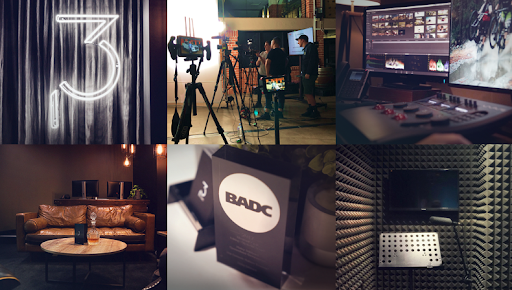
Purpose Built for Business and Creative Content McDonald built the stunning boutique facility from the ground up. And the chic design took into account installing an EditShare shared-storage solution in late 2017. “When we were wiring the office I made sure I had the cable runs and all the infrastructure shared down the track. I always knew that I wanted to install EditShare because I had used it before, and I really liked the way it supported the content flow. We just needed to save for the investment.” For the first six months, the team worked off the old hard drive system where they had RAIDs that were backing up to other RAIDs overnight and doing mirroring for redundancy. “So, we’d put a project in motion and eventually come to the point where someone would say, ‘Oh, that operator needs to use the project on that,’ meanwhile someone else also needed to use it too, then we’d copy off the data onto another drive and it just became unmanageable so we made the leap to EditShare.”
McDonald quips that she could have purchased other gear, but the EditShare scale-out shared storage nodes were the solution to power her successful business. “I could have gone out and purchased a Mac Pro and hooked it up to a couple of hard drives. Would it have done the same thing? To a certain degree, but it hasn’t been tried and tested like in EditShare. After talking with the guys at EditShare and getting the rundown of the specs and performance reports, investing in EditShare gave me the peace of mind I needed. In addition, my previous experience with using EditShare on very demanding projects assured us that this system would take a beating and keep performing.”
3P Studio installed an EFS 200 single node scale out shared storage solution connecting 10 creative Mac and PC-based workstations over 10-GB Ethernet comprising a mix of Adobe® Premiere® Pro and After Effects®, The Foundry’s NUKE, Maxon’s Cinema-4d, Autodesk Maya, 3D Studio Max, DaVinci Resolve for grading and the premium hero suite, Autodesk Flame Premium while Avid Pro tools is utilized to provide audio post production. With advanced support for project and media sharing, EditShare features helped tremendously with the boutique’s retail clients who, more often than not, required an incredibly fast turnaround. It allowed the team to work simultaneously on projects with one person recording voice-overs while another artist works on the graphics and another edits. “Because the EditShare system is designed for content sharing, it makes the workflow as fast and as collaborative as possible. This means higher quality projects completed on time and of course most importantly, happier clients.”
A Business in Overdrive The successful post-production company tripled its staff between the years of 2017 and 2021, requiring an expanded media infrastructure. Upgrading to EFS 450 and adding FLOW and AirFLOW, the team was able to facilitate traditional editorial campaigns and the growing number of fast-turn projects targeted for social, digital, and other marketing channels. McDonald adds, “More and more client requests are project-specific rather than a campaign. While the content still needs to be delivered across all channels, it has a short-shelf life and smaller budget. The pace from start to finish is accelerated. With our expanded EditShare installation, we have a content factory workflow that gives our clients a first-class post-production experience meeting both their tight timeline and budget requirements.”
The addition of EditShare’s remote media management solution, AirFLOW, to the workflow allowed 3P to offer a “content warehouse” service to its clients. Clients can log in from anywhere, browse through content at their convenience, review work-in-progress and submit project changes. The service removes the burden of clients needing to maintain their own drives or storage servers as all content is stored on the EFS storage platform, maintained by 3P. It also enabled remote collaboration, which was key during the pandemic restrictions.
McDonald notes of the growth, “Our business has reached a point where we need to utilize advanced tools to refine our service offering and delivery. EditShare workflow solutions and creative tools like Adobe have enabled us to make those advancements across our business and deliver a superior level of service.”
Setting a Great Example As a woman-run and owned post facility, Haley is in a very rare category. “I am very proud to be a female post house owner and can definitely say there is room for more of us to take the lead! Running my own shop has given me the opportunity to work with female directors, producers and operators and I take great pleasure in collaborating with them in my studio. In addition, I also have the support of a fantastic group of young men who are sound designers, VFX artists, animators and videographers and I am very lucky to have them. I also have the support of loyal clients that have been with me since I started and most of my work comes from word of mouth which is nice.” As for EditShare, we are very proud to be a part of this success story.
EFS, FLOW, and AirFLOW and Adobe integrations support workflow demands and enable new client service offerings
Boston, MA – October 26, 2021 – EditShare®, a technology leader that enables collaborative media workflows for storytellers, today announced that Brisbane’s leading post-production facility, 3P Studio (3P) has expanded its investment in EditShare’s FLOW media management and EFS storage solutions to manage its growing editorial business. The full-service post-production house, which produces creative content for top brands like Isuzu Motor Company, Subway, and Allianz, has tripled its team over the past three years to support the rise in client projects and campaigns across broadcast, digital, and social channels.
“Our business has reached a point where we need to utilize advanced tools to refine our service offering and delivery,” states Haley McDonald, Founder and Managing Director, 3P Studio. “EditShare workflow solutions and Adobe creative tools have enabled us to make those advancements across our business and deliver a superior level of service.”
3P upgraded their EditShare environment to facilitate traditional editorial campaigns and the growing number of fast-turn projects targeted for social, digital, and other marketing channels. The EditShare media foundation connects the facility’s premium creative tools which include Adobe® Premiere® Pro and After Effects®, Avid Pro Tools, Autodesk Maya and Flame, DaVinci Resolve, NUKE, and Maxon’s Cinema 4D, creating a well-integrated ecosystem that optimizes post-production workflows. The talented 3P team of compositors, editors, and color graders can seamlessly collaborate on projects utilizing FLOW and EFS to manage the nuances of file sharing, asset tracking, file formats, and package delivery for multiple channels.
McDonald adds, “More and more client requests are project-specific rather than a campaign. While the content still needs to be delivered across all channels, it has a short-shelf life and smaller budget. The pace from start to finish is accelerated. With our expanded EditShare installation, we have a content factory workflow that gives our clients a first-class post-production experience meeting both their tight timeline and budget requirements.”
The addition of EditShare’s remote media management solution, AirFLOW, to the workflow allowed 3P to offer a “content warehouse” service to its clients. Clients can log in from anywhere, browse through content at their convenience, review work-in-progress and submit project changes. The service removes the burden of clients needing to maintain their own drives or storage servers as all content is stored on the EFS storage platform, maintained by 3P. It also enabled remote collaboration, which was key during the pandemic restrictions.
“EditShare is designed to make it easier for customers like 3P to collaborate with their clients from anywhere,” Paul Hayes, Regional Sales Manager for Asia, EditShare “Rather than having clients send in individual drives to work with, 3P houses all of their content and clients simply log in, browse, and give direction. EditShare speeds up the entire workflow enabling 3P to create space and scale their business in new directions while creating a more personalized service for their clients.”
“We love seeing studios such as 3P tap into the power of our Adobe Creative Cloud apps, like Premiere Pro and After Effects,” said Sue Skidmore, head of partner relations for Adobe video. “EditShare takes advantage of Adobe panel APIs and other integration features that bring media management right into the creative applications, enabling users to pivot their productions and deliver high-quality content quickly.”
About EditShare EditShare is a technology leader in networked shared storage and smart workflow solutions for the production, post-production, new media, sports, and education markets. Whether you need on-prem, cloud, or hybrid solutions, our products improve efficiency and workflow collaboration every step of the way. They include media optimized high-performance shared storage, archiving and backup software, a suite of media management tools and a robust set of open APIs that enable integration throughout the workflow. Customer and partner success are at the heart of EditShare’s core values ensuring a world-class experience that is second to none.
Boston, MA – October 21, 2021 – EditShare® invites InfoComm 2021 attendees to booth 2809 to discuss how its award-winning FLOW media management and EFS shared storage solutions can simplify storytelling for video workgroups across Advertising, Broadcast, Corporate, Education, House of Worship, News, Production and Post-production. A perfect fit for any scenario ranging from a smart replacement of direct attached storage to building a high-performance, high-capacity enterprise workflow, FLOW and EFS offer customers flexible on-premise, cloud and hybrid configurations that facilitate a better on-premise and remote creative collaboration experience.
About EditShare Solutions FLOW is EditShare’s media management platform for creative workflows. It serves as a control layer across storage pools, offering fast-production tools and exceptional asset and metadata tracking. Easy-to-configure automation simplifies and expands workflows. Underpinning FLOW is EFS, a software-optimized storage layer that securely centralizes content with features and performance to build small to enterprise production environments. EFSv virtualizes EditShare solutions offering exceptional media workflows, including patent pending seamless proxy editing, in the cloud.
EditShare’s workflow solutions can be configured for productions of all sizes and complexities, on premise, in the cloud, or a hybrid of the two. Users can work with anyone, anywhere. The robust EditShare API and extensive partner network allows customers to augment their media ecosystem with familiar editorial and production tools that make them more productive, freeing their workflows from conventional limits and taking them into new directions and business opportunities.
About EditShare EditShare is a technology leader that enables collaborative media workflows on-premise, in the cloud, or in a hybrid configuration. With customer and partner success at the heart of EditShare’s core values, our open software solutions and robust APIs improve workflow collaboration and third-party integrations across the entire production chain, ensuring a world-class experience that is second to none. The high-performance software lineup includes media optimized shared storage management, archiving and backup, and media management, all supported with open APIs for extensible integration.