EditShare Showcases Media Workflows and Cloud Integration at MPTS
Newly redefined cloud and hybrid storage; rich edit support
Boston, MA – May 03, 2022 –EditShare®, the technology leader that enables storytellers to create and manage collaborative media workflows, is using its presence at the Media Production & Technology Show (MPTS, 11 – 12 May, Olympia, London, stand L726) to highlight its latest enhancements for production and post production. Headlining the stand will be the new suite of FLEX software solutions for cloud and hybrid workflows.
FLEX meets today’s expectations in post, including the freedom to work with any edit software, and to do so from any location. It provides a simple, ready to implement and very cost-effective route for edit in the cloud, remote collaborative working, and secure cloud archiving.
EditShare is committed to the idea that post production creatives should use the tools that best suit them and their work and FLEX reflects this by offering turnkey bundles that allow customers to get started quickly, with a known configuration and pricing profile.
In its simplest form, FLEX Cloud Edit provides media asset management, high performance software-defined post production storage, and virtual workstations in the AWS cloud.
The FLEX Cloud Edit+ bundle adds accelerated file transfer capabilities and comprehensive workstation management.
FLEX Cloud Sync provides a simple route to back up media libraries and FLOW databases to AWS S3, where it can be retrieved when required, making it easy to retire LTO tape libraries and gain huge resilience and availability.
MPTS will be the first opportunity to see other significant developments following their launch at NAB 2022. These are all aimed at simplifying the creative experience while providing even greater content security and availability.
A highlight for editorial workflows is enhanced project synchronization with NLEs, including Media Composer, Adobe® Premiere® Pro and DaVinci Resolve. The next release of EditShare’s core FLOW workflow management software will include the first implementation of this integration, allowing complex projects to be readily moved between EditShare media management and the NLE environment.
Also added to FLOW is the ability to support the latest RAW format updates for RED and Blackmagic Design camera systems, and impose LUTs in real time, both on full resolution material and on proxies.
For news and sports fast turnaround editing, FLOW can now ingest NDI contribution feeds and immediately present them for editing; making the workflows as slick as possible.
Adding to the security and sharing concept, EFS Multi-Site allows users with multiple locations to leverage built-in file acceleration to synchronize project storage between EFS clusters in different facilities. This ensures that users have ready access to content, wherever they choose to work.
EditShare will also be available to discuss the new EFS 60NL, aimed at nearline storage and providing 60 drive bays in 4U of rack space. Within the EditShare environment, nearline storage is ideal for content which is needed but not being immediately worked on, ready to be transferred to the online servers with virtually no delay.
“Our focus is on simplifying the day-to-day experience for our customers,” said Stephen Tallamy, CTO, EditShare. “Whether it is deep integration into NLE software to help editors focus their creativity, or helping post houses manage costs and security as they migrate to the cloud, simplicity and power is what sets us apart.
“The UK is, of course, a global powerhouse in broadcast and post-production, so we are excited to have a presence at the London show,” added Tallamy. “We are looking forward to showing our latest developments for the first time on this side of the Atlantic, and sharing our knowledge with the local media tech community.”
To book a meeting or demo at MPTS, please click here.
About EditShare
EditShare is a technology leader that enables collaborative media workflows on-premise, in the cloud, or in a hybrid configuration. With customer and partner success at the heart of EditShare’s core values, our open software solutions and robust APIs improve workflow collaboration and third-party integrations across the entire production chain, ensuring a world-class experience that is second to none. The high-performance software lineup includes media optimized shared storage management, archiving and backup, and media management, all supported with open APIs for extensible integration.
EditShare’s cloud-enabled remote editing and project management technology was recently recognized by the National Academy of Television Arts and Sciences (NATAS) with a prestigious 2021 Emmy® Award for Technology and Engineering.
Mike Wright to head up sales in Americas in time for NAB 2022
Boston, MA – April 20, 2022 –EditShare®, the technology leader that enables storytellers to create and manage collaborative media workflows, has underlined its commitment to the key market of the Americas with three new senior staff, in addition to the solid regional team already in place. Mike Wright joins as VP for sales across the Americas, Jodynne Wood as VP of business development in the region, and Gregory Cash to lead the regional pre-sales team.
Mike Wright brings a wealth of commercial leadership experience. His proven career in the media technology industry has seen him in senior sales roles at Telestream, Tektronix and Grass Valley. “Mike is charged with leading and growing our sales organization across the media community, including the management of our strategic accounts as well as our channel partners in the Americas,” commented Said Bacho, Chief Revenue Officer at EditShare. “We already have a broad range of great users in the Americas, and we are excited to continue our success in the region.”
“A key part of our business growth will come from tier 1 production houses and broadcasters, which is why we have tasked Jodynne Wood to take on the business development role in the Americas,” Bacho added. “She will look after our key strategic accounts to make sure we are serving them diligently.” Wood brings experience in cutting edge technology within the media business. She also draws on her experience at GrayMeta and Ci-Sony Media Cloud Services to build strong and trusted relationships with her clients.
The third new addition to the Americas team is Gregory Cash, who has experience on both sides of the market with spells at NBC Universal and Rohde & Schwarz before making the move to EditShare. His new role in managing pre-sales for the Americas region means he will focus on demonstrations and proof of concepts, managing the relationship between EditShare and its users to ensure that the requirements are absolutely clearly defined with key metrics in place.
“We already have a strong team in the Americas, who have delivered remarkable success in recent years,” Bacho said. “Mike, Jodynne, and Gregory are key appointments to bolster the regional growth even further, maximizing our potential in the market and reinforcing our commitment to the Americas. It is great that they will all be on board in time for NAB this year, allowing them to meet our fantastic customers and channel partners in the region first hand. We all look forward to great things from the revitalized team.” Mike Wright, Jodynne Wood, and Gregory Cash will all be on the EditShare booth, N3008, at NAB2022 (24 – 27 April, Las Vegas Convention Center). For more information on EditShare solutions, please click here to get in touch.
About EditShare
EditShare is a technology leader that enables collaborative media workflows on-premise, in the cloud, or in a hybrid configuration. With customer and partner success at the heart of EditShare’s core values, our open software solutions and robust APIs improve workflow collaboration and third-party integrations across the entire production chain, ensuring a world-class experience that is second to none. The high-performance software lineup includes media optimized shared storage management, archiving and backup, and media management, all supported with open APIs for extensible integration.
EditShare’s cloud-enabled remote editing and project management technology was recently recognized by the National Academy of Television Arts and Sciences (NATAS) with a prestigious 2021 Emmy® Award for Technology and Engineering.
Simple to deploy bundles allow creative facilities to concentrate on storytelling
Boston, MA – April 13, 2022 –EditShare®, the technology leader that enables storytellers to create and manage collaborative media workflows, today announced it will unveil its new FLEX cloud solutions at NAB2022 (Las Vegas Convention Center, 24-27 April, booth N3008). This suite of powerful media asset management and storage software solutions provide a straightforward way for businesses, large and small, to take full advantage of cloud services and workflows.
FLEX reflects the powerful business trends in post today, including the migration to a “work anywhere” environment, with ready access to content wherever the creative staff need to be. In adopting cloud video storage and processing, it also meets the move towards an OpEx financial model, with the cloud hosting and storage fees flexing to reflect the level of business.
“EditShare began leading the industry’s shift to the cloud a few years ago by expanding many of its existing core product capabilities – openness, interoperability and scale – to the cloud,” commented Stephen Tallamy, CTO, EditShare. “EditShare FLEX is the result of these investments and we’re excited to show the industry how it can greatly simplify how their teams may choose to work.”
Leading the new initiatives is FLEX Cloud Edit. In its simplest form it provides media asset management, high performance software-defined storage, and virtual workstations in the AWS cloud. The real beauty of FLEX is that it provides a powerful but completely open hosting environment, so users are free to use whatever editing software they prefer.
FLEX Cloud Edit+ adds accelerated file transfer capabilities using the CloudDat transfer software from Data Expedition Inc. It also provides comprehensive workstation management using Teradici’s Cloud Access Manager, all tightly integrated into an intuitive, single-sign on EditShare environment.
FLEX Cloud Sync provides synchronization of content between local EFS arrays and archive storage with leading cloud providers. By automating backup to the cloud, EditShare FLEX Cloud Sync makes it easy to retire LTO tape libraries and gain the huge resilience and availability that major cloud providers offer. As necessary, a FLEX Cloud Edit system can be spun up using all of the content in a customer’s FLEX Cloud sync backup.
“We continually listen to what the industry is telling us, and this is a direct response to current demands,” said Tallamy. “With FLEX, our customers can maintain full control over their working environment and the security of their content, while gaining the huge benefits of remote working and editing-in-the-cloud.
“FLEX offers turnkey bundles that allow customers to get started quickly with a known configuration and pricing profile. Our professional services team can work with customers to tailor the system to exactly meet their needs,” Tallamy added. “The customer maintains operational oversight and budgetary control, with no over-provisioning so no over-paying.”
EditShare is a technology leader that enables collaborative media workflows on-premise, in the cloud, or in a hybrid configuration. With customer and partner success at the heart of EditShare’s core values, our open software solutions and robust APIs improve workflow collaboration and third-party integrations across the entire production chain, ensuring a world-class experience that is second to none. The high-performance software lineup includes media optimized shared storage management, archiving and backup, and media management, all supported with open APIs for extensible integration.
EditShare’s cloud-enabled remote editing and project management technology was recently recognized by the National Academy of Television Arts and Sciences (NATAS) with a prestigious 2021 Emmy® Award for Technology and Engineering.
2021 turnover shows 24% increase fuelled by remote production, hybrid and cloud-based workflows
Boston, MA – March 15, 2022–EditShare®, the technology leader that enables storytellers to create and manage collaborative media workflows, has bucked market trends by continuing its remarkable growth in sales and global presence. 2021 was a record year for the company, with a 24% increase in sales over 2020.
“What is most satisfying, is that while we have won big projects from some of the largest media and entertainment companies, enterprises and houses of worship, we have seen success come from all corners of the world,” states EditShare’s Chief Revenue Officer, Said Bacho.
Alongside GBH and Unity 3D in the US, EditShare has worked on projects for Zee News in India and TV5 in The Philippines, as well as some of the leading production and post houses like Soul Movie in Rome and Director’s Cut in London. These installations, combined with some impressive projects in the Middle East including, Saudi Arabia’s NEOM futuristic city, Expo2020 Dubai showcase and the Iraqi Parliament, have cemented EditShare’s upwards trajectory.
EditShare’s continued success is derived from its open architecture that enables its customers to scale their business and media platforms on-prem, in a hybrid configuration or in the cloud
EditShare’s robust and reliable tools used by content creators around the world include its EFS networked shared storage and FLOWmedia asset management system, that easily integrate with leading editorial tools such as Adobe® Premiere® Pro and DaVinci Resolve. Through a partnership with AWS, EditShare also offers a seamless route to cloud and hybrid architectures for scalable, remote operation and storage protection applications.
“Our growth depends upon our partnerships with other technology leaders ― and very importantly ― with our channel partners who provide the vital link between us and our global users,” Bacho said. “Our investment in channel partner engagement over the last 12 months, supporting them with technical and product knowledge and making configuration and ordering easier, has really paid dividends, and we’re excited to continue this further in 2022.”
EditShare is a technology leader that enables collaborative media workflows on-premise, in the cloud, or in a hybrid configuration. With customer and partner success at the heart of EditShare’s core values, our open software solutions and robust APIs improve workflow collaboration and third-party integrations across the entire production chain, ensuring a world-class experience that is second to none. The high-performance software lineup includes media optimized shared storage management, archiving and backup, and media management, all supported with open APIs for extensible integration.
Remote production has become an attractive proposition, with multiple benefits. The challenge, though, is to provide sufficient connectivity to allow the production and post production teams access to content in a timely manner.
In this short blog piece, EditShare’s CTO, Stephen Tallamy, runs through some of his top tips for making remote editing more productive.
1 – Get Organized Remotely
In a remote editing set-up, the editing software is on your computer but the raw footage is on a server at a remote location. It might be the broadcaster or production company’s headquarters, in the cloud, or if you’re involved in fast turnaround editing it might still be at the location of the shoot.
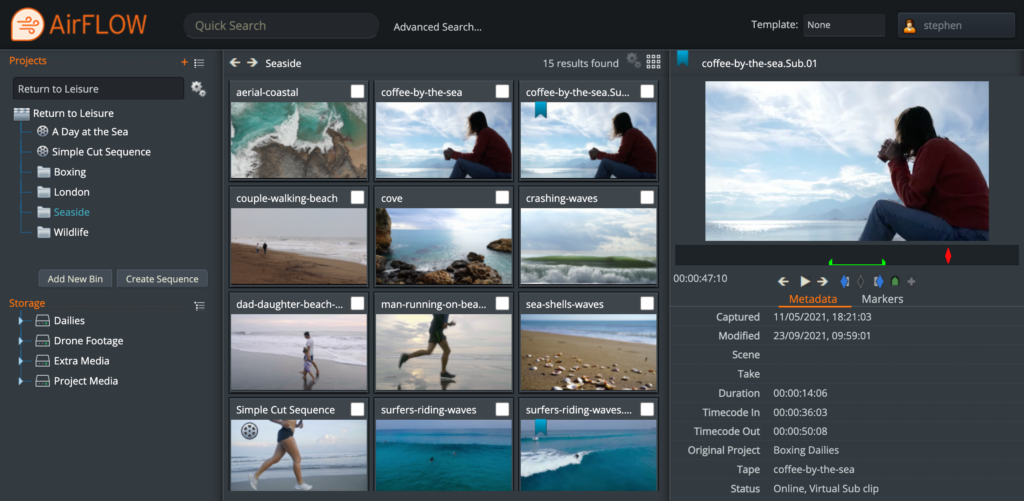
To minimize the download time, I recommend your first task is to organize the clips and decide what you need directly on the server. To make this easy you’ll ideally use a web-based tool to start building up your project structure. EditShare’s award-winning FLOW software has built-in web tools that allow you to easily drag and drop material into bins, create sub-clips and even create a rough timeline and cuts-only edit before you start downloading.
This will have two benefits. First, you get your material and can start working faster. Second, you have fewer clips to download to your computer, so you can be more productive. Especially if you already have a rough timeline mapped out.
Organize your footage using AirFLOW to save time in the edit.
2 – Embrace the Proxy
What are proxies? They are reduced resolution versions of clips, which make it easier for the editing software to run seamlessly on your computer. We all use them every single day, without even thinking about it. It’s what we generally look at when we are in the edit software – a scaled rendering of the original media.
Unless you’re working on the finest details of the image, you don’t need to worry about the full resolution versions.
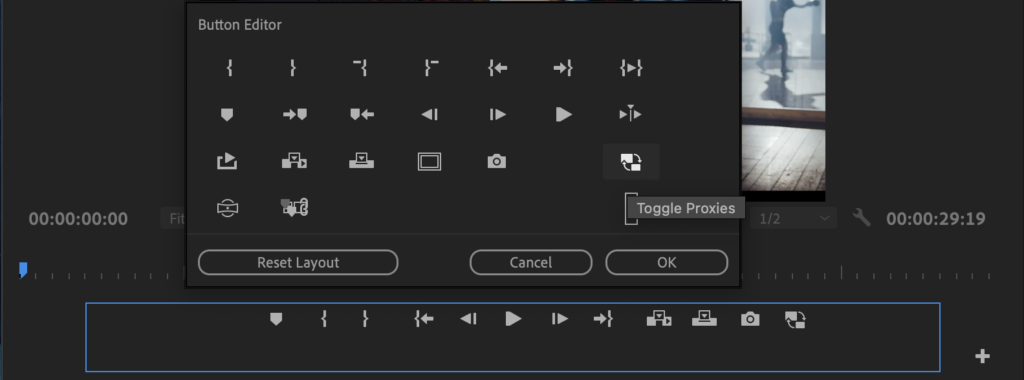
If you do have full resolution content available in your editor, then don’t forget that Premiere Pro allows you to toggle between looking at the proxy and the full resolution with a single click of the mouse. If the toggle proxy button is not there, below the source or the program monitors, then click on the + button to reveal it. Once you have the toggle control, you can switch instantly into full resolution to check a detail, then back to the proxy for smooth playback.
Add the Toggle Proxies button to your Button Editor to switch between proxies and original media.
3 – Centralize the Proxy Creation
This is the logical extension of tips 1 and 2. In standalone editing, you import the full resolution material and your software creates the proxies. This takes time and processing power.
But if you organize your material in advance on the server, you only need to download the proxies, saving even more bandwidth and download time.
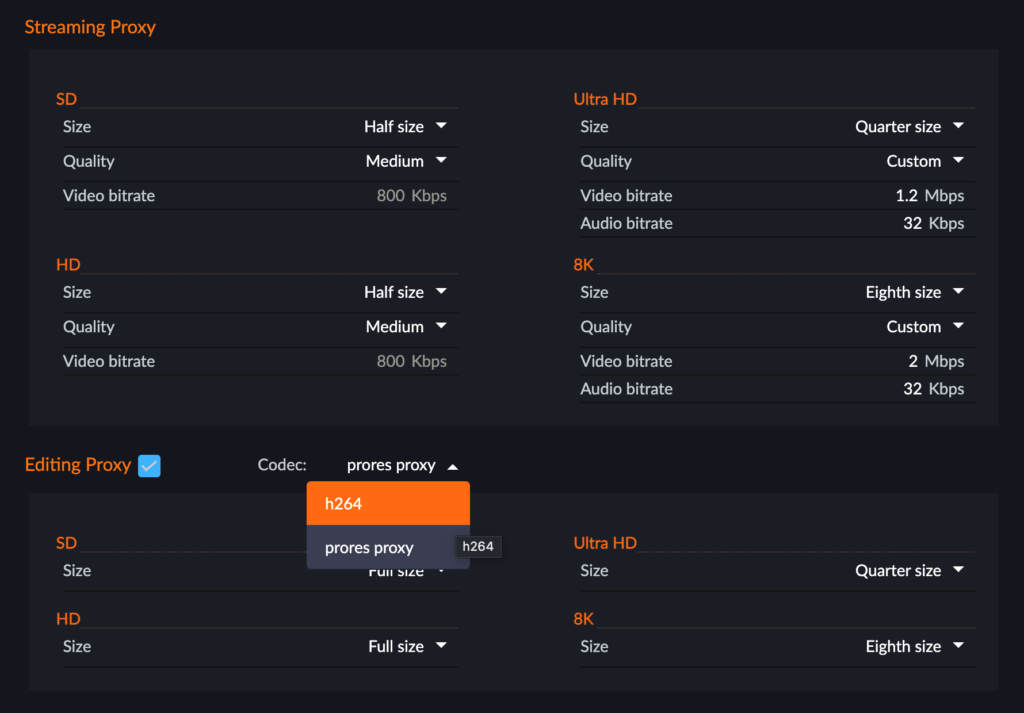
FLOW actually has two types of proxies. You can determine whether you want one or both, and set parameters, on a project by project basis.
The first is what we call the “streaming proxy”, which is an MPEG-4 file designed to be lightweight for internet delivery. It can start with a 4K or 8K file and still deliver a compact proxy.
The second is an “editing proxy”, which is in H.264 or ProRes, and supports multiple audio tracks, in a wrapper recommended by Adobe for seamless use of the proxy toggle feature. But while it is designed for maximum flexibility in editing, you can work perfectly well with streaming proxies if you have a simple audio layout in your original media.
Set your proxy format once and automatically create both streaming and edit proxies.
4 – Plug In To Adobe® Premiere® Pro
Working in a web tool can be great during the organization stage, when it gets down to the edit you really want all your focus on the job in hand. You want to stay inside your editing software.
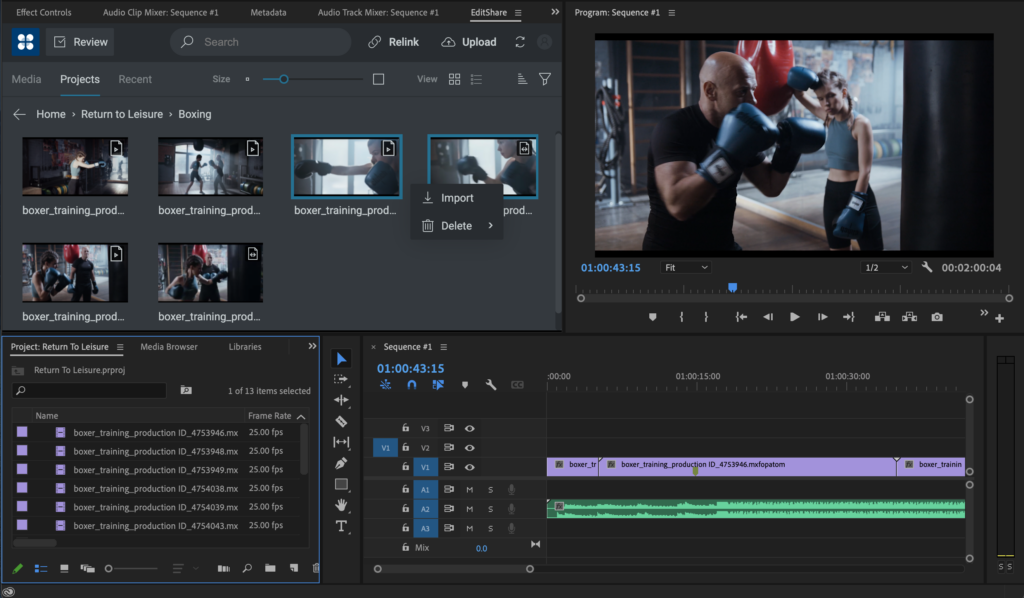
One of the great benefits of using Premiere Pro is that Adobe actively encourages open interfaces, which in turn means that developers like EditShare can provide very tight integration. We’ve put a FLOW panel into Premiere Pro, so all the things I have talked about, like organization in advance and selecting what proxy to use, can be done within the familiar user interface.
The EditShare panel also allows you to send your work in progress, as a proxy, to a producer, who can make comments tagged to markers in the timeline. It’s a fast and seamless way to work towards approval.
Use the FLOW panel to select media, import markers, rough cuts and publish for review
Finally, that same panel gives you relinks to the original footage, should you need it, which leads naturally to…
5 – Finishing the Job
At the end of the project you need to conform it: finalize the edit with all its transitions and effects using the full resolution originals, and output to the final format.
If it’s a prestige project, the editor will want to check the final output. So, you relink to the original footage and download only the parts of the project you need for the edit.
But if speed is of the essence, then you upload the EDL to a remote renderer or Adobe Media Encoder hosted on the server. You upload a very lightweight file, and the heavyweight processing power of the server speeds the rendering. This is ideal, for example for sports highlights packages.
These are just a few thoughts on how remote editing can be smooth, seamless and productive. For a glimpse of how it works in practice, you can watch our short YouTube video at: https://www.youtube.com/watch?v=DahAtBLMZbg
Recognized for Cloud-Enabled Remote Editing and Project Management
Boston, MA – February 2, 2022–EditShare®, the technology leader that enables storytellers to create and manage collaborative media workflows, announced today that it has won a prestigious 2021 Emmy® Award for Technology and Engineering from the National Academy of Television Arts and Sciences (NATAS). The Technology & Engineering Emmy® Awards are awarded for developments and/or standardization involved in engineering technologies that either represent so extensive an improvement on existing methods or are so innovative in nature that they materially have affected television.
Stephen Tallamy, Chief Technology Officer for EditShare and an expert in cloud technology, comments, “It is fantastic to be recognized for EditShare’s ongoing innovation and a testament to our incredible engineering, product and support teams who go the extra mile to create solutions for the media industry.
“We have pioneered open solutions that allow our customers to realize powerful remote workflows using the creative tools and cloud services of their choice. Our integrations with leading editorial tools including Adobe® Premiere® Pro and DaVinci Resolve along with cloud-native storage management options such as AWS S3 and EBS, and robust open APIs ensure our customers can pivot quickly to take advantage of emerging technologies and new business opportunities that arise during the journey to the cloud.”
EditShare’s remote editing technology, which is a core part of the FLOW media management and EFSshared video storage solution, makes use of lower resolution proxy video files to enable post-production workflows, even when connectivity is weak and/or systems lack the power to support editing high resolution files. EditShare’s open environment supports a wide range of cloud providers and enables seamless integration of a diverse range of post-production tools within the remote editing workflow. EditShare customers can participate in the post-production process, regardless of where they are located and using the creative tool of their choice.
“We continue to see our customers embrace new and innovative ways of telling their stories but one thing that hasn’t changed is the desire for teams to collaborate,” states Conrad Clemson, CEO, EditShare. “Whether production happens in one place or is spread remotely around the world, EditShare offers world-class solutions to help customers create amazing content together. It is an honor to be recognized with this prestigious Emmy® Awardfor our ongoing investment in technology to simplify storytelling.”
EditShare will receive its Emmy® Award on Monday, April 25th, 2022 at the annual National Association of Broadcasters Show (NAB) in Las Vegas, NV.
About EditShare EditShare is a technology leader that enables collaborative media workflows on-premise, in the cloud, or in a hybrid configuration. With customer and partner success at the heart of EditShare’s core values, our open software solutions and robust APIs improve workflow collaboration and third-party integrations across the entire production chain, ensuring a world-class experience that is second to none. The high-performance software lineup includes media optimized shared storage management, archiving and backup, and media management, all supported with open APIs for extensible integration.
For this next step in our journey we review cloud video storage as it can be one of the biggest sources of confusion and costs when it comes to post-production storage. All major cloud providers offer a range of storage solutions, all optimized for different uses and price points.
In this article we’ll review some of the primary cloud storage options for editing in the cloud as well as the tradeoffs and associated costs.
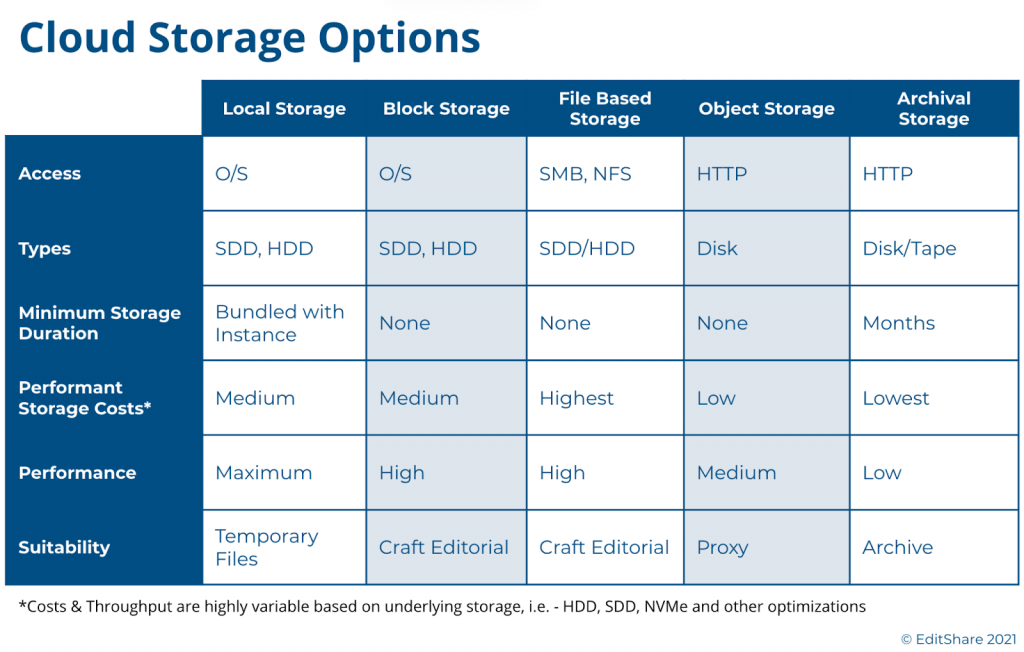
A Look into Cloud Based Storage Much like the traditional storage models, cloud-based storage options fall into one of five major categories:
Local Storage: Analogous to a local computer configuration, this is an HDD or SSD physically attached to the cloud compute instance.
Block Storage: This is network attached storage that must be provisioned against a compute instance during deployment time. Similar to local storage, it relies on the compute instance operating system to make it useful to applications. For those familiar with SAN’s (Storage Area Networks), block storage is similar in concept.
File Storage: These are storage systems that act similar to a NAS (Network Attached Storage), and provide higher-level file-based access to a shared network of computers, typically using NFS.
Object Storage: In this tier, files are stored as data objects referenced using an ID. The benefit is that there is no structural scale inhibiting storage growth. HTTP is the protocol for access.
Archive Storage: A type of object-based storage, this is a lower-cost tier that is typically less accessible and requires a commitment of storage duration for several months or longer.
With the exception of local storage, these storage tiers can be highly scalable and extend dynamically during run-time or via deployment scripts. All of the storage tiers have trade-offs between costs, performance, scalability, and availability. We explored a bit of this in our prior Journey to the Cloud blog, where we focused on backup and archival storage.
For the purposes of video editing, one must focus on the usefulness of these storage types to the needs of the application as well as the costs. This requires a storage layer with low-latency, that can ideally scale to multi-TBs, and can be used by the editing application in a cost effective manner. A general rule of thumb is the further down in the above list you go the cheaper the storage, but that is not always the case. Offerings of SSD, NVMe, HDD, highly-performant file systems, and other permutations offered in each of these tiers make price/performance reviews a very complex analysis.
While costs are generally based on storage sizes and performance, other factors typically apply. As an example, depending on the vendor and storage tier, transferring content out of a tier may incur a fee and so will the actual I/O calls themselves, such as an HTTP GET and PUT, which read and write the data.
Video Editing Storage Choices These considerations leave us with three choices for editing: Local Storage, Block Storage, and File Storage. Let’s review the usefulness of these choices.
Local storage has long been the tried and true means for editing workstations. These local disks come in a variety of sizes and speeds, and while they may be useful for a single, stand-alone editor, there are a few drawbacks. First, they can’t be resized dynamically so as a project grows you could find yourself short on space. Perhaps more importantly in this virtualized cloud world, once you shutdown the system you lose all your data, applications, and settings. This is not a factor in the on-premise world, but in a virtual environment the cost of running virtual workstations full-time is significant and you will want to shut-down these instances when not in use. Unless you can finish your project in one sitting or you have money to spare, this may not be the best option.
Block-based storage is a far more effective solution for video editing environments. In a virtual environment, you can provision the exact amount of low-latency storage you require and attach it to your editing environment when you spin up your system. Done correctly, you can even expand it as your needs grow. In addition, all of the public cloud vendors provide various types of block storage optimized for different performance and cost points so you can dial in exactly what you need for your editing applications.
From a cost point of view, block storage can have a permanence distinct from the compute instances. When you shutdown your cloud compute instances, whether that’s a virtual editing workstation or an asset manager, you can continue to maintain your storage so you don’t lose anything. Yes it’s not free, but it is far more economical than having to keep your entire environment running all of the time.
File storage is another possible option for video editing environments. Much like your NAS in the office, these systems provide a shared storage pool to multiple clients. They typically rely on NFS as the protocol. These file-based storage systems are sometimes offered with different performance characteristics, some optimized for higher throughput, but at a cost. These NAS-like systems, however, have limited storage capacity and performance. They are fine for IT applications, but video production environments can quickly run into issues.
Finally, object storage is a popular and cost-competitive storage tier, and you only pay for what you use, however for video editing it has its drawbacks due to latency and native application support. And while there are solutions for translating object storage to file-system calls, these gateways will continue to be hampered by the latency issues and often require caching workarounds. This is not ideal for professional or collaborative editing purposes.
The Best of all Worlds For many teams exploring cloud production for the first time, the choices are overwhelming. Between the major cloud vendors, there are hundreds of choices of cloud storage tiers, performance choices, and tradeoffs. Too many choices can result in analysis-paralysis and leave organizations behind in the technology curve.
EditShare developed FLEX Storage as a software-defined-storage layer to abstract these complexities and provide high-performance, cost-optimized, video production storage. FLEX uses a mix of both block storage and object storage to provide that balance between storage performance and costs, and this mix can be altered to meet any workflow or budget. We’ve also benchmarked and tested the various storage performance types within these tiers – such as SSD, HDD, etc – to find the right balance for different application mixes.
As many of our customers require editing libraries of 10’s or 100’s of TBs of media, often captured at high bit-rates, we found a need to be more clever about storage cost optimizations. In 2020 we began offering FLEX Seamless Proxy Editing, which provides a cost optimized workflow that leverages proxy editing, but in a unique simple workflow. For those interested in learning more, you can read more here.
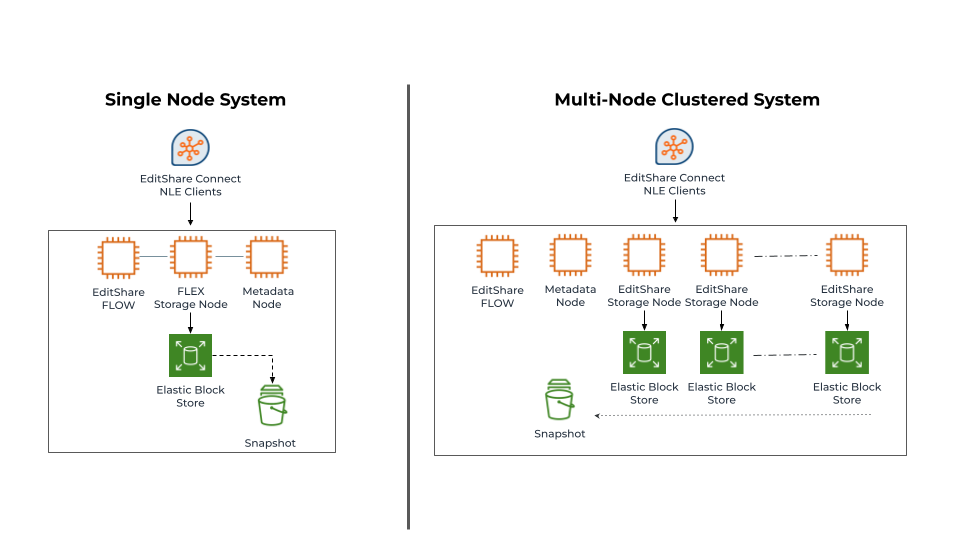
EditShare offers FLEX as both a standalone node or a cluster of nodes. Both configurations can be scaled out or scaled up to meet different performance requirements. The important thing to note, is FLEX is not a one size fits all solution. At EditShare we focus on openness and choice, giving our customers the ability to deploy what’s right for them, as well as the ability to adapt their environments as their needs change.
Boston, MA – January 5, 2022 –EditShare, the technology leader that enables storytellers to create and manage collaborative media workflows, has been honored in Built In’s 2022 Best Places To Work Awards for the second year in a row. EditShare earned a place on Boston Best Places to Work, Boston Best Midsize Companies to Work For and Boston Best Benefits. Best Places to Work annual awards program recognizes top employers across the country of all sizes, from startups to large enterprise organizations, and honors both remote-first employers as well as companies in the eight largest tech markets across the U.S.
Built In seeks out companies who go above and beyond for their people, measuring benefits, support, remote and flexible work opportunities, as well as programs for DEI and other people-first cultural initiatives. “At EditShare, our employees’ well-being is top of mind. Human beings thrive as a result of their environment, and we strive to offer an innovative, inclusive and safe space to work,” states Jennifer Ashton, VP of People Operations, EditShare. “We are thrilled to be named one of Boston’s best places to work and to continue to be recognized for the benefits that we offer our employees.”
“It is my honor to extend congratulations to the 2022 Best Places to Work winners,” states Sheridan Orr, Chief Marketing Officer, Built In. “This year saw a record number of entrants — and the past two years fundamentally changed what tech professionals want from work. These honorees have risen to the challenge, evolving to deliver employee experiences that provide the meaning and purpose today’s tech professionals seek.”
About Built In’s Best Places to Work Built In’s esteemed Best Places to Work Awards, now in its fourth year, honor companies across numerous categories: 100 Best Places to Work, 50 Best Small Places to Work, 100 Best Midsize Places to Work, 50 Companies with the Best Benefits and 50 Best Paying Companies, 100 Best Large Companies to Work For, and 50 Best Remote-First Places to Work.
About EditShare EditShare is a technology leader that enables collaborative media workflows on-premise, in the cloud, or in a hybrid configuration. With customer and partner success at the heart of EditShare’s core values, our open software solutions and robust APIs improve workflow collaboration and third-party integrations across the entire production chain, ensuring a world-class experience that is second to none. The high-performance software lineup includes media optimized shared storage management, archiving and backup, and media management, all supported with open APIs for extensible integration.