The Simple, Flexible Route to Making the Most of the Cloud
Stephen Tallamy, CTO EditShare
In the post industry, the biggest pressure today – aside from the usual need to control costs and boost productivity – is the need to support a “work anywhere” environment. Creative staff want the flexibility to work their preferred hours, from a location of their choosing. It reduces or eliminates the commute to an office, which has real environmental benefits as well as reducing stress for the editor.
EditShare led the industry in developing cloud solutions. It took existing, successful products and concepts and added the open-ness, interoperability and scalability that the cloud offers.
All of this experience is now brought together in EditShare FLEX, which offers a highly tailored environment for all the major tasks from remote editing to secure archiving. Most importantly, FLEX is designed in such a way that it is simple to implement and intuitive to manage. It does not require IT expertise to get the best of the system, nor to ensure security and reliability.
Migrating to the cloud gives businesses the obvious advantage that they do not need to physically host the hardware on which their work depends. This reduces the space they need, the power they consume, the air conditioning demands and the downtime and staff to ensure that the hardware is maintained and updated as required.
Conversely, the creative team will be accustomed to their preferred software and know how it should respond. Forcing a change of edit software, for example, would be simply unacceptable. Equally, making the system less responsive to key presses or mouse clicks would be unsettling and cause slow down workflows and become a stumbling block in adoption.
The guiding principle of EditShare FLEX is that you should carry on using your preferred tools in exactly the way you are used to. Cloud and remote working means there is an abstraction between the operator and the physical workstation, but that cannot be any sort of obstacle: it must be completely transparent.
To make this possible, EditShare has collaborated with industry leaders. FLEX uses the popular and widely recognised Teradici software to provide remote access from anywhere to virtual workstations. And if you are new to cloud connectivity and do not have an established fast file transfer process we can integrate CloudDat software from Data Expedition Inc.
Even more important, the FLEX virtual workstations in the cloud support whatever NLE software you currently use: it is completely agnostic. Indeed, if you have some editors who prefer Premiere Pro, some who are Avid fans and others who are most comfortable on DaVinci Resolve, you can support all of them, simultaneously and completely transparently.
There are two main bundles of the FLEX offering at present, with more to come in the future. FLEX Cloud Edit does what the name suggests: allows your editors to sit wherever they like and edit on virtual machines in the AWS cloud. Customers can take this bundle a step further with FLEX Cloud Edit+ which adds workstation management and file transfer acceleration, providing video production teams with an end-to-end video studio suite virtualized in the cloud.
The second bundle is FLEX Sync, which synchronizes between local EFS storage and cloud-based archives. It can be set to be completely automatic and it eliminates the need for LTO tape libraries, another continuing cost for space, maintenance, tapes and upgrades. By moving your archive or DR backup to the cloud, you also gain massive resilience. Once your archive is available in the cloud it unlock opportunities to utilize it for other cloud solutions, including FLEX Cloud Edit.
There are options in each service so you can tailor your system to precisely your requirements. If you do not have the necessary IT and engineering skills in house, then EditShare’s professional services team can provide the system design and scoping.
The great advantage of FLEX, though, is that you maintain full control over your working environment. Your talented and creative team will notice few changes, and will be able to work as productively as before, if not more so.
It delivers against the key concerns. It provides secure and efficient remote working, alongside edit-in-the-cloud, with all the CapEx savings and OpEx control that implies. And you maintain full control over your working environment and, most important, the security of the content entrusted to you.
Flexible, cloud-enabled workflows, project synchronization with NLEs, LUT and RAW support, live capture and more
Boston, MA – May 10, 2022 –EditShare®, the technology leader that enables storytellers to create and manage collaborative media workflows, will showcase its strong commitment to the Middle East region at CABSAT 2022 (17 – 19 May, Dubai World Trade Centre, stand C6-31), introducing its new FLEX cloud solutions. This suite of powerful media asset management and storage software solutions provides a straightforward way for businesses, large and small, to take full advantage of cloud services and workflows.
FLEX reflects the powerful business trends in post today, including the migration to a “work anywhere” environment, with ready access to content wherever the creative staff need to be. In adopting cloud storage and processing, it also meets the move towards an OpEx financial model, with the cloud hosting and storage fees flexing to reflect the level of business.
Michele Dwayk and Amjad Baidas, the latest recruits to EditShare’s team in the region, will be on the booth to showcase the new technology enhancements.
“The Middle East is a very strategic territory to EditShare, and we continue to work with many of the big players in the region,” comments Said Bacho, Chief Revenue Officer at EditShare. “We know how important strong relationships are in this community, which is why we have carefully recruited very well-known and respected talent like Michele and Amjad to work with our customers and channel partners here.”In its simplest form, FLEX Cloud Edit provides media asset management, high performance software-defined storage, and virtual workstations in the AWS cloud.
CABSAT will be the perfect opportunity to see the latest developments following their launch at NAB 2022. These are all aimed at simplifying the creative experience while providing even greater content security and availability.
A great example of workflow streamlining is the enhanced project synchronization with NLEs, including Media Composer, Adobe® Premiere® Pro and DaVinci Resolve. This allows complex projects to be readily moved between EditShare FLOW media management and the NLE environment.
Also added to FLOW is the ability to support the latest RAW format updates for RED and Blackmagic Design camera systems, and impose LUTs in real time, both on full resolution material and on proxies.
FLOW can now also ingest NDI contribution feeds and immediately present them for editing, ideal for news and sports fast turnaround editing. To make the workflows as slick as possible, EditShare has been collaborating with MoovIT on its Helmut 4 orchestration platform, and will demonstrate how they work together to make Adobe and EditShare the perfect environment for high pressure operations.
Content security and availability is vital to professional users, and EditShare is adding new hardware and software in this area. The EFS 60NL is a new device, aimed at nearline storage, and providing 60 drive bays in 4U of rack space. Within the EditShare environment, nearline storage is ideal for content which is needed but not being immediately worked on, ready to be transferred to the online servers with virtually no delay.
Adding to the security and sharing concept, EFS Multi-Site allows users with multiple locations to leverage built-in file acceleration to synchronize project storage between EFS clusters in different facilities. This ensures that users have ready access to content, wherever they choose to work. Cloud Sync extends the capabilities of Multi-Site to cloud storage, providing added flexibility in access as well as security in archiving.
“This year’s participation at CABSAT marks a first for EditShare by exhibiting at our own booth with a regional team on board,” added Bacho. “It will be great to show our users and channel partners in the Middle East all the exciting new innovations we have been working on, and discuss how we can transform story-telling.”
To book a meeting or demo at CABSAT, please click here.
About EditShare
EditShare is a technology leader that enables collaborative media workflows on-premise, in the cloud, or in a hybrid configuration. With customer and partner success at the heart of EditShare’s core values, our open software solutions and robust APIs improve workflow collaboration and third-party integrations across the entire production chain, ensuring a world-class experience that is second to none. The high-performance software lineup includes media optimized shared storage management, archiving and backup, and media management, all supported with open APIs for extensible integration.
EditShare’s cloud-enabled remote editing and project management technology was recently recognized by the National Academy of Television Arts and Sciences (NATAS) with a prestigious 2021 Emmy® Award for Technology and Engineering.
For this next step in our journey we review cloud video storage as it can be one of the biggest sources of confusion and costs when it comes to post-production storage. All major cloud providers offer a range of storage solutions, all optimized for different uses and price points.
In this article we’ll review some of the primary cloud storage options for editing in the cloud as well as the tradeoffs and associated costs.
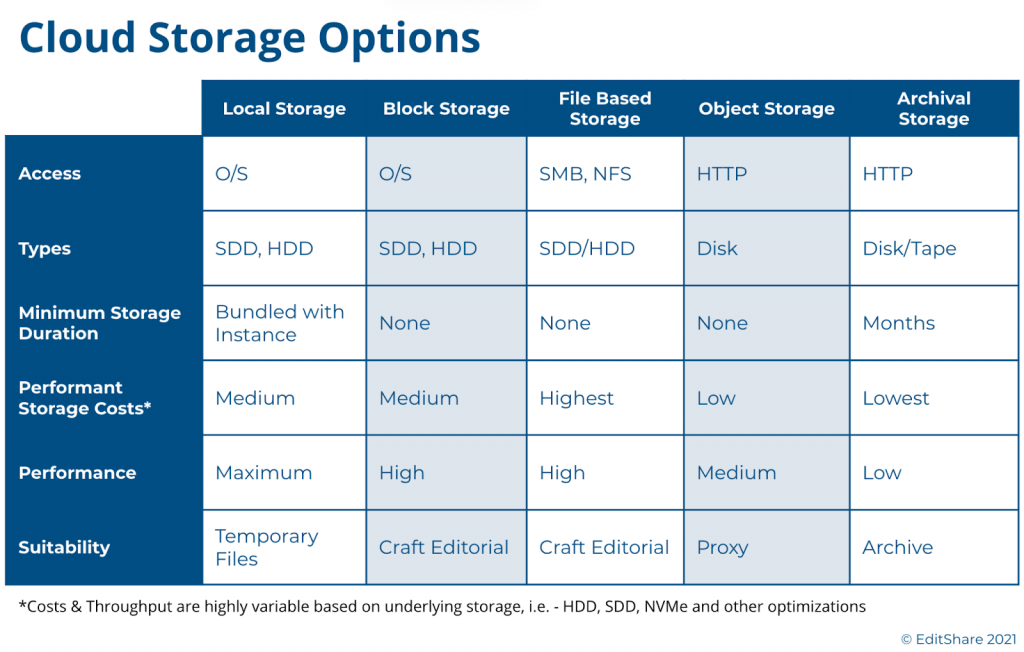
A Look into Cloud Based Storage Much like the traditional storage models, cloud-based storage options fall into one of five major categories:
Local Storage: Analogous to a local computer configuration, this is an HDD or SSD physically attached to the cloud compute instance.
Block Storage: This is network attached storage that must be provisioned against a compute instance during deployment time. Similar to local storage, it relies on the compute instance operating system to make it useful to applications. For those familiar with SAN’s (Storage Area Networks), block storage is similar in concept.
File Storage: These are storage systems that act similar to a NAS (Network Attached Storage), and provide higher-level file-based access to a shared network of computers, typically using NFS.
Object Storage: In this tier, files are stored as data objects referenced using an ID. The benefit is that there is no structural scale inhibiting storage growth. HTTP is the protocol for access.
Archive Storage: A type of object-based storage, this is a lower-cost tier that is typically less accessible and requires a commitment of storage duration for several months or longer.
With the exception of local storage, these storage tiers can be highly scalable and extend dynamically during run-time or via deployment scripts. All of the storage tiers have trade-offs between costs, performance, scalability, and availability. We explored a bit of this in our prior Journey to the Cloud blog, where we focused on backup and archival storage.
For the purposes of video editing, one must focus on the usefulness of these storage types to the needs of the application as well as the costs. This requires a storage layer with low-latency, that can ideally scale to multi-TBs, and can be used by the editing application in a cost effective manner. A general rule of thumb is the further down in the above list you go the cheaper the storage, but that is not always the case. Offerings of SSD, NVMe, HDD, highly-performant file systems, and other permutations offered in each of these tiers make price/performance reviews a very complex analysis.
While costs are generally based on storage sizes and performance, other factors typically apply. As an example, depending on the vendor and storage tier, transferring content out of a tier may incur a fee and so will the actual I/O calls themselves, such as an HTTP GET and PUT, which read and write the data.
Video Editing Storage Choices These considerations leave us with three choices for editing: Local Storage, Block Storage, and File Storage. Let’s review the usefulness of these choices.
Local storage has long been the tried and true means for editing workstations. These local disks come in a variety of sizes and speeds, and while they may be useful for a single, stand-alone editor, there are a few drawbacks. First, they can’t be resized dynamically so as a project grows you could find yourself short on space. Perhaps more importantly in this virtualized cloud world, once you shutdown the system you lose all your data, applications, and settings. This is not a factor in the on-premise world, but in a virtual environment the cost of running virtual workstations full-time is significant and you will want to shut-down these instances when not in use. Unless you can finish your project in one sitting or you have money to spare, this may not be the best option.
Block-based storage is a far more effective solution for video editing environments. In a virtual environment, you can provision the exact amount of low-latency storage you require and attach it to your editing environment when you spin up your system. Done correctly, you can even expand it as your needs grow. In addition, all of the public cloud vendors provide various types of block storage optimized for different performance and cost points so you can dial in exactly what you need for your editing applications.
From a cost point of view, block storage can have a permanence distinct from the compute instances. When you shutdown your cloud compute instances, whether that’s a virtual editing workstation or an asset manager, you can continue to maintain your storage so you don’t lose anything. Yes it’s not free, but it is far more economical than having to keep your entire environment running all of the time.
File storage is another possible option for video editing environments. Much like your NAS in the office, these systems provide a shared storage pool to multiple clients. They typically rely on NFS as the protocol. These file-based storage systems are sometimes offered with different performance characteristics, some optimized for higher throughput, but at a cost. These NAS-like systems, however, have limited storage capacity and performance. They are fine for IT applications, but video production environments can quickly run into issues.
Finally, object storage is a popular and cost-competitive storage tier, and you only pay for what you use, however for video editing it has its drawbacks due to latency and native application support. And while there are solutions for translating object storage to file-system calls, these gateways will continue to be hampered by the latency issues and often require caching workarounds. This is not ideal for professional or collaborative editing purposes.
The Best of all Worlds For many teams exploring cloud production for the first time, the choices are overwhelming. Between the major cloud vendors, there are hundreds of choices of cloud storage tiers, performance choices, and tradeoffs. Too many choices can result in analysis-paralysis and leave organizations behind in the technology curve.
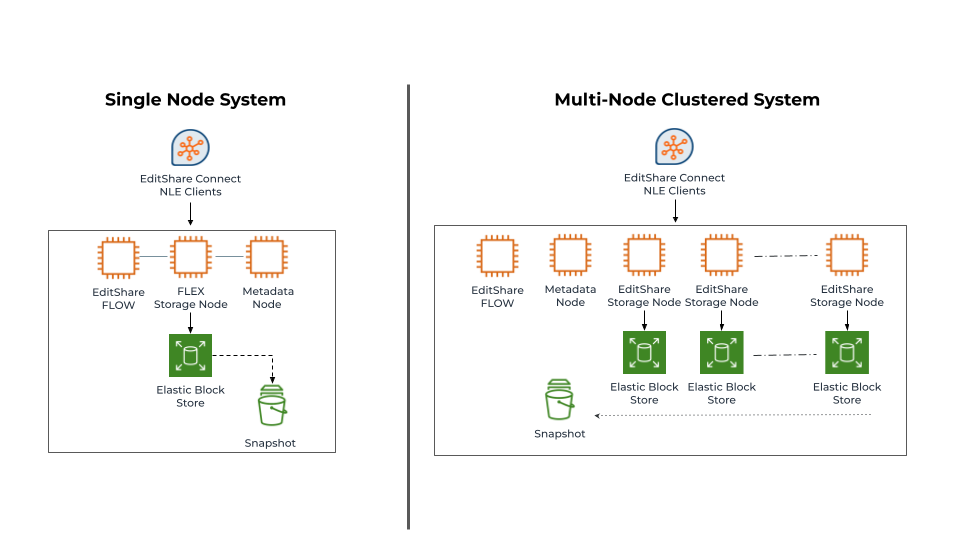
EditShare developed FLEX Storage as a software-defined-storage layer to abstract these complexities and provide high-performance, cost-optimized, video production storage. FLEX uses a mix of both block storage and object storage to provide that balance between storage performance and costs, and this mix can be altered to meet any workflow or budget. We’ve also benchmarked and tested the various storage performance types within these tiers – such as SSD, HDD, etc – to find the right balance for different application mixes.
As many of our customers require editing libraries of 10’s or 100’s of TBs of media, often captured at high bit-rates, we found a need to be more clever about storage cost optimizations. In 2020 we began offering FLEX Seamless Proxy Editing, which provides a cost optimized workflow that leverages proxy editing, but in a unique simple workflow. For those interested in learning more, you can read more here.
EditShare offers FLEX as both a standalone node or a cluster of nodes. Both configurations can be scaled out or scaled up to meet different performance requirements. The important thing to note, is FLEX is not a one size fits all solution. At EditShare we focus on openness and choice, giving our customers the ability to deploy what’s right for them, as well as the ability to adapt their environments as their needs change.
Channel Partner Portal – First Exclusive Walkthrough
Sales Leads – Management & Distribution
Product Use Cases & Updates
Demos, Training, & Professional Services
Join us for this end-of-the-year session as we all work together towards a successful IBC show and a great closure of 2021!
EFSv streamlines production with remote workflow flexibility
Boston, MA – June 8, 2021 –EditShare®, a technology leader that enables collaborative media workflows for storytellers, today announced that public media producer GBH, the largest content creator for PBS, has invested in EditShare’s EFSv cloud solution, hosted in Amazon Web Services, to modernize media workflows across its post-production operations. An early adopter of cloud technologies for its broader IT needs, GBH’s move to EFSv extends video production into the cloud, maximizing operational efficiencies and reducing overall costs. The open EFSv platform facilitates both hybrid and cloud post-production workflows which optimize content access and enhance the user experience for video editors who create critically acclaimed programs such as NOVA, ANTIQUES ROADSHOW and AMERICAN EXPERIENCE and for PBS’ WORLD Channel.
“We require adaptable, efficient media systems for all of our clients,” said Tim Mangini, senior director of production technology for GBH. “EditShare’s cloud solution gives our producers flexibility and scalability. They can work wherever they want, with whomever they want, whenever they want, and only pay for the resources they actually use. They upload their media once and work from anywhere as if they were working in any GBH edit suite.”
EditShare’s approach to open platform development, specifically its support for multiple cloud providers and public APIs for integration and workflow expansion, was a key factor in GBH’s decision to select EFSv. Additionally, access to key technologies, such as artificial intelligence and content usage analytics will enable GBH to unleash new media workflows.
“Shifts in video production require more agility and demand the ability to accommodate changing work habits. As GBH embraces those shifts, open and flexible cloud-based solutions enable new workflows while protecting the investments made in on-premise platforms,” comments Tracy Geist, chief marketing officer, EditShare. “EFSv offers GBH as well as our other customers the best of both worlds, providing frictionless storytelling workflows that are flexible and secure, while accommodating change.”
About EFSv Cloud Solution
EFSv redefines the economics of editing in the cloud while significantly enhancing the user experience. The tiered solution approach supports customers at every stage of their journey to the cloud. Offerings include cloud-based backup solutions that serve as the foundation for building cost-effective, distributed cloud editing and seamless proxy editing workflows, up through full production environments in the cloud. EditShare’s cloud innovations offer unparalleled flexibility, allowing customers to easily adapt to cloud or hybrid environments and benefit from a lower total cost of ownership.
EditShare is a technology leader in networked shared storage and smart workflow solutions for the production, post-production, new media, sports, and education markets. Whether you need on-prem, cloud, or hybrid solutions, our products improve efficiency and workflow collaboration every step of the way. They include media optimized high-performance shared storage, archiving and backup software, a suite of media management tools and a robust set of open APIs that enable integration throughout the workflow. Customer and partner success are at the heart of EditShare’s core values ensuring a world-class experience that is second to none.
Press Contact Cat Soroush Zazil Media Group (e) catherine@zazilmediagroup.com (p) +1 (631) 880-9534
In our previous entry in the Journey to the Cloud series, we reviewed virtual workstations. In that article we covered the advantages and concerns of using cloud-based workstations as non-linear video editing machines. For teams that are shifting their video production away from on-premise environments, it is important to consider how these workstations are managed, operationalized, and costs are controlled. That is what we will discuss in this article.
Virtual Workstation Recap In a video production environment, a virtual workstation is an on-demand compute server running applications for editing, ingesting, and other functions of a video workflow. These workstations are appropriately sized to the tasks at hand – which in this case will be non-linear video editing. Offered with a variety of CPU speeds and cores, along with memory and video graphics acceleration, they can be right-sized for the needs of the codecs being processed and edited.
An important consideration in virtual workstation usage is managing the uptime of that workstation properly. In an ideal world, this would be similar to simply powering on the system when in use and then remembering to shut it down when no longer in use. In a cloud environment that process is not straight-forward. For one, users may not always be diligent about shutting down their computers, and if they were diligent they may find the process of spinning workstations up and down more complicated than a power button. Often it’s necessary to have access, and training, to operate the cloud management console where this operation is controlled. Alternatively the IT cloud team needs to get involved manually or write scripts to perform this operation. This is not a simple process, but it is perhaps the most important step in controlling cloud costs. Because of this, a need for workstation management tools has emerged.
What Will Workstation Management Do For Me? There are a number of capabilities that workstation management solutions provide to make users’ lives easier, help them save money, and maintain control of their cloud environments. Let’s walk through a few of them.
Workstation Scheduling: Ideally, a workstation manager will allow team administrators to control the uptime of their virtual workstation environments. That’s as simple as turning them on in the morning and turning them off in the evening. The primary advantage here is cost savings. Instead of running a GPU assisted compute node 24×7, a workstation management system can control the overall uptime and usage schedule. The savings is straightforward here – there are approximately 722 hours in a month, yet typically only 173 working hours. Providing a simple scheduling management function can result in a 76% savings against your cloud bill.
Now there are solutions, such as AWS Instance Scheduler, that can provide similar functions, but will require the user to have the IT and programming skills to implement them. For video production teams, a simpler solution is almost always preferred.
Connection Management: This element of workstation management orchestrates the connection of users to virtual workstations and watches over the use of those connections. When logging in, a connection manager will find an idle workstation and connect that user to their new environment for the duration of that session. This element also has the ability to monitor the workstation usage. If the environment goes idle the connection manager will sense this and shutdown the workstation in order to minimize costs. Typically this idle period can be set to find that right balance of idle time acceptable to users.
To ensure productivity within a team, when users are disconnected from their virtual workstations, the compute instance is also suspended. This suspended mode often means that the storage associated with this workstation is maintained, not deleted. However, the compute instance is released and is no longer incurring a cost. The storage is maintained separately but these fees are relatively small, for example, AWS Elastic Block storage for a 200 GB volume will only be around $8-16/month. Once that user comes back online, that storage volume is connected to a new virtual workstation and users can become productive again.
Authentication: An important element is the ability to ensure only authorized users can access workstations. A workstation management solution will integrate smartly into your company’s security solutions and map to the correct policies set by your information security team.
Provisioning and Management: The ability to provision new workstations into your workstation pool is an important element of workstation management. For example, you may have 20 workstations available to your team, but find yourself facing a new project which will require an extra 5 workstations. The administrator of the workstation management system will have the rights to provision these new workstations, and later delete them when no longer in use. Similarly new video production workloads may arise requiring workstations capable of editing very high resolution video. These higher-end workstations can be created and provisioned specifically for these requirements, and then deleted when no longer in use.
Cost Insights: In a video production environment, workstations used for editing or ingest may be among the most costly cloud elements in use. The ability to have visibility into these costs will allow teams to maintain controls on their spend, well ahead of any surprise bills. In addition, this capability can make it much simpler for production groups to easily shift to an OpEx model where revenues from projects can be tightly aligned with the costs associated with that work.
The advantages of virtual video productions have become more compelling to teams as cloud costs plummet and bandwidth increases. However, as this world has emerged it has required a new set of skills and oversight that differs from on-premise solutions. For some organizations, tracking on-going costs can be more challenging than the analysis behind a CapEx investment of new equipment. A workstation management solution with visibility into costs can help manage this concern and provide clear visibility into spend.
Operationalizing Cloud Virtual Video Production Moving to a cloud environment today may require team members to become familiar with a cloud vendor’s console administration, operations, coding, and cost calculators. Not exactly a set of skills a creative department may want to invest in. Some market solutions address this complexity with a Software-as-a-Service (SaaS) offering, allowing users to subscribe to a video production environment of fixed sizes and capabilities. This can sound compelling but it also eliminates the advantages of a scalable cloud approach, and requires customers to pay staggering fees as the SaaS vendor must over-provision their cloud infrastructure to account for worst case usage models.
EditShare’s approach has been to truly embrace the cloud offering a scalable solution which its customers can use cost-effectively in their cloud account. This ensures our customers receive the best pricing possible for their cloud infrastructure uses and allows them to maintain control and oversight. To provide further operational and cost oversight we have partnered with workstation management vendors such as 7FiveFive, and together we can provide the end to end solution that is manageable and operationally controlled by our customers. The entire environment – performant storage, asset management, archiving and ingest all operationalized in the cloud with full control over usage and cost management.