Why NVMe Architecture Excels for High-End Finishing with EditShare EFS
In the world of media production, high-end finishing workflows for 4K, 6K, and 8K projects demand more than just speed; they require intelligent, collaborative infrastructure designed for creative professionals. Whether you’re a VFX artist refining complex effects, a colorist grading cinematic visuals, or an editor working on file-per-frame formats like DPX and OpenEXR, your video editing storage solution must keep up.
EditShare EFS NVMe rises to that challenge. Built on a media-optimized file system and designed from the ground up for collaborative video storage, EFS NVMe delivers exceptional throughput, scalability, and real-time performance.
Here’s why its NVMe-based architecture, integrated with the award-winning EditShare File System (EFS), stands out as the best shared storage for video editors tackling today’s most demanding finishing tasks.
The Power of NVMe Architecture in Shared Video Storage
High-resolution finishing workflows, especially in VFX, DI, and color grading, deal with massive data rates and layered files. Traditional HDDs and even SSDs often fall short. NVMe (Non-Volatile Memory Express) changes the game with speeds exceeding 20GB/s per node and ultra-low latency.
EditShare’s EFS NVMe leverages this performance to support formats like DPX, DNxHR 444, and ProRes 4444 with smooth multi-layer playback and immediate access to large media assets. With 24 enterprise-grade NVMe drives per node, ranging from 2TB to 16TB each, EFS NVMe offers robust bandwidth that allows multiple users to work simultaneously without bottlenecks—making it ideal for post production shared storage needs.
EFS: The Heart of EditShare’s Media Storage Software
What sets EFS NVMe apart isn’t just hardware, it’s the EditShare File System, a clustered, parallel file system tailored for media. Unlike conventional NAS solutions relying on SMB or NFS, EFS uses native clients for Mac, Windows, and Linux. This enables workstations to pull over 10GB/s of data directly, perfect for file-per-frame formats in 4K+ resolution.
With technologies like SwiftRead, EFS intelligently routes data from the fastest available node in the cluster, maintaining uninterrupted performance even under heavy load. Its built-in Quality of Service (QoS) ensures playback remains fluid, even during concurrent tasks like transcoding, backups, or large media transfers. This is media storage software that’s built with creativity in mind.
Seamless Integration with the EditShare Ecosystem
EFS NVMe is part of a broader EditShare ecosystem that supports every stage of the media lifecycle. Tight integration with FLOW and MediaSilo makes this collaborative video storage platform even more powerful:
FLOW MAM automates proxy creation, AI metadata tagging, and scene detection, accelerating prep work and reducing time to edit. Editors and VFX teams benefit from lightweight proxies and instant access to high-res assets, ensuring smoother handoffs between Adobe Premiere Pro, DaVinci Resolve, and Avid Media Composer.
MediaSilo, a secure video review and approval platform, adds forensic watermarking and timestamped feedback features. It’s a vital layer for keeping sensitive finishing work secure while enabling remote collaboration with producers and clients.
Scalable, Flexible, and Built for Collaboration
EFS NVMe scales from 32TB to 20+ PB in a single namespace. Whether you’re building a boutique studio or scaling a global operation, it’s the shared video storage platform that grows with you.
Add more nodes to expand your cluster or deploy EFS Field, a portable NVMe unit with up to 64TB for on-set finishing. Combined with tools like SwiftLink and SwiftSync for secure remote access and daily syncs, EditShare enables hybrid workflows that keep creative teams connected across locations.
Why EFS is the Best Shared Storage for Video Editors
EFS NVMe is more than fast, it’s intelligent, secure, and optimized for collaboration. Here’s how it redefines video editing storage solutions:
Unmatched Throughput: Over 20GB/s of aggregate bandwidth powers real-time playback of uncompressed 4K and 8K footage.
Collaborative Efficiency: Native EFS clients and SwiftRead ensure multiple users can edit, grade, and render simultaneously without interruption.
Rock-Solid Reliability: Dual metadata controllers, RAID-1 OS drives, and real-time analytics via Guardian deliver high availability and visibility.
Security at Every Step: MediaSilo’s watermarking, access controls, and audit logging protect valuable IP in high-stakes projects.
Cost-Effective Scalability: Energy-efficient NVMe drives and flexible configurations make high-performance finishing accessible for any size facility.
Real-World Performance: EFS NVMe in Action
At Leeds Trinity University, an upgrade to EFS NVMe enabled the media department to handle multiple high-resolution streams with ease.
According to Mark Willett, Media Facilities Manager, “The recent classification by The Guardian as the No. 1 University in the UK for Journalism is in large part due to the wonderful facilities we provide, of which EditShare is central.”
In another deployment, EFS NVMe powers Lasergraphics film scanners, ingesting 5K 16-bit DPX files at 30fps while simultaneously supporting 8K DPX grading in DaVinci Resolve. Proof that EditShare can handle the pressure of even the most demanding media workflows.
Choose EFS NVMe for Your Finishing Pipeline
If you’re looking for the best shared storage for video editors handling complex finishing projects, look no further. EditShare’s EFS NVMe combines the speed of NVMe with the intelligence of media-specific software and the flexibility of a collaborative video storage platform. From ingest to delivery, your team stays focused on creativity, not IT headaches.
New technology boosts performance for high-resolution post-production and flexible workflows
Boston, MA, 4 August 2025: EGG Post Production & VFX, one of Ireland’s leading post-production facilities, has expanded its capabilities with a significant storage upgrade from EditShare. This investment supports EGG’s growing demand for high-performance workflows, including 4K and beyond colour grading, while improving remote collaboration and workflow flexibility.
The project was delivered in collaboration with Tyrell, EditShare’s long-time channel partner in Ireland, who worked closely with EGG and EditShare to scope, install, and support the new system.
Founded in 2004 by editors Gary Shortall and Gareth Young, EGG has built a strong reputation for its award-winning editing, finishing, sound, and VFX services. The company delivers content for major Irish, UK, and US broadcasters, as well as audiences worldwide, making reliability and efficiency in their storage infrastructure critical to their operations.
To meet these demands, EGG has integrated EditShare’s 96TB NVMe and EFS300 256TB storage solutions, replacing an older system that could no longer support the increasing technical requirements of high-resolution workflows. The upgrade consolidates all offline, online, grading, and VFX under a single vendor, improving overall efficiency and project management.
One of the most valuable additions to EGG’s workflow is EditShare’s Swift Link technology, which allows creative teams to access media and work on projects from any location. As productions increasingly demand flexible, hybrid workflows, Swift Link ensures that EGG’s editors, colorists, and VFX artists maintain seamless productivity, whether on-site or remote. The ability to securely stream high-resolution content without performance compromise has been transformative for EGG’s post-production pipeline.
Gareth Young, CEO and Co-Founder of EGG, emphasized the continued value of the partnership with EditShare: “We’ve trusted EditShare for over eight years, and this latest upgrade reinforces why we continue to rely on them. The combination of high-performance storage, local European support, and the flexibility provided by Swift Link made this the right choice for our team.”
Since going live last summer, the upgraded system has enabled EGG to serve as a reference site for high-end grading workflows. The team has praised the simplicity and speed of Swift Link for remote collaboration, without sacrificing the performance needed for complex post-production tasks.
Tara Montford, EVP of Sales and Co-Founder of EditShare, added: “EGG represents the kind of forward-thinking post facility that pushes the boundaries of creative and technical excellence. We’re proud to support their next chapter with a solution that combines performance, flexibility, and security, delivering everything they need to meet the demands of high-resolution workflows, both in-studio and remotely.”
EditShare is an Emmy Award-winning technology leader, supporting storytellers through collaborative media workflows across on-premise, cloud and hybrid architectures. It offers scalable storage and collaboration for media businesses and at every stage of the video production process from storyboarding to screening.
The software is inherently open, encouraging workflow collaboration, third-party integrations and content sharing across the entire production chain. Where required, the software is backed by high performance, high availability designed specifically for the demands of media storage, management and delivery. The comprehensive offering covers multi-level content storage for production and post, along with innovative asset and workflow management software, plus specialized and highly valued tools for content review and distribution, the creation of customized and branded pitch reels, and secure preview of high-value pre-release content.
About Tyrell
For 25 years Tyrell has been providing video, audio, graphics and storage solutions to the Irish and UK broadcast, post, production, corporate and education markets. In this time, we have become the leading provider of technology and service solutions both on-premise and in the cloud. Tyrell has an excellent understanding of the fast pace and unique pressures facing the media and entertainment industry; developing solutions for complex workflows. Allowing our clients to concentrate on the creative process and business development. From our two locations we offer a comprehensive range of professional services from consultancy to system design and integration, technical support and maintenance.
Press Contact Katharine Guy katharine.guy@editshare.com
Boston, MA, 1 August 2025 – At IBC 2025, EditShare debuts the next evolution of its platform, built for media teams that demand real-time collaboration, AI-driven post, lightning-fast media-aware storage, and easy-to-use hybrid workflows. From post and sports to news and archiving, EditShare blends technical muscle with creative flexibility. Visit Booth 7.A35 to see how we’re pushing performance and energy efficiency, without sacrificing adaptability
What You’ll See at IBC
What’s New at IBC 2025
Expanded EFS Storage Solutions EditShare will premiere the latest Ultimate EFS Nodes, optimized for high-performance media workflows at any scale. Preview all-NVMe systems tailored for demanding 8K, VFX, and DI tasks. The newest EFS Field, portable, rugged, and now offering greater capacity, live ingest, and secure, verified media transfer, will also be featured. Additional updates to the Ultimate EFS lineup will be announced exclusively at the show, offering a hands-on look at the future of production workflows.
Next-Generation Collaborative Workflows Discover EditShare’s advances in collaborative workflows: MediaSilo’s integration with Louper enables real-time, frame-accurate review sessions without lag, downloads, or version confusion, allowing global teams to comment and approve instantly. A live Atomos Camera to Cloud demonstration will show proxy uploads directly into MediaSilo for immediate access, accelerating fast-turnaround projects.
Integrated Specialist Workflows On-booth demos showcase powerful integrations: Lasergraphics 5K 16-bit DPX film scanning with EFS, frame-accurate NDI ISO ingest with multi-channel recording, and comprehensive newsroom collaboration with Octopus.
“From green performance at scale to workflow flexibility across post, production, and archive, we deliver innovation shaped by customer insight,” said Tara Montford, EVP of Sales and Co-Founder of EditShare. “Whether you’re scaling up, streamlining reviews, or refining remote workflows, our solutions help teams move faster, collaborate better, and reduce friction. We look forward to showcasing these advances in Amsterdam.”
To book time with us at the show, please click here
About EditShare
EditShare is an Emmy Award-winning technology leader, supporting storytellers through collaborative media workflows across on-premise, cloud and hybrid architectures. It offers scalable storage and collaboration for media businesses and at every stage of the video production process from storyboarding to screening.
The software is inherently open, encouraging workflow collaboration, third-party integrations and content sharing across the entire production chain. Where required, the software is backed by high performance, high availability designed specifically for the demands of media storage, management and delivery. The comprehensive offering covers multi-level content storage for production and post, along with innovative asset and workflow management software, plus specialized and highly valued tools for content review and distribution, the creation of customized and branded pitch reels, and secure preview of high-value pre-release content.
Press Contact Katharine Guy katharine.guy@editshare.com
For media teams managing massive files, tight deadlines, and fast-paced collaborative workflows, generic file servers just don’t cut it. What you need is shared video storage designed specifically for video production and post workflows.
In this article, we’ll explore how media-optimized storage differs from standard IT storage, and why making the switch can be a game-changer for creative teams.
The Key Differences Between Generic and Media-Optimized Storage
1. Bandwidth Over IOPS: Why Consistent Throughput Matters
Generic Storage: IT systems like databases and email servers are built for high IOPS (Input Output Operations Per Second). That’s fine for tiny, frequent operations like processing emails or database requests, but it fails under the sustained demands of high-bitrate video playback.
Media Storage:Shared video storage is optimized for high-bandwidth, low-latency transfers. It ensures reliable performance even during multi-stream 4K or 8K editing, no frame drops, no playback freezes, just uncomplicated real-time editing. This is essential for collaborative editing for Adobe Premiere Pro and DaVinci Resolve workflows.
Why it matters: Scrubbing through 8K RAW footage during a live client session? You need throughput, not IOPS. Media storage delivers performance you can count on.
2. File Management Tools That Actually Work for Video
Generic Storage: File services like Google Drive or Dropbox lack the intelligence to handle media workflows. Version control is clunky. Metadata is manual. Integrations with creative tools? Limited or nonexistent.
Media Storage: Media storage platforms include production asset management tools that allow smart versioning, automated metadata tagging, and seamless integration with NLEs like Adobe Premiere Pro, Avid, and DaVinci Resolve.
Why it matters: With advanced video review and approval software built into the workflow, your team stops wasting time searching for files and starts focusing on creativity.
3. Scaling Without Downtime or Drama
Generic IT Storage: Scaling often means downtime, migrations, and complex reconfigurations, aka production nightmares.
Media Storage: Media storage for remote post production teams scales. Add new nodes, expand bandwidth, or enable remote collaboration all without interrupting ongoing projects.
Picture this: You’re in post on a global ad campaign. An editor scrubs through 8K timelines smoothly. Your colorist joins remotely to adjust the grade. The client reviews and approves clips in real time using your video review and approval software. Meanwhile, a new storage node is added overnight without downtime. That’s what the best shared storage for video editing teams enables.
Delays in post-production workflows can cost thousands per day in idle talent, missed deadlines, and rework. Investing in shared video storage prevents bottlenecks, protects your schedule, and supports real-time collaboration for every team member no matter where they are.
Why Media Teams Deserve Better
Media professionals shouldn’t have to wrestle with tech built for spreadsheets and PDFs. You need:
Shared video storage tailored to high-res workflows
EditShare’s EFS, FLOW and Mediasilo solutions combine high-performance shared storage with powerful workflow tools, purpose built for post production.
Introduction
Accidental leaks of pre-release content can lead to significant financial losses and reputational damage. For professionals in film, television, and corporate video production, safeguarding sensitive material is paramount. EditShare’s SafeStream technology provides a robust solution to prevent unauthorized distribution and trace leaks back to their source, making it a trusted and secure video sharing solution for modern workflows.
What Is SafeStream?
SafeStream is a real-time video watermarking technology that embeds both visible and invisible (forensic) watermarks into video content, ensuring each copy is uniquely traceable. This dual-layered approach not only deters unauthorized sharing but also facilitates accountability by identifying the source of any leaks. It’s ideal for use as a watermarked video sharing platform or video DRM platform for media screeners.
How SafeStream Works
Visible Watermarks
Visible watermarks display user-specific information directly on the video, such as the viewer’s name or email address. This personalization discourages recipients from sharing the content, as they know it can be traced back to them.
Forensic Watermarks
Forensic watermarks are invisible markers embedded within the video file. They allow content owners to trace the origin of a leak without altering the viewing experience. This is particularly useful when visible watermarks are not feasible and when using an embargoed content distribution tool is critical.
Benefits of Using SafeStream
Leak Deterrence: Personalized watermarks make recipients think twice before sharing unauthorized content.
Traceability: In the event of a leak, forensic watermarks help identify the source quickly with detailed audit trails for shared media.
Compliance: Ensures adherence to industry standards and legal requirements for content security.
Integration: Seamlessly integrates with existing workflows in film, television, and corporate environments.
Implementing SafeStream in Your Workflow
Integrating SafeStream into your post-production process is straightforward. It can be applied during content review stages, internal screenings, or when sharing with external stakeholders. By embedding watermarks at these critical points, you maintain control over your content throughout its lifecycle.
Conclusion
Accidental leaks can have devastating consequences for media professionals. SafeStream offers a proactive approach to content security, combining visible and forensic watermarking to deter unauthorized sharing and effectively trace leaks. By incorporating SafeStream into your workflow, you protect your content, your reputation, and your career with a best-in-class secure video sharing solution.
Ready to elevate your content security? Discover how SafeStream can protect your valuable assets, visit our website and schedule a demo today:
If you’re managing video production with traditional IT storage, chances are your team is running into performance issues—dropped frames, offline media, slow load times, and frustrated editors. And it’s not their fault. They’re doing high-stakes creative work with tools that weren’t designed for the job.
Here’s why it’s happening—and what to do about it.
The IT Storage Problem
Most general-purpose IT storage systems are built to handle lots of small files and transactions—think emails, documents, or databases. These are low-throughput, high-IOPS (input/output operations per second) environments.
Video is the opposite.
Editing high-resolution media requires sustained throughput to stream large video files in real time. When multiple editors are working simultaneously, that demand only increases. Traditional IT storage just wasn’t built for this kind of load, and trying to make it work can lead to serious performance bottlenecks and creative downtime.
Dropped Frames Are a Symptom—Not the Root Cause
Dropped frames, playback lag, and crashes are warning signs that your storage system is under stress. These issues can interrupt workflows, delay projects and make collaboration nearly impossible. Editors may spend more time waiting for media to load than actually cutting footage.
And when projects go offline or files disappear mid-edit, you’re not just losing time and money—you’re losing trust.
The Case for Purpose-Built Storage
At EditShare, we’ve spent over a decade solving these problems for media teams so they can worry about the finished product, not storage. Our EFS shared storage system is engineered from the ground up to support the unique needs of video production. That means:
High-throughput performance: Stream high-bitrate media without dropped frames—even during node failures.
Media-aware architecture: Optimized for large files and real-time playback, not email attachments.
Collaborative editing workflows: Multiple users can work on the same project without stepping on each other’s toes.
Granular permissions: Keep media secure with project-based access control.
Scalability: Whether you’re a small post house or a large broadcast operation, EFS grows with you.
The Bottom Line
If you’re still relying on traditional IT storage, your team is working harder than they need to. Creative professionals deserve a system that supports their workflow, not one that holds them back.
It’s time to upgrade to a storage platform built for media.
Looking for new ways to streamline your media workflows and get more done in less time? The latest FLOW media management update, FLOW 25.1.0, is packed with powerful updates designed to simplify your day-to-day, and now you can see it all in action.
In our latest webinar, Unlocking the Power of FLOW 25.1.0, EditShare’s Senior Product Manager Lucy Seaborne teams up with Global Pre-Sales Technical Manager Adam Lewiston to walk you through the latest features, enhancements, and real-world use cases for this exciting new release.
Whether you’re managing fast-turnaround productions or large-scale archival workflows, FLOW 25.1.0 delivers smarter ways to organize, automate, and collaborate.
Watch the webinar replay to learn:
✅ What’s new in FLOW 25.1.0, including UI improvements, workflow automations, and more
✅ How the latest updates can drive efficiency across your team
✅ Best practices for getting the most out of FLOW, straight from the experts who helped build it
Don’t miss your chance to get up to speed with everything the new release has to offer.
Access the webinar replay now(Free with registration)
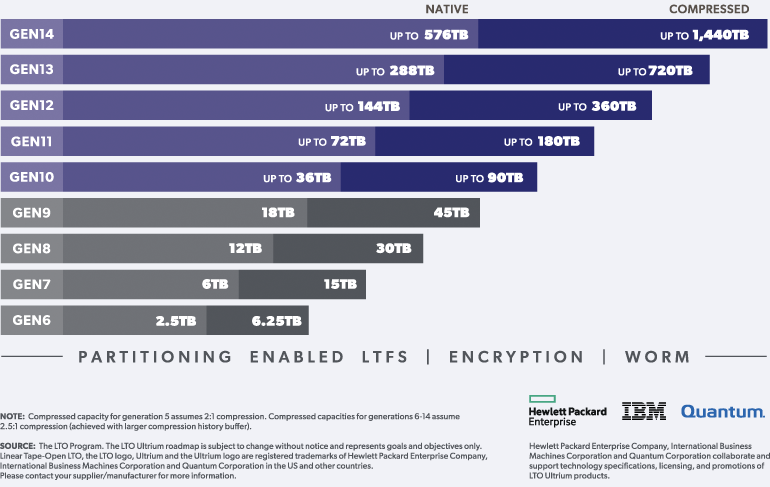
Tape isn’t dead! While everyone’s out there singing the praises of cloud storage and trying not to choke on their monthly invoices, tape just keeps doing its thing: Reliable, Affordable, and Built for the long haul. Now we’ve got LTO 10, which is a huge upgrade.
Roadmap: 36 TB Raw Capacity
The roadmap states that LTO 10 will double the raw capacity of LTO 9. If you’re dealing with 4K or 8K RAW footage or just have a mountain of footage that needs to be stored safely and long-term, that’s a big advancement. Fewer cartridges to manage. Less rack space and less shuffling around in the archive room. You will often see larger capacities being discussed, but that’s compressed, which is fine for CRMs or transactional data, but we can’t compress media. So we always work on the raw capacity. You will notice in the image below how it shows two sizes for LTO 10: compressed and raw. We are hearing that the LTO may be capped at 30TB at 400MB/s transfer speed. It’s early days, but we shall see how it pans out.
EditShare ARK and LTO 10 A Perfect Match
Here’s the good news: EditShare ARK will support LTO 10. There’s no need to change how your team works. Everything just runs like it always has, except now your shelves fill up a whole lot slower. That means you’re ready for whatever next-gen content you’re producing, whether that’s episodic 8K delivery, remastering old content in HDR or just trying not to get buried in files.
Now, if you have an existing LTO legacy deployment, let’s say LTO 4, you will need to migrate those tapes back to EFS, deploy a new LTO 10 tape device, and then re-archive them. But you get more than 10 tapes now condensed into one!
Compatibility
Let’s talk about the one weird anomaly. IBM’s datasheet for LTO 10 only says, “IBM LTO 10-tape drive can read and write to LTO Ultrium 10 cartridges.” They don’t mention backward compatibility at all. There is no promise that LTO 10 drives will read LTO 9 or anything older. That’s a break from how LTO has worked for years, where each new gen could usually read two generations back. If you’ve got a mountain of older tapes, you’ll either need to keep older drives around or run a migration strategy. But honestly, that’s just part of managing any archive.
LTO Still Makes Sense for Media Teams
Storage needs in media and entertainment are not shrinking. 8K VFX dailies, every project is bigger than the last. So when you get a format that gives you 36 TB per tape and runs for decades without a subscription attached, that’s worth paying attention to. Tape is a cost-effective long-term archival medium, complemented by our large. Adding EditShare ARK, which compliments FLOW asset management, means every asset that gets archived and FLOW knows its location. It keeps a proxy of that archived file always online, meaning you get a representation of that high-resolution file immediately. Its streamlined initiative and most important, fast.
Final Word
Is LTO 10 perfect? Not quite. The missing backward compatibility might be a pain. But if you’re starting fresh, building new archives, or just want to stop adding shelves every quarter, LTO 10 is the biggest leap we’ve had in years.
Best Practices for Organizing Teams and Reviewers in MediaSilo
When you’re managing video review workflows across multiple projects, the way you structure access to your content matters just as much as the content itself.
Too often, creative teams wrestle with outdated permission systems that force them to duplicate users, manually reassign roles, or rely on blanket access levels that don’t reflect the nuances of their team. That’s why in MediaSilo, flexible user management isn’t just a feature, it’s foundational.
Here’s how to organize your workspace and projects for clarity, security, and efficiency.
Step 1: Understand the Difference Between User Types and Roles
MediaSilo uses a two-tier system for managing people:
User Type controls what a person can do at the workspace level
User Role defines their permissions within a specific project
There are three user typesin MediaSilo:
Administrator: Full workspace access: user creation, security settings, billing, etc.
Manager: Can create/manage their own projects and invite users to the projects they manage (but not edit workspace settings or create new custom roles).
User: Can only access projects they’ve been assigned to and can only take actions defined by their project role.
Best Practice: Assign workspace-level roles conservatively. Most collaborators only need project-level access.
Step 2: Use Project Roles to Tailor Access
Once a user is added to a project, you can choose from predefined roles or create custom roles with granular permissions. This lets you match access to the actual work someone needs to do.
Best Practice: For external vendors or freelancers, start with a limited built-in role like Uploader, then build a custom role if they need more access over time.
Step 3: Assign One User, Multiple Roles – Without Duplicates
One of MediaSilo’s most powerful and unique features is that a single user can be assigned different roles across multiple projects, without being re-invited or duplicated.
That means:
A PR rep can be a Public Collaborator on your finished marketing campaign project
The same person can be a view-only User on an in-progress sizzle reel
Your video editor can be an Asset Manager on one series and a Uploaderon another, depending on their level of involvement
Best Practice: Take advantage of this flexibility to avoid over-permissioning. No need to clone or re-invite the same user across projects – just assign the right role per project.
Step 4: Group Your Projects by Function or Campaign
Whether you’re managing episodic content, branded campaigns, or FYC rollouts, it helps to mirror your real-world workflow inside MediaSilo. Organize projects based on:
Client
Production phase
Distribution window (e.g. “Internal Cuts,” “For Review,” “Press Screeners”)
Then assign reviewers only to the projects relevant to them.
Best Practice: Resist the urge to dump everything into one project with a long access list. Smaller, clearly scoped projects make permissioning cleaner and reduce confusion for collaborators.
Step 5: Audit Access and Adjust As Needed
As projects evolve, so do roles. MediaSilo makes it easy to:
Promote a viewer to a collaborator
Revoke external sharing
Grant download rights temporarily
Restrict access without removing someone entirely
Best Practice: Set recurring calendar reminders to audit access for active projects – especially when screeners are shared externally.
Final Thought
Your MediaSilo workspace is more than just a holding pen for content; it’s the foundation of your review and approval pipeline. When your teams and reviewers are organized with the right level of access at every stage, you can move faster, collaborate better, and reduce risk across the board.
With MediaSilo’s flexible user types, project-specific roles, and customizable permissions, you can fine-tune access without the hassle, so the right people always have the right permissions, right when they need them.
Ready to Get Projects Approved Faster? Start your free 14-day Trial today.
The way creative teams review and approve video content hasn’t kept up with the speed and complexity of modern production. What was once a straightforward process to send a cut, get feedback, make changes has turned into something much messier. More stakeholders. Tighter timelines. Higher expectations for security and speed. And yet, many of the tools teams rely on still reflect an outdated reality.
After speaking with dozens of post-production professionals, editors, and creative teams, one clear theme emerged. Review and approval is one of the biggest bottlenecks in modern video production. Not because it’s inherently complex, but because the tools meant to support it often create as many problems as they solve.
The Three Jobs of Review & Approve
At its core, every review and approval workflow exists to do three things:
Make sharing easy and reliable. Creators need to distribute content quickly, without worrying about slow uploads, playback issues, or access problems.
Ensure control and security. Teams need to know who has access, who has seen what, and ensure that sensitive content stays protected from leaks or unauthorized distribution.
Gather feedback efficiently. The review process should capture input in a way that’s structured, clear, and actually moves the project forward.
When these jobs are done well, creative teams stay focused on the work instead of fighting the process. When they break down, frustration sets in, deadlines slip, and teams resort to workarounds that only make things worse.
Job 1: Make Sharing Easy and Reliable
At its best: Content reaches the right people without login friction, playback issues, or speed bumps. Sharing and access happen without unnecessary delays.
At its worst: The simple act of sharing a video turns into a technical problem. Uploads stall, links break, playback stutters, and creatives become the de facto IT support for their own projects.
How this job actually gets done:
Despite all the emphasis on software tools that capture feedback and share iterations, this job (simply getting your content into the hands of external collaborators) is the foundation. If you can’t do this (without problems, snags, or turning yourself into the IT handyman who unsticks the process), everything else stops.
Speed and reliability matter more than a slick interface. If the tool creates friction in sharing, teams will revert to email and cloud storage workarounds.
Where tools fall short:
Slow load times and buffering kill momentum. If a video stutters or fails to load, reviewers disengage and feedback slows down.
Uploads and downloads take too long. One team told us they nearly missed a live event deadline because their existing platform locked them out of a critical file at the last minute.
Playback isn’t universal. Teams need their content to work across desktop, mobile, and bad WiFi connection without needing re-exports at different quality levels.
Job 2: Ensure Control and Security
At its best: The team knows exactly who has access to what, security settings are intuitive, and no one loses sleep over leaks or unauthorized sharing.
At its worst: Review links get passed around unchecked, high-value content ends up in the wrong hands, and teams don’t know if their work-in-progress has been accessed by the right people.
How this job actually gets done:
Security is about confidence. Teams need to know that once they share a file, it won’t be accessed by the wrong people or left exposed by default settings.
Granular control over who can view, download, and share files matters just as much as how fast a video loads. Teams want default settings that ensure security without extra steps, easy ways to manage permissions on the fly, and real-time visibility into who has accessed what.
Control can also mean visibility – for instance, one customer we talked to deals with over 100+ external distribution partners that get sent dozens of assets before a live telecast. Being able to accurately track who has viewed the assets (and who hasn’t) is vital for getting ahead of broadcast issues (and ensuring SLAs are met).
Review links that get forwarded too easily. If content can be accessed by “anyone with the link,” teams lose control over who sees their work-in-progress.
Limited visibility into who’s watched what. Teams need better insight into whether the right people have accessed their content, not just vague view counts.
Job 3: Gather Feedback Efficiently
At its best: Feedback flows naturally, whether it happens inside the platform or elsewhere. Every note is clear, relevant, and easy to act on.
At its worst: Comments are scattered across emails, Slack messages, and spreadsheets. Reviewers hesitate to leave feedback because the process is too rigid or clunky.
How this job actually gets done:
Some feedback will always be gathered outside the platform. The higher the seniority of the external stakeholder, the less likely they are to leave comments “in the app.”
Tools that force a single, rigid review workflow create more problems than they solve. The platforms that embrace flexibility—acknowledging that there is no universal best workflow—stand to win.
Where tools fall short:
Logins create friction. External clients and executives don’t want to create an account just to leave a comment, so they default to email.
Feedback tracking is inconsistent. Some tools don’t let reviewers easily pinpoint exact sections of a video, leading to vague, hard-to-follow notes.
Too much structure slows things down. Teams bypass formal review tools because rigid workflows add unnecessary steps when they just need quick input.
What’s Next for Review & Approve Tools?
The next generation of review & approve workflows won’t just replicate existing processes with better UI. They’ll solve the deeper inefficiencies that frustrate teams today. Based on what we’re hearing, here’s where things are headed:
Security as a default, not a luxury. Teams shouldn’t have to pay extra just to know who’s watching their content or to ensure content doesn’t get into the wrong hands.
Feedback that works flexibly inside the app and beyond. The best tools acknowledge that review workflows happen across multiple channels and make it easy to consolidate input.
More automation that keeps things moving. Teams need tools that don’t just store feedback but actively help progress a project, whether through automated notifications, approval workflows, or smart routing of tasks.
Final Thoughts
After so many conversations with creative teams, one thing is clear: review and approval isn’t just about technology it’s about how work actually gets done. The best tools make sure the parts of the workflow that “just have to work” don’t even need to be thought about, and they acknowledge that different teams get feedback on their work in different ways.
The future of review and approval isn’t about adding more features—it’s about removing friction. The teams getting this right aren’t just adopting new tools; they’re embracing smarter, simpler workflows that help them move faster, stay secure, and focus on the work that matters.
Creative teams using MediaSilo can share, review, and get feedback on their content without friction, ensuring their work reaches the right people, stays secure, and moves forward without unnecessary delays.