Pros and cons of cloud vs on-premise video storage solutions
As a video production professional, choosing the right video storage solution for your media assets is a crucial decision. While file and project sizes continue to grow exponentially, deadlines are continuously shrinking, so having a video storage system that can keep up with capacity demands while remaining fast, secure and cost-effective is essential.
In this article, we’ll examine the pros and cons of the two main options – cloud video storage and on-premise video storage – and look at the benefits of the hybrid solutions that combine both.
What is the difference between on-prem and cloud storage?
On-premise video storage is locally connected media storage such as individual hard drives and RAIDs, network-attached storage (NAS) or storage area networks (SANS) that are physically located at your facility and managed by your own IT staff.
The benefits of on-premise storage include the potential for air-gapped security, predictable costs and reliable performance. The downside to this kind of video storage is that the full expenditure is incurred upfront, your internal IT or creative teams must manage, backup and repair the system, and significant expansion requires additional costs and expertise.
Cloud video storage, however, is offsite, internet-connected media storage managed by an external third-party vendor. One of the main benefits of working with cloud storage for video production is that the cost is limited to a monthly subscription for the capacity used, negating the requirement for a lot of up-front cash.
That capacity can be rapidly expanded or constrained in tandem with current project requirements, leading to cost savings and overall efficiencies but also a more unpredictable monthly spend. Furthermore, the third-party vendor bears all management, servicing and infrastructure costs, which is often preferable for teams without this in-house expertise.
Hybrid video storage solutions aim to combine the best of both worlds into one integrated system. Fast, high-bandwidth local storage is used for active projects and workflows, while completed projects and non-urgent media are sent to the cloud for archiving. This combines the performance and simplicity of on-premise storage with the scalability and cost savings of the cloud.
What about remote access? For both on-premise and cloud video storage, remote access is possible, depending on the security and performance requirements of the video production team.
The Pros and Cons of On-Premise Video Storage
While there are many benefits to having all of your video storage on-premise, cloud storage is designed to overcome limitations and challenges. Let’s consider some of the pros and cons of on-premise video storage in more detail.
Pro – Full control over all hardware and software
One of the advantages of on-premise vs cloud storage is that you design and control the entire hardware and software architecture, selecting a system that best meets your specifications and overseeing maintenance and upgrades. You’re not at the mercy of an external vendor’s roadmap, business changes or downtime.
Pro – Predictable high-speed performance
Local hard drives and network-attached storage provide fast, reliable connectivity for high-bandwidth processes like multi-stream video editing. Unlike cloud storage for video editing, your read/write performance doesn’t suffer due to internet congestion, server loads or bandwidth limitations.
Pro – Enhanced security
Keeping your storage on-premise protects sensitive media files from being erroneously or maliciously accessed while on shared cloud infrastructure. Restricting physical access and air-gapping (disconnected from the internet) your media storage adds a further layer of protection.
Pro – No hidden costs
While on-premise storage comes with larger upfront costs than a cloud storage subscription, it also negates any hidden or unexpected expenses, such as egress fees, which occur when you move your data out of the cloud or surcharges enforced when you over-step your subscription limits.
Pro – Integration with legacy systems
Existing edit bays, asset management software and established video production workflows can often more easily connect to new on-premise storage without the need to re-construct the whole system, as everything is under your control and most often is largely plug-and-play.
Con – High upfront costs
Purchasing substantial video storage capacity as well as the switches, servers, and management software required to make it all function comes with a large capital expenditure. You’re also paying for all unused capacity from the start.
Con – Complex configuration and management
Even a medium-scale video storage solution requires some IT staff time for the initial design and integration, not to mention the ongoing administration and daily troubleshooting. This staff skill set also needs regular updating as technology and workflows evolve.
Con – Separate disaster recovery site required
A system for backing up and storing all of your media in a second physical location is needed to replicate and recover all of your data in the event of a disaster at your main premises. This necessitates purchasing yet more storage capacity and connectivity.
Con – Scaling requires overprovisioning
While you can work within the constraints of your initial storage capacity, adding further storage capacity requires purchasing it in large chunks and planning for the upgrade downtime. Running out of storage space will obviously impact the efficiency and productivity of your creative team!
Con – Dependence on locality
To get the best out of the system, users must be physically on-premise to access the media, while remote users often have comparatively limited connectivity and bandwidth. Even when remote access is established, staff are still required onsite to manage the physical devices.
Pros and Cons of Cloud Video Storage
While we are all used to working with cloud storage on a daily basis, from our Dropbox accounts to our iCloud photo backups, cloud storage that is capable of storing, managing and streaming or downloading large video files with the performance for real-time playback is a different beast altogether.
Here are some pros and cons to consider when using cloud video storage for modern video production workflows.
Pro – No infrastructure to manage
As part of your subscription fee, the cloud storage provider handles all of the necessary hardware, component upgrades, system maintenance and offsite backups, and instead, your team focuses on their creative work.
Pro – Scalability on demand
Adding further capacity to your cloud video storage account is as simple as clicking ‘upgrade.’ This has the added benefit of only paying for what you need when you need it and allows you to respond quickly to unexpected growth or capacity requirements.
Pro – Global availability
Storing your media in the cloud means it’s instantly available to authorized users anywhere in the world with an internet connection. This gives you access to a global talent pool, the efficiency of single-source asset management, and the potential for a creative team to work around the clock from different time zones—all without the need for setting up remote access VPNs for your on-premise storage.
Pro – Reduced disaster recovery costs
As cloud providers replicate their data storage globally by default, there’s no need to build and maintain a second offsite backup in case of disaster recovery. This is already done for you.
Pro – Lower initial costs
With no upfront expenditure on expensive hardware, there are no large CapEx purchases to wait and plan for. Costs move to OpEx, where subscription fees based on usage, storage capacity, and the number of seats needed are much more manageable from a cash flow perspective month-to-month.
Cons – Vendor dependence and lock-in
Once you choose a cloud video storage provider, you have no real control over that vendor’s policies, service charges, fee increases or business stability. Once a workflow has been established and a lot of media is stored online, switching cloud providers is more complicated.
Con – Variable performance
While most cloud video storage providers offer some form of performance guarantee, internet outages or service congestion are unpredictable. Also, each end-users experience relies on a range of factors, including their local internet connection strength and stability, proximity to the data center and local system spec.
Con – Limited integration options
While using cloud storage does open up the potential for some newer automated workflows and remote production capabilities, it is not always possible to integrate legacy apps with cloud storage or even with other online services and storage providers.
Con – Security risks
No matter how tight your security procedures, storing your valuable media online, especially in a shared cloud storage server you don’t control brings a level of exposure to a greater number of threats.
Con – You may end up paying more in the long run
If you store and maintain a substantial amount of video media in your cloud storage over a long period of time, your total cost of ownership (TCO) may end up exceeding that of on–premise storage. Services often charge egress fees for downloading data, for example, when making room online or moving it to cheaper archival storage like AWS Glacier.
The Pros and Cons of Hybrid Video Storage
If you decide to use a hybrid cloud and on-premise storage solution, you can get the benefits of both and avoid some of the limitations of either one, yet you will create some new challenges to consider.
Let’s examine the pros and cons of a hybrid video storage workflow.
Pro – Best of both worlds
The most obvious benefit of a hybrid video storage solution is that you’re set up to enjoy the strengths of both models, gaining the performance and security of on-premise video storage with the scalability and global reach of the cloud.
Pro – Elastic Capacity Management
Having your media stored in the cloud gives you the buffer to absorb the unexpected variable demands of different projects and the flow of projects over time, while your local storage can handle anticipated project requirements.
Pro – Reduced disaster recovery costs
By setting up an automatic cloud backup of your on-premise video storage, you can more affordably and easily manage both archiving and disaster recovery by creating an offsite duplicate.
Pro – Greater workflow possibilities
Modern video productions require a wide range of workflow capabilities, from high-performance local storage for demanding processes like color grading final high-resolution media or combing through terabytes of archival material to enabling a globally distributed creative team to manage assets and artistic responsibilities through shared media stored in the cloud.
Pro – Gradual transition path
Developing a hybrid storage model can be a simple and gradual process that doesn’t require wholesale reinvestment or scrapping existing workflows or hardware. When starting with local storage, it’s easy to add cloud storage for archiving. Or, when starting from a cloud platform, it’s easy to add local storage for more demanding tasks. This makes it easier to test the benefits of either solution before fully committing to either or both.
Con – Added complexity
One consideration of combining on-premises and cloud storage is that it does add a further layer of complexity to managing media files, user access permissions and deciding where files should live and for how long. Further complexity arises if files live in multiple locations at once rather than having a ‘single source of truth’ for all uses.
Con – Potential replication lag
If you have to move media files from local storage to cloud storage (or vice versa), a lot of data must be copied between locations, which can create a delay. This also requires the on-premises storage to have access to adequate bandwidth.
Con – Two sets of storage to purchase and pay for
With the costs of a cloud subscription, on-premise infrastructure and software, the hybrid model may be more expensive in combination than leveraging a single platform.
Con – File management training
Having worked at a few facilities that had their own unique way of doing things when it comes to file management, and sometimes, in fast turn-around environments, management goes out the window – educating your users on where to store their files or where to look for the right files becomes all the more important – otherwise you end up wasting either time or storage capacity.
Con – Partial vendor dependence remains
While there are many benefits to a hybrid workflow, one consideration when choosing a cloud storage provider for that workflow, is that you will be locked into a dependence on them.
How to choose the best cloud video storage solutions for your needs
Determining the ideal storage solution for your video workflows depends on several key factors:
Bandwidth needs – High-speed on-premise storage is best for multi-stream 4K editing, while remote teams will need cloud or VPN connections.
Scalability requirements – The cloud offers the most flexibility for rapid growth.
Budget – While the cloud has lower startup costs, on-premise storage can offer TCO savings at larger capacities.
Security – Contractual requirements may require on-premise storage for sensitive footage and projects.
Team skills – The cloud reduces the need for dedicated storage admins and IT professionals.
Disaster recovery – The cloud’s built-in redundancy makes backups easier to manage.
Growth plans – A Hybrid solution can future-proof on-premise expansion with cloud filling in the gaps.
The best way to evaluate your needs is to take an in-depth look at your current infrastructure, workflows and pain points, then calculate the total cost of ownership for an on-premise vs cloud video storage solution over a 3-5 year timeframe. Ask your creative team for their opinions and try to road test potential solutions in a small way where possible.
With the right strategy tailored to your situation, you can build a storage setup that keeps your creative work flowing while staying within budget and IT constraints. The goal for the optimal solution will be to transform how your team collaborates and unlocks greater productivity and business potential.
FAQ about on-premise storage vs cloud storage
Which storage solution is better for you?
How much do storage solutions cost?
How secure is each solution?
How reliable is each solution?
How scalable is each solution?
How easy is it to manage your storage?
How easy is file-sharing or real-time viewing?
What are the potential drawbacks of relying solely on one storage for a business?
What are the key considerations for implementing a hybrid storage solution, and how does it address the limitations of both on-premises and cloud storage models?
Which video storage solution is better for you?
The best storage solution is a hybrid cloud and on-premise storage model for performance-intensive workloads with cloud storage for scalability and broader access. The high-speed local area network would enable smooth video editing and collaboration, while the cloud side would allow remote team members to access files from anywhere. The cloud capacity would also help manage spikes in storage demand. This hybrid approach delivers a solid mix of control and reliability with on-premise along with the flexibility and global availability of cloud.
How much do the storage solutions cost to use?
Cloud storage has a lower startup cost since it avoids major capital expenditures on hardware and software. Monthly subscription fees based on limited usage are more predictable. On-premise storage requires large upfront investments in storage, servers, networking equipment and more. But at scale the ongoing costs of cloud data egress fees can make on-premise more cost effective in the long run.
How secure is each solution?
On-premise storage keeps data isolated within a controlled environment, reducing exposure to external threats like hackers or ransomware. Control over physical access and air-gapped networks ensures high security. Cloud storage, however, involves some additional risks since data resides in a multi-tenant environment while being stored on a shared server. Most cloud providers offer robust security measures, vetted by the media industry, but security is always a concern when data leaves the premises. A hybrid solution provides strong isolated security for the most sensitive files, along with the convenience of cloud access for low-risk assets.
How efficient is each solution?
Cloud storage enables great access efficiency by allowing authorized users to access files from anywhere with an internet connection, avoiding the need for remote access VPNs back to the local network.
However, the performance efficiency of cloud storage can suffer from variability based on internet traffic levels. On-premise storage offers consistent and predictable high-speed performance thanks to dedicated local networks, especially valuable for bandwidth-heavy video editing work. A hybrid configuration puts performance-sensitive workflows on reliable on-premise storage while leveraging the global accessibility of the cloud.
How reliable is each solution?
On-premise storage has higher reliability since its performance depends on a controlled local network rather than the open internet. Latency and congestion on the public and local internet connection can inhibit access to cloud video storage. However, cloud services tend to have very durable underlying infrastructure with lots of redundancy to minimize downtime risk, as this is an essential part of their business offering.
How scalable is each solution?
The cloud is extremely scalable, allowing storage capacity to be increased essentially instantly through a web dashboard rather than waiting for fresh hardware deliveries. Cloud services are designed for massive scale to handle demand spikes and growth surges that would overwhelm on-premise infrastructure.
On-premise storage requires purchasing and installing larger capacity systems in chunky increments to scale up gradually. The combination of the two enables core consistent storage needs to be handled on-premise while leveraging the cloud to absorb surges in requirements.
How easy is it to manage your storage?
Cloud services are much easier to manage since the provider takes care of all hardware, software, troubleshooting and maintenance behind the scenes. So your creative team can focus on creative work rather than storage infrastructure.
On-premise storage requires dedicating skilled IT staff to architect, integrate, administer, optimize, and upgrade storage systems on an ongoing basis.
How easy is file sharing or real-time viewing?
Cloud video storage’s global accessibility makes sharing and collaboration very straightforward for distributed teams. It allows access from anywhere with credentials as long as the video storage platform supports this functionality.
However, the ability to view high-resolution media files in pristine quality, smoothly in real-time, such as in a color grading suite, depends heavily on having consistent high network bandwidth, something on-premise storage excels at.
What are the potential drawbacks of relying solely on one storage for a business?
Depending on only cloud or only on-premise storage increases vulnerability. If the cloud goes down, all workflows halt without the backup of a local system. Disaster recovery becomes very difficult if local hardware fails or is destroyed without off-site backups.
Blending the two provides contingency options to mitigate risk – essential data is protected on-premise through RAID-level redundancy, with archives and overflow capacity stored in the cloud. A hybrid solution means an outage in one environment won’t cripple overall operations thanks to the redundancy and flexibility cloud and on-premise storage can provide each other.
What are the key considerations for implementing a hybrid storage solution, and how does it address the limitations of both on-premises and cloud storage models?
The keys to an effective hybrid implementation are ensuring adequate bandwidth between environments, thoughtfully integrating workflows and applications across cloud and on-premise boundaries, and designing cost-effective disaster recovery.
The hybrid approach helps overcome the inherent limitations of a single storage model. The cloud side provides scalability and geographic diversity missing from pure on-premise. The local side offers reliability, performance and control lacking in pure cloud deployments.
Together they can complement each other and side-step the weaknesses of either standalone option.
Transforming innovations in workflow, server and delivery from storyboard to screen
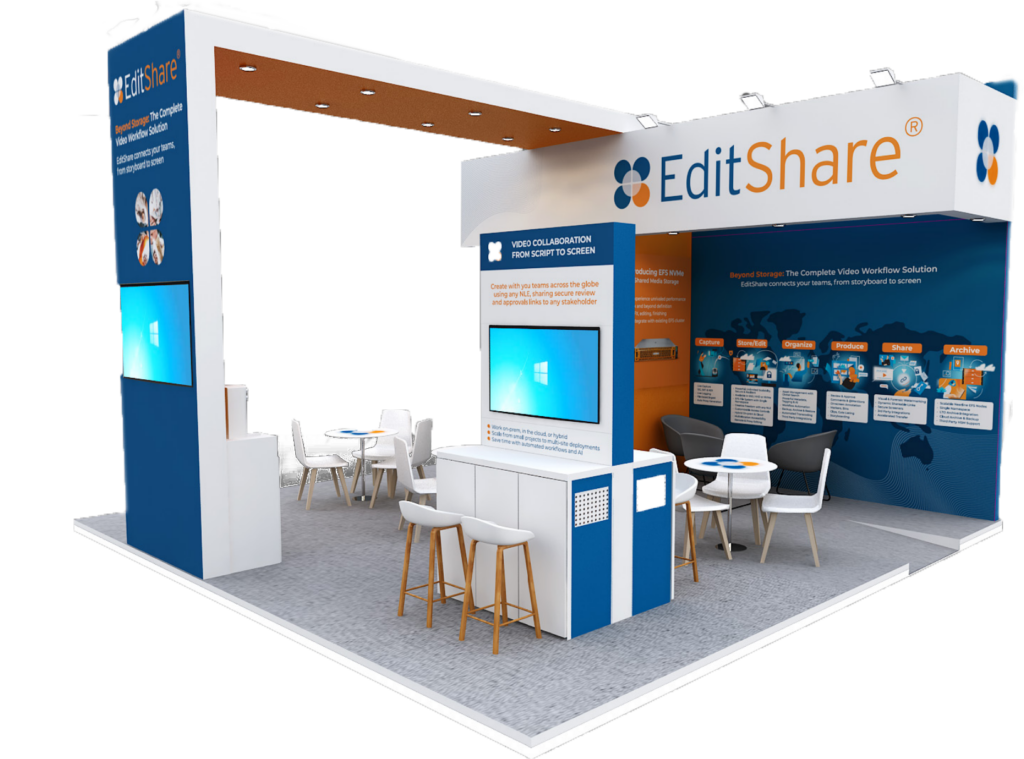
Boston, MA, 24 May 2024 — EditShare, the technology leader that enables storytellers to create and manage collaborative workflows at every stage from storyboard to screening, will use its presence at BroadcastAsia 2024 (stand 6G2-10, Singapore Expo, 29 – 31 May) to highlight the creative, economic and productive benefits of its unified approach to content management. The presentation will show EditShare’s scalable and collaborative solutions for media across multiple premises, cloud and hybrid implementations, focusing on ease of operation and security of content.
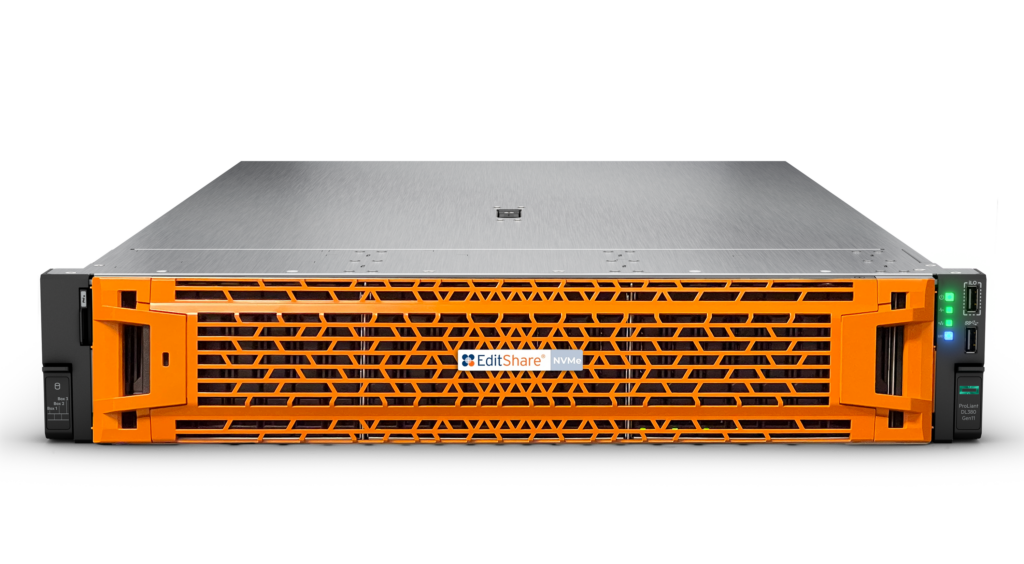
EFS, the EditShare media storage architecture, has now been boosted with the addition of EFS NVMe, adding the high performance, high bandwidth solid state technology as another building block. For demanding creative applications – like DPX, OpenEXR, 4k, 8k and beyond – EFS NVMe provides throughput three times faster than previous generation SSD servers, while still being integrated with and managed by the overall EFS environment, including traditional servers, nearline storage, archives and the cloud.
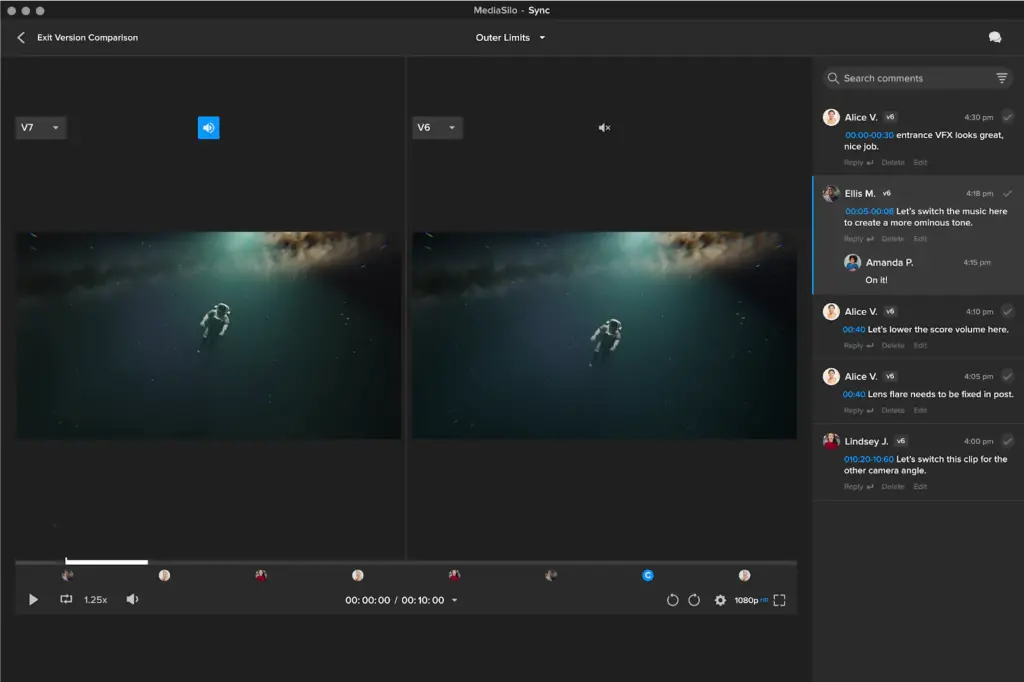
MediaSilo, the video collaboration platform for sharing work in progress, sees enhanced review functionality, including side-by-side version comparisons, and more facilities for making, tracking and acknowledging comments and sign-offs. To provide protection when sharing review material, MediaSilo incorporates visible and forensic video watermarking as well as image and document watermarking, dynamically inserting customizable viewer information into the file. The result is a secure but effective way of distributing all assets, including scripts, casting shots and marketing materials as well as content.
Improved security, along with more branding customization and in-video logo watermarks are also among the enhancements for Screeners.com, the preferred press screening platform widely used by major studios and production companies worldwide. Reviewers will see an enhanced OTT-style experience, with improved content recommendations, watchlists and expiry notifications.
“From the foundation of EditShare, 20 years ago, our overriding aim has been to give creators the tools they need to make and deliver great content, without tying them up in technology,” said Tara Montford, EVP Sales and Co-Founder at EditShare. “That still drives our thinking today, and we continue to innovate as we strive for those goals. We allow open interworking with the creative tools users really need, providing the platform for truly end-to-end workflows from script to screen; and we protect it all through excellent security.”
Visitors to BroadcastAsia will discover all the latest enhancements to EditShare products, like FLEX Sync which provides powerful tools to sync with services like Amazon S3, Wasabi and Backblaze, and the new EditShare One Organize module, ensuring users can easily identify assets whether they are stored locally, remotely or in the cloud.
Find out more on stand 6G2-10 at BroadcastAsia 2024, or visit www.editshare.com
About EditShare
EditShare is an Emmy Award-winning technology leader, supporting storytellers through collaborative media workflows across on-premise, cloud and hybrid architectures. The market-leading open software solutions and robust APIs improve workflow collaboration, third-party integrations and content sharing across the entire production chain. Designed specifically for media applications, the high performance line-up provides shared storage, archiving and backup, and intelligent media asset management.
Through a merger with Shift Media, EditShare now also integrates tools for content review and distribution, the creation of customised and branded pitch reels, and secure preview of high-value pre-release content.
Beyond storage with workflow, server and delivery solutions from storyboard to screen
Stand S1-E20, CABSAT, Dubai World Trade Centre, 21 – 23 May 2024 — EditShare, the technology leader that enables storytellers to create and manage collaborative workflows at every stage from storyboard to screening, is celebrating its 20th and CABSAT’s 30th anniversaries by bringing its latest remarkable advances to the MENA region (stand S1-E20, Dubai World Trade Centre, 21 – 23 May). Visitors will see the breadth of coherent solutions from EditShare, bringing benefits beyond storage, from storyboard to screen.
EFS, the EditShare media storage architecture, has now been boosted with the addition of EFS NVMe, adding the high performance, high bandwidth solid state technology as another building block. For demanding creative applications – like DPX, OpenEXR, 4k, 8k and beyond – NVMe provides throughput three times faster than previous generation SSD servers, while still being integrated with and managed by the overall EFS environment, including traditional servers, nearline storage, archives and the cloud.
MediaSilo, the popular tool for sharing work in progress, sees enhanced review functionality, including side-by-side version comparisons, and more facilities for making, tracking and acknowledging comments and sign-offs. To provide protection when sharing review material, MediaSilo incorporates visible and forensic watermarking, dynamically inserting customizable viewer information into the file. The result is a secure but effective way of distributing all assets, including scripts, casting shots and marketing materials as well as content.
Improved security, along with more branding customization and in-video logo watermarks are also among the enhancements for Screeners.com, the preferred press screener widely used by major studios and production companies worldwide. Reviewers will see an enhanced OTT-style experience, with improved content recommendations, watchlists and expiry notifications.
“It’s great to be able to share major milestones with CABSAT: our 20th, the event’s 30th,” said Vincent Eade, RVP sales EMEA at EditShare. “Our goal has always been on freeing creators so they can concentrate on making great content, we do this by providing the storage and workflow tools they need along with a secure way of collaborating on projects and sharing material, all the way from ingest to screen.”
“I’ve had the privilege of attending CABSAT many times,” Eade continued, “and I know that it is a great opportunity to have detailed, positive conversations with the industry. That helps us set our own development plans, so we can deliver even better solutions in the future.”
EditShare staff will be on hand at CABSAT to talk about all of the latest enhancements, find out more on stand S1-E20 at CABSAT, or click here to get in touch.
About EditShare
EditShare is an Emmy Award-winning technology leader, supporting storytellers through collaborative media workflows across on-premise, cloud and hybrid architectures. The market-leading open software solutions and robust APIs improve workflow collaboration, third-party integrations and content sharing across the entire production chain. Designed specifically for media applications, the high performance line-up provides shared storage, archiving and backup, and intelligent media asset management.
Through a merger with Shift Media, EditShare now also integrates tools for content review and distribution, the creation of customised and branded pitch reels, and secure preview of high-value pre-release content.
At first glance, video storage for post-production seems so simple. Just buy a big external hard drive and start editing. (Of course, we know professional post-production storage solutions need to be more robust than that.) For a lot of editors, when the project is done, they just put the hard drive on the shelf. Rinse and repeat. Many shops have used this method and end up accumulating a closet full of hard drives. The lead editor has the inventory of what was shot and when it was shot in his or her head. So, if a junior editor needs a clip, they just ask their lead. As long as there wasn’t a disaster, teams would keep going with this system.
But then remote work became a thing. Post-production teams became distributed and immediately encountered the shortcomings of the “closet full of hard drives” approach. Scalable storage infrastructure was needed. Granted, dedicated post-production facilities had “SAN” (Storage area network) systems connected by fiber channel for their post-production data storage. Some teams even deployed a NAS to help them share projects in the office along with various other post-production workflows. However, a typical NAS setup will quickly come up short for a team of distributed video editors, and it is vulnerable to a single point of failure.
We’re seeing more and more cloud storage systems come online today, but many of them have unpredictable fees and complex systems of per-seat licenses, storage tiers, and even fees for accessing your data.
At the end of the day, you know your footage is valuable. For data to remain valuable it has to be accessible. And it has to be quickly accessible. Data also needs to remain accessible if there is a malfunction or a hard drive goes bad.
This is why your video team needs a shared video storage solution.
Why do I need a video storage solution?
It isn’t uncommon for a video shoot to produce 2-4TB of data in a single day of shooting. If you have just a single editor on your team, storage is pretty straightforward. You need a primary copy of your footage and a backup copy. If you are smart, you’ll make another copy and put it in an offsite location.
When you add a second editor things get a little bit more complicated. Both editors may need to access the same footage. Duplicating footage is wasteful. So the answer is to use a NAS (network attached storage) device. This enables a couple editors to access the same data at the same time.
It doesn’t take much to max out the performance of a typical NAS. Video editors need to playback timelines with multiple tracks of 4K video. That kind of demand can cause a NAS to slow down and stutter during playback.
If your team has a remote editor, you need flexible storage that can be accessed securely and remotely. The moment you start working remotely, content security is at the top of everyone’s mind.
If you have multiple people who need to access the same footage, you’ll need video storage and infrastructure that allows your storage silos to be accessed securely (Content is valuable. You want to keep it safe), remotely, and without getting bogged down.
What is infrastructure for post-production?
A post-production infrastructure is a hardware and software solution. The hardware is designed to facilitate delivering uninterrupted playback to multiple video editors. The software handles the organization of clips and efficiently manages the traffic on your system. Shared video storage isn’t like other kinds of servers. Video files have different demands than PDFs.
EditShare EFS is a simple, yet powerful open storage platform designed to work with all creative applications in the VFX and post environment. It works on Windows, Mac, and even Linux. The hardware and the software applications work together to deliver the performance that will keep your team cranking away without costly delays.
How is shared video storage different from a regular server?
You might have the unpleasant experience of trying to upload large files to a cloud service like Google Drive only to run into slowdowns and failed uploads. That’s because it just isn’t designed to handle those kinds of files well. Why is that? There are different ways to format a file system. Some favor speed, others favor stability, and so on. Video editors and VFX artists need both. They need performance and bandwidth. The system needs to be fast, not just for one computer but for multiple users.
Typical storage solutions are often designed like the streets through downtown with a lot of stoplights. Data comes and goes in starts and stops. However, editors need their data to flow like an interstate. If your video starts and stops, you can’t feel for the edit. This video does a wonderful job of explaining the difference between a NAS and a SAN.
Active Storage
EditShare EFS simplifies storage by putting everyone on the interstate. Editors can get uninterrupted performance while working off the same system at the same time. The software that comes with the system can also serve remote editors as well.
When working on an active project, you want the highest performance available for your footage. That is why the part of your infrastructure that supports the fastest performance is called “Active Storage.” It uses an underlying technology called “block storage.” This helps everything to perform at its peak.
Nearline Storage
Your team probably has a bunch of older footage that needs to be available, but it doesn’t necessarily need to be on the fastest hardware. Stock clips would be a good example of this. You might have a stock library that you go to every now and then.
“Nearline storage” can utilize “object storage” instead of “block storage.” This technology is great for long-term archival or parking media long term. If you want to learn more about the difference between these kinds of storage, check out this video.
Archive Storage
The third tier of storage to consider is “archive storage.” When you are storing footage long term, it is crucial that you can find what you need when you are looking for it in the years to come. Archive storage can be slower than nearline storage. This is for projects that may not be accessed, except once in a blue moon. You don’t want to delete it, but it might be accessed very infrequently. Some teams might want to use an online service for their archive storage, and EditShare’s software can handle that whole process of archival for you.
Backup Storage
If you have ever lost data, then backup storage is a prerequisite for you. If you haven’t been through data loss you might be tempted just to skip this section. Backup storage is critical because files can be lost in two different ways. You might experience mechanical failure, or it can be caused by human error. A robust, reliable, redundant storage solution will not protect you against someone accidentally deleting the wrong files. EditShare EFS features different hardware tiers for each of these storage needs. EditShare’s software can automate your backup process as well.
Organizing Footage
Video files use obscure naming conventions that aren’t helpful when you are searching for a clip. Some cameras, like ones on drones, always name the files in the same way, which can cause serious organizational issues. EditShare helps you organize all your data by project instead of folder. This is also important if your team members have permission to access certain media but not others.
EditShare’s software effectively replaces the “file system” in the head of your lead editor with an interface that everyone can search. Now, team members can find favorite clips and even a specific moment that has been marked on a clip.
EditShare EFS is agnostic to which video editing app you use. If you like to edit in Premiere, there is an integration. If you prefer DaVinci Resolve, you’ll find that it works seamlessly with it as well.
Remote Editing
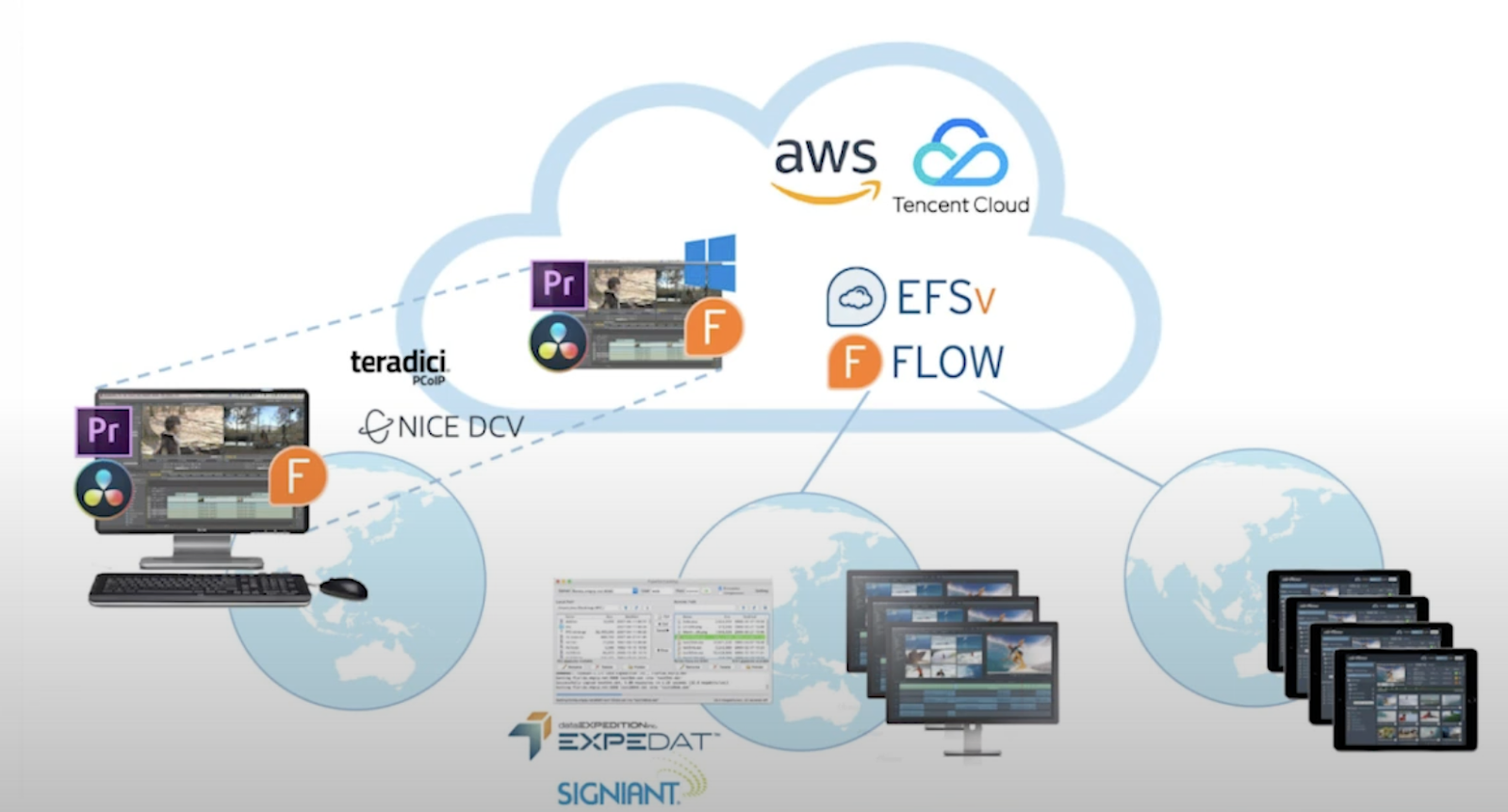
Some teams are fully local. Some teams are hybrid, with local editors and remote collaborators. We’re now seeing the rise of fully remote teams, where there is no physical “post-house.” That’s where EditShare FLEX comes in.
You can set up the ability to remotely access instances of these NLEs in the cloud. This is cutting-edge technology that became critical during the early days of lockdown. It does require a few more pieces of gear and software, but the ability to edit from anywhere with a solid internet connection is now a reality.
Conclusion
Now, you have an overview of how EditShare EFS can benefit your team. It removes the most significant roadblock to the growth of your post-production business: your storage. Editshare automates the tedium of data management, enabling editors to be in their NLE editing, instead of wading through files systems, passing around hard drives, or wondering which hard drive a certain clip lives on.
Your team can collaborate locally, remotely, or even in a hybrid environment. Your data retains its value because it is organized, accessible, and backed up.
Producers, directors, editors, and VFX artists can now collaborate without friction or wasted time. This is the flow that you want your team to be in, and it’s why EditShare goes “Beyond Storage.”If you are ready to see if EditShare is a good fit for your team, just reach out here.
Workflow, server and delivery solutions from storyboard to screen
Stand D40, London Olympia, May 15-16, 2024 – EditShare, the technology leader that enables storytellers to create and manage collaborative workflows at every stage from storyboard to screen, is exhibiting at the 2024 Media Production & Technology Show to showcase its unified approach to content management. The demonstration will show EditShare’s scalable and collaborative solutions for media across multiple premises, cloud and hybrid implementations, focusing on ease of operation and security of content.
EFS, the EditShare media storage architecture, has now been boosted with the addition of EFS NVMe, adding the high performance, high bandwidth solid state technology as another building block. For demanding creative applications – like DPX, OpenEXR, 4k, 8k and beyond – EFS NVMe provides throughput three times faster than previous generation SSD servers, while still being integrated with and managed by the overall EFS environment including traditional online servers, nearline storage, archives and the cloud. Attendees at the Media Production & Technology Show will have the exclusive opportunity to experience a live demo of this cutting-edge technology firsthand.
MediaSilo, the premier video collaboration platform trusted by the biggest names in entertainment, sees enhanced review functionality, including side-by-side version comparisons, @ user mentioning, and range-based commenting to provide feedback on entire scenes. To provide protection when sharing videos for review, MediaSilo incorporates visible and forensic watermarking, dynamically inserting customisable viewer information into the file. Now MediaSilo also offers image and document watermarking, protecting non-video content including scripts, casting shots and marketing materials.
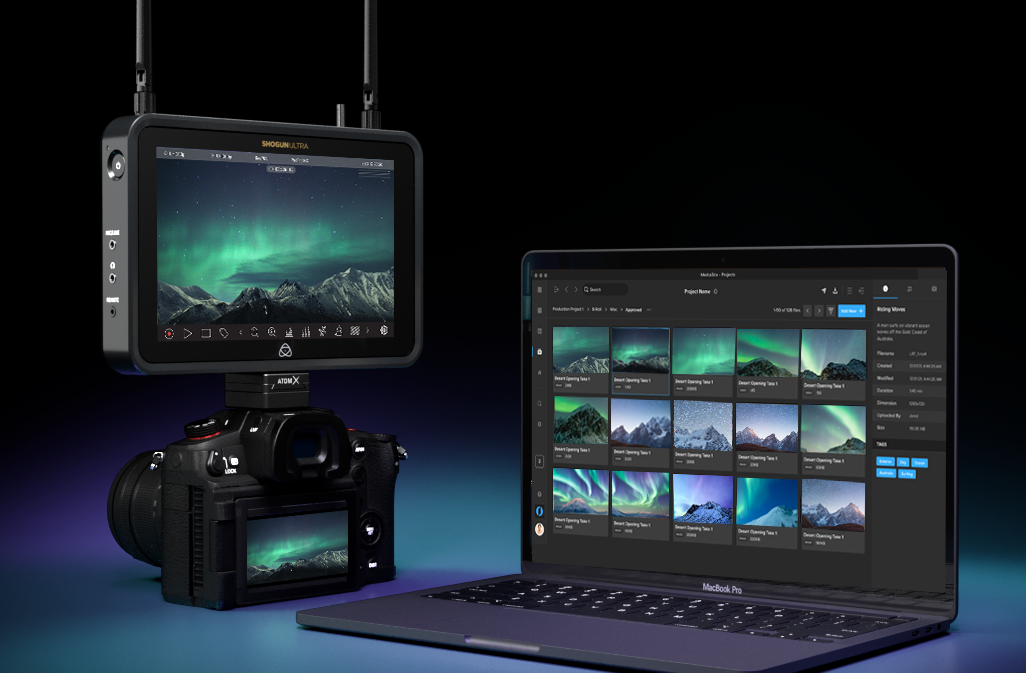
Also, MediaSilo is now seamlessly integrated with Atomos’ pioneering cloud-connected range of camera-mounted monitor-recorders, offering attendees a firsthand view of this innovative collaboration. Camera to Cloud workflows accelerate the creative process by shrinking the capture-to-edit timeframe, enabling editors to begin working on media instantly instead of waiting for hard drives or delayed file transfers. The Atomos MediaSilo integration elegantly unlocks these capabilities. Additionally, MediaSilo creates dynamic review links that automatically update as more footage is shot, providing external collaborators with one destination for feedback.
Improved security, along with more branding customization and in-video logo watermarks are also among the enhancements for Screeners.com, the preferred press screener widely used by major studios and production companies worldwide. Reviewers will see an enhanced OTT-style experience, with improved content recommendations, watchlists and expiry notifications.
“EditShare was formed 20 years ago now, and from that day to this our sole focus has been on freeing content creators to exercise their craft and not worry about the technology,” said Tara Montford, Co-Founder and EVP of Sales at EditShare. “That still drives our developments today, and we continue to innovate as we strive for those goals. We allow open interworking with the tools users really need such as editing software; we provide the platform for truly end-to-end workflows from ingest to screeners; and we protect it all through excellent security,
“Our direction is set through a deep understanding of our clients and their needs, so events like MPTS are vital in building and maintaining those relationships,” Montford added.
Staff will be on hand on stand D40 at MPTS to talk about all of the latest enhancements to EditShare products, like FLEX Sync which provides powerful tools to sync with services like Amazon S3, Wasabi and Backblaze to create an automated but completely secure, completely reliable backup system.
EditShare is an Emmy Award-winning technology leader, supporting storytellers through collaborative media workflows across on-premise, cloud and hybrid architectures. The market-leading open software solutions and robust APIs improve workflow collaboration, third-party integrations and content sharing across the entire production chain. Designed specifically for media applications, the high performance line-up provides shared storage, archiving and backup, and intelligent media asset management.
Through a merger with Shift Media, EditShare now also integrates tools for content review and distribution, the creation of customised and branded pitch reels, and secure preview of high-value pre-release content.
Integration between MediaSilo and Atomos Cloud Studio unlocking rapid transfer of content from on-set to editors to be showcased at NAB 2024
Boston, MA – April 11, 2024 – EditShare®, a technology leader that enables storytellers to create and manage collaborative media workflows, today announced it has partnered with Atomos to bring camera to cloud workflows to MediaSilo, the leading video collaboration platform. MediaSilo will be integrated with Atomos’ pioneering cloud connected range of camera mounted monitor-recorders, which can be attached to virtually any HDMI or SDI camera source. Camera to Cloud workflows accelerate the creative process. By shrinking the capture-to-edit time frame, editors can begin working on media instantly instead of waiting for hard drives or delayed file transfers. The Atomos MediaSilo integration unlocks these capabilities elegantly. Simply connect your camera to your cloud enabled Atomos device via HDMI or SDI. After pairing your device via your Atomos Cloud Studio account and adding MediaSilo as your destination, you can select the target project and folder for media upload. Once you hit record, proxy files will automatically sync to the MediaSilo project or folder you have selected. Team members can then jump in to start reviewing the footage as it arrives. MediaSilo also creates dynamic review links that automatically update as more footage is shot, so external collaborators have one destination for feedback.
Access to your MediaSilo account is included in Atomos Cloud Studio’s Camera to Cloud plan. Anyone purchasing an Atomos Connect (for Ninja V, V+, Ninja or Ninja Ultra), a Shogun, or Shogun Ultra automatically receives a free all-inclusive subscription. Both plans include single/dual recording, 4K upload, and progressive upload, Atomos’ unique progressive file transfer technology that gets content into MediaSilo while you are still shooting.
EditShare CEO Ramu Potarazu said, “We’re extremely excited to start MediaSilo’s camera to cloud journey with Atomos. Our decision was rooted in the EditShare brand ethos of flexibility: we want our customers to work with creative tools of their choice. Integrating MediaSilo to Atomos products such as the Shogun and Ninja lets people choose the right camera product for each project. We look forward to seeing our customers benefit from the speed and flexibility they’ll see with MediaSilo + Atomos camera to cloud.”
“I’m delighted to announce another camera to cloud integration with Atomos Cloud Studio. We’ve always considered ourselves to be a neutral ‘gateway’ to a wide selection of secure destinations for our customers’ content,” said Jeromy Young, CEO of Atomos. “MediaSilo is highly respected in the post production world for accelerating collaboration, and its addition to our online platform offers our DNx-orientated customers in particular a route into Camera to Cloud. It’s very much a win-win scenario for both parties.”
The integration will be on display at NAB 2024 at both the Atomos booth (Central Hall – C4931) and the EditShare booth (South Hall Lower – SL8087), and will be generally available in mid Q2 of 2024.
For more information on all EditShare solutions, please visit the website at www.editshare.com. Information on the Atomos product portfolio can be found at www.atomos.com.
#
About EditShare EditShare is a technology leader that enables collaborative media workflows from storyboard to screen on-premise, in the cloud, or in a hybrid configuration. With customer and partner success at the heart of EditShare’s core values, our open software solutions and robust APIs improve workflow collaboration and third-party integrations across the entire production chain, ensuring a world-class experience that is second to none. The high-performance software lineup includes media optimized shared storage management, archiving and backup, and media management, all supported with open APIs for extensible integration. EditShare’s cloud-enabled remote editing and project management technology was recently recognized by the National Academy of Television Arts and Sciences (NATAS) with a prestigious 2021 Emmy® Award for Technology and Engineering.
About Atomos Atomos is a video technology innovator. When we started just over a decade ago, we combined high-quality touchscreen monitors, removable storage, and Apple ProRes to dramatically improve the quality of video captured by almost any camera. For the first time, video makers could take the uncompressed output from the camera and store it in Apple’s professional, easy-to-edit format.
With Connect, Atomos extends the capabilities of its monitor-recorders with a host of cloud-based tools and services. Content creators now have greater peace of mind as their footage is simultaneously stored on the camera, in the cloud and on the Atomos recorder. Workflows anywhere in the world can access media from a cloud connected Atomos device. Our online services extend our physical products’ capabilities, empowering filmmakers, and video creators with essential tools for camera-to-cloud, collaboration and review, cloud editing, live multi-cam production, wireless timecode, and streaming. It is a flexible ecosystem of subscription-based services that can grow with customers’ needs.
Amy and Drive to Survive producer updates collaborators simply and securely
Boston, MA, March 18, 2024 – Box to Box Films, an Emmy® award winning producer of high end documentaries and factual entertainment, has extended their agreement with EditShare and will continue to leverage MediaSilo for delivering work-in-progress content to collaborators. The software allows clips and completed content to be distributed simply and securely, for viewing on any platform.
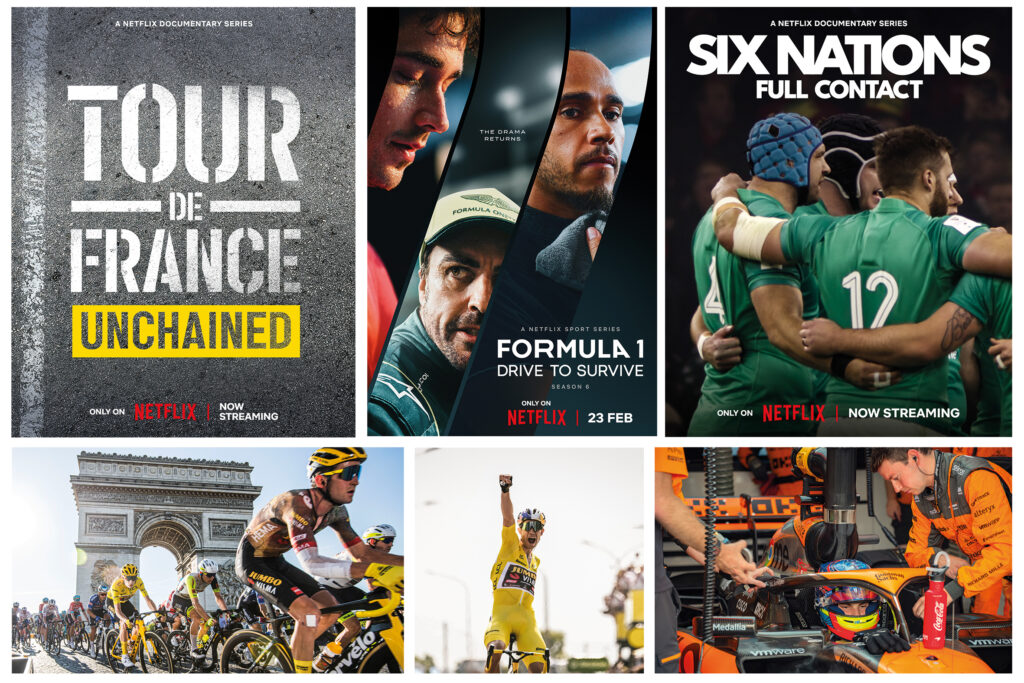
Box to Box is the producer behind the acclaimed documentary Diego Maradona, which chronicles the career of celebrated football player Diego Maradona. Its Formula 1: Drive to Survive inside motorsports documentaries reached series six on Netflix in February 2024. The company prides itself on its ability to create dynamic and dramatic narratives for international audiences.
For these and many more one-offs and series, each project is managed independently, with different managements, clients, post facilities and producers. MediaSilo gives Box to Box a ready way to distribute dailies and cuts, just to the team involved in that particular production. It provides a completely flexible storage space, allowing it to serve the requirements of different projects, and to allow multiple users to access it.
“On a typical project we would send a cut to maybe two bosses, three or four executive producers, showrunner and producer, post supervisors and more,” explained Box to Box technical editor Rafael Bettega. “We send the picture lock cut to the composer, and to the creative marketing people so they can plan and start the campaign as early as possible.”
“With MediaSilo we don’t need to worry about technology,” Bettega continued. “The users simply receive a review link with a video which they can access with a password, to play just by pressing the spacebar. No need to download additional software; no need to take up licences in an asset management system. And because of the two-factor security it is acceptable to the networks we’re partnering with, which prioritize secure methods for content transfer”.
Bettega first used MediaSilo on Amy in 2013, at the suggestion of the post house he was working with. It now uses the system for all its productions.
“This is the perfect application for MediaSilo,” said Eric Wynalek, EVP marketing & strategy at EditShare. “As massive fans of Box to Box’s productions like Drive to Survive and 6 Nations: Full Contact, we’re honoured to be an integral part of their workflow. Box to Box has a set of diverse users who need to collaborate on content securely, including protection with custom permissions and receipt of usage analytics. The interface allows groups to be set up for each project, with permissions set by user, so each clip and cut is sent to just the right people and the all-important feedback is received quickly.”
EditShare is an Emmy Award-winning technology leader, supporting storytellers through collaborative media workflows across on-premise, cloud and hybrid architectures. The market-leading open software solutions and robust APIs improve workflow collaboration, third-party integrations and content sharing across the entire production chain. Designed specifically for media applications, the high performance line-up provides shared storage, archiving and backup, and intelligent media asset management.
Through a merger with Shift Media, EditShare now also integrates tools for content review and distribution, the creation of customised and branded pitch reels, and secure preview of high-value pre-release content.
After a few very tough years throughout the pandemic and the rise of streaming services, the past 12 months have actually looked pretty bright for Hollywood. And now, it’s that time of year again. With nominations announced and locked in, the 2024 Oscars are upon us. The Oscars have always been the pinnacle of awards in Hollywood and as such, they tend to reveal a thing or two about the industry. So, what can we learn from 2023’s memorable batch of Oscar-nominated films?
Cinema ain’t dead
There’s no doubt that the cinema industry has been through utter turmoil in recent years. The combination of the Covid-19 pandemic, which kept cinemas closed nationwide for years and halted productions, alongside the continued rise of various streaming rivals (which were, of course, buoyed by the stay-at-home nature of lockdown), has meant that the industry was hanging on by a thread.
Then comes along a special, culturally significant moment – Barbenheimer. This meme that grew legs and snowballed uncontrollably ensured that the two filmsBarbie and Oppenheimer grossed over $2 billion worldwide. To have this many people visiting cinemas and paying for tickets again was a huge moment for Hollywood. It’s clear that when the films are good and they’re marketed right, cinema ain’t dead. There is still hope for the industry.
In the hyper-competitive, over-saturated world of unlimited content on social media, there’s often the notion that audience attention spans are getting worse. While there may be truth and science in that, Hollywood hasn’t been afraid to go big with their runtimes and clearly, this hasn’t been a detriment to the success of the films.
Six of the ten nominations for best picture run over the 2-hour mark, with Oppenheimer touching 3 and Killers of the Flower Moon running for a colossal 3 hours and 26 minutes:
Anatomy of a Fall – 2 hrs 36 mins
The Holdovers – 2 hrs 13 mins
Killers of the Flower Moon – 2 hrs 26 mins
Oppenheimer – 3 hrs
Maestro – 2 hrs 9 mins
Poor Things – 2 hrs 21 mins
It appears that audiences aren’t particularly dissuaded by longer runtimes and increasingly, directors and editors aren’t shy of them either. If a story needs three hours to be told, then so be it.
Film is alive and well
You’d be forgiven for thinking shooting Hollywood blockbusters on analog film was a thing of the past. While digital does remain the overall format of choice, more and more filmmakers are reverting back to film. This has been well reflected in this year’s Oscar nominations for best cinematography. Four out of the five nominees (Oppenheimer, Maestro, Poor Things, Killers of the Flower Moon) were shot on Kodak film.
This is the first time this has been the case since 2010, marking the revival of the medium. Some filmmakers feel so strongly about this they’ve gone as far as creating brand-new film stocks, as was the case for Oppenheimer. “Film, I think, is uniquely suited to pulling an audience into a subjective experience…the way a film camera records light onto its emulsions – that’s as close as you can get to the way the eye sees,” gushes director Christopher Nolan to Kodak.
Going forward, expect to see more and more cinematographers opting to shoot film rather than digital.
A masterclass in cinematography
To be nominated at the Oscars for best cinematography, you have to do something pretty special. With Oppenheimer, cinematographer Hoyte van Hoytema really did pull out all the stops. As mentioned above, he shot the film using 65mm KODAK VISION3 250D Color Negative Film 5207 for exteriors and brighter day interiors and KODAK VISION3 500T Color Negative Film 5219 for low-light and night scenes.
But in order to support the different storylines, they also shot in EASTMAN DOUBLE-X Black & White Negative Film 5222 – a film stock created explicitly for this film. The nominated DP tells Kodak “that filmstock was unfamiliar to everyone, had never been run through IMAX or System 65 cameras, and required the reconfiguration of a 65mm film processor at the lab…It became quite a complex engineering process – encompassing things like the thickness of the backing for the film emulsion and making new gates and pressure plates in the cameras so as to avoid scratches.”
As if the careful handling and creation of film stocks from scratch wasn’t enough, Van Hoytema was also juggling a complex lens equation. Having established that 50mm and 80mm are the sweet spots when shooting in IMAX, but not wanting to be stood so far away from actors and needing to shoot in low-light situations, the cinematographer had a problem. These kinds of lenses don’t really exist.
He turned to Panasonic’s “lens guru,” Dan Sasaki, for help. “He tweaked existing lenses or re-engineered others from the ground up…he even built a special, waterproof snorkel lens for use with the IMAX cameras that didn’t exist before”. A range of different lenses from Hasselblad and Panavision were eventually used on the IMAX MKIV, IMAX MSM 9802 and Panavision Panaflex System 65 Studio cameras.
Hoyte Van Hoytema’s dedication to his craft is exceptional. Rather than simply accepting the answer “no,” he found ways to engineer brand-new film stocks and lenses to suit his specific needs. It’s a worthy winner if we’ve ever seen one.
Game changers
The VFX category is a really exciting one this year because it contains game-changers that potentially alter how Hollywood does things. Great VFX doesn’t necessarily mean huge budgets. Who knew?
The Creator, directed by Gareth Edwards, is the shining beacon for run-and-gun filmmakers. Looking at the stunning nature of the VFX in this beautifully crafted sci-fi world, you’d be forgiven for thinking that the budget for this thing was eye-wateringly large. Astonishingly, the film cost just $80m to make.
Typically, with VFX on this scale, you’d need to build it all from scratch. Green screens and studios would be the order of the day, costing a lot of money in the process. Gareth Edwards and the team went about things differently, opting to first shoot everything in real-world locations, edit the footage into the story they wanted, and then send it to ILM (Industrial Light & Magic). ILM was then tasked with effectively “painting over” the frames, adding in sci-fi aspects afterward. The fact that they could integrate the CGI so seamlessly is phenomenal work and saved a lot of money in the process.
The Japanese film industry has made similar inroads. Godzilla: Minus One rightly received a nomination for best VFX, too. The stats speak for themselves: just 35 VFX artists, 610 shots, 8 months and a total film budget of just $15m. It’s hard to call who ends up winning this category, but it’s an exciting landmark moment for the VFX industry.
Less can be more
Though often overlooked, sound is absolutely critical to the success and quality of a film. James Mather (already an Oscar winner for his sound supervising work on the excellent Top Gun: Maverick) has earned another nomination for Mission: Impossible – Dead Reckoning Part One. What caught our ear here was that, in many cases, Mather found that less sound can actually be more impactful.
Speaking with A Sound Effect, Mather admits that nowadays, the audio for most films has every little detail filled in, but for this production, he and Tom Cruise decided to go in a different direction… “it’s a distraction if there’s so much sound in a piece, whether it’s percussion in the music or footsteps in the sound design. If there’s no need for it, then don’t have it.”
How far to take this theory was up to the talents of the sound designer, who revealed that, more often than not, “we started with an awful lot more sound, which we then peeled away until we were in a place where we recognized what was happening.”
Masterfully, Mather and his team also used sound design as a way of aiding the story. “They wanted to highlight the fact that the train was out of control. They wanted these big bangs and jolts to remind the audience that they were on a runaway train. Earlier on, when you are with The White Widow, it’s very quiet. They wanted the train to sound very luxurious and smooth. So there’s quite a lot of work in the train sounds to subliminally remind the audience of where we are in the arc of the storyline for that section.”
Black and white as a storytelling tool
The category for best editing is a tough one to call this year, but one thing stands out in two of the nominations.
In Oppenheimer, first-time nominee Jennifer Lame masterfully balances interlocking subjective points of view from both Oppenheimer himself and antagonist Admiral Lewis Strauss. Despite the film effectively having a lot of people talking in rooms, the tension and pacing are handled beautifully by Lame, who reaps the benefits of using black and white to cover and differentiate Strauss’ storyline.
Similarly, in Poor Things, editor Yorgos Mavropsaridis manages the sudden shifts in style and tone by using black and white, then various shades of color that mark out and define Bella’s journey. Color isn’t the be-all and end-all of editing, but it certainly makes its presence known in this year’s category.
Interestingly, Maestro (nominated for categories including best picture and best cinematography) also adopted the use of black and white to showcase the different time periods and storylines, as well as going even further in switching up aspect ratios. It did not get the nomination for best editing, which may reflect the feedback from some audience members that the aspect ratio change was actually quite jarring.
Subtitles? No problem
This was a big year for non-English-speaking films. Through previous nominations, we’ve seen the likes of Roma, Parasite, Minari, Triangle of Sadness and All Quiet on the Western Front all win big (and rightly so). In 2024, for the first time, there’s more than one movie nominated for best picture that is primarily not spoken in English (Anatomy of a Fall, Past Lives, The Zone of Interest).
While many movie-goers may have turned their nose up at foreign language films and the idea of having to read subtitles not so long ago, that trend appears to be less and less existent. Nowadays, perhaps in part thanks to global streaming services such as Netflix, it seems that audiences are much more willing to watch a film from any part of the world, and they don’t mind at all if it isn’t spoken in their native language.
This appetite for non-English speaking films has ensured a fairer distribution of budget, consequently unearthing plenty of gems that may have yet to see the light of day ten or twenty years ago. Long may it continue.
All hail the king
You have to appreciate greatness while you have it. At 81, Martin Scorsese has made history by becoming the oldest nominee for best director. He’s now overtaken fellow legendary director Steven Spielberg as the most Oscar-nominated director with 10 nominations overall.
Like a fine bottle of wine that gets better with age, Marty appears to be at the height of his powers. Killers of the Flower Moon is being hailed by some as his best picture to date, and he certainly considers this his most important thus far. To undertake such large, influential and important projects at his age is phenomenal and worthy of the highest praise. We can only hope he has a few more left in him.
A wealth of talent
When you take a moment to scroll through all of the nominations, what you’re looking at is an astonishing wealth of talent. These awards are about celebrating and recognizing that talent because, without them, we simply wouldn’t get these amazing movies.
Major South African production facility uses EFS and FLOW
Boston, MA, March 4, 2024 – Rapid Blue, one of the leading production companies in Africa, is now using the EFS 300 storage system from EditShare for all its in-house shows. Through the use of EditShare FLOW media management and workflow tools, the company has built a very efficient and cost-effective platform which allows multiple users direct access for review and approval, as well as supporting large post production teams. Rapid Blue’s productions encompass a diverse array of content, spanning from drama serials such as Is’thunzi to studio shows like Family Feud South Africa and Last One Laughing South Africa, as well as location-based reality programs including The Bachelor and Come Dine With Me South Africa. Rapid Blue, who is part of BBC Studios’ international family of production companies, is also the South African producer of international hits such as The Great South African Bake Off and Dancing with the Stars. The result is large volumes of content acquisition, often needing very rapid turnaround times.
When its central storage system reached end of life and began to raise serious issues with reliability, Rapid Blue looked for a system that would deliver content security as the top priority. Workflows needed to be fast, intuitive and cost effective. The EFS platform answered all the questions, and the company installed a 280TB storage network, implementing the system in conjunction with Protea Broadcast & Multimedia, EditShare’s South African partner.
“The whole facility runs off it, and it’s been awesome,” said Jacques Wolfaardt, Rapid Blue Head of IT. “It hosts almost all of our productions, and we can connect all our edit suites – as many as 20 – at the same time on the same content, giving us great productivity and fast turnarounds.”
Rapid Blue uses both Adobe Premiere Pro and DaVinci Resolve non-linear editors, and both are tightly integrated into the EditShare FLOW media management functionality. The relevant parts of the shared storage appear as locations within the software, so editors get direct access to the material they need, and can save cuts directly to the storage network.
“We connect many desktops directly to FLOW, and it automatically generates high-quality proxies” Wolfaardt said, “Producers working on their own computers can select the content they need from bulk ingests before it gets to editors – and reality shows generate a massive amount of content. They can also review and approve cuts, all without tying up edit suites just to look at material. That saves us time and resources, and makes us much more efficient.
“We also use the workflow automation in FLOW,” he continued. “It creates all the deliverables in different formats, and delivers them to FTP sites, without tying up staff or facilities.”
James Macpherson of Protea Broadcast & Multimedia said “Reliability was a key deciding factor for Rapid Blue, and we could clearly show that EditShare leads the field. In production, deadlines are often very tight, and a day’s delay can be catastrophic.
“Jacques and his team would certainly let me know if there had been any issues, but EditShare has delivered the performance they need with no downtime.”
EditShare is an Emmy Award-winning technology leader, supporting storytellers through collaborative media workflows across on-premise, cloud and hybrid architectures. The market-leading open software solutions and robust APIs improve workflow collaboration, third-party integrations and content sharing across the entire production chain. Designed specifically for media applications, the high performance line-up provides shared storage, archiving and backup, and intelligent media asset management.
Through a merger with Shift Media, EditShare now also integrates tools for content review and distribution, the creation of customised and branded pitch reels, and secure preview of high-value pre-release content.