Technology has the ability to shape the way we work, sometimes for the better, sometimes for the worse. With the introduction of new technology, such as cloud-enabled editorial tools, it can be an opportunity to consider a better way of working.
The Evolution of Video Workflows: From Bespoke Hardware to Cloud Operations
It is worth reminding ourselves that up until maybe 10 years ago, all the equipment we needed for media production depended upon bespoke hardware. You bought a box to do a job, and your workflows were defined by the boxes you owned and how you connected them together. That applied whether you were shooting in the field, in the studio, or in post.
The twin-pronged revolution came when processing power developed to be able to handle video in real time, and when standards were established to share content as data files, replacing SDI (which of course also required bespoke hardware). By opening the option to use standard hardware and open standards, video workflows became more accessible and the ability to process video in software made these workflows more flexible.
Virtualizing Post Tools: The Benefits of Cloud Editing
The next step was to virtualize the software, and build systems on microservices. In simple terms, we have moved from connecting boxes that we happen to have into assembling the precise functionality we need, in precisely the order we need. With the infinite scalability of the cloud, the architecture can flex to do what we want without the requirement for large capital investment.
And that is why we have the opportunity to take a completely fresh approach. We need to decide what it is we are actually trying to achieve, and how best to do it.
Take editing, for example. Online editing has meant a largish room in a post house, with room for clients to sit around. That costs a lot in real estate, and power, and catering, and security, on top of the salary for a top editor and the cost of the equipment.
It is the way we have always done it, because it was the only way we could make it work. But if we are starting with a blank sheet of paper, is it the best way?
Collaborating Remotely: Enhancing Productivity and Saving Time and Money
At EditShare we talk a lot about how post tools, like editing, can be virtualized alongside the storage network and asset management platform. These are the industry standard tools that editors expect: tools from Avid, Adobe, DaVinci and others. With remote desktop access technology such as PCoverIP, the editor will work exactly the way they are used to, whether the processing and storage is in the machine room in the basement or in an AWS data centre hundreds or thousands of kilometres away.
The logical extension of that is that the editor doesn’t have to be in the expensive edit suite in the city centre post house. They can be anywhere which is convenient for them. The idea of editing high-value content on someone’s kitchen table has always been a security nightmare, but with cloud editing the video never leaves the central, controlled environment in the cloud.
But of course an editor rarely works in complete isolation. Producers and clients want to know what is going on, and directors may well want creative input. That is why the expensive edit suites have large couches for all these collaborators. And having everyone in the room may be right for some projects.
But for others, producers, directors and other collaborators will need to understand progress and approve material, without watching the whole process. With cloud-based tools it is easy for remote contributors to securely access proxy versions of rushes and cuts for comment. . If you need real time collaboration, there is no reason why you cannot use Zoom as the communication tool.
That saves time for producers and the rest, who are not sitting around while the dull parts of the job happen. They focus their attention where it matters most. And they save time and money by not travelling to the post house.
Balancing Work and Life: The Importance of Staff Welfare in Cloud Operations
The travel point is becoming increasingly important. Commuting every day, only to sit alone in a darkened room until late into the evening to meet a deadline can be demotivating and sap creativity and productivity. Connecting with people in person undoubtedly improves a quality of life, so it’s a balance of travelling when it counts. With the ability to start work in one location and continue somewhere else helps address work/life balance whilst still keeping to commitments. .
The cloud could, and should, be transformative for video creatives. It should be boosting staff welfare, business economics, and creative collaboration. That is why it is important to draw up a list of what is important to your facility, and fit the technology around it.
Want to find out more? click here to book a demo, or a chat with your local EditShare team member.
When you’re in a business like EditShare, the start of a new year means the time to think about what is going to be important in the coming 12 months. What are users going to talk about, what capabilities are they going to need, how will they challenge us?
Here is my view: this is going to be the year that hybrid production comes to maturity. Hybrid in the sense that it will be part on location, part remote; part using traditional tools onsite and part in the cloud.
Why 2023?
Before I explain why I think it is going to be important, let me just say why 2023 is the year when it is going to happen.
In media, we have a well-established four year cycle, driven by external forces, mainly sport. In 2024 and every four years from then on we have the Olympics (and a US presidential election). In 2026 and every four years we have the Winter Olympics plus the FIFA World Cup. In 2025 we have the European football championships. But in the other year of the four year cycle – like 2023 – we do not have any big events. So we have time to think, to develop sensible plans.
Think about this: there is no one size fits all post production workflow. If you are making a nature documentary you may be accumulating footage over years; but investigative journalism might be shooting almost up to the time of transmission. Movies will allow months for post production; sports broadcasters will want a fresh highlights package every time there is a break in play.
If you are planning a major sports event like the Olympics, or a major location-shot reality show that needs daily coverage, do you want to ship your post production team off to the location – where you will have to build facilities and pay for food and accommodation – or do you want to keep them back at base where they have set up their rooms just as they like them, and they know the quickest route to the best coffee shops?
Fast connectivity has changed everything
There are no right answers to any of these questions. But what has happened is that we have built workflows because, in the past, they were the only way that the technology allowed us to work. Now, thanks to fast connectivity around the world, we can take a step back and decide what is the best way to work on each individual project.
The cloud, of course, is central to all of this. That is not to say that it is compulsory: there will be plenty of workflows where traditional, in-place post is the best solution. The major nature documentary series I talked about earlier is a good example: getting all the content to a post facility for editing and finishing at a considered pace is probably the way to go (although you might want a security archive in AWS S3).
But if you do put all your content in the cloud, then you can access it from anywhere. You can call up processing resources when you need them, for instance for batch creation of proxies, or to do large-scale transcoding.
The real transformative technology, though, is cloud editing. All your media is in the cloud, as is all the metadata. With EditShare FLEX, you can host the edit software – whichever platform is your preference – within the storage network. If the post-production storage network is in the cloud, so too is your edit software. Remote desktop technologies like PC-over-IP (PCoIP) means you have the look and feel of a traditional edit suite, but it is all happening at some distant location.
You can access huge resources without the cost or time of moving large amounts of content. With good, automated proxy generation you can work with even a modest broadband connection.
Cloud editing is not for everyone, or for every project. That is not the point. What it does is open up new avenues and new workflows. You can take a step back and decide what is the best way for you to work on this particular project: what is best for staff welfare, for business economics, and for creative collaboration. Workflows your way.
The return of conferences and exhibitions in 2022 has finally given us all the opportunity to sit down and talk to industry professionals from around the world to discuss what’s working and where the current challenges lie.
Many of the conversations I’ve had at these events relate to the industry hot topic at the moment: remote production. This topic takes on many forms depending on the needs of the production and so to tackle them in a single blog would be ambitious (for me to write and for you to read). So instead, I thought I would cover a more specific scenario to show the sort of challenges I’ve heard and illustrate some of the techniques that can be applied to other scenarios.
Take for example a production company responsible for a popular reality TV show. Let’s say it’s set, and shot, in the south of France, although the production company itself is based in Paris, 500km to the north.
Like all reality shows, it generates a huge amount of content from many cameras running non-stop. It also has an extremely fast turnaround, with audiences expecting high production values in programs reflecting the action that took place on site within the previous few hours.
To meet these two requirements, the production company could have set up a large server network on site. Let’s explore some of the implications of this and what alternatives could be used to improve the workflow.
On-Site Production Challenges
In a single storage network scenario the program would have to base a team of editors at the location. This would add substantially to the production budget: these editors, edit assistants and edit producers would need accommodation and food over the months that the program was in production. Space would have to be rented to house the edit suites. Travel costs would be high because editors may not want to be away from home for extended periods of time, therefore they would be constantly rotated in and out.
What the production company needs is the ability to edit story packages, and packages into programs, within the facilities they already have in Paris (close to the homes and favorite restaurants of the editors and producers). However, the content is hundreds of kilometers away.
Bring On The Proxy
I’ve written before about how you should embrace the proxy. When content is ingested into EditShare storage nodes it can automatically generate a proxy, at a bitrate determined by you, but small enough to be regarded as portable.
This means that users anywhere with the right privileges can log in, view the proxies, add comments if necessary, and manage the content. In this application, producers responsible for each story strand could log in, from Paris for example, whether from a computer or tablet, and review all the footage available. They could very quickly identify what material to use and drag it into an appropriate bin. This can all happen in a web browser using the FLOW media asset management system. We are nowhere near an edit workstation yet.
An edit assistant could then go through the selected sequences for the story and set up the bin structure for the editor. Again, this is still in a web browser, at any location, using the proxy.
When everything is ready, the relevant clips are loaded into the edit software. We are completely agnostic: we can preload bins and projects into Adobe® Premiere® Pro, Avid Media Composer and Da Vinci Resolve. The editor can start cutting straight away.
Stay In Sync
With EditShare EFS we recently introduced a new feature called Swift Sync. This is designed to synchronize content between multiple locations. It incorporates file acceleration which can move media files, over a leased line or a VPN tunnel, as much as ten times faster than Rsync.
It also is extremely flexible in what it synchronizes. In an application like the reality show example, there may still be too much raw content to reliably move, even after the selections have been made. We have smart segmentation in mind during this process as it’s not necessary to synchronize absolutely everything. The key is to synchronize what’s required, automate and optimize. So the editor can cut on the proxies, and only when the story is complete, will Swift Sync move the required clips with handles. It can even conform the edit in the server node at the location and just move the finished story as one file.
Savings Abound
This is the architecture that can deliver huge operational savings for the reality show, while maintaining quality and boosting productivity. The same ideas are applicable for other situations too.
You do not need to have physical storage nodes in both the remote location and back at base. One or both of them could be in the cloud, using EditShare FLEX software and the AWS Backbone to move material as needed.
If you are shooting a drama in 4K Ultra HD, or even higher resolutions using RED cameras, it might even be most efficient and cost-effective to edit using proxies and deliver the selected raw clips back to base on disk drives using FedEx.
At EditShare we see our mission as supporting producers to create amazing everywhere. Proxy workflows are a practical and very flexible way of achieving that.
Want to find out more? click here to book a demo, or a chat with your local EditShare team member.
Shared storage environments are critical to the successful operation of all modern-day education institutions. At the top of that tree are some of Australia’s oldest and most prestigious universities, including the University of Sydney and the University of Technology Sydney (UTS), both of whom use EditShare storage solutions supplied by Digistor.
EditShare shared storage solutions in use at the University of Sydney
The University of Sydney’s Manager, Media Production, Deputy Vice-Chancellor Indigenous Strategy and Services, Tom Cavdarovski, explained, “Our media team has grown over the last few years and our postproduction workflow has changed to meet the growing demands. We use EditShare systems and find them particularly suitable for a growing production slate.”
The University of Sydney’s Manager, Media Production, Deputy Vice-Chancellor Indigenous Strategy and Services, Tom Cavdarovski
UTS’ Client Computing Manager Faculty of Arts and Social Sciences, Simon Prowse, agreed saying, “The Faculty of Arts and Social Sciences (FASS) runs courses in communications including journalism and production. These courses include sound production, film and animation. In the past FASS used a different shared storage solution but decided to move to a more open environment for production workflows. UTS has now been using an EditShare solution for around 9 years has recently acquired new EFS storage and FLOW licences for student off site usage for editing.”
EditShare shared storage solutions in use at the University of Technology Sydney
For the University of Sydney, the requirements were centred around a secured, robust, 4K editing storage solution with Cavdarovski adding, “We have huge amounts of 4K data that needs to be accessed across multiple editors. Our content is captured on country with drones, C300 and DSLR cameras. We also produce multicamera live stream events, so having a post-production system workflow that integrates with creating pre-packaged content, is an important part of our workflow.”
In UTS’ case the university required a sizeable amount of storage capacity and bandwidth to handle up to 60 concurrent connections for editing from personal and group project spaces on the server.
Prowse said, “This time around we chose 10GB Ethernet with 20GB link aggregation to a 10GB switch. Since COVID there is more need for flexibility and a need for more students to work remotely. We also have students studying remotely overseas so the need for working from the server remotely was important. As most of the editing is done with Adobe, the Premier plugin was desirable.”
UTS’ Client Computing Manager Faculty of Arts and Social Sciences, Simon Prowse
It’s clear for both universities that the EditShare solutions for education shared storage environments are a vital part of their courses and day-to-day operations as Cavdarovski explained, “The EditShare system Digistor installed has RAID redundancy, integrates with existing university infrastructure and allows our editors to work in various 4K resolutions seamlessly.”
Prowse echoed this sentiment saying, “It’s a flexible arrangement for constantly changing circumstances. Openness and flexibility of the solution is important and EditShare meets this perfectly. Courses and requirements change and we can easily add capacity, bandwidth or capabilities with plugins.”
The University of Sydney uses a 98TB EFS 300 system with 8 clients PC connections. These are both Mac and Windows computers, all connected via 10Gb network ethernet connections and all editors are able to open Adobe Creative Cloud projects at any time.
EditShare’s cloud platform EditShare FLEX has evolved to a suite of turnkey, ready-to-go solutions for remote collaborative workflows and video editing in the cloud. Users of EditShare FLEX choose the modules they need – including edit in the cloud and multi-premises synchronisation – and implement them in their own cloud account. This gives users an easy opportunity to implement cloud solutions which education institutions often consider the best way to utilise a combination of on-premise and cloud storage and editing.
There are many on premises and cloud solutions at UTS. They run an animation render farm for the faculty that is on server blades in the data centre and processing of jobs is distributed to around 300 lab computers. UTS also has an HPC environment as well an Isilon which is widely used across the university. The faculty EditShare EFS can backup to Isilon which represents a cost saving to leverage other products in the EditShare solution.
Workflows are obviously at the core of these solutions as Cavdarovski explained, “We have a mix of projects throughout the year, some are quick turnaround with a single producer and editor, while others are 12 months in post and up 50 individual videos with shared resources across multiple editors.”
Prowse added, “We keep our workflows reasonably basic. EditShare is the file server for students’ media work. The workflows involve group spaces for group projects and these have a set folder structure. Students also have personal scratch space with quotas. Class materials are in spaces accessible to students from either the lab and suite facilities or on their BYO devices accessible from home via the client and VPN or on campus.”
A UTS shared storage workflow may also involve students borrowing faculty sound, lighting and video equipment and doing a shoot. They will then upload content to EditShare via a lab or studio computer.
It’s clear that both Cavdarovski and Prowse are big fans of the EditShare solutions for education shared storage environments they purchase from Digistor as Cavdarovski highlighted, “We have used smaller storage solutions in the past, but found they are very limited and lacked performance beyond one or two concurrent users compared to the EditShare solution we now have. We really like the FLOW application that we purchased as part of the EditShare package. It allows the team of editors to log content easily, accurately and create proxies for working offline and working flexibly. FLOW helps to ensure that we can always store, retrieve and broadcast the appropriate content.”
Whilst Prowse said, “We feel that EditShare has a flexible and futureproofed product that is not proprietary or rigid. It’s modular so we are not paying for capabilities that we do not need now but have the option to add capability, licences or services going forward. Lots of storage capacity in the EditShare solution is important and being on premise, we can leverage the fast network for connections, transfers and backup.”
When asked to explain what edge using the EditShare solutions Digistor provided gives their university Tom Cavdarovski concluded, “The EditShare system enables our team to work more efficiently, reducing menial tasks and streamlining complex workflows. This frees the team up to work in more creative and innovative space, which in this industry, is a what customers and partners want from content producers. Our experience with Digistor has always been very professional, I have been purchasing postproduction systems for over 20 years and they understand how to work with clients who work in large complex organisations, like a university.”
Whilst Simon Prowse concluded, “We have had excellent experiences with both EditShare and Digistor. This is our third renewal of hardware over 9 years and the sales and project process has been smooth each time. Any support issues are dealt with promptly and professionally too. My IT team has to be across a huge amount of knowledge to effectively manage all of the moving parts in this complex university environment. Hence, we need to rely on good support for specialised solutions, applications and facilities. Thus, the great confidence we have in Digistor and EditShare is a very important factor for us.”
EditShare is a technology leader that enables collaborative media workflows on-premise, in the cloud, or in a hybrid configuration. With customer and partner success at the heart of EditShare’s core values, our open software solutions and robust APIs improve workflow collaboration and third-party integrations across the entire production chain, ensuring a world-class experience that is second to none. The high-performance software lineup includes media optimized shared storage management, archiving and backup, and media management, all supported with open APIs for extensible integration.
EditShare’s cloud-enabled remote editing and project management technology was recently recognized by the National Academy of Television Arts and Sciences (NATAS) with a prestigious 2021 Emmy® Award for Technology and Engineering.
About Digistor
Managing Director Andrew Mooney founded Digistor in 1990. His experience designing, installing, and maintaining services for broadcasters and post-production houses had made it clear to him that the industry needed a group of experts who could look at things objectively. The result is a company that for over 30 years has been providing elegant solutions to leading organisations in the most technically demanding application areas. Digistor provides solutions for the creation, management, storage, and distribution of digital assets. From post-facilities to broadcast operations, from single studios to collaborative, networked environments operating across a room or across the world, Digistor empowers its customers through smarter technology and service solutions.
For more information on Digistor, please visit the website at www.digistor.com.au
Brazilian broadcaster adds storage, control and cloud sync
Boston, MA, November 29, 2022 – EditShare®, the technology leader that enables storytellers to create and manage collaborative media workflows, has greatly extended its storage and content management system at Rede Evangelizar é Preciso, the religious broadcaster in Brazil. As well as boosting operational performance, the new installation also allows Rede Evangelizar to migrate its archive from LTO tapes to the cloud.
Rede Evangelizar, under the guidance of Father Reginaldo Manzotti, was launched in 2011, based in the city of Curitiba, south-west of São Paulo. As its success continued to grow, it extended its in-house production and post facilities, adding its first EditShare servers in 2017.
This major expansion, designed and implemented by EditShare’s local system integration partner CIS Group, includes a FLOW Ingest server and EFS online storage, as well as FLOW asset management, metadata controller and additional production nodes. The integral FLEX Cloud Sync software applications ensure that all media is securely backed up, with archives and restore functionality in the Amazon Web Services (AWS) cloud.
“We had found our original EditShare installation to be a very powerful tool for us,” said Renan Borges, post production coordinator at Rede Evangelizar é Preciso. “As our productions grew in size and complexity, we needed to boost our operational performance and allow more users access to our content. EditShare and CIS Group readily understood our requirements, and proposed an excellent technical solution, support for the migration, and the ability to move our archive to the cloud which gives us lifecycle cost savings as well as easier operations.”
Said Bacho, Chief Revenue Officer at EditShare added, “CIS Group was able to put together a very attractive package, including long-term licensing and continuing support, it meant we could deliver all the functionality Rede Evangelizar needed, at the right price point, and help them achieve the operational streamlining they sought.”
“It’s important to see that the partnership between CIS and EditShare has brought a level of trust to our customers. With the upgrade of Rede Evangelizar’s system to the new EditShare FLOW tools, we will optimize the end-to-end workflow, offer greater productivity and efficiency, and also guarantee greater production quality,” said Alberto Santana, Territory Account Manager at CIS Group. The extensions to the EditShare architecture at Rede Evangelizar are being installed at the end of 2022, and will go live in the first quarter of 2023.
EditShare is a technology leader that enables collaborative media workflows on-premise, in the cloud, or in a hybrid configuration. With customer and partner success at the heart of EditShare’s core values, our open software solutions and robust APIs improve workflow collaboration and third-party integrations across the entire production chain, ensuring a world-class experience that is second to none. The high-performance software lineup includes media optimized shared storage management, archiving and backup, and media management, all supported with open APIs for extensible integration.
EditShare’s cloud-enabled remote editing and project management technology was recently recognized by the National Academy of Television Arts and Sciences (NATAS) with a prestigious 2021 Emmy® Award for Technology and Engineering.
About CIS Group
Since 1988, CIS Group has been a Media Technology solutions provider & systems integrator with core competencies across the professional services spectrum. Over the years our scope has evolved to include: Consulting & Workflow Design, Integration, Full System Commissioning & Installation, Technical & Operational Training, Maintenance & Support, DevOps, and Managed Services. Focused exclusively on the MediaTech space, CIS has delivered countless solutions aimed at a variety of use cases throughout the Content Supply Chain – including live production, post-production, archiving, and distribution. In relying on CIS’s expertise, our clients have been able to outsource a lot of their technical challenges, and focus their energy and resources on how the technology we implement ultimately delivers business value and creative value to their organizations. Enabling our customers to achieve their desired business goals and operational goals by effectively implementing our solutions is what we mean when we say that customer success is in our DNA.
In an earlier blog, EditShare CTO Stephen Tallamy looked at five top tips for remote editing using Adobe Premiere Pro. Avid Media Composer remains an industry standard and is still hugely popular, so here are five cool takeaways for improving your workflow by using it with EditShare.
1 – Automate Transcodes
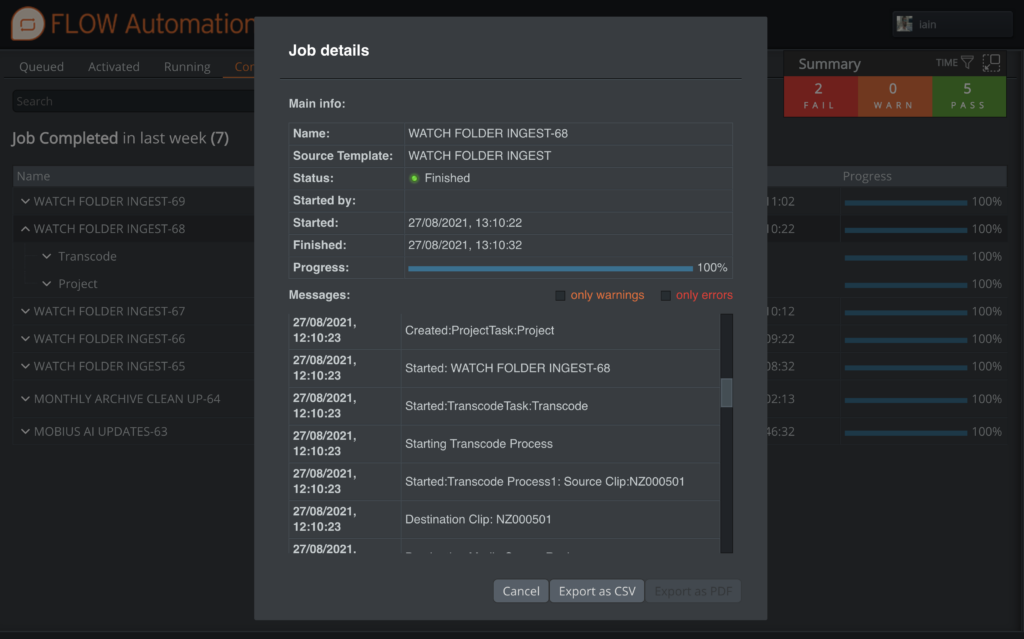
EditShare FLOW does a lot more than metadata management. It allows you to offload routine tasks to avoid using up edit workstations for things that can be better done elsewhere.
Use FLOW for ingest, whether from a delivered file or direct from the camera cards. You can store the raw footage, and at the same time prepare the content in the MXF Op-Atom wrapper that is a native format for Media Composer managed media.
FLOW supports all the latest versions of raw formats, and as well as rewrapping, you can transcode to the house codec, which might be DNxHD, or XDCam, or whatever you choose.
Easily track automated processes
2 – Prepare Bins Online
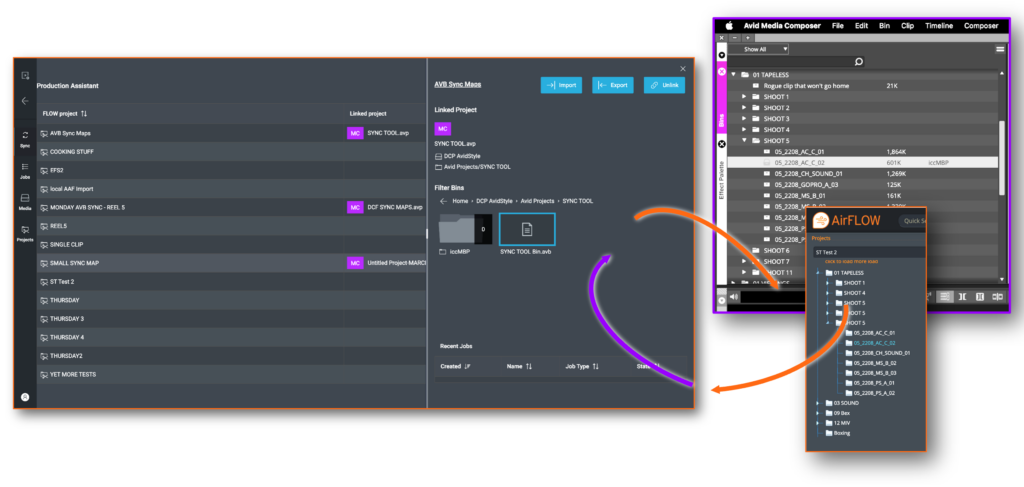
You can set up the bin structure before you get to the Avid workstation too. A core part of the Universal Projects software in FLOW is that it allows you to work from a central view of a project inside of FLOW and then synchronize that project to a range of editing systems, including Media Composer.
Working in a web browser, you can go through all the input material and organize it into logical structures such as folders for rushes, subclips and shot lists. This can be supported by automation when you need it, for example creating rules to create bins per day, to organize by metadata such as tape/scene information or even write a rule to ignore any clip that is less than three seconds long (or whatever duration you think is likely to be unusable).
Assistant editors, directors and producers can work collaboratively to review the dailies and only offer the editor the preferred takes. Once ready, all the work can be automatically synchronized into Media Composer bin files.
By doing all this in FLOW, it means you are transferring less material to the editing workstation, with all the bins set up and populated for the editor to start the creative work immediately.
Sync between FLOW and Media Composer respecting bin locking
3 – Work From Anywhere
The ingest processing, as well as storing the raw footage and transcoding to the house edit format, can also generate proxies, at a maximum bitrate determined by you. Proxies make it practical to view the content, in real-time, from anywhere with a web browser and a reasonable internet connection, on any device.
The producer and director might be on location but can still review dailies in exactly the same way that they used to, as soon as the content is ingested, rather than waiting for large files (or rush prints) to be delivered. The post facility could carry out automated sorting, the director could choose the best takes (on an iPad), and the edit assistant could set up and load the bin structure, all at the same time, from different locations.
Again, the key point here is that editors and edit suites are expensive entities and overheads for production teams. You want as much of their time as possible to be devoted to telling the story, and not wrangling data and waiting for timely transfers. This is a real boost to productivity.
4 – Bin Locking Support
Media Composer users will be familiar with the collaborative features available when using shared storage systems.
Bin locking is central to the Media Composer way of working, which allows users to share bins and projects, but provides a secure locking mechanism to ensure only one person is working on a file at a time. EditShare EFS supports this locking through AvidStyle spaces, allowing users to work with a familiar workflow whilst taking advantage of the other features of EFS and FLOW.
When using FLOW Universal Projects, bin locking is respected by FLOW itself when it updates bins, ensuring users don’t lose their work. Working in combination with the Avid Attic location, history of bin changes is retained as well, so if you ever need to go back to a previous version of a bin, it’s there for you.
5 – Review, Grade and Deliver Anywhere
Once you have completed the edit and rendered the output to the house master format, the next stage involves sending the file back to EditShare FLOW, where it is ingested and given its new identity and metadata.
At that point, a fresh proxy is generated. Everyone who is entitled to review the finished cut can then log in to view it and make comments, from anywhere and on anything that supports a web browser.
The project file is then ready to be transferred across to the colorist. If you grade on DaVinci Resolve, it will appear with all the project information, thanks to EditShare’s Universal Projects. If you are a Baselight post house, then you can mount the EditShare storage network as a source and directly access the file.
Once the project has been graded and signed off, you can leave the creation of all the deliverables to the automated processes in FLOW to handle. Again, it saves using an expensive and in-demand edit suite to do vital but uncreative and repetitive transcoding and rendering tasks.
At EditShare, the goal is to help you create amazing everywhere. I hope these tips help you get the best out of your post production resources by using the powerful intelligence in the combination of EFS and FLOW.
For more information on how you can optimize your Media Composer workflows, click here to get started.
I’m spending 2022 making up for lost time.
After a few years sitting in front of a screen on seemingly endless Zoom calls, I’ve spent most of this year in airplanes, on the road, and in front of partners and clients. And after a few particularly busy weeks of travel, I finally took a moment to look back on our first in-person IBC show in three years.
Like any good trade show, this year’s IBC was exciting, eye-opening, exhausting, and a little indulgent all at the same time. We won’t talk about the lines at Schiphol trying to leave Amsterdam! After some reflection, I wanted to share a short summary of what I took away from IBC, in one word, one theme, and one feeling.
One Word: Optimism
The only thing that people on planet earth do more than consuming video is working and sleeping and people are watching more video than ever before, and that trend is creating big opportunities for our creative clients. However, if you look across the economic climate, there’s a lot of heaviness out there too. The specter of a potential recession, a rising interest rate environment, and armed conflicts around the world are creating a lot of concern, and the need for many in our industry to do more with less. Despite that turmoil, I saw example after example at IBC of technology solving problems that enable creators to bring compelling content to subscribers faster and more efficiently. I see a real opportunity for our industry to come together and partner across our environment to solve the hard problems that need solving. Business models are changing from perpetual to recurring models. The industry is moving towards the cloud. As an industry, we need more innovation, more automation, and more simplification. Maybe this is an unpopular opinion, but I’m also hoping to see a little less of vendors beating down on price and more examples of innovation that helps creators do what they’re really great at: Making more cool movies, TV, and content.
Maybe this is a stretch of the concept of optimism, but I can’t tell you how good it felt to connect with people I’ve only had a chance to meet with virtually, and how much I’m looking forward to doing more of it in 2023. More than once I found myself closing a conversation on the floor with a handshake and a “good to see you again”, only to realize (or, on a few occasions, to be politely reminded) that I had only ever met the person over Zoom. Some of these folks have been customers of EditShare for multiple years now, and we are having our first in person introductions. So many of us still have so much catching up to do.
Our week in Amsterdam reminded me how much I’m looking forward to more of those connections later this year. For those of you joining us at NAB New York, or our channel partner training programs in Watertown, Basingstoke, and Thailand, I look forward to seeing you in November!
One Theme: A more flexible approach to Cloud
Cloud has been a hot topic for our channel partners and customers for some time now. But this year’s conversation around Cloud is noticeably different when compared to a few years ago. The conversation has shifted from “should we move to the cloud” or “I’m never going to the cloud” or “I just don’t get the cloud” to “I’m in the cloud” or “I need to know you can take me to the cloud when I’m ready” or “I don’t believe in the cloud, but… convince me because I might be wrong”.
At our last in-person IBC show in 2019, I remember a lot of “in or out” cloud conversations. Our industry was conceptualizing the cloud at that time as a full commitment, “either-or” proposition. You either kept everything local, or you moved it all into the cloud. There was no middle ground. That’s not the case anymore. Even the language people use to talk about the cloud is changing. The stuff we labeled “cloud” before is now much more likely to be referred to as “hybrid workflows.”
That’s a small shift, but almost everyone on our team noticed it. As we debriefed the show and discussed the changing perspectives on the cloud, the word that kept coming up was “flexibility.” Creative teams have different appetites, different needs, and are starting from different places as they consider how to equip their people. Some of our best conversations at IBC centered on how creators can make the “right first move to the cloud”, and helping our customers diagnose where they are and what they’re ready for in their cloud journey. My biggest takeaway? There’s no one right answer. Teams can and should take a flexible approach. But flexible approaches can also be daunting – there are so many options to consider. Having a framework to lean on sure seems to help. We have some good thinking to share here. Our CTO, Stephen Tallamy, will also be sharing some of his evolving point of view on a more flexible journey to the cloud in an upcoming IBC recap, and I encourage you to keep an eye out for that in a few weeks.
One Feeling: Pride
I walked out of IBC feeling proud. Proud of what our product can do, proud of what we’ve accomplished this year, but most of all, proud of the people on our team.
I won’t lie. I like to win. After being awarded a technical Emmy this spring, EditShare took home a Best of Show award for our Universal Projects approach at IBC. The team was elated. Being recognized for innovating in a room full of innovators is the kind of recognition you hope for in this industry. It’s validation for all the work we’ve done to translate what we hear from our customers into how our products work and what we choose to build next. It felt great.
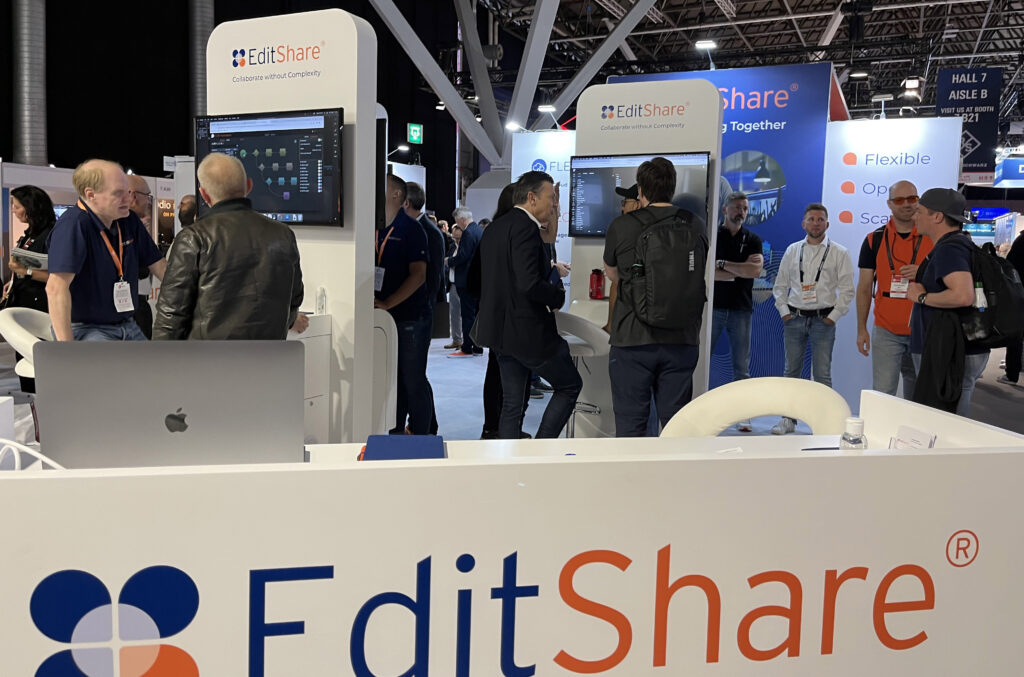
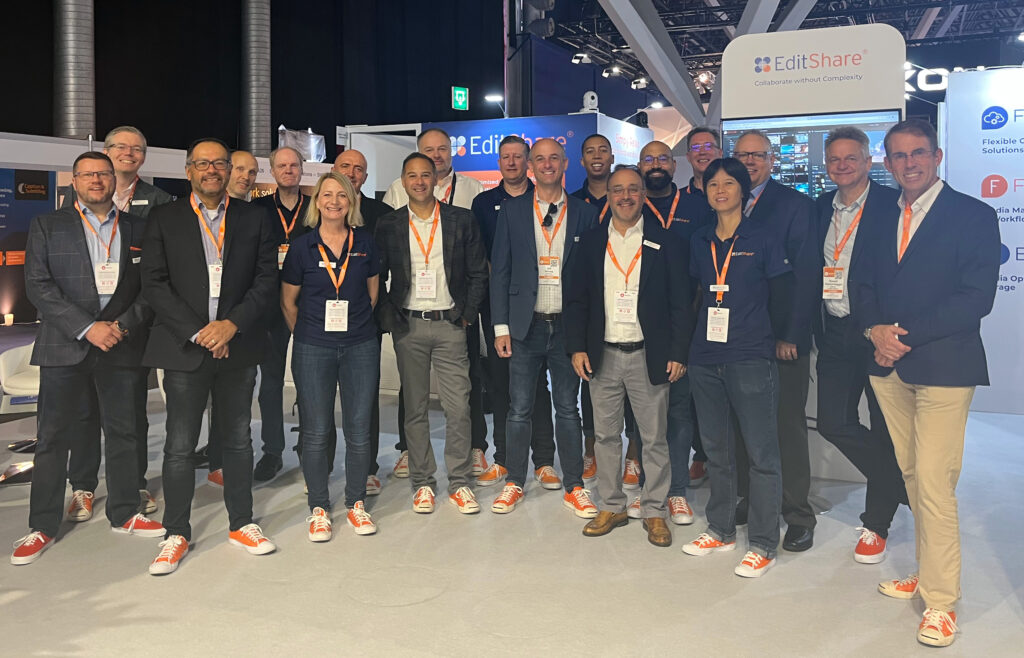
But like I said, our win isn’t what I’m most proud of. What makes me most proud is simply how our team showed up. Every company out there talks about culture. But anybody who visited the EditShare booth got to experience ours and feel just how special our team is. They got to see firsthand how EditShare’s core values make this not only a great place to work, but also how they inform our product decisions and corporate strategy, and how they help us simplify storytelling for hundreds of clients around the world. We dig deep. We are all around athletes. We have deep customer empathy. We are humble. We win together. We’re EditShare. We are excited and optimistic about today and the future.
We’re looking forward to seeing many of you as we continue the [tradeshow tour] in Q4 and into 2023. In the meantime, don’t hesitate to drop us a line if there’s anything we can do – or if you’d like to hear more of what’s standing out for us so far this year.
Hope to see you soon.
While it is definitely a hot topic at the moment, at EditShare we have been helping users create and operate successful cloud solutions for many years.
Those early adopters, and the many who have followed, tend to be organizations who are reasonably cloud-savvy. They are comfortable using EditShare FLEX Cloud Edit software, alongside tools like the Adobe® Creative Cloud suite and Teradici for remote desktop control.
To make the best use of the cloud for post-production, you have to be able to manage the processes and optimize post-production storage. The much-lauded advantage of the cloud is that you only pay for the computing power you use, so you have to be able to rapidly spin up instances as you need them, and equally quickly release them when you are finished.
Some organizations will have the detailed cloud knowledge to be able to implement their own management layer. For teams without this knowledge, we now offer FLEX Cloud Edit+. Essentially, Edit+ takes over the detail of the cloud management so you don’t have to get into its depths.
FLEX Cloud Edit has been around for a number of years, and gives post facilities the ability to edit in the cloud using their preferred software, including Adobe, Apple, Avid, Autodesk, DaVinci and more. What FLEX Cloud Edit+ adds is workstation management capabilities, and integrated file transfer acceleration.
As we are talking to customers, one of the biggest areas of concern about cloud migration is how to get the material up and down from cloud video storage. When you are dealing with the very large files of professional video, it is natural to see transfers as a potential major bottleneck.
To solve this, we have partnered with Data Expedition, a specialist in accelerated communication. Its product CloudDat can push data transfers up to 5 gigabits a second on a single instance, and instances can be stacked when exceptionally high performance is required. The EditShare integration allows for direct upload to FLEX storage for online use or to Amazon S3 for archive or to use with EditShare’s Seamless Proxy Editing feature.
This file acceleration is bundled into a turnkey system and it works out of the box. It also fits into the cloud philosophy in that you pay for it only while you use it: the license is by connected time.
The second major challenge is management of the cloud workstation environment to reduce costs and overheads for management. FLEX Cloud Edit+ integrates the HP Teradici Cloud Access Manager (CAM) to handle the management layer.
As an administrator of the system, the Cloud Access Manager allows you to allocate users to workstations, giving the flexibility to choose from allocating one user to one workstation, through to allowing all users access to a pool of workstations (or any combination between). From the end user perspective, they simply use the standard PC over IP client to connect to the CAM. Once authenticated, the user will be shown the list of workstations they have access to, which workstations are in use and the ability to remotely start a workstation if it is powered off. Not only does this simplify the user experience, it provides significant cost savings – you are only charged for the workstation whilst it is powered on.
FLEX Cloud Edit+ has built-in Active Directory management to support single log-in credentials for all users and functions, which can be used stand-alone or connected to existing Active Directories.
In summary, EditShare has worked with two other industry leaders, HP Teradici and Data Expedition, to build an integrated solution to cloud editing for users who do not want to get into the details of AWS administration. It is a seamless, turnkey experience: a fast on-ramp to the cloud for those businesses who would rather focus on their core creative skills.
Co-sell partnership strengthens bond with cloud market leader
Boston, MA – August 24, 2022 – EditShare®, the technology leader that enables storytellers to create and manage collaborative media workflows, announced it has joined the Amazon Web Services (AWS) Independent Software Vendor (ISV) Accelerate Program, a co-sell program for AWS Partners that provides software solutions that run on or integrate with AWS. The program helps AWS Partners drive new business by directly connecting participating ISVs with the AWS Sales organization.
Members of the AWS ISV Accelerate program are held to the industry’s highest standards and must undergo a comprehensive architectural and security evaluation to gain acceptance into the program. Proof of customer excellence was also reviewed to validate the successes EditShare customers have achieved across industry verticals. EditShare has an excellent track record in integrating cloud video storage into practical solutions which are used by media organizations from national broadcasters to boutique post houses. In turn, this makes it a proven partner for the AWS Partner Network (APN) Customer Engagement Program.
“More and more media industry leaders are making the transition towards cloud and hybrid production workflows, because they support new ways of engaging with creative talents as well as providing the resilience and security of business continuity,” commented Said Bacho, chief revenue officer at EditShare. “The AWS ISV Accelerate Program gives us another route to provide our FLEX cloud storage and asset management applications to AWS customers.”
“Participation in the AWS ISV Accelerate program is more than just signing a form,” Bacho added. “A company is invited to join when it has demonstrated both the technical strength of the solutions and their relevance in the ecosystem, through multiple sales and significant revenues. This is an important accolade for the EditShare platform, and we are proud to be a part of this program.” EditShare’s cloud and hybrid technologies for storage and workflow can be seen at IBC2022 on stand 7.A35.
EditShare is a technology leader that enables collaborative media workflows on-premise, in the cloud, or in a hybrid configuration. With customer and partner success at the heart of EditShare’s core values, our open software solutions and robust APIs improve workflow collaboration and third-party integrations across the entire production chain, ensuring a world-class experience that is second to none. The high-performance software lineup includes media optimized shared storage management, archiving and backup, and media management, all supported with open APIs for extensible integration.
EditShare’s cloud-enabled remote editing and project management technology was recently recognized by the National Academy of Television Arts and Sciences (NATAS) with a prestigious 2021 Emmy® Award for Technology and Engineering.