Cut to the Chase: The “Swiss Army Knife” of Productivity with Lucy Seaborne
In the high-pressure landscape of 2026, media teams are constantly tasked with delivering more content in less time. To stay ahead, your infrastructure needs to do more than just store files, it needs to act as a force multiplier.
In this installment of our Cut to the Chase series, EditShare’s Shanna is joined by FLOW product expert Lucy Seaborne to dive into three features that turn FLOW into the ultimate “Swiss Army Knife” for post-production efficiency.
1. EditShare One: Ending the “App Juggling” Era
For years, media professionals have been forced to bounce between different applications to search, log, and ingest media. This “context switching” is a silent productivity killer. EditShare One solves this by providing a unified, browser-based experience that serves as a single point of entry for the entire team.
Rather than managing a fragmented toolkit, users access tailored modules designed for their specific roles. Whether it’s a producer checking a simplified dashboard or a media manager scheduling complex ingest feeds, the interface remains consistent and accessible from any browser. By centralizing these tasks, teams can eliminate the friction of software silos and focus entirely on the creative output.
2. Speed Over Friction: The Seamless Proxy Workflow
Remote work is no longer a luxury; it’s the standard. However, the biggest hurdle for remote editors has traditionally been the “relinking drama” between low-res proxies and high-res masters. Lucy highlights how FLOW removes this bottleneck by automatically generating high-quality proxies the moment media hits the system.
This allows editors to begin cutting on a standard Wi-Fi connection immediately—even for 8K projects—without waiting for massive file transfers. The real magic happens during the finish: with a single toggle in the FLOW panel, the NLE switches back to the high-res media for final color and export. This creates a friction-free bridge between the rough cut and the final delivery, regardless of where the editor is located.
3. FLOW Automation: The Assistant Who Never Sleeps
Manual “grunt work”—like transcoding, moving files to the correct folders, and sending “media is ready” notifications—can consume up to 20% of a creative team’s day. FLOW Automation functions as a background assistant that handles these repetitive tasks without human intervention.
By building customizable, “set it and forget it” workflows, administrators can ensure that every file is QC’d, renamed, and delivered to the right department automatically. With hundreds of possible configurations, this engine doesn’t just save time; it virtually eliminates the risk of human error in file management, keeping the creative team focused on the story rather than the folder structure.
Reclaim Your Creative Time
The goal of FLOW isn’t just to manage assets—it’s to return hours to your production schedule. From a unified interface to an automation engine that handles the heavy lifting, these features are designed to help your team work smarter, not harder.
Watch the full episode below to see these features in action and learn how to get your creative time back.
Post-production workflows, whether for editing, grading, or film finishing, frequently face tight deadlines while also working with massive files, complicating team coordination. Pairing DaVinci Resolve Studio with EditShare’s infrastructure provides effective collaborative video storage and shared video storage solutions. This setup eases access to high-resolution assets, enhances performance, and supports smoother collaboration. Here’s how these tools integrate to optimize workflows.
Performance and Compatibility: The Foundation for Shared Video Storage
DaVinci Resolve Studio handles editing, colour grading, audio mixing, and VFX in a single application. Amazingly, they have integrated programs like Fairlight audio and Fusion into Resolve. It also supports native operation on Windows, Mac, and Linux, ensuring flexibility across setups.
EditShare’s EFS serves as robust shared video storage, organizing media securely in managed MediaSpaces. These spaces centralize footage, enabling quick tracking and access for projects. EFS provides massive 24 GB/s throughput across each NVMe node, allowing workstations to achieve over 15 GB/s read speeds utilising our native EFS drives. The native drivers stand out; they’re tailored for media tasks, delivering higher bandwidth for Resolve users compared to traditional IT mounting like SMB, which delivers slower speeds
Collaborative Video Storage: Resolve Project Server on EFS
For teamwork, Resolve’s Project Server operates on EditShare EFS nodes as collaborative video storage. It oversees projects, timelines, and permissions, allowing multiple users to contribute without overlap. For instance, an editor modifies a sequence, and collaborators view updates in real-time, with built-in controls to safeguard key elements.
The cross-platform support shines here, with native drivers for Windows, Mac, and Linux in both Resolve and EFS, eliminating setup hurdles in mixed environments.
Production Asset Management: Flow Panel in Resolve
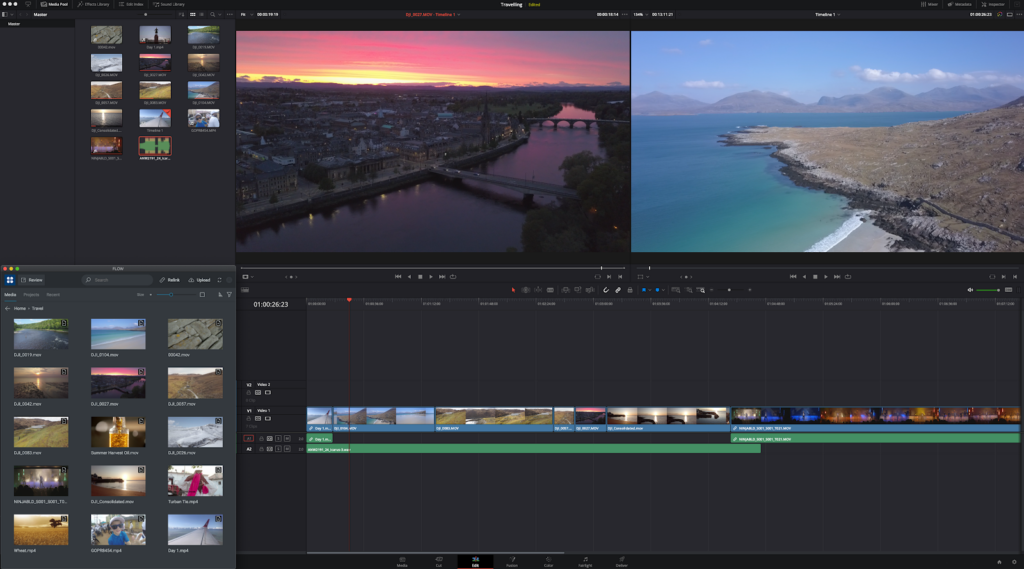
EditShare’s FLOW, a production asset management solution, embeds directly into Resolve for easy file handling. It enables pulling assets from ProRes proxies to file per frame masters without leaving the interface, sourcing directly from EFS MediaSpaces to maintain organization.
Remote users benefit from proxy workflows, where Flow preserves parent-child relationships between full-resolution originals and proxies. This allows fluid editing over limited bandwidth, with automatic relinking for final outputs, no manual fixes required.
Real-World Examples of Shared Video Storage and Collaboration
Consider a news team covering an election. Reporters ingest 4K footage into EFS MediaSpaces. Project Server manages permissions, giving the lead editor control over masters while others access proxies through FLOW. The native drivers’ bandwidth advantage over SMB accelerates speed. Combine it with Mediasilo and you get faster approval results.
In a documentary project featuring 8K drone captures, remote VFX specialists use FLOW’s production asset management for proxy-based creations. The director pulls full-res versions from collaborative video storage, with EFS ensuring uniform access and Project Server logging revisions to minimize back-and-forth.
Key Benefits for Post-Production Workflows
DaVinci Resolve Studio powers the creative side, while EditShare EFS excels in shared video storage and production asset management. This integration resolves issues like access controls, multi-OS compatibility, and proxy management, allowing focus on delivering polished results.
For teams seeking optimized shared video storage for DaVinci Resolve or tips on collaborative video storage setups, this pairing delivers proven efficiency.
How can broadcasters harness Adobe Premiere Pro’s flexibility without workflow chaos? In busy broadcast environments, Adobe’s openness and flexibility often lead to issues with shared assets going missing or offline, often disrupting deadlines. Helmut FX steps in as the project manager to structure Premiere Pro for broadcast teams. Combined with EditShare’s infrastructure, it delivers administrative control and creativity. Perfect for newsrooms working around the clock or sports productions demanding rapid turnarounds.
What Is Helmut FX, and How Does It Manage Premiere Pro?
Helmut FX centralizes Premiere Pro project tasks for teams. It automates creation, search, opening, editing, and archiving. Custom metadata filters make finding files instant. Role-based access lets admins set presets for users or groups, approving only vetted assets.
In broadcasts, Helmut FX adapts Premiere Pro’s open style to strict needs. It integrates with Active Directory for single sign-on and user groups. The Stream Debugger logs steps to pinpoint problems fast. Custom menus create workflows aligned to the news rhythm in a studio. Auto-backups with easy restores secure files in high-pressure scenarios. Hlemut also expands the ecosystem to other industry-standard applications, such as VizRT for graphics.
How Does EditShare’s EFS Provide Shared Video Storage and Collaborative Video Storage?
EditShare’s EFS offers high-speed shared video storage and collaborative video storage for media teams. Projects and media live in organized spaces on EFS, scaling to petabytes without lags.
What Role Does FLOW Play in Production Asset Management?
EditShare’s FLOW handles production asset management. Its Panel integrates into Premiere Pro, allowing editors to search, browse, and import clips without leaving the Adobe interface. FLOW eliminates file hunts; every user (subject to their granted permissions!) can access everything from a single library. FLOW’s API links straight to Helmut FX, enabling complete project workflows in large Adobe environments.
Helmut FX, FLOW, and EFS connect via APIs to orchestrate projects, users, mediaspaces, and assets. Helmut and FLOW maintain ongoing syncs, linking assets and metadata throughout the process. When starting a Premiere Pro project, Helmut automatically builds the mediaspace and matching FLOW location from templates. These templates can define storage paths, codecs, ingest/export rules, and essentials like scratch disks, frame rates, and bin structures for uniform outputs.
How Does FLOW Ingest Support Live News and Sports Workflows?
For news and sports, FLOW Ingest captures live feeds and routes them directly to editing. Ingest from baseband or NDI directing into Premiere Pro, minimizing delays. The growing timeline in Premiere Pro is perfect for breaking news or game highlights that need a fast turnaround
It connects to NRCS systems like Octopus. Reporters start stories from Octopus, syncing a project to FLOW for immediate Premiere Pro access. Editors import via the panel, cut footage, and export to playout. Octopus placeholders update with finals, streamlining from capture to air.
What Is the Value Proposition of Helmut FX, FLOW, and EFS Together?
This stack automates up to 20% of manual work, boosting creative time. Standardized setups and quick asset pulls accelerate news and sports edits for on-site or remote teams. A central dashboard searches projects, metadata, and sequences.
Efficiency Gains: Reduces errors and speeds collaboration.
Scalability: Handles growing teams and content volumes.
Security: Enforces access and backups for compliance.
For 24/7 broadcasts, it cuts delays, ramps up production speed, and expands easily. Broadcasters chasing peak efficiency get a setup tailored for the edit suite.
FAQ: Adobe Premiere Pro with EditShare and Helmut FX
Q: Does this integration keep editors in the Adobe UI?
A: Yes, FLOW’s Panel and Helmut FX ensure all asset management happens inside Premiere Pro.
Q: How does it support fast sports turnarounds?
A: Real-time ingest and auto-project setup cut edit times from hours to minutes.
Q: Is it compatible with NRCS like Octopus?
A: Fully, users in Octopus NRCS can automatically create projects in Editshare for end-to-end news flows.
Amsterdam, 12 Septemver 2025 – EditShare, the technology leader that enables storytellers to create and manage media, is unveiling major product advancements at IBC 2025. From new NVMe storage options to powerful automation features in FLOW, the announcements underscore EditShare’s commitment to delivering high-performance, collaborative solutions for modern production and post.
FLOW Automation: Smarter Remote Collaboration with “Send to Site”
EditShare is introducing FLOW Automation’s new “Send to Site” task, designed to make moving media and metadata between locations faster, secure and more reliable. Built on EditShare’s Multisite architecture and Warp accelerated transfer services, Send to Site enables direct transfer of high-resolution media, proxies, and metadata between EditShare systems.
This removes the need for manual sidecar files or redundant proxy generation, saving time and reducing errors. Integrated with EditShare One, teams can schedule entire media space transfers, trigger automated workflows, or simply right-click and send assets between locations.
The feature has been hardened in demanding real-world deployments and is available now in FLOW 2025.2.0.
Ultimate EFS Field: More Capacity, More Power On the Go
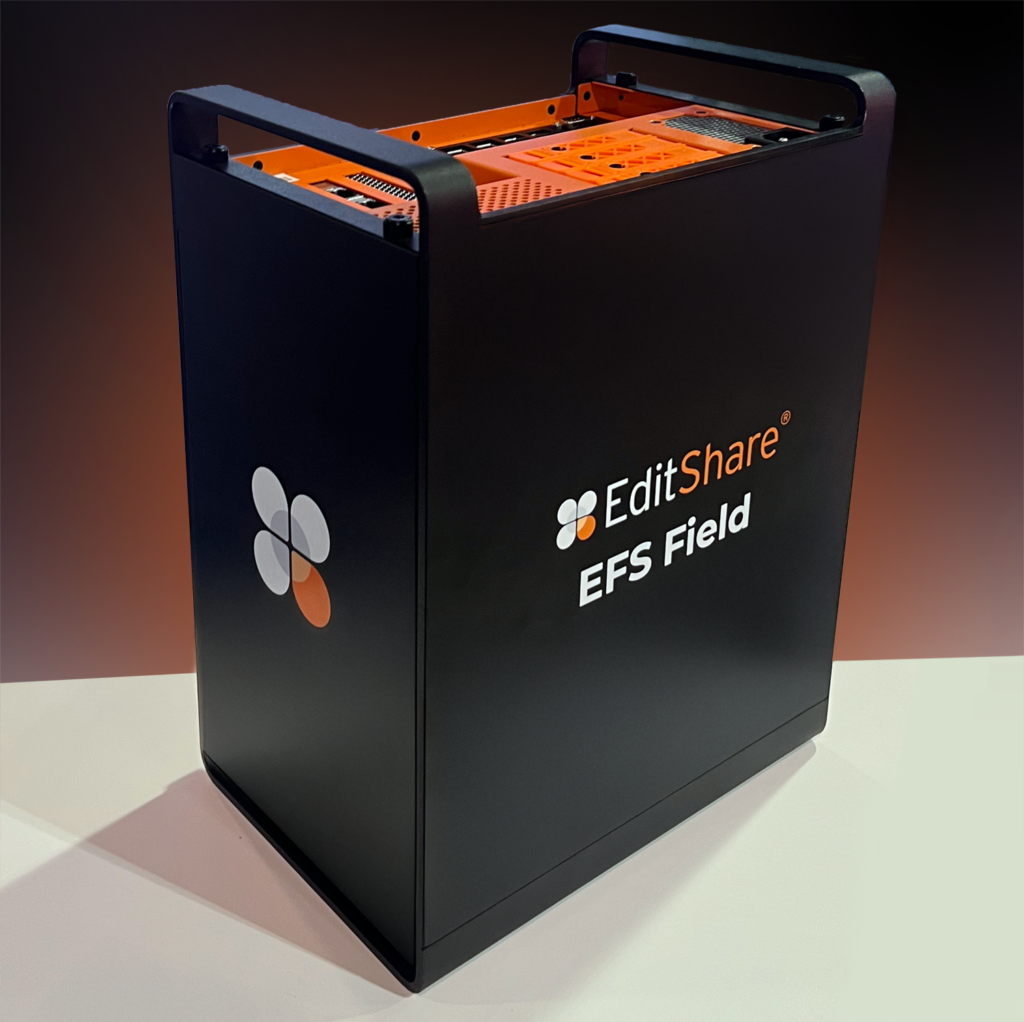
First launched at IBC 2024, the Ultimate EFS Field portable NVMe-powered storage has been dramatically expanded for 2025. Now offering up to 122 TB of ultra-fast NVMe storage, EFS Field is built for capturing dailies, editing in the field, and keeping productions moving no matter where the shoot takes place.
The system’s airline-friendly design and rugged build make it ideal for mobile crews, while full integration with the EditShare multisite ecosystem ensures footage can be securely transferred back to base with SwiftSync.
EFS Ultimate NVMe: New Options for Every Workflow
EditShare is strengthening its NVMe lineup with three complementary options:
Ultimate 24 NVMe NodeNow shipping. This flagship NVMe solution delivers extreme bandwidth for uncompressed, file-per-frame workflows including 8K finishing. With over 24GB/s aggregate performance, it enables real-time DPX capture and playback previously limited to costly SANs.
Ultimate EFS NVMe Lite, debuting at IBC 2025. NVMe Lite offers a more accessible entry point to NVMe performance. Featuring 8 NVMe drives in a 2RU form factor, it delivers up to 14GB/s read throughput per node, making XOR-protected NVMe groups achievable at lower cost and scale.
Ultimate Hybrid NVMe/HDD Node. Also new for IBC 2025, this hybrid system combines NVMe performance with high-capacity HDDs in a single chassis. Users can define separate storage tiers, moving projects between HDD and NVMe as needed without downtime. The hybrid node is ideal for facilities balancing everyday 4K offline workflows with occasional ultra-high-bitrate finishing projects.
“Today’s creative teams need storage and workflow tools that are as flexible as they are powerful,” said Tara Montford, EVP Sales and Co- founder EditShare . “From high-capacity field systems to cost-optimized NVMe nodes and intelligent cross-site workflows, we’re giving customers more options to accelerate production while keeping collaboration front and center.”
Press Contact Katharine Guy katharine.guy@editshare.com
Boston, MA, and Prague, Czech Republic, Aug 21, 2025: EditShare, a leader in collaborative media storage and intelligent workflow solutions, and Octopus Newsroom, a global provider of newsroom computer systems (NRCS), today announced a fully integrated, end-to-end newsroom solution to be showcased at IBC 2025 in Amsterdam (September 12–15).
The partnership combines Octopus’ story-centric newsroom platform with EditShare’s high-performance media infrastructure, enabling news teams to plan, produce, and deliver stories with greater speed, scalability, and collaborative efficiency. The joint solution empowers broadcasters to meet the demands of today’s fast-paced, multi-platform news landscape.
A Unified Ecosystem for Modern Newsrooms
Octopus NRCS is built for story-first production, supporting everything from single-channel broadcasters to global networks. With more than 100 third-party integrations via MOS protocol and APIs, Octopus enables real-time script editing, rundown management, and publishing to broadcast, digital, and social channels. Its open approach ensures compatibility with studio automation, playout, graphics, and AI-driven tools, giving journalists the flexibility to focus on storytelling.
EditShare complements this with robust media infrastructure, including:
EFS Shared Storage is a media-engineered file system delivering more than 20GB/s throughput and scaling beyond 20PB. High-availability configurations and native drivers for Adobe Premiere Pro, Avid Media Composer, and DaVinci Resolve ensure uninterrupted collaboration for editing teams.
FLOW Media Asset Management automates ingest, proxy creation, versioning, and AI-driven metadata tagging. Integrated with Octopus, FLOW accelerates content search and retrieval, giving journalists immediate access to assets during breaking news.
Multi-Channel Ingest captures satellite, field, and agency feeds for instant use in scripting, editing, and playout.
Vbox Rundown Integration connects directly with Octopus via MOS, allowing producers and directors to manage rundowns, preview assets, and adapt live output in real time.
Together, the two systems create a connected newsroom environment that allows teams to gather, edit, and deliver content faster, with confidence and flexibility at every stage.
Why It Matters for Newsrooms
The joint solution addresses key challenges facing today’s news operations:
Speed: Multi-channel ingest, NVMe-powered storage, and FLOW automation provide instant access to high-resolution assets, cutting prep time for editing and publishing.
Collaboration: Journalists, editors, producers, and directors can work in parallel across locations, supported by native integrations between Octopus and FLOW, enabling instant asset access and synchronized rundowns.
Scalability: From 32TB to more than 20PB, EditShare infrastructure grows with newsroom demand, from local stations to 24/7 global networks.
Open Ecosystem: Over 100 MOS and API integrations, including AI transcription, graphics, and playout, ensure future-ready workflows.
“Octopus NRCS is built to meet the demands of modern journalism, where speed and collaboration are critical,” said Gabriel Janko, COO of Octopus Newsroom. “Our partnership with EditShare at IBC 2025 showcases how our open ecosystem, combined with EditShare’s high-performance storage and asset management, delivers a unified platform that lets newsrooms focus on storytelling, not technology. This integration enables journalists to break news faster while maintaining creative control across all channels.”
“EditShare’s mission is to provide media teams with tools that accelerate workflows and foster collaboration,” said Tara Montford, EVP Sales and Co-Founder of EditShare. “At IBC 2025, our integration with Octopus NRCS demonstrates a true end-to-end solution for newsrooms. By combining EFS’s high-availability storage, FLOW’s intelligent media management, and Vbox’s MOS-driven rundown capabilities, we’re enabling broadcasters to deliver high-quality news with agility and confidence, no matter the scale.”
Experience It at IBC 2025
Visit Octopus Newsroom at Stand 6.C12 and EditShare at Stand 7.A35 to see the solution in action. Live demos will showcase the full workflow, from ingest and planning to scripting, rundown management, and playout, highlighting how the two companies are empowering news teams to deliver compelling stories faster across every platform
To book time with us at the show, please click here
About EditShare
EditShare is an Emmy Award-winning technology leader, supporting storytellers through collaborative media workflows across on-premise, cloud and hybrid architectures. It offers scalable storage and collaboration for media businesses and at every stage of the video production process from storyboarding to screening.
The software is inherently open, encouraging workflow collaboration, third-party integrations and content sharing across the entire production chain. Where required, the software is backed by high performance, high availability designed specifically for the demands of media storage, management and delivery. The comprehensive offering covers multi-level content storage for production and post, along with innovative asset and workflow management software, plus specialized and highly valued tools for content review and distribution, the creation of customized and branded pitch reels, and secure preview of high-value pre-release content.
About Octopus Newsroom Octopus Newsroom is a global leader in newsroom computer systems, offering Octopus 12 NRCS and iReporter User-generated content platform for modern news production. With over 400 customers worldwide, Octopus supports flexible, story-centric workflows and integrates with over 100 broadcast technologies, empowering newsrooms to create and publish efficiently.
Boston, MA, 1 August 2025 – At IBC 2025, EditShare debuts the next evolution of its platform, built for media teams that demand real-time collaboration, AI-driven post, lightning-fast media-aware storage, and easy-to-use hybrid workflows. From post and sports to news and archiving, EditShare blends technical muscle with creative flexibility. Visit Booth 7.A35 to see how we’re pushing performance and energy efficiency, without sacrificing adaptability
What You’ll See at IBC
What’s New at IBC 2025
Expanded EFS Storage Solutions EditShare will premiere the latest Ultimate EFS Nodes, optimized for high-performance media workflows at any scale. Preview all-NVMe systems tailored for demanding 8K, VFX, and DI tasks. The newest EFS Field, portable, rugged, and now offering greater capacity, live ingest, and secure, verified media transfer, will also be featured. Additional updates to the Ultimate EFS lineup will be announced exclusively at the show, offering a hands-on look at the future of production workflows.
Next-Generation Collaborative Workflows Discover EditShare’s advances in collaborative workflows: MediaSilo’s integration with Louper enables real-time, frame-accurate review sessions without lag, downloads, or version confusion, allowing global teams to comment and approve instantly. A live Atomos Camera to Cloud demonstration will show proxy uploads directly into MediaSilo for immediate access, accelerating fast-turnaround projects.
Integrated Specialist Workflows On-booth demos showcase powerful integrations: Lasergraphics 5K 16-bit DPX film scanning with EFS, frame-accurate NDI ISO ingest with multi-channel recording, and comprehensive newsroom collaboration with Octopus.
“From green performance at scale to workflow flexibility across post, production, and archive, we deliver innovation shaped by customer insight,” said Tara Montford, EVP of Sales and Co-Founder of EditShare. “Whether you’re scaling up, streamlining reviews, or refining remote workflows, our solutions help teams move faster, collaborate better, and reduce friction. We look forward to showcasing these advances in Amsterdam.”
To book time with us at the show, please click here
About EditShare
EditShare is an Emmy Award-winning technology leader, supporting storytellers through collaborative media workflows across on-premise, cloud and hybrid architectures. It offers scalable storage and collaboration for media businesses and at every stage of the video production process from storyboarding to screening.
The software is inherently open, encouraging workflow collaboration, third-party integrations and content sharing across the entire production chain. Where required, the software is backed by high performance, high availability designed specifically for the demands of media storage, management and delivery. The comprehensive offering covers multi-level content storage for production and post, along with innovative asset and workflow management software, plus specialized and highly valued tools for content review and distribution, the creation of customized and branded pitch reels, and secure preview of high-value pre-release content.
Press Contact Katharine Guy katharine.guy@editshare.com
For media teams managing massive files, tight deadlines, and fast-paced collaborative workflows, generic file servers just don’t cut it. What you need is shared video storage designed specifically for video production and post workflows.
In this article, we’ll explore how media-optimized storage differs from standard IT storage, and why making the switch can be a game-changer for creative teams.
The Key Differences Between Generic and Media-Optimized Storage
1. Bandwidth Over IOPS: Why Consistent Throughput Matters
Generic Storage: IT systems like databases and email servers are built for high IOPS (Input Output Operations Per Second). That’s fine for tiny, frequent operations like processing emails or database requests, but it fails under the sustained demands of high-bitrate video playback.
Media Storage:Shared video storage is optimized for high-bandwidth, low-latency transfers. It ensures reliable performance even during multi-stream 4K or 8K editing, no frame drops, no playback freezes, just uncomplicated real-time editing. This is essential for collaborative editing for Adobe Premiere Pro and DaVinci Resolve workflows.
Why it matters: Scrubbing through 8K RAW footage during a live client session? You need throughput, not IOPS. Media storage delivers performance you can count on.
2. File Management Tools That Actually Work for Video
Generic Storage: File services like Google Drive or Dropbox lack the intelligence to handle media workflows. Version control is clunky. Metadata is manual. Integrations with creative tools? Limited or nonexistent.
Media Storage: Media storage platforms include production asset management tools that allow smart versioning, automated metadata tagging, and seamless integration with NLEs like Adobe Premiere Pro, Avid, and DaVinci Resolve.
Why it matters: With advanced video review and approval software built into the workflow, your team stops wasting time searching for files and starts focusing on creativity.
3. Scaling Without Downtime or Drama
Generic IT Storage: Scaling often means downtime, migrations, and complex reconfigurations, aka production nightmares.
Media Storage: Media storage for remote post production teams scales. Add new nodes, expand bandwidth, or enable remote collaboration all without interrupting ongoing projects.
Picture this: You’re in post on a global ad campaign. An editor scrubs through 8K timelines smoothly. Your colorist joins remotely to adjust the grade. The client reviews and approves clips in real time using your video review and approval software. Meanwhile, a new storage node is added overnight without downtime. That’s what the best shared storage for video editing teams enables.
Delays in post-production workflows can cost thousands per day in idle talent, missed deadlines, and rework. Investing in shared video storage prevents bottlenecks, protects your schedule, and supports real-time collaboration for every team member no matter where they are.
Why Media Teams Deserve Better
Media professionals shouldn’t have to wrestle with tech built for spreadsheets and PDFs. You need:
Shared video storage tailored to high-res workflows
EditShare’s EFS, FLOW and Mediasilo solutions combine high-performance shared storage with powerful workflow tools, purpose built for post production.
New Enhancements in EditShare One
The latest FLOW release, version 2025.1.0, delivers powerful new capabilities to media managers, streamlining workflows and making asset management more intuitive than ever. With enhanced scanning, uploading, and automation tools, EditShare One Organize simplifies complex tasks, saving time and improving efficiency. Let’s explore how these new features empower media professionals.
FLOW’s extensive range of applications often left users confused about which tools to use and how to install and maintain them. This limited user accessibility and acceptance and its why we created EditShare One. A simple browser based Interface that enables all users to access all of FLOW’s powerful tools for a variation of different workflows.
Time-consuming, manual processes are a thing of the past. FLOW Automation eliminates repetitive tasks like tagging, transcoding, and file delivery, allowing media teams to focus on creative work.
What’s New?
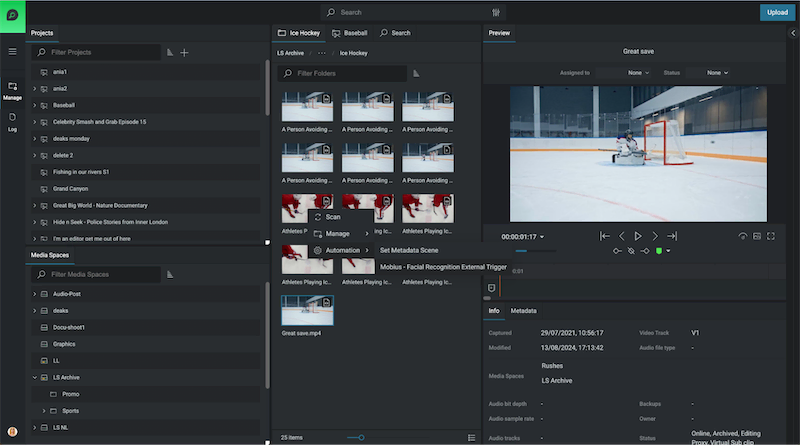
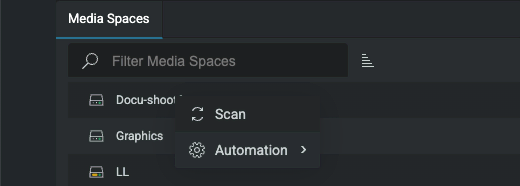
Right-Click Automations: Users can now trigger automation workflows directly from the Organize module, applying them to single or multiple assets with ease.
Automate across Projects or Media Spaces: Automate processes across entire projects, reducing manual steps and ensuring consistency.
Simplified Access to Templates: View only available automation workflows by asset type. Only relevant templates are displayed, keeping the interface clutter-free.
With these improvements, EditShare One is faster, easier, and more accessible—allowing teams to move media seamlessly through their production pipeline.
Keep Your Media Database Up to Date
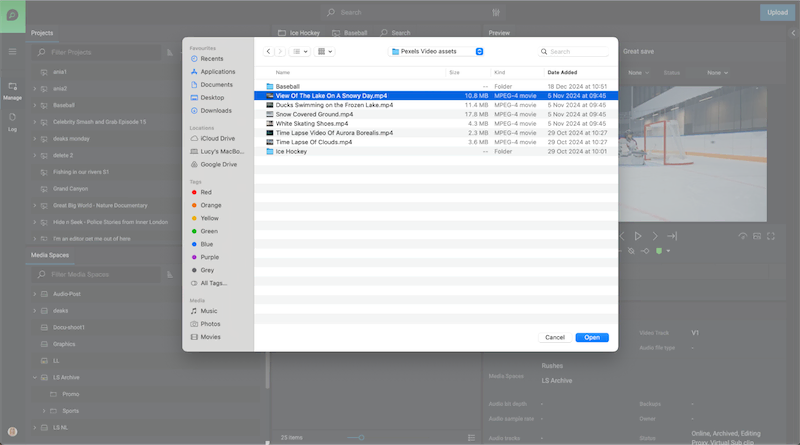
Scan Assets Directly from EditShare One
Keeping track of media assets is crucial for efficient project management. The new scanning functionality enables users to update the FLOW database effortlessly—without leaving the Organize module.
How It Helps
On-Demand Scans: Update media metadata and add new assets to the database anytime.
Two Scan Modes:
Quick Scan – Ideal for detecting and adding newly created or modified files.
Normal Scan – Updates metadata for all new and modified files, keeping asset details current.
Direct Access in Organize: No need to navigate to FLOW Control for scans—everything is accessible where you work.
This feature ensures your database remains accurate and up to date, improving searchability and media organization.
Upload Files Faster, Smarter, and with Greater Control
Enhanced Upload Capabilities
Managing late arriving assets can be challenging, but the improved Upload function simplifies the process, giving users more control over their media.
Key Benefits
Batch Uploading: Add multiple assets at once, reducing downtime between uploads.
Advanced Metadata Options:
Prevent duplicate uploads with the Fail if asset already exists option.
Generate streaming proxies during upload.
Apply custom metadata tailored to your workflow including metadata triggers to automate workflows.
Global Ignore List: Admins can restrict unwanted file types, preventing unnecessary clutter in the system.
With these enhancements, uploading assets is more efficient and customizable than ever before.
Navigate and Manage Assets More Intuitively
Flexible layouts
Media professionals need a fast, streamlined way to organize and move assets. The new Flexible layouts in EditShare One – Organize, introduces a more intuitive layout designed for seamless asset handling
Why It Matters
Customizable Interface: Show or hide panels to tailor the workspace to your needs.
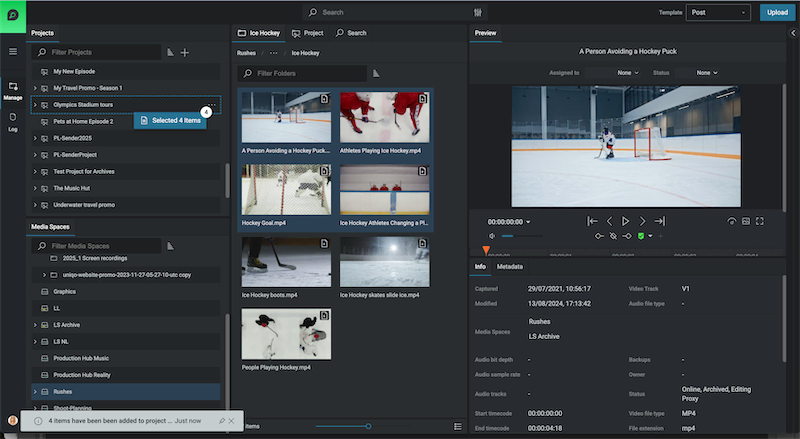
Multi-Select Dragging: Select multiple assets using keyboard shortcuts and move them together effortlessly with fewer clicks.
New Manage Viewpoint: Complimentary to the Log Viewpoint, the new Manage view stacks panels vertically providing simultaneous visibility of Media Spaces and Projects. Each view point can be utilized to maximise the layout specific to the task in hand from managing media to logging
Enhanced Searchability:
A new Results Panel categorizes assets into three tabs: Media Space, Project, and Latest Search Results.
Tabs remain visible even when navigating, eliminating redundant searches.
Breadcrumbs have been relocated for clearer navigation paths.
This update dramatically improves efficiency, making it easier to organize and access media in large-scale projects.
Performance Enhancements for Large-Scale Workflows
As more teams scale up operations, FLOW’s automation engine has been optimized for handling multiple workflows daily. A new Status View provides real-time insights into automation performance, allowing administrators to monitor system activity at a glance.
Get Started with FLOW Today
The FLOW 2025.1.0 release redefines how media professionals manage assets—offering automation, improved navigation, and more control over media workflows. Whether you’re handling high-volume uploads, triggering automated tasks, or optimizing media organization, EditShare One Organize ensures your team works smarter, not harder.
Boston, MA – 1st May 2025 — EditShare®, a global leader in collaborative media workflow solutions, will unveil its latest advancements at CABSAT 2025, delivering a new standard for performance, scalability, and intelligence across creative production environments. Live demonstrations at Booth S1-D20 will spotlight the newUltimate EFS Field, a revolutionary, portable NVMe-based storage platform engineered to provide production-proven performance and simple multi-site collaboration from on-set to the studio.
Headlining the showcase is the Middle East debut of FLOW AI, powered by FLOW Ultimate GPU engines. Built as a multimodal intelligence engine, FLOW AI transforms media workflows with state-of-the-art capabilities including multi-language speech-to-text (STT) transcription, scene detection, facial recognition, logo detection, and advanced OCR (optical character recognition). By combining high-speed asset management with intelligent automation and accelerated smart tagging, FLOW AI arms creative teams to find, organize, and deliver content faster, smarter, and at a global scale, obliterating old production bottlenecks and setting a new standard for speed, precision, and domination in modern media
For asset management, the new FLOW Core Unlimited licensing model removes seat restrictions, allowing media organizations to onboard users instantly and scale operations on demand. From boutique studios to global production houses, FLOW Core delivers true operational flexibility and scalability without limits
In addition to these headliners, EditShare will highlight:
An advanced newsroom workflow integration with leading NRCS vendor Octopus, delivering fast-turnaround, collaborative journalism for modern news teams.
All EFS nodes now feature multi-channel Live NDI support, enabling real-time, high-performance live production.
The stunning All-in-One 410, redefining compact storage with up to 600TB of raw capacity per node ideal for facilities demanding big performance in tight spaces.
The debut of expanded storage capacities across the entire EditShare solution portfolio, providing even greater flexibility for high-volume, high-performance environments.
“At CABSAT 2025, we’re bringing the full force of EditShare innovation,” said Tara Montford, Co-Founder and EVP of Sales at EditShare. “From blazing-fast performance to limitless scalability and smart automation, we’re empowering creative teams to tell bigger, bolder stories faster and from anywhere.”
EditShare staff will be on hand at CABSAT to talk about all of the latest enhancements, find out more on stand S1-D20 at CABSAT, or click here to get in touch.
About EditShare
EditShare is an Emmy Award-winning technology leader empowering storytellers with collaborative media workflows designed for on-premise, cloud, and hybrid environments. Its scalable storage and collaboration solutions support media businesses at every stage of video production, from storyboard to screen.
With an open architecture, EditShare fosters workflow collaboration, third-party integrations, and content sharing across the entire production chain. Its high-performance, high-availability design meets the rigorous demands of media storage, management, and delivery. The comprehensive suite includes multi-tiered content storage for production and post-production, innovative asset and workflow management tools, specialized features for content review, secure preview of pre-release materials, and the creation of customized branded pitch reels, ensuring a seamless and secure media production process.