Over the past year, we’ve received a ton of feedback from SHIFT users and customers of our legacy platforms MediaSilo and Wiredrive on what they’d like in a media management system. The most common themes were metadata file-tagging, better global search and navigation, and smaller file tiles to make better use of screen space.
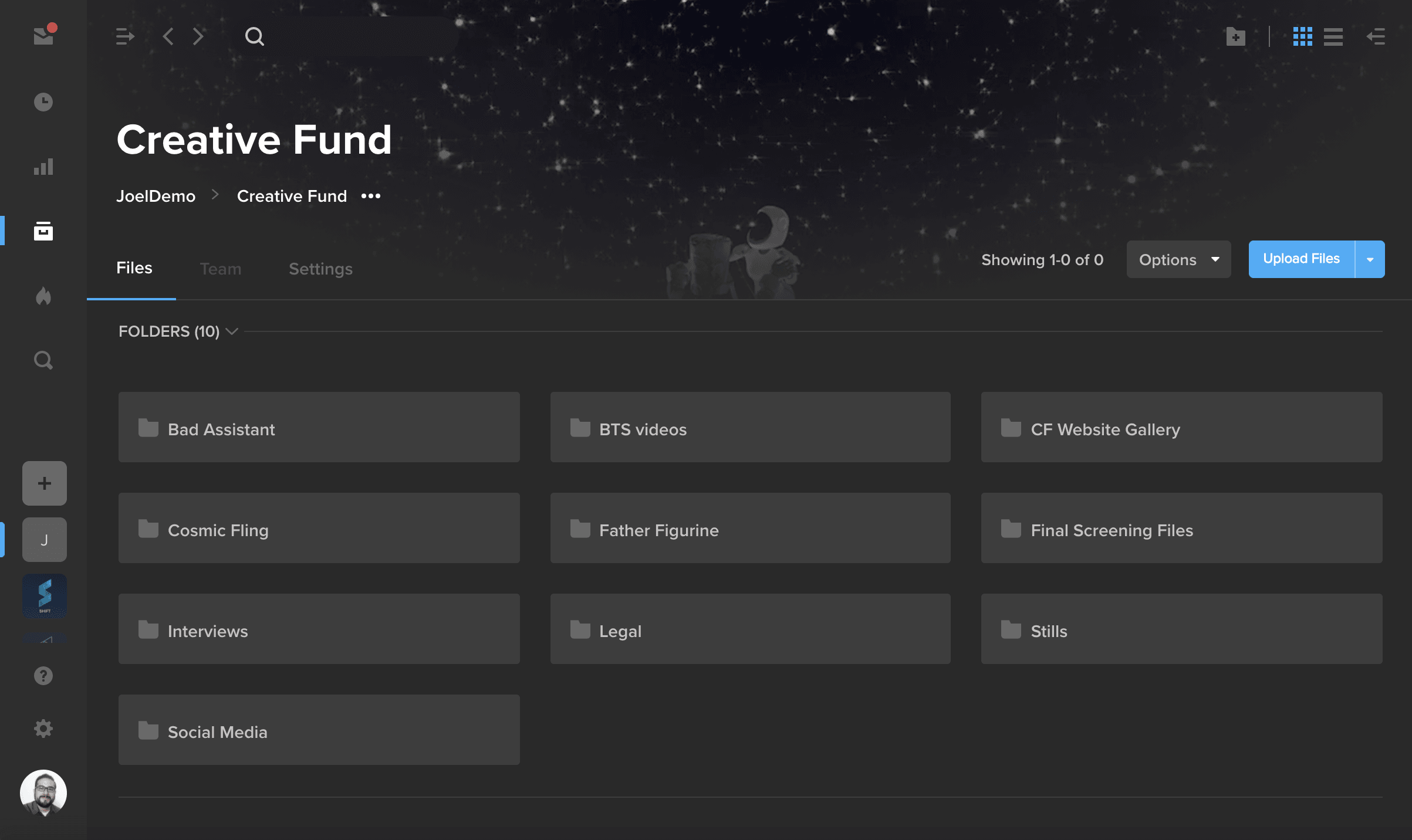
Good news: We’ve solved for all of those requests — and more! Take a look at SHIFT’s new and improved Projects. It’s the most secure and user-friendly asset management platform you’ll find to manage your content at scale.
Here are the major improvements you’ll see in SHIFT:
New navigation, global search, and resizable sidebars
The first step to a productive workflow is a clean interface. You’ll notice that the project header collapses as you scroll, and folder tiles are now condensed. The new top navigation includes back and forward buttons, and the search bar helps you find what you need no matter which page you’re on in Projects. Plus, the left and right sidebars are resizable, so you can stretch your folder tree to reveal long folder names or hide it altogether for a more minimalist look and feel.
List view and resizable file tiles
List view is here! That’s right — now you can get a more compact view of your files. In both gallery and list view, you can customize your page size and the number of asset tiles that appear on the page. In gallery view, you can also adjust the size of asset tiles.
New upload manager
Here, we added the option to open a file’s asset detail page or its file location directly from the Upload Manager once the upload has finished processing. Other features remain intact: SHIFT still offers private network uploading, so you can enjoy faster upload speeds than the rest of the Internet.
Need to move or copy files between folders and projects? You can still do that by dragging single or multiple files and dropping them onto the folder tree.
Metadata tagging
When you have hundreds or thousands of files, it’s important for your team to know how to find the right ones at the right time. That’s why we introduced metadata tagging. In addition to plaintext tags, you can now create categories like location, director, and client. Set your categories and tags and quickly find files with the advanced search and filters on every page.
In-line Team and Settings tabs
To make things easier for admins and project owners, we took what previously lived in the Edit Project pop-up window and created a new home for it in your new Team and Settings tabs. Use the Team tab to view, add, or delete project members or to change their roles.
Settings is where you can brand your project thumbnail and banner images, as well as manage things like lifecycle policies and SafeStream (our real-time, personalized watermarking feature for keeping your content cybersecure) if you’re on a paid account.
Explore all these changes and more by logging into app.shift.io. Don’t have a SHIFT account yet? Sign up for a free account or reach out to sales@shift.io with any questions.
You can now use SHIFT’s SFTP integration to upload both files and folders.
To get started, right-click on any project or folder, go to the Advanced options, and select “Create SFTP Credentials.” Enter these credentials in your SFTP application, connect to SHIFT, and start uploading folders to your SHIFT projects.
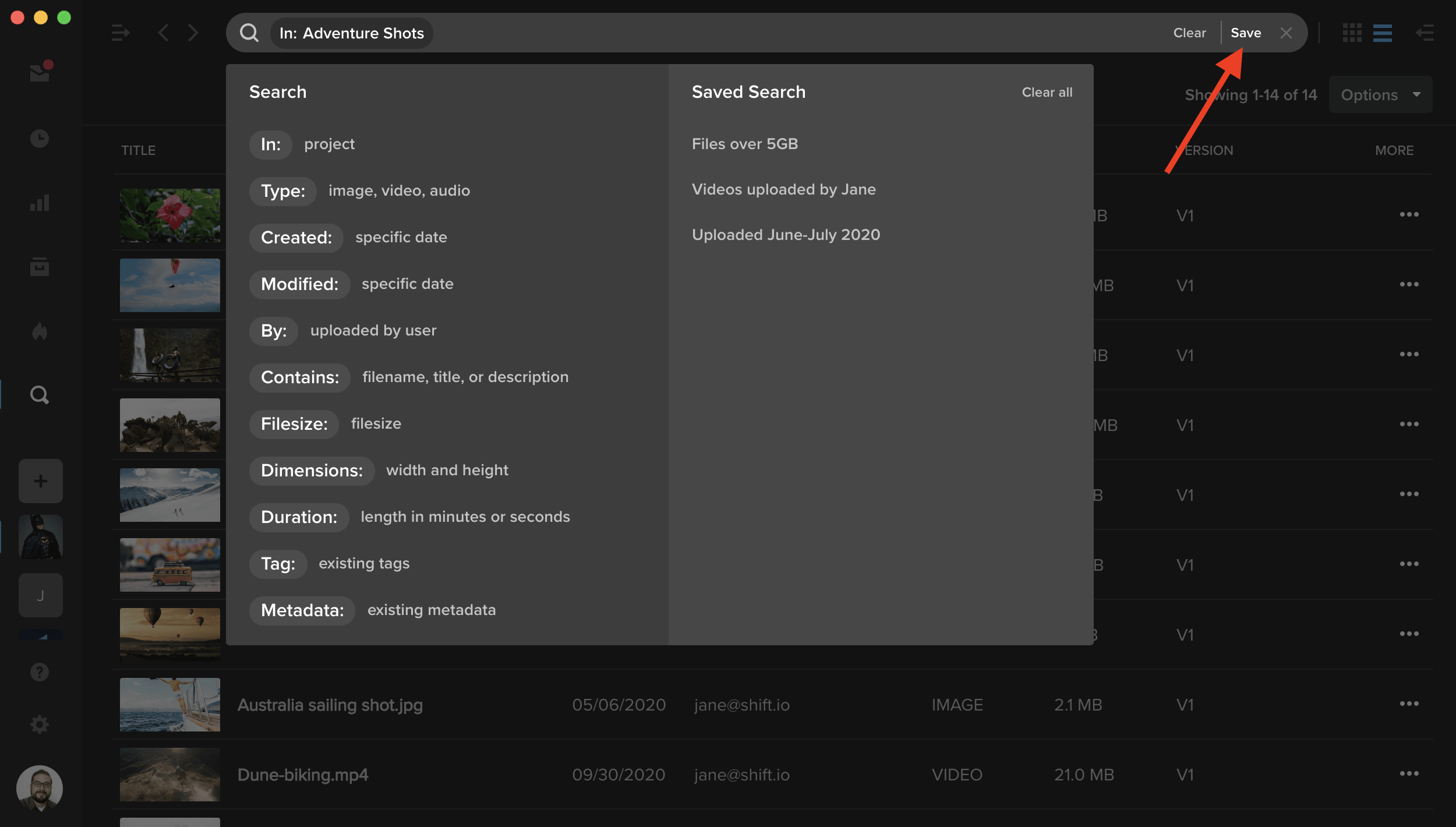
After you perform a search, you can now save the filters you used and reuse it at any time. Simply click the “Save” button on the right side of the search bar, and enter a name for your search. Whenever you access the search menu, your saved searches will appear in the right column.
Note: Searches are saved on a user basis. A saved search is only available to the user who created it.
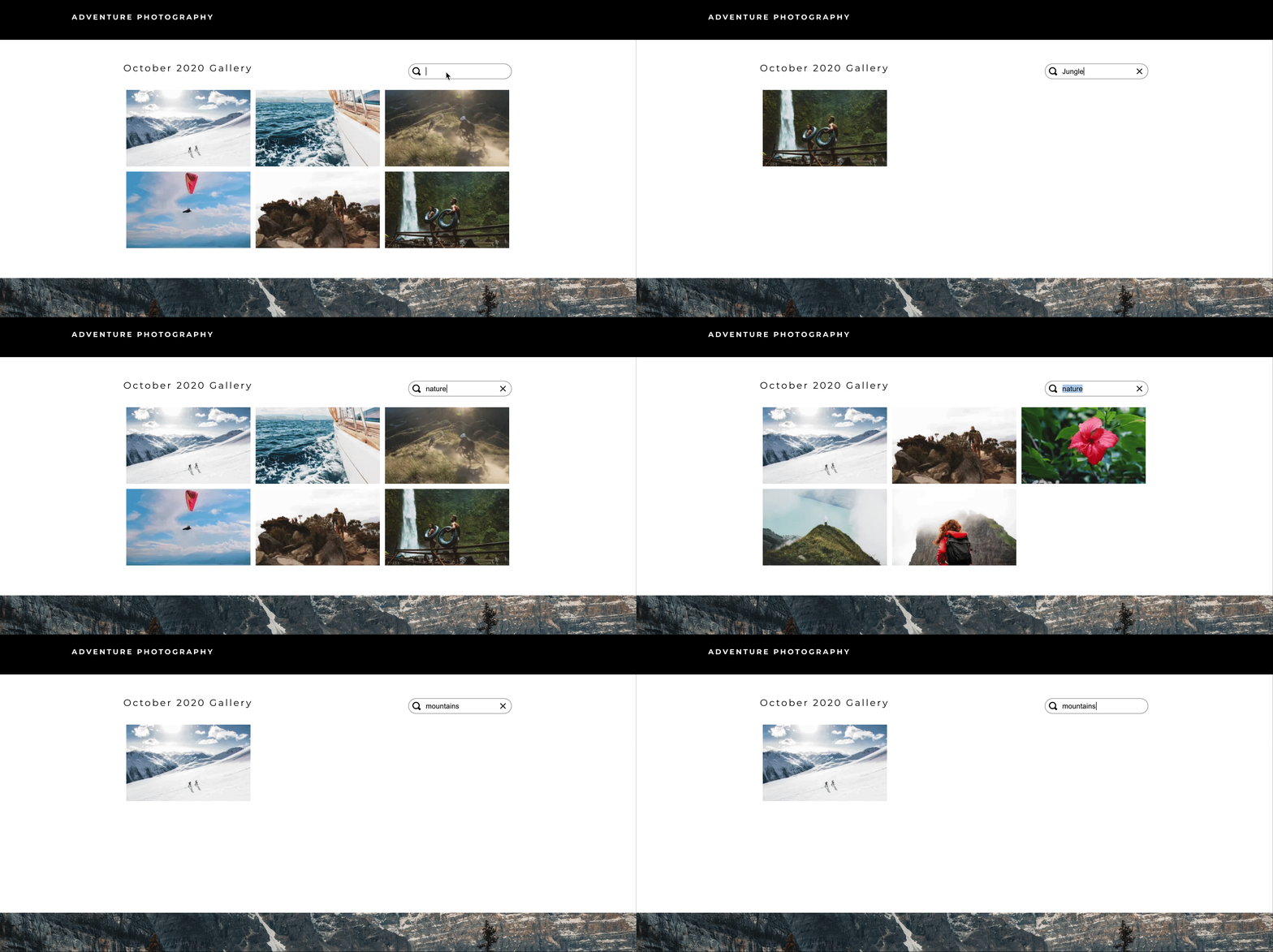
The Spotlight template builder now includes a “Search” element to make your galleries searchable.
- Add a search bar to your template and use the properties panel to link the search bar to a media gallery.
- When your audience enters text in the search bar, your gallery will display any item whose title, description, or tags matches the search term.
** This webinar has passed. Please fill out the form to access the recording.
With fewer opportunities for in-person teamwork, collaborative, geographically-distributed media production workflows have quickly become a must have for traditional and nontraditional producers of video. In this webinar, AWS and EditShare will demonstrate how quickly and easily a cloud-based production studio can be spun up to connect teams all over the world. We will discuss the best practices in enabling cloud-based production with a focus on:
- Scalable and cost-effective content production storage and media management on AWS
- Balancing performance and capacity vs. cost
- The ability to provide collaborative workflow environments with any mix of leading content tools
- Open APIs for quick integration into media services and applications
See how easily an edit in the cloud environment can be provisioned and made operational in under an hour while hearing from AWS and EditShare technology leaders on best practices for production in the cloud.

Our guest Amanda Sayeg reflects on her own personal experiences often being the only woman on a film crew, and how female representation is most needed in positions of power on film productions.
The following interview is an excerpt from our video series, Production – In Conversation. To watch the full interview and see more video content, click here. Or you can listen to the Shift In Conversation podcast here.
——
Amanda Sayeg – Producer/Director
Grace Amodeo – Marketing Manager – Shift Media
Grace:
Tell us a little bit about yourself.
Amanda:
My name is Amanda Sayeg and I’m from San Paolo, Brazil. I’ve lived in LA for a little bit over six years now working on productions. Mainly music videos, commercials, short films and documentaries.
Grace:
For those not familiar with film production, would you say that it is a male-dominated industry?
Amanda:
Yes, absolutely. And I think we are moving forward, but we have a lot of work to do on that. Overall I think it depends on the production. I’ve worked on some smaller productions that were female-led, which is wonderful, but overall bigger-sized productions are 60-70% male.
Grace:
Why do you think that is?
I think it’s not, unfortunately, something exclusive to the film industry. I think it’s part of all industries, it’s part of the society we live in which is a male-dominated society.
Amanda:
I think it’s not, unfortunately, something exclusive to the film industry. I think it’s part of all industries, it’s part of the society we live in which is a male-dominated society. You see in positions of power not only just males, but white males — so it’s a racial question too. It’s part of a very archival concept that we are still breaking from. The industry that we work for works like any other one, you have a hierarchy of position and power and roles. But also as an industry that forms opinion, we create a very big impact in the society and in trends and behavior. So it makes sense that everything we have lived so far also has a lot of white male dominance.
Grace:
Have you ever had the experience of being the only woman on a film set? What was that like?
Amanda:
Yes, I have. Many times. And I’ve been lucky for the most part to work with amazing people, and amazing men that I admire and respect a lot. Many of them are role models to me. But it is different when you have a crew that is only male, and you can’t relate to anyone. When you see people that you look up to it’s very different when you see a man versus a woman. How do you see yourself in those positions? That’s a huge part of it, it’s very important to have representation on set. Production is problem-solving, 24/7. That’s what the role is. So by having different perspectives, that helps a lot.
Grace:
When you have a position of authority on a film set, like as director or producer, do you think people relate to you differently than they might relate to a man in the same position?
Amanda:
Yes. Coming from the structure we are coming from where it is a male-dominated industry, when you start to have women in positions of power there can be a lot of second-guessing the authority of a woman that’s in charge. Something that bothers me a lot is if you are strong and you know what you want and you are taking charge of the situation, for men those traits are respected and admired by everyone. But when you are a woman that can easily come across as being upset, or bossy, or loud. It can seem like something small or silly, but the impact that it has makes you rethink your behavior or think you are doing something wrong. There is so much pressure on women to be nice and to please everyone, and those things can’t work well together on a film set. This pressure is immensely bad for us.
There is so much pressure on women to be nice and to please everyone, and those things can’t work well together on a film set. This pressure is immensely bad for us.
It creates such a hostile environment to work in. That second-guessing feeling from the crew, and even from women too! It’s something that happens with us as well. It’s something we need to break too, the work is not just for men. I had an experience on set working with this woman that wore her hair up in a ponytail the whole time. At the end of the day I ran into her in the bathroom and she had this long, beautiful hair when it was down. I asked her why she always wore her hair up, and she said, “I feel that we are not really respected and listened to on set. So I just always wear a ponytail, so I kind of look more like a man”. That made me so sad, because I know it’s true and I know she had reasons to do that.
Grace:
Why do you think it is important that films have female directors and producers? What difference does it make?
Amanda:
Our job is to tell stories that represent our society. In order to tell the stories and in order to portray an accurate picture, we need to have diverse people behind the scenes. We’re slowly seeing diversity on camera, but it’s very important in order for the stories to be told right that we have representation behind the cameras too. Those are the people writing, those are the people crewing up, those are the people making decisions. There is so much more authenticity and truth when you not only see diverse actors on screen, but you have a whole crew of diverse people supporting that actor. It’s important to come from a place of truth. I can write any story I want, but the work we are doing is meant to connect people. I don’t think we can truly connect if it doesn’t come from a place of authenticity and truth.
Grace:
Do you think the audience can see that difference when they are sitting in the theater watching that film?
Amanda:
Absolutely. From women to women, we know what we go through. And we know what we are going to keep going through. When stories come from that place, as an audience you’re listening to and watching stories that you can relate to versus watching content that tells you what you should be based on some stereotype that society creates. There is such a difference in seeing big female directors and big producers and writers, because you can project and you can see yourself in positions like that too. The representation is so important to inspire young girls and adults at any age. When a little girl watches a movie and of course she thinks, “I can be an actress”. But if she sees an amazing female director, she knows that she can do that, or she can produce, or she can write, she can do absolutely anything. Until very recently we couldn’t really see that because there were just so few of us.
If a young girl sees an amazing female director, she knows that she can do that, or she can produce, or she can write, she can do absolutely anything.
Grace:
What is your vision for the future of representation in the film industry?
Amanda:
It definitely looks like a much more female-led industry. And of course there is space for men, there is space for everyone, but right now we are in a moment where we need to prioritize. Guarantee that there is female representation in all departments. We need to create more situations for female-led projects and fully female crews. There are so many associations and organizations doing a beautiful job on that, and it is so valuable. I know this is going to keep going because there is no way back right now, thankfully. There is still a lot of work to be done, but the future is much brighter for us. We’re going to get there. We’re also realizing as women that we don’t need to compete against each other. Society has made us believe that it’s a competition, but it’s not. I see women bringing other women on board and supporting each other, there’s such a beautiful sisterhood going on. The more we enjoy that the farther we are going to go together, there’s going to be more space for us at the table.
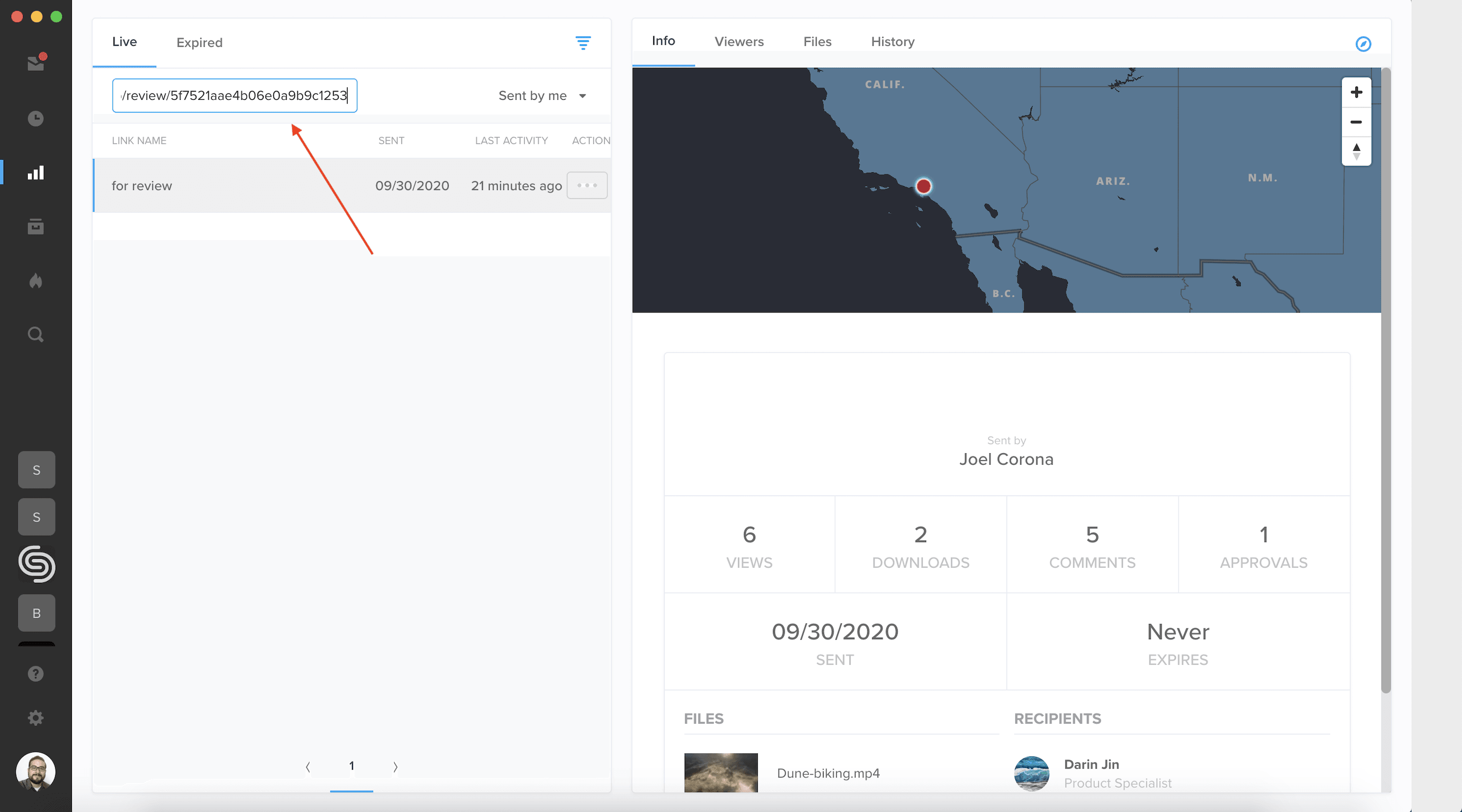
In addition to searching for a review link by its title, you can now search for your link by entering its URL. On the Reporting page, paste your URL in the search bar in the top-left to access your link’s view counts, viewer information, and other activity details.
You can now access global search right from the Projects homepage. Use the search bar at the top of the page to search for assets by metadata, uploader, and other properties.
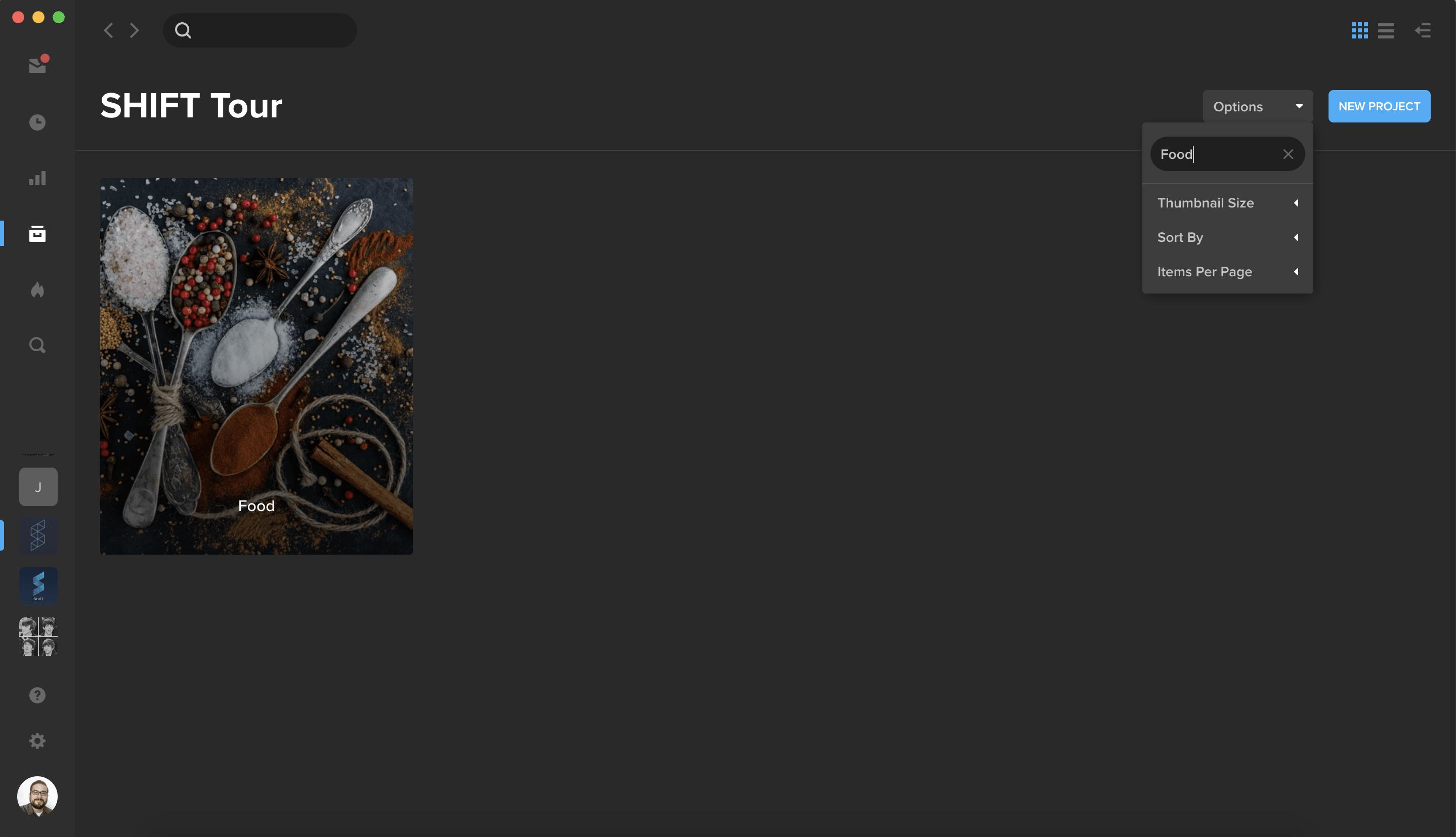
To quickly find a specific project, click the Options button and enter your project name in the “Filter by title” field.
Automating more than 50 Workflows, EditShare’s Secure Hybrid Media Foundation Ensures Zero Downtime for TV5’s Remote Productions
Boston, MA – October 1, 2020 – EditShare®, a technology leader that specializes in collaboration, security, and intelligent storage solutions, is helping broadcasters and media companies increase remote content production output to meet growing programming demands with its EFS shared storage and FLOW media management solutions. Phillipine-based TV5, a subsidiary of telecommunications giant Philippine Long Distance Telephone company (PLDT), implemented EditShare’s collaborative solutions at its Reliance and Novaliches operations, leveraging FLOW’s smart workflow and cloud capabilities to automate more than 50 manual workflows and increase remote production content output by up to 40%.
“With the pandemic, many staff had to work from home and thus we were unable to create enough new program content for our own schedule and for our partner channel and networks. To fill the programming demands, we used EditShare to tap into our archives, repackage content and share programs with our sister channels. We were able to use FLOW to automate many tasks and work remotely without having to add resources or increase the team’s workload,” states Angelito R. Salazar Jr., head of post-production, TV5. “EditShare professional services was key in helping us design the automated workflows. They dug deep into our operation to understand the review, approval and delivery process, helping us create the best possible workflow design.”
TV5, one of three main broadcasters in the Philippines, is dedicated to creating and delivering news, sports and thematic programming for the Philippine community and beyond. EditShare’s end-to-end smart workflow solutions offered a secure network enabling the TV5 team to remotely access content and facilitate the often extensive review and approval process and share newly created program packages from existing archives across sites and partner channels.
“It is EditShare’s open platform and cloud innovation that enables our clients to adapt their workflows and reimagine their business operations” states Alan Dishington, vice president of sales for APAC, EditShare. “TV5 is a prime example of how customers are using EditShare’s solutions in a secure hybrid cloud to successfully facilitate and automate their remote productions while massively scaling content output all without increasing resources. It’s a winning technology combination that is helping business thrive.”
To learn more about TV5 and EditShare, please read the customer spotlight: https://editshare.com/resources/
About EditShare
EditShare is a technology leader in networked shared storage and smart workflow solutions for the production, post-production, new media, sports, and education markets. Whether you need on-prem, cloud, or hybrid solutions, our products improve efficiency and workflow collaboration every step of the way. They include media optimized high-performance shared storage, archiving and backup software, a suite of media management tools and a robust set of open APIs that enable integration throughout the workflow. Customer and partner success are at the heart of EditShare’s core values ensuring a world-class experience that is second to none.
©2020 EditShare LLC. All rights reserved. EditShare® is a registered trademark of EditShare.
Press Contact
Cat Soroush
Zazil Media Group
(e) catherine@zazilmediagroup.com
(p) +1 (631) 880-9534