EditShare y MoovIT se asocian para potenciar los flujos de trabajo con Adobe
EditShare and MoovIT have formed a global alliance to deliver an integrated workflow solution with ‘under the hood’ administration and media management for Adobe enterprise workgroups. The workflow features EditShare’s EFS and FLOW for high speed shared storage and media management and MoovIT’s Helmut workgroup administration tools, designed specifically for Adobe Premiere Pro, After Effects, Media Encoder, and Audition.
The combination is unbeatable. Here’s why.
Adobe is often the default choice for content creators worldwide. But, what’s lacking is large scale workflow automation and management. EFS, FLOW, and Helmut, together coordinate and simplify the complexity of large-scale workflows, keeping Adobe professionals comfortable within their sphere of familiarity while boosting efficiency and providing tools for enterprise-level media orchestration.
The EFS shared storage and FLOW media management combination ensures assets are available in real-time for any large-scale workgroup collaboration. Across these enterprise workflows, there are many intricate steps that must be followed to optimize asset sharing and collaboration. However, real-world experience tells us that things don’t always happen by the book. Media can come from any location, in any unexpected or unapproved format. The assistant editor drops in some cool stock FX clips they found online but forgets to put them on the shared storage. The freelance editor is working on a different Adobe software version or OS up until delivery day. The editor chooses the wrong export settings or uploads the file to the wrong client.
Adobe users working in a collaborative production environment most likely experience one or more of these headaches. Software versions that are not compatible with each other, content that was not put in the correct folder, nor on the correct shared storage project, or in the right format and codec and so on. In smaller Adobe workgroups, this type of housekeeping can be managed manually. In larger workgroups, the day to day editing and VFX fragments are amplified. The bigger the group, the more manual clean up required until it becomes unstructured chaos that is unmanageable. In these situations, an additional layer of administration is needed – utilizing the Helmut tools in combination with EFS and FLOW.
Helmut offers customizable project templates that enable a facility to pre-determine the best in-house workflow and standardize those processes across all projects. Users can pre-determine elements such as storage locations, codecs, ingest and export presets, and project-based tiered storage workflows. For example, if an editor drags media directly from a downloads folder, Helmut will ensure it’s flipped to the appropriate codec and placed in the correct shared folder, making it available to all editors in the right format. No downtime – the editor can start working immediately. And for administrators and facilities management, have project-based control over storage locations, render nodes and archive systems from one user friendly dashboard.
The MoovIT and EditShare core technologies are tightly integrated via APIs to dramatically improve large-scale Adobe workflows. Working as a seamless technology solution, Helmut, together with EFS and FLOW creates the consistency necessary to be able to quickly scale workflows of any size. Helmut and FLOW maintain a continuous dialogue across all stages of the workflow, efficiently keeping assets and metadata connected with projects for an optimized, orchestrated media production environment.
And this combination is fully customizable.
FLOW is an open platform with a robust set of APIs that can deeply connect with the following Helmut capabilities to supercharge your workflow:
Automated Project Management & Format Standardization – Streamline workflow administration and file delivery specifications across workgroups using pre-set templates to standardize key project management elements such as scratch disk location, fps, raster size, directory structure and bin layout. Underlying conversion engine ensures Adobe project files, regardless of the version they were created in, are universally compatible.
Offload Rendering – Leveraging your existing infrastructure, Helmut can offload render intensive projects such as encoding and graphics.
Searchable Database – The missing link for many broadcasters and large media workgroups, Helmut will index projects including folder structures, metadata, assets and sequences into a searchable database with data visualised in a dashboard to easily identify and locate content.
Automated Administration Tasks – Create metadata driven rules to automate housekeeping functions such as delete, move, archive and manage projects and project-related assets.
The team at MoovIT have designed Helmut tools with simplicity in mind. Easy deployment with straightforward templates and under-the-hood file migration do the heavy lifting for you!
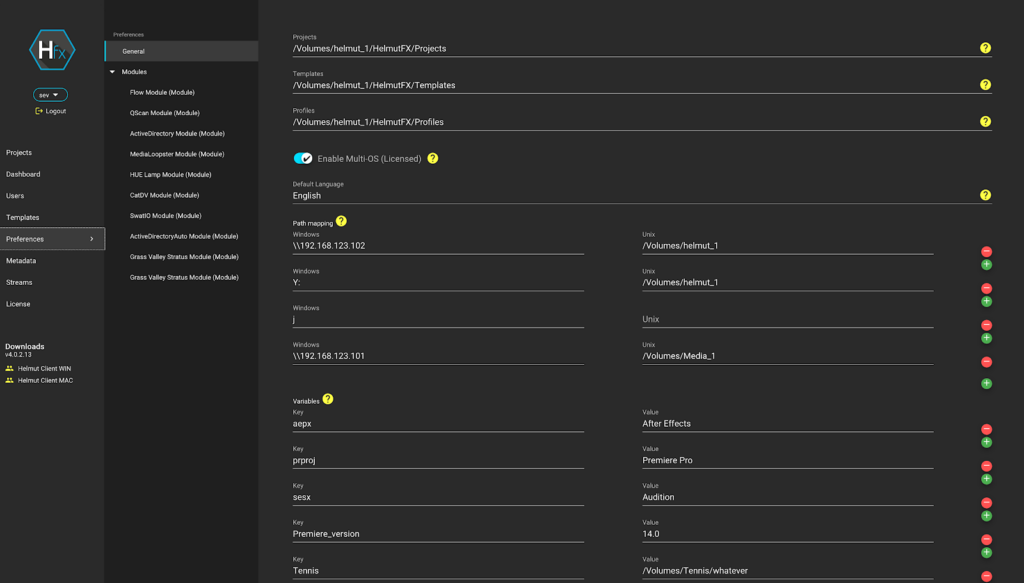
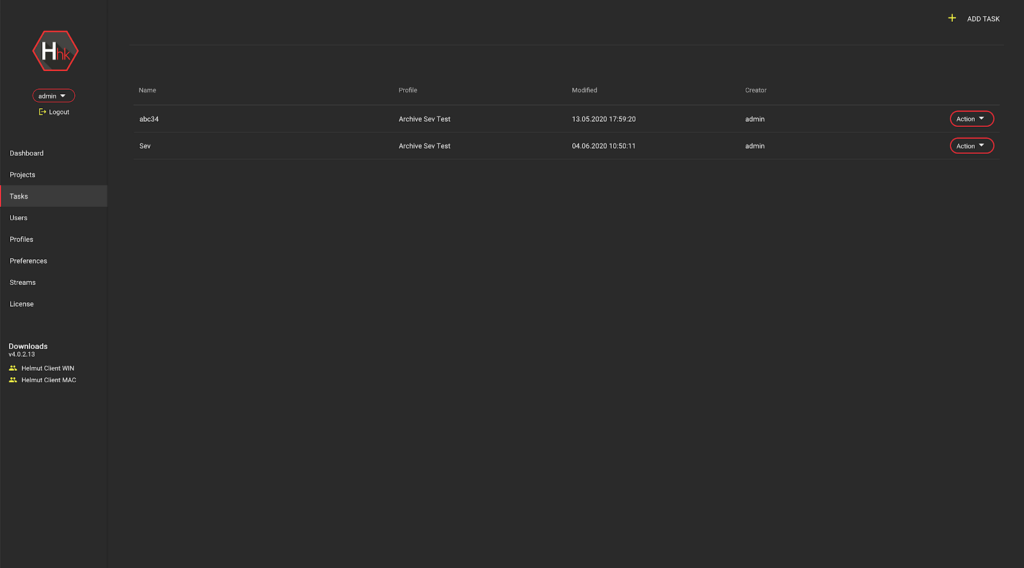
Helmut UI snapshot – configure permissions for users and projects
Helmut UI snapshot – organize your Adobe projects, content and folders for archive
Creatives are working at full steam, with deadlines getting shorter and projects becoming ever more complex. Various industry reports indicate that creatives spend up to 20% of their time on administrative tasks or one day a week. Eliminating administration bottlenecks and freeing creatives up from mundane tasks is what this winning combination offers. If you are in an Adobe workgroup and you need to collaborate on projects with multiple stakeholders, located on premise or dispersed across different locations, the powerful combination of Helmut, EFS, and FLOW can supercharge your Adobe workflow.
If you are interested in gaining back 20% of your time, reach out to our team today and get an in-depth demonstration.
** This webinar has passed. Please fill out the form to access the recordings.
Efficient and powerful production workflows leverage EditShare technology and automations, enabling creators to focus on telling their stories. By partnering with MoovIT and their Helmut suite of Adobe workgroup project management tools, we enhance FLOW media management to handle more of the mundane, error prone, and overly complex steps of your production workflow. Join us to explore the benefits of FLOW and Helmut for Adobe creators, from simple automations to a complete workgroup optimization platform.
** This webinar has passed. Please fill out the form to access the recordings.
Efficient and powerful production workflows leverage EditShare technology and automations, enabling creators to focus on telling their stories. By partnering with MoovIT and their Helmut suite of Adobe workgroup project management tools, we enhance FLOW media management to handle more of the mundane, error prone, and overly complex steps of your production workflow. Join us to explore the benefits of FLOW and Helmut for Adobe creators, from simple automations to a complete workgroup optimization platform.
End-to-end solution for collaborative editing and project management leads to big workflow gains for large Adobe workgroups, on premise and in the cloud
Boston, MA – July 21, 2020 –EditShare®, a technology leader that specializes in secure media management, collaboration and intelligent storage solutions for video content creators, and MoovIT GmbH, developers of the Helmut suite of Adobe workflow tools, announced today an exclusive global partnership that transforms Adobe enterprise workflows. As the use of Adobe creative tools in distributed collaborative environments continues to grow, the need for a robust media management environment that connects users, content, and media becomes even more critical for workflow efficiency. EditShare’s EFS shared video storage solution and FLOW media management, integrated with the Helmut suite of products, form the industry’s most comprehensive project management and remote editing workflow solution for enterprise Adobe workgroups.
“To succeed in the evolving world of video production, our customers are looking to EditShare to provide open solutions that allow them to rewire their workflows and adapt,” states Tom Rosenstein, vice president of business development, EditShare. “EditShare’s expanded partnership with MoovIT allows us to bring to our Adobe customers a powerful, adaptable set of tools to address those challenges head-on. The Helmut platform coupled with EFS and FLOW, embodies the workflow structure users require. Powerful, yet simple, collaborative Adobe Premiere Pro project management alongside adaptive media production management. It’s the complete package professional editors have been waiting for.”
Helmut solutions are used by leading broadcasters, newsrooms, sports leagues, corporations and new media organizations for their robust project management and administration, enhancing creative workflows for large distributed Adobe workgroups.
“Partnering with EditShare gives us a significant advantage in developing collaborative editing workgroup solutions for Adobe customers. EditShare’s strategy of empowering creatives through a robust set of open APIs enables us to bring the full potential of Helmut’s project management capabilities, creating better workflow and richer end-user experience for Adobe editors and artists,” states Wolfgang Felix, managing director of MoovIT. “The unbeatable combination of EFS, FLOW, and Helmut provide a resilient media foundation with the flexibility for large Adobe workgroups to work on premise or in the cloud, which is critical for supporting today’s climate of rapidly changing business models.”
Scalable to the enterprise level, EFS, FLOW and Helmut integrated workflow offers a media technology foundation that combines storage, media management, workflow automation, and workgroup management for a proven all-in-one solution.
EditShare is the exclusive reseller* of the Helmut suite of products. To obtain more information, please visit here.
Learn More about Powering Collaborative Adobe Workflows with EditShare and MoovIT on July 22 Join EditShare and MoovIT on July 22, 2020 at 9am EDT and again at 2pm EDT for a joint webinar on how to ‘Automate and Optimize Adobe Workgroups with FLOW and Helmut’. To register for one of the time slots, please visit: https://editshare.live/webinar072220session1pr (9am EDT) and https://editshare.live/webinar072220session2pr (2pm EDT)
*Excluding the DACH region.
About Moovit MoovIT provides video and IT solutions for broadcasters and organisations of all shapes and sizes. The company, headquartered in the Schanzenviertel district of Cologne, specialises in the development and support of workflows for all aspects of post-production, news and archiving at the interface between video and IT. MoovIT leverages particular expertise in the field of technical solutions for sports reporting. In addition, the company develops web-to-video solutions, localisations, remote editing systems and video hosting products used by organisations across a highly diverse range of industries. MoovIT’s customers include broadcasters, production companies, sport event organisers, agencies, and enterprises from a wide range of backgrounds.
About EditShare EditShare is a technology leader in networked shared storage and smart workflow solutions for the production, post-production, new media, sports, and education markets. Whether you need on-prem, cloud, or hybrid solutions, our products improve efficiency and workflow collaboration every step of the way. They include media optimized high-performance shared storage, archiving and backup software, a suite of media management tools and a robust set of open APIs that enable integration throughout the workflow. Customer and partner success are at the heart of EditShare’s core values ensuring a world-class experience that is second to none.
Press Contact Cat Soroush Zazil Media Group (e) catherine@zazilmediagroup.com (p) +1 (631) 880-9534
Customers have long been asking for the ultimate in remote workflow flexibility. Whether that means hiring video editors from distant geographies or simply letting employees and contractors work from home, production houses no longer want to be tethered to their machines. COVID-19 has only accelerated this request. As a part of EFSv, we recently announced the capability to achieve true seamless proxy editing. This patent-pending feature enables the first cost-effective cloud editing infrastructure, overcoming one of the primary objections of migrating media workflows to the cloud.
Cloud editing economics –block storage vs object storage
Until today, the questionable economics of editing in the cloud has been one of the biggest objections to adoption. With EFSv seamless proxy editing, we have dramatically reduced the costs, making cloud editing economically viable for anyone. When we say dramatically better, we mean reductions in the region of 50-75% compared to current cloud editing infrastructure implementations.
When it comes to editing video in the cloud, assuming you plan to use standard applications such as Adobe® Premiere® Pro, Davinci Resolve, Media Composer®, ProTools® or Adobe® After Effects®, you need your shared cloud storage to appear as though it is just another drive attached to your workstation. That is to say, the storage needs to have a filesystem that supports all normal operations such as read, write, seek, modify, The filesystem also needs to use standard mechanisms to tell an application if your username or group has permission to read, write, and lock a file for exclusive use. To protect your media you also need file system auditing to see who is accessing files within your storage. And, of course, you need storage that’s fast enough to play back your media in real time. These are all features that can be realized easily in the cloud using block storage.
Unfortunately, block storage in the cloud is expensive. However, there is a lot of value that cloud providers are bringing on top of standard disk storage. Behind the scenes you are getting file protection and robust security for your data with high performance guarantees.
Being able to utilize object storage in the cloud (like AWS S3) would be much less expensive. However, out of the box, it doesn’t meet the requirements of media creation applications because it lacks the features needed to create a real filesystem and instead focuses on simplicity, scalability, and reliability. By limiting the features of object storage, cloud providers can offer significant cost savings. You only pay for the exact number of bytes you store, rather than reserving a whole block of storage that ends up only being partially used.
But what if you could make object storage appear as a standard filesystem so that you could enjoy the cost benefits and also get it to work with editing, mixing and visual effects applications? In fact, that’s part of what we have done with EFSv — making object storage look exactly like a normal file system, regardless of whether it’s connected to Windows, MacOS or Linux. But there’s still one more challenge to overcome that is specifically problematic for video and audio editing – latency.
Object storage is fine for throughput, and when you play a video from a streaming platform such as Netflix, Amazon Prime Video, or Disney+, you are almost certainly streaming the video from an object storage solution. These streaming platforms deal with latency (the time it takes to read the first byte of video) by having you wait a small amount of time to watch the first segment of video (you know, that little bit of buffering you see before the video plays) and then, because the videos are generally played linearly, it is always possible to keep ahead of the user, disguising the latency.
While this works for streaming services, such a solution is not acceptable for video and audio editing – by its very nature these are non-linear activities. When you edit video even a small amount of latency will impact your workflow as you attempt to read multiple video files simultaneously and jump quickly back and forth between different files on your timeline.
Current object storage trades latency for resilience and throughput. Indeed most object storage solutions not only have higher latency than is acceptable for video editing, they also have inconsistent latency. So the challenge is to find a way to blend object and block storage into a single filesystem in a manner that lets you have your cake and eat it too — in other words, get the cost savings of object storage but the low latency of block storage that’s needed for editing.
Fixing the headaches of proxy editing
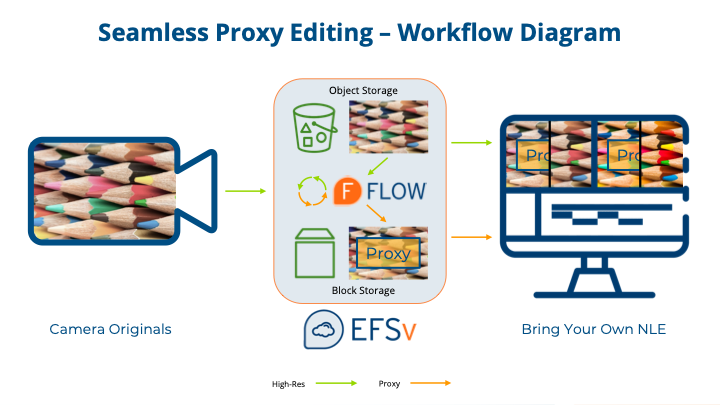
EditShare isn’t the first company to come up with the idea of blending object and block storage. Since people first started editing in the cloud, a common approach to mixing the two types of storage and saving money has been to put high resolution original media into object storage, and then transcode everything to smaller, just good enough low-resolution proxy files for rough editing and store just those proxy files on the more expensive block storage. Because proxies are small, they don’t use up a lot of block storage — and so you save money. Then, at the end of a project, you restore from object storage back to block storage just the files that made it into the final cut and you “conform” your sequence back to high-quality originals.
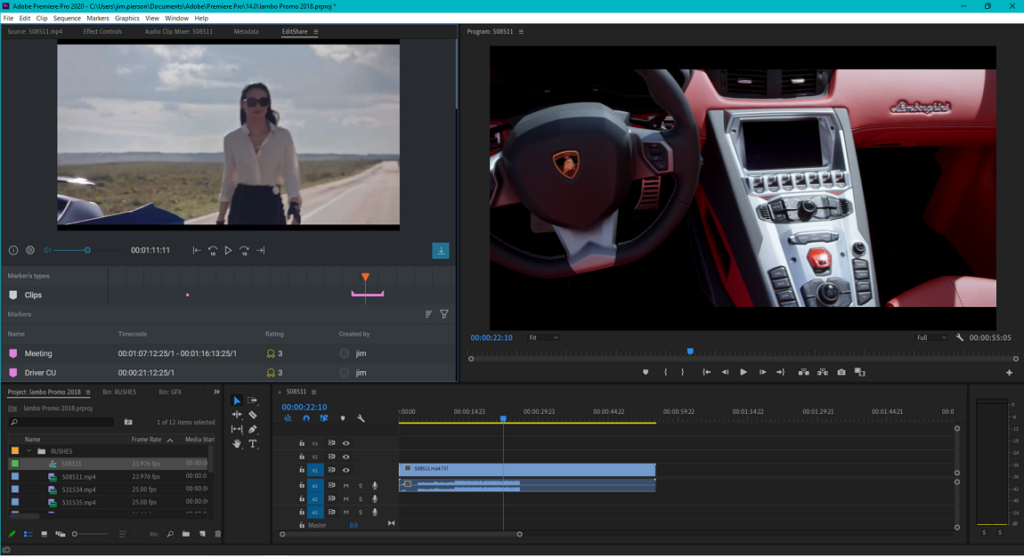
Adobe UI accessing content via FLOW panel and toggling proxy with high res content
Unfortunately, this kind of proxy workflow is fraught with problems.
Just ask anyone who has ever had to proxy edit a project. First, there are inevitably shots that don’t look great in the proxy version, and it’s really frustrating to have to wait for the conform to find out a shot isn’t any good. Second, it’s impossible to create accurate effects that match colors when you are dealing with proxy files. Third, it’s no fun to have rough cut and fine cut screenings based on your proxies because these screenings will never give the best impression. Fourth, at the end of an edit, it takes time to copy high-resolution files back to block storage and if your project is coming down to the wire, every minute counts. And finally, there’s nothing worse than conforming an edit and getting a “media offline” or “nothing relinked” message when you attempt to relink back to the original.
It’s probably safe to say, no one loves the offline and conform workflow. While it is not a ‘broken’ system, it’s far from ideal. And it doesn’t even save as much money as it could, because at the end of the day you still have to copy at least some content back to expensive block storage.
A seamless proxy workflow designed for everyone
The EFSv seamless proxy editing feature solves all these problems. It is open — we have yet to find a NLE that it doesn’t work with — and fundamentally, it changes the economics of editing in the cloud.
EFSv lets you put your high-resolution files into cost-effective object storage but makes those files appear as if they are on a normal mounted block storage file system. At the same time, EFSv provides the scalable high performance block storage needed for low-latency access to proxy files and renders. Proxies can be generated by our FLOW media management system, or by your own tools. Both high-resolution and proxy versions are accessible at all times to your media creation application. And when you import clips into NLEs such as Premiere Pro using our new FLOW panel, the panel “teaches” the application about the existence and location of both high-resolution and proxy versions, so you can toggle back and forth between versions any time you want. While you won’t be able to play back your whole timeline from the object storage — mostly because of the latency — you can nonetheless view the original high-resolution clips at any time (including for color correction), and when it comes time to rendering your timeline for a screening or for the final deliverables, you just toggle to (or link back to) the originals and hit the render or export button. There’s never anything to copy or restore from object storage. Instead, you render directly from object storage — a process that is not slow, by the way. The momentary latency you get when first accessing a file and that can frustrate timeline playback won’t make any noticeable difference for rendering.
Our new system not only works with cloud workstations you connect to by advanced remote desktop software such as Teradici, but it also works spectacularly over a VPN — so if you want to keep working from home with the editing application running on your own workstation or laptop, this is also an option. You can get the same proxy/high-resolution toggling — and this even works with macOS-based workstations (something you cannot run in any cloud today). And if you need to download proxies instead of working with them “in place” from central storage, that’s supported too.
There’s a reason we refer to this as “true” seamless proxy editing — because it is truly seamless.
For creatives, the new system eliminates any compromises on quality or workflow, and for the people who look after the finances, the news is equally good. Better. Faster. Cheaper.
Cost savings – it’s BIG.
The savings you get with EFSv seamless proxy editing are tremendous. For example, you may have a media library of about 100 terabytes for a project — consisting of a little over 2,000 hours of original media assuming you’re using a 100 Mb/s codec. With traditional block storage , storing this content for editing would cost about $4,500/month. On top of this, you’ll require fairly powerful storage and workstation instances to handle the bandwidth of this high-resolution content. Suddenly, cloud-based editing may stretch outside of your budget. In fact, in many cases, your high-resolution codec will be of a higher bit-rate; for example many ProRes codecs exceed 500 Mb/s.
Seamless proxy editing resolves these issues. By taking down the content to a lower bit rate for editing we can reduce your block storage needs down to the 2-4 terabyte range, a factor of 25x or more. In this scenario, your total storage costs (object and block) will come down to something closer to $1400/month. And since we will be editing proxy files, less expensive compute instances can be used for storage management and NLE workstations. Your high-resolution files will continue to be stored in cheaper storage tiers, where they can be accessed instantly by the NLE with no additional workflow effort required. An added bonus – with your high-resolution files residing in object storage, you can easily take advantage of cloud-based AI tools such as automatic object recognition and audio transcription, and also share your files with partners who may be doing other work on the project.
EFSv with seamless proxy editing not only makes cloud editing affordable for the first time, it also creates the opportunity for new cloud-centric workflows to make your media projects more efficient. Learn more.
6/23/2020
Lowering cloud infrastructure costs up to 75%, the seamless proxy editing feature of EFSv makes cloud editing irresistibly affordable while allowing you to leverage your tools of choice and the workflows you love
Boston, MA – June 23, 2020 –EditShare®, a technology leader that specializes in collaboration, security, and intelligent storage solutions for media creation and management, today unveiled an EFSv innovation that transforms the economics of editing in the cloud while significantly improving the efficiencies of dynamic and remote editing workflows. Making cloud editing more accessible to more facilities, EFSv optimizes the use of both object and block storage located in the cloud to allow for savings up to 75% compared to the existing costs of cloud video storage and workstations. A solution that solves the work arounds associated with proxy editing and conforming, EFSv facilitates a true seamless proxy editing experience for all editors including Adobe, Avid, Blackmagic Design and Grass Valley. Costs savings through better cloud storage management allows facilities to keep production content and archives online and available at all times.
“The economics of cloud production have been a barrier to widespread adoption for media companies everywhere. Often it is considered as a back-up plan or short-term workaround to a specific situation or project,” states Conrad Clemson, CEO, EditShare. “While other solutions provide a bandaid for the problems, we have actually solved it. The innovative implementation of the seamless proxy editing feature of EFSv unlocks the power of the cloud as the last piece of the content supply chain.”
EditShare’s cloud innovation comes at a time where many facilities have moved from viewing the cloud as a future consideration to one that is an immediate and foundational component to support their business. Removing workflow complexities and costs barriers associated with cloud editing, EditShare serves as a trusted partner for customers to completely shift to the cloud.
“By integrating cloud-based management that simplifies workflows and reducing storage costs, EditShare prioritizes content creators in remaining true to one of their core tenants,” said IDC’s Jacob Groshek, research manager. “This development offers compelling economics and an important value-add proposition that is top of mind for many media organizations moving into the cloud. It gets to the heart of the matter and helps customers create and edit high resolution video content via proxies in the cloud, on demand, collaboratively while ensuring affordable day-to-day operations and business continuity.”
With EFSv, high-resolution original files can be stored in economical object storage, yet read through the EFSv native file system driver while small lightweight editing proxies are stored in standard block storage. Both sets of files are always available and accessible to the NLE application — streamlining color grading, effect creation and conforming. Additionally, for Adobe Premiere Pro, the new FLOW panel automates the clip import process to ensure Premiere Pro understands that both versions exist, and enables the ability to toggle back and forth between them at any time.Clemson concludes, “EFSv is a robust solution that will enable businesses to fully embrace the cloud with their entire content catalog and workflows using the tools they love. It’s a win-win — the user experience is outstanding with a much lower total cost of ownership.”
EFSv Typical Benchmark The intelligent and seamless movement between storage tiers will save clients a fortune over an entire production. High-performance block storage tiers, used for high-resolution editing, are expensive. If clients can minimize their use of block storage by only storing editing proxy files there, while maintaining the high-resolution files on object storage, huge savings can be achieved. For example, block storage can be 5x the cost of object storage. The beauty and simplicity of EFSv is that it provides for these cost efficiencies while allowing an editor to toggle between high-resolution and proxies with the click of a button. EFSv allows for the benefit of proxy editing without requiring editors to endure the complicated workflows typically associated with those environments.
About EFSv The EFSv platform supports industry-standard third-party creative tools for editing, audio mixing, and grading with best-in-class security capabilities such as file auditing to propel secure, end-to-end editorial workflows in the cloud. EFSv native drivers eliminate traditional IT bottlenecks and deliver superior performance in virtual environments. The RESTful API lets customers and technology partners easily automate advanced storage management workflows.
About EditShare EditShare is a technology leader in networked shared storage and smart workflow solutions for the production, post-production, new media, sports, and education markets. Whether you need on-prem, cloud, or hybrid solutions, our products improve efficiency and workflow collaboration every step of the way. They include media optimized high-performance shared storage, archiving and backup software, a suite of media management tools and a robust set of open APIs that enable integration throughout the workflow. Customer and partner success are at the heart of EditShare’s core values ensuring a world-class experience that is second to none.
Press Contact Cat Soroush Zazil Media Group (e) catherine@zazilmediagroup.com (p) +1 (631) 880-9534
Part 3 of a 5 Part Series introducing EditShare’s FLOW Asset Management and Remote Video Collaboration.
Wide Format Support: FLOW Story supports hundreds of formats, from professional broadcast codecs such as ProRes, DNxHD, AVC-Intra and XDCAM, through to 4K and beyond, such as RED R3D, XAVC, Cinema DNG and DPX. As well as working with low-resolution proxy files, you can import and export almost any format locally. You have the option to switch between hi-res or proxy media on the fly.
Real Time Collaboration: When connected to any Editshare FLOW Database, FLOW Story has real time collaboration with other FLOW users, such as FLOW Browse and AirFLOW. Projects, Clips, Sequences, Markers and Metadata are all updated and synchronized in real time, opening up endless possibilities for creative collaboration.
NLE Integration: FLOW Story has a strong integrated workflow with other NLEs (and DAWs) such as Avid Media Composer®, Adobe Premiere®, Da Vinci Resolve® and Avid ProTools®. This enables FLOW Story to be the perfect creative hub for anyone that needs to collaborate with editors. Through AAF and XML, FLOW Story provides interchange files that can support round-trip workflows. Create a rough cut in FLOW Story and open it in Avid. Changes made in Avid can then be viewed in FLOW Story – from anywhere in the world. This feature enables new possibilities for workflows involving Review and Approval, or simply for quickly scaling up a post-production operation.
Work Offline: FLOW Story is built with remote editing in mind. While you only need a regular internet connection to access your content, clearly it is not always possible. FLOW Story can work in a standalone mode – for accessing FLOW projects that you have already been working on, or for working on local projects. Once your internet connection is re-established, any changes to your FLOW Project will be synchronized, and you will also see any changes made by other users, giving you true flexibility to work wherever and whenever you need to.
Airbus and Boeing are the two top airliner manufacturers. Their planes are by far the most frequently seen in the skies. Yet Airbus pilots can’t fly Boeing aircraft without extensive retraining and vice versa. The vast majority of pilots spend their entire careers flying one brand or the other, but not both.
It’s easy to understand why pilots prefer to stay with their chosen aircraft manufacturer, and it’s equally easy to see why video editors remain loyal to their chosen editing systems. It’s the investment in time and money spent learning the product. It’s the muscle memory. It’s the experience and the know-how. It’s an editor’s confidence that she or he can get the job done for the customer. It’s being productive. It’s being able to sleep at night.
Workflow changes
Most editors are reluctant to make big changes to their workflows. That’s understandable – a stable, dependable workflow is a wonderful thing. And yes, experience and knowledge matter here too.
Sometimes though, things have to change. Occasionally the industry pivots to a new set of requirements that demand a new way of working. And when it does, the experience can be painful.
Why is it painful? Even with the best intentions, and the best technology, it’s very likely new skills will be required. Some people simply don’t like change. They are happy with the status quo and their feeling is “if it ain’t broke don’t fix it”. But it’s always wise to review working methods: can we make the production process easier, better and faster by implementing new workflow procedures?
Even slight differences can act as major roadblocks if they’re not well thought out. Bigger changes stop workflows in their tracks. Old production methods used to run without the user having to think about them, while new methods bring unwanted problems that suddenly loom ahead like an undocumented mountain range.
Mandatory media management
When Adobe’s NLE, Premiere, was first introduced in 1991, there were few, if any, competitors. As you’d expect, Adobe’s video editing software has changed radically since then. Computers are thousands of times faster. Storage is hundreds or thousands times bigger. And it needs to be, because acquisition, post production and display resolutions – and hence file sizes – have increased around eighty times since the ‘90s.
On top of all of this, video consumption has exploded, with new outlets, destinations and video-capable devices appearing so fast that it’s hard to keep track of them.
What’s more, tapes were physical. Every tape had a number and a location – probably on a shelf. They were tangible and simple to track. After the transition to digital, we started dealing with digital files. These had abstract naming conventions that were not obviously related to the content. As drives became bigger, content became more unstructured – and therefore harder to track.
This is the background to the story of how media asset management (MAM) systems have become crucial to virtually any size of post production facility, where it’s common for editors to collaborate on larger projects, and for storage to be shared and centrally managed.
It’s the inevitable result of complexity. Without effective media management, on all but the smallest projects, there would be chaos.
Adobe’s focus on video production has culminated in today’s Premiere Pro, which is used everywhere including Hollywood, where $100m+ blockbusters like Terminator Dark Fate and Deadpool have been cut on Adobe software. Partly to achieve scalability, but also to allow “best of breed” third party inclusion, Adobe has responded to this level of success by creating an accessible architecture where external software can appear though extension “panels” within the Adobe UI.
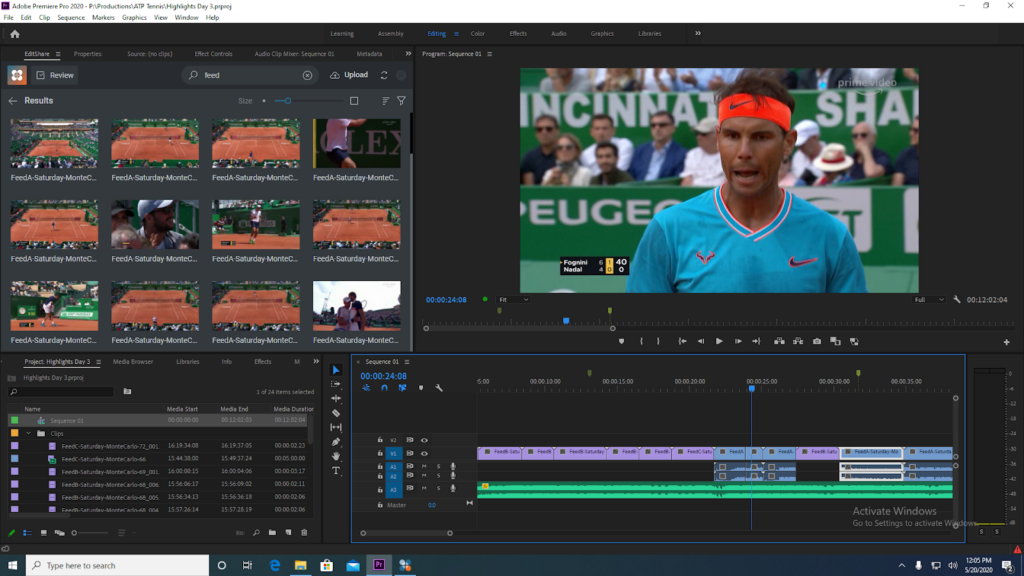
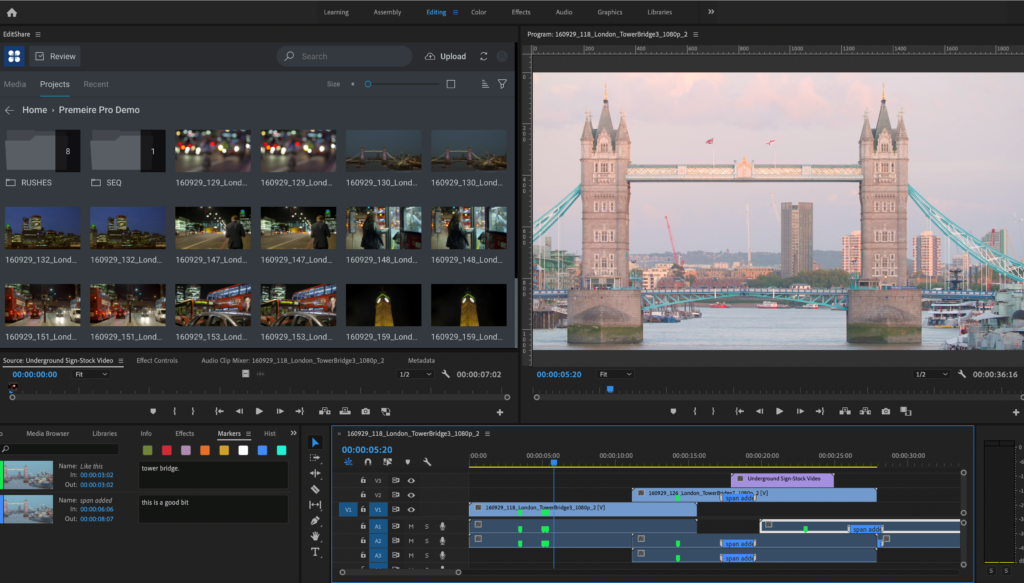
The above image showcases its new Flow panel connected directly into the Adobe Premiere Pro UI.
Meeting in the middle
EditShare’s FLOW Panel for Premiere Pro is a portal between two worlds. On one side is enterprise-level media management and on the other is the creative world of editing and post production with Premiere Pro. Two different specialties, each with an essential job.
Editors have their own set of priorities. Their skills marry productivity with artistic and aesthetic choices. Understandably, they are reluctant to step outside their optimized personal work environment.
The FLOW panel allows editors to stay inside their productive zone. To an editor, it is instant access to the power and scope of FLOW, without having to leave Premiere Pro. An immediate connection to their media from a shared and collaborative storage system without having to learn a new user interface.
Let’s have a closer look at why interfaces grow up differently, and why our FLOW panel is such a big leap for Adobe users.
The above image showcases its new FLOW panel connected directly into the Adobe Premiere Pro UI.
Center of gravity
Every successful company has its area of expertise which you could see as a “center of gravity”. EditShare is media management, collaborative storage, ingest, logging, and scalability (on premise and in the cloud). Adobe’s is all about editing, VFX, audio and easy interchange between these disciplines within the Adobe environment (between Premiere Pro, After Effects and Audition, for example).
This means each company has a differently evolved, separately optimized user interface. And, this is what defined the challenge of building the FLOW panel. Specifically – how do you present a significant element of FLOW functionality from within the Premiere Pro interface?
In technical terms, much of the heavy lifting was already done. Adobe has a developer partner program with a very deep, wide ranging SDK. EditShare also has well developed, published APIs.
So the tools were there for a reliable and stable connection. It was then a question of selecting the aspects of FLOW that editors would need to have the most direct connection with.
The panel will continue to evolve, but it already has some remarkable time saving features. It gives Premiere Pro editors the ability to search for content and get direct and instant access to all their media spaces on the EditShare video content management system, to see content that may have been archived long ago on LTO tapes or cloud video storage, see all metadata associated with each clip – user markers, automated audio transcripts, AI-assisted object recognition information, and more. Simply select and import media directly from the FLOW panel into a Premiere Pro project. Instantly switch between proxy and full resolution. Never leave the Adobe UI to find the clips you want.
Designed by editors for editors
The FLOW panel was designed by editors, for editors. Editors save time by not having to switch working environments. No duplication of effort. Most of all, there is a true and friction free round trip from Premiere Pro to FLOW and back again. The FLOW panel has a powerful core functionality, but it is full of thoughtful touches. For example, if you’re searching for some media in a tree of folders, the panel will remember where you were the next time you have to go back there. You don’t have to start again from scratch. There’s also the flexibility to switch between high resolution files and proxies. If you’re in the field and you find you don’t have the high resolution material to hand: the system can automatically download the fully editable proxy version to a local drive of their choice.
The continuous connection between your Adobe project and FLOW makes it possible for other remote users to review your footage, adding markers and comments on the fly, while you’re working in Premiere Pro.
Technical and artistic co-operation
EditShare’s FLOW Panel for Premiere Pro is the result of openness by both companies.The FLOW panel is an editors-first interface within Premiere Pro. It provides the maximum efficiency with the minimum friction.