MediaSilo Product Update: New options to edit your workspace name and user email addresses
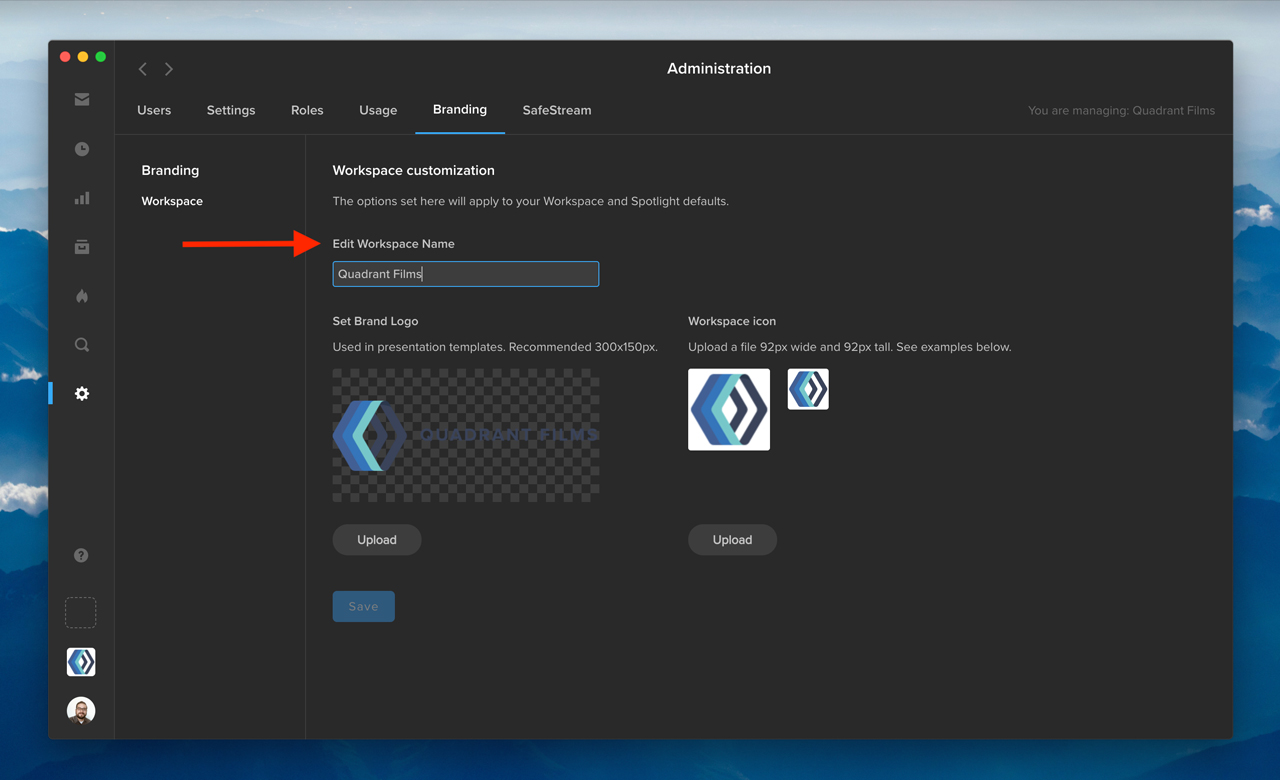
As a workspace administrator, you now have the ability to edit your workspace name. First, click the gear icon in the navigation bar to access the Administration section. Then, go to the Branding tab, and change your workspace name under “Edit Workspace Name.” Once you click “Save,” your updated workspace name will appear in the workspace switcher in the bottom left.
In addition, you can now edit the email address associated with an existing user on your Shift account. Under the Users tab in Administration, click the three-dots menu in any row, and select “Edit User.” In the “User Info” window, you can edit a user’s email address to reflect any changes to the user’s name or email domain. The user’s access to projects will remain unaffected.
Our Director of Business Development, Jeff Barnes, sat down with SVG’s Chief Editor, Jason Dachman, to provided an update on our EFS collaborative storage and FLOW media management solutions and to highlight some of the key partnerships that are strengthening our presence in the sports industry.
When you are the creative director of a rapidly growing retail startup with a worldwide presence, relying on Slack or, even worse, email as your primary asset management tool is a recipe for chaos.
But, this was the reality that Benoit Habfast, the creative director of the French sneaker brand CAVAL, was experiencing when the company began a highly successful Indiegogo campaign to raise capital in 2019.
At any given time, Habfast was managing dozens of campaigns and a variety of products, including CAVAL’s innovative, handcrafted line of “mismatched sneakers.” CAVAL’s meteoric success has meant an increased need for marketing campaigns, online storefronts, and social media presence, with massive amounts of photo content being created for all of these different outlets.
Scalable asset management is essential to successful growth.
High demand for photos across all departments at CAVAL has created thousands of assets that need to be organized and managed on a daily basis. An image library of this size can easily get disorganized, making it difficult to ensure everyone on the team can quickly find the assets they need for a project.
Habfast and his team struggled to find media management software that solved all of their problems. As a stopgap, they were storing files on their desktops and external hard drives. “They were half on my computer, half on some hard drives, and a bit on Google Drive too,” he said. “We would share by sending through Slack or email, but it was a big pain.”
In order to keep pace with the company’s growth, Habfast needed to centralize the image library so the entire Caval team could easily search and find exactly what they needed. MediaSilo helped CAVAL create an effective asset management strategy. That’s when the brand turned to MediaSilo and its organization workflows. Habfast found MediaSilo’s project and folder-based structure, tagging features, and robust search functionality to be the exact media management solution the brand needed.
Tagging streamlines file organization.
CAVAL’s creative team started by moving all of the existing files off of their desktops and hard drives and uploading their vast library of content into the cloud-based MediaSilo platform. Although organizing the files into projects and folders was a good jumping-off point, Habfast found that using tags was the real key to unlocking the full potential of the system.
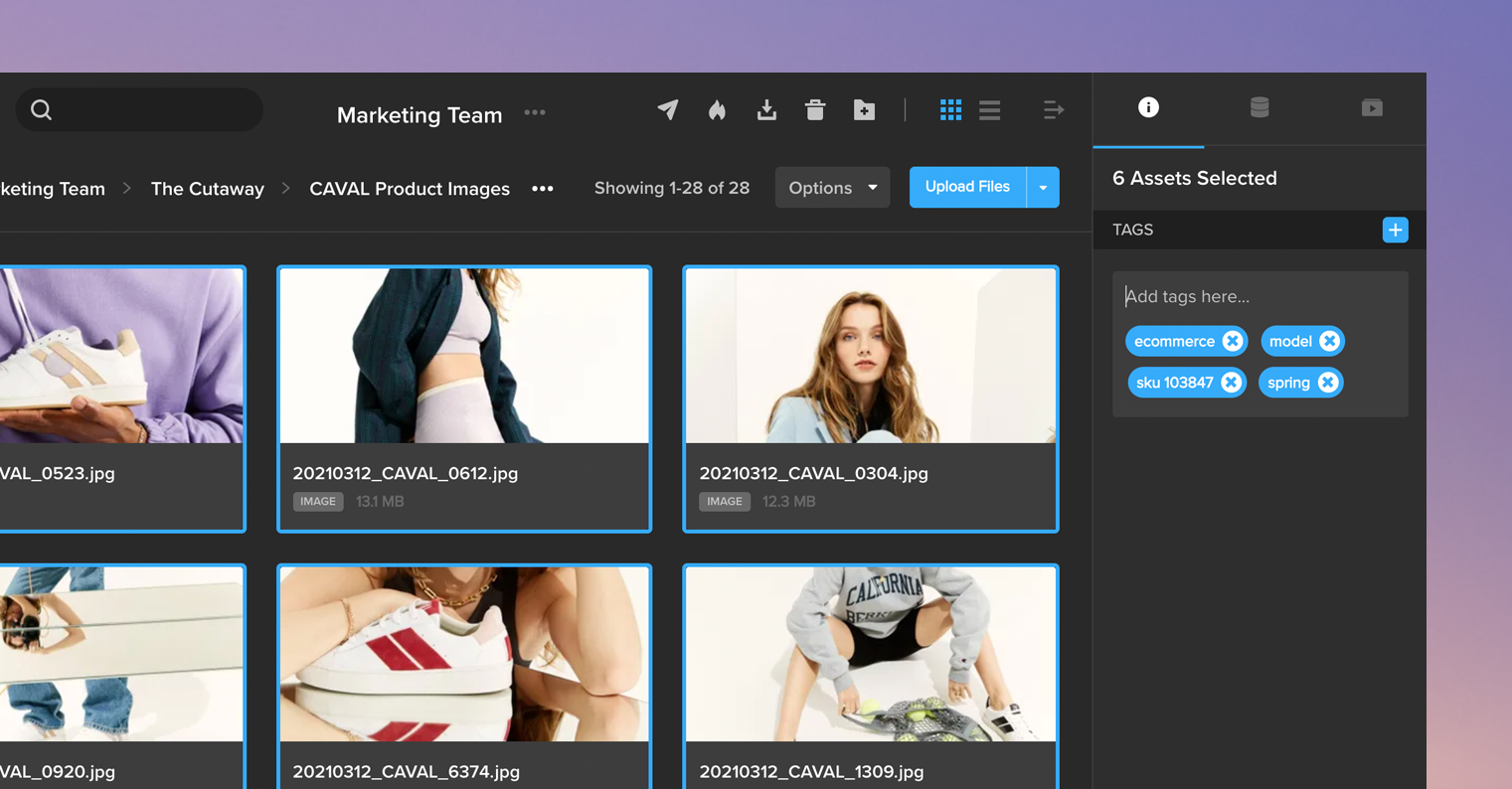
As new content was continually added to their MediaSilo account, the team established a system for uploading where tagging assets was an integral and routine part of the process. Using MediaSilo’s bulk-tagging feature, the team easily added relevant tags as new content was uploaded into their projects. After dragging and dropping batches of related content into the system, the team selected all of the new assets and labeled them with relevant tags in one easy step.
Structured tagging eliminates redundancy.
The CAVAL team was looking for a system that would eliminate overlaps while requiring as few tags as possible. Using the MECE Principle to structure image tags and guide his tagging in MediaSilo, Habfast settled on four essential tags that would effectively organize every image in their account.
“E-commerce” and “Creative” are the first tags to be added to every asset, differentiating between images intended for the online storefront and images that will be used for a creative marketing campaign. “Model” and “Packshot” are the second layer of tags, indicating whether the image has a person or model wearing the sneakers or features the sneakers alone.
With this simplified tagging strategy, Habfast’s team built an organizational structure within MediaSilo that breaks down their entire content library into those four target image categories. Supplemental tags for product name, reference number, and special campaigns such as “Valentine’s Day” are added on top of the four primary categories to further distinguish individual images and create a more robust search experience.
Intuitive, tag-driven search makes it easy to find content.
“Now, we don’t ask on email or Slack anymore, ‘Hey can you send me that file.’ We know where to find that file—there’s just one place to find everything.”
With this new, more organized tagging structure, CAVAL’s MediaSilo users can easily and intuitively search for assets in their account. Using MediaSilo’s advanced global search, users can select one or more tags from a picklist; apply additional filters, such as who uploaded the assets and when they were added; and narrow thousands of assets to a select few by searching for a handful of relevant keywords.
MediaSilo’s cloud-based media management software has enabled CAVAL to get images off of a hard drive and into a feature-rich, easy-to-navigate platform. By centralizing its asset workflow, MediaSilo allows the entire CAVAL team to securely share and access the files they need when they need them. As Habfast explained, “Now, we don’t ask on email or Slack anymore, ‘Hey can you send me that file.’ We know where to find that file—there’s just one place to find everything.”
MediaSilo empowered CAVAL to scale its asset management processes so employees are free to focus on their high-level creative projects, new campaigns, and marketing strategies.
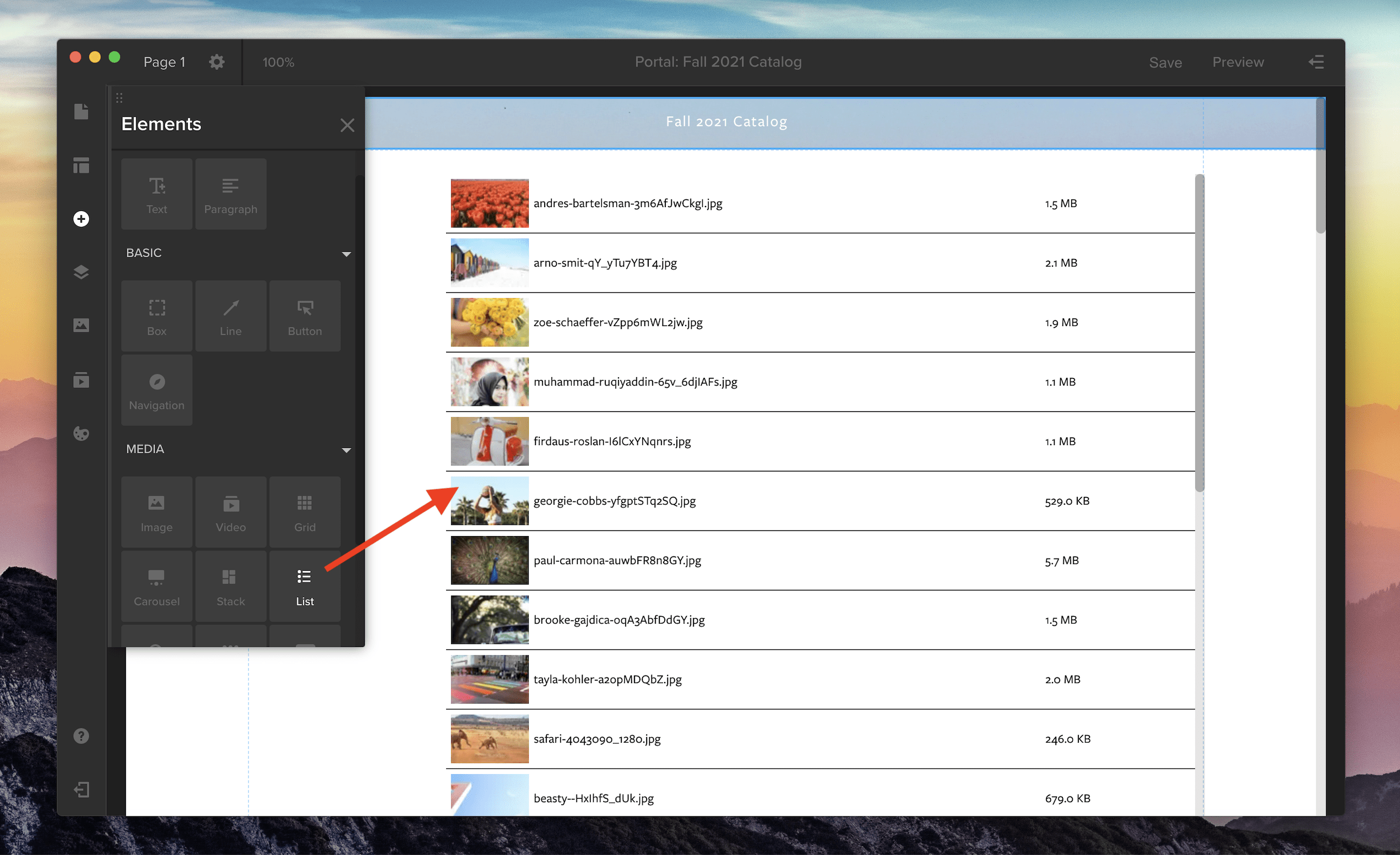
List view is now supported in Spotlight for your media galleries. To add a gallery with list view to your Spotlight template, open the Elements panel by clicking the plus icon along the left-side toolbar. Then, in the Media section, choose the List option or pick from three other media gallery views: Grid, Carousel, or Stack. Click and drag the gallery icon onto the main screen to add it to your Spotlight template.
To customize your gallery, open the properties panel in the right-side drawer. Here, you can adjust the spacing and thumbnail size in your list by changing the width and height. You can also customize the font, background color, and the divider line between each row.
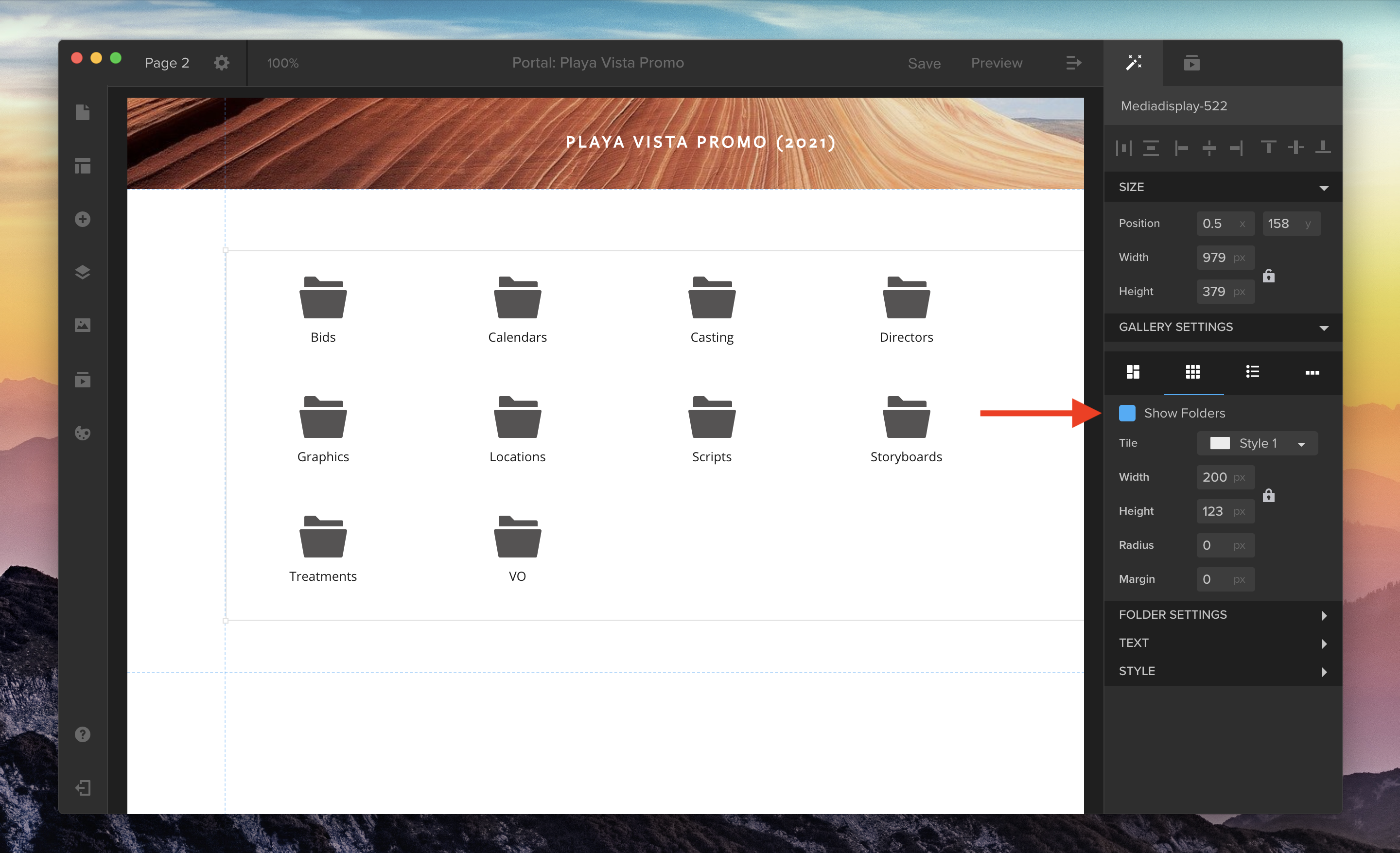
You can also now choose whether or not you’d like to hide or show playlist folders in your media galleries. Use the “Show Folders” checkbox in the properties panel to toggle this option on or off for Grid or List view.
** This webinar has passed. Please fill out the form to access the recording.
May 12 Session 2: 3:00 PM USA Eastern Time (duration 1 hour)
Join EditShare’s VP of Business Development, Tom Rosenstein, and Lead Pre-sales Engineer, Nathan Rausch, as they outline the pragmatic steps toward a complete end-to-end production workflow in the cloud. Each stop along the way brings maximum value for an incremental investment. We’ll share sample diagrams, demos, and cost comparisons for cloud production workflows to help begin your Journey to the Cloud.
Save Your Seat
Webinar Speakers
Dan Schaffer, Director of Partner Strategy and Enablement, EditShare
Tom Rosenstein, VP of Business Development, EditShare
** This webinar has passed. Please fill out the form to access the recording.
May 12 Session 1: 9:00 AM USA Eastern Time (duration 1 hour)
Join EditShare’s VP of Business Development, Tom Rosenstein, and Lead Pre-sales Engineer, Nathan Rausch, as they outline the pragmatic steps toward a complete end-to-end production workflow in the cloud. Each stop along the way brings maximum value for an incremental investment. We’ll share sample diagrams, demos, and cost comparisons for cloud production workflows to help begin your Journey to the Cloud.
Access the Recording
Webinar Speakers
Dan Schaffer, Director of Partner Strategy and Enablement, EditShare
Tom Rosenstein, VP of Business Development, EditShare
Ministries create engaging content that expands beyond the in-house gatherings to the hundreds of thousands of congregants looking to connect online
Boston, MA – April 29, 2021 – EditShare®, a technology leader that specializes in collaboration, security, and intelligent storage solutions, has been chosen by several large-scale houses of worship to provide each unique operation with an enterprise-strength media platform to sustain the fast-growing audiences seeking their church experiences online. The Potter’s House in Texas, World Changers Church International in Georgia, and Hillsong Church in Australia are using EditShare’s EFS shared storage and FLOW media management to facilitate their hybrid video content management system needs and increase programming to boost engagement with congregants, anywhere and everywhere.
“With the shift to online, connecting with our congregants in the digital world has become even more important. We want to share stories in a way that when they are seen, our members understand how we are giving back to the community. In order to engage congregants on this level, we needed to do more than stream Wednesday and Sunday services. We needed to think about the production value. Everything from the music we choose, to the way we light the scene, to how we shoot and layer in graphics to create an experience that our online congregants can engage with,” states Antao Tywii Ayers-Allen, TV Production, The Potter’s House of Dallas. “There are many moving parts in these stories and EditShare helps us manage all of the parts in a way that we can easily index, search, use, collaboratively edit, and archive for later use. It’s a media foundation that enables us to get to the next level of production.”
Ministries are using EditShare solutions to produce and deliver church services as well as pre-recorded studio shows, documentaries, commercials, and educational programs over traditional, digital, and social channels. Unlike “traditional” networks, these shows, conferences, and podcasts are produced all in-house. Similar to conventional OTT streaming services, some ministries offer yearly subscriptions to their branded channel.
“The day-to-day media operations of large-scale ministries increasingly resemble that of a fully-fledged 24/7 broadcast network with thousands of hours of content to manage,” states Tracy Geist, chief marketing officer, EditShare. “Using an ‘off the shelf’ non-media solution to store and manage the content is not an option. EditShare provides the media optimized workflow infrastructure that enables them to redefine the content strategy and deliver the engaging experience they want for those attending the service in person or connecting online.”
According to Barna research, 70% of churchgoers agree that even after the pandemic, houses of worship should continue to use digital resources to engage with congregants. EditShare’s media platform is the basis for cutting-edge workflows that are instrumental in helping houses of worship create engaging content at a higher quality. In what is likely in the future to be a “hybrid” model, where congregants participate in services both at the church and online, EditShare is the proven, optimized and productive foundation for large-scale video content production.
The lead Engineer for The Potter’s House TV Department, Fletcher Garrett, explains the importance of a workflow platform: “Engineers at houses of worship with responsibilities ranging from TV broadcasts, streaming and social media content want to know, ‘How do I record live services and performances, and get it ready for distribution as fast as possible?’ This all comes back to the media platform you plug your cameras and editing system into. EditShare provides the automation and workflow efficiencies that let you capture directly to storage, automate tagging of content, making it immediately searchable to your editors for packaging and distributing over traditional, digital, and social channels. What is paramount is that the media system is secure, stable and dependable and I have found that EditShare’s systems meet those demands!”
In addition to facilitating production and post production media workflows for short and long form studio and live programs, ministries are using the advanced AI features of FLOW for speech to text transcription on every piece of video recorded. FLOW automates the logging, making it easily searchable and instantly available for repurposing and sharing. Geist adds, “One of the biggest challenges is logging the massive amount of content these productions capture in a way that you can quickly and easily locate that special moment or important message. The AI capabilities of FLOW automate the entire transcription and logging process so editors can turn out more personalized programs faster.”
EditShare is a technology leader in networked shared storage and smart workflow solutions for the production, post-production, new media, sports, and education markets. Whether you need on-prem, cloud, or hybrid solutions, our products improve efficiency and workflow collaboration every step of the way. They include media optimized high-performance shared storage, archiving and backup software, a suite of media management tools and a robust set of open APIs that enable integration throughout the workflow. Customer and partner success are at the heart of EditShare’s core values ensuring a world-class experience that is second to none.
Press Contact Cat Soroush Zazil Media Group (e) catherine@zazilmediagroup.com (p) +1 (631) 880-9534
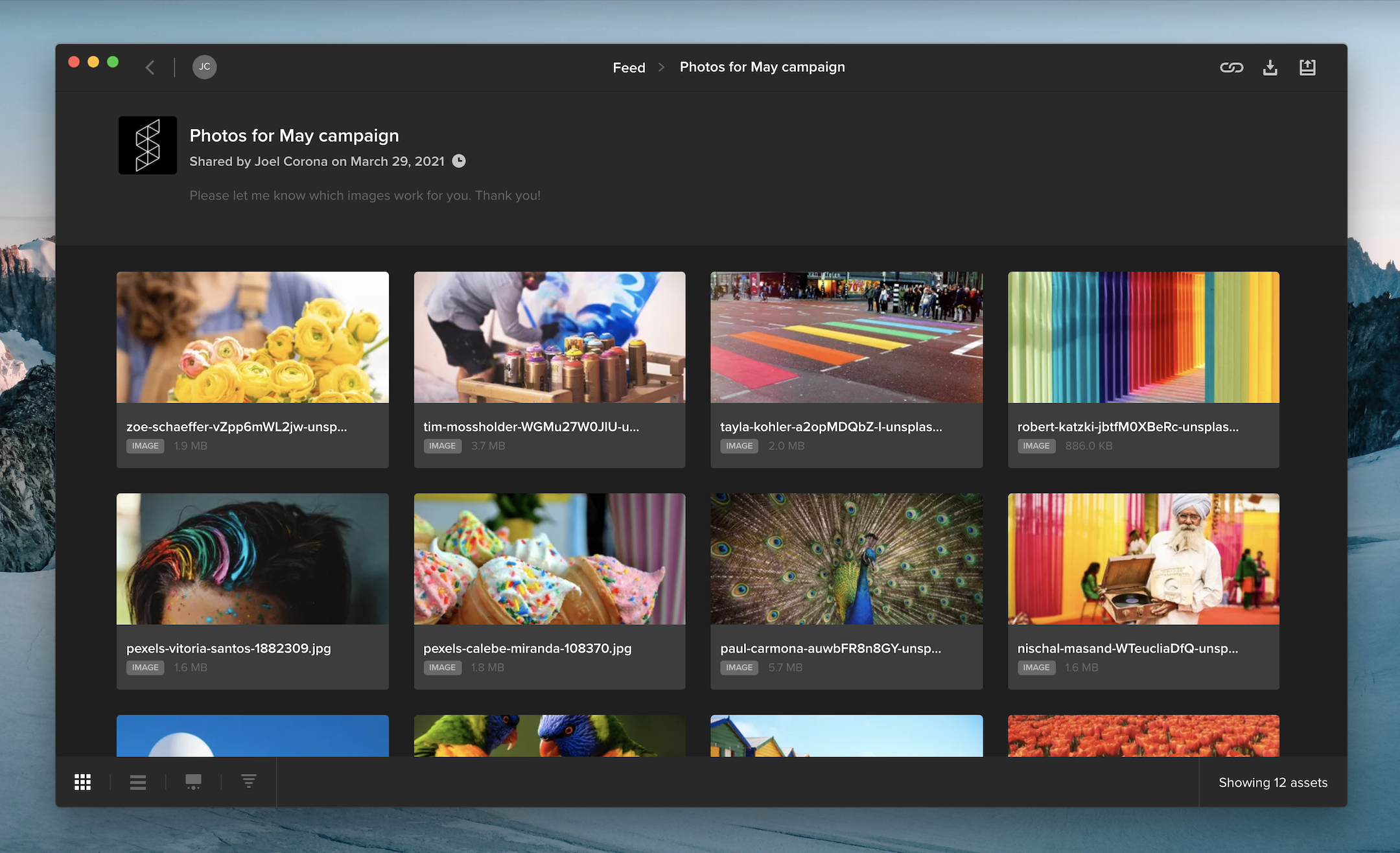
When you share multiple files in a review link, your audience can now access the files in a gallery that supports batch approval and downloading.
If you requested feedback on a review link, your audience can hover over an asset tile and click the thumbs-up icon to approve it. Viewers can also select multiple files and click the thumbs-up along the top of the page to approve multiple files at once.
When downloading is enabled on a review link, viewers can select one or more files and click the download button at the top of the page to download them. Clicking the download button without selecting any assets will download all of the files included in the review link.
In the bottom left corner of the screen, you can choose between gallery or list view, change the sort order, or open the review page with commenting and annotation tools for videos, images, and documents.
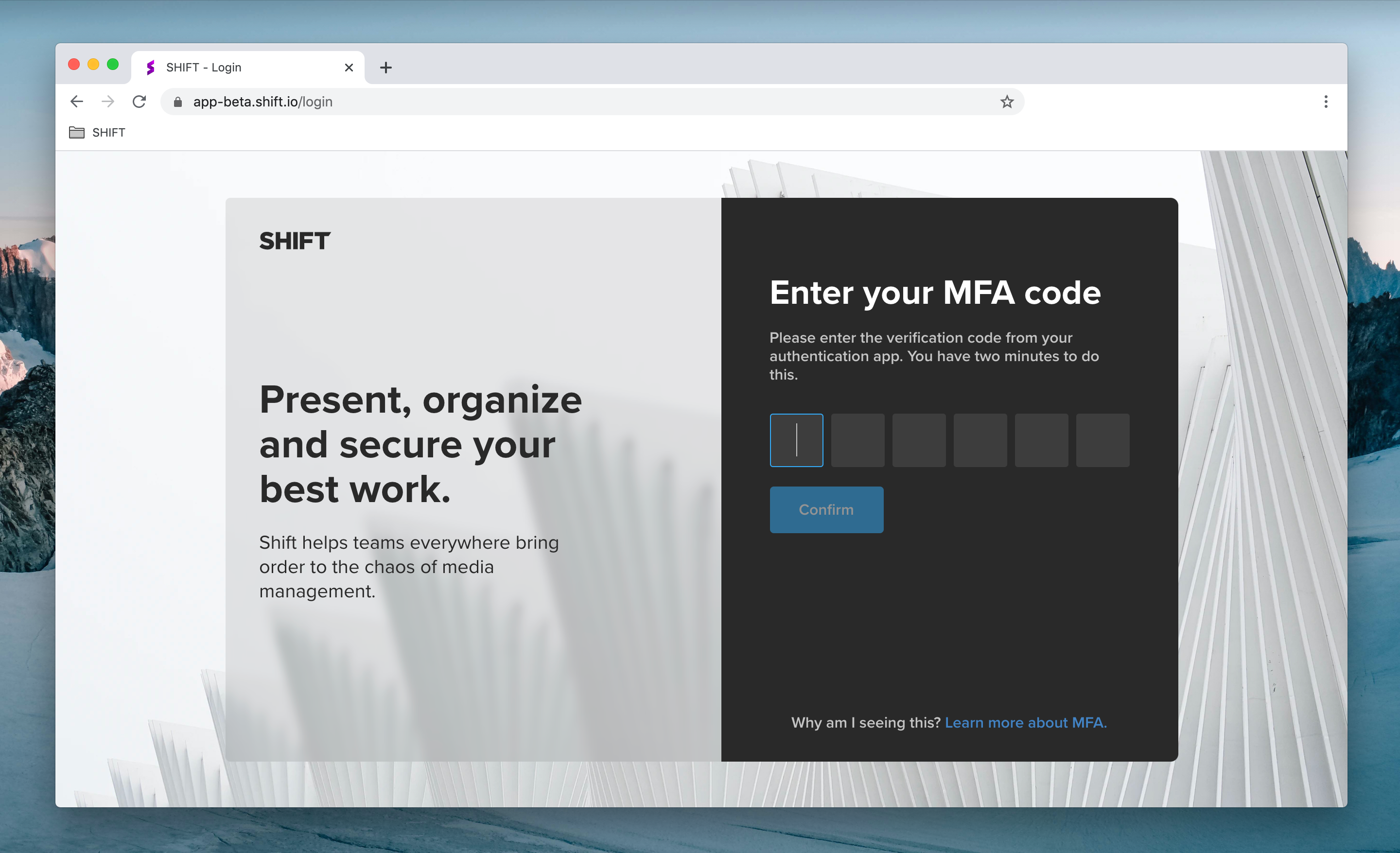
For added security, administrators can now require workspace users to log in using Multi-Factor Authentication (MFA).
To set up MFA, users link their Shift account to their phone or tablet by installing an authentication app, such as Authy or Google Authenticator. When they log into Shift, they will be prompted to enter a six-digit code provided by the authentication app.
As an administrator, you can enable MFA on your workspace by visiting the Security Settings tab in the Administration section.
Note: Shift uses the same MFA code as Screeners.com. If you already use MFA to access Screeners.com, Shift will use the same MFA code to log you in.
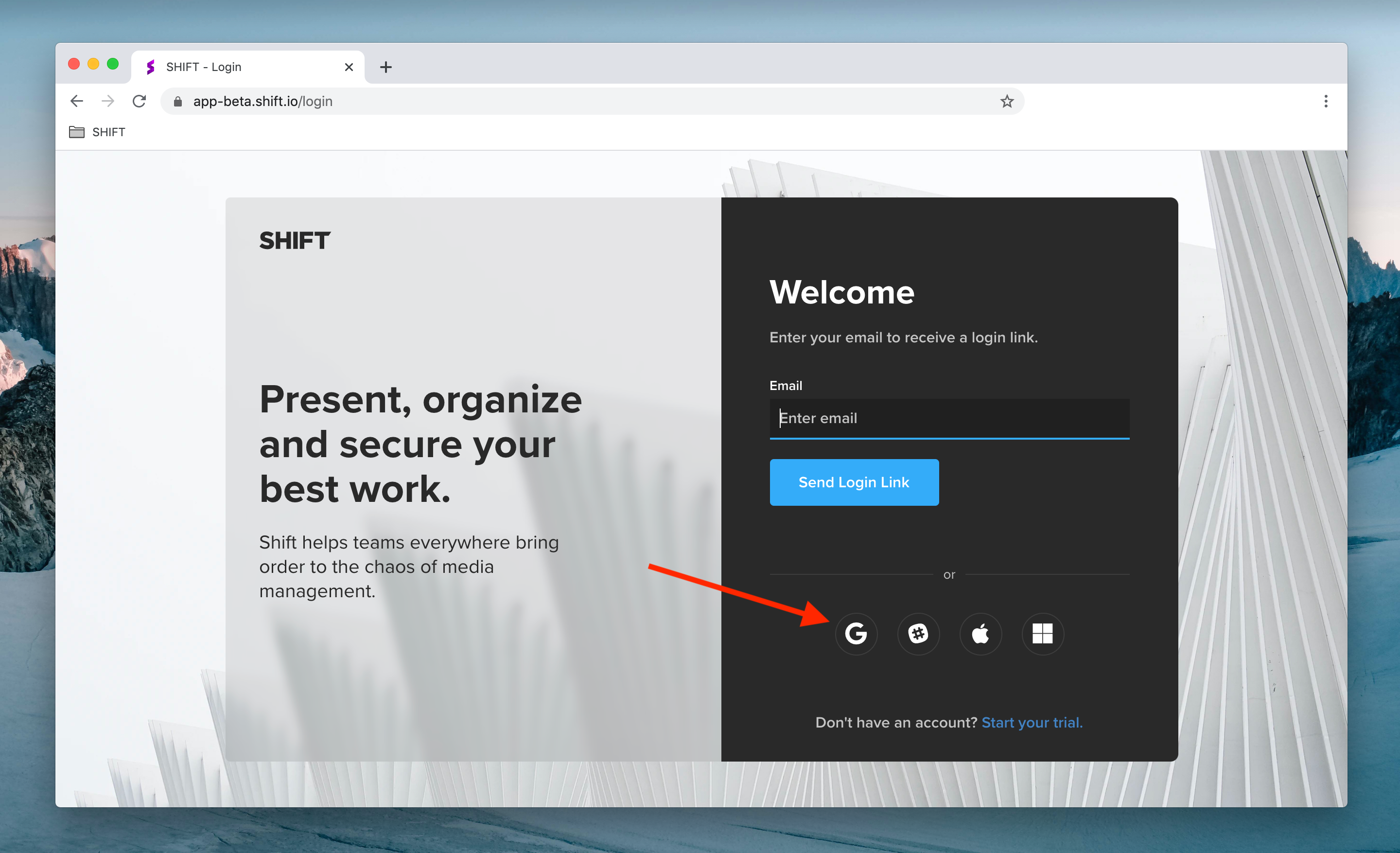
You now have more ways to log into your Shift account. Enter your email address to receive a login link in your inbox, or click any of the icons below the email field to log in with your Google, Slack, Apple or Microsoft account.
Additional login options are also available when you access a Review Link. To comment on a public review link, simply click “Add Comment” on the review page and log in to start leaving feedback.