MediaSilo Product Update: In-project asset commenting is now available
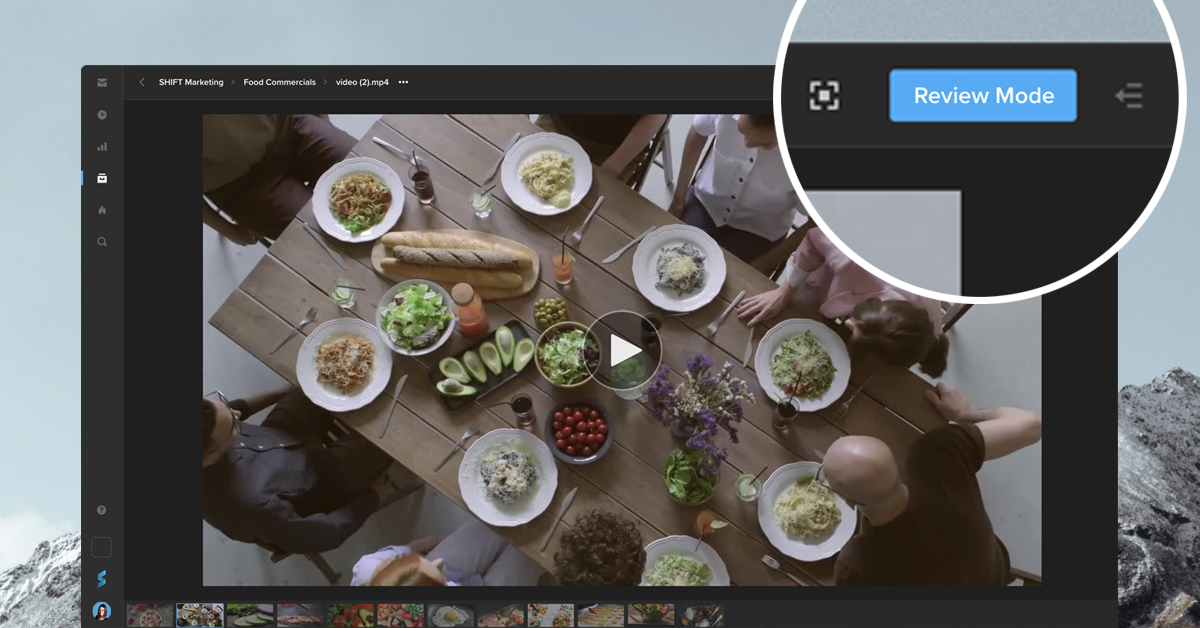
You can now leave comments on an asset directly from your Shift project. Simply go to the asset and click the “Review Mode” button to access your commenting and annotation tools. Your feedback will be visible to all collaborators with access to the asset. This mode also displays the comments made in review links, providing you with one centralized place to view all your feedback.
If your workflow requires a private review session, where comments are only visible to the people with a link, you can still create a Review Link and turn on the toggle “Limit comments to this link.”
Whether you need Review Link commenting or in-project commenting, our newest tools let you choose the best way to gather feedback on your content.
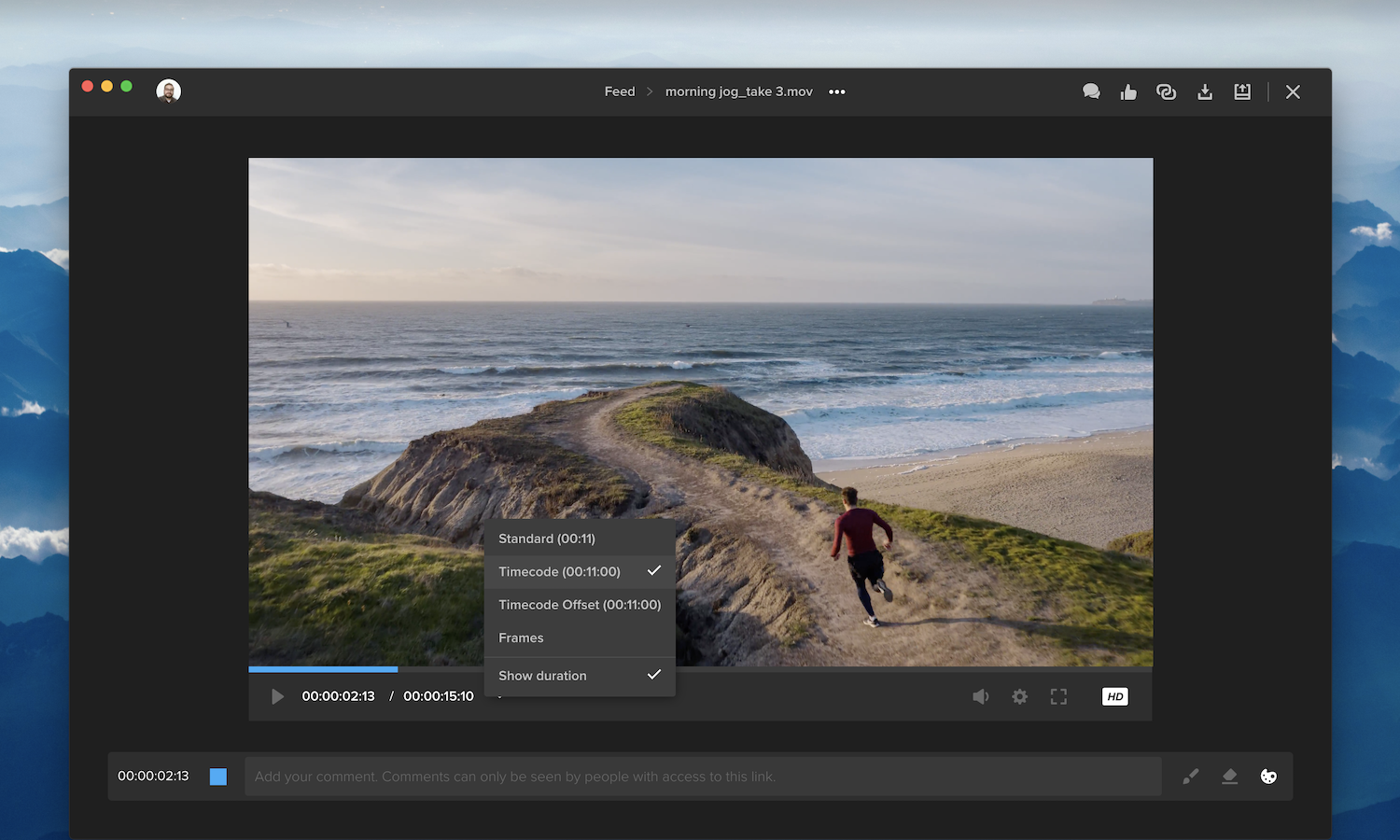
We’ve updated our video player to improve your viewing experience. The arrow button next to the timecode now opens a menu, so you can choose your preferred timecode format. You can also click “Show duration” to display the video’s duration alongside the timecode.
Additional features are now accessible by clicking the gear icon next to the volume button. For example, select “QC Mask” to apply an aspect-ratio overlay to the video, or select “Keyboard Shortcuts” for a list of time-saving shortcuts.
The comment bar below the video player also includes a checkbox, so you can choose to leave a timecode-specific comment or a general comment. All comments appear in the right-side drawer, which you can open and close by clicking the speech-bubbles icon. This section now includes search and filtering options to easily find and display the comments you’re looking for. Once a comment has been addressed, click the blank circle on the right to mark the comment as “resolved.” You can still access resolved comments by selecting “Show resolved” from the filters menu.
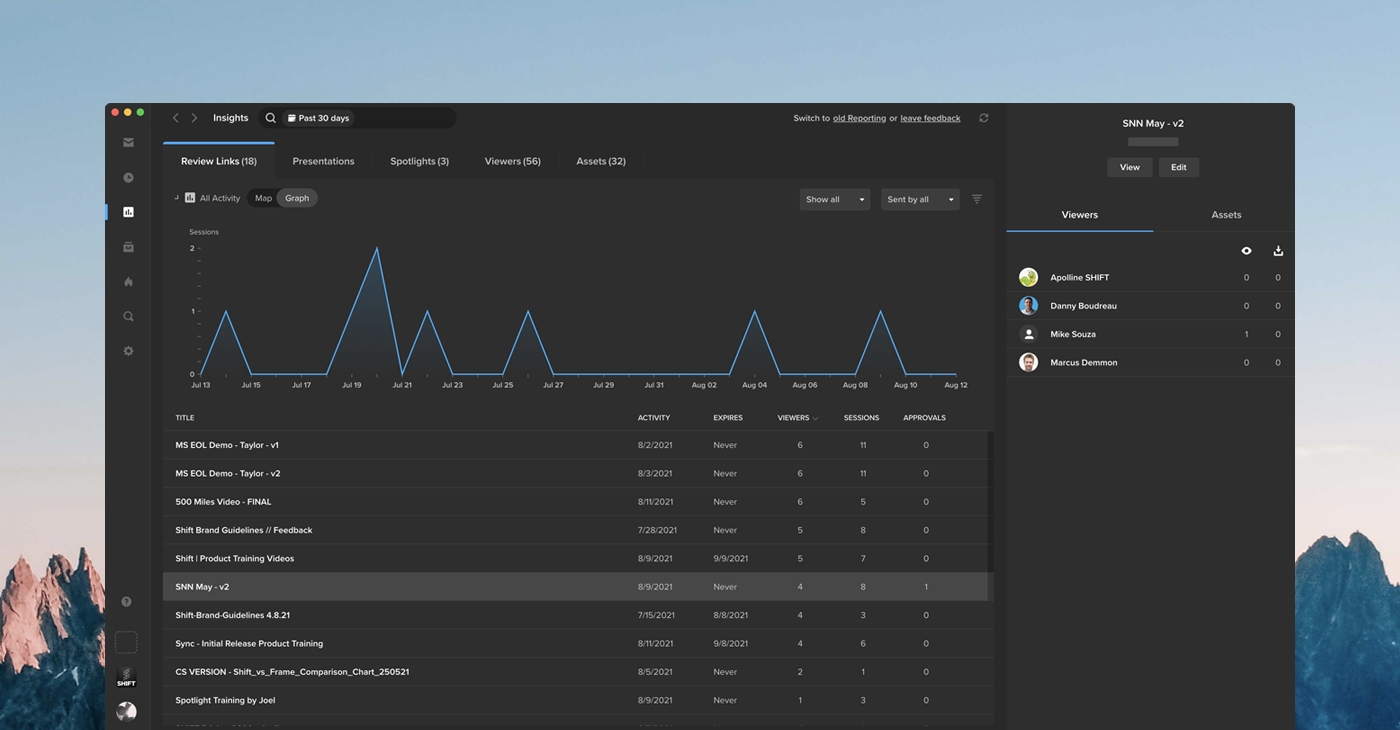
Insights is the new hub for analytics on all your links, viewers, and assets. See how your content is performing by clicking the Insights icon in the navigation bar.
The left side of the Insights page provides a summary of your activity, including the number of visits to your links, the number of unique visitors, and the date of last activity. Click “All Activity” to display a map with your viewers’ locations, or select “Graph” to track viewer engagement over a period of time. Use the search bar along the top of the page if you are looking for analytics on a particular link, viewer, or asset.
You can select any item on the left side of the page to display more information in the right column. This section contains details on your viewers’ activity, including the specific assets they viewed or downloaded and the video percentage watched.
To learn more about the ways Insights tracks activity, please visit our support article.
University of Hertfordshire, puts EditShare Solutions at the Core of Its Nationally Ranked Curriculum
Key Highlights
Enterprise Ready – IT-friendly and ultra-secure EditShare FLOW and EFS formed the media foundation to support the university’s two media labs consisting of 80 workstations as well as up to 400 Film and TV students who needed to access content remotely.
Openness – Seamless integration with real-world tools Adobe Premiere Pro, Avid, Baselight, and Final Cut Pro ensured smooth project workflow and student collaboration.
Future Proof – EditShare remote workflows supported critical remote production and review approvals, metadata entry, enabling students and teachers to do their coursework on campus and off.
Automation – FLOW automation provided key efficiencies, including, managing the conversions of delivery formats for student project submissions. The consistency ensured access as well as managed storage volumes.
Competitive Proposal – EditShare’s competitive bid and robust offering stood out from the competition.
Background Located in the picturesque Hertfordshire countryside in England, the University of Hertfordshire has a robust film and TV program with some 400 students. In 2018, the institution achieved the TEF gold rating by the UK government, the highest standard, for its teaching excellence framework. Thanks to its high-quality vocational content, graduates are ready for real-world careers upon entering the creative market.
The popular film and TV program recalibrates its curriculum every 5 years to ensure students are taught the latest techniques using modern filmmaking and video production technology. Just ahead of the COVID-19 shutdown, the university began its anniversary validation, selecting EditShare which supported multiple production and post-production workflows taught at the school, including remote-working workflows. Little did they know what lay ahead and how that investment in the future would enable them to keep the creativity flowing during a global pandemic.
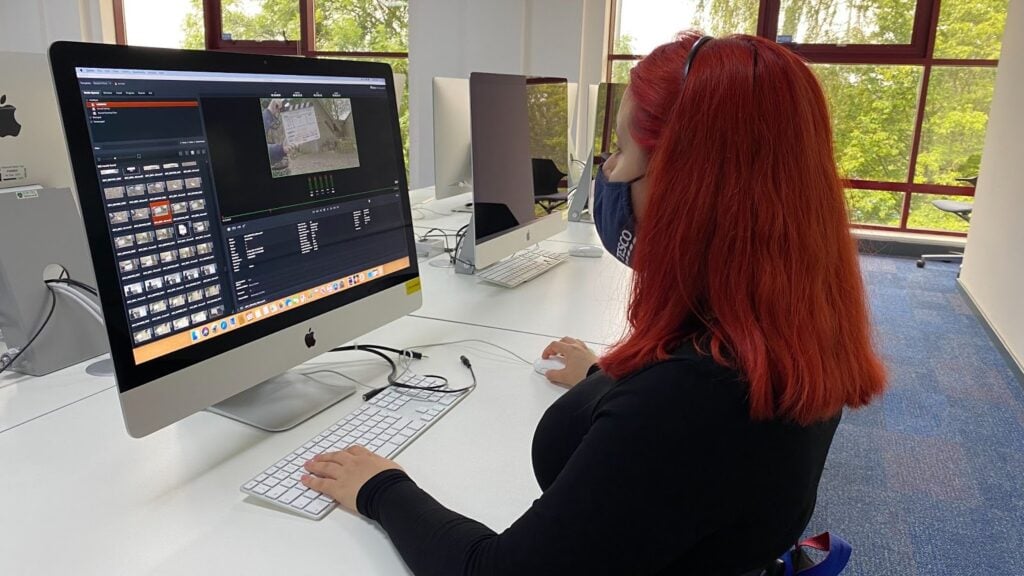
Widening the Opportunities to Learn Principal lecturer, with a body of work that includes major motion pictures, Howard Berry brings a wealth of experience to the classroom.An Avid Certified Instructor, Apple Certified Master Trainer, and Blackmagic Design DaVinci Resolve Certified Trainer, Howard is also a savvy technologist who led the campus wide upgrade which coincided with the university’s course re-validation. Berry explains, “When we began the validation exercise, we had three different pathways that students could take: film and TV, documentary, film and TV fiction, and film and TV entertainment. People move from genre to genre, so we revised and consolidated to a unified film and TV production with a heavy emphasis on post-production. The new path would cover the range of productions as well as picture editing, color grading, visual effects, effects and, most importantly, the workflow side of things, giving students a more well-rounded education.”With the various productions consolidated into one track, Berry selected the EditShare EFS and FLOW solution to support the multiple workflows and various post-production tools used throughout the course. The open platform supported the university’s strategy for an integrated workflow that mapped back to real-world productions and provided a central shared storage platform to safely house content and easily manage student permissions from an administration module designed for educators.
Efficiency Through Automation FLOW automation is key to streamlining the film and TV Program’s submission process. Berry explains the efficiency it has brought to the process, “FLOW hosts folders for all the student assignments. When they submit their QuickTime and finished version files to the EditShare system, FLOW automation scans the file and moves them into a folder only the lecturers can see. If the file is not in the right format, it will be scanned and transcoded. It also timestamps the submissions, so we know that the coursework was submitted on time.” Berry adds, “Some of the coursework is actual paperwork which is supposed to be submitted via the web portal, but students often hedge their bets and send it everything through FLOW, and FLOW automatically filters their PDFs into another folder. It’s a fantastic system where we can see all the relevant submitted files all the time. And it runs in a web browser, making it even easier for me to manage and share with my colleagues.”
Flip to Remote Production Overnight The EditShare installation had been done just ahead of the pandemic, which enabled the film and TV department to continue its coursework after the world shut down. Key to the success of the remote production was EditShare’s FLOW, AirFLOW and FLOWStory. FLOW media management provided the media management foundation with AirFLOW and FLOWStory providing cloud-based editing, review and approval. Berry explains just how important these features became during the pandemic. “Without FLOWStory, the only option was to have students come into the university lab to work on their edits. During a pandemic the thought of having to go this route was not an option and our labs were closed for half of the year. FLOWStory was a light install that ran on Windows and Mac and would allow the students to edit from anywhere. It was perfect.” Berry adds, “As the students dived deeper into the application, they discovered that it could do 4k multi-camera editing and export the EDL directly into an NLE. And of course, AirFLOW gave us the important remote review and approval capabilities. Just incredible that we could slip into remote working so quickly. Weekly edit reviews, where staff and students would usually have to gather together, became easy with AirFLOW remote viewing and review markers added to the timeline with notes that the students could instantly see and act upon.”
It’s All About Flexibility For Berry, production has typically been rigid with required specifications and hardware. With EditShare, the restrictions of connecting with other systems and geographic boundaries have been lifted. It allowed them to be adaptable to extremes. One degree project this year, “My Hundred Brothers and Sisters”, has involved students at a partner film school in Poland filming on behalf of Hertfordshire students who couldn’t travel abroad. The footage was sent from Poland over the internet, and the editor of the project was able to save it directly onto their dedicated 2TB EditShare space – instantly making it available to the director to review, the assistant editor to log and add metadata, and for transcripts to be prepared before the cut. The whole team could see the footage remotely any time they wanted to access it. Berry concludes, “We have many students who cannot return to campus because of the pandemic for one reason or another and they are still doing the coursework, they are still doing the training, and they are still able to learn because we are using EditShare. It’s an amazing gift of being able to do what we want and in any kind of way that we want to deliver it now. And I am very grateful.”
EditShare Solutions
FLOW media management provides a control layer for managing millions of assets as well as tools for ingest/log, browse, automate, and distribute AirFLOW facilitates remote production including review and approval workflows FLOW Storyeditor supports remote storyboarding and remote editing EFSprovides media engineered shared storage
EditShare Q3 FLOW and EFS Update – Capabilities at a Glance
Operating similar to a CDN, the optimized EFS multi-location data transfer capabilities leverage best in class, open software solutions to provide transparency over asset movement, enabling users to prioritize transfers across multiple locations with easy to define business rules.
Paving the way for scalable, resilient enterprise workflows, FLOW Scan Scaling Service enables distributed processing in parallel, letting users run multiple scan instances across storage tiers.
Optimized for HPE, new FLOW Production Nodes now come in Light, Standard and XL, supporting small to enterprise workflows, enabling customers to right-size configurations for their productions.
Popular open-source ELK analytics lets customers easily visualize important data to proactively maintain the health of their FLOW and EFS installations as well as ensure that all systems are running at optimal performance.
EditShare Connect is now available for Linux expanding cloud workflows and enabling every EditShare customer to have a first-class user experience.
FLOW UI and EFS Control offer users a superior navigation and seamless graphical experience with new iconography and ‘dark-mode’ color scheme.
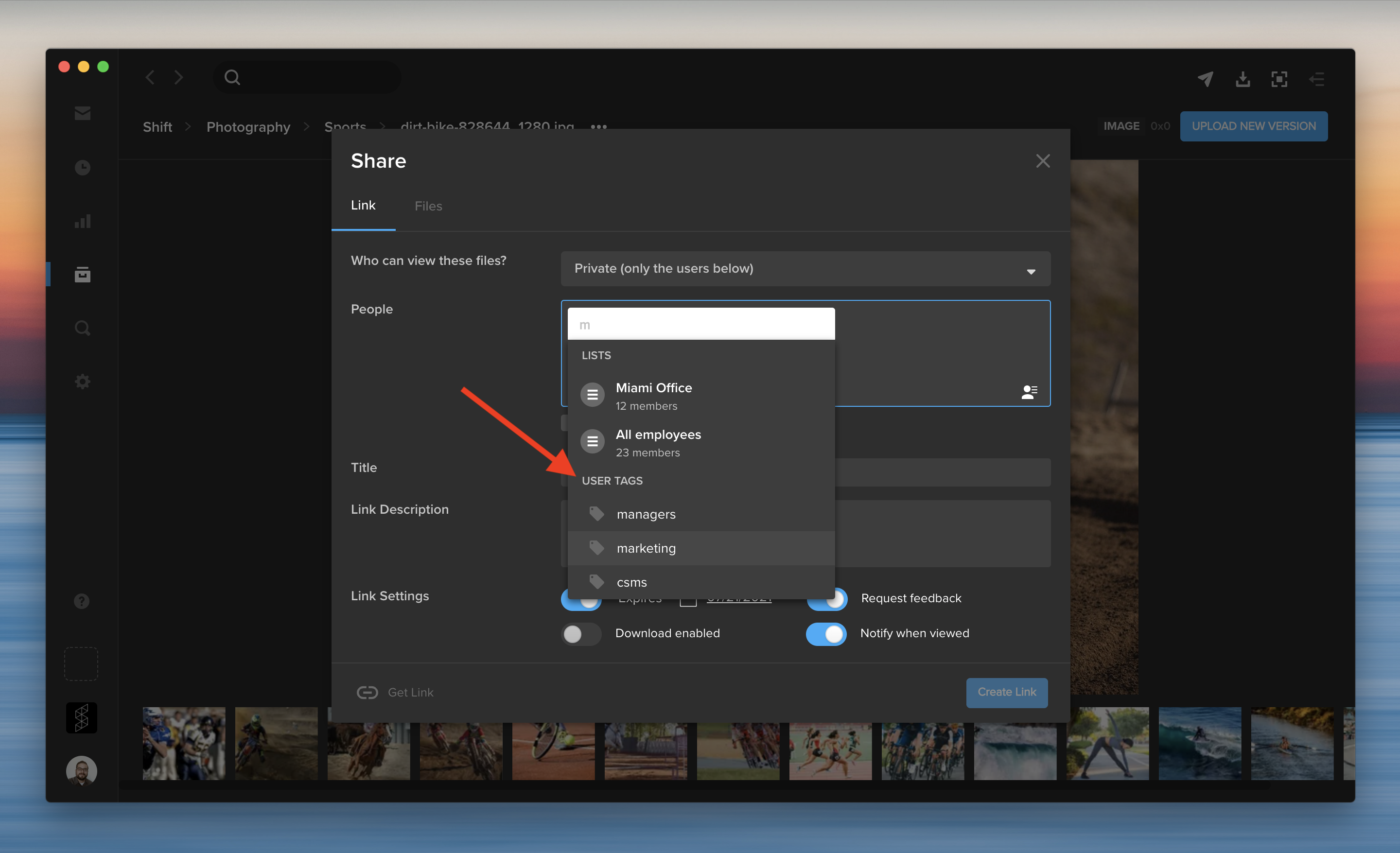
You can share content with a group of people without entering their email addresses every time. In addition to distribution lists, you can now enter a user tag to add multiple tagged users to a share. When you create a new share, start typing a user tag in the recipients field. Then, select a user tag to add all the tagged users at once.
User tags can also be used to easily filter or search for groups of users throughout the application. You can tag existing users on the Administration page by selecting “Add tags” from the Actions menu, or during the “Add Users” process for new users. User tags are listed along the left side of the Administration page.
The Administration page now offers more ways to create, manage, and share distribution lists with other users.
To add people to a distribution list, click the checkbox next to their names. Then, click the Actions menu on the right, and select “Add users to a Distribution List.” You can select an existing distribution list, or click “Create New” to add them to a new list.
When you create or edit a distribution list, you can now share the list with specific workspace users or make the list accessible to your entire workspace. You can still create a private list that is only accessible to you by selecting “Just me” from the sharing options.
To edit a distribution list, click the More menu on the Administration page, and select “Manage Distribution Lists.” This opens a window where you can review and make changes to your lists, such as adding or removing members and choosing a different sharing option.
In addition to emails and names, you can now enter user tags to add multiple tagged users to a distribution list. For example, if five different users are tagged with “marketing,” start typing “marketing” to add all five of these users at the same time.
Adding new users to distribution lists
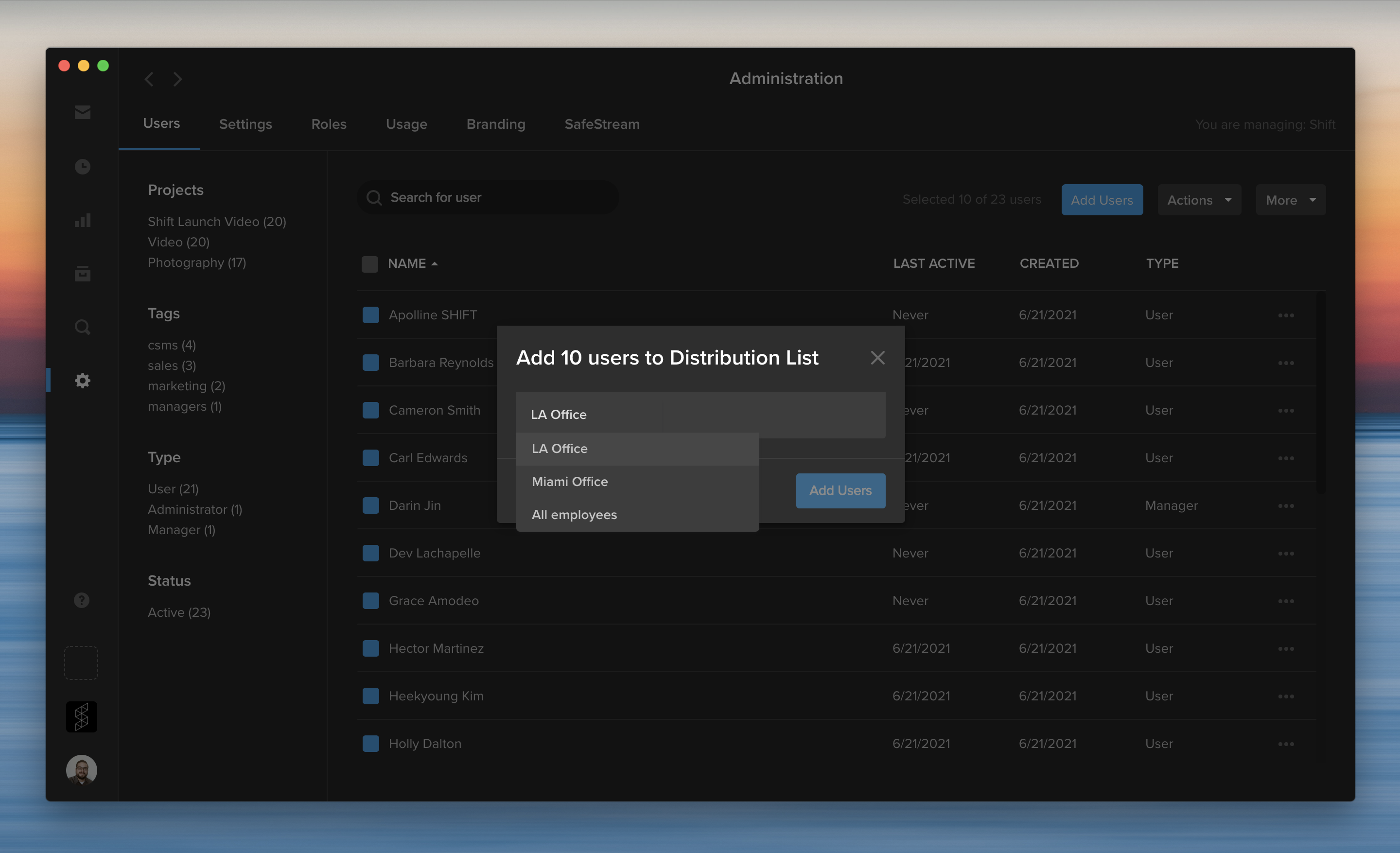
When you add new users to your workspace, you can now easily include them on existing distribution lists.
Start by clicking the blue “Add Users” button on the Administration page. Then, enter the users’ email addresses and choose their project assignments. Next, you can select a distribution list to add these new users to the list. For example, add new employees to an “All Employees” distribution list as they join your team.
EFS media platform provides video professionals a powerful collaboration and storage solution
Beijing, China – June 23, 2021 – EditShare®, a technology leader that specializes in collaboration, security, and intelligent storage solutions, today announced that it has deployed its EditShare EFS solution at Malanshan Video Cultural and Creative Industry Zone (The Zone). Located in Changsha, China, The Zone is known as a “World Media Arts City” that integrates creativity, culture, and technology into the fabric of its community. As the cultural epicenter of China, The Zone draws filmmakers and artists, boasting a thriving digital media market. The EFS solution, which was installed by EditShare partner Thinktone Technology at the park’s main creative hub, integrates with a wide range of production and post production solutions including key editing applications Adobe® Premiere® Pro, Avid Media Composer®, Apple Final Cut Pro® X and Blackmagic Design’s DaVinci Resolve.
“Media production is fluid and collaborative. In order to achieve full artistic expression, you need a foundation that connects artists with tools to fuel the creative workflow process,” Alan Dishington, vice president of sales for Asia Pacific, EditShare. “EditShare has always designed products that prioritize creative users with no compromise on technology. Creative professionals are abstracted from the complexity of modern media management while the technology at the heart of the EditShare products is designed to the very best principles of software engineering. All of this is wrapped in the imperative that our systems are open and scalable in order to adapt to future requirements.”
About EditShare EFSMedia Engineered Storage Powering faster EditShare storage nodes and networks, EFS enables media organizations to build extensive HD, 4K, and 8K collaborative workflows. To the end-user, EFS is a fast and flexible, collaborative, easy-to-use, storage space with an incredible throughput performance. To the engineers who manage it, EFS offers a scalable, stable, and incredibly secure media storage platform. Unlike generic IT storage systems, EditShare has written its own efficient drivers for EFS, for use with Windows, MacOS and Linux. Users access more real-time video streams, without the bottlenecks caused by legacy network protocols.The open platform features robust APIs for extensive integration and workflow optimization.
The EFS product line offers solutions for on-premise, hybrid and cloud-based workflows. Other feature highlights include:
EFS Single Namespace – a distributed file system designed to scale at will, while retaining a single namespace across tiered storage.
EFS Native Drivers – native client drivers substantially increase bandwidth and reduce latency across the network.
EFS Auditing – real-time analytics for every nuance of your valuable content’s journey.
EFS APIs – restFul API’s for simple but powerful integration with third party applications and services.
EFS Fault Prevention – distributed file system, writing content and giving protection across multiple nodes that intelligently replicates data as often as needed without negatively impacting performance.
Active directory integration with SSO
EFS High Availability – extreme reliability, and with no single point of failure, facility managers and administrators can have peace of mind in 24/7 environments such as broadcast playout centers.
Support for Industry Creative Applications – support for video and audio editing applications, color grading and visual effects solutions including Adobe, Apple Autodesk, Avid, Blackmagic Design and Sony.
For more information on EditShare solutions, please visit the website at www.editshare.com
About EditShare
EditShare is a technology leader in networked shared storage and smart workflow solutions for the production, post-production, new media, sports, and education markets. Whether you need on-prem, cloud, or hybrid solutions, our products improve efficiency and workflow collaboration every step of the way. They include media optimized high-performance shared storage, archiving and backup software, a suite of media management tools and a robust set of open APIs that enable integration throughout the workflow. Customer and partner success are at the heart of EditShare’s core values ensuring a world-class experience that is second to none.
EFSv streamlines production with remote workflow flexibility
Boston, MA – June 8, 2021 –EditShare®, a technology leader that enables collaborative media workflows for storytellers, today announced that public media producer GBH, the largest content creator for PBS, has invested in EditShare’s EFSv cloud solution, hosted in Amazon Web Services, to modernize media workflows across its post-production operations. An early adopter of cloud technologies for its broader IT needs, GBH’s move to EFSv extends video production into the cloud, maximizing operational efficiencies and reducing overall costs. The open EFSv platform facilitates both hybrid and cloud post-production workflows which optimize content access and enhance the user experience for video editors who create critically acclaimed programs such as NOVA, ANTIQUES ROADSHOW and AMERICAN EXPERIENCE and for PBS’ WORLD Channel.
“We require adaptable, efficient media systems for all of our clients,” said Tim Mangini, senior director of production technology for GBH. “EditShare’s cloud solution gives our producers flexibility and scalability. They can work wherever they want, with whomever they want, whenever they want, and only pay for the resources they actually use. They upload their media once and work from anywhere as if they were working in any GBH edit suite.”
EditShare’s approach to open platform development, specifically its support for multiple cloud providers and public APIs for integration and workflow expansion, was a key factor in GBH’s decision to select EFSv. Additionally, access to key technologies, such as artificial intelligence and content usage analytics will enable GBH to unleash new media workflows.
“Shifts in video production require more agility and demand the ability to accommodate changing work habits. As GBH embraces those shifts, open and flexible cloud-based solutions enable new workflows while protecting the investments made in on-premise platforms,” comments Tracy Geist, chief marketing officer, EditShare. “EFSv offers GBH as well as our other customers the best of both worlds, providing frictionless storytelling workflows that are flexible and secure, while accommodating change.”
About EFSv Cloud Solution
EFSv redefines the economics of editing in the cloud while significantly enhancing the user experience. The tiered solution approach supports customers at every stage of their journey to the cloud. Offerings include cloud-based backup solutions that serve as the foundation for building cost-effective, distributed cloud editing and seamless proxy editing workflows, up through full production environments in the cloud. EditShare’s cloud innovations offer unparalleled flexibility, allowing customers to easily adapt to cloud or hybrid environments and benefit from a lower total cost of ownership.
EditShare is a technology leader in networked shared storage and smart workflow solutions for the production, post-production, new media, sports, and education markets. Whether you need on-prem, cloud, or hybrid solutions, our products improve efficiency and workflow collaboration every step of the way. They include media optimized high-performance shared storage, archiving and backup software, a suite of media management tools and a robust set of open APIs that enable integration throughout the workflow. Customer and partner success are at the heart of EditShare’s core values ensuring a world-class experience that is second to none.
Press Contact Cat Soroush Zazil Media Group (e) catherine@zazilmediagroup.com (p) +1 (631) 880-9534
The last few years have presented businesses with unique challenges, leading many companies to embrace more flexibility in deciding when and where their teams work.
To make these new arrangements effective, digital platforms have become critical in ensuring businesses maintain productivity without sacrificing security.
This is especially true when it comes to keeping your content safe, no matter where it is in the post-production workflow.
Helping organizations solve problems like these is at the core of MediaSilo’s products and services. We want to provide ways to keep your valuable content safe and secure, no matter your location or industry.
So, whether you’re unfamiliar with the MediaSilo platform, or a user who has been with us for years, here are some of MediaSilo’s top security features to keep your post-production workflow on track and safe.
1. Customize user access with Project-level and workspace permissions
Sometimes your production team needs the input of freelancers, contractors, vendors, or other internal employees. MediaSilo’s multi-level user access and role-based permissions can help keep collaboration moving and limit risk.
With our simple-to-use MediaSilo Admin Panel interface, you can assign Types to each user, controlling their ability to access projects or create their own. You can then dig deeper into other permissions with customizable Roles to fit your needs. For example, you can create rules to specify which groups of users can edit, upload, download, or share content on a per-project basis, giving your team the control they need to do their jobs while keeping your workspace secure.
2. Gate externally-shared content with private links
If your team needs to send content externally, MediaSilo provides an easy and secure way to do so with our Private Link feature.
Private Links require recipients to first verify themselves as users associated with your MediaSilo workspace before they can access your content. MediaSilo’s Private Link feature works with any share in MediaSilo—whether it’s a Review Link, Presentation, or Spotlight—and generates a simple, secure URL to send to recipients.
In addition to Private Links, your team can also choose to:
Provide Public Links with the “Allow Download” setting enabled
Distribute Public Links, but with set expiration dates
Use the “Public Link with the Password” sharing option
3. Protect against content theft and misuse with SafeStream
For an extra layer of protection on your content, you can leverage MediaSilo’s built-in SafeStream functionality, offering on-demand watermarking technology.
SafeStream offers two different types of watermarks:
A visible watermark provides a unique, traceable visual deterrent that will make viewers rethink sharing valuable, confidential content.
The watermark can be customized to include the viewer’s full name, email address, or even custom text like “Property of MediaSilo.”
A forensic (invisible) watermark is a set of unique, invisible characters digitally embedded into a video to identify its origin.
Forensic watermarks can be used on their own or with visual watermarks, providing a secure, uninterrupted experience to viewers.
To mandate this high level of security, SafeStream watermarking can be enforced on a Project or Admin level. or even embedded in a template for use across your organization.
4. Log in securely with Multi-Factor Authentication
Another cybersecurity best practice available in the MediaSilo platform is the ability to use multi-factor authentication (MFA) to increase the security of your post-production workflow. Combining the use of a username, password, and another method of verifying your identity adds an extra layer of security to your account or workspace. MFA is a great option for workspaces that aren’t protected with single sign-on (SSO), and it is extremely easy to implement within your MediaSilo environment.
When working with sensitive content, you need a way to confirm the access controls in your MediaSilo workspace are functioning as expected. The MediaSilo Insights dashboard can help with this.
Use MediaSilo’s real-time reporting features to access a comprehensive list of all the links you or any member of your team have ever created, as well as granular activity data related to each link. You can also use this feature to change the status or expiration date of each public or private link.
You can choose to track the number of views and downloads on each of your shared files. Or, you can identify who is viewing your content, when they accessed it, and where they are located with a geolocation map. You can even go to the next level and track the origin of a leak down to the culprit’s IP address.
Future-Proof Your Post-Production Workflow
If the last couple of years have proved anything, it’s the need to have processes and tools that help your team stay productive, no matter when and where they work.
No matter your industry, MediaSilo provides a powerful way to keep your team communicating, collaborating, and creating, just as easily and safely as before.
If you are ready to learn more about how MediaSilo can enhance your post-production workflow with additional security and productivity features, our team can help you get started.