Part 3 of a 5 Part Series introducing EditShare’s FLOW Asset Management and Remote Video Collaboration.
Wide Format Support: FLOW Story supports hundreds of formats, from professional broadcast codecs such as ProRes, DNxHD, AVC-Intra and XDCAM, through to 4K and beyond, such as RED R3D, XAVC, Cinema DNG and DPX. As well as working with low-resolution proxy files, you can import and export almost any format locally. You have the option to switch between hi-res or proxy media on the fly.
Real Time Collaboration: When connected to any Editshare FLOW Database, FLOW Story has real time collaboration with other FLOW users, such as FLOW Browse and AirFLOW. Projects, Clips, Sequences, Markers and Metadata are all updated and synchronized in real time, opening up endless possibilities for creative collaboration.
NLE Integration: FLOW Story has a strong integrated workflow with other NLEs (and DAWs) such as Avid Media Composer®, Adobe Premiere®, Da Vinci Resolve® and Avid ProTools®. This enables FLOW Story to be the perfect creative hub for anyone that needs to collaborate with editors. Through AAF and XML, FLOW Story provides interchange files that can support round-trip workflows. Create a rough cut in FLOW Story and open it in Avid. Changes made in Avid can then be viewed in FLOW Story – from anywhere in the world. This feature enables new possibilities for workflows involving Review and Approval, or simply for quickly scaling up a post-production operation.
Work Offline: FLOW Story is built with remote editing in mind. While you only need a regular internet connection to access your content, clearly it is not always possible. FLOW Story can work in a standalone mode – for accessing FLOW projects that you have already been working on, or for working on local projects. Once your internet connection is re-established, any changes to your FLOW Project will be synchronized, and you will also see any changes made by other users, giving you true flexibility to work wherever and whenever you need to.
Part 4 of a 5 Part Series introducing EditShare’s FLOW Asset Management and Remote Video Collaboration.
FLOW Automation adds an additional layer of intelligence to your FLOW media management system. Automation can orchestrate workflows and remove human repetitive tasks like copying, moving, deleting, transcoding and organizing projects or media spaces. Simple or complex processes can be triggered at regular times of day or week or based on user actions. Automation also provides an on ramp to the cloud.
Key Features
Build extensible workflows for every project Orchestrate tasks such as transcoding, support for over 550 deliverables Deliver backups to the cloud QC and deliver content to any location Full open source API for integration with solutions such as AI Optimize efficiency and limit downtime by offloading tasks to dedicated worker nodes
Part 2 of a 5 Part Series introducing EditShare’s FLOW Asset Management and Remote Video Collaboration.
AirFLOW brings all the media sharing capabilities of the FLOW production MAM to secure multi-team multi-location productions. Its simple and intuitive web-based interface lets collaborators located anywhere in the world search, log, organize and play media content; and also upload and download content directly to and from EditShare central storage systems. Producers on the go can keep an eye on projects and view rough cuts and fine cuts on a device of their choice whether it’s a laptop, tablet or smartphone, making it easier than ever to work with talent located anywhere in the world. Reviewer comments, which are written to the FLOW database in real-time, can be timecode-tagged, giving editors back at home base concrete creative direction. Organizations with multiple facilities can search for and exchange material from any of their sites. And thanks to easily customizable metadata templates, AirFLOW can be deployed to support diverse workflows such as review and approval, outsourced transcriptions, marketing archival material for sale to third parties, and proxy editing with relinking to high-resolution files.
Key features:
Platform independent, no client software installation required, simple and intuitive user interface Browse, search and organize content in media spaces, projects, folders and sequences Load custom metadata templates and view and enter clip metadata Download proxies and/or high-resolution files individually or in batch through web browser Edit remotely using downloaded AirFLOW proxies locally in NLE, then relinking to high-resolution media onsite
Part 1 of a 5 Part Series introducing EditShare’s FLOW Asset Management and Remote Video Collaboration.
A New Layer of Intelligent Media Management for Your Storage
EditShare FLOW is a software-defined media asset management suite, designed to manage millions of media and non-media assets across multiple tiers of post-production storage. Whether you’re an edit assistant, producer or an online editor, FLOW’s unique workflow capabilities enables teams located across the globe to connect, communicate, and collaborate effortlessly with a comprehensive tool set for every team member. And as a software solution, FLOW can be installed on your own hardware, offering the ability to scale as and when you need – from two users up to hundreds of team members.
FLOW scans and indexes your storage devices, providing a single unified view of all your content regardless of where it is actually stored – online, nearline, offline (tape) or cloud, making it easier than ever to manage multiple pools of storage.
For production and post-production environments, FLOW efficiently manages your content and seamlessly integrates with other content creation applications such as NLEs or Color Grading applications. With support for any frame rate, format and scaling up to 8K, FLOW can ingest, index, tag, organize, edit and deliver content from anywhere in the world. And with Automation, FLOW can simplify the most complex of tasks by automating entire workflows.
Airbus and Boeing are the two top airliner manufacturers. Their planes are by far the most frequently seen in the skies. Yet Airbus pilots can’t fly Boeing aircraft without extensive retraining and vice versa. The vast majority of pilots spend their entire careers flying one brand or the other, but not both.
It’s easy to understand why pilots prefer to stay with their chosen aircraft manufacturer, and it’s equally easy to see why video editors remain loyal to their chosen editing systems. It’s the investment in time and money spent learning the product. It’s the muscle memory. It’s the experience and the know-how. It’s an editor’s confidence that she or he can get the job done for the customer. It’s being productive. It’s being able to sleep at night.
Workflow changes
Most editors are reluctant to make big changes to their workflows. That’s understandable – a stable, dependable workflow is a wonderful thing. And yes, experience and knowledge matter here too.
Sometimes though, things have to change. Occasionally the industry pivots to a new set of requirements that demand a new way of working. And when it does, the experience can be painful.
Why is it painful? Even with the best intentions, and the best technology, it’s very likely new skills will be required. Some people simply don’t like change. They are happy with the status quo and their feeling is “if it ain’t broke don’t fix it”. But it’s always wise to review working methods: can we make the production process easier, better and faster by implementing new workflow procedures?
Even slight differences can act as major roadblocks if they’re not well thought out. Bigger changes stop workflows in their tracks. Old production methods used to run without the user having to think about them, while new methods bring unwanted problems that suddenly loom ahead like an undocumented mountain range.
Mandatory media management
When Adobe’s NLE, Premiere, was first introduced in 1991, there were few, if any, competitors. As you’d expect, Adobe’s video editing software has changed radically since then. Computers are thousands of times faster. Storage is hundreds or thousands times bigger. And it needs to be, because acquisition, post production and display resolutions – and hence file sizes – have increased around eighty times since the ‘90s.
On top of all of this, video consumption has exploded, with new outlets, destinations and video-capable devices appearing so fast that it’s hard to keep track of them.
What’s more, tapes were physical. Every tape had a number and a location – probably on a shelf. They were tangible and simple to track. After the transition to digital, we started dealing with digital files. These had abstract naming conventions that were not obviously related to the content. As drives became bigger, content became more unstructured – and therefore harder to track.
This is the background to the story of how media asset management (MAM) systems have become crucial to virtually any size of post production facility, where it’s common for editors to collaborate on larger projects, and for storage to be shared and centrally managed.
It’s the inevitable result of complexity. Without effective media management, on all but the smallest projects, there would be chaos.
Adobe’s focus on video production has culminated in today’s Premiere Pro, which is used everywhere including Hollywood, where $100m+ blockbusters like Terminator Dark Fate and Deadpool have been cut on Adobe software. Partly to achieve scalability, but also to allow “best of breed” third party inclusion, Adobe has responded to this level of success by creating an accessible architecture where external software can appear though extension “panels” within the Adobe UI.
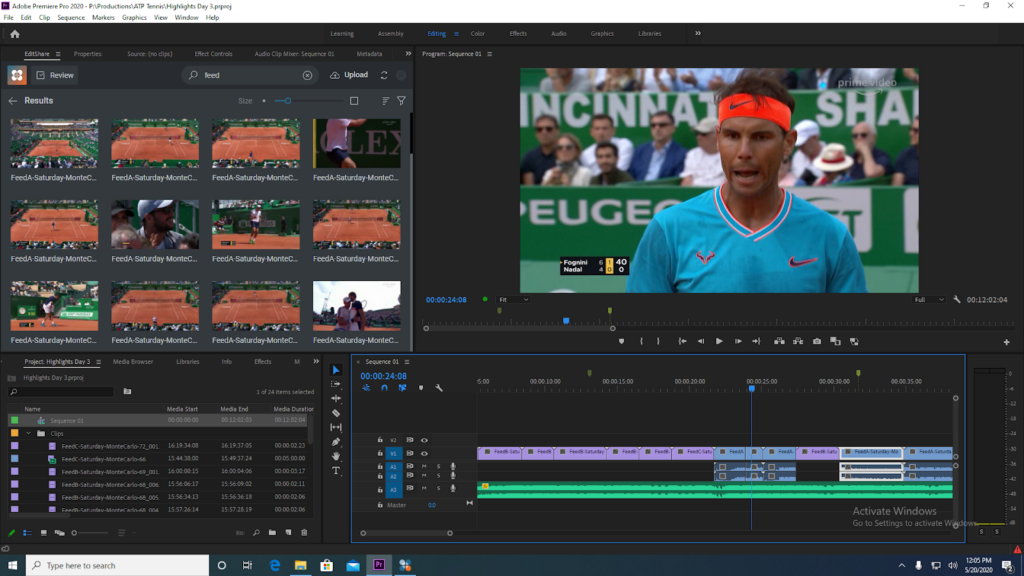
The above image showcases its new Flow panel connected directly into the Adobe Premiere Pro UI.
Meeting in the middle
EditShare’s FLOW Panel for Premiere Pro is a portal between two worlds. On one side is enterprise-level media management and on the other is the creative world of editing and post production with Premiere Pro. Two different specialties, each with an essential job.
Editors have their own set of priorities. Their skills marry productivity with artistic and aesthetic choices. Understandably, they are reluctant to step outside their optimized personal work environment.
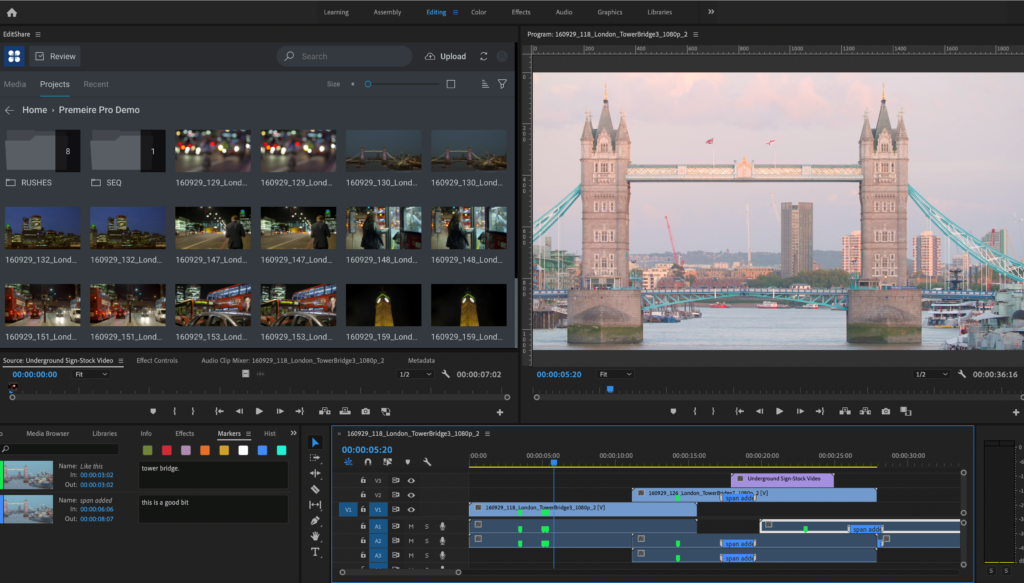
The FLOW panel allows editors to stay inside their productive zone. To an editor, it is instant access to the power and scope of FLOW, without having to leave Premiere Pro. An immediate connection to their media from a shared and collaborative storage system without having to learn a new user interface.
Let’s have a closer look at why interfaces grow up differently, and why our FLOW panel is such a big leap for Adobe users.
The above image showcases its new FLOW panel connected directly into the Adobe Premiere Pro UI.
Center of gravity
Every successful company has its area of expertise which you could see as a “center of gravity”. EditShare is media management, collaborative storage, ingest, logging, and scalability (on premise and in the cloud). Adobe’s is all about editing, VFX, audio and easy interchange between these disciplines within the Adobe environment (between Premiere Pro, After Effects and Audition, for example).
This means each company has a differently evolved, separately optimized user interface. And, this is what defined the challenge of building the FLOW panel. Specifically – how do you present a significant element of FLOW functionality from within the Premiere Pro interface?
In technical terms, much of the heavy lifting was already done. Adobe has a developer partner program with a very deep, wide ranging SDK. EditShare also has well developed, published APIs.
So the tools were there for a reliable and stable connection. It was then a question of selecting the aspects of FLOW that editors would need to have the most direct connection with.
The panel will continue to evolve, but it already has some remarkable time saving features. It gives Premiere Pro editors the ability to search for content and get direct and instant access to all their media spaces on the EditShare video content management system, to see content that may have been archived long ago on LTO tapes or cloud video storage, see all metadata associated with each clip – user markers, automated audio transcripts, AI-assisted object recognition information, and more. Simply select and import media directly from the FLOW panel into a Premiere Pro project. Instantly switch between proxy and full resolution. Never leave the Adobe UI to find the clips you want.
Designed by editors for editors
The FLOW panel was designed by editors, for editors. Editors save time by not having to switch working environments. No duplication of effort. Most of all, there is a true and friction free round trip from Premiere Pro to FLOW and back again. The FLOW panel has a powerful core functionality, but it is full of thoughtful touches. For example, if you’re searching for some media in a tree of folders, the panel will remember where you were the next time you have to go back there. You don’t have to start again from scratch. There’s also the flexibility to switch between high resolution files and proxies. If you’re in the field and you find you don’t have the high resolution material to hand: the system can automatically download the fully editable proxy version to a local drive of their choice.
The continuous connection between your Adobe project and FLOW makes it possible for other remote users to review your footage, adding markers and comments on the fly, while you’re working in Premiere Pro.
Technical and artistic co-operation
EditShare’s FLOW Panel for Premiere Pro is the result of openness by both companies.The FLOW panel is an editors-first interface within Premiere Pro. It provides the maximum efficiency with the minimum friction.
5/27/2020
Updated FLOW Panel for Premiere Pro, and EFS support for project-locking in Premiere Pro’s Productions, bring outstanding remote editing and collaboration workflows to Adobe users – on premise, in a hybrid environment or in the cloud
Boston, MA – May 27, 2020 –EditShare®, a technology leader that specializes in secure media management, collaboration and intelligent storage solutions for video content creators, continues its collaboration with Adobe® to enhance end-to-end remote production and collaborative editing workflows. Creating an exceptional user experience, from individual storytellers to enterprise workgroups, the integrated solution of EditShare with Adobe seamlessly connects editing workflows into a wider media ecosystem with deep metadata tracking and workflow automation to simplify storytelling, whether on-premise, in a hybrid configuration, or as a complete cloud-based workflow. The new FLOW panel for Adobe Premiere® Pro transforms content management, proxy and remote editing, and review and approval workflows for editors. EditShare’s EFS open shared storage solution enhances collaborative editing with full support for project-locking for Productions in Premiere Pro. With the Productions feature set, Premiere Pro can now handle projects with an extraordinary number of assets while maintaining peak performance. Sharing and organizing those assets is much easier than before. Read more in EditShare’s blog on Productions in Premiere Pro.
“Building collaborative digital video workflows for our customers continues to be one of the fundamental drivers of our FLOW and EFS partner developments,” comments Sunil Mudholkar, Vice President of Product Management, EditShare. “Our solutions are optimized from the highest levels of the technology stack down to the storage file system, so creatives can work with Adobe tools in any location, with the very best user experience. The FLOW Panel for Premiere Pro and EFS support for Productions enables users to delve deep into on-premise, cloud or deep archive storage to find that all important content, and collaborate with colleagues anywhere in the world, all without ever leaving the Adobe Premiere Pro UI.”
“Editors and creative teams want to focus on telling great stories without thinking about workflow issues,” said Sue Skidmore, head of partner relations for Adobe video. “The collaboration between Adobe and EditShare helps our users – from individual creatives to large groups – have a great experience whether they are on premise, in a hybrid environment or in the cloud.”
Designed to simplify storytelling, FLOW manages the entire media technology stack with tools to orchestrate assets and workflows across tiered on-premise, nearline, and cloud storage environments. An essential, secure platform for remote, collaborative productions, FLOW offers an advanced proxy-based workflow with support for over 500 codecs. Its enhanced Premiere Pro panel connects individual editors and production teams directly to the FLOW media asset management and its productivity-focused toolset including extensive asset tracking, collaborative proxy editing workflow, and review and approval workflows across cities, countries and continents.
EFS scalable storage enables media organizations to build extensive collaborative workflows on premise, in the cloud, or in hybrid installations, shielding creative personnel from the underlying technical complexity while equipping administrators and technicians with a comprehensive set of storage management tools. For Adobe editors, EFS is fast and flexible collaborative storage with outstanding support for Productions in Premiere Pro, enabling best-in-class project sharing. Mudholkar adds, “Creatives don’t have to feel overwhelmed with learning an entire media management platform: the lightweight FLOW panel fits directly within Premiere Pro and delivers exceptional workflow efficiency while EFS supports the underlying transactions that keep media safe and projects organized.”
Special EditShare Bundle for Adobe Workflows For a limited time, EditShare is offering a special Adobe workflow bundle that includes FLOW media management, EFS open storage solution and Helmut workgroup management tools.
EFS and FLOW provide a robust storage and media management platform that connects creatives, content and media optimized technology. Scalable up to the enterprise level, the workflow bundle for Adobe offers a media foundation that is built for creative workflows with tools to administer Premiere Pro workgroups and distributed teams. For complex workgroup management, EditShare offers the suite of Helmut tools as an optional extension to the bundle. To obtain more information, please visit here.
Join EditShare and Adobe on May 28th Join the Adobe and EditShare team on Thursday May 28, 2020 at 12:00 pm EDT and again at 9:00 EDT for a joint webinar on Production, Group Editing, and Remote Workflows with Adobe Premiere Pro. To register for one of the time slots, please visit https://editshare.live/webinar052820session1pr (12:00 pm EDT) and https://editshare.live/webinar052820session2pr (9:00 pm EDT).
About EditShare EditShare is a technology leader in networked shared storage and smart workflow solutions for the production, post-production, new media, sports, and education markets. Whether you need on-prem, cloud, or hybrid solutions, our products improve efficiency and workflow collaboration every step of the way. They include media optimized high-performance shared storage, archiving and backup software, a suite of media management tools and a robust set of open APIs that enable integration throughout the workflow. Customer and partner success are at the heart of EditShare’s core values ensuring a world-class experience that is second to none.