In this guide, we'll highlight how creative agencies and the production world can each optimize their reels to get the attention they deserve and win more business.
For creative professionals, showreels are a resume, portfolio and calling card all rolled into one. Whether you work at an agency, production company or any of the dozens of other businesses where creativity is at a premium, showing your work in the best possible light can mean the difference between getting the gig and being forgotten.
Creative and marketing agencies of all types use reels for pitching agency services, demonstrating category experience, illustrating case studies and differentiating their creative thinking processes from those of competitors. Meanwhile, companies that represent production, post-production and supporting talent use their reels to show off the past work of their talented creatives, highlight specific skills or technical capabilities, and draw attention to the specific voices of their artisans.
While those two categories of businesses often have very different goals when showing reels, they have even more in common. All of them ultimately are accessing the power of sight, sound and motion to present the best of their creative output.
In this guide, we’ll highlight how creative agencies and the production world can each optimize their reels to get the attention they deserve and win more business. Then we’ll review the most critical considerations in setting up an in-house system for building great reels.
Pain-Free Pitching For Ad Agencies
The traditional agency pitch is a drawn-out, sprawling, cumbersome process that has now spread throughout the creative industry. From pitching on a client’s entire creative business to bidding on a specific project or campaign, creative agencies in advertising, marketing, experiential, PR and digital all dutifully invest time, creative energy and resources into frustratingly rigid dog-and-pony shows.
Most consultants’ pitch templates are older than the internet.
The average agency spent 22.2 days of staff time last year on each pitch they entered (equal to one employee working one entire month per pitch – eleven times a year).
“We’re meant to be in the business of creativity, but the focus has shifted…The average agency now spends around 2,000 hours a year working on pitches, time that’s often tacked on to the end of the working day.”
Lucy Taylor, MullenLowe Group UK
So how can you shift the odds in your favor when preparing for the dreaded pitch? Consider the basic criteria clients use to determine the fit of any agency:
You understand the client’s business, vision and immediate needs.
You have experience in their industry.
You have a recognizable roster of previous clients.
You have the right mix and level of capabilities.
You can personalize your solution to them.
The most important thing to remember is that the best reels reflect the specific client watching it and demonstrate what you can do for their exact needs. Of course, every client is different, meaning the best reel you can use is customized particularly for them. If you’re going to engage with multiple prospects, it makes sense to scale up your reel-building capabilities internally. Doing this will allow you to conduct business development proactively, respond more swiftly to requests, reduce the expense of customizing your reels and, most importantly, increase the “at bats” your agency gets by pitching as many clients as possible.
A Digital Foot In The Door — Reel Building For Prodcos And Post Vendors
When you first approach an agency or client, you often don’t even get the chance to talk to anyone. It’s only after you’ve sent a reel and they like it that you get to have an actual conversation about the talent you represent. Whether you’re an independent rep hoping to get your future star on an agency’s radar or an executive producer with a director or editor who’s ready to tear up the awards circuit, the first step is getting agency producers or creatives to take notice. And that means you need a showreel. But how do you make your showreels work harder and cut through the clutter amidst so much competition? Our guide will help you make the most of your work by making the most of your reels.
Use advertising tactics to cut through the clutter.
You want a combination of reach and frequency, so use a platform that allows you to track viewership metrics and follow-up. You want to keep in touch and maintain an ongoing relationship to ensure viewers engage.
Choose work that demonstrates you’ll take their project to the next level. You want to show them how good their work could be if they hire you.
Specialize your reel for their project.
If you’re really strong in multiple genres or styles, there’s nothing wrong with creating separate reels for each of them, but it’s often a good idea to refrain from putting it all on one showreel (unless specifically requested).
Leave them wanting more.
Especially with new and developing talent, having a short reel is fine, and far preferable to a reel of mixed quality with some flawed pieces that aren’t up to standard. As a guideline, people will assume you’re as good as the worst work they’ve seen from you.
Look the part.
Include company graphics or animation at the head and tail, and make the hosting page or presentation look flawless. If possible, you may even want to include their logo or customize the reel with a mention of the project.
Building a great showreel can be a bit like building a great meal. You want enough courses to make everyone satisfied, but you don’t want to overwhelm with volume.
In the end, what you choose to put on the reel is about reassuring a prospective client that you have the knowledge and skills to make their project great, even if you haven’t done that exact thing before. That connection between your work and the client’s needs is what gives a reel the best chance of getting you in the door. So the more customized you can make the reel, the better your chances of winning the job.
What Matters When You’re Building Reels In-House
So you’ve decided to set up an in-house system for making your reels. There are a few basic parameters to keep in mind when you’re setting up your reel-building system:
Organization: Every additional step it takes to get your work samples onto your finished reel is another obstacle between you and your potential new work. You want to have anything that you might ever use on a reel in one place so that no one has to go hunting for an asset or version. And you want all the pieces well organized and in compatible formats, ensuring your presentations are consistent and reliable.
Simplicity, Speed, and Efficiency: Your system should be straightforward and non-technical enough that anyone on your staff can create a great reel in a pinch, even if you’re out of the office. And it should be efficient enough that it can be done on short notice. Your responsiveness alone—along with your ability to turn around a beautiful presentation quickly—will make a strong impression from the start and potentially get you the chance to compete for projects you might have missed out on otherwise.
Customization: You should be able to make customized reels for any client or project and be able to adjust the look and presentation so that each client feels like it was made just for them. Find a solution with premade templates, customizable design themes and drag-and drop presentation-building features to ensure consistency and deliver presentations quickly.
Security: Unlike showcase websites and traditional asset storage solutions, modern asset management and reel-building systems can also offer higher-tech security features, like watermarking and personal access codes. Some platforms offer more advanced multi-factor security and even integrate it with their analytics so you can keep track of who is seeing your work in real-time. You need to keep your materials safe and ensure that only the right eyes see them. This also shows prospective clients that you understand their security needs and how to keep your future work for them secure.
Analytics: You want to be able to harvest a robust set of data from the reels you send out. Being able to tell who has looked at a reel, which parts they watched, and for how long can be critical in pursuing new business and following up with the presentations you’ve already sent out. Finding this type of solution can help you make better, more profitable new business decisions.
Make Your Next Pitch A Fast One
The arduous process of building reels isn’t going away any time soon. But with tools that let you quickly present the beautiful work you’ve already created, you can get on the shortlist and possibly even short-circuit the process of winning more work.
Wiredrive by EditShare can help you share winning work with the world. Contact us to get started with a demo of the industry gold standard for building and presenting winning showreels.
Docs are real films
Since the Lumière brothers wowed audiences with footage of a train pulling into a station in 1896, documentary films have been a part of cinema. Some documentaries record life as it happens, and some films interweave re-enactments, graphics, or archival footage. But all documentaries promise to grant the viewer a glimpse of the truth. They seek to deliver insight into the truth of things instead of just the pantomime of reality that narrative fiction brings to the screen. For those brave filmmakers seeking to challenge, inspire, and illuminate the world through documentaries, we present this guide to making real films.
Some documentaries follow a “hands-off” approach. The goal of these filmmakers is to be a fly on the wall. They want to introduce as little disruption to the events they document as humanly possible. Others see limitations to this approach and cast actors to amplify the emotional impact of a story.
We want to get into the nuts and bolts of crafting a compelling doc. Mastery of lensing, the use of audio, story structure, editing, music clearances, and distribution lead to a total package that rises above the noise. Of course, there are also different levels of documentary. You can see docs shot on phones and docs shot on RED cameras. The critical thing is that you use all the tools at your disposal to draw the audience into the emotional arc of the story. So, we will cover the planning, shooting, and editing so that you can go into your next unscripted project fully prepared. It’s true that beginners can just grab a phone and get shooting. But we want to push things to the next level and see what it takes to craft a top-tier documentary.
Filmmaker Elaine McMilion Sheldon has been on both sides of the coin. Elaine McMillion Sheldon is an Academy Award-nominated, Peabody-winning, and two-time Emmy-winning documentary filmmaker. She premiered her latest feature-length documentary, “King Coal” at the 2023 Sundance Film Festival. “King Coal,” employs the latter method to weave an evocative story about the coal communities of her childhood.
In an interview with EditShare, the filmmaker describes casting the two young girls who help to tell the story visually. They were cast from the local community for their ability to “ignore the camera.” And their presence in the film provides a visual metaphor for the experiences of the locals. Elaine McMilion Sheldon wrote and delivered narration, thereby revealing her own perspective as another layer in this ethereal documentary. These divergent techniques show how much a documentary film is the product of the director’s heart and soul. Documentaries embody a point-of-view and express a desire to bring the viewer into that perspective and see real life through the eyes of another.
Story priorities should guide camera choice
Some filmmakers get more excited about buying gear than making films. They make more videos about buying, comparing, unboxing, and reviewing equipment than actual films. This is mainly because YouTube rewards this kind of video with ad revenue. But in another way, nerding out on technology is easier than going out and shooting something that exposes your soul to an audience and invites criticism or rejection. Choosing a brand can be like choosing a sports team or a personal fashion style. It is too easy for your camera to become an extension of your ego and a mark of your belonging to a particular tribe. But with that being said, there’s nothing like bringing home a new baby cine cam and getting it all rigged up to go make a movie. The right gear prevents headaches and amplifies your creativity. So, I’m not one who says cameras are just tools. For whatever reason, they are more than that. They do become the means through which you see, create, and communicate. Like the sword of a samurai or a knight, cameras become part of our professional identity as image makers, and that’s why we agonize over the choice. Just don’t let your tools define your personal identity, and you’ll be okay.
How do you determine the best camera choice? Consider your storytelling priorities. If you are putting together a run-and-gun project, consider these questions.
Do you need to quickly boot up to grab shots on the fly?
Do you have a crew, or are you a one-person band?
Will you have a separate sound person, or will you record audio right into the camera? Do you need a lightweight camera to go on a small gimbal?
Will you have the time to manage a matte box and filters in the field?
On the other hand, you might have more time to compose shots and the ability to take a bit more gear. If you have a small crew, you can take a more capable camera and give some attention to lighting. In that case, image quality may trump extreme portability.
The Canon C300 series has long been considered the king of documentary cameras. It works with Canon EF mount photo lenses. Those lenses are high quality and available just about anywhere in the world. You can run your XLR audio cables right into the camera as well. The C300 MK III also features built-in ND filters. That makes it easy to adjust your exposure while shooting outside. Canon is, of course, renowned for its warm, pleasing images, and the C300 MK III delivers on image quality. At $8,999, it is not inexpensive, but it provides excellent value and can be rented at reasonable rates.
Sony has been working hard to elevate the mirrorless camera form factor to provide the functionality of a cinema camera. The FX3 has a full-frame sensor, excellent auto-focus capabilities, and built-in image stabilization. Its tiny size makes it perfect for shooters who need to be agile and low profile. While it can send a RAW signal from the HDMI jack, you won’t get ProRes or RAW recording in the camera body itself. The Sony comes in at $3,899, making it less than half the Canon C300 MK III cost.
Panasonic combines a smaller “micro 4/3rds” sensor with the professional ProRes recording format. This makes the GH6 attractive because its lenses are smaller and lighter. Since it has a professional codec, you eliminate the need to record externally. At just $1,697, it is less than half of the Sony FX3. Panasonic’s weakness is that it does not have the same autofocus performance as the Sony or Canon. But it does offer enhancements to Lumix lenses. You can set up those lenses so that they are able to pull focus manually instead of focus-by-wire. This is important if you are shooting a scene where an actor needs to hit a mark.
When image quality takes priority over the speed of operation, you might turn your attention to cine cameras, like the new RED Komodo X. At $9,995, it is the most expensive camera on the list. RED offers in-body REDCODE RAW. That is a 16-bit RAW recording format that offers maximum flexibility in post. As a documentary shooter, I love shooting in REDCODE RAW because it is the most forgiving format when you’ve over- or under-exposed a shot. You can’t always control the light in a given situation; that is where raw codecs shine. To my eye, the images that come out of the RED cameras “look right.” REDCODE RAW is also flexible, allowing for quality levels that deliver raw images at data rates lower than ProRes. But RED cameras are designed with a crew in mind. Yes, you can use them solo. For instance, RED offers a PL mount with electronic ND filters, but this solution does not come cheap. So remember that RED cameras work best when paired with a camera assistant.
I won’t lie. When in a pinch, the iPhone Pro Max will deliver a ProRes (512GB version $1,399) image that can work. The new cinematic mode even allows you to pull focus in post! The software will denoise footage and manage highlights for you. Its in-body image stabilization is just amazing. The biggest issue I have with it is the lenses. It can be challenging to rid your image of unwanted glare when shooting with a backlit subject, and the “smart” features of the camera can often work against you. Battery life, heat, internal capacity, and file offload speed are issues with this camera. But every year, Apple delivers better video performance. Most of all, if you are trying to shoot unobtrusively, the iPhone could be your go-to tool of choice.
The high end:
The cameras listed above favor a lightweight style of documentary shooting. If your project demands the highest quality of images, and you have the budget for lights and crew, the RED V-Raptor ($24,995) makes a lot of sense. When a project calls for high-resolution images, the V-Raptor delivers 8k at 120fps in REDCODE RAW. It is RED’s best camera for low light and combines superior dynamic range with a body built for efficiency when you work with a team. If you are working on the next “Chef’s Table” cinematic-style documentary, then the RED V-Raptor might be the right choice.
Even if a film doesn’t use a “high-end” camera, that doesn’t mean a documentary can’t have a cinematic look. Lens choice, quality camera support, and lighting techniques can create beautiful images with low-cost equipment. The real challenge to creating compelling b-roll is not in equipment but in conceptualizing sequences that communicate concepts. Visual metaphors and vignettes go a long way toward engaging a viewer than merely pretty visuals. So, work to find ways to shoot sequences of shots that amplify the message of your interviewees.
Audio is more important than video
You’ve probably heard the old adage, “People will watch a video with bad video quality but not with bad audio quality.” That is especially true for documentaries. Viewers understand that capturing life as it happens means trading off polished visuals for behind-the-scenes access.
The best way to ensure top-quality audio for your documentary film is to hire a sound mixer when you shoot. They will be able to provide the microphones for the right situation, balance levels on the fly, and ensure that unwanted sounds aren’t affecting your recording.
Documentarians often don’t have the budget to hire a sound mixer or their setup calls for something as minimal as a shotgun mic on a boom pole over a seated interviewee. Here are some recommendations for gear to help the solo shooter get the best audio for their film.
The Zoom F3 audio recorder features 32-bit float recording technology. This technology means that you don’t have to worry about your recording “clipping” when an interviewee gets too loud. The F3 offers timecode sync via a Bluetooth adapter, the UltraSync Blue, and UltraSync One combo of timecode boxes. When recording an interview, you can run a cable out of the line out into your camera. This setup gives a nice, clean recording in the camera and a higher quality 32-bit float recording in the F3 itself. (It also provides a little insurance if you forgot to press record on your audio recorder, not that anyone has ever failed to do such a thing!) The F3 is small yet can power XLR microphones that need phantom power. If you need more than two channels, the Zoom F6 is a good choice.
Another popular method of syncing timecode is the Tentacle Sync system. Tentacle Sync is used by sound professionals worldwide to ensure that the audio recorder and camera stay perfectly in sync.
Microphones
There are so many choices for microphones. And more than any other area of audio/video production, “you get what you pay for” applies to mics. More expensive mics sound better. But for the typical documentary shooter, the keys to success are simplicity and reliability.
Just about everyone has a smartphone. You can use the Apogee ClipMic Digital 2 to plug into a phone and record right to it. It works with the same UltraSync timecode system as the Zoom F3 to keep all your recordings in sync. At $199, the ClipMic provides one of the least expensive ways to get quality audio for the documentary shooter.
Rode just released a 32-bit float, timecode-enabled lavalier system. This solution eliminates the need for an additional audio recorder like the Zoom F3. You also won’t need external timecode boxes like the UltraSync.
Sennheiser delivers a great-sounding and simple-to-use lavalier mic system. The build quality of these mics is a step up from the lower-cost solutions. They fall into a space in the market that is short of the higher-end professional solutions and better than the prosumer offerings.
Hiding lav mics
When a lav mic shows in the shot, it really reminds you that you are watching a produced piece. Ironically, it takes more work to hide the mic. Sean Woods has a great 3-part series on how to hide lav mics on different shirts and then how to easily EQ the mic to compensate for it being under clothing.
If your subject is stationary, like in a sit-down interview, or if you have a boom op on set, you’ll want to consider a shotgun microphone. Shotgun mics reject noise around the subject and focus on a narrow pickup pattern. This pattern makes it great for environments where you can’t control the ambient audio. The Sennheiser MKE 600 lets you power it from the camera or audio recorder’s phantom power jacks. But you can also use an AA battery and power it without phantom power.
As microphones increase in price, they become more specialized. As you consider the various environments you’ll record in, you begin to see why sound pros bring a selection of mics with them on location. One of the most highly regarded microphones for indoor recording is the Sennheiser MKH 50. It provides a beautifully warm natural recording that will elevate your audio to a professional level. It isn’t the best choice when you are outside or if the mic has to be far from the subject.
Rigging a boom pole
If you are conducting a sit-down interview, having a solid rig to hold your mic over your interviewee is essential. You’ll want to position the mic out-of-frame and pointed toward your subject’s chin. Here are the key pieces of equipment that will help you build a solid and lightweight rig.
The reverse stand is great for packing in a case when traveling. It is lighter than a standard baby stand and easier to work with than a C-stand. It has a “baby pin” on the tip, which makes it compatible with video-oriented rigging gear, unlike many light stands designed for still photography.
Place a grip head on the reverse stand to hold accessories firmly. Don’t skimp out and buy a plastic grip head of some sort. This piece of kit prevents your boom pole from slipping and bonking your interviewee on the head.
A boom pole holder, or yoke, will enable you to position your boom pole at a slightly upward angle. This positioning will compensate for the flex in your boom pole when it extends. Make sure that you don’t skip this piece and try to put your boom pole through the grip head.
The most important tool for rigging your mic is the boom pole. You can use it handheld or as a part of a rig. This boom pole from K-tek has an internal XLR cable that will keep your rig tidy. It extends so you can place your stand away from your subject and keep it out of the shot.
Your shotgun mic is held in place by a shock mount. This mount eliminates handling vibrations from being transferred into the microphone. Make sure that the shock mount you choose fits your microphone. For instance, the Sennheiser MKH 50 P48 has its own shock mount.
The last thing you want is for your microphone rig to fall over. You can take a boa bag or other shot bag and wrap it around the base of your stand. This is a critical piece for the safety of both your gear and the on-camera talent.
Don’t forget a high-quality XLR cable. This cable will go from the back of the boom pole to the audio recorder. It will transfer power to the microphone and signal to the audio recorder. It can be convenient to have this cable be a different color than black to distinguish it from all the other cables in your kit.
Headphones
A good pair of closed-back headphones is essential to successfully recording audio on location. Don’t fall into the trap of trying to use an old pair of Apple headphones from an old iPhone. Sennheiser’s HD280 Pro headphones are relatively inexpensive and will serve you well both in the field and when you are editing. The key is to use a pair of headphones that deliver a relatively flat frequency response, unlike Beats or other headphones designed to accentuate specific frequencies for music listening.
Closed-back headphones are critical because you want to hear the environment through the headphones only. It is also essential to avoid audio bleed-through, like on a pair of “open-back” headphones, which will affect your recording. If the Sennheiser headphones are too bulky, you might like the Sony MDR-7506 headphones.
Listening to locations
Half the work is done if you can scout out a location ahead of filming. Listen for heating and cooling systems. Clap your hands in the room and listen for echoes. Ask about construction projects in the area. If there are ways to reduce the background noise in the location during filming, it will save you an enormous amount of time in post-production.
In addition to listening for sounds to remove, listen for sounds to capture. Can things like fans, vehicles, or natural sounds enhance the story when used with b-roll? If you have hired a sound mixer, bring them on the location scout and treat their ears like you would treat the eyes of a cinematographer. They can help enhance the story by identifying both sounds to remove and sounds to capture.
Archival documentaries
Some docs shoot interviews, and some just use archival footage to tell their story. In the Netflix documentary WHAM!, the filmmakers didn’t film interviews. Instead, they used extant footage and interviews. They combined this with footage of a scrapbook one of the pop duo’s moms made during her son’s journey to stardom. The National Geographic documentary LA92 took the same approach. The filmmakers used news footage and archives to demonstrate the strife that shook that city and the nation. The effect of archival footage is powerful. As a viewer, you get a sense of the bigger narrative. The filmmaker’s point-of-view can be just as effectively portrayed through archival footage as through original video.
Clearances
The challenging aspect of archival documentary is known as “clearances.” This involves balancing the need to contact the original TV network or studio that created the media in the first place against the “fair use” doctrine. Fair use is a legal doctrine allowing media to be reused in specific ways. It is intentionally vague. A documentary filmmaker must carefully evaluate the guidelines for fair use and determine their willingness to take on the risk of using media under fair use. If the owner of that clip contests the use of that media as not being legitimate under fair use, you could face a legal fight.
The other option is to contact the media owner and pay them a licensing fee, which will be negotiated based on your project’s budget, the places the documentary will be shown, and the license duration (e.g., ten years or in perpetuity).
In these cases, it is a good idea to enlist the services of an entertainment attorney to help guide your decision-making process. Sometimes, a clip needs multiple layers of releases to clear it.
When it comes to music clearances, it is helpful to employ a music supervisor who can help you navigate the complex world of licensing songs. Using a famous hit will be expensive and time-consuming, so keep that in mind before attempting to license a television performance of a famous musician. You may need to negotiate with their estate if they have passed on.
Photo licensing can be more straightforward. Getty offers services for licensing its catalog of images. It can be easier to license a photo of a famous person than to license audio or video footage.
After Skid Row
Sometimes, a documentary comes together after months of careful planning; other times, an opportunity presents itself, and you have to move quickly. That was how Lindsey Hagen was able to assemble a small crew and capture the experience of “Gangsta Grannie,” Barbie Carter, in her short doc film After Skid Row. Lindsey is a Director, Executive Producer and Story Producer at Gnarly Bay. Together, the team at Gnarly Bay has garnered multiple awards and produces films for Fortune 500 brands. In 2022, they won the Vimeo Film Festival award for the best branded video for Cannondale, which Hagen directed. Lindsey Hagen It went on to be Oscar Qualified, and L.A. Times distributed it.
The crew was small, and their gear was light. That helped them to take a “fly-on-the-wall” approach to this film. Hagen notes that the story was really about their subject “reclaiming her identity.” As a result of the film’s impact, the crew was able to raise funds for Carter’s medical needs as well. It really stands out as a beautiful example of how an audience can enter into the suffering of someone, and yet the subject of the film can retain their agency so that it is their story, told on their terms.
Editing a documentary film
Walter Murch edited the brilliant documentary Particle Fever. In this look at the editing process, he talks about the ratio of footage shot to footage used as 300:1.
This presentation is a tour-de-force in the level of organization that it takes to surface a compelling narrative from so much footage. The story is there, and the tension and drama are real, but the effort it takes to form that story into a movie is immense.
The key is to organize and log that footage. One of the best tools for doing that is transcripts. Here is a case where AI comes into play. Adobe Premiere, DaVinci Resolve, and Lumberjack Builder (initially designed for Final Cut Pro) use machine learning to generate transcripts. Those transcripts are key to identifying common themes and making those spots quick and easy to access.
Transcripts allow editors to do a “paper edit” or “radio edit” based on the interview content. This edit can help the editor build a backbone for the story with the drama necessary to maintain the audience’s interest. Because no matter how important your story is, it won’t matter if you lose the audience’s attention.
Ode to Desolation
Lindsey Haggen also directed the short documentary Ode to Desolation, where she and her cinematographer/editor, Chris Naum, voyaged into the North Cascades. The gear for this film was even lighter. They shot on camera designed for stills but paired it with some beautiful lenses to capture the majestic landscapes that can be seen from the fire lookouts of Washington state. The filmmakers captured Jim Henterly’s role as a “keeper of history” and “maintainer of the story” of one of the last fire lookouts in North America.
The shoot took four days. They slept at altitude, hiked up a mountain for hours, and traveled by boat. This goes to show that you truly can tell a majestic story with a kit that can fit into a couple of backpacks.
Storage and Workflow
It takes a team to execute a film. That’s true on set, and it’s true in post. The assets you create and share with your team need to live in a central location that is separate from your editing team’s MAM (media asset manager) and accessible remotely.
When creating a world-class documentary, you accumulate a huge number of assets. I’ve written about the challenges of organizing massive amounts of footage. This is especially true when you are trying to shuttle drives back and forth. I once heard a story of someone who shipped drives via FedEx and the truck got into an accident, and the drives were lost! It’s best if you can deploy multiple strategies for backing up footage. Shipping two drives separately would be one approach that gives you redundancy. But as upload speeds have greatly improved, cloud-based collaboration workflows are revolutionizing the way teams work.
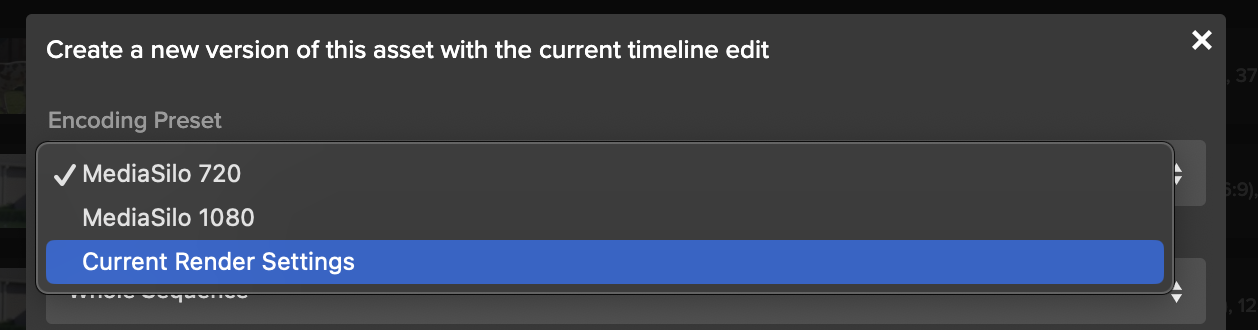
The team at DEFINITION6 shoots everything from unscripted work to Sesame Street. MediaSilo is their tool of choice for collaboration. According to their Chief Engineer Luis Albritton, DEFINITION 6 uploaded over 10,000 assets, sent nearly 7,000 review links, and hosted almost 24,000 viewers of their content in MediaSilo during 2022 alone. With MediaSilo, producers, executives, and stakeholders can stay in the loop on the post-production process while maintaining the security that is critical to their clients.
Conclusion
Documentary filmmaking can be your ticket to see the world or see the world from a new perspective. It’s taken me to Oxford, Cambridge, the Jerusalem Museum, and the Vatican Library for Fragments of Truth. Some projects are small and tell the story of your family; others can be on the cosmic level. They can showcase the beauty and struggles of a community, like King Coal, or the beauty of nature. But one thing all good documentaries share is a point of view. They show the world from a unique perspective and seek to touch the hearts of an audience and challenge their perspectives on the world.
Reuben Evans (Member, Producers Guild of America) is a director, an award-winning producer, writer and director. His company Visuals 1st Films, LLC is producing a documentary on the hymn Amazing Grace, starring John Rhys-Davies. He is the former Executive Producer at Faithlife Films & Faithlife TV. He’s produced and directed multiple feature-length documentaries including Fragments of Truth (2018) and The Unseen Realm (2020). Most recently Reuben produced “The Disappearance of Violet, Willoughby” (coming in 2023).
EditShare’s video workflow and storage solutions power the biggest names in entertainment and advertising, helping them securely manage, present, and collaborate on their highest-value projects. To learn more about how EditShare can help your video production team, contact us today.
The EditShare team designed this guide as a reference for the most commonly used codec you will run into in your work in motion picture post production. It can’t serve as a universal encyclopedia of codecs; there are just too many to count, and new special purpose formats arrive seemingly every month.
Motion picture post production has luckily settled on a few commonly used codecs that have a large footprint in the industry, and a good working knowledge of each will help you tremendously as you go about your work.
Apple ProRes
Apple ProRes is currently the most widely used codec in all of motion picture post production. If you work in a Mac shop, and Macs continue to dominate a lot of post, you’ll likely run into ProRes on a daily basis. In fact, one of the factors that keep Macs on top in motion picture post is the functionality and ubiquity of ProRes.
ProRes is used all the way from image capture in major platforms like the Arri Alexa, through editing in any of the four major NLE platforms, all the way through delivery, with streamers and major networks accepting ProRes file for delivery. If you are worried about the drawbacks of transcoding from one format to another, ProRes avoids those issues with an end-to-end pipeline that stays in one codec throughout.
Though you shouldn’t be afraid of transcoding for your edit workflow, you can always reconnect back to another format at the end in your online color session. Whatever format you shoot, you’ll be happier with your edit if you take the time to transcode to ProRes, especially an edit-friendly flavor.
If you are going to be working with ProRes extensively, it’s well worth a read of the ProRes Whitepaper, the technical sheet that Apple keeps alive spelling out the ins and outs of ProRes as a format.
The basics to understand is that Apple ProRes isn’t just a single codec, but a family of codecs built around the same technology, available in multiple implementations. You can think of these as “flavors” or “strengths” of ProRes. These flavors refer to both the method of encoding the image, 422 or 4444, and the data rate, how many Mb per second are allocated to creating the image. The higher the data rate, the higher quality the image reproduction will be, with fewer artifacts, but on the flip side, the larger the file will be.
The data rate scales with the image size, meaning that a given flavor of ProRes will be a much bigger file if you shoot a higher resolution and a smaller file if you shoot a smaller resolution. You can see the strengths in the following chart, combined with their data rate when working at 1080p 29.97.
ProRes File Sizes
4444 XQ 500 Mb/s
4444 330 Mb/s (often called 4×4 or quatro)
422 HQ 220 Mb/s
422 147 Mb/s (often called prime)
422 LT 102 Mb/s
422 Proxy 45 Mb/s
This starts all the way at the smallest file sizes with ProRes Proxy and goes up to the currently largest file sizes of ProRes XQ. You might shoot your film and capture it in XQ, then transcode it to LT for editing, then reconnect back to the XQ’s for color grading, then deliver to your network in 4444.
4444 and XQ both support Alpha Channels (that’s the fourth four in 4444), which allows for passing transparency information back and forth with VFX platforms like After Effects, Fusion and Nuke. Most VFX houses work on PC platforms and prefer to get files delivered as image sequences (discussed below), but there is increasing use of 4444 and XQ for some motion graphics and VFX workflows.
For many years, ProRes support on Windows was relatively weak, but the last few years have seen an explosion of both approved and work-around versions of that support. You can currently work natively with ProRes in applications like Avid, Premiere and Resolve on a Windows machine, which is very useful for professional workflow. Where things break down is at the consumer level. If you are delivering a file to a client, there still isn’t an easy way to get a non-tech savvy Windows user who defaults to Windows Media Player to playback a ProRes file.
ProRes naming has sometimes been a little difficult, with “proxy” confusing some users since a lot of software can create “proxy” files, but in any format. You can use Premiere to make “proxies,” but they don’t have to be ProRes proxy; they could be in LT. 4444 is often difficult to say, so many say four by four or quatro, with quatro being more common on the west coast. Plain old “prores” without any modifiers can be confusing since you might say to someone, “can I have it in ProRes,” meaning plain prores, and they’ll ask, “what flavor,” and you say, “ProRes,” and comedy ensues. Thus most use the term “prime,” as in, “let’s use ProRes prime for that workflow,” to mean the middle-level codec.
While you might think “bigger is always better,” bigger files take up more storage, take longer to move around and are more taxing on the system to work with, so you often choose the flavor that works for your workflow. ProRes proxy is rarely used anymore since the image quality is visibly degraded, and storage is less expensive than it used to be. Most projects use LT for “offline” work like editing, then a bigger flavor for finishing & VFX.
But if your camera doesn’t shoot enough data, it’s likely not worth going to a huge format like XQ since those files are large, and the extra data rate isn’t going to magically create quality that isn’t there in the source file. XQ is really for cameras that are capable of shooting high bit depths natively (like an Alexa, for instance). If your camera shot in 10bit 4:2:2 video, transcoding it to 4444XQ doesn’t magically add extra quality. Typically most productions render out to plain old 4444 for their final master file.
While originally built primarily for the .mov video wrapper, Apple ProRes is officially supported in the .mxf wrapper, which is widely used in broadcast applications and has some features that can make it more useful, including better implementation of timecode.
Avid DNx
While Apple ProRes has become far more ubiquitous in post-production workflows, Avid DNx as a codec family actually launched first and has a few key features that make it more useful in a few key situations that should keep it on your radar.
DNx, like ProRes, is actually a family of codecs available at a variety of data rates and encoding for a variety of workflows. You can shoot straight to it in cameras like the Alexa, the RED lineup and more, and you can edit it and deliver it to networks.
DNx is most comfortable in the .mxf (media exchange format) wrapper, which is a robust format with a lot of professional features, though you can also write DNx into a .mov wrapper if, for some reason, your workflow requires that.
DNx is widely supported on both PC and Mac machines, meaning it can be a great codec to use if your facility has mixed platforms or you are collaborating with others working in a variety of different formats. This has been its greatest strength. However, it’s not particularly easy to install for the less technically savvy, so it again doesn’t make a great format for delivering cuts to clients since it requires installing a professional application for support.
DNx originally launched as DNxHD in a series of flavors that baked their data rate right into the name of the codec; you had DNx36 for editing and DNx175 for masters. DNx36 was a 36 Mb/s codec, designed to work well with 1080p 23.98 footage, and somewhat equivalent to ProRes proxy though ever so slightly smaller.
The problems came when formats started exploding. When the vast majority of work was 1080p, having the codec name and implementation built around a data rate made sense. While a 1080p 23.98 codec might look fine at 36Mb/s (not great, but fine), a 4k 60fps file would look terrible at that format. The larger resolution and framerate need more data to still look good.
Users, of course, could and should use a different flavor of DNx for 4k files than 1080p files, but many users were accustomed to using 36 for their edit. Avid revised the rollout of the DNx codecs to a new platform, which you would commonly work from today as the DNxHR format of codecs. These shift their data rate depending on the resolution and framerate of the source footage, making them work more like how ProRes works and more how users expect them to work.
So, to compare with ProRes, the new DNxHR HQ format at 1080p 29.97 is 25.99 MB/s, while ProRes HQ is 220 Mb/s. That might seem like a big difference until you note that the Avid number is MB, while the Mac number is Mb. MB is megabyte, and Mb is megabit. Putting them both in Mb, the DNxHR HQ is around 207 Mb/s, roughly equivalent to ProRes HQ.
DNxHR is a very common format in all houses running Avid Media composer, and its cross-platform compatibility makes it useful when dealing with moving from PC and Mac.
H.264/H.265
These codecs are consumer-facing codecs that post-production professionals need to be aware of and work with on a daily basis, but have some huge drawbacks. It’s important to understand and master to keep your workflow performing optimally. The main place you will want to actively use these codecs is in delivery, especially on web platforms. You aren’t going to send an H.265 file to Netflix or HBO, but if delivering to IG, YT, Vimeo or a work-in-progress review platform, you are going to be using H.265 all day long to get a file that is both small enough to quickly upload but still looks good enough to share with the world.
H.264 has been around longer, and H.265 is an update of the technology that offers similar image quality with about half the file size. You’ll sometimes see H.265 referred to as “HEVC,” an abbreviation for “high efficient video codec.”
H.264 is far more ubiquitous since it’s been around longer and is easier to license. H.265 has relatively high license pricing, so while you’ll find it supported natively in all the major editing platforms and all the major web delivery platforms (Youtube, Instagram, Vimeo, etc.) you’re still going to run into the occasional weird platform that doesn’t fully support H.265. If you are having trouble delivering to a strange client portal or obscure streaming software the client uses, the issue might be that that platform doesn’t support H.265, and you should try making an H.264 instead.
These codecs are built around Long GOP technology, in which a group of frames is compressed together to save space in the file. This is a wonderful technology for when you are viewing something linearly forward in time, making this a great codec for delivering video over the web. However, Long GOP can be very awkward in the editing room, since it requires your video software to recreate individual frames by looking at the group of frames. If you are scrubbing around, it can be laggy, and if you cut in the middle of a GOP group, the software has to recreate the missing picture information by holding those other frames in memory.
While some software platforms like to market that they can natively cut in H.264 or H.265, it is highly recommended you transcode footage into an editing codec like ProRes or DNxHR for an easier post-workflow experience. Running an overnight dailies render will make the rest of your post pipeline so much easier.
H.264/H.265 can also be used for capture, though that is generally something to be avoided if you can, as the image quality drawbacks can be very frustrating. Even cameras like the iPhone now shoot straight to ProRes, so the arguments for capturing into H.265 are less pressing than they were a few years ago. If you have to shoot to H.265, choose the highest bitrate you can and choose “All-I” if it is an option, which will make every frame an “I” frame instead of compressing groups of frames together for compression.
H.264/H.265 formats can support whatever data rate you want to encode; generally, your encoder will let you change the data rate of your compression when you make the file. It is highly encouraged you test your specific encoder and project at a variety of data rates to find one that works for your projects and deliveries. For some reason, most encoders (like Resolve, Adobe Media Encoder, Compressor, etc.) have relatively small data rates as their “high-quality” file size. If you aren’t happy with how your images look when compressing to these codecs, try testing at higher quality file sizes to see when you start to like the image.
DPX AND SIMILAR IMAGE SEQUENCES
These aren’t technically “codecs,” but you should be aware of image sequences as a tool in post production. DPX is the most common image sequence (and the one we’ll focus most on here), though EXR and Cineon are other common image sequences.
Image sequences are literally just a folder with a series of still images, numbered sequentially, saved into it. That’s pretty much the totality of it. Software dealing with image sequences (like Resolve and most VFX platforms like Nuke) will look at that folder full of still images and see it as a single image file that you can manipulate just like a video file.
Image sequences are incredibly popular in the VFX world for a few main reasons. First off, they are easier to move around. If you have a 40GB file, and your file transfer crashes halfway through your upload to the web, you have to start over from the beginning. Not with an image sequence; you can just start over with the last frame copied.
Beyond that, if you have a render and 90% of the shoot looks perfect, but you need to fix part of something that looked off at the end, with an image sequence, you only need to re-render those final frames. With a video file, you need to re-render the whole shot. With render times sometimes being exceptionally long in the VFX world, this is a huge time savings.
VFX artists aren’t going to give up image sequences any time soon for those benefits. If you are being asked to interface with a VFX artist and they are asking for an image sequence, you can and should ask them for a spec sheet on what they are looking for. Then you can deliver it with a tool like Resolve, which has full support for multiple image sequence formats built-in natively.
RAW FORMATS
RAW capture formats aren’t technically “codecs” since RAW happens to the video signal before it gets wrapped into a codec, but it’s good to have a handle on the most common RAW formats and how they might present in your workflow. RAW isn’t “video” in that it can’t be played easily by a video player. RAW formats take the RAW camera signal from the sensor and compress it into a file before it gets processed into video and the menu settings like ISO, white balance, etc. get applied. This makes more processing required in post (since your editing station has to do all that work that the camera used to have to do), but they offer the benefit of more flexibility in post. If you want to change your mind about white balance or ISO, you can do it in the edit or color suite, which is helpful, especially if the settings were accidentally wrong on camera.
There are two major categories of RAW forms, open RAW formats and proprietary or closed RAW formats. Open RAW formats are designed for many different platforms to capture to or work with. Proprietary formats created by a camera company are often only supported by that one company, with varying support from post-production software. The major proprietary RAW formats are now natively supported in all the major software platforms, but if you run into a more obscure format, you’ll often need to download software support from their website.
OPEN RAW FORMATS
Before discussing the two open RAW formats, one issue needs to be discussed: the red RAW patent. RED introduced the RED ONE camera at NAB 2006, and it was a working model that captured compressed motion picture RAW footage into an internal recorder. They applied for and received a patent on that technology. Both Sony and Apple have challenged the patent in court, and even with their legal resources, both lost. The RED patent stands, and as far as we know (it’s not always public), the other internal RAW proprietary formats are paying some sort of license fee to RED.
This led to two different strategies for how to implement a RAW video format that was accessible to all users without paying for the RED license fee, since whatever that fee is, it doesn’t make sense within a mass-market-facing, consumer-focused video market.
ProRes RAW
The first “open” RAW to market is ProRes Raw, a format co-developed by Apple and Atomos, which makes an external monitor/recorder platform. That is their method for getting around the limitations of the RED patent; ProRes RAW is something you record to an external recorder.
Currently, ProRes raw has native support in Final Cut Pro, Avid Media Composer and Adobe Premiere, but not in Blackmagic Resolve. There are no announced plans to bring it to Resolve. If you are planning on doing your final color grade in Resolve, ProRes Raw isn’t going to be the format for you.
Interestingly, DJI has implemented ProRes RAW into some of their drones, since, technically, with a drone, the camera is actually dangling underneath the drone, and the recorder is up in the body of the drone, which is enough to make it an “external” recording. ProRes RAW was briefly available in the DJI Ronin 4D but then disappeared, and the suspicion is that they weren’t able to argue that it counted as “external” on that camera.
ProRes Raw is available in two data rates and offers substantial image quality benefits for shots that weren’t exposed under proper settings, such as with the wrong white balance. However, for shots properly exposed and with correct menu settings, the benefits are not large, though they are there.
Blackmagic RAW
Blackmagic had an interesting challenge in building their RAW codec; they make external recorders, and editing software, but they also make cameras, and they wanted their RAW to work inside a Blackmagic Camera. However, they sell a lot of cameras, and outsiders suspect they wanted to avoid a RED license fee considering the sheer volume of units they ship. To get around it they designed the Blackmagic RAW format which is partially debayered. It’s not a full debayer, which means there are still some of the benefits of RAW (you can change ISO and white balance in post), but also avoid the patent limitations of trying to record full RAW.
Blackmagic RAW is an open format, supported by all the major NLEs, and available in Blackmagic cameras and recorders, supported by several other camera manufacturers, including Fujifilm.
Blackmagic RAW is available in multiple bitrates but, interestingly, is also available in a variable bitrate format. This changes the bitrate based on the content of the shot so that a very static shot (an interview, for instance, where only the mouth of the speaker moves) can be a smaller file than a handheld shot out the moving window of a car in a busy street where there is a ton of movement. Variable bitrate shooting makes some users nervous, but some doc shooters have taken to the format for data rate savings in predictable environments.
PROPRIETARY OR CLOSED RAW FORMATS
We can’t cover every proprietary raw format here as there are too many, but there are two we need to discuss a bit. If you run into another format, you should go to the camera manufacturers website for more info.
.r3d RED RAW
RED RAW, recorded in the .r3d wrapper, is the format that started the RAW video revolution. RED RAW takes the RAW camera data, applies a JPEG2000 compression to it, and wraps it up in a file that you can then process to your heart’s content in post production.
RED RAW is currently supported basically everywhere. It’s been around 15 years, and all the major software platforms have fully integrated it’s technology into their systems.
RED files are surprisingly small, considering the quality of their imagery; because of the nature of their compression, many users are surprised to discover that the files can get larger when transcoding to an edit codec like ProRes, depending on your editing resolution and codec choice.
.ARRIRAW
ARRIRAW is the other major file format to discuss, not just because ARRI is at the top of the industry but also because the files are just huge. For a long time, you needed to rent an additional external recorder from Codex to record ARRIRAW (to avoid the patent, most assume), though you can now record ARRIRAW internally to an ARRI camera. Either ARRI figured out some very tricky way to argue their internal recorder is actually external, or they are paying the license fee to RED.
The thing to know about ARRIRAW files is that they are big. If you are bidding your first ARRIRAW job after years of RED RAW, know that it’s going to require more hardware resources than you are used to. These are massive files. Transcode them immediately to an edit-friendly codec, then deal with them again only at the end for color grading on a powerful machine. Their saving grace is that ARRI cameras only shoot up to 4k; an 8k or 12k ARRIRAW file would be a monster.
ODDBALL FORMATS
While this guide can’t go into detail on every possible format and codec you might encounter, we want to offer some general advice when a shot lands in your lap that might not immediately make sense to you.
Your first tip is to use the “get info” command, either in the finder, in QuickTime player or in an app like “Screen,” to get a better sense of what is going on with the codec. A quick Google search will often turn up more info on the codec, and it is usually available for download and install on your system for playback. If “get info” isn’t helping, there is a great app called “MediaInfo” that might offer more information.
There are some limits to this (Apple ProRes still has issues with running on a Windows machine in certain players depending on the install), but for the most part, pretty much every codec you need is possible to download, and that will often lead to your software being able to decode the video.
If you run into a truly unplayable codec, there is a player you should know about called VLC. It’s a video playback software that is often a “swiss army knife” in post when you’ve been given a strange video format to deal with. Maybe you are working on a documentary with a lot of archival home-video footage in an obscure format that didn’t take off commercially. Or you are working on a film with footage coming in from primary sources from a variety of archives. Or you have a shot that has gremlins and just doesn’t want to play. VLC is often the tool that will finally get that video open, and then you can export from VLC into a more traditional codec and format that will let you play it in your editing platform of choice.
EditShare’s video workflow and storage solutions power the biggest names in entertainment and advertising, helping them securely manage, present, and collaborate on their highest-value projects. To learn more about how EditShare can help your video production team, contact us today.
With so many different types of cameras on the market, it’s difficult to keep up with the specific features of each. The MediaSilo by EditShare team designed this guide to cover the major factors affecting post-production for each of the major camera platforms currently popular in production. Our goal with this guide was to help you know what questions to ask and what to expect when coming on to a production shooting on any of these systems.
ARRI ALEXA
ARRI has been a dominant camera maker for going on 100 years now, and the ARRI ALEXA platform is a widespread capture format across motion pictures, television, commercials and music videos.
The ALEXA platform can shoot into both video files (in either ProRes or DNx formats, depending on your workflow) in either the .mxf or .mov wrappers) or into RAW. For a long time, RAW was less common on ALEXA jobs since it required renting an accessory recorder that significantly raised costs, but for several years now .ARRIRAW capture has been built into the system.
RAW isn’t the default on mid or low-budget projects, as the files are massive. Working with RAW requires a lot of post-processing to handle and more hard drive space for downloading and backup. The larger productions default to .ARRIRAW, but many smaller productions will shoot video files in Log.
The ARRI Log format is known as Log C, and there is a LUT available on the ARRI website to support it. Currently, there are two versions of the Log C LUT in common use: LogC3, which is the newest LUT for earlier generations of the ALEXA, and LogC4, which is used for the new color science that came with the ALEXA 35 and that is supported with the LF and Mini LF. ALEXA Log C color (both 3 and 4) is also fully implemented in the ACES workflow and Resolve Color Management. In fact, the ALEXA implants a flag in the video files so that Resolve can auto-detect if it was shot in Log C, in which version, and automatically transforms it to linear video when working in Resolve Color Management.
The ALEXA platform doesn’t typically support recording simultaneously to RAW and video proxies, though that isn’t recommended anyway when working with a single-card camera like the ALEXA lineup. Doing simultaneous RAW and proxy recording to a single card increases data management time and hard drive expense.
The ALEXA has a common timecode input standard for the industry, 5-pin LEMO. It also reputationally has one of the better internal timecode clocks that seems to drift less than others, but there is still some drift, and timecode should be jammed at least twice a day.
While it seems like the ALEXA lineup has everything a post team might want, the lineup does have some hiccups that post teams should be aware of, especially around the area of audio. The most notable is that the full-sized ALEXA LF only has a 5-pin XLR input (instead of the normal 3-pin) and the Mini LF uses the obscure and pricey 6-pin LEMO connection. This special connector is for a single-cable connection to bring 4 tracks of audio into the cable the simplest way possible, which is a noble goal, but of course, requires the sound team to have the cable. In addition, while many cameras allow audio to be input at either mic or line level, the ALEXA lineup traditionally only allowed for line level, which means if you wanted to record a “scratch” audio track with a microphone on the camera for absolute backup or to hear operators comments, you needed a mic to line converter. The newest bodies, the Mini LF and the ALEXA 35, now have built-in microphones to serve this purpose.
ALEXA bodies put out the filename over SDI, so you can use something like a Teradek Cube to make proxies with a filename match for later relinking.
If you are encouraging the production team to run a scratch mix to the camera, they might well enough up needing to purchase a special cable or down converter to do so.
RED
The RED camera platform is widespread both on RED-native productions and also as a special-purpose camera on other productions for its flexibility. It was one of the first platforms to launch with a smaller camera form factor (the DSCM2 bodies) and was capable of high frame rates without the expense and complication of a specialty camera like the Phantom. As such, it’s incredibly common to see the RED as a second camera on an ALEXA show since the ALEXA had more limited slow-motion capture options. The ALEXA would be A and B camera for most of the heavy lifting, and then the RED would fly out on a steadicam or a gimbal for action sequences.
RED camera as a company is heavily responsible for pushing RAW image capture in motion pictures, starting with their launch at NAB 2006, and for a long time, was a true leader in the space. In the early years, there were some frustrations with their post integrations, with the company making statements like, “Kodak doesn’t tell you how to develop your film, we won’t tell you what to do with our images,” which was frustrating for many users since, in fact, Kodak did publish technical guides on development, and a camera maker having robust post software support was a good thing. RED originally pushed its own software, REDCine, for a lot of early post work.
However, RED has now fully integrated with other popular software platforms and could arguably be considered one of the most widely supported cameras in the post world. Native support for RED RAW .r3d file processing is built into every major NLE, and when RED updates its firmware with new image parameters, the updates flow into other software like Resolve with rapid speed.
One thing to remember with RED RAW is that it is live debayering the images, which can be processor intensive. If your editor will be working on a lower-power machine, it is still highly recommended that you render video dailies into a format like ProRes or DNx for editing. RED does offer the ability to change your debayer quality, which can make for easier processing on your system, but that comes with image quality tradeoffs.
While RED does have a Log format, it is very uncommonly used, as the default and most common format to capture when shooting RED is straight to RAW in .r3d files.
RED cameras offer the ability to shoot natively to both .r3d RAW files and .mov or .mxf video files at the same time. However, most users find that this fills cards up more quickly, increases download time and increases the complication and expense of on-set downloads. While there are occasional jobs where this might make sense (a tight turnaround job that requires both the flexibility of RAW and the immediacy of dailies), it’s very uncommon. Another solution to that same problem would be using a proxy box like the Teradek Cube to make immediate proxies. The filename passes over SDI with the RED cameras for later relinking to your RAW file.
RED cameras use the common 5-pin DIN timecode format. Reputationally RED cameras don’t keep the best internal timecode, and many recommend re-jamming often or using an external timecode box to feed more stable timecode into the system.
RED camera bodies have both on-body microphones for scratch tracks and have industry-standard audio inputs for sending in a microphone or a mix if necessary.
Panavision
Panavision is in an interesting position in that they have a major camera platform, the DXL (or Digital-XL), that is very popular, especially in Television production.
However, as Panavision is best known for its lenses and was never particularly famous for its camera bodies, they actually built the DXL system on top of RED camera bodies. The DXL systems have their own color science baked in and use Panavision lens mounts and accessories, but the primary decisions you’ll be making with a DXL are very similar to the decisions you’ll be making with a RED camera platform.
Phantom
Phantom cameras are the current gold standard of high frame rate slow-motion capture. While traditional motion picture cameras from RED and Blackmagic are getting speeds up to 240fps, for action sequences or product work there is often a benefit in going higher, up to 480fps or even 960 and above. For those moments, most productions go with a Phantom camera.
In terms of production use, the Phantom has a bit of a reputation for being slightly high maintenance. They are made in lower volumes by a company with more of a specialization in scientific imaging, and they aren’t always ready for all the various needs of motion picture production. That issue rolls on into post-production, where support for Phantom files is occasionally hiccupy. Most of the kinks are worked out, but be sure to do extra testing and prep for phantom-heavy jobs.
Phantom shoots a file format called .cine and are RAW files recording the data coming straight off the sensor. They are a bit processor intensive, even on powerful machines, and you should absolutely make editing video proxy files as quickly as you can after production, only relinking back to the RAWs for final color.
In order to shoot to higher framerates, the Phantom shoots at lower resolutions (as is common on other cameras). This can occasionally lead to some shots coming in from Phantom at lower resolutions, like 1280 x 720, if the production wanted to shoot at 2700 fps. This has led more than one post team to worry they were getting an editing proxy but not the camera-original file. Be sure to check the camera reports to see what resolution was shot since, with high—-speed work, it is often not the original format. Another tip is that if it’s a .cine file, it’s the camera original, since you can’t make a RAW proxy file with software.
Sound and timecode aren’t really something most people worry about with high-speed work, so they aren’t a major factor when working with files from the Phantom.
Panasonic
Panasonic has long been dominant in digital video capture, and after a few years of fewer offerings, have come back in force in the last few years with the Varicam and EVA-1 cameras.
Both camera lines are primarily used for Log-based video recording, though they both support RAW to an external recorder (the Atomos lineup of ProRes RAW cameras and the Codex V-RAW system for the Varicam Pure). If the production shot V-Log (the Varicam Log format, also available on the EVA-1), LUTs are available on the Panasonic site, and ACES and Resolve Color Management support it, though there aren’t flags in the files, and you’ll need to tell RCM what camera the files were shot with.
Panasonic is excellent at interface, hardware and I/O. It uses standard audio interfaces and a timecode interface, the more affordable BNC connection, with an internal timecode clock that is considered quite stable. One nice feature on the Varicam bodies is that they feature both 5-pin XLR inputs for a stereo mixed input (as you might get from a dedicated sound mixer), and also individual 3-pin XLR inputs for a documentary or scratch workflow where you’ll want to run microphones directly into the camera.
Sony
Sony offers a wide gamut of cameras from the top-of-the-line VENICE platform (now up to VENICE 2) to the FX9, FX6 and FX3 cine-style video cameras and the A7 lineup of stills cameras that maintain their impact on motion picture production. Sony cameras are everywhere and will often show up as the B or C or “night-work” camera on productions just because the director owns one and they want to keep it in the mix.
At the top of the line is VENICE (you aren’t supposed to use the definite article “the,” like Concorde, Venice is not “the Venice,” just VENICE), their cinema camera offering that is designed to compete with the likes of ALEXA and is successfully doing so. With a full-frame sensor, the ability to shoot RAW internally to Sony’s proprietary X-OCN format, and a robust body design, VENICE has grown popular on a lot of productions at the high end of the market.
The X-OCN RAW files are full 16-bit RAW files recording the data coming off a 16-bit sensor, so they offer a high level of flexibility for your post-production grading pipeline. The other option is to shoot video files in S-Log3/SGamut3.cine, which is a popular format that is also available on the FX and A7S lineups of cameras and makes intercutting between those cameras relatively easy.
With its amazing low light and autofocus performance, the Sony A7S lineup has been a major hit for motion picture image capture, but it has some drawbacks that make it less ideal for larger productions. There is a motion-picture-focused version of the camera, the FX3, that is very similar internally in terms of sensor and processor but adds more robust inputs, including timecode, though a special adapter cable needs to be purchased.
One thing to be aware of is that Sony cameras have many more picture profiles than competitors, with more arguments for why you might use one or another. DPs will frequently have arguments around issues like, “I use S-Log3 for everything, except for night scenes, then it’s S-Log2.” Each of these formats has a different LUT or transform for converting them back to property viewing space, so you’ll need to watch the camera reports closely to be sure you have a handle on what you need to apply to each shot.
Another issue to be aware of in post-production on Sony is that there is often proprietary software that will require you to sign up for a Sony account to purchase, and is required for post-production on the footage. X-OCN support is built into Resolve and other platforms natively, but if you are having an issue, downloading the dedicated Sony software can help troubleshoot problems. Even with that support for traditional workflows, some of their more unique features that require special software. For instance, the A7S3 has an accelerometer built-in and can record that data in the video file. This is useful in post if you want to use post stabilization; the software can extract stabilization info from the shot and use it to help make the shot appear smooth. To do that, however, requires Sony-specific software.
In the FX and VENICE lineups, timecode inputs exist and audio I/O is quite robust. The A7S lineup lacks those integrations, making it more frustrating and often requiring more work in post for audio and multi-camera syncing.
The A7S lineup shoots to an AVC-Intra format that doesn’t need to be reconnected for final finishing; you can take those files, transcode them directly to ProRes4444, and treat those files are your new master files. If someone has chosen to shoot that format on the FX line, you can do the same.
Blackmagic
Blackmagic makes a lineup of cameras from the small “Pocket” lineup through the larger URSA bodies that shoot up to 12k resolution. One of the key benefits of Blackmagic is that there is a lot of similarity across the camera lineup; all feature real audio inputs (full-sized XLR on the bigger URSA, Mini XLR on the pocket), timecode, video output and more. All shoot straight to SSD hard drives like the Samsung T7 lineup. All shoot Blackmagic RAW, prores or DNx. It makes for a very simplified lineup, with the main benefits of the larger camera bodies being more robust input and output features and higher resolutions.
Blackmagic RAW is not a full RAW format, it’s actually been partially debayered, but you can still correct your ISO and White Balance in post with the power of the camera’s original settings. The design of Blackmagic RAW makes it a relatively lightweight format for post-processing, and some productions edit it natively, though of course, it’s still always the best bet to crunch out some ProRes or DNx video dailies where possible.
Unsurprisingly, Blackmagic Camera footage integrates exceptionally well with Blackmagic DaVinci Resolve if you are using that for your dailies creation. For an RCM workflow, it will auto-detect not just what camera shot the footage but also what settings were in the camera in terms of gamma and color space.
One interesting feature of the Blackmagic Pocket camera is that it is the only major “small handheld DSLR form factor” camera with a robust timecode input. The audio input ⅛ inch jack will auto-detect if you run timecode into it. Most competitors’ cameras will accept timecode over that port but then record it as LTC (linear timecode, as audio data) that needs to be extracted with special software. With the Blackmagic Pocket 6k, it just comes in as timecode.
Audio inputs are robust, and all cameras have an in-camera microphone for scratch audio.
Canon
Canon likely has the broadest array of camera options that a post team will have to deal with. There is the cinema lineup, from C100 up to C700FF, with steps in between. Some of which have features out of order from what you would expect. The C200 shoots RAW, but the C300 doesn’t (the 300 came out years before the 200).
In addition, there is the R5, their mirrorless full-frame cinema-focused camera, and the C70, their compact version of the cinema line. And you’ve got a lot of folks still doggedly hanging on to their older cameras like the 5D Mark IV, which came out in 2016 but still shows up on jobs from time to time.
Most Canon cameras shoot to H.264 or H.265, formats you should transcode to ProRes or DNx for editing. Many users transcode those files to a larger ProRes or DNx format like 4444 and then treat those new files as their new masters, never going back to the lower bandwidth camera original files.
Canon supports the Cinema RAW Light format for RAW recording, but it is not dominant in the way RAW recording is on the RED or VENICE platforms. Canon will also allow you to shoot RAW out to an external recorder from some cameras, which is increasingly popular.
Most users shoot in C-Log, with variations available, including C-Log 2 and C-Log 3, both of which remain popular. Be sure to check in with production to know which format they shot so you can apply the right LUT or Transform in your workflow.
The Cinema lineup, generally noted by the “C” at the start of the camera name, will have the timecode and audio I/O to do things right and make things easier on you in post-production. Unfortunately, you won’t get that level of integration from the other cameras, which were originally designed as still cameras, and remain focused on that world. They might shoot wonderful video images, but it will be difficult to run audio into them in a robust fashion, and they generally lack a real timecode workflow, though you can use an LTC timecode system to the audio track.
MediaSilo by EditShare can help your post production team get video projects approved faster. Contact us to learn more.
Post-production is one of the most critical and complex parts of making the creative vision come to life. But it is also one of the most administratively laden elements of production. Between dumping footage, labeling clips, managing the project file, controlling versions, and collecting feedback, the process is burdened with tasks that create friction. In this guide, the MediaSilo by EditShare team will show you how to move smoothly from raw footage all the way to final output, and even start preparing it for marketing and sales.
Remote, but connected
Over 94% of MediaSilo’s customers say they are doing their post-production work either fully remote or semi-remote. With production and post-production becoming more complex and intertwined, modern workflows have to be re-thought in order to keep up with and take advantage of new technologies. This has created the need for new tools that help manage your assets, share work-in-progress, get approvals, and even facilitate pitching and selling your projects. And those tools need to work whether on set, in the office, or at home.
Stage 1: From Camera to Editing Bay
Lights. Camera. Action. Import.
A critical step in the post process is one of the first ones — importing shoot footage. Dailies need to be reviewed quickly and across multiple roles and departments. Often this process involves input from not only the director, but also from the producer(s), the editor, and sometimes the representatives of the studio, network, or client.
Remote viewing of dailies has become increasingly more global in the post-pandemic world. Having everyone on the team able to access the dailies as soon as they are available, whether on-set or remote, means that input can happen while there’s still time to address any issues.
Complexity in these early stages comes from more than just reviewing dailies. It is about importing footage in a way that is easy to find later, like ten versions from now when someone asks, “Remember that scene we shot and there was a take when he stepped forward and not back? Can we see that?” Being able to put your hands on this clip quickly, even weeks out from the import stage, is essential to keeping the team efficient and indispensable.
To stay organized, you need to import with purpose. You must design an organizational architecture that allows for multiple projects, clips, project files, assets, and multiple ways to search to find it all at your fingertips, in seconds. Tagging, adding meta-data, and creating naming conventions is possible when using a remote collaboration platform. And it’s not possible on less sophisticated cloud-based tools that may be cheap, free, or outdated.
“I think most people realized that as long as you can receive the footage in some way, you don’t need to be face-to-face to be able to create a finished video.”
— MediaSilo Customer
Along with the footage itself, there are often camera logs and script supervisor notes that correspond to the footage. Keeping all of these assets where anyone on the team can review them is invaluable and can save enormous amounts of time throughout the life of the project when key documents are constantly referenced and needed.
Using a platform like MediaSilo allows you to upload dailies directly into your account and instantly share files with your collaborators, while allowing commenters to leave feedback directly on the files, or send private links for more contained review sessions.
With a robust asset management and storage solution, relevant files can be organized in one place, allowing producers, project managers and anyone on the team to add, revise, delete, and update any documents as needed so that the entire team is always working from the most current version of the materials.
Stage 2: From Raw Footage to Rough Cut
Ready. Set. Rough.
The rough cut or offline edit is where your show, commercial, or film starts to come together as a story. Typically, this is a complicated process as the editor needs to review all the footage and determine how to best tell the story while maintaining the vision of the team. Carefully logged and tagged footage helps in this stage as it makes the work of the editor more efficient. With less time spent searching for clips and director’s notes, the editor has time to think creatively about the story arc.
In some cases, there may even be more than one editor working on a project, with various scenes divided up amongst several cutters and assistants. Having multiple editors can create issues staying on the same page while handling review and input from stakeholders. As with any collaborative project, clear communication and organization is key.
After the first pass is created, often using smaller low-quality files called proxies, the editor and director may collaborate to create a “director’s cut.” Easily being able to share project files for review with the director is essential so he or she has a broader view of the footage available.
Once the rough cut is complete, it is sent to other team members to review. At times, the team reviewing the cut can be large, and global. Using a tool that allows collaborators to make timestamped comments ensures smoother communication. All of the comments and input need to be collected and tracked, so that revisions can be made efficiently and in a way that takes all feedback into account.
“By creating proxies and sharing material internally, we were able to work remotely having great results. Then, we shared rough cuts to directors and clients for a more secure way to get feedback.”
— MediaSilo Customer
Finding a place for placeholder assets
The rough cut phase is also where temporary or placeholder graphics, sound elements, music, visual effects, and color correction are introduced for reference. These assets can be sourced from font libraries, stock footage collections, music libraries, and sound effects catalogs. Keeping track of these assets is critical to the success of the rough cut.
As all editors know, every cut has versions that use different assets, takes, or edits to achieve the ideal finished product. Versioning can be a challenge, as keeping track of subtle changes is tricky and often requires diligence and attention to detail.
A well-thought-out naming convention is a crucial, albeit complicated, aspect of any post-production workflow. While it’s sometimes seen as superstitious, many post-production veterans will tell you that you should never name a version “final” — nothing guarantees another round of edits more reliably. But there is also a practical reason for that. Small errors are caught and changes must be made, making it very difficult to tell which final version is actually final.
“Collaboration platforms make it easy to access files between teammates especially in remote conditions because it makes sending files more efficient.”
— MediaSilo Customer
Instead, using a naming convention that incorporates dates, revision numbers, and sometimes even colors, can help manage a project that has had a large number of changes made to it.
Finally, when all of the elements are in place and agreed upon in the rough cut, the cut is locked. This “picture lock” stage means that there will be no more changes made to the overall structure of the edit, and that it’s time to move on to finishing.
With MediaSilo’s versioning features, you can keep track of all of a file’s versions easily in one place. Shared links automatically update with the newest file, and reviewers can easily toggle between old and new versions to see changes and resolve comments.
Stage 3: The Post Production Team
Who’s Who
While getting to picture lock in the offline edit or rough cut is a huge part of the post-production process, there is still a lot of work to be done before the project is completed. Many details still need to be finalized, and finishing touches need to be applied to various aspects of the piece to create a finished work. Imagine an art gallery, in which all of the pencil sketches on the walls will soon be replaced with real paintings.
To create the final masterpiece, many people and players fall in and out of the workflow. It takes a village to make a movie! When watching the credits roll at the end of a film or TV show, you’re reminded of all the human touchpoints within the post-production process. Keeping track of all of them and assigning user roles at this stage is critical to ensuring that the appropriate people have access to the correct cuts at the right time.
Editors / Finishing Team / Artists – The online editing process, or “conform”, is usually when the original, full-size footage files are accessed again, and inserted into the cut in place of the smaller proxies. Close collaboration between the offline editor and the finishing and online artists is critical. When working remotely, everyone will need access to the same elements in order to accurately transition from locked rough cut to final online conform.
VFX – The creation of visual effects is a detail-oriented process that may require working on each frame of the footage individually. Tiny details, such as shadow and lighting, can throw off the realism of the effect for even the most casual viewer. And often a particular visual effect, or piece of CGI work, will go through multiple rounds of revisions and approvals before being inserted into the online edit.
Graphic Designers – The online phase of post-production is when the final type treatments are discussed, fonts and logos are designed and chosen, and overall composition is determined for any graphic elements. Often an entirely separate company may be in charge of the titles and graphics. They will provide options for the graphics work to the entire team and input will be given by the team, just as in the other phases of the cut. Once reviewed and approved, usually remotely, the finished elements will be placed in the final piece.
“Clients and directors are adapting and trusting the post-production process more and more every day. They are using technology to their advantage and shortening reviewing time by getting the videos right in their phones and computers having the opportunity to watch them anytime, anywhere.”
— MediaSilo Customer
Colorists – Careful color grading makes a film more cohesive by better matching footage from different days and places, and under different lighting conditions. This helps the finished piece feel more like a uniform whole and sets the mood and tone for the entire film. It’s always a good idea to view the work on a variety of monitors of all sizes and qualities, to simulate the experience of different viewers using all kinds of personal devices. What might seem pleasantly dark and moody on one device, may simply be impossible to see on another.
Musicians and Composers – Music is one of the most powerful components of a film, tv show, or ad. When the editor first starts composing the rough cut, temporary music or a “scratch track” is often used to give a general sense of how the scene will feel with music in place. But once the picture is locked, final music needs to be locked down, too. If stock music or an existing song is to be used, the rights must be secured. If original music is to be created, the composer will begin scoring to the picture. This process can often include several rounds of compositions and revisions for each piece or scene, and tracking the versions is key, as is sharing files remotely.
Sound Editors – Sound design can play an important element in bringing a film, television show, or commercial to life. Sound design can be as simple as enhancing or adding footsteps to a scene in which a character is walking, or as complex as creating an entire auditory language for a cinematic world. Naturally, no two filmmakers will choose the same elements for a particular sound, so choosing sounds is quite a creative endeavor, and having the team review and agree on them is also an important part of the post-production workflow.
During the finishing process, an entire ecosystem of different users can focus their energy on specific elements of the ad, show, or movie — but they must all be seamlessly integrated into the process in order for the end product to be effective. Keeping track of versions, examining minute details, and providing access to those who need it (when they need it) is crucial in creating an elegant and seamless workflow.
MediaSilo’s user permissions allow you to easily control who has access to your content and exactly what they can do with it. Use one of our standard user roles, or create your own custom roles for each team member.
Stage 4: After the Final Cut
One for Me, One for You
Once the picture is locked and the masterpiece has been fully developed, it feels like the end of the line. But, wait, there is still more. Two important final steps are needed to complete the finished piece: delivery to a host of other teams, departments, and vendors who need to begin the sales and distribution process, and archiving in a media storage system.
Delivery
When post production ends, a whole new phase of the process begins. Before signing off on a project, an editor or post production supervisor must ensure that the project is delivered to any other team that might need it. This could include internal departments or outside vendors, depending on the size and scope of the production.
Marketing and distribution teams will need to generate promotional materials, that may include trailers and promos, photographic assets, printed posters and artwork, or press kits. While many of these will have been in the works throughout the post process, they are often subject to versioning and team approvals just like the film. Because the content is so closely intertwined with the film, the versions and input need to be centralized where team members can always access the latest materials.
Captioning and localization is often handled by a third-party vendor, who will need full access to audio and video files to complete their work. For an international release, the film or tv show may need to be captioned in a variety of languages, dubbed, or even reformatted entirely to fit the specifications of international distribution platforms.
Traffic managers or broadcast business managers might oversee the process as the piece gets sent to networks, studios, theaters, digital portals, or other final users. And each is likely to have his or her own preferred specifications. Some will request files in a particular file size, format, or compression algorithm that is best suited to their own systems. Security will have to be maintained for any projects that might be proprietary or attractive to eager fans or competitors.
The threat of content leaks and piracy is a huge concern for pre-release materials. MediaSilo has built-in SafeStream technology for both visual and forensic watermarking, keeping your content safe while you share to all of your vendors.
Archiving
In addition to outputs, all of the elements that went into making the piece, including the original camera footage, camera logs, XML files of metadata, sound elements, visual effects elements, graphics, and any versions of the masters will all need to be prepared for storage and archiving, so they can be found and accessed later if needed. A cataloging and naming convention is a good idea, since it’s often difficult to remember all the little things that were done months or even years later. A versatile and robust storage platform is critical to being able to find what you need for later revisions, and to create future files as needed.
Non-Traditional Workflows
While we’ve talked about how things are typically done, each project has its own unique needs, and post-production workflows can be created based on the way a particular project comes together. Today’s increasing use of remote collaboration makes non-traditional workflows even more common, and adds new challenges to designing them. Flexibility is often critical in making things happen efficiently. In some cases, a phase of post-production may start before the typical preceding ones are complete. For example, time-consuming visual effects may have to be underway before the picture is locked. Or music may be composed before the shoot is even complete, so that it can be played on set and the characters can react specifically to it. The key to managing an unconventional workflow is organization. Without it, a huge amount of time and work can be wasted. So it becomes even more important to have a well-synchronized team and a solid post-production structure when using a non-traditional workflow.
Conclusion
Today’s post-production workflows bear almost no resemblance at all to how things were done
20-30 years ago in the days of tape-to-tape editing and processing actual film. And post-production continues to change every day, as new technologies and needs arise. With an increasing percentage of production being done with all or part of the team operating remotely, up-to-date sharing solutions and digital collaboration are more important than ever.
“I think this will be the way to work from now on. I don’t think we will ever go back to the way it was.”
— MediaSilo Customer
We can already see significant changes coming, such as dumping footage from cameras to post tools, VR and AR formats, new finishing considerations for virtual production, and finishing platforms that seamlessly combine offline, online, and color grading capabilities for users of all levels.
What will never change is the need to be organized, team-oriented, and collaborative when undergoing a post-production project. New technologies will only bring new complexities and building a foundation for an elegant workflow will serve you now, and… to infinity and beyond.
Find out how MediaSilo by EditShare can help your post-production team get projects reviewed and approved faster. Contact us to get started.
Have more questions? You can reach out to Product Support for technical issues or our Customer Success team for more information about your specific account.
The Hollywood Professional Association (HPA) wrapped its 29th annual Tech Retreat in Palm Springs last week, and EditShare was honored to meet with attendees in the Innovation Zone. This show is one of the most anticipated events in the media engineering world, where industry leaders, scientists, creatives and organizations gather to discuss innovative new technologies, standards and practices.
From cutting-edge technology discussions to collaborative innovations, join us as we unwrap the key takeaways and exciting developments that unfolded at the highly anticipated event.
AI continues to dominate the conversation
HPA President Seth Hallen took on the task of programming the AI track of the main program, which discussed topics ranging from using GenAI as a screenwriting partner and pre-production assistant to demystifying AI in the supply chain.
Some worry that AI means you soon won’t be able to trust what you see, while others believe it could help accelerate content creation by as much as 50% by removing mundane tasks from your workflow. Only time will tell, but a look back at this interview on the launch of Photoshop 25 years ago might improve your outlook.
Five years into MovieLabs 2030 Vision
Our friend Mark Turner, Program Director, Production Technology at MovieLabs, led a “State of the Union,” providing an update on the progress of their 2030 Vision. Mark and his MovieLab partners hosted several sessions to discuss industry advancements and identify gaps that need to be filled.
“We’re approaching five years into our odyssey towards ‘ProductionLandia’ – an aspirational place where media creation workflows are interoperable, efficient, secure-by-design, and seamlessly flexible,” said Leon Silverman, HPA founder and past president. “It is the destination – and the 2030 Vision is our roadmap to get there. What we are finding is that this Vision resonates well beyond Hollywood and that the HPA Tech Retreat has become the vital meeting place for fellow travelers to learn all about MovieLabs’ work while MovieLabs gains visibility into pioneering developments that would otherwise go under our radar.”
Themes at the event included implementing the MovieLabs Ontology for Media Creation, Bringing the “Studio in the Cloud” to Fruition and Enabling Interoperable Workflows. Mark stressed that while there has been tremendous progress, they still have a lot of work to do to achieve the 2023 Vision.
Exciting news from EditShare
We were excited to demonstrate how our products help enhance the quality and efficiency of production and post-production processes, particularly for remote work and seamless cloud integration.
With Swift Link, we address the need for storage solutions that connect multiple facilities and integrate with the cloud, catering to users working remotely or from home. Swift Link significantly improves remote client speeds over VPNs or high-latency connections, boosting throughput up to 10 times. This technology allows users to preview and edit proxies and high-res media, optimizing connections for remote work without altering existing equipment or workflows.
Now available with all new EFS systems, EditShare Connect features new swift link technology, a revolutionary productivity tool turning your on-premise storage into your own private cloud for remote editing workflows. Reliably connect from any location using automatic latency detection and use your favorite NLE software on any OS to work on your media remotely and securely.
EditShare One, a new user experience, streamlines creative processes, with initial applications like Producer View facilitating task assignments and feedback delivery across dispersed teams. Producers can mark key points in transcriptions for editors through the FLOW panel, enhancing collaboration. AI-driven services, such as speech-to-text transcriptions, integrate seamlessly into FLOW, expediting work and enabling automatic creation of rough cuts or integration of selected clips into Adobe Premiere sequences. This can be extended even further with the new integration between FLOW and MediaSilo, allowing users to share links, create presentations and collaborate throughout the production team.
Thanks for the Double-Double®
HPA surprised us by bringing in an In-N-Out Cookout Truck to close out the show. The conversations with customers and knowledge gained were unbeatable, but an Animal Style Double-Double® comes in at a close second.
Thank you to HPA for another remarkable event that helps keep us on the cutting edge of the M&E industry.
MediaSilo’s panels for Adobe Premiere Pro, After Effects and DaVinci Resolve Studio* make uploading a breeze
Sometimes, at the end of a long editing session, you just want to hit “export” and call it night. But everyone has experienced waiting for exports to complete, then initiating an upload to a review platform, and then waiting for that to complete. Then, you have to wait for the transcode to complete. Then, you have to ensure it plays right and the watermark is applied. Then, you have to send emails to producers and directors. Next, you wait for their comments.
The next day, editors try to figure out how to match the comments from emails back into their timelines. Then, you have to be careful because making changes affects the timecode, which throws off another set of comments where a reviewer typed in the timecode in a Slack message. And so on.
MediaSilo’s Panels for Premiere Pro, After Effects and DaVinci Resolve Studio solve this whole mess for editors. Let’s investigate the panels and see how they can save you time and grief.
MediaSilo Panel for Premiere Pro and Resolve
The MediaSilo panel gives you access to assets in MediaSilo right within your NLE. It also allows you to export a timeline with a single click and have it uploaded into the right project folder on MediaSilo. You can choose your upload settings and identify the people who need to be notified. Once the team has made notes in MediaSilo’s review mode, you can immediately import those comments as markers into your sequence.
Those features streamline so many manual steps in the review and approval process. Basically, the MediaSilo panel gets you home in time for dinner.
DaVinci Resolve Studio
Once the panel is installed, Open DaVinci Resolve Studio and go to Workspace -> Workflow Integrations -> MediaSilo. A floating window appears with your projects. It uses a helper app called “Electron,” so don’t quit it. Your assets appear in the projects. When you float your mouse over each asset, you can preview (Resolve only), download, create a new version, or Open in MediaSilo.
Premiere Pro
Install the MediaSilo Panel from the Creative Cloud desktop app. Go to “Stock & Marketplace” and search for MediaSilo. Once the extension is installed in Premiere, open the Window menu > Extensions > MediaSilo.
After Effects
Install the MediaSilo Panel from the Creative Cloud desktop app. Go to “Stock & Marketplace” and search for MediaSilo. Once the extension is installed in After Effects, open the Window menu > Extensions > MediaSilo.
Downloading assets into your project
If you want to include one of your MediaSilo assets in your local project, just drag it into the media. If you prefer to download a proxy version, click the download icon and select “Proxy” from the drop-down menu. Proxies are smaller, lower-resolution versions of the original footage. They are handy when you are putting together a rough cut. And when your project is ready for color grading, you “conform” it to the original, high-resolution clips.
Exporting your timeline directly to MediaSilo is a breeze with the panel. Once you’ve completed your cut, click “Export Timeline” (Premiere says, “Export Sequence”) in the MediaSilo Panel. The “Export Sequence/Timeline” window opens up. You can choose your encoding preset based on your needs. Sometimes, you need the highest quality version to go up, and sometimes, you just need a lower-resolution version for quick approval. Choose the whole sequence or just from the In/Out points. You can specify a title and add a description that will appear in MediaSilo.
“Upload Location” is the next option. Start typing the project name, folder or asset with which this upload should be associated. This step is important because an editor may work on projects with different security levels.
The “Recipients” field saves you the hassle of waiting for an upload to complete before notifying reviewers. Enter the names of the individuals who need to receive a review link, and they will be notified once the asset is ready for viewing.
Create a new version of your timeline
Typically, when I’m ready to output a new version of an edit, I export it from the timeline. If the service I’m using for review and approval (non-MediaSilo) keeps track of versions, I usually just cross my fingers and hope it picks up on the new file coming in. Most of the time, I just append a “v2” or “v3,” and then manually identify it as a new version once the upload has completed. Then, I send a message to alert the reviewer.
The MediaSilo panel takes a different, more efficient approach. This feature is so simple that it took me a moment to understand how it works.
This process applies if you have already exported your timeline once and you need to export another version after some changes have been made. Select the clip in the panel and click on the button to share a new version.
This will bring up the export window. Rather than simply exporting the asset, all these options are designed to help you streamline creating a new version of the asset. This way, you can give the new version its own title, and MediaSilo will keep it associated with the initial version. This means the links that you have previously sent out will continue to work.
You can even change the access on the new version, and reviewers will be notified when it is ready. You’ll also receive a notification when they view it. This little box saves so many steps in the process of exporting compared to the process I outlined at the beginning of this section.
Encoding Presets
The encoding presets section allows you to choose the resolution for your upload. Sometimes, you need to get a change up quickly or share a low-quality version with a collaborator. So you can choose a lower-resolution setting. If you need to upload at a higher quality, choose your “current render settings.”
Watermarking and security
If you have watermarking turned on with your project, that will get automatically applied in MediaSilo. This is really helpful for editors because they don’t need to turn on and off a watermark within their NLE. In addition to the visible watermark, MediaSilo supports forensic watermarking with SafeStream. This technology ensures that any leaks can be traced back to their source.
MediaSilo also supports the ability to use your own custom email server for email notifications and 2-factor authentication — to ensure an even higher level of security.
Support articles
MediaSilo offers support articles for Resolve, Premiere and After Effects that show you how to install and use the panels in detail.
Conclusion
The MediaSilo panels in DaVinci Resolve Studio and Adobe Premiere Pro will save you time and energy. They help to make collaboration, review and approval a much more streamlined process.
*Note: The MediaSilo + DaVinci Resolve Studio integration is only available on the DaVinci Resolve Studio paid tier. You can find their pricing here.
When you send large video files, you can encounter all sorts of challenges. When your team is collaborating on a video project, you often have to send multiple versions, track review and approval comments, and make sure everything is secure. However, video collaboration workflows are more demanding than your typical cloud-based file-sharing workflows. This can be even more challenging when the creative team and the IT team propose different solutions for sharing video files.
Here are 10 of the top ways to share large video files and their pros and cons. I’ll also share things I wish IT knew about the unique demands of video review and approval processes. So, let’s dig in to find out which solution is best for your video collaboration workflow.
WeTransfer
WeTransfer’s simple interface makes it easy to share files up to 2GB. To upload larger files, you’ll need to upgrade to Pro or Premium.
WeTransfer uses a web browser interface for uploading. With some browsers, like Safari, you can run into an issue where the browser will time out before your large upload is complete. This isn’t the case when apps feature an app that installs on your local machine.
While WeTransfer Pro does a great job of sharing your final exports in the delivery phase of your project, it lacks review and approval features, so it might not be the right tool for collaborating during the post-production phase.
The other major drawback is that WeTransfer does not recover well from an interrupted file transfer. You’ll need to re-initiate if your transfer is interrupted (maybe due to a bad WiFi connection). If your upload is a large file, this can mean a significant amount of lost time, and you still won’t know if it will complete on a second go-around.
Dropbox
Dropbox is well known for its ability to sync files between the cloud and your various devices. But since DropBox Business Plus caps file sizes at 250GB, it runs into similar constraints as WeTransfer Pro. DropBox does feature “Replay,” which allows for commenting on videos, but it is not available on the least expensive plan. Additionally, the replay feature is limited to 10 file uploads on their top plan.
While Dropbox offers reliable syncing, it can be confusing when working with two different organizations. It tends to demand that both parties upgrade. That makes it confusing when you are trying to figure out who is hosting which files. A common question that arises is, “If I delete this file on my computer, will it vanish from yours?”
Post-production professionals need to know that they can deliver files without confusing mismatched subscription tiers between vendors. So, if you find yourself dealing with multiple projects and multiple clients, getting everyone to collaborate through Dropbox is a tall order.
Box
Box enjoys a solid reputation for handling lots of smaller files well. Their lowest tier caps file sizes at 250MB. (The highest tier caps out at 150GB per file). This gives you an idea of where their emphasis lies. There are no review or commenting features associated with videos.
Box is a great example of the difference between typical workflows that IT supports vs. media workflows. While an IT team may be accustomed to supporting petabytes of small files, this is different from workflows that have a smaller overall footprint, but the individual files are larger.
Google Drive
Google knows how to sync and send large files. Google Drive is inexpensive and reliable. Google offers a web interface and a downloadable app that syncs locally. The downloadable app is more reliable than the web interface for large transfers.
However, by many accounts, Google Drive is slower than Dropbox. My personal experience is that Google will eventually get your file uploaded. But sometimes, you can run into a frustrating scenario where interrupted syncs hang. This causes Google to stall out until Google Drives figures out that a file has been moved or renamed. This can put a halt to your other uploads.
Google also changed how sharing works between paying and free users.
If everyone within an organization is on a paid tier, then file sharing works well. But if you are sharing between organizations, Google will basically push both sides to upgrade. It is frustrating because you cannot know whether the person on the other side of the share has a paid account. I just ran into this a couple of weeks ago. I had a paid version, and the other team had free accounts (but I didn’t know this). The other team had to get their CEO to join the shared folder to accept my shared folder because he had a paid account.
Post-production pros need to know that the delivery of their assets is friction-free. You don’t want your client hit with promotional “nag-ware” when you are trying to deliver your final assets.
OneDrive
Microsoft enjoys a solid reputation with IT teams for good reason. Their products cater to the needs of corporate users. Microsoft places an emphasis on security and integration with Windows.
However, OneDrive is not oriented toward post-production. It lacks features oriented toward video review and approval and version tracking. This makes it a good solution for sharing graphics and project files, but it isn’t great for managing video projects.
Vimeo
Vimeo has been the champion for preserving video quality for films delivered to the web. Vimeo is a great tool for the distribution of assets online, where video quality trumps workflow efficiency. It works well for embedding your finished project on your website. In the past few years, Vimeo has also been adding collaboration, AI, and live-streaming features.
However, in my personal experience, I have found uploading to Vimeo painfully slow. Transcoding also seems to take longer than other services. It will be interesting to see if Vimeo’s performance can keep pace with their aspirations.
Resilio
Resilio uses P2P technology to facilitate the syncing of large files between multiple collaborators. This is a powerful technology, but it does require the app to be installed on the computers of both the sender and the recipient. This means Resilio is a nice solution for frequent collaborators. However, it’s really a no-go for client work where somebody just wants to click a link, quickly compare versions, and leave some comments.
Frame.io
Adobe’s frame.io platform is a popular solution for review and approval. It features integration into popular NLEs, and tools for managing versions. Adobe is working to incorporate AI features into frame.io as well.
However, my experiences with frame.io over the past year have been challenging. They’ve acknowledged these challenges and reported that they are working on an overhauled version of their software.
Infrastructure solutions: Aspera, Signant, and EditShare EFS
IBM Aspera and Signant Media Shuttle are robust solutions that integrate your team’s IT infrastructure. They’re often used by broadcasters to move large files. However, many teams are finding challenges with these solutions. And they are expensive.
EditShare EFS has built-in file acceleration for large transfers from one EFS system to another. This can be particularly advantageous to customers who have multiple facilities and the transfer software is included in the standard EFS license – no additional costs are involved.
MediaSilo
MediaSilo delivers a platform designed specifically to tackle the challenges of video collaboration. It integrates right into Adobe Premiere Pro and DaVinci Resolve. This allows editors to save huge amounts of time when exporting, uploading, and versioning.
MediaSilo allows users to upload through the browser or the desktop app. MediaSilo’s robust uploader gives you real-time feedback on the speed and progress of your uploads. If you’re connection is interrupted, MediaSilo does a great job of completing the transfer when you are reconnected. It is also easy to cancel an upload and clear the queue. This avoids the hangs and syncing issues that other solutions run into.
The SafeStream technology ensures that assets can be forensically tracked to individual users, and watermarks deter IP theft.
MediaSilo’s review and approval tools allow for easy commenting and versioning. This helps everyone on the team to know if specific notes have been addressed. It is easy to send your collaborators a MediaSilo link, and they don’t have to worry about having an account, what tier they are on, or sync settings. MediaSilo’s strength is wrapping powerful features in a simple interface. If you need to send a collaborator a video file for review, it doesn’t get easier than MediaSilo.
Conclusion
Moving around massive video files is a challenge without the right tool. Sometimes, you just need to send someone a file, but other times, you need to gather notes, compare versions, and intelligently group assets. Video files present challenges that are different from syncing a bunch of documents. Tools like MediaSilo, and EditShare EFS can smooth out your workflow and simplify remote collaboration.
On premise and cloud storage supports busy production services
Boston, MA, February 6, 2024 – Florida Panthers, the NHL ice hockey team based in the Greater Miami area, has transformed its production workflows with the adoption of storage systems and management tools from EditShare. The new system provides support for a rapidly growing video department, which creates and delivers sophisticated content for in-house screens and scoreboards, and for extensive fan engagement online and through the team’s custom app.
Previously, the Panthers had been using ad hoc storage for video content, together with consumer tools for file transfers. Recent successes for the Panthers – including a Stanley Cup final place in 2023 – meant demand for content ramped up dramatically, and a more fluid, more secure workflow was required. It needed to support four producers/editors creating content at home and on the road, a motion graphics workshop charged with making engaging content for the scoreboard, and the team’s close relationship with the Bally Sports Network, its broadcast partner.
With consultation from sales engineers at 76 Media Systems (now part of Starin Marketing) the Panthers developed a solution around a 256TB EFS300 storage appliance. This is installed at the team’s home, the Amerant Bank Arena in Sunrise, Florida, just west of Fort Lauderdale.
The ground storage network is linked and synchronized to an EditShare cloud implementation. As well as adding content redundancy, the hybrid on premise/cloud architecture allows shooting teams on the road with the Panthers to upload content via VPN, making it immediately available for post and delivery, as well as securing it. The ability to edit on the road is a real boost.
Dennis Docil, Senior Director of Content Services for the Florida Panthers, made the point that key tools like FLOW workflow and asset management and FLEX cloud synchronization are core parts of the technology, making the system easy to implement as well as intuitive to use.
“Before coming back to the Panthers I worked for Ion Media Networks, and they were one of the first users of EditShare,” Docil said. “When we were looking for a solution we looked at the market, EditShare seemed to be the most user friendly for what we needed it to do. It gave us the slick workflows we need to keep on top of our exponentially increasing workloads.
“On top of that, the EditShare price was more attractive than the competition, and that included all the extra software components we needed to manage content and synchronize through the cloud.”
The ability to support large numbers of streams is vital for this sports application. At game time, as well as feeding the scoreboard and all the video screens around the arena the EditShare EFS300 is also ingesting live content from eight cameras, plus live coverage and additional shots from Bally Sports Network.
A lot of material is generated for fan engagement and distributed via the website and app. The Panthers also have a large retail shop alongside the new practice facility in Fort Lauderdale, and multiple screens there create interest and excitement around the team and players, as well as driving sales of merchandise.
EditShare is an Emmy Award-winning technology leader, supporting storytellers through collaborative media workflows across on-premise, cloud and hybrid architectures. The market-leading open software solutions and robust APIs improve workflow collaboration, third-party integrations and content sharing across the entire production chain. Designed specifically for media applications, the high performance line-up provides shared storage, archiving and backup, and intelligent media asset management.
Through a merger with Shift Media, EditShare now also integrates tools for content review and distribution, the creation of customised and branded pitch reels, and secure preview of high-value pre-release content.