Advice from engineer Fletcher Garrett on building a video production workflow
Church services are increasingly attended in living rooms as well as traditional venues. Well produced content can significantly increase the reach of a church and make services, events, and activities accessible to remote audiences.
From gathering in person to connecting online The ongoing global health emergency acted as a giant reset for many aspects of society. Churchgoers unable to attend services in person often found their local house of worship offered online programming of church services and other activities. Like most TV viewers, these online audiences have come to expect polished production values, easy to digest program segments, and ways to engage with the content.
Producing programs for both in-person and virtual congregations involves creating everything from full-length services to byte-sized segments. For this level of production, you need a media infrastructure that enables you to pay attention to lighting, sound, the number of cameras and their positioning, stagecraft, and editing.
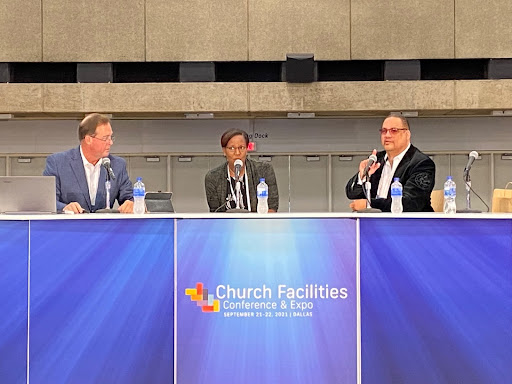
Fletcher Garrett
Recommendations from a top house of worship video engineer For nearly 8 years, Fletcher Garret was the engineer in charge of TV operations at The Potter’s House Dallas. In that role, he was charged with setting the direction for technical innovation, and made it all work, under the pressure that will be familiar to anyone involved in live broadcasting.
The 10,000 capacity of The Potter’s House building is dwarfed by the 30,000 strong membership of the church, with a following many times that on social media. Essentially, The Potter’s House has a lot in common with broadcasters, except it produces all its own content.
We asked Fletcher what advice he’d give to churches, big and small, as they embrace TV production.
The importance of planning up front “I’d say it’s crucial for churches to plan their systems properly. They must plan for what they want to do and buy the systems that support the objective. Are you going to merely stream your “conventional” services? Or are you going to make the production more “theatrical”? The more complex your ambitions, the more consideration you need to give to the hardware and the software that are going to bring those experiences to life.”
Fletcher adds, “I have witnessed organizations blame the system for their workflow issues when in reality it was the lack of planning. The equipment has the potential to do what you need, but it’s the plan that enables that potential and makes your media infrastructure work for you!”
The media server is at the heart of your system set up A church typically purchases cameras, a switcher, and some storage. However, everything centers around your media and what ultimately matters is how you manage that content. A production media server is much more than a hard drive. It is the heart of the entire operation that allows you to manage the content and your video production workflow. If you just think of storage in terms of capacity, it’s like walking into a bookshop and saying, “I’d like a book, please”. The media server finds the right book for you and puts it in your hands immediately. You need a media server to effectively manage your media and maximize efficiency.
EditShare’s Mike Mahoney, The Potters House A. Ty Ayers Allen and Engineer Fletcher Garrett
Technical experience is important Also, there is a distinction between production staff, and engineers. Essentially, engineers assist in planning and make the technology work. The engineers keep it working, enabling the production staff to make programs. If churches don’t have an engineer on staff, there are good system integration companies out there that they can partner with. Experience matters when dealing with any system planning and engaging a good system integrator early on would be in your best interest.
Plan for ROI To get the best return on your investment, it’s absolutely essential to design your system and your workflow to make the type of material you have in mind but also do it efficiently. The more time you spend on planning, the more time you’ll have to make great programs. So, consider all the types of productions you want to deliver to your audience. Then, talk to EditShare. They’ll help and make sure you get the right system to achieve your goals.
The power of EditShare’s integrated media production platform for church productions While cameras, lighting, video switchers, and audio mixing desks might be the most visible parts of a TV production, it’s the “back-end” that makes it all work together. That back-end is EditShare’s EFS, a media-optimized shared storage solution. EFS connects to a high-speed network and is capable of moving very large files around quickly. It takes the place of tapes, external hard drives, “sneaker-net” and recording devices.
Combine EFS with FLOW, a clever media management solution, and you have an integrated platform for video production.
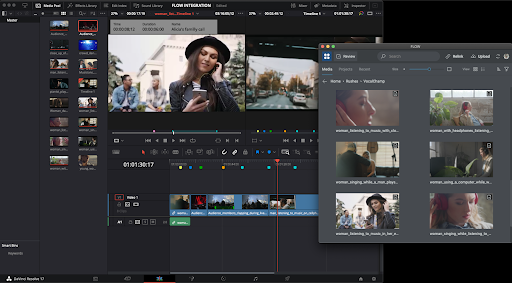
FLOW Panel for Resolve. FLOW integrates post-production into the workflow.
You can keep track of your files, always with frame accuracy. You can generate “proxies” – small versions of the original files that are still high quality but easy to move over even a broadband connection which are essential for remote working. You can convert files into multiple formats for distribution. The platform also allows multiple people to work on either the same or different projects at the same time, keeping track of permissions so that one editor doesn’t overwrite another editor’s work.
Most of all, EFS and FLOW keep complexity away from the users, and when technical administration is needed, it is highly optimized and easy to learn.
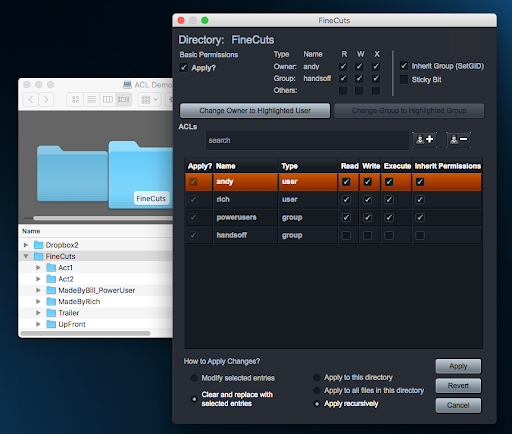
All storage appears as a single volume – a single storage space, even though it’s composed of potentially dozens of drives. Management software allows parts of the space to be allocated to individual users or groups. Security is built in.
EFS Active Directory gives users a familiar windows explorer view.
With so much storage, some of it is used to provide resilience against disk drive failure. If a drive fails, the overall system won’t even slow down while it is removed and replaced. It certainly won’t lose any material.
To sum up, the core of a “back-end” integrated video production system can:
Ingest multiple camera feeds and other files and media
Store the content centrally
Make this content available to authorized users (editors, etc) simultaneously
Allow editors to collaborate on stories
Make small versions of the media files (“proxies”) that can be used remotely
Allow editors to work anywhere
Take the place of tapes and portable disk drives
Look after your content security
Store media long term in an archive
Use AI to search for keywords and phrases making it easy to find relevant material, even from years ago
Keep this extremely advanced technology simple to use, reliable and productive in ways that would be impossible with previous-generation products
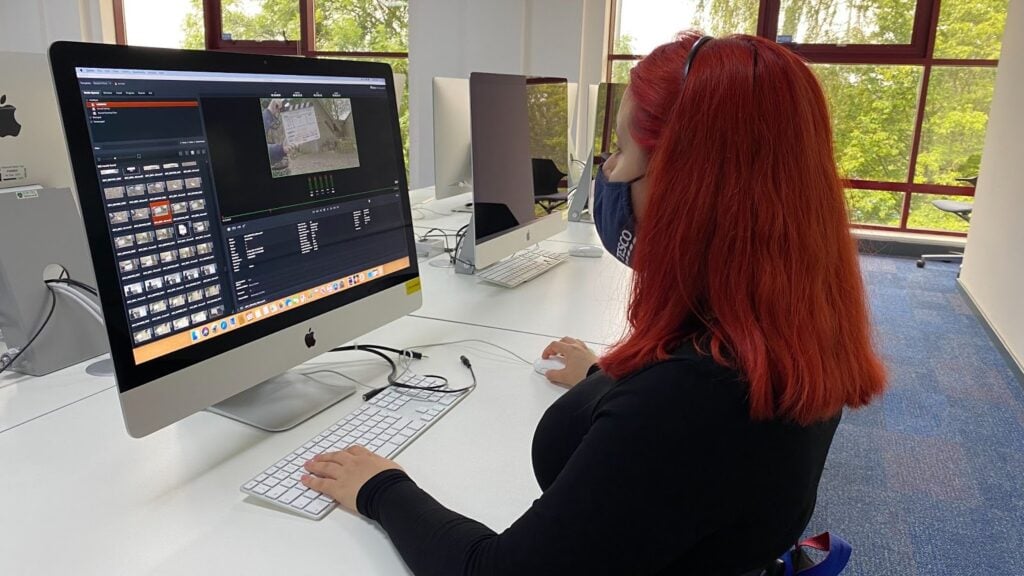
University of Hertfordshire, puts EditShare Solutions at the Core of Its Nationally Ranked Curriculum
Key Highlights
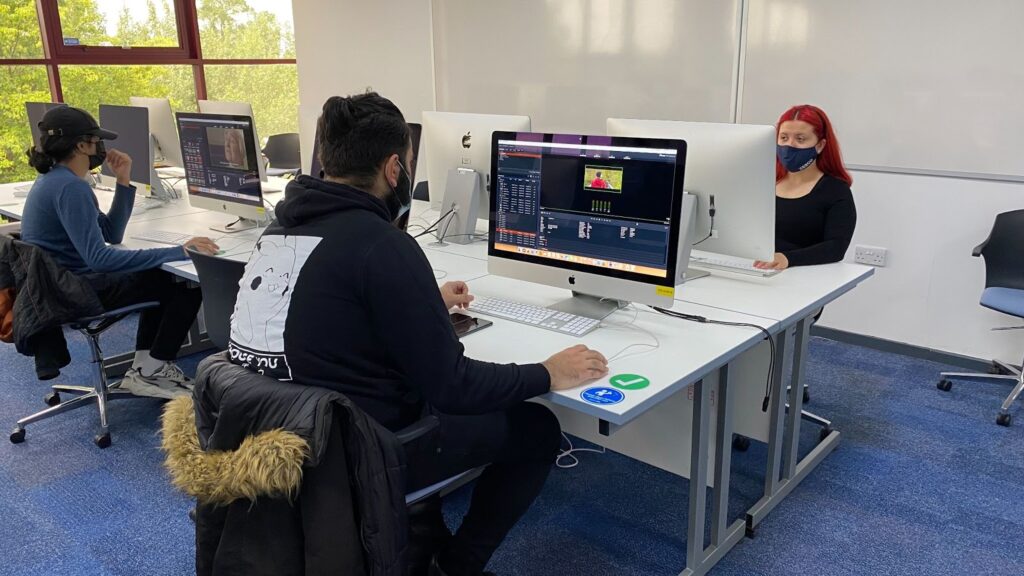
Enterprise Ready – IT-friendly and ultra-secure EditShare FLOW and EFS formed the media foundation to support the university’s two media labs consisting of 80 workstations as well as up to 400 Film and TV students who needed to access content remotely.
Openness – Seamless integration with real-world tools Adobe Premiere Pro, Avid, Baselight, and Final Cut Pro ensured smooth project workflow and student collaboration.
Future Proof – EditShare remote workflows supported critical remote production and review approvals, metadata entry, enabling students and teachers to do their coursework on campus and off.
Automation – FLOW automation provided key efficiencies, including, managing the conversions of delivery formats for student project submissions. The consistency ensured access as well as managed storage volumes.
Competitive Proposal – EditShare’s competitive bid and robust offering stood out from the competition.
Background Located in the picturesque Hertfordshire countryside in England, the University of Hertfordshire has a robust film and TV program with some 400 students. In 2018, the institution achieved the TEF gold rating by the UK government, the highest standard, for its teaching excellence framework. Thanks to its high-quality vocational content, graduates are ready for real-world careers upon entering the creative market.
The popular film and TV program recalibrates its curriculum every 5 years to ensure students are taught the latest techniques using modern filmmaking and video production technology. Just ahead of the COVID-19 shutdown, the university began its anniversary validation, selecting EditShare which supported multiple production and post-production workflows taught at the school, including remote-working workflows. Little did they know what lay ahead and how that investment in the future would enable them to keep the creativity flowing during a global pandemic.
Widening the Opportunities to Learn Principal lecturer, with a body of work that includes major motion pictures, Howard Berry brings a wealth of experience to the classroom.An Avid Certified Instructor, Apple Certified Master Trainer, and Blackmagic Design DaVinci Resolve Certified Trainer, Howard is also a savvy technologist who led the campus wide upgrade which coincided with the university’s course re-validation. Berry explains, “When we began the validation exercise, we had three different pathways that students could take: film and TV, documentary, film and TV fiction, and film and TV entertainment. People move from genre to genre, so we revised and consolidated to a unified film and TV production with a heavy emphasis on post-production. The new path would cover the range of productions as well as picture editing, color grading, visual effects, effects and, most importantly, the workflow side of things, giving students a more well-rounded education.”With the various productions consolidated into one track, Berry selected the EditShare EFS and FLOW solution to support the multiple workflows and various post-production tools used throughout the course. The open platform supported the university’s strategy for an integrated workflow that mapped back to real-world productions and provided a central shared storage platform to safely house content and easily manage student permissions from an administration module designed for educators.
Efficiency Through Automation FLOW automation is key to streamlining the film and TV Program’s submission process. Berry explains the efficiency it has brought to the process, “FLOW hosts folders for all the student assignments. When they submit their QuickTime and finished version files to the EditShare system, FLOW automation scans the file and moves them into a folder only the lecturers can see. If the file is not in the right format, it will be scanned and transcoded. It also timestamps the submissions, so we know that the coursework was submitted on time.” Berry adds, “Some of the coursework is actual paperwork which is supposed to be submitted via the web portal, but students often hedge their bets and send it everything through FLOW, and FLOW automatically filters their PDFs into another folder. It’s a fantastic system where we can see all the relevant submitted files all the time. And it runs in a web browser, making it even easier for me to manage and share with my colleagues.”
Flip to Remote Production Overnight The EditShare installation had been done just ahead of the pandemic, which enabled the film and TV department to continue its coursework after the world shut down. Key to the success of the remote production was EditShare’s FLOW, AirFLOW and FLOWStory. FLOW media management provided the media management foundation with AirFLOW and FLOWStory providing cloud-based editing, review and approval. Berry explains just how important these features became during the pandemic. “Without FLOWStory, the only option was to have students come into the university lab to work on their edits. During a pandemic the thought of having to go this route was not an option and our labs were closed for half of the year. FLOWStory was a light install that ran on Windows and Mac and would allow the students to edit from anywhere. It was perfect.” Berry adds, “As the students dived deeper into the application, they discovered that it could do 4k multi-camera editing and export the EDL directly into an NLE. And of course, AirFLOW gave us the important remote review and approval capabilities. Just incredible that we could slip into remote working so quickly. Weekly edit reviews, where staff and students would usually have to gather together, became easy with AirFLOW remote viewing and review markers added to the timeline with notes that the students could instantly see and act upon.”
It’s All About Flexibility For Berry, production has typically been rigid with required specifications and hardware. With EditShare, the restrictions of connecting with other systems and geographic boundaries have been lifted. It allowed them to be adaptable to extremes. One degree project this year, “My Hundred Brothers and Sisters”, has involved students at a partner film school in Poland filming on behalf of Hertfordshire students who couldn’t travel abroad. The footage was sent from Poland over the internet, and the editor of the project was able to save it directly onto their dedicated 2TB EditShare space – instantly making it available to the director to review, the assistant editor to log and add metadata, and for transcripts to be prepared before the cut. The whole team could see the footage remotely any time they wanted to access it. Berry concludes, “We have many students who cannot return to campus because of the pandemic for one reason or another and they are still doing the coursework, they are still doing the training, and they are still able to learn because we are using EditShare. It’s an amazing gift of being able to do what we want and in any kind of way that we want to deliver it now. And I am very grateful.”
EditShare Solutions
FLOW media management provides a control layer for managing millions of assets as well as tools for ingest/log, browse, automate, and distribute AirFLOW facilitates remote production including review and approval workflows FLOW Storyeditor supports remote storyboarding and remote editing EFSprovides media engineered shared storage
EditShare Q3 FLOW and EFS Update – Capabilities at a Glance
Operating similar to a CDN, the optimized EFS multi-location data transfer capabilities leverage best in class, open software solutions to provide transparency over asset movement, enabling users to prioritize transfers across multiple locations with easy to define business rules.
Paving the way for scalable, resilient enterprise workflows, FLOW Scan Scaling Service enables distributed processing in parallel, letting users run multiple scan instances across storage tiers.
Optimized for HPE, new FLOW Production Nodes now come in Light, Standard and XL, supporting small to enterprise workflows, enabling customers to right-size configurations for their productions.
Popular open-source ELK analytics lets customers easily visualize important data to proactively maintain the health of their FLOW and EFS installations as well as ensure that all systems are running at optimal performance.
EditShare Connect is now available for Linux expanding cloud workflows and enabling every EditShare customer to have a first-class user experience.
FLOW UI and EFS Control offer users a superior navigation and seamless graphical experience with new iconography and ‘dark-mode’ color scheme.
New workgroup permissions, NDI Support, and third-party integrations enhance workflows for admins and video editors
Boston, MA – July 1, 2021 –EditShare®, a technology leader that delivers software to enable collaborative media workflows for storytellers, announced today a number of key enhancements to its EFS and FLOW solutions. As the intelligent media control and management layer for on-premises and cloud, EditShare solutions enable collaborative media production workflows including storyboarding, review and approval, storage management, archiving and distribution.
FLOW Key Enhancements
EditShare customers can watch the FLOW Q2 update video to learn more about the new features and capabilities. NDI and H.265 Scan Support
Support for the growing demand for NDI workflows within FLOW, which is currently in public beta, provides EditShare customers a convenient architecture for distributing video over IP.
Support for H.265 HEVC compression technology widely used in productions around the world offers EditShare customers outstanding picture quality with very low file sizes.
Group Permissions with Support for Projects, Metadata and Channels
Quickly create, delete, and edit groups permissions.
Disable and re-enable entire groups.
Easily promote and track users’ permissions.
Extend permissions on a group basis to projects, metadata templates and ingest channels.
Forced Logout from all FLOW Clients
Disconnect users from FLOW applications to free up licenses, optimizing use for production resources.
Metadata and Mapping
Support for import of .mxf/.r3d file samples for mapping configuration. Key for customers using Avid workflows, reveals internal metadata contained within supported media files, allowing quick configuration of metadata-mapping into FLOW custom fields.
Support for import and mapping of sidecar XML to non-video files, such as still images, enables facilities with large still libraries and other non-video collections to migrate seamlessly to FLOW to be ready for production.
Video Previews Available for Real-time Preview of SDI/NDI
‘Live’ monitoring, configuration, and workflow management.
Support for the preview of live ingest sources in web applications.
Integration with Mobius Vision AI – Facial Recognition
Saves FLOW users time reviewing and tagging content.
Comprehensive database includes thousands of celebrities and public figures.
Ability to augment the database with a custom collection of faces for detection.
Support for the latest Archiware Release
Optimized for large file counts in transfer.
Users can easily archive and restore assets from FLOW tools supporting accurate source path preservation and tape barcode metadata tracking.
EFS Key Enhancements
EFS Control: Advances in our new Web-Based UI with User Groups Support
View user group membership in the sidebar.
View and search media spaces to which each group has been assigned.
Add and remove groups to and from media spaces.
Support for exporting any table view (e.g., the list of spaces and users) as a CSV file.
Active Directory
Support for legacy operation of a single group for all active directory accounts.
Audit and Monitor
View summary of real-time read and write bandwidth data to manage user traffic and prioritize bandwidth for high priority tasks.
EFS Storage Optimization
Default speed for EFS background operations is 20X faster, making the system more efficient when adding a new storage node.
Ability to immediately utilize replication goals for new media spaces without rebooting.
“Our commitment to customer success drives our roadmap,” comments Sunil Mudholkar, vice president of product management, EditShare. “This release of EditShare software enhances support for large-scale installations and complex workflows where customers need greater control without losing the nimble flexibility, making EFS and FLOW even easier to use on a day-to-day basis.”
About EditShare EditShare is a technology leader that enables collaborative media workflows on-premise, in the cloud, or in a hybrid configuration. With customer and partner success at the heart of EditShare’s core values, our open software solutions and robust APIs improve workflow collaboration and third-party integrations across the entire production chain, ensuring a world-class experience that is second to none. The high-performance software lineup includes media optimized shared storage management, archiving and backup, and media management, all supported with open APIs for extensible integration.
Press Contact Cat Soroush Zazil Media Group (e) catherine@zazilmediagroup.com (p) +1 (631) 880-9534
EFSv streamlines production with remote workflow flexibility
Boston, MA – June 8, 2021 –EditShare®, a technology leader that enables collaborative media workflows for storytellers, today announced that public media producer GBH, the largest content creator for PBS, has invested in EditShare’s EFSv cloud solution, hosted in Amazon Web Services, to modernize media workflows across its post-production operations. An early adopter of cloud technologies for its broader IT needs, GBH’s move to EFSv extends video production into the cloud, maximizing operational efficiencies and reducing overall costs. The open EFSv platform facilitates both hybrid and cloud post-production workflows which optimize content access and enhance the user experience for video editors who create critically acclaimed programs such as NOVA, ANTIQUES ROADSHOW and AMERICAN EXPERIENCE and for PBS’ WORLD Channel.
“We require adaptable, efficient media systems for all of our clients,” said Tim Mangini, senior director of production technology for GBH. “EditShare’s cloud solution gives our producers flexibility and scalability. They can work wherever they want, with whomever they want, whenever they want, and only pay for the resources they actually use. They upload their media once and work from anywhere as if they were working in any GBH edit suite.”
EditShare’s approach to open platform development, specifically its support for multiple cloud providers and public APIs for integration and workflow expansion, was a key factor in GBH’s decision to select EFSv. Additionally, access to key technologies, such as artificial intelligence and content usage analytics will enable GBH to unleash new media workflows.
“Shifts in video production require more agility and demand the ability to accommodate changing work habits. As GBH embraces those shifts, open and flexible cloud-based solutions enable new workflows while protecting the investments made in on-premise platforms,” comments Tracy Geist, chief marketing officer, EditShare. “EFSv offers GBH as well as our other customers the best of both worlds, providing frictionless storytelling workflows that are flexible and secure, while accommodating change.”
About EFSv Cloud Solution
EFSv redefines the economics of editing in the cloud while significantly enhancing the user experience. The tiered solution approach supports customers at every stage of their journey to the cloud. Offerings include cloud-based backup solutions that serve as the foundation for building cost-effective, distributed cloud editing and seamless proxy editing workflows, up through full production environments in the cloud. EditShare’s cloud innovations offer unparalleled flexibility, allowing customers to easily adapt to cloud or hybrid environments and benefit from a lower total cost of ownership.
EditShare is a technology leader in networked shared storage and smart workflow solutions for the production, post-production, new media, sports, and education markets. Whether you need on-prem, cloud, or hybrid solutions, our products improve efficiency and workflow collaboration every step of the way. They include media optimized high-performance shared storage, archiving and backup software, a suite of media management tools and a robust set of open APIs that enable integration throughout the workflow. Customer and partner success are at the heart of EditShare’s core values ensuring a world-class experience that is second to none.
Press Contact Cat Soroush Zazil Media Group (e) catherine@zazilmediagroup.com (p) +1 (631) 880-9534
In our previous entry in the Journey to the Cloud series, we reviewed virtual workstations. In that article we covered the advantages and concerns of using cloud-based workstations as non-linear video editing machines. For teams that are shifting their video production away from on-premise environments, it is important to consider how these workstations are managed, operationalized, and costs are controlled. That is what we will discuss in this article.
Virtual Workstation Recap In a video production environment, a virtual workstation is an on-demand compute server running applications for editing, ingesting, and other functions of a video workflow. These workstations are appropriately sized to the tasks at hand – which in this case will be non-linear video editing. Offered with a variety of CPU speeds and cores, along with memory and video graphics acceleration, they can be right-sized for the needs of the codecs being processed and edited.
An important consideration in virtual workstation usage is managing the uptime of that workstation properly. In an ideal world, this would be similar to simply powering on the system when in use and then remembering to shut it down when no longer in use. In a cloud environment that process is not straight-forward. For one, users may not always be diligent about shutting down their computers, and if they were diligent they may find the process of spinning workstations up and down more complicated than a power button. Often it’s necessary to have access, and training, to operate the cloud management console where this operation is controlled. Alternatively the IT cloud team needs to get involved manually or write scripts to perform this operation. This is not a simple process, but it is perhaps the most important step in controlling cloud costs. Because of this, a need for workstation management tools has emerged.
What Will Workstation Management Do For Me? There are a number of capabilities that workstation management solutions provide to make users’ lives easier, help them save money, and maintain control of their cloud environments. Let’s walk through a few of them.
Workstation Scheduling: Ideally, a workstation manager will allow team administrators to control the uptime of their virtual workstation environments. That’s as simple as turning them on in the morning and turning them off in the evening. The primary advantage here is cost savings. Instead of running a GPU assisted compute node 24×7, a workstation management system can control the overall uptime and usage schedule. The savings is straightforward here – there are approximately 722 hours in a month, yet typically only 173 working hours. Providing a simple scheduling management function can result in a 76% savings against your cloud bill.
Now there are solutions, such as AWS Instance Scheduler, that can provide similar functions, but will require the user to have the IT and programming skills to implement them. For video production teams, a simpler solution is almost always preferred.
Connection Management: This element of workstation management orchestrates the connection of users to virtual workstations and watches over the use of those connections. When logging in, a connection manager will find an idle workstation and connect that user to their new environment for the duration of that session. This element also has the ability to monitor the workstation usage. If the environment goes idle the connection manager will sense this and shutdown the workstation in order to minimize costs. Typically this idle period can be set to find that right balance of idle time acceptable to users.
To ensure productivity within a team, when users are disconnected from their virtual workstations, the compute instance is also suspended. This suspended mode often means that the storage associated with this workstation is maintained, not deleted. However, the compute instance is released and is no longer incurring a cost. The storage is maintained separately but these fees are relatively small, for example, AWS Elastic Block storage for a 200 GB volume will only be around $8-16/month. Once that user comes back online, that storage volume is connected to a new virtual workstation and users can become productive again.
Authentication: An important element is the ability to ensure only authorized users can access workstations. A workstation management solution will integrate smartly into your company’s security solutions and map to the correct policies set by your information security team.
Provisioning and Management: The ability to provision new workstations into your workstation pool is an important element of workstation management. For example, you may have 20 workstations available to your team, but find yourself facing a new project which will require an extra 5 workstations. The administrator of the workstation management system will have the rights to provision these new workstations, and later delete them when no longer in use. Similarly new video production workloads may arise requiring workstations capable of editing very high resolution video. These higher-end workstations can be created and provisioned specifically for these requirements, and then deleted when no longer in use.
Cost Insights: In a video production environment, workstations used for editing or ingest may be among the most costly cloud elements in use. The ability to have visibility into these costs will allow teams to maintain controls on their spend, well ahead of any surprise bills. In addition, this capability can make it much simpler for production groups to easily shift to an OpEx model where revenues from projects can be tightly aligned with the costs associated with that work.
The advantages of virtual video productions have become more compelling to teams as cloud costs plummet and bandwidth increases. However, as this world has emerged it has required a new set of skills and oversight that differs from on-premise solutions. For some organizations, tracking on-going costs can be more challenging than the analysis behind a CapEx investment of new equipment. A workstation management solution with visibility into costs can help manage this concern and provide clear visibility into spend.
Operationalizing Cloud Virtual Video Production Moving to a cloud environment today may require team members to become familiar with a cloud vendor’s console administration, operations, coding, and cost calculators. Not exactly a set of skills a creative department may want to invest in. Some market solutions address this complexity with a Software-as-a-Service (SaaS) offering, allowing users to subscribe to a video production environment of fixed sizes and capabilities. This can sound compelling but it also eliminates the advantages of a scalable cloud approach, and requires customers to pay staggering fees as the SaaS vendor must over-provision their cloud infrastructure to account for worst case usage models.
EditShare’s approach has been to truly embrace the cloud offering a scalable solution which its customers can use cost-effectively in their cloud account. This ensures our customers receive the best pricing possible for their cloud infrastructure uses and allows them to maintain control and oversight. To provide further operational and cost oversight we have partnered with workstation management vendors such as 7FiveFive, and together we can provide the end to end solution that is manageable and operationally controlled by our customers. The entire environment – performant storage, asset management, archiving and ingest all operationalized in the cloud with full control over usage and cost management.