The Simple, Flexible Route to Making the Most of the Cloud
Stephen Tallamy, CTO EditShare
In the post industry, the biggest pressure today – aside from the usual need to control costs and boost productivity – is the need to support a “work anywhere” environment. Creative staff want the flexibility to work their preferred hours, from a location of their choosing. It reduces or eliminates the commute to an office, which has real environmental benefits as well as reducing stress for the editor.
EditShare led the industry in developing cloud solutions. It took existing, successful products and concepts and added the open-ness, interoperability and scalability that the cloud offers.
All of this experience is now brought together in EditShare FLEX, which offers a highly tailored environment for all the major tasks from remote editing to secure archiving. Most importantly, FLEX is designed in such a way that it is simple to implement and intuitive to manage. It does not require IT expertise to get the best of the system, nor to ensure security and reliability.
Migrating to the cloud gives businesses the obvious advantage that they do not need to physically host the hardware on which their work depends. This reduces the space they need, the power they consume, the air conditioning demands and the downtime and staff to ensure that the hardware is maintained and updated as required.
Conversely, the creative team will be accustomed to their preferred software and know how it should respond. Forcing a change of edit software, for example, would be simply unacceptable. Equally, making the system less responsive to key presses or mouse clicks would be unsettling and cause slow down workflows and become a stumbling block in adoption.
The guiding principle of EditShare FLEX is that you should carry on using your preferred tools in exactly the way you are used to. Cloud and remote working means there is an abstraction between the operator and the physical workstation, but that cannot be any sort of obstacle: it must be completely transparent.
To make this possible, EditShare has collaborated with industry leaders. FLEX uses the popular and widely recognised Teradici software to provide remote access from anywhere to virtual workstations. And if you are new to cloud connectivity and do not have an established fast file transfer process we can integrate CloudDat software from Data Expedition Inc.
Even more important, the FLEX virtual workstations in the cloud support whatever NLE software you currently use: it is completely agnostic. Indeed, if you have some editors who prefer Premiere Pro, some who are Avid fans and others who are most comfortable on DaVinci Resolve, you can support all of them, simultaneously and completely transparently.
There are two main bundles of the FLEX offering at present, with more to come in the future. FLEX Cloud Edit does what the name suggests: allows your editors to sit wherever they like and edit on virtual machines in the AWS cloud. Customers can take this bundle a step further with FLEX Cloud Edit+ which adds workstation management and file transfer acceleration, providing video production teams with an end-to-end video studio suite virtualized in the cloud.
The second bundle is FLEX Sync, which synchronizes between local EFS storage and cloud-based archives. It can be set to be completely automatic and it eliminates the need for LTO tape libraries, another continuing cost for space, maintenance, tapes and upgrades. By moving your archive or DR backup to the cloud, you also gain massive resilience. Once your archive is available in the cloud it unlock opportunities to utilize it for other cloud solutions, including FLEX Cloud Edit.
There are options in each service so you can tailor your system to precisely your requirements. If you do not have the necessary IT and engineering skills in house, then EditShare’s professional services team can provide the system design and scoping.
The great advantage of FLEX, though, is that you maintain full control over your working environment. Your talented and creative team will notice few changes, and will be able to work as productively as before, if not more so.
It delivers against the key concerns. It provides secure and efficient remote working, alongside edit-in-the-cloud, with all the CapEx savings and OpEx control that implies. And you maintain full control over your working environment and, most important, the security of the content entrusted to you.
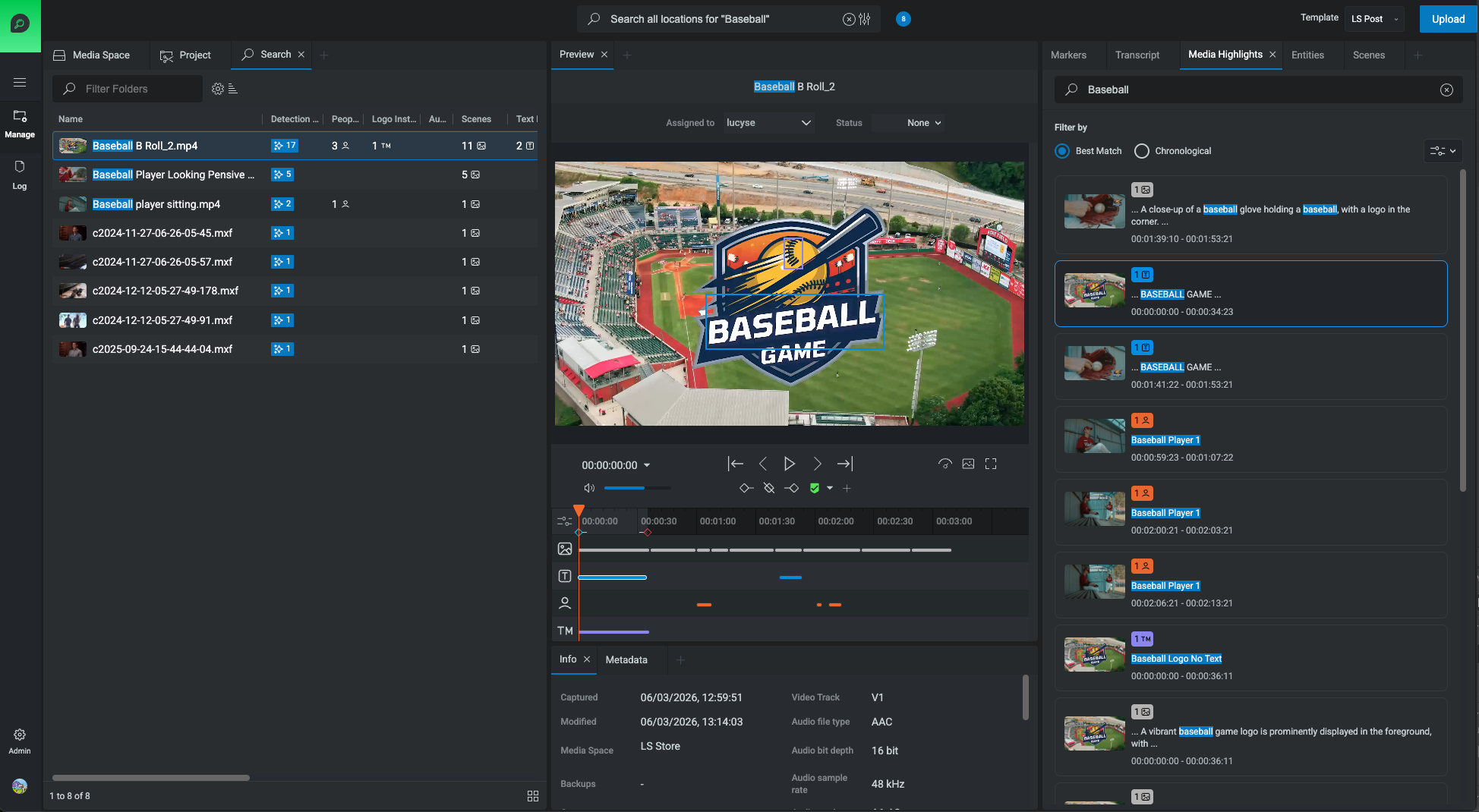
Finding a specific moment in your library, a jersey logo, a crowd reaction, or a specific interview setup often feels like digital archaeology. When a producer remembers a shot but can’t locate it, the result is hours of manual scrubbing that drains creative momentum. Because video is unstructured data, there is no inherent metadata that tells you what is happening on-screen. Historically, the only solution was manual logging, which is slow, expensive, and rarely complete.
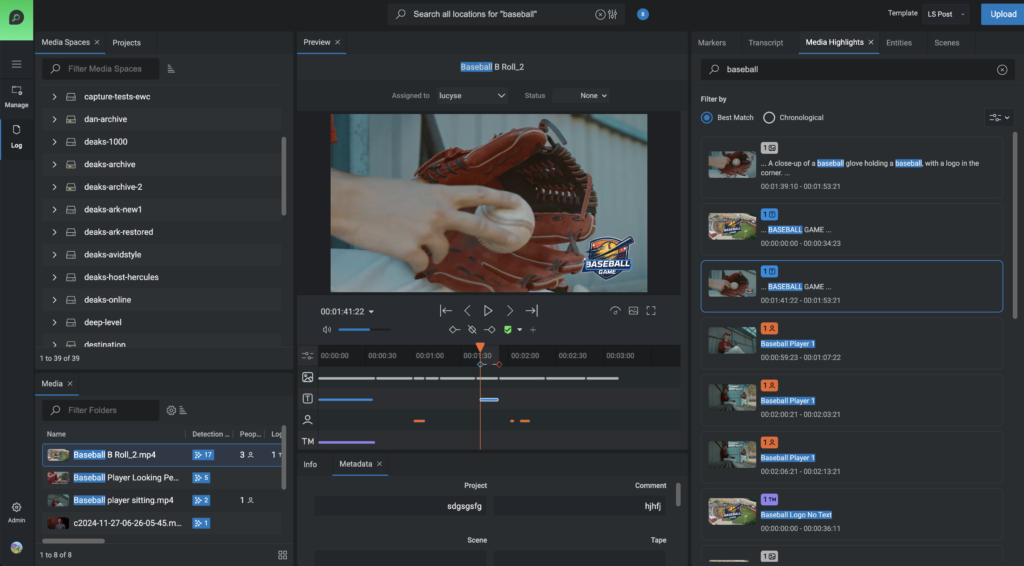
At NAB this year, we’ll be showing off FLOW AI, our new analytical AI engine designed to bring intelligence directly into media management and workflow automation. It does the unsexy but essential work: finding logos, recognizing faces, describing scenes, and adding the context needed for true semantic search inside our core FLOW asset management interface. It’s a major step forward in how EditShare customer teams can understand, organize, and move faster with the content they create every day.
We have some previous experience with audio and video AI processing. Our generation one offering was expensive, slow, and required two different products to actually accomplish most tasks. We learned from that experience.
We could have treated the next version of AI as a web-based integration: sending files to AWS or Google, pulling results back, and stitching it into the UI. But that approach creates exactly the kind of fragile, multi-vendor complexity media teams are trying to escape (and failed the first time). Our customers don’t want another system to configure or another support boundary when deadlines hit: they want intelligence that’s native to the workflow they already trust. That’s why we made AI a core part of FLOW, building on the broader platform transformation we described in The Rebirth of FLOW. Along the way, we also strengthened FLOW’s underlying search performance, because sophisticated customers managing millions of assets were pushing the platform to its limits. We optimized for that scale.
This approach does come with a trade-off today: AI video processing requires a dedicated GPU server, adding additional entry costs. We built the first version for serious editing teams and media management professionals who aren’t dabbling with a few clips, but need to analyze and organize 500+ hours of content every year, like reality TV productions, large corporate marketing teams, and sports organizations.
Over time, we’ll fold GPU capability into our core server architecture to eliminate extra hardware and reduce friction, and we’re also focused on displaying FLOW AI results inside DaVinci Resolve or Adobe Premiere.
We’re building AI that actually works in real media operations, not demos.
Book a 1:1 demo or stop by booth N1251 to see how these tools perform in real-world media operations and how native intelligence can turn your archive into a functional, searchable asset.
NAB 2026 is shaping up to be the “AI Show,” but for most video editors and post-production supervisors, the excitement is mixed with a healthy dose of skepticism. Between the ecosystem friction found in once-seamless tools and the constant noise of new plugins, it’s hard to tell what will actually save you three hours on a Tuesday and what is just a shiny toy.
Before you hit the floor, here is a guide to the four kinds of AI you’ll encounter, and how to spot the real problem solvers.
1. The Generative “Shiny Toys”
These are the booths with the longest lines. They show you how to swap a background or generate a voiceover in seconds. It’s impressive technology, but for many high-end pros, these are silver medal features. They are fun to play with, but they don’t solve the digital archaeology of digging through thousands of folders just to find one three-second soundbite.
The Reality Check: If it’s cool for a demo but doesn’t fit into a secure, professional delivery workflow, it might just be a toy.
2. The “Black Box” Harvesters
Many AI tools operate by sending your content to a third-party cloud for processing. This often comes with “fine print” that allows them to use your footage to train their machine learning models, which is a massive dealbreaker for corporate and legal teams concerned about biometric data and intellectual property.
The Problem Solver: Look for “white-glove” security. AI should happen inside a secure, private cloud environment where your content is never used to train someone else’s model. Full stop.
3. The Creative’s Brain (FLOW AI)
For production teams managing massive amounts of media and cold storage, the real problem is the archive. FLOW AI acts as a Production Asset Management (PAM) powerhouse designed for the rigors of on-premise hardware.
Massive Indexing: FLOW AI is built to search through 100TB+ of storage including archives, turning years of current and old footage into searchable assets.
Frame-Accurate Discovery: Because FLOW is the “Editor’s Companion,” it provides sub-second precision (e.g., finding a face at exactly the right place) because that’s where you need to make the cut.
Future-Proofed: The upcoming release includes more 3rd-party storage integrations to help you truly own and extract value from your archive.
4. The Library Gateway (MediaSilo AI)
While FLOW handles the archive, MediaSilo AI is designed for your library: the active and past projects you are currently sharing for review, approval and delivery.
The “Gold Medal” Feature: Automatic Transcription and Captioning. It replaces expensive, slow third-party services with instant SRT/VTT generation on ingest.
Enhanced Discovery: It isn’t just about the frame; it’s about the content. MediaSilo makes it easy to manage and share assets without enterprise overhead or clunky workflows.
Remote Workflow Hero: It allows remote editors to instantly grab transcripts and captions the moment a file is uploaded, ready to be brought straight into the NLE.
Making Sense of the Ecosystem: One Engine, Two Missions
At the EditShare booth, we’re showcasing how these two systems work together while serving unique purposes.
FLOW for the surgical, on-prem production management and archive
MediaSilo for the collaborative, cloud-based library and transcription
Because they share the same engine, your intelligence, including face, logo, and speech detection, remain consistent and secure from the first ingest to the final archival search.
Stop by Booth N1251 at NAB
Don’t get distracted by the shiny toys. Come see how we’re solving the digital archaeology problem and making media libraries usable again.
Would you like to see the gold medal AI in action?
Moving past the “cool factor” to find the tipping point where search friction starts costing you real money.
AI indexing is rapidly becoming a standard feature in media workflows. It’s easy to assume that adopting it is simply part of staying current. But at EditShare, we believe that’s the wrong starting point.
The more useful question isn’t “What can AI do?” but rather: Does it change the economics or throughput of your specific operation?
The Tipping Point: From “Annoying” to “Expensive”
We’ve all heard the complaint: “We produce more than we can find.” For a small team, that’s a minor annoyance. For a high-volume production house, it’s a business failure.
The “tipping point” occurs when search friction manifests as a tangible loss. We’ve seen it happen in three specific ways:
The Duplicate Shoot: A team flies a crew out to capture “generic city b-roll” because no one can find the high-quality drives from six months ago.
The Missed Deadline: An editor spends six hours “scrubbing” through raw footage to find a specific interview soundbite, pushing the delivery past the broadcast window.
The Lost Opportunity: A brand wants to do a “throwback” campaign, but the archive is such a “black hole” of unindexed data that the creative idea is killed because the labor cost to find the clips exceeds the project budget.
When AI Indexing Doesn’t Make Sense
If your team produces one-off projects that are delivered and rarely revisited, the long-term value of indexing every frame is limited. An archive that is rarely accessed does not suddenly become valuable just because it has more metadata. Searchability enables reuse, but it does not create reuse on its own.
When the Math Changes
Where AI indexing begins to make financial sense is in environments where volume and reuse are structurally important.
The Scalability Gap: At a modest scale, manual logging is manageable. At a large scale, it’s either ignored or becomes a massive labor expense. AI converts unstructured video into searchable metadata (faces, objects, speech) at a fraction of the cost of human labor.
The Inventory Mindset: An indexed archive behaves like inventory. An unindexed archive behaves like storage. If you regularly repurpose content, localize material, or monetize archives, searchability directly affects your margins.
Creative Throughput: Editors are your most valuable (and expensive) assets. When a skilled editor spends 45 minutes looking for a clip instead of cutting, that is an opportunity cost. AI doesn’t replace their judgment; it simply narrows the search space so they can get back to storytelling.
The Reality Check
AI is a lever, not a magic wand. It is brilliant at pattern recognition, like finding a logo, a specific face, or a spoken word. It still struggles to interpret emotional nuance or “vibe.”
Furthermore, the technology only works if the workflow changes. Media must be centralized, and metadata must be visible exactly where the editors work. Without adoption, indexing is just background noise.
Investment in high-bandwidth shared storage prepares the Soho facility for next-generation finishing and future workflow expansion
Boston, MA, 17 March 2026: EditShare®, a leader in collaborative media workflow solutions, today announced that TVC Soho, a London-based post-production facility, has selected EditShare shared storage as the foundation for a new high-performance finishing environment.
Based in the heart of London’s media district, TVC Soho provides premier editorial, grading, and audio services for global broadcasters and film studios. To support its growing DaVinci Resolve finishing tier, the facility will implement a 128TB Ultimate EFS NVMe system alongside an Ultimate EFS-310 providing 192TB of scalable storage. This high-bandwidth architecture is designed to ensure seamless 4K/8K performance while maintaining full compatibility with TVC’s existing Avid offline workflows.
“For our finishing workflows, we needed storage that could deliver the throughput required for high-resolution media without compromise,” said Marc Collins, Managing Director of TVC Soho. “EditShare provides the performance we need for Resolve today, together with the scalability to grow and the reassurance of working with a trusted supplier with local support and spares here in the UK.”
The solution is being delivered in collaboration with Jigsaw24 Media, a specialist media systems integrator supporting creative and production environments across the UK.
Once live, the new environment will provide TVC Soho with a unified platform to keep media accessible across collaborative teams. The architecture also establishes a foundation for future growth, including potential expansion of offline editorial capacity.
“Post-production facilities today are balancing the need for extreme finishing performance with the reality of increasingly distributed teams,” said Brad Turner, CEO of EditShare. “By combining NVMe speed with our EFS file system, we’re providing TVC Soho with a high-bandwidth foundation that doesn’t just power their Resolve suites, but also enables the seamless remote workflows and collaborative flexibility required in a modern media hub.”
The system is scheduled for installation in the coming weeks.
EditShare is an Emmy Award-winning technology leader, supporting storytellers through collaborative media workflows across on-premise, cloud and hybrid architectures. It offers scalable storage and collaboration for media businesses and at every stage of the video production process from storyboarding to screening.
The software is inherently open, encouraging workflow collaboration, third-party integrations and content sharing across the entire production chain. Where required, the software is backed by high performance, high availability designed specifically for the demands of media storage, management and delivery. The comprehensive offering covers multi-level content storage for production and post, along with innovative asset and workflow management software, plus specialized and highly valued tools for content review and distribution, the creation of customized and branded pitch reels, and secure preview of high-value pre-release content.
About Jigsaw24 Media Jigsaw24 Media is a specialist division of Jigsaw24 and provides technology solutions and services to media and entertainment professionals, educators, and marketing and content teams. The company’s industry-recognised experts design, deliver, integrate and support end-to-end solutions for some of the nation’s biggest broadcasters and facilities, and it’s the only UK-based business of its kind that has in-house system integration capabilities. Jigsaw24 Media’s vendor community features over 120 technology companies and the business partners with 30 of the biggest industry suppliers including Adobe, Apple, Avid, EditShare and Nutanix. Headquartered in the heart of London’s media community, with dedicated representatives in the regions and a nationwide support team, Jigsaw24 Media provides local services on a national scale. For more information visit https://media.jigsaw24.com/
Press Contact Katharine Guy katharine.guy@editshare.com
Boston, MA –11 March 2026 – EditShare®, a leader in collaborative media workflow solutions, will demonstrate its latest advancements in AI-powered media operations and high-performance NVMe storage at the 2026 NAB Show (Booth N1251). The showcase will focus on how broadcasters, post facilities, and production teams can manage growing content volumes without increasing operational complexity.
EditShare’s approach centers on Analytical AI, technology that analyzes media to identify and structure information such as speech, faces, text, and scenes. Unlike generative AI systems that create new content, Analytical AI focuses on understanding existing media, automatically enriching files with metadata that makes video searchable and easier to find. Integrated across the EditShare platform and accelerated by high-bandwidth shared storage, these capabilities allow teams to quickly find the clips they need across their media libraries.
“At NAB 2026, we’re showing how analytical AI has moved from an interesting tool to a foundational part of the EditShare platform,” said Brad Turner, CEO of EditShare. “The real opportunity is the ability to analyze video at scale and make that intelligence usable across the entire workflow. Whether media lives on-premise with our FLOW asset manager or in the cloud with MediaSilo, teams can instantly search their libraries and find the moments they need.”
AI and Intelligent Workflows Across the Platform
EditShare One: The latest version of EditShare’s unified interface will be showcased at NAB, providing a streamlined operational view across storage, asset management, and AI-powered workflows..
FLOW AI: Within the FLOW platform, AI-generated metadata enables automation and management workflows to operate without manual tagging. FLOW AI transforms media libraries and archives into dynamic, discoverable assets. Instead of spending hundreds of man-hours on manual data entry, creative teams can reclaim their time for high-value production, confident that every frame is indexed and searchable the moment it enters the system.
MediaSilo AI: At NAB 2026, EditShare will also introduce new AI capabilities within MediaSilo, extending intelligence directly into review and collaboration workflows. MediaSilo AI helps teams locate moments of interest, navigate content faster, and streamline feedback cycles by making media immediately searchable and context-aware for stakeholders across the production process.
MediaSilo: Intelligent Review and Approval for Modern Production Teams
Alongside the new AI capabilities being introduced within MediaSilo, EditShare will also unveil new MediaSilo bundles: Teams, Pro, and Enterprise – providing scalable options for organizations of any size. These bundles bring together core collaboration capabilities including forensic watermarking, single sign-on (SSO), and unlimited AI, giving production teams access to advanced functionality without the pricing barriers traditionally associated with high-end review platforms.
MediaSilo also enables teams to collaborate with unlimited external stakeholders, making it easy to involve clients, partners, and reviewers throughout the production process.
Visitors to the booth will see how MediaSilo integrates with the FLOW asset management platform, allowing teams to move directly from ingest and media management into secure review and approval workflows.
Infrastructure Built for Intelligent Workflows
The continued evolution of the Ultimate EFS lineup will be on display, engineered to support demanding media workflows across leading creative applications including Avid Media Composer, Adobe Premiere Pro, DaVinci Resolve, Final Cut Pro, Autodesk Flame, and Baselight:
Ultimate EFS NVMe Lite: A compact 8-drive NVMe storage node delivering up to 14 GB/s throughput per node with up to 122 TB raw NVMe capacity. NVMe Lite provides cost-efficient, ultra-low-latency performance for boutique post, finishing, and VFX environments, with the ability to scale across multiple nodes for increased bandwidth.
Ultimate EFS Hybrid: A unique,flexible and cost effective storage node combining an ultra-fast NVMe tier and a high-capacity HDD tier in a single system. The NVMe tier delivers up to 9 GB/s throughput with up to 122 TB NVMe capacity, complemented by up to 192 TB of HDD storage for compressed media and longer-term project storage.
EditShare will again partner with Lasergraphics to showcase high-resolution film scanning captured directly into an Ultimate EFS NVMe storage node. Attendees can watch 4K and 8K DPX image sequences ingest in real time and move immediately into playback and grading in DaVinci Resolve, illustrating the huge sustained shared read and write bandwidth required for film restoration and archive workflows.
Commitment to Enterprise-Grade Security and Compliance
As content security becomes increasingly critical for high-stakes productions, EditShare continues to invest in rigorous protection for its users’ intellectual property. MediaSilo has officially joined the TPN+ (Trusted Partner Network) community, signaling a commitment to the industry’s highest standards for content security. The company is also undergoing the assessment process for the TPN+ Shield certification, with completion expected in the coming months. This initiative ensures that MediaSilo users can collaborate with confidence, knowing their workflows adhere to the most stringent security best practices defined by the Motion Picture Association (MPA).
From Capture to Collaboration
EditShare is also pleased to welcome farmerswife to the booth, showcasing how its resource scheduling and management tools complement the EditShare ecosystem. “At NAB, we’re showcasing how farmerswife and Cirkus bring greater structure and visibility to production planning and project execution,” said Jodi Clifford, CEO, farmerswife. “By leveraging EditShare’s Open API, organizations can connect operational data with their media workflows, helping teams stay aligned from acquisition through delivery.”
Attendees are invited to visit Booth N1251 to see these workflows in action. To schedule a meeting with the EditShare team, visit: https://editshare.com/event/nab-2026/
Press Contact Katharine Guy katharine.guy@editshare.com
SwiftLink and the End of VPN Headaches
The “office” is no longer a single building when it comes to media production. It’s a global network of edit suites, home offices, and field locations. But for years, the barrier to seamless collaboration has been the dreaded VPN (Virtual Private Network).
Traditional VPNs are often the “bottleneck” of creativity. They are notoriously difficult for IT departments to manage, confusing for freelance editors to set up, and, most importantly, frequently underperform when handling high-resolution media.
That’s why we created SwiftLink, powered by our partnership with ZeroTier. Here is how we solve the remote access puzzle for good.
The Problem: The “VPN Wall”
Remote production usually hits one of two walls:
The Enterprise Wall: Corporate IT departments are often reluctant to grant external freelancers access to the main corporate VPN due to security risks or complexity.
The Capability Wall: Smaller production houses may not have the technical “wherewithal” to build or maintain a high-performance VPN that can handle the rigors of real-time video editing.
When connectivity fails, editors resort to shipping hard drives or struggling with “SMB over WAN,” which simply doesn’t work for professional workflows.
The Solution: SwiftLink + ZeroTier
SwiftLink integrates ZeroTier directly into the EditShare ecosystem to create a “Private Cloud” that is secure, affordable, and incredibly fast.
1. Instant Access for Freelancers
Instead of a complex manual setup, an admin simply generates a 16-digit network ID.
Ease of Use: The freelancer installs the ZeroTier stack, enters the ID, and is “off to the races.”
Security: Access is “fine-grained.” Even with the ID, an admin must manually authorize the freelancer’s machine in the dashboard before any media is visible.
Affordability: This isn’t an enterprise-cost solution. At roughly $2 per month per user/node, it’s a professional-grade tool at a fractional price point.
2. “Peer-to-Peer” Performance
Unlike traditional VPNs that route all traffic through a slow central server, ZeroTier acts as a “cloud broker.” Once the connection is made, it gets out of the way.
The Result: A direct, peer-to-peer connection between the editor’s laptop and the EFS server.
Workload: You can browse media spaces performantly. If your local bandwidth is low, you can seamlessly switch to proxy workflows in Adobe Premiere Pro, then relink to high-res—all through the same secure tunnel.
3. Connecting the Global Studio (Site-to-Site)
SwiftLink isn’t just for individuals; it’s for entire facilities. You can link up to nine distinct sites (e.g., LA, London, and a field unit) into a single ecosystem.
Disaster Recovery: Automatically synchronize media between a master site and a DR site.
Follow-the-Sun Editing: Pass media effortlessly between global offices so production never stops.
The Bottom Line
SwiftLink removes the “IT middleman” and the “physics bottleneck.” Whether you are a solo freelancer needing to mount a media space as if you were in the room, or a global studio syncing terabytes of data, SwiftLink makes the connection invisible so you can focus on the story.
“We can’t violate the laws of physics… but we’re going to make the most efficient use of that pipe.”
A “secure perimeter” is no longer enough in today’s media production. As workflows become increasingly distributed, the industry is shifting toward a Zero-Trust model: Never trust, always verify.
In our latest episode of Cut to the Chase, Chris Zeid (Manager of Technical Support & Services) and Simon Lamprell (VP of SaaS Product & Engineering) discuss how MediaSilo doesn’t just store content, it secures the entire production process.
1. Project Access. How MediaSilo goes beyond the password.
The traditional username-and-password model is one of the weakest links in security. MediaSilo replaces this legacy approach with identity-bound access methods designed for the modern studio.
Key Technical Takeaways:
Magic Link System: Users are invited via unique, time-sensitive links, ensuring that only the intended recipient can access the workspace.
SSO & MFA: For enterprise environments, MediaSilo supports Single Sign-On (SSO) and Multi-Factor Authentication (MFA), adding a critical secondary layer of verification.
No Shared Credentials: By eliminating static passwords, you eliminate the risk of credential stuffing and unauthorized account sharing.
2. Granular Permissions: Production-Minded Access
Security shouldn’t be “all or nothing.” A freelancer needs different permissions than an executive producer. MediaSilo was built with the production process in mind, offering granular control over who sees what, and what they can do with it.
Key Technical Takeaways:
Limited Visibility: Grant access to a specific set of assets while keeping the rest of the workspace invisible to the user.
Functional Restrictions: Define exactly what a user can do. You can allow a contractor to upload deliverables without giving them access to the rest of the account or the ability to review other assets.
Freelancer Integration: Securely onboard external talent without compromising the integrity of your corporate firewall.
3. Forensic Protection & Behavioral Intelligence
What happens when content leaves the platform for review? This is the point of maximum vulnerability. MediaSilo utilizes a multi-layered defense strategy to deter leakers and provide 100% accountability.
Key Technical Takeaways:
Visual & Dynamic Watermarking: Overlay name-and-email-specific watermarks to act as a powerful deterrent.
Forensic Layer: Embed an invisible ID unique to the user and the specific viewing session. Even if someone records the screen with a smartphone, the leak can be traced back to the source using as little as 20 seconds of footage.
Behavioral Analytics: Track who watched, from where, and for how long. Detailed insights allow you to monitor for irregular activity and identify the source of compromises before they escalate.
Security That Enables Creativity
At EditShare, we believe that when you don’t have to worry about the safety of your assets, you have more room to be creative. MediaSilo gives you the peace of mind that your “work-in-progress” projects are protected by the most advanced security features in the SaaS space.
In the current media landscape, “Video AI” has become a catch-all term that has lost its meaning. When a headline screams about AI, is it talking about generating a photorealistic cat from a text prompt, or is it talking about an algorithm that can index 500 hours of raw footage in minutes?
The distinction matters. For media organizations, lumping these together creates a “Chasm of Trust.” One category is creatively exciting but operationally risky; the other is the engine of the modern media supply chain.
To build a sustainable 2026 roadmap, we have to stop talking about AI as a monolith and start looking at the four distinct categories of the video AI landscape.
1. Generative AI: The High-Hype Creative Frontier
Intent: Create video from scratch.
The Job to be Done: “Make something that didn’t exist before.”
This is the AI of Runway, Pika, and OpenAI’s Sora. It’s text-to-video, requiring no real-world actors or original footage. While it’s arguably the most “flashy” category, it remains the most operationally risky for professional workflows. Issues regarding copyright, IP safety, and “hallucinations” mean that for now, adoption is high for ideation and pre-viz, but low for high-stakes production.
2. Editing-Assist AI: The Creative’s Power Tool
Intent: Enhance existing footage during the edit.
The Job to be Done: “Help me finish faster or fix a technical problem.”
This category lives inside the NLE (Adobe Premiere, DaVinci Resolve). It’s the “Generative Fill,” the background removal, and the audio cleanup tools that editors have rapidly adopted. Why? Because it lives inside familiar tools and doesn’t threaten the creative process—it simply removes the “drudgery” of manual fixes.
3. Selection & Rough-Cut AI: Finding the Story
Intent: Move from raw footage to an editable sequence.
The Job to be Done: “Help me find the best takes faster.”
This is a burgeoning category focused on automated selects and string-outs. For unscripted, social, and high-volume content, selection AI is a massive time-saver. However, editors remain cautious here; trust in “automated storytelling” is still being earned, and control remains the top priority.
4. Analytical & Operational AI: The Engine of ROI
Intent: Search, review, and manage content at scale.
The Job to be Done: “Operate my content business more efficiently.”
This is where EditShare lives. This isn’t about creating pixels; it’s about understanding them. It’s the layer of AI that sits within your Production Asset Management (PAM) and review systems to provide:
Automated transcription and facial/logo detection.
Media-specific accuracy tuned for high-security environments.
The ability to search a 100TB archive for a specific face and find it in under 10 seconds.
Analytical AI is where real adoption is happening because it offers a clear ROI. It removes friction from high-analysis jobs where AI actually makes business sense.
Crossing the Chasm
Crossing the AI chasm in media isn’t about replacing the editor; it’s about removing the “Search Tax” and the “Chaos Tax” that plague high-output teams. When AI is embedded directly into your storage, your PAM, and your review workflows, it ceases to be a “feature” and becomes an operational standard.
At EditShare, we are focused on the “Grown-Up” side of AI. The side that prioritizes security, predictability, and business value over flashy prompts.
See the Future of Operational AI at NAB 2026
We are heading to Las Vegas this April to showcase how we’ve embedded these analytical and operational AI layers directly into FLOW and MediaSilo. If you are ready to move past the hype and into a high-efficiency AI roadmap, we’d love to show you what we’ve built.
Book a 1-on-1 strategy meeting with our team at NAB 2026.
In the high-pressure landscape of 2026, media teams are constantly tasked with delivering more content in less time. To stay ahead, your infrastructure needs to do more than just store files, it needs to act as a force multiplier.
In this installment of our Cut to the Chase series, EditShare’s Shanna is joined by FLOW product expert Lucy Seaborne to dive into three features that turn FLOW into the ultimate “Swiss Army Knife” for post-production efficiency.
1. EditShare One: Ending the “App Juggling” Era
For years, media professionals have been forced to bounce between different applications to search, log, and ingest media. This “context switching” is a silent productivity killer. EditShare One solves this by providing a unified, browser-based experience that serves as a single point of entry for the entire team.
Rather than managing a fragmented toolkit, users access tailored modules designed for their specific roles. Whether it’s a producer checking a simplified dashboard or a media manager scheduling complex ingest feeds, the interface remains consistent and accessible from any browser. By centralizing these tasks, teams can eliminate the friction of software silos and focus entirely on the creative output.
2. Speed Over Friction: The Seamless Proxy Workflow
Remote work is no longer a luxury; it’s the standard. However, the biggest hurdle for remote editors has traditionally been the “relinking drama” between low-res proxies and high-res masters. Lucy highlights how FLOW removes this bottleneck by automatically generating high-quality proxies the moment media hits the system.
This allows editors to begin cutting on a standard Wi-Fi connection immediately—even for 8K projects—without waiting for massive file transfers. The real magic happens during the finish: with a single toggle in the FLOW panel, the NLE switches back to the high-res media for final color and export. This creates a friction-free bridge between the rough cut and the final delivery, regardless of where the editor is located.
3. FLOW Automation: The Assistant Who Never Sleeps
Manual “grunt work”—like transcoding, moving files to the correct folders, and sending “media is ready” notifications—can consume up to 20% of a creative team’s day. FLOW Automation functions as a background assistant that handles these repetitive tasks without human intervention.
By building customizable, “set it and forget it” workflows, administrators can ensure that every file is QC’d, renamed, and delivered to the right department automatically. With hundreds of possible configurations, this engine doesn’t just save time; it virtually eliminates the risk of human error in file management, keeping the creative team focused on the story rather than the folder structure.
Reclaim Your Creative Time
The goal of FLOW isn’t just to manage assets—it’s to return hours to your production schedule. From a unified interface to an automation engine that handles the heavy lifting, these features are designed to help your team work smarter, not harder.
Watch the full episode below to see these features in action and learn how to get your creative time back.
In high-output post-production, the most expensive asset isn’t the storage or the licenses, it’s the editor’s time. Yet, in many facilities, senior creatives still spend hours on “janitorial” tasks: renaming files, manually triggering transcodes, moving assets to review folders, and checking boxes in a spreadsheet.
As production volumes scale in 2026, manual workflows aren’t just slow; they are a liability. We designed FLOW Automation to eliminate this operational friction, turning your Production Asset Management (PAM) from a passive library into an active member of the production team.
Here is how technical teams are using FLOW to recapture billable hours and ensure architectural consistency.
1. Eliminating the “Ingest Bottleneck”
The start of any project is usually the most chaotic. Multiple camera cards, varying codecs, and inconsistent naming conventions can derail a project before the first cut.
The FLOW Solution: Instead of manually sifting or sorting footage, FLOW uses Watch Folders and metadata triggers. As soon as media hits the “Ingest” volume, FLOW can automatically:
Normalize codecs to a preferred house mezzanine format.
Generate low-bitrate proxies for remote editing.
Rename files based on project-specific metadata (Date, Camera ID, Scene).
Notify the lead editor via email that the footage is ready for the timeline.
2. Streamlining the Review and Approval Cycle
One of the biggest time-sinks in post is the “Review Gap,” or the time between an editor finishing a sequence and a producer actually seeing it. Manual uploads to third-party review sites often lead to versioning errors and “Link Hell.”
The FLOW Solution: By integrating FLOW with MediaSilo, the entire delivery chain is automated. When an editor moves a file to a “To Review” folder, FLOW picks up the asset, transcodes it for web playback, and pushes it to a specific MediaSilo project.
The Result: The producer receives a link automatically. No manual uploads, no password mishaps, and no “v2_FINAL_FINAL” confusion. Updates your spotlight/ make it available to the cloud for review.
3. Intelligent Tiering: The End of “Storage Anxiety”
High-performance NVMe storage is too valuable to be cluttered with raw footage from a project that wrapped three months ago. However, manually moving terabytes of data to the cloud or LTO is a recipe for data loss.
The FLOW Solution: FLOW allows you to build Metadata-Driven Archiving. You can create a rule that says: “If a project status is marked ‘Complete,’ move it to AWS S3 Glacier and leave a proxy behind in the MAM.”
The Result: Your high-speed storage stays lean and performant, while your “Master” assets are safely and cheaply stored in the cloud, all without the editor lifting a finger.
4. Precision at Scale: The Visual Automation Designer
The most powerful aspect of FLOW Automation is that it doesn’t require a computer science degree to configure. The Workflow Designer uses a node-based interface (as seen in our technical demonstrations on FLOW Automation) to map out the “Life of a Clip.”
Technical leads can drag and drop logic blocks. Here’s just one example workflow:
Trigger: New file detected.
Filter: Is it a .R3D file?
Action: Transcode to ProRes 422.
Action: Update Metadata “Status” to “Online.”
Output: Move to “Edit_Share” volume.
There are hundreds of options to configure the automation that works for your specific workflow.
The Bottom Line: ROI Through Accuracy
Automation isn’t just about speed; it’s about predictability. When you automate your workflow with FLOW, you eliminate human error. Codes are always correct, metadata is always consistent, and files never go missing in a “Temp” folder.
For facilities looking to increase their output without ballooning their headcount, FLOW Automation isn’t an optional upgrade; it’s the engine of a sustainable business model. FLOW Automation is available in small, medium and enterprise bundles, keeping cost to entry affordable.