Revolutionizing media storage: Introducing EFS NVMe
A massive upgrade to throughput is one of the latest innovations from EditShare, set to revolutionize the world of media and entertainment storage.
3x more bandwidth and throughput
Built on our trusted media-aware EditShare file system (EFS), EFS NVMe harnesses the power and speed of NVMe (Non-Volatile Memory Express) drives to deliver a superior storage experience. With three times more bandwidth and throughput compared to traditional SSD storage solutions, which, by definition, were 5-times faster than HDD nodes, EFS NVMe enables creative editors to stay in their creativity zone without any limitations on codec, frame rate or plate size.
Storage specifically for high-end finishing work and file-per-frame workflows
Specifically designed for high-end finishing work and file-per-frame workflows in the post-production and VFX market, EFS NVMe is the perfect fit for creatives who demand the highest level of performance with an added intelligent layer of control over projects, permissions and users who can access and modify the content.
Improvements to the EFS native drivers now allow a single Mac or Windows workstation to read file-per-frame content in excess of 3 GB/sec. This extreme workstation performance, once unheard of for a NAS, means that EFS NVMe is perfect for workflow territory that was previously reserved for only the highest-end SANs or direct attached storage.
Whether you’re working on UHD video projects, complex visual effects or real-time editing tasks, EFS NVMe delivers smooth multi-layer playback and lightning-fast access to your original media assets.
Seamless integration and scalability
What sets EFS NVMe shared storage apart is its seamless integration with the EditShare ecosystem. Existing EditShare storage clusters can easily incorporate EFS NVMe, allowing users to expand their storage capacity and workflow without disruption. Whether you’re a small production house or a large-scale studio, EFS NVMe fits perfectly into an existing EditShare environment, or if you’re starting with EditShare, it will provide a scalable and future-proof storage solution that will meet your needs for years to come.
Technical Specifications/ Hardware Platform
HPE DL380 Gen 11 Hardware (2RU)
Rack mountable HPE 2U server with 24 NVMe disks
Intel 4th Gen Xeon Processor (Sapphire Rapids)
128GB DDR-5 RAM
Operating System (OS) Boot Drives: 2 x M.2 NVMe SSDs, hot-swappable, rear-accessible, hardware RAID-1 mirror protection (1+1)
Storage disks: 24 enterprise-grade read-intensive NVMe drives in 2, 4, 8, or 16 TB capacities. Hot-swappable, front-accessible. One DWPD (Drive Write Per Day) endurance drives. **
Dual HW RAID Controllers, RAID-50
Hot-swappable Power Supplies, Fans, NVMe Media Drives
4 x 1 Gb network ports included + HPE iLO OOB management port
10GBASE-T, 10 GbE SFP+, single & dual 10/25G SFP28, and single & dual 100/50/40G QSFP28 NIC options available
And if you’re headed to NAB, schedule a demo with us in the South Lower Hall at Booth SL8087!
We use the expression “asset management” so regularly today that we can be forgiven for overlooking the critical significance of the words. Content – production material and completed programmes – are the core assets of the media business. You invest heavily in the content, creating business assets, and subsequently expect to earn a fair return.
Any leak of the material risks those returns. Movie and premium drama producers are notoriously averse to any risk of leaks and spoilers, and every facility in the production and post chain will have to demonstrate the highest levels of content protection.
Broadcasters pay very large sums for the rights to cover major sports events. They invest heavily in must-watch programming like Traitors or Love Island: if these are leaked before transmission then the audience disappears completely – along with the substantial advertising revenues.
When we talk about security in media systems, we are looking to protect the intellectual property. As technology develops to help us create even better content, so its security layer must grow to ensure the content cannot be pirated. The entirety of the financial investment in the content is at risk.
The same applies to other cyber threats. In court we are asked to tell “the truth, the whole truth and nothing but the truth.” In media asset management, we want to know that the file is what the metadata says – complete as originally created, and nothing has been added. That means we must consider security a central part of any file-based environment.
Responsibilities
The major cloud providers, like AWS, Microsoft and Google, have adopted a shared responsibility model. Put simply, this draws a distinction between protection “of” the cloud – the infrastructure itself – and protection “in” the cloud – the user’s data and processes.
Protection “of” the cloud is the provider’s responsibility, and they are very good at it. AWS has a page on its website about how its security allows it to provide services to the US intelligence community.
Protection “in” the cloud is the responsibility of the user. That includes ensuring tight control on identity and access management.
In practice, users share responsibility with their technology partners. A post house, for example, which uses EditShare cloud-enabled shared storage, will look to us to provide the structures necessary to secure the content. Indeed, we would like to think that one of the primary reasons our customers choose EditShare is that we have thought through the security implications of the cloud and have the tools and certifications in place to make it simple to implement.
Remember that protection “in” the cloud is your responsibility. If material is pirated or systems corrupted because of a failing in your security, you have no-one to blame but yourself.
Identities
The core of that protection is knowing who can get into your content and workflows. This is IAM: identity and access management.
Every individual in your operation must be uniquely identifiable. Individuals must also be cross-certified in a matrix so that they can only access the parts of the system and the specific content they need.
This is vital for security, of course, but it is also an operational benefit. Editors are immediately presented with just the materials for their project, rather than having to wade their way through the whole of a large asset management system, wasting time and potentially compromising the security of other projects,
Powerful IAM is part of a new generation of cloud-appropriate security systems, which must be integral to any media system. The goal, as always, is to let creative people focus entirely on creativity with no worries about building and protecting workflows wherever the technology sits.
That could include multiple cloud providers. Your commercial and operational decisions should not be limited by technical and security considerations.
With secure client-side security “in” the cloud, users can work with content that happens to be stored on different sites. Or, perhaps more likely, the assets are in one cloud, and the deliverables must go to another.
In conclusion
Security is vital. No one wants content pirated, and no one wants to be at risk of cyber-crime like ransomware. Cybercrime Magazine estimates that ransomware could cost victims up to $42 billion this year, with a new attack occurring every two seconds.
Piracy is an existential threat to your business. You have invested in creating great content, and you must ensure you get the full return on that investment. Data leaks mean significant, perhaps total, financial losses.
Cyber-crime is on the rise, and we are all aware of high-profile cases where operations have been halted for extended periods. In 2023, one of the largest entertainment groups in the world, Sony, suffered a number of ransomware attacks. Also in 2023 – and probably also by the same criminal group, Rhysida – the online catalogue of the British Library was compromised, causing damage likely to take more than a year to rectify,
Security is vital for any media enterprise. Understanding the issues around security and how they can be addressed has to be at the top of the agenda when specifying systems and developing workflows. When looking for a technology partner to implement collaborative systems and cloud operations, make sure they really understand just how important it is to get the security right.
FAQs
Why is security important?
You have invested a lot in your content: you do not want anyone taking that content without paying for it. Or blocking it by ransomware so you cannot exploit it commercially,
Content can also be leaked for malicious purposes, like spoilers or to harm some of the performers. And content can be changed or damaged by adding to the files in your store.
Keeping your content safe is business-critical.
Who is responsible for cloud security?
The roles are shared. The cloud provider is responsible for securing the infrastructure, to ensure it keeps working. You are responsible for securing access to your data and processes.
How do you secure content?
Primarily, by ensuring that only those authorised to do so can access your data and processes. A careful sign-on process will ensure only those who should be there can get there.
In a multi-tenant operation like a post production facility, that means only granting access to the content relevant to each individual. An editor working on production A cannot see anything of what is going on with production B, for example.
That incidentally makes it easier for the editor, who is presented with just the content they need for the part of the project they are working on.
What is IAM?
IAM is identity and access management.
Through a system of secure log-ins and validated paths, IAM ensures that only authorised people get onto your site, and then only see the media and processes they need. Good IAM will keep everyone else out.
What happens if IAM is compromised?
Criminals can get in. They may be seeking to pirate your content, but more worryingly they may want to hold you to ransom: pay a large sum of money or your content is destroyed. Ransomware gangs are international in scope, and it can prove impossible to even isolate where in the world they are before they carry out their threats.
Can I carry security from one cloud to another?
Work in AWS but need to deliver to Microsoft Azure? With good IAM and other security practices, this is simple.
Remember the difference between the cloud providers protecting the infrastructure and you protecting the data. Your own security systems should move transparently and seamlessly with the data across barriers.
After a few very tough years throughout the pandemic and the rise of streaming services, the past 12 months have actually looked pretty bright for Hollywood. And now, it’s that time of year again. With nominations announced and locked in, the 2024 Oscars are upon us. The Oscars have always been the pinnacle of awards in Hollywood and as such, they tend to reveal a thing or two about the industry. So, what can we learn from 2023’s memorable batch of Oscar-nominated films?
Cinema ain’t dead
There’s no doubt that the cinema industry has been through utter turmoil in recent years. The combination of the Covid-19 pandemic, which kept cinemas closed nationwide for years and halted productions, alongside the continued rise of various streaming rivals (which were, of course, buoyed by the stay-at-home nature of lockdown), has meant that the industry was hanging on by a thread.
Then comes along a special, culturally significant moment – Barbenheimer. This meme that grew legs and snowballed uncontrollably ensured that the two filmsBarbie and Oppenheimer grossed over $2 billion worldwide. To have this many people visiting cinemas and paying for tickets again was a huge moment for Hollywood. It’s clear that when the films are good and they’re marketed right, cinema ain’t dead. There is still hope for the industry.
In the hyper-competitive, over-saturated world of unlimited content on social media, there’s often the notion that audience attention spans are getting worse. While there may be truth and science in that, Hollywood hasn’t been afraid to go big with their runtimes and clearly, this hasn’t been a detriment to the success of the films.
Six of the ten nominations for best picture run over the 2-hour mark, with Oppenheimer touching 3 and Killers of the Flower Moon running for a colossal 3 hours and 26 minutes:
Anatomy of a Fall – 2 hrs 36 mins
The Holdovers – 2 hrs 13 mins
Killers of the Flower Moon – 2 hrs 26 mins
Oppenheimer – 3 hrs
Maestro – 2 hrs 9 mins
Poor Things – 2 hrs 21 mins
It appears that audiences aren’t particularly dissuaded by longer runtimes and increasingly, directors and editors aren’t shy of them either. If a story needs three hours to be told, then so be it.
Film is alive and well
You’d be forgiven for thinking shooting Hollywood blockbusters on analog film was a thing of the past. While digital does remain the overall format of choice, more and more filmmakers are reverting back to film. This has been well reflected in this year’s Oscar nominations for best cinematography. Four out of the five nominees (Oppenheimer, Maestro, Poor Things, Killers of the Flower Moon) were shot on Kodak film.
This is the first time this has been the case since 2010, marking the revival of the medium. Some filmmakers feel so strongly about this they’ve gone as far as creating brand-new film stocks, as was the case for Oppenheimer. “Film, I think, is uniquely suited to pulling an audience into a subjective experience…the way a film camera records light onto its emulsions – that’s as close as you can get to the way the eye sees,” gushes director Christopher Nolan to Kodak.
Going forward, expect to see more and more cinematographers opting to shoot film rather than digital.
A masterclass in cinematography
To be nominated at the Oscars for best cinematography, you have to do something pretty special. With Oppenheimer, cinematographer Hoyte van Hoytema really did pull out all the stops. As mentioned above, he shot the film using 65mm KODAK VISION3 250D Color Negative Film 5207 for exteriors and brighter day interiors and KODAK VISION3 500T Color Negative Film 5219 for low-light and night scenes.
But in order to support the different storylines, they also shot in EASTMAN DOUBLE-X Black & White Negative Film 5222 – a film stock created explicitly for this film. The nominated DP tells Kodak “that filmstock was unfamiliar to everyone, had never been run through IMAX or System 65 cameras, and required the reconfiguration of a 65mm film processor at the lab…It became quite a complex engineering process – encompassing things like the thickness of the backing for the film emulsion and making new gates and pressure plates in the cameras so as to avoid scratches.”
As if the careful handling and creation of film stocks from scratch wasn’t enough, Van Hoytema was also juggling a complex lens equation. Having established that 50mm and 80mm are the sweet spots when shooting in IMAX, but not wanting to be stood so far away from actors and needing to shoot in low-light situations, the cinematographer had a problem. These kinds of lenses don’t really exist.
He turned to Panasonic’s “lens guru,” Dan Sasaki, for help. “He tweaked existing lenses or re-engineered others from the ground up…he even built a special, waterproof snorkel lens for use with the IMAX cameras that didn’t exist before”. A range of different lenses from Hasselblad and Panavision were eventually used on the IMAX MKIV, IMAX MSM 9802 and Panavision Panaflex System 65 Studio cameras.
Hoyte Van Hoytema’s dedication to his craft is exceptional. Rather than simply accepting the answer “no,” he found ways to engineer brand-new film stocks and lenses to suit his specific needs. It’s a worthy winner if we’ve ever seen one.
Game changers
The VFX category is a really exciting one this year because it contains game-changers that potentially alter how Hollywood does things. Great VFX doesn’t necessarily mean huge budgets. Who knew?
The Creator, directed by Gareth Edwards, is the shining beacon for run-and-gun filmmakers. Looking at the stunning nature of the VFX in this beautifully crafted sci-fi world, you’d be forgiven for thinking that the budget for this thing was eye-wateringly large. Astonishingly, the film cost just $80m to make.
Typically, with VFX on this scale, you’d need to build it all from scratch. Green screens and studios would be the order of the day, costing a lot of money in the process. Gareth Edwards and the team went about things differently, opting to first shoot everything in real-world locations, edit the footage into the story they wanted, and then send it to ILM (Industrial Light & Magic). ILM was then tasked with effectively “painting over” the frames, adding in sci-fi aspects afterward. The fact that they could integrate the CGI so seamlessly is phenomenal work and saved a lot of money in the process.
The Japanese film industry has made similar inroads. Godzilla: Minus One rightly received a nomination for best VFX, too. The stats speak for themselves: just 35 VFX artists, 610 shots, 8 months and a total film budget of just $15m. It’s hard to call who ends up winning this category, but it’s an exciting landmark moment for the VFX industry.
Less can be more
Though often overlooked, sound is absolutely critical to the success and quality of a film. James Mather (already an Oscar winner for his sound supervising work on the excellent Top Gun: Maverick) has earned another nomination for Mission: Impossible – Dead Reckoning Part One. What caught our ear here was that, in many cases, Mather found that less sound can actually be more impactful.
Speaking with A Sound Effect, Mather admits that nowadays, the audio for most films has every little detail filled in, but for this production, he and Tom Cruise decided to go in a different direction… “it’s a distraction if there’s so much sound in a piece, whether it’s percussion in the music or footsteps in the sound design. If there’s no need for it, then don’t have it.”
How far to take this theory was up to the talents of the sound designer, who revealed that, more often than not, “we started with an awful lot more sound, which we then peeled away until we were in a place where we recognized what was happening.”
Masterfully, Mather and his team also used sound design as a way of aiding the story. “They wanted to highlight the fact that the train was out of control. They wanted these big bangs and jolts to remind the audience that they were on a runaway train. Earlier on, when you are with The White Widow, it’s very quiet. They wanted the train to sound very luxurious and smooth. So there’s quite a lot of work in the train sounds to subliminally remind the audience of where we are in the arc of the storyline for that section.”
Black and white as a storytelling tool
The category for best editing is a tough one to call this year, but one thing stands out in two of the nominations.
In Oppenheimer, first-time nominee Jennifer Lame masterfully balances interlocking subjective points of view from both Oppenheimer himself and antagonist Admiral Lewis Strauss. Despite the film effectively having a lot of people talking in rooms, the tension and pacing are handled beautifully by Lame, who reaps the benefits of using black and white to cover and differentiate Strauss’ storyline.
Similarly, in Poor Things, editor Yorgos Mavropsaridis manages the sudden shifts in style and tone by using black and white, then various shades of color that mark out and define Bella’s journey. Color isn’t the be-all and end-all of editing, but it certainly makes its presence known in this year’s category.
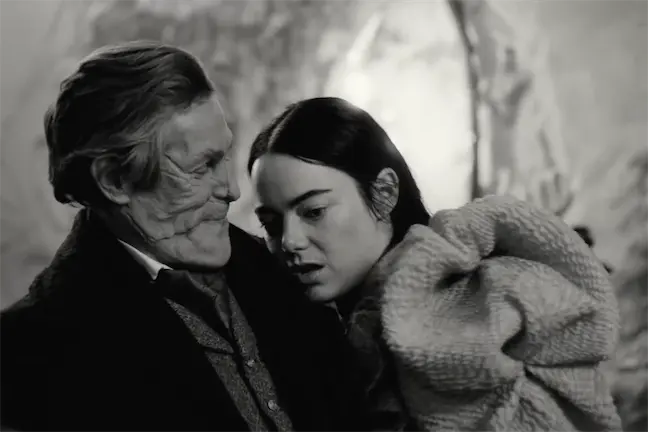
Interestingly, Maestro (nominated for categories including best picture and best cinematography) also adopted the use of black and white to showcase the different time periods and storylines, as well as going even further in switching up aspect ratios. It did not get the nomination for best editing, which may reflect the feedback from some audience members that the aspect ratio change was actually quite jarring.
Subtitles? No problem
This was a big year for non-English-speaking films. Through previous nominations, we’ve seen the likes of Roma, Parasite, Minari, Triangle of Sadness and All Quiet on the Western Front all win big (and rightly so). In 2024, for the first time, there’s more than one movie nominated for best picture that is primarily not spoken in English (Anatomy of a Fall, Past Lives, The Zone of Interest).
While many movie-goers may have turned their nose up at foreign language films and the idea of having to read subtitles not so long ago, that trend appears to be less and less existent. Nowadays, perhaps in part thanks to global streaming services such as Netflix, it seems that audiences are much more willing to watch a film from any part of the world, and they don’t mind at all if it isn’t spoken in their native language.
This appetite for non-English speaking films has ensured a fairer distribution of budget, consequently unearthing plenty of gems that may have yet to see the light of day ten or twenty years ago. Long may it continue.
All hail the king
You have to appreciate greatness while you have it. At 81, Martin Scorsese has made history by becoming the oldest nominee for best director. He’s now overtaken fellow legendary director Steven Spielberg as the most Oscar-nominated director with 10 nominations overall.
Like a fine bottle of wine that gets better with age, Marty appears to be at the height of his powers. Killers of the Flower Moon is being hailed by some as his best picture to date, and he certainly considers this his most important thus far. To undertake such large, influential and important projects at his age is phenomenal and worthy of the highest praise. We can only hope he has a few more left in him.
A wealth of talent
When you take a moment to scroll through all of the nominations, what you’re looking at is an astonishing wealth of talent. These awards are about celebrating and recognizing that talent because, without them, we simply wouldn’t get these amazing movies.
The Hollywood Professional Association (HPA) wrapped its 29th annual Tech Retreat in Palm Springs last week, and EditShare was honored to meet with attendees in the Innovation Zone. This show is one of the most anticipated events in the media engineering world, where industry leaders, scientists, creatives and organizations gather to discuss innovative new technologies, standards and practices.
From cutting-edge technology discussions to collaborative innovations, join us as we unwrap the key takeaways and exciting developments that unfolded at the highly anticipated event.
AI continues to dominate the conversation
HPA President Seth Hallen took on the task of programming the AI track of the main program, which discussed topics ranging from using GenAI as a screenwriting partner and pre-production assistant to demystifying AI in the supply chain.
Some worry that AI means you soon won’t be able to trust what you see, while others believe it could help accelerate content creation by as much as 50% by removing mundane tasks from your workflow. Only time will tell, but a look back at this interview on the launch of Photoshop 25 years ago might improve your outlook.
Five years into MovieLabs 2030 Vision
Our friend Mark Turner, Program Director, Production Technology at MovieLabs, led a “State of the Union,” providing an update on the progress of their 2030 Vision. Mark and his MovieLab partners hosted several sessions to discuss industry advancements and identify gaps that need to be filled.
“We’re approaching five years into our odyssey towards ‘ProductionLandia’ – an aspirational place where media creation workflows are interoperable, efficient, secure-by-design, and seamlessly flexible,” said Leon Silverman, HPA founder and past president. “It is the destination – and the 2030 Vision is our roadmap to get there. What we are finding is that this Vision resonates well beyond Hollywood and that the HPA Tech Retreat has become the vital meeting place for fellow travelers to learn all about MovieLabs’ work while MovieLabs gains visibility into pioneering developments that would otherwise go under our radar.”
Themes at the event included implementing the MovieLabs Ontology for Media Creation, Bringing the “Studio in the Cloud” to Fruition and Enabling Interoperable Workflows. Mark stressed that while there has been tremendous progress, they still have a lot of work to do to achieve the 2023 Vision.
Exciting news from EditShare
We were excited to demonstrate how our products help enhance the quality and efficiency of production and post-production processes, particularly for remote work and seamless cloud integration.
With Swift Link, we address the need for storage solutions that connect multiple facilities and integrate with the cloud, catering to users working remotely or from home. Swift Link significantly improves remote client speeds over VPNs or high-latency connections, boosting throughput up to 10 times. This technology allows users to preview and edit proxies and high-res media, optimizing connections for remote work without altering existing equipment or workflows.
Now available with all new EFS systems, EditShare Connect features new swift link technology, a revolutionary productivity tool turning your on-premise storage into your own private cloud for remote editing workflows. Reliably connect from any location using automatic latency detection and use your favorite NLE software on any OS to work on your media remotely and securely.
EditShare One, a new user experience, streamlines creative processes, with initial applications like Producer View facilitating task assignments and feedback delivery across dispersed teams. Producers can mark key points in transcriptions for editors through the FLOW panel, enhancing collaboration. AI-driven services, such as speech-to-text transcriptions, integrate seamlessly into FLOW, expediting work and enabling automatic creation of rough cuts or integration of selected clips into Adobe Premiere sequences. This can be extended even further with the new integration between FLOW and MediaSilo, allowing users to share links, create presentations and collaborate throughout the production team.
Thanks for the Double-Double®
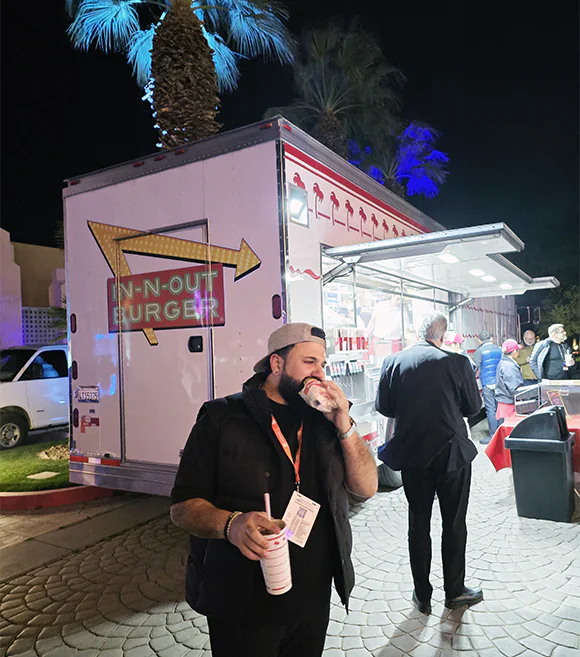
HPA surprised us by bringing in an In-N-Out Cookout Truck to close out the show. The conversations with customers and knowledge gained were unbeatable, but an Animal Style Double-Double® comes in at a close second.
Thank you to HPA for another remarkable event that helps keep us on the cutting edge of the M&E industry.
MediaSilo’s panels for Adobe Premiere Pro, After Effects and DaVinci Resolve Studio* make uploading a breeze
Sometimes, at the end of a long editing session, you just want to hit “export” and call it night. But everyone has experienced waiting for exports to complete, then initiating an upload to a review platform, and then waiting for that to complete. Then, you have to wait for the transcode to complete. Then, you have to ensure it plays right and the watermark is applied. Then, you have to send emails to producers and directors. Next, you wait for their comments.
The next day, editors try to figure out how to match the comments from emails back into their timelines. Then, you have to be careful because making changes affects the timecode, which throws off another set of comments where a reviewer typed in the timecode in a Slack message. And so on.
MediaSilo’s Panels for Premiere Pro, After Effects and DaVinci Resolve Studio solve this whole mess for editors. Let’s investigate the panels and see how they can save you time and grief.
MediaSilo Panel for Premiere Pro and Resolve
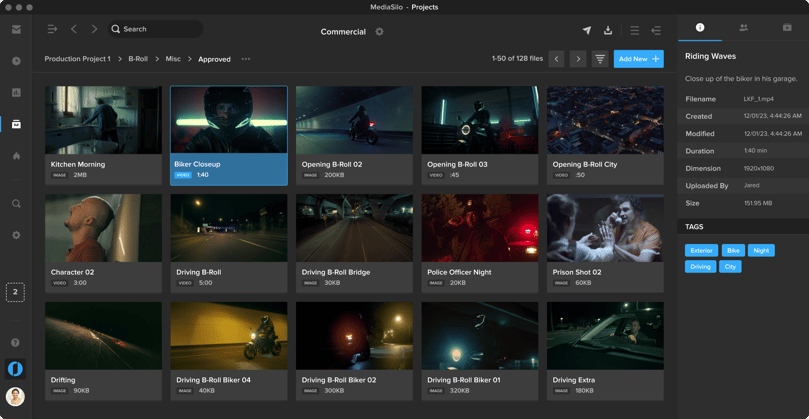
The MediaSilo panel gives you access to assets in MediaSilo right within your NLE. It also allows you to export a timeline with a single click and have it uploaded into the right project folder on MediaSilo. You can choose your upload settings and identify the people who need to be notified. Once the team has made notes in MediaSilo’s review mode, you can immediately import those comments as markers into your sequence.
Those features streamline so many manual steps in the review and approval process. Basically, the MediaSilo panel gets you home in time for dinner.
DaVinci Resolve Studio
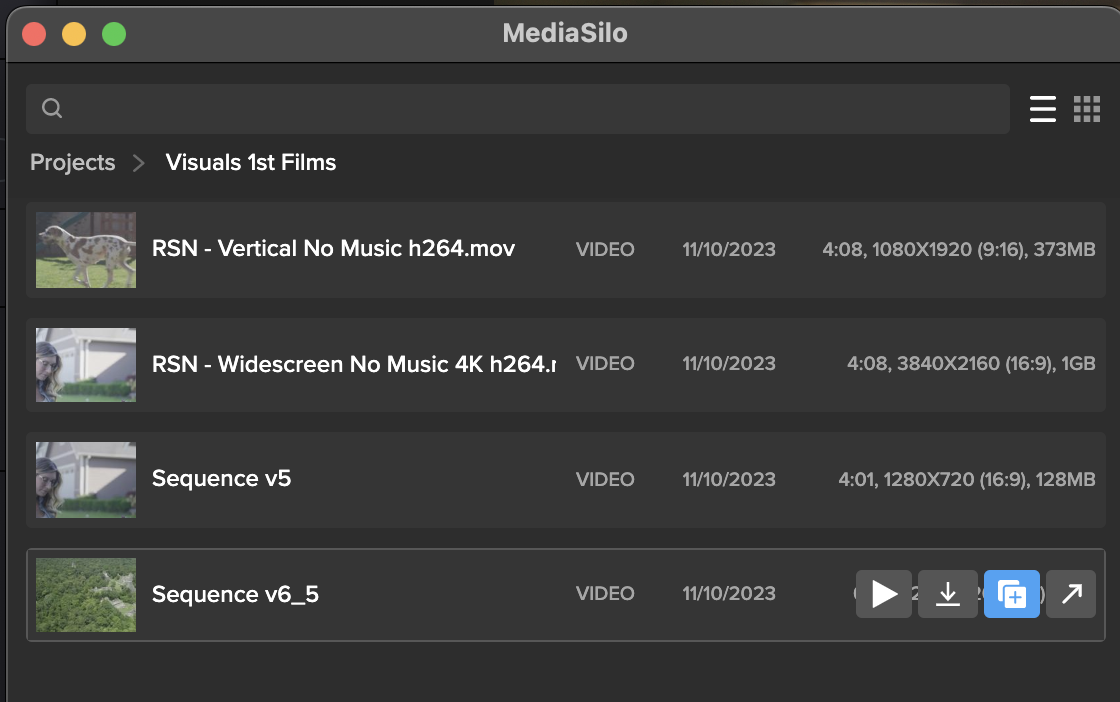
Once the panel is installed, Open DaVinci Resolve Studio and go to Workspace -> Workflow Integrations -> MediaSilo. A floating window appears with your projects. It uses a helper app called “Electron,” so don’t quit it. Your assets appear in the projects. When you float your mouse over each asset, you can preview (Resolve only), download, create a new version, or Open in MediaSilo.
Premiere Pro
Install the MediaSilo Panel from the Creative Cloud desktop app. Go to “Stock & Marketplace” and search for MediaSilo. Once the extension is installed in Premiere, open the Window menu > Extensions > MediaSilo.
After Effects
Install the MediaSilo Panel from the Creative Cloud desktop app. Go to “Stock & Marketplace” and search for MediaSilo. Once the extension is installed in After Effects, open the Window menu > Extensions > MediaSilo.
Downloading assets into your project
If you want to include one of your MediaSilo assets in your local project, just drag it into the media. If you prefer to download a proxy version, click the download icon and select “Proxy” from the drop-down menu. Proxies are smaller, lower-resolution versions of the original footage. They are handy when you are putting together a rough cut. And when your project is ready for color grading, you “conform” it to the original, high-resolution clips.
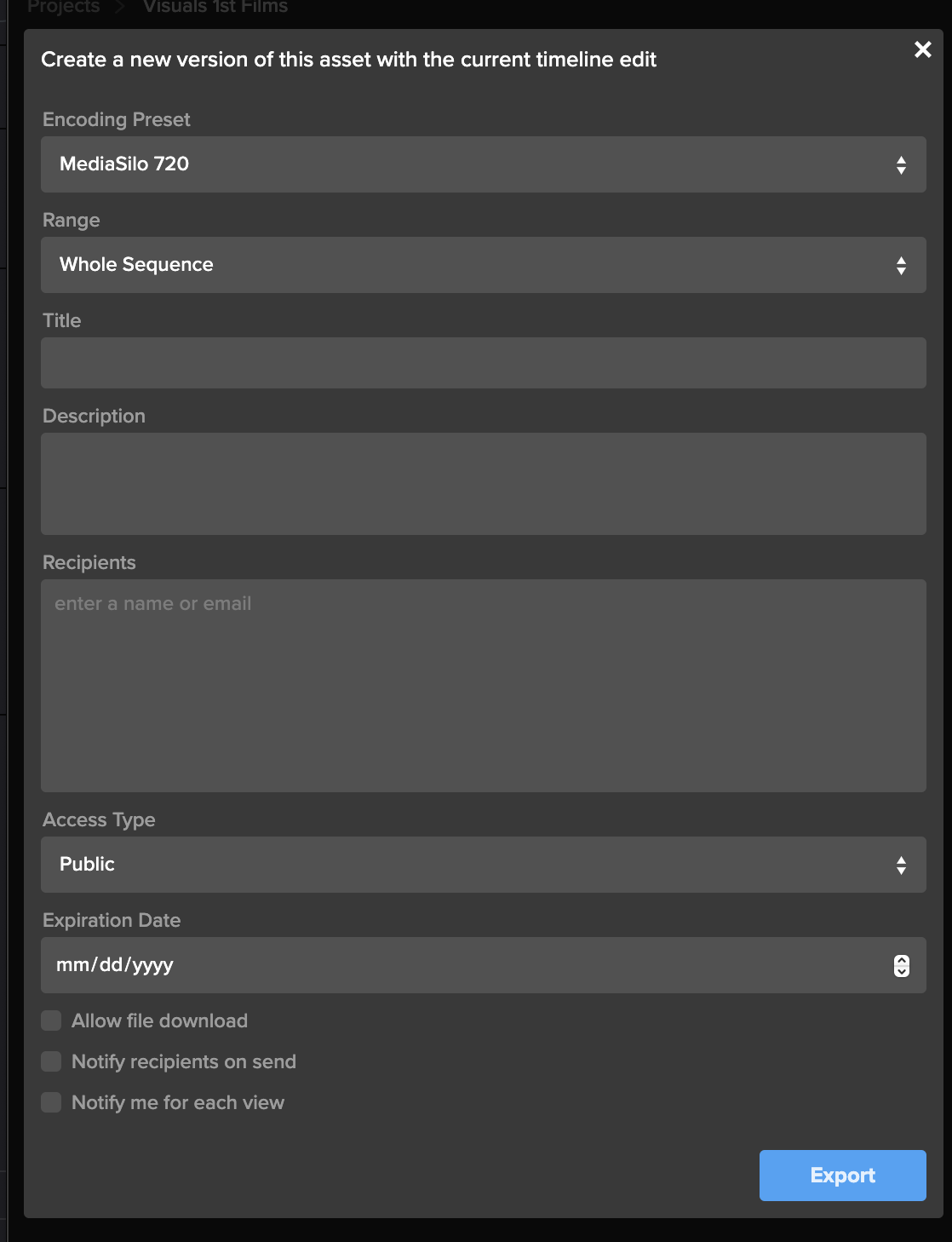
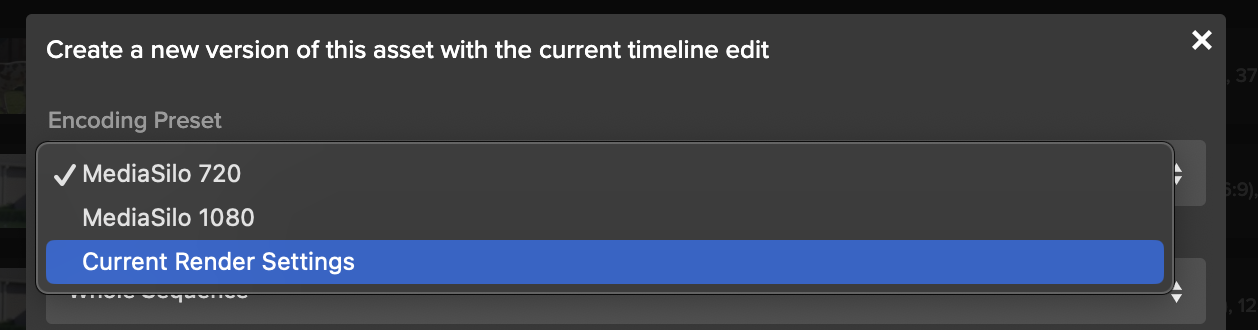
Exporting your timeline directly to MediaSilo is a breeze with the panel. Once you’ve completed your cut, click “Export Timeline” (Premiere says, “Export Sequence”) in the MediaSilo Panel. The “Export Sequence/Timeline” window opens up. You can choose your encoding preset based on your needs. Sometimes, you need the highest quality version to go up, and sometimes, you just need a lower-resolution version for quick approval. Choose the whole sequence or just from the In/Out points. You can specify a title and add a description that will appear in MediaSilo.
“Upload Location” is the next option. Start typing the project name, folder or asset with which this upload should be associated. This step is important because an editor may work on projects with different security levels.
The “Recipients” field saves you the hassle of waiting for an upload to complete before notifying reviewers. Enter the names of the individuals who need to receive a review link, and they will be notified once the asset is ready for viewing.
Create a new version of your timeline
Typically, when I’m ready to output a new version of an edit, I export it from the timeline. If the service I’m using for review and approval (non-MediaSilo) keeps track of versions, I usually just cross my fingers and hope it picks up on the new file coming in. Most of the time, I just append a “v2” or “v3,” and then manually identify it as a new version once the upload has completed. Then, I send a message to alert the reviewer.
The MediaSilo panel takes a different, more efficient approach. This feature is so simple that it took me a moment to understand how it works.
This process applies if you have already exported your timeline once and you need to export another version after some changes have been made. Select the clip in the panel and click on the button to share a new version.
This will bring up the export window. Rather than simply exporting the asset, all these options are designed to help you streamline creating a new version of the asset. This way, you can give the new version its own title, and MediaSilo will keep it associated with the initial version. This means the links that you have previously sent out will continue to work.
You can even change the access on the new version, and reviewers will be notified when it is ready. You’ll also receive a notification when they view it. This little box saves so many steps in the process of exporting compared to the process I outlined at the beginning of this section.
Encoding Presets
The encoding presets section allows you to choose the resolution for your upload. Sometimes, you need to get a change up quickly or share a low-quality version with a collaborator. So you can choose a lower-resolution setting. If you need to upload at a higher quality, choose your “current render settings.”
Watermarking and security
If you have watermarking turned on with your project, that will get automatically applied in MediaSilo. This is really helpful for editors because they don’t need to turn on and off a watermark within their NLE. In addition to the visible watermark, MediaSilo supports forensic watermarking with SafeStream. This technology ensures that any leaks can be traced back to their source.
MediaSilo also supports the ability to use your own custom email server for email notifications and 2-factor authentication — to ensure an even higher level of security.
Support articles
MediaSilo offers support articles for Resolve, Premiere and After Effects that show you how to install and use the panels in detail.
Conclusion
The MediaSilo panels in DaVinci Resolve Studio and Adobe Premiere Pro will save you time and energy. They help to make collaboration, review and approval a much more streamlined process.
*Note: The MediaSilo + DaVinci Resolve Studio integration is only available on the DaVinci Resolve Studio paid tier. You can find their pricing here.
When you send large video files, you can encounter all sorts of challenges. When your team is collaborating on a video project, you often have to send multiple versions, track review and approval comments, and make sure everything is secure. However, video collaboration workflows are more demanding than your typical cloud-based file-sharing workflows. This can be even more challenging when the creative team and the IT team propose different solutions for sharing video files.
Here are 10 of the top ways to share large video files and their pros and cons. I’ll also share things I wish IT knew about the unique demands of video review and approval processes. So, let’s dig in to find out which solution is best for your video collaboration workflow.
WeTransfer
WeTransfer’s simple interface makes it easy to share files up to 2GB. To upload larger files, you’ll need to upgrade to Pro or Premium.
WeTransfer uses a web browser interface for uploading. With some browsers, like Safari, you can run into an issue where the browser will time out before your large upload is complete. This isn’t the case when apps feature an app that installs on your local machine.
While WeTransfer Pro does a great job of sharing your final exports in the delivery phase of your project, it lacks review and approval features, so it might not be the right tool for collaborating during the post-production phase.
The other major drawback is that WeTransfer does not recover well from an interrupted file transfer. You’ll need to re-initiate if your transfer is interrupted (maybe due to a bad WiFi connection). If your upload is a large file, this can mean a significant amount of lost time, and you still won’t know if it will complete on a second go-around.
Dropbox
Dropbox is well known for its ability to sync files between the cloud and your various devices. But since DropBox Business Plus caps file sizes at 250GB, it runs into similar constraints as WeTransfer Pro. DropBox does feature “Replay,” which allows for commenting on videos, but it is not available on the least expensive plan. Additionally, the replay feature is limited to 10 file uploads on their top plan.
While Dropbox offers reliable syncing, it can be confusing when working with two different organizations. It tends to demand that both parties upgrade. That makes it confusing when you are trying to figure out who is hosting which files. A common question that arises is, “If I delete this file on my computer, will it vanish from yours?”
Post-production professionals need to know that they can deliver files without confusing mismatched subscription tiers between vendors. So, if you find yourself dealing with multiple projects and multiple clients, getting everyone to collaborate through Dropbox is a tall order.
Box
Box enjoys a solid reputation for handling lots of smaller files well. Their lowest tier caps file sizes at 250MB. (The highest tier caps out at 150GB per file). This gives you an idea of where their emphasis lies. There are no review or commenting features associated with videos.
Box is a great example of the difference between typical workflows that IT supports vs. media workflows. While an IT team may be accustomed to supporting petabytes of small files, this is different from workflows that have a smaller overall footprint, but the individual files are larger.
Google Drive
Google knows how to sync and send large files. Google Drive is inexpensive and reliable. Google offers a web interface and a downloadable app that syncs locally. The downloadable app is more reliable than the web interface for large transfers.
However, by many accounts, Google Drive is slower than Dropbox. My personal experience is that Google will eventually get your file uploaded. But sometimes, you can run into a frustrating scenario where interrupted syncs hang. This causes Google to stall out until Google Drives figures out that a file has been moved or renamed. This can put a halt to your other uploads.
Google also changed how sharing works between paying and free users.
If everyone within an organization is on a paid tier, then file sharing works well. But if you are sharing between organizations, Google will basically push both sides to upgrade. It is frustrating because you cannot know whether the person on the other side of the share has a paid account. I just ran into this a couple of weeks ago. I had a paid version, and the other team had free accounts (but I didn’t know this). The other team had to get their CEO to join the shared folder to accept my shared folder because he had a paid account.
Post-production pros need to know that the delivery of their assets is friction-free. You don’t want your client hit with promotional “nag-ware” when you are trying to deliver your final assets.
OneDrive
Microsoft enjoys a solid reputation with IT teams for good reason. Their products cater to the needs of corporate users. Microsoft places an emphasis on security and integration with Windows.
However, OneDrive is not oriented toward post-production. It lacks features oriented toward video review and approval and version tracking. This makes it a good solution for sharing graphics and project files, but it isn’t great for managing video projects.
Vimeo
Vimeo has been the champion for preserving video quality for films delivered to the web. Vimeo is a great tool for the distribution of assets online, where video quality trumps workflow efficiency. It works well for embedding your finished project on your website. In the past few years, Vimeo has also been adding collaboration, AI, and live-streaming features.
However, in my personal experience, I have found uploading to Vimeo painfully slow. Transcoding also seems to take longer than other services. It will be interesting to see if Vimeo’s performance can keep pace with their aspirations.
Resilio
Resilio uses P2P technology to facilitate the syncing of large files between multiple collaborators. This is a powerful technology, but it does require the app to be installed on the computers of both the sender and the recipient. This means Resilio is a nice solution for frequent collaborators. However, it’s really a no-go for client work where somebody just wants to click a link, quickly compare versions, and leave some comments.
Frame.io
Adobe’s frame.io platform is a popular solution for review and approval. It features integration into popular NLEs, and tools for managing versions. Adobe is working to incorporate AI features into frame.io as well.
However, my experiences with frame.io over the past year have been challenging. They’ve acknowledged these challenges and reported that they are working on an overhauled version of their software.
Infrastructure solutions: Aspera, Signant, and EditShare EFS
IBM Aspera and Signant Media Shuttle are robust solutions that integrate your team’s IT infrastructure. They’re often used by broadcasters to move large files. However, many teams are finding challenges with these solutions. And they are expensive.
EditShare EFS has built-in file acceleration for large transfers from one EFS system to another. This can be particularly advantageous to customers who have multiple facilities and the transfer software is included in the standard EFS license – no additional costs are involved.
MediaSilo
MediaSilo delivers a platform designed specifically to tackle the challenges of video collaboration. It integrates right into Adobe Premiere Pro and DaVinci Resolve. This allows editors to save huge amounts of time when exporting, uploading, and versioning.
MediaSilo allows users to upload through the browser or the desktop app. MediaSilo’s robust uploader gives you real-time feedback on the speed and progress of your uploads. If you’re connection is interrupted, MediaSilo does a great job of completing the transfer when you are reconnected. It is also easy to cancel an upload and clear the queue. This avoids the hangs and syncing issues that other solutions run into.
The SafeStream technology ensures that assets can be forensically tracked to individual users, and watermarks deter IP theft.
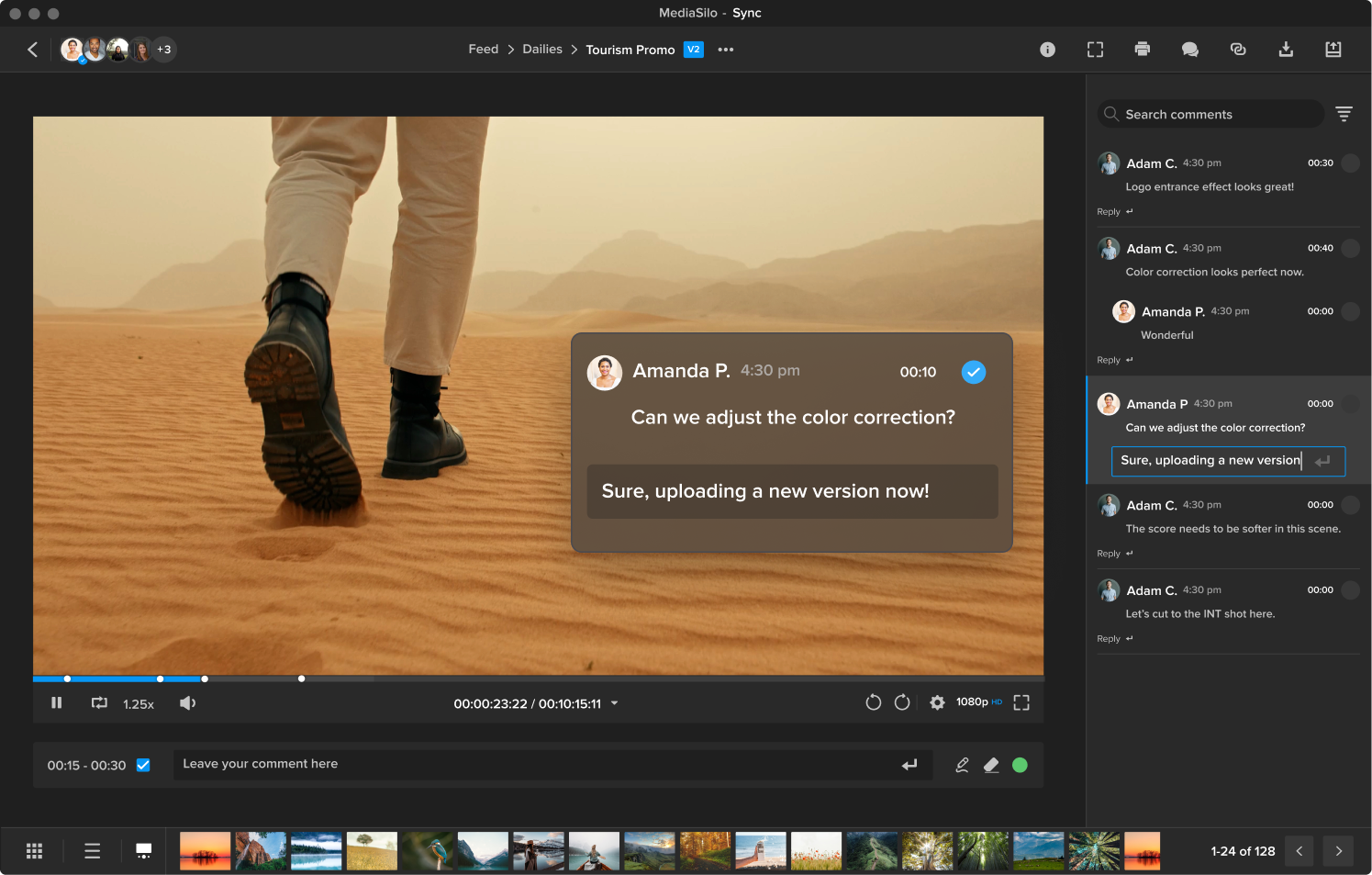
MediaSilo’s review and approval tools allow for easy commenting and versioning. This helps everyone on the team to know if specific notes have been addressed. It is easy to send your collaborators a MediaSilo link, and they don’t have to worry about having an account, what tier they are on, or sync settings. MediaSilo’s strength is wrapping powerful features in a simple interface. If you need to send a collaborator a video file for review, it doesn’t get easier than MediaSilo.
Conclusion
Moving around massive video files is a challenge without the right tool. Sometimes, you just need to send someone a file, but other times, you need to gather notes, compare versions, and intelligently group assets. Video files present challenges that are different from syncing a bunch of documents. Tools like MediaSilo, and EditShare EFS can smooth out your workflow and simplify remote collaboration.
If you’re unfamiliar with the church world, the extent of video production used in megachurches’ weekly services might surprise you. The definition of a “megachurch” is any church with a weekly attendance of 2,000 or more. They come in various denominations. In the United States, they are mainly protestant and often non-denominational.
Many of these churches actually use two video teams. One team runs the “live production” for the weekly service. This generally includes multiple cameras, image magnification (IMAG), live switching, slides, and streaming the service online. Furthermore, megachurches often employ a smaller “film crew” to create elements such as bumpers that complement the week’s message, commonly known as a sermon.
We’ll take a closer look at how the video teams of these houses of worship function and some of the challenges they face.
Video is a key medium for megachurches
It’s reported that 66% of megachurches “always or often” have video segments as a part of their services. Video helps these churches communicate a consistent message to their communities. Some churches meet at a single location with multiple services, while other churches have adopted a multi-site approach to their ministries. In either case, a core creative team usually helps produce design and media (with the help of volunteers) for the entire organization.
Live Production
The “Live Production” video team helps to produce the Sunday service. 75% of megachurches use IMAGE (image magnification) technology to help the crowd get a better look at the speakers and worship leaders. This involves a multi-cam setup that generally employs professional cameras, broadcast zoom lenses, and support such as jibs, gimbals, and beefy tripods.
Volunteers trained by the staff on the live production team frequently operate the cameras. This also offers an excellent opportunity for students and older teens to get some hands-on experience with gear. Even though I didn’t attend a megachurch, I remember as a teen learning to work a soundboard, lavs, recording gear (cassette tape! It was the 90s!), and projectors, and I’m still using those skills today (well, maybe not the cassette tape skills).
These live production teams need to have a firm grasp on camera operation, running professional cabling through long runs, taking live direction over headsets, or even wireless focus pulling.
Over 90% of these churches also use streaming for their services. I was surprised to learn that 45% of Americans have viewed a church service online, even though many don’t attend church in person.
This actually produces a large amount of data that needs to be managed and referenced for special events, compilation videos, or social highlights. Increasingly, ministries have needed more robust digital asset management tools to help them disseminate these assets to their teams.
Multi-site megachurches
Many megachurches have adopted the multi-site model. In this model, there is a main campus and satellite campuses. Generally speaking, each satellite campus has its own set of volunteers and worship music leaders. The sermon may be live-streamed from the central location. Other times, the satellite locations use local pastors to deliver the message. There are multiple ways of executing this strategy and many times, the satellite locations grow into their own autonomous congregations.
Church film crew
In addition to the live production crew, megachurches often have a “film crew.” Typically, a smaller team focuses on producing pre-recorded material intended for playback during the service. In many ways, this parallels the setup of professional sports broadcasts or even “Saturday Night Live.” In both kinds of shows, there is a live presentation, and they also cut away to pre-recorded segments.
The teams that create these pre-recorded segments function as small film crews rather than broadcast teams. So they might use equipment such as cinema cameras, cinema lenses, and audio techniques more commonly found on a movie shoot.
The film crews could be volunteers or even contracted on an occasional basis. The sermon series “bumpers” could also incorporate motion graphics and 3D effects. The goal of these teams is to use the beauty of cinematography and the emotional impact of storytelling to touch their audience. These teams use aesthetics and story as an extension of the Sunday message. They try to find ways to visualize the text of scripture or the stories of their community.
Challenges of video production in a megachurch
Most of the time, church leaders aren’t media professionals. This leads to challenging situations around review and approval processes. All video professionals know that it takes a long time to do high-quality work. We also know that people outside of production have difficulty understanding the necessary timelines to deliver solid work. Sometimes, those mismatched expectations can lead to burnout. In the article, Life after Church, several filmmakers describe those challenges.
Communication is key to helping leadership teams and creative teams work together in healthy ways. Creative briefs, budgets, and time estimates can help align expectations regarding production.
When you enter post-production, the review and approval process can be tricky on any project. This is where tools like MediaSilo can come in and streamline the process. It makes it much easier to work together as a team.MediaSilo also makes it simple for teams to find and repurpose archival footage. This helps to keep the video team’s efforts valuable into the future so that you aren’t digging through hard drives looking for clips.
Streamlining review and approval
Church film crews (often just a couple) also cover things like international mission trips, fundraising videos, testimonials and more. When working on the road, it is common to need to “get something up so they can see something.”
However, WiFi networks can be slow and unreliable in the field. MediaSilo’s uploader is one of its best features. It gives you the percentage uploaded, the upload speed, and the estimated time for the upload to complete. If the upload is interrupted, MediaSilo will let you know. Then, it will continue where it left off once a connection has been re-established.
When you approach the end of a project, you can enter into a phase where you repeatedly upload versions and tweak a video. We all know how disappointing it is to attempt a large upload to a cloud provider and have it fail after partially completing the upload. You can waste hours trying alternative services, re-uploading, or changing formats.
MediaSilo features panels for Adobe Premiere Pro and DaVinci Resolve so that you can go right from your timeline into the cloud, and reviewers will be notified. This eliminates the frustration of a multi-step export, upload, checking the upload, and then sending out a review email/message. This automation can distinguish between getting home in time for dinner or getting stuck late in the edit bay on a Saturday night.
Churches and feature-length films
As filmmaking has become more accessible, churches have embarked on feature-length documentaries and even narrative films. The Kendrick brothers (Fireproof, Courageous, War Room) started their film career out of Sherwood Baptist Church. That experience helped them grow as filmmakers, and they eventually started their own production company, Kendrick Brothers.
The church has a complicated and evolving relationship with Hollywood. The award-winning documentary Reel Redemption, directed by film critic Tyler Smith, goes into the history of how the church has engaged Hollywood. Smith covers it all from the Hayes-code to the international hit, Passion of the Christ, to schmaltzy faith-based films, to the latest entrants that have sought to improve on the craft of filmmaking. It’s an insight deep-dive into this little known chapter of Hollywood history.
This system has provided a network where young people can start as volunteers on a live production team on Sundays and move up to bigger projects with larger audiences while growing their careers as filmmakers.
Conclusion
According to NPR, there are over 1,800 megachurches in America. Many of these are amongst the fastest-growing churches in America. However, the pandemic did have a substantial impact on in-person church attendance. But with over 60% of the US population attending church at least once a month, we will continue to see the importance of video production grow in the faith-based space.
In the same way, as we are seeing the cross-pollination of disciplines between television broadcast tools and film production techniques, we’ll see collaboration between live production and film crews in churches.
EditShare tools like MediaSilo and EFS can help facilitate that collaboration with solutions for on-site storage, remote collaboration, and review and approval.
It will be exciting to see this space continue to grow. And it will also be good to see it develop in its capacity to nurture artists while still faithfully sharing its message.
Data breaches are costly – creatively and financially. Trust your content to a product that values data security. With just a few clicks, you can easily protect pre-released or confidential content, ultimately protecting creative impact and revenue potential.
Users can now watermark images and documents with email, name and/or custom text with SafeStream technology at the Workspace, Project or Review Link level. Whether you’re trying to protect scripts, key art, screenplays or call sheets, we help keep your projects safe and sound. Sleep better knowing you don’t have to worry about waking up to a catastrophic content leak.
Apply Watermarking Requirements to Your Workspace
As an administrator, you can require visible image and document watermarking for every new project created in your workspace.
Start by clicking the gear icon in the left-side navigation bar, which will take you to the Administration page. In the SafeStream tab, select Watermark Settings from the menu to open your workspace-level watermark settings. Now, toggle on Apply Visible Image and Document Watermarking.
Next, use the dropdown menus under Image Template and Document Template and select your default watermark template to apply to new projects. You can choose a template that displays a viewer’s full name and email address, the viewer’s email address only or a custom template created for your workspace.
On all templates, the watermarks will be displayed in a “wallpaper” format, which repeats diagonally across the entire image or document.
Apply Watermarking to a Project
You can apply visible image and document watermarking to all images and documents inside a project, provided the files match our list of supported file types.
From the project settings, a project owner or administrator can find watermarking options in the SafeStream tab. Simply toggle on the Apply Visible Image and Document Watermarking tab and use the dropdown menu to select the template you want to apply to the images and documents in this project. Whichever template you choose, the viewer’s identifying information will be displayed in a “wallpaper” format, which repeats diagonally across the entire image or document.
Apply Watermarking to Unwatermarked Files in a Review Link
Applying watermarks to images and documents at the Review-Link level allows you to protect select items you’re sending without using those watermarks on the entire project.
Click the Advanced button in the bottom left in the Share for Review window, and toggle on the Apply Visible Image and Document Watermarking tab in the Watermarking section. The default templates chosen by your administrator will display automatically. You can keep these selections or choose a different template. Whichever template you choose, the viewer’s identifying information will be displayed in a “wallpaper” format, which repeats diagonally across the entire image or document.
If these watermark templates display a viewer’s identifying information, you must enter link recipients in the Audience tab on the left side of the share window.
Your choice of watermark template can affect the link’s Access setting.
If a watermark displays the viewer’s name, you must select Workspace users and enter workspace users as recipients.
If a watermark only shows the viewer’s email address, then you have the additional access options of Public and Password protected. When you select Public or Password protected, you can enter any email address in the recipients field, even if that email does not belong to your MediaSilo workspace.
For more detailed information, please visit our support page or contact us at sales@mediasilo for a demo.
You already know how important good audio and sound is for a film. When was the last time you watched through the entirety of a video with bad-quality audio? As an audience, we can deal with a certain level of poor video quality, provided the sound quality is still good. However, as soon as the sound is bad, we’ll stop watching.
While filmmaking is a visual medium for storytelling, it’s undeniable that audio plays a huge role in the process. To create great films and videos, you need to produce great audio and sound. Let’s take a look at 8 tips to achieve great film audio production.
Microphone choices
First things first, let’s talk about microphones. Yes, every camera nowadays comes fitted with its in-built microphone, but let’s be honest…these simply don’t cut it.
If you’re serious about capturing great audio and sound, you must invest appropriately. Just as we invest in cameras to achieve beautiful visuals, we need to invest in microphones and develop professional microphone techniques to capture stunning audio.
For video production, there are two main microphones to consider:
Shotgun mics
Long and cylindrical, the shotgun microphone is directional. It picks up sounds directly in front of the mic while rejecting and toning down ambient sounds to the rear and sides.
Shotgun microphones are highly versatile, allowing you to capture all kinds of sound, from actor dialogue to room noise and wild sound. Because of its directional nature, you will need to think about where you place a shotgun microphone and how you use it. We’ll take a look at how to do this below.
Some of the broadcast-grade shotgun mics you may want to consider:
Lavalier microphones, often termed “lav mics” or “lavs” in the industry, are the classic small-form clip-on microphones you’ll see used frequently in interview videos or where a presenter is talking to the camera.
Unlike their shotgun counterparts, lavalier microphones are very small and designed to be lowkey and unobtrusive. Because of this, Lav mics don’t really pick up that much background noise. Lavs are much more about capturing quality, clear audio from the person they’re attached to.
Some of the broadcast-grade lavalier mics you may want to consider:
To boom, or not to boom? That’s a common question when tackling how to capture great audio during video production. As discussed above, there’s a clear difference between shotgun and lav mics. To capture really high-quality audio and sound for your film project, you need to consider the following:
Which one you’re going to use
When you’re going to use it
Where you’re going to use it
With a lavalier microphone, you’ll capture clear, crisp human speech from the actor. However, it can create a sense of closeness for the audience, which may feel a little jarring or strange if we’re watching a wide shot. This is where you need to think about the microphone perspective.
Shotgun microphones can be attached to a boom pole, which then gives you the freedom to experiment with the microphone perspective. If you’re looking for closeness, you can bring the boom in closer to the actor. Equally, if you’re going for a wider shot and want to capture a bit more of the room tone or environment, you can bring that boom away so that the audio recording feels more natural with what you see on screen.
Stop and listen
When you’re in the middle of production, firing on all cylinders and juggling ten things at once, it can be easy to forget to check your audio before hitting record. However, it’s an essential part of any professional production.
When you take the time to listen to your audio before each shot, you’re allowing yourself to catch any potential mistakes or errors. You may notice that you can hear the traffic from a distant highway or planes from a nearby flight path. All these details help you to adjust and rethink the way you shoot this particular scene. Or perhaps (I’ve experienced this plenty of times), you realize you need to switch on your microphone!
By taking the time and slowing down to listen and double-check things, we save ourselves a lot of pain further down the line in post-production.
Invest in necessary accessories
Again, just like with cameras, where we buy different lenses and ND filters for specific scenarios, along with tripods, lights and whatever else you can think of, you need to invest in additional accessories and gear for your audio-capturing gear.
Noise-canceling headphones
On the topic of listening to audio before shooting, it’s well worth purchasing a high-quality pair of noise-canceling headphones. These will eliminate all the background noise on set and enable you to focus on the actual sound of the film. This approach often helps you detect any potential mistakes that need to be smoothed out. When the guy with the headphones on set says do it again, you do it again.
Some of the best noise-canceling headphones you may want to consider are:
It’s advisable always to avoid filming in windy conditions at all costs. However, that’s sometimes easier said than done. As filmmakers, we can’t control the weather; therefore, it’s well worth ensuring all your microphones (lavaliers and shotguns) have deadcats. These fluffy mic buffs will shield the condenser from any unwanted noise, such as wind or even a sharp exhale of breath, that could cause the audio to clip and create all kinds of issues in the edit.
Compressors and limiters
Making use of compressors and limiters can help you to smooth out an audio signal. On many higher-end microphones, you may well find that they already come with an in-built option for limiting. Employing a limiter prevents the amplitude of a signal from exceeding a predetermined value. In other words, you hopefully stop any potential clipping from happening.
Meanwhile, a compressor will reduce the volume of louder sounds while amplifying quieter sounds. This effectively compresses the audio signal’s dynamic range, making it “smoother” and easier to work with.
Think about your location
When you’re location scouting in pre-production, don’t just analyze a space from a visual perspective. Think about location in terms of audio.
How does your voice carry in a certain location – is it bouncing off walls and echoing? Are you on a busy flight path? What elements of the environment can you control, and what can you not?
Developing location-sound strategies will help you immensely later in post. Ideally, the more things you control, the better.
Room tone
On the topic of location, it’s a great idea to pick up room noise and ambient sound from the places you shoot in. Think of this as Foley on set.
When you’re in post-production working on your film sound design (more on that below), it can be very difficult (often impossible) to recreate the exact ambiance and match it with the scene you’re working with. Sometimes called “room tone,” this process helps you precisely capture the tone of your room.
For this, you may want to invest in an audio recorder, or you can use something like a shotgun microphone. However, you do it, it’s a really useful habit to have, giving your sound designer much more to work with in the edit.
Clean dialogue
Depending on the type of video or film you’re making, you may want “clean dialogue” capture.
Even if two actors are interacting with each other, going back and forth in a scene, it’s a good idea to have them redo their lines afterward, just one actor at a time. Capturing these lines crisply and clearly, with no interference from anyone else, gives you much more to work with in post-production. Clean dialogue can allow you to speed up lines, cut them out, overlay them elsewhere, and perform many other little tricks in the edit.
Post-production
Typically, the phrase “we’ll fix it in post” should cause you to run for the hills. As a professional filmmaker, you should never rely on post-production as a surefire way to patch up bad production. However, certain elements of post-production audio are essential when it comes to quality audio and sound.
For example, don’t be afraid of SFX. Great filmmakers understand that not everything can be captured during production. When you’re editing your film, you need to work closely with SFX to help build out your environments with sound design, helping to bring the visuals to life and make the audience feel like they’re truly there. This is where capturing things like room tone and ambiance can lend a helping hand.
Additionally, if working with actors, you may also need to capture ADR (audio dialogue replacement) to ensure you’ve got the best-sounding edit possible.
Wrapping up
So, there are 8 great tips to help you capture great audio and sound in your next video. It’s a challenging part of the filmmaking process to perfect, and many filmmakers can shy away from it. However, as this arti
In the ever-changing world of broadcasting, remote projects have transformed the industry. The pandemic showed us what was possible, with production moving from inside studios to live locations and even peoples’ homes, using techniques that may include remote desktop software and cloud platforms such as Zoom and Amazon Web Services (AWS).
Several elements are needed to execute remote broadcasting successfully, including a reliable internet connection, quality broadcast equipment and web-based tools for collaborating on video editing, graphics and more. Broadcasters also face continuously shifting, imminent deadlines, so streamlining workflows and sharing files quickly is imperative. That’s why employing the right collaboration tool is so important.
Why team collaboration is essential for remote broadcasts
Remote broadcasts require capturing massive amounts of audio and video content from remote locations and sending it all to a central facility or studio. The remote production team must collaborate efficiently with that facility to ensure a seamless broadcast.
Digital video transmission enables the delivery of high-quality content and timely updates to their audiences, regardless of the geographical distance between facilities. That’s why having the right equipment is imperative for the success of a remote broadcast.
In this industry, creating and editing content quickly is nonnegotiable. If a single copy of media gets lost or destroyed, finding something else to plug in for that evening’s broadcast in a pinch can cause a frenzy, with producers and editors scrambling to fill the slot. That’s why resilience is essential, along with having alternate media available online at all times. If a producer needs to pivot to a new story at the last minute, they must have access to all the required assets without adding the unnecessary delays of searching for the proper files.
Employing the right video collaboration software can increase your team’s overall efficiency and help establish clear goals. Sharing information quickly and easily saves you the most precious resource available in broadcasting – time. Additionally, when your team sees the results of their work in real-time, it can help boost morale and strengthen the culture.
How MediaSilo accelerates collaboration
MediaSilo’s cloud-based video management and collaboration software is designed to streamline your workflow and video collaboration process. The software provides real-time feedback and file sharing in a secure web-based environment ideal for remote teams.
From a production and post-production standpoint, employing video collaboration software like MediaSilo is an essential ingredient in a remote broadcast team’s success. The tool makes it easy to manage, share, review and present your video projects all in one place. MediaSilo is a creative collaboration HQ that provides the following capabilities:
Asset management
Save time with fast file uploads that allow you to store everything from clips to scripts to project files in one secure location so they are ready to use. Accelerate your team’s creative process with intuitive folder navigation, metadata-rich search and tagging, and flexible user permissions. You’ll also be able to keep your assets current, track changes and update versions as needed.
Streamlined communication
Expedite your review process and make edit requests clear using time-coded comments or on-screen drawings. Brainstorm and collaborate with your entire team, whether in the field or the studio, in real-time with MediaSilo’s cloud-based software (available through the web browser or app). Enable private or password-protected external links—allowing outside collaborators to interact with your team. You can also limit comments to a select user group to keep your information assets confidential.
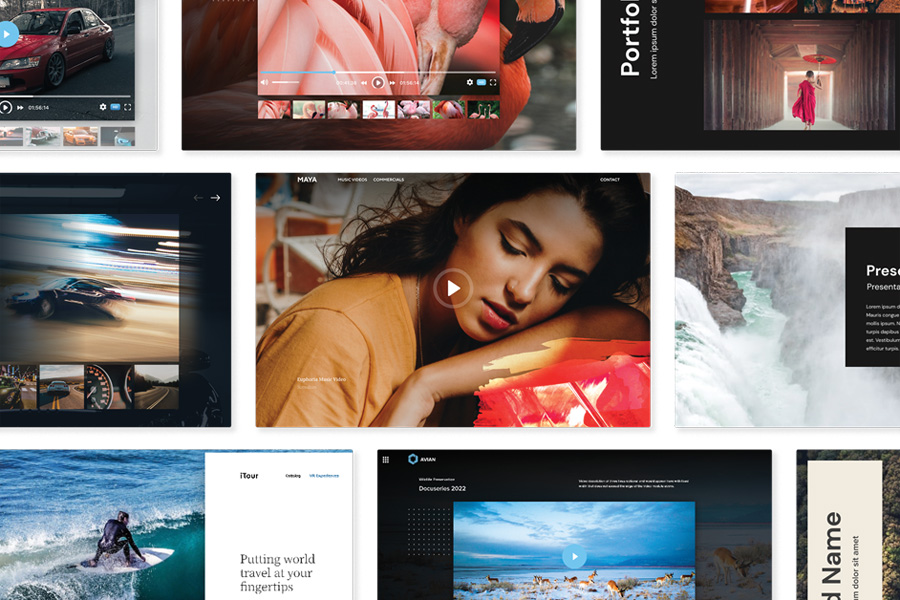
Showcased content with Spotlight
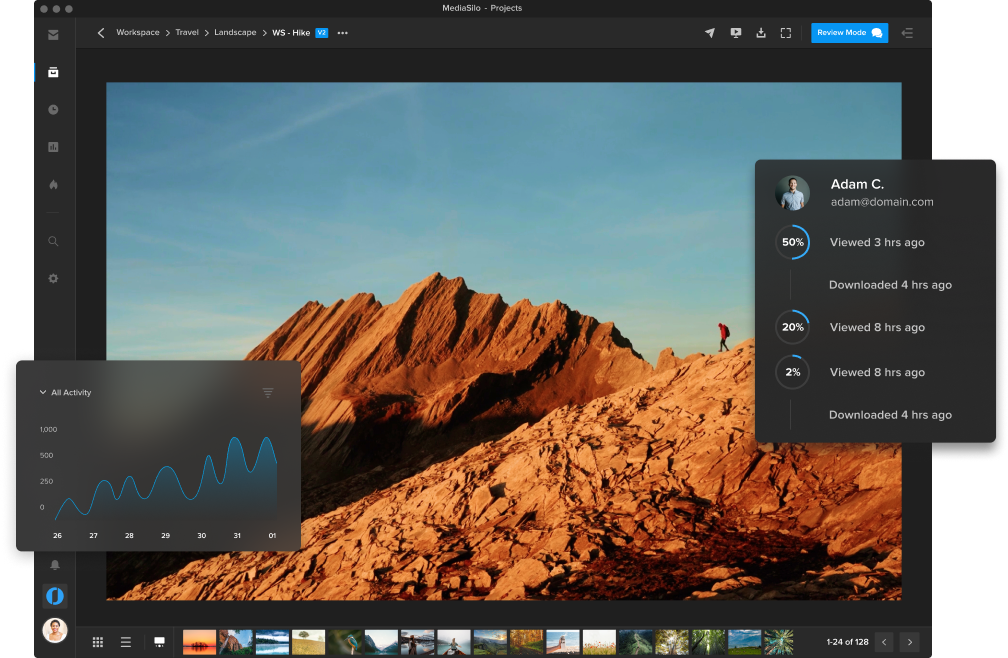
MediaSilo empowers broadcasters to create bespoke digital experiences that showcase content as intended with customizable templates, pitch decks and microsites. Share access with specific users via password or to a broader audience with open access. Gauge what content gets the most engagement with Insights, the analytics tool that allows you to track activity, viewing location and history of any individual user, file, link or presentation.
Trusted security
Ensure only specific users can access your content with MediaSilo’s password-less login and multi-factor authentication. The most effective theft-deterrent measure is available by placing user-specific SafeStream™ customizable watermarks on your content. You can also generate one-time links to verify user identity, grant secure access to login, and share content securely with private expiration-dated links and role-based user permissions.
Data-driven insights
MediaSilo makes it easy to see your videos’ performance in real time within one central dashboard. You can measure the engagement of your content, review user logs, monitor drop-off points, and more—to see which users and files are the most active. You can also export your data in different formats and track review links to see views, comments, and approvals.
Why broadcast professionals choose MediaSilo
MediaSilo solves many common problems faced by broadcast professionals. Remote broadcasters often encounter unreliable internet upload performance. MediaSilo tracks the progress of your uploads, reports on the speed and recovers the files if your connection is interrupted. Our robust tools for managing user permissions and two-factor authentication mean you never have to worry about gaining secure access to station video and graphic assets.
MediaSilo also helps broadcast professionals with the following:
Organizing, storing and sharing digital media files
Collaboration for vital feedback
Synchronization with your timeline for adequate changes
Managing, sharing, reviewing and presenting video projects
Faster project approvals
Today’s broadcast professionals and post-production teams want the freedom to choose the tools they prefer without compromising the creative process, and that’s where MediaSilo comes in.
Widely known as a go-to platform for post-production professionals in the TV, media and entertainment industries, MediaSilo is used by production companies, broadcasters and content creators worldwide. Providing a centralized hub for media management, collaboration and distribution, MediaSilo streamlines your workflows, accelerates team collaboration and helps you distribute content to the market faster.
MediaSiloallows for easy management of your media files, seamless collaboration for critical feedback, and out-of-the-box synchronization with your timeline for efficient changes. See how MediaSilo is powering modern post-production workflows with a 14-day free trial.
Kim is a seasoned content marketing professional with over 15 years of corporate communications experience. Her sweet spot is with creative writing, both short and long-form, and she has a proven track record working with IBM, Jackson Healthcare, and Walt Disney World, among many others. Kim is also a singer and actor and has been performing on stage and screen since she was a child. She has a great passion for TV and film production and went to school for broadcast journalism.