Data breaches are costly – creatively and financially. Trust your content to a product that values data security. With just a few clicks, you can easily protect pre-released or confidential content, ultimately protecting creative impact and revenue potential.
Users can now watermark images and documents with email, name and/or custom text with SafeStream technology at the Workspace, Project or Review Link level. Whether you’re trying to protect scripts, key art, screenplays or call sheets, we help keep your projects safe and sound. Sleep better knowing you don’t have to worry about waking up to a catastrophic content leak.
Apply Watermarking Requirements to Your Workspace
As an administrator, you can require visible image and document watermarking for every new project created in your workspace.
Start by clicking the gear icon in the left-side navigation bar, which will take you to the Administration page. In the SafeStream tab, select Watermark Settings from the menu to open your workspace-level watermark settings. Now, toggle on Apply Visible Image and Document Watermarking.
Next, use the dropdown menus under Image Template and Document Template and select your default watermark template to apply to new projects. You can choose a template that displays a viewer’s full name and email address, the viewer’s email address only or a custom template created for your workspace.
On all templates, the watermarks will be displayed in a “wallpaper” format, which repeats diagonally across the entire image or document.
Apply Watermarking to a Project
You can apply visible image and document watermarking to all images and documents inside a project, provided the files match our list of supported file types.
From the project settings, a project owner or administrator can find watermarking options in the SafeStream tab. Simply toggle on the Apply Visible Image and Document Watermarking tab and use the dropdown menu to select the template you want to apply to the images and documents in this project. Whichever template you choose, the viewer’s identifying information will be displayed in a “wallpaper” format, which repeats diagonally across the entire image or document.
Apply Watermarking to Unwatermarked Files in a Review Link
Applying watermarks to images and documents at the Review-Link level allows you to protect select items you’re sending without using those watermarks on the entire project.
Click the Advanced button in the bottom left in the Share for Review window, and toggle on the Apply Visible Image and Document Watermarking tab in the Watermarking section. The default templates chosen by your administrator will display automatically. You can keep these selections or choose a different template. Whichever template you choose, the viewer’s identifying information will be displayed in a “wallpaper” format, which repeats diagonally across the entire image or document.
If these watermark templates display a viewer’s identifying information, you must enter link recipients in the Audience tab on the left side of the share window.
Your choice of watermark template can affect the link’s Access setting.
If a watermark displays the viewer’s name, you must select Workspace users and enter workspace users as recipients.
If a watermark only shows the viewer’s email address, then you have the additional access options of Public and Password protected. When you select Public or Password protected, you can enter any email address in the recipients field, even if that email does not belong to your MediaSilo workspace.
For more detailed information, please visit our support page or contact us at sales@mediasilo for a demo.
You already know how important good audio and sound is for a film. When was the last time you watched through the entirety of a video with bad-quality audio? As an audience, we can deal with a certain level of poor video quality, provided the sound quality is still good. However, as soon as the sound is bad, we’ll stop watching.
While filmmaking is a visual medium for storytelling, it’s undeniable that audio plays a huge role in the process. To create great films and videos, you need to produce great audio and sound. Let’s take a look at 8 tips to achieve great film audio production.
Microphone choices
First things first, let’s talk about microphones. Yes, every camera nowadays comes fitted with its in-built microphone, but let’s be honest…these simply don’t cut it.
If you’re serious about capturing great audio and sound, you must invest appropriately. Just as we invest in cameras to achieve beautiful visuals, we need to invest in microphones and develop professional microphone techniques to capture stunning audio.
For video production, there are two main microphones to consider:
Shotgun mics
Long and cylindrical, the shotgun microphone is directional. It picks up sounds directly in front of the mic while rejecting and toning down ambient sounds to the rear and sides.
Shotgun microphones are highly versatile, allowing you to capture all kinds of sound, from actor dialogue to room noise and wild sound. Because of its directional nature, you will need to think about where you place a shotgun microphone and how you use it. We’ll take a look at how to do this below.
Some of the broadcast-grade shotgun mics you may want to consider:
Lavalier microphones, often termed “lav mics” or “lavs” in the industry, are the classic small-form clip-on microphones you’ll see used frequently in interview videos or where a presenter is talking to the camera.
Unlike their shotgun counterparts, lavalier microphones are very small and designed to be lowkey and unobtrusive. Because of this, Lav mics don’t really pick up that much background noise. Lavs are much more about capturing quality, clear audio from the person they’re attached to.
Some of the broadcast-grade lavalier mics you may want to consider:
To boom, or not to boom? That’s a common question when tackling how to capture great audio during video production. As discussed above, there’s a clear difference between shotgun and lav mics. To capture really high-quality audio and sound for your film project, you need to consider the following:
Which one you’re going to use
When you’re going to use it
Where you’re going to use it
With a lavalier microphone, you’ll capture clear, crisp human speech from the actor. However, it can create a sense of closeness for the audience, which may feel a little jarring or strange if we’re watching a wide shot. This is where you need to think about the microphone perspective.
Shotgun microphones can be attached to a boom pole, which then gives you the freedom to experiment with the microphone perspective. If you’re looking for closeness, you can bring the boom in closer to the actor. Equally, if you’re going for a wider shot and want to capture a bit more of the room tone or environment, you can bring that boom away so that the audio recording feels more natural with what you see on screen.
Stop and listen
When you’re in the middle of production, firing on all cylinders and juggling ten things at once, it can be easy to forget to check your audio before hitting record. However, it’s an essential part of any professional production.
When you take the time to listen to your audio before each shot, you’re allowing yourself to catch any potential mistakes or errors. You may notice that you can hear the traffic from a distant highway or planes from a nearby flight path. All these details help you to adjust and rethink the way you shoot this particular scene. Or perhaps (I’ve experienced this plenty of times), you realize you need to switch on your microphone!
By taking the time and slowing down to listen and double-check things, we save ourselves a lot of pain further down the line in post-production.
Invest in necessary accessories
Again, just like with cameras, where we buy different lenses and ND filters for specific scenarios, along with tripods, lights and whatever else you can think of, you need to invest in additional accessories and gear for your audio-capturing gear.
Noise-canceling headphones
On the topic of listening to audio before shooting, it’s well worth purchasing a high-quality pair of noise-canceling headphones. These will eliminate all the background noise on set and enable you to focus on the actual sound of the film. This approach often helps you detect any potential mistakes that need to be smoothed out. When the guy with the headphones on set says do it again, you do it again.
Some of the best noise-canceling headphones you may want to consider are:
It’s advisable always to avoid filming in windy conditions at all costs. However, that’s sometimes easier said than done. As filmmakers, we can’t control the weather; therefore, it’s well worth ensuring all your microphones (lavaliers and shotguns) have deadcats. These fluffy mic buffs will shield the condenser from any unwanted noise, such as wind or even a sharp exhale of breath, that could cause the audio to clip and create all kinds of issues in the edit.
Compressors and limiters
Making use of compressors and limiters can help you to smooth out an audio signal. On many higher-end microphones, you may well find that they already come with an in-built option for limiting. Employing a limiter prevents the amplitude of a signal from exceeding a predetermined value. In other words, you hopefully stop any potential clipping from happening.
Meanwhile, a compressor will reduce the volume of louder sounds while amplifying quieter sounds. This effectively compresses the audio signal’s dynamic range, making it “smoother” and easier to work with.
Think about your location
When you’re location scouting in pre-production, don’t just analyze a space from a visual perspective. Think about location in terms of audio.
How does your voice carry in a certain location – is it bouncing off walls and echoing? Are you on a busy flight path? What elements of the environment can you control, and what can you not?
Developing location-sound strategies will help you immensely later in post. Ideally, the more things you control, the better.
Room tone
On the topic of location, it’s a great idea to pick up room noise and ambient sound from the places you shoot in. Think of this as Foley on set.
When you’re in post-production working on your film sound design (more on that below), it can be very difficult (often impossible) to recreate the exact ambiance and match it with the scene you’re working with. Sometimes called “room tone,” this process helps you precisely capture the tone of your room.
For this, you may want to invest in an audio recorder, or you can use something like a shotgun microphone. However, you do it, it’s a really useful habit to have, giving your sound designer much more to work with in the edit.
Clean dialogue
Depending on the type of video or film you’re making, you may want “clean dialogue” capture.
Even if two actors are interacting with each other, going back and forth in a scene, it’s a good idea to have them redo their lines afterward, just one actor at a time. Capturing these lines crisply and clearly, with no interference from anyone else, gives you much more to work with in post-production. Clean dialogue can allow you to speed up lines, cut them out, overlay them elsewhere, and perform many other little tricks in the edit.
Post-production
Typically, the phrase “we’ll fix it in post” should cause you to run for the hills. As a professional filmmaker, you should never rely on post-production as a surefire way to patch up bad production. However, certain elements of post-production audio are essential when it comes to quality audio and sound.
For example, don’t be afraid of SFX. Great filmmakers understand that not everything can be captured during production. When you’re editing your film, you need to work closely with SFX to help build out your environments with sound design, helping to bring the visuals to life and make the audience feel like they’re truly there. This is where capturing things like room tone and ambiance can lend a helping hand.
Additionally, if working with actors, you may also need to capture ADR (audio dialogue replacement) to ensure you’ve got the best-sounding edit possible.
Wrapping up
So, there are 8 great tips to help you capture great audio and sound in your next video. It’s a challenging part of the filmmaking process to perfect, and many filmmakers can shy away from it. However, as this arti
The Royal National Theatre – more usually referred to as the National Theatre, the National or just the NT – is one of the UK’s best known theatre venues. Founded in 1963, the reach and influence of the National has extended over the last 15 years beyond its concrete building on London’s South Bank. This is in part due to NT Live, the cinema programme of multi-camera captures of productions, distributed by satellite or DCP, to over 700 UK sites and more globally. Making the arts more accessible to a wider audience.
During the covid pandemic the National Theatre’s live performances were suspended but they adapted by creating the NT at Home streaming service. Initially it started as a program of free streams on YouTube with the full NT at Home SVOD service launching in December 2020. During this time the National Theatre discovered inefficiencies in the infrastructure when faced with a large increase in captured content, so they needed to look at the addition of post production storage. Central to this was the installation of an EditShare EFS 300 storage system, which was designed and implemented by Tyrell.
“When the pandemic hit, we were no longer able to capture new material and the cinemas were closed as well,” comments Jim Cross, Senior Post Production Manager, National Theatre. “But part of our Arts Council remit as a publicly funded organization is to bring theatre to our audiences. Because of this we started putting out productions free on YouTube, which became the NT At Home platform. To support that we went from a team of 15 to now nearly 60 people, who now work on the dual delivery of NT Live for cinema and purpose capture for NT at Home.”
Cross explains that these services along with the requirement to promote shows in the theatre, as well as the rise in the volume of work for the internal learning department meant their workload increased significantly. As a result, both the production/post-production and archiving departments realised the three legacy servers that had been used since the mid-2010s were no longer suitable for the increased demands being put on them. “It was very hard drive-based, with IT ‘non-video’ servers that weren’t specifically for media,” he says. “And these days we do less live satellite, we do more full post-production workflows in house, including editing, mixing and grading, so we needed a more dynamic, powerful and robust solution.”
This has meant there is a lot more media moving around and being worked on by the edit team, which has doubled in size in the last three years. Cross explains that by the end of 2021 the increased workload meant the NT was beginning to run out of storage. “During the covid pandemic everyone was working from home and shuttling hard drives back and forth,” he says. “We knew we were going to come back into the building, but it became very obvious we needed near-line, hot storage. A NT Live show takes on average 4 terabytes of storage and it would take three, four or five hours to ingest that. Now with EditShare EFS we can do it in just 45 minutes.”
The NT’s digital content is archived using the Preservica cloud-based platform and although that is a self-contained operation, it needed to connect to any new near-line storage set-up in a more efficient way than previously. “Historically there wasn’t such a smooth workflow process around getting material from the digital media team into the archive involved a lot of local knowledge on the part of the editors, producers and me,” comments Post-Production Archive Manager Zoe Bowers, who describes herself as sitting between the digital media team and the archive. “The move towards the new EditShare system came in tandem with thinking we all needed to know where content is so we can find it, particularly as so much more is being created.” Tyrell’s sales and marketing director, Dan Muchmore adds, “it’s a common issue that every facility hits as they grow and it’s our speciality as a technical partner to help migrate workflows away from a single source or knowledge to a way of working that benefits the business, regardless of team size and structure”.
The NT previously did not have a digital asset management system but worked on a SMB file share arrangement, with folders for short-term and long-term storage. With both Tier 1 and Tier 2 server systems nearing the end of their operational lives, Jim Cross and Zoe Bowers instigated a request for proposal (RFP) process, with EditShare being their primary choice for a new system.
“I worked with Tyrell on the installation of the system into our server room, which involved the networking and commissioning of the 256TB EditShare hardware,” Tom Rhodes, Head of IT Infrastructure explains. “But really it was all quite self-contained within the EditShare technology. It’s now utilized on our 10Gb infrastructure, which allows us to ingest material a lot quicker than before. EditShare also has its FLOW media asset management software and although we haven’t fully implemented this yet, it is something we looked at when selecting the system.”
The National Theatre has been using EditShare for 18 months and in that time, Jim Cross concludes, the new storage installation has changed the way the post-production process for the NT. “Previously the team would take material from the SANs and save content locally and on drives,” he says. “Now, the machines themselves are clear of data and we don’t use hard drives in that way anymore because of how fast it is. This means anyone can pick up a project at any point because everything is in EditShare. It has revolutionized the way we work.”
The NT has always led the way in representing the arts in the UK. Constantly evolving to find ways to make productions more accessible to wider audiences, both geographically and financially. NT Live began as a fantastic initiative and become a leader in the event cinema industry. What we love most about their hunger to evolve is that the NT team worked hard to not only maintain the value of the arts to its patrons but also the actors and production teams, who would have been impacted by the loss of work.
This evolution continues to this day, with Jim, Zoe and Tom not only identifying their post production inefficiency but also the importance of their roles as stewards of the NT archive. Inefficiencies often result in additional expenditure, which could instead be used by the arts and as we know the NT archive is important for future generations. EditShare solves both these problems whilst giving the team another opportunity to evolve again.
Brings order to the complex demands of golf coverage
Boston, MA, December 11, 2023 – EditShare®, the technology leader that enables storytellers to create and manage collaborative media workflows, has delivered a shared storage system, with integrated asset management, to Singapore-based Asian Tour Media. The company provides coverage and content distribution for the Asian Golf Tour, the only recognized pan-Asian professional golf tour in Asia.
Asian Tour Media had an existing shared storage network, but its operation was severely limited by its lack of practical production asset management functionality. Editors searching for material were using OS searches, which was slow and inconvenient. As well as good asset management, the new storage system also had to provide comprehensive support for 4k Ultra HD, including the ability to move material as proxies when bandwidth was limited.
The Media Village, EditShare’s partner in Singapore, set up a comprehensive demonstration built on EFS storage nodes and FLOW production asset management. The proof of concept also showed that the EditShare architecture provides ample bandwidth for multiple I/O and concurrent users in 4k.
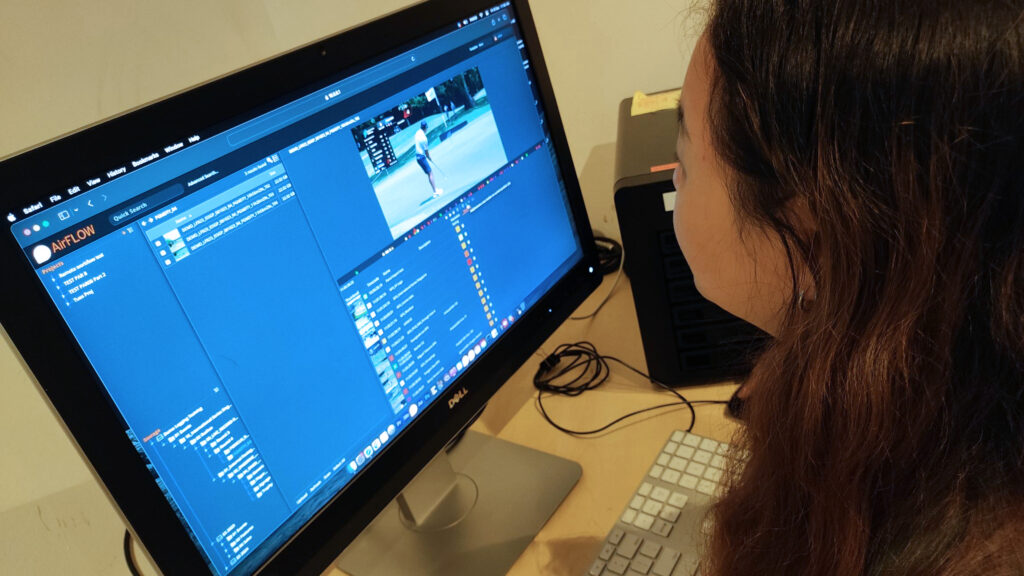
In capturing all the coverage of a professional golf tournament, the production generates a huge amount of content. The new EditShare installation allows media managers to put markers on all the action points afteringest, so editors can instantly access the clips they need. The system is used on the road at tournaments, and also in Asian Tour Media’s headquarters to prepare packages in advance to make the live coverage more engaging.
“We knew that we wanted to replace our aging video servers,” said Peter White, Senior Head of Production,at Asian Tour Media. “We wanted good asset management, and excellent bandwidth for multiple users and remote access. The Media Village arranged a demonstration, and the rest is history.
“At Asian Tour Media, our content and our staff are the assets.” Whitecontinued. “With EditShare we have found a better way of managing and monetizing our content. We are developing new workflows which will allow us to become more efficient. Time saved means more time to be creative – and more work/life balance for the staff.”
Said Bacho, Chief Revenue Officer at EditShare commented “With our local partner The Media Village we could show Asian Tour Media how they could transform their workflows with EFS and FLOW, and give them the confidence to develop efficient workflows and operational practices they need. That is because the technology is designed for production professionals, making it logical and intuitive to use and absolutely reliable when there is no second chance.”
EditShare is an Emmy award-winning technology leader supporting storytellers through collaborative media workflows across on-premise, cloud and hybrid architectures. The market-leading open software solutions and robust APIs improve workflow collaboration, third-party integrations and content sharing across the entire production chain. Designed specifically for media applications, the high performance line-up provides shared storage, archiving and backup, and intelligent media asset management.
Through a merger with Shift Media, EditShare also now integrates tools for content review and distribution, the creation of customized, branded pitch reels, and secure preview of high-value pre-release content.
Helping users and administrators get up to speed quickly
Boston, MA, December 7, 2023 – Jigsaw24 Media, a leading UK media systems integrator and EditShare® partner, has developed two online training courses to help users and system administrators get the best out of the technology. The EditShare 101 courses have been developed and are delivered by David Bourke, who has worked at EditShare and brings in-depth knowledge and a unique perspective to the programme.
The courses give a quick start to users of EFS storage and FLOW asset management. The sessions for users and for admins each run for three hours, and are timed to make it practical for delegates in any time zone around the world to join.
“EditShare is a very powerful platform, and it is designed to be intuitive to use and to manage,” said David Skeggs, Technical & Operations Director at Jigsaw24 Media. “But with any new system there is a natural learning curve. What we are doing is taking delegates through that curve, helping them understand the underlying principles so that they will be able to run with all the functionality, tools and tricks that EditShare brings to post.”
Said Bacho, Chief Revenue Officer at EditShare commented “David has worked as an engineer at EditShare, so he knows what is going on under the hood. This programme is designed as a general introduction and understanding to get users and admins up and running with confidence.
“We know that systems sales around the world often involve application-specific training,” Bacho continued. “Think of this as the starter kit, to get users into the EditShare way of thinking so they can quickly develop their own processes, workflows and structures.”
The first courses offered by Jigsaw will be run in January 2024. For more information see: https://media.jigsaw24.com/editshare-101-training.
EditShare is an Emmy award-winning technology leader supporting storytellers through collaborative media workflows across on-premise, cloud and hybrid architectures. The market-leading open software solutions and robust APIs improve workflow collaboration, third-party integrations and content sharing across the entire production chain. Designed specifically for media applications, the high performance line-up provides shared storage, archiving and backup, and intelligent media asset management.
Through a merger with Shift Media, EditShare also now integrates tools for content review and distribution, the creation of customized, branded pitch reels, and secure preview of high-value pre-release content.
About Jigsaw24 Media
Jigsaw24 Media is a specialist division of Jigsaw24 and provides services and technology solutions to the media and entertainment, education and corporate sectors. It’s the only UK-based company of its kind that has in-house system integration capabilities. Jigsaw24 Media’s team of industry-recognised experts design, deliver, integrate and support end-to-end solutions for some of the nation’s biggest broadcasters and facilities, underpinned by partnerships with over 30 leading technology vendors including Avid, Adobe, AWS, Nutanix and EditShare. With headquarters in Nottingham, an office and demo space at the heart of London’s post-production community, and a nationwide support team, Jigsaw24 Media provides local services on a national scale. For more information visit https://media.jigsaw24.com/
In the ever-changing world of broadcasting, remote projects have transformed the industry. The pandemic showed us what was possible, with production moving from inside studios to live locations and even peoples’ homes, using techniques that may include remote desktop software and cloud platforms such as Zoom and Amazon Web Services (AWS).
Several elements are needed to execute remote broadcasting successfully, including a reliable internet connection, quality broadcast equipment and web-based tools for collaborating on video editing, graphics and more. Broadcasters also face continuously shifting, imminent deadlines, so streamlining workflows and sharing files quickly is imperative. That’s why employing the right collaboration tool is so important.
Why team collaboration is essential for remote broadcasts
Remote broadcasts require capturing massive amounts of audio and video content from remote locations and sending it all to a central facility or studio. The remote production team must collaborate efficiently with that facility to ensure a seamless broadcast.
Digital video transmission enables the delivery of high-quality content and timely updates to their audiences, regardless of the geographical distance between facilities. That’s why having the right equipment is imperative for the success of a remote broadcast.
In this industry, creating and editing content quickly is nonnegotiable. If a single copy of media gets lost or destroyed, finding something else to plug in for that evening’s broadcast in a pinch can cause a frenzy, with producers and editors scrambling to fill the slot. That’s why resilience is essential, along with having alternate media available online at all times. If a producer needs to pivot to a new story at the last minute, they must have access to all the required assets without adding the unnecessary delays of searching for the proper files.
Employing the right video collaboration software can increase your team’s overall efficiency and help establish clear goals. Sharing information quickly and easily saves you the most precious resource available in broadcasting – time. Additionally, when your team sees the results of their work in real-time, it can help boost morale and strengthen the culture.
How MediaSilo accelerates collaboration
MediaSilo’s cloud-based video management and collaboration software is designed to streamline your workflow and video collaboration process. The software provides real-time feedback and file sharing in a secure web-based environment ideal for remote teams.
From a production and post-production standpoint, employing video collaboration software like MediaSilo is an essential ingredient in a remote broadcast team’s success. The tool makes it easy to manage, share, review and present your video projects all in one place. MediaSilo is a creative collaboration HQ that provides the following capabilities:
Asset management
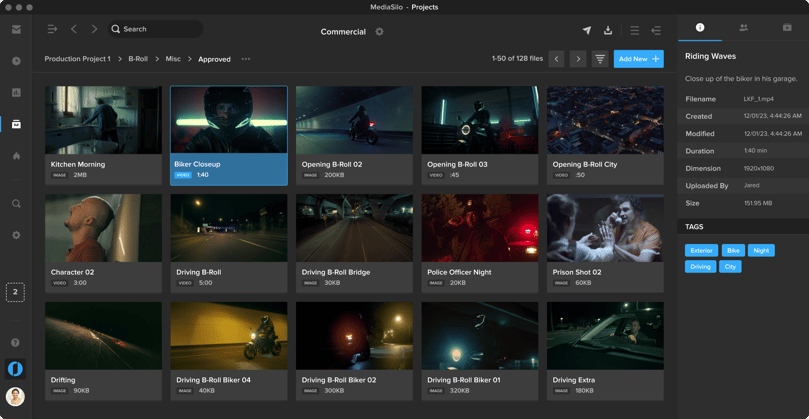
Save time with fast file uploads that allow you to store everything from clips to scripts to project files in one secure location so they are ready to use. Accelerate your team’s creative process with intuitive folder navigation, metadata-rich search and tagging, and flexible user permissions. You’ll also be able to keep your assets current, track changes and update versions as needed.
Streamlined communication
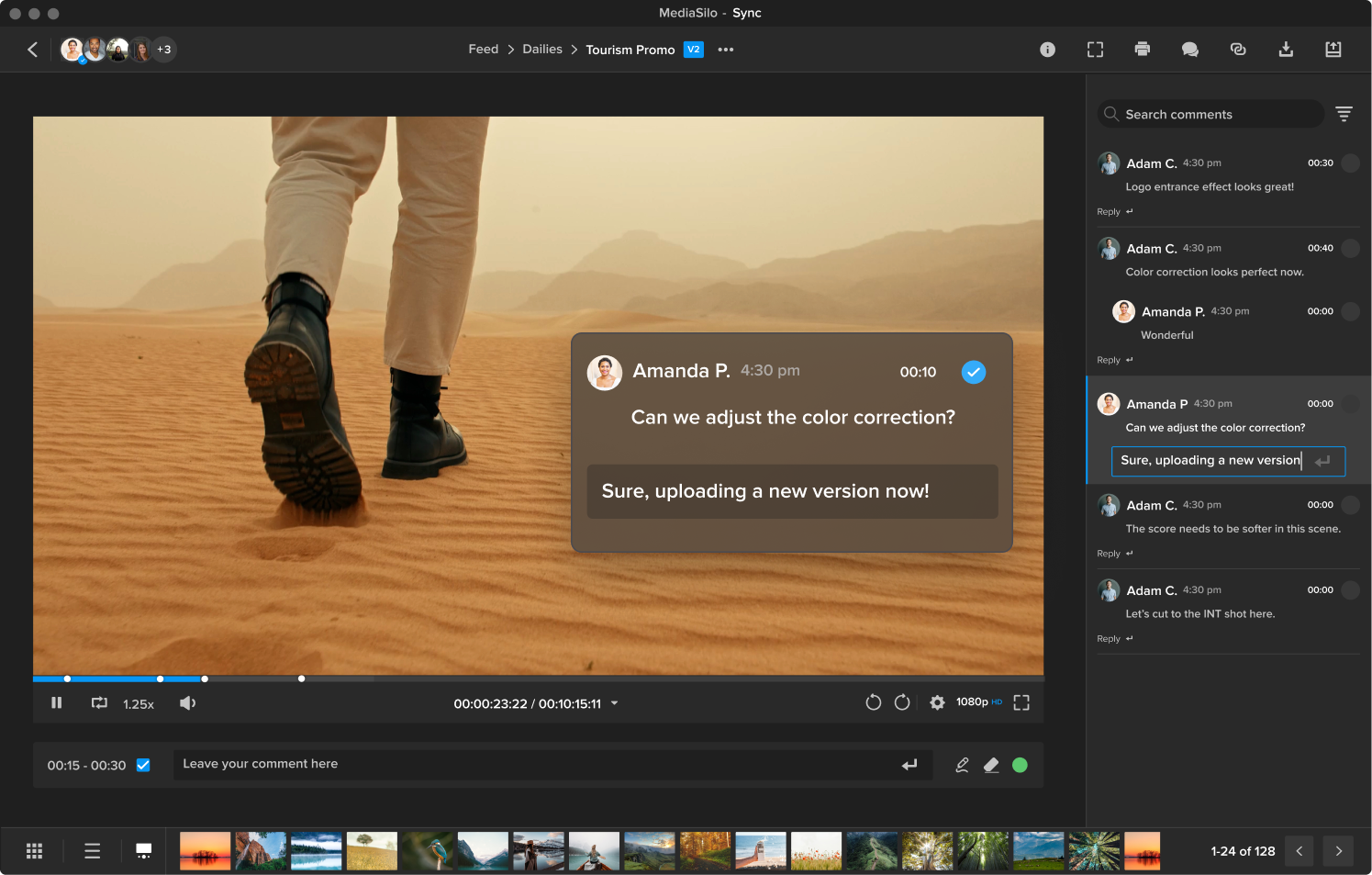
Expedite your review process and make edit requests clear using time-coded comments or on-screen drawings. Brainstorm and collaborate with your entire team, whether in the field or the studio, in real-time with MediaSilo’s cloud-based software (available through the web browser or app). Enable private or password-protected external links—allowing outside collaborators to interact with your team. You can also limit comments to a select user group to keep your information assets confidential.
Showcased content with Spotlight
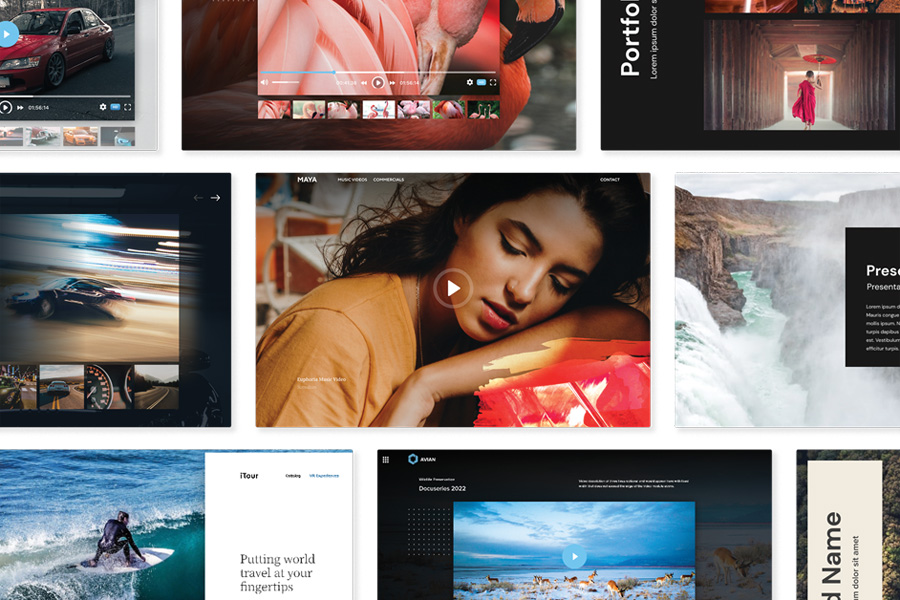
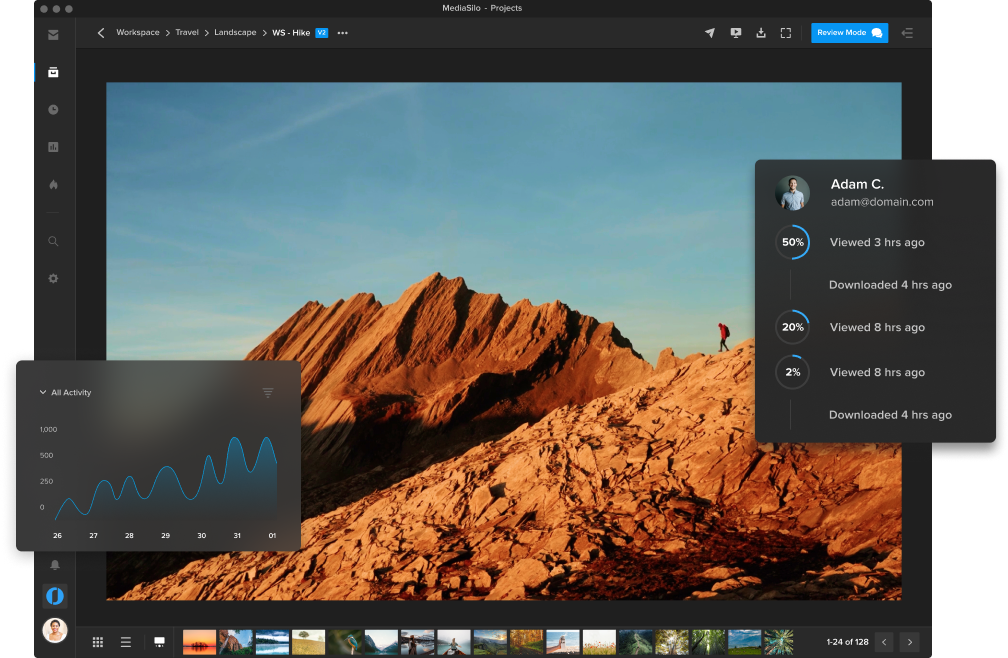
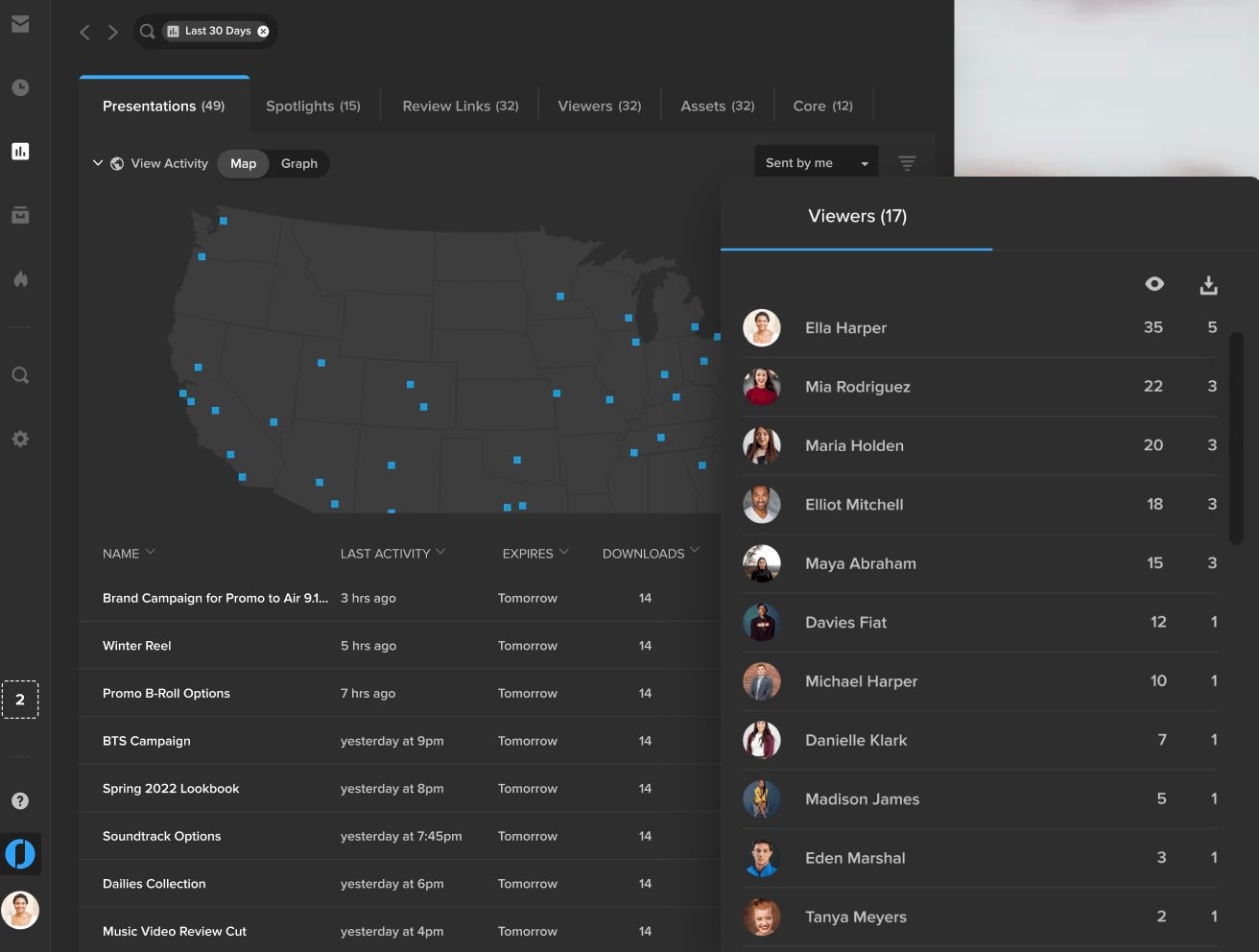
MediaSilo empowers broadcasters to create bespoke digital experiences that showcase content as intended with customizable templates, pitch decks and microsites. Share access with specific users via password or to a broader audience with open access. Gauge what content gets the most engagement with Insights, the analytics tool that allows you to track activity, viewing location and history of any individual user, file, link or presentation.
Trusted security
Ensure only specific users can access your content with MediaSilo’s password-less login and multi-factor authentication. The most effective theft-deterrent measure is available by placing user-specific SafeStream™ customizable watermarks on your content. You can also generate one-time links to verify user identity, grant secure access to login, and share content securely with private expiration-dated links and role-based user permissions.
Data-driven insights
MediaSilo makes it easy to see your videos’ performance in real time within one central dashboard. You can measure the engagement of your content, review user logs, monitor drop-off points, and more—to see which users and files are the most active. You can also export your data in different formats and track review links to see views, comments, and approvals.
Why broadcast professionals choose MediaSilo
MediaSilo solves many common problems faced by broadcast professionals. Remote broadcasters often encounter unreliable internet upload performance. MediaSilo tracks the progress of your uploads, reports on the speed and recovers the files if your connection is interrupted. Our robust tools for managing user permissions and two-factor authentication mean you never have to worry about gaining secure access to station video and graphic assets.
MediaSilo also helps broadcast professionals with the following:
Organizing, storing and sharing digital media files
Collaboration for vital feedback
Synchronization with your timeline for adequate changes
Managing, sharing, reviewing and presenting video projects
Faster project approvals
Today’s broadcast professionals and post-production teams want the freedom to choose the tools they prefer without compromising the creative process, and that’s where MediaSilo comes in.
Widely known as a go-to platform for post-production professionals in the TV, media and entertainment industries, MediaSilo is used by production companies, broadcasters and content creators worldwide. Providing a centralized hub for media management, collaboration and distribution, MediaSilo streamlines your workflows, accelerates team collaboration and helps you distribute content to the market faster.
MediaSiloallows for easy management of your media files, seamless collaboration for critical feedback, and out-of-the-box synchronization with your timeline for efficient changes. See how MediaSilo is powering modern post-production workflows with a 14-day free trial.
Kim is a seasoned content marketing professional with over 15 years of corporate communications experience. Her sweet spot is with creative writing, both short and long-form, and she has a proven track record working with IBM, Jackson Healthcare, and Walt Disney World, among many others. Kim is also a singer and actor and has been performing on stage and screen since she was a child. She has a great passion for TV and film production and went to school for broadcast journalism.
In my last blog, I introduced the thinking behind our new workflow management layer, EditShare One. If you have not read that yet, you can find it here. In this blog I’ll explain how it is used in a real-world production.
Footage is shot, in a studio or on location. Those files are ingested into the shared storage, along with the metadata. That may include information from a production assistant on set, about good or bad takes and other details.
Depending on the nature of the production, a producer or director may want to make another decision on preferred takes, or an edit assistant will need to build bins making it clear to the editor which is likely to be the best material.
The editor then cuts the scene and hands it on for review. That may lead to rework later, or the scene may be locked ready for final assembly and finishing. In parallel, the sound designer will be mixing and sweetening the audio to match the cut.
The producer will be monitoring progress at all times and will be commenting on scenes as they are cut, giving notes to the editor and sound designer. The final cut will be passed to the colorist, and again the producer and director will make comments on the grade.
There may be other people taking note of the progress too. For marketing, there may be a second editorial team creating trailers and teasers, for example. Where an independent company is making programmes for a broadcaster, the executive producer will want to check progress.
The huge advantage of collaborative file-based workflows is that every stage is non-destructive. You can go back and tweak any stage of the post production until everyone is happy, because all of the material is still available in the shared storage.
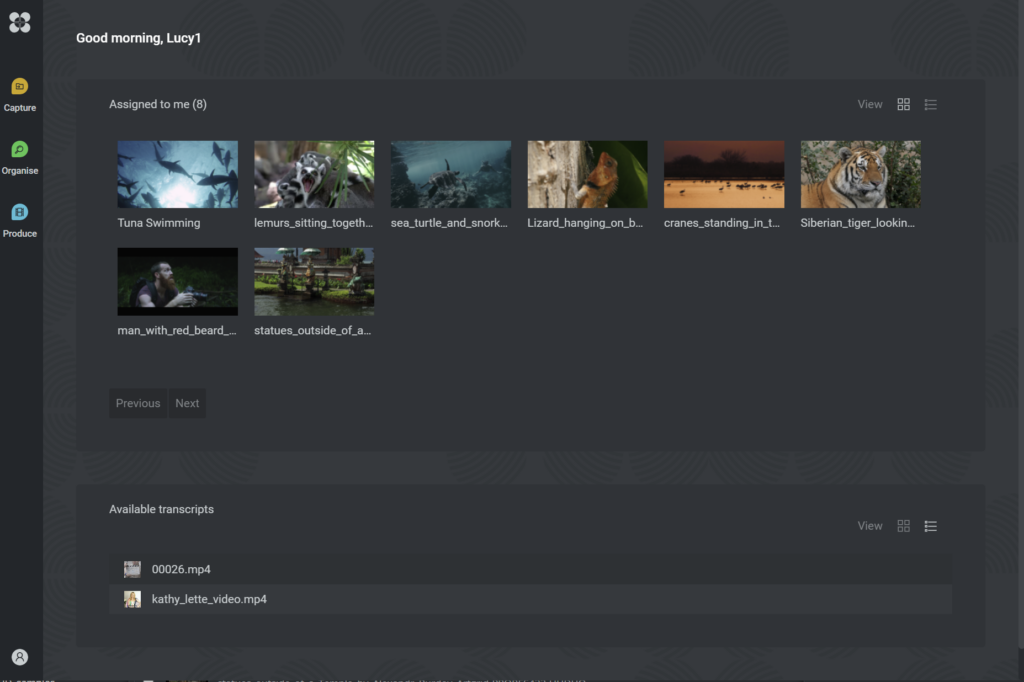
EditShare One and the Produce Tool provide access to the material throughout the process. There is a single sign-on to all the content and metadata, but each user has different requirements, and will be presented with different tools, different media and metadata, and different capabilities.
A producer could be alerted to new cuts that need to be reviewed and signed off. The user interface would simply offer the new material, a player, and a text tool for comments. No need to know how the underlying technology works, or even where the content is at that moment: just focus on the job at hand.
More generally, the Produce tool is a simple dashboard that saves time and potential confusion in searching through media spaces and folders. It is completely independent of all the other tools, so users simply see what is relevant to them.
For the editor, the EditShare One intuitive interface appears as a panel within the edit software itself. Editors are, of course, free to choose whichever software package works best for them, but within the Adobe or DaVinci user interface is a panel or integration tool which is linked to EditShare FLOW asset management and its management tools.
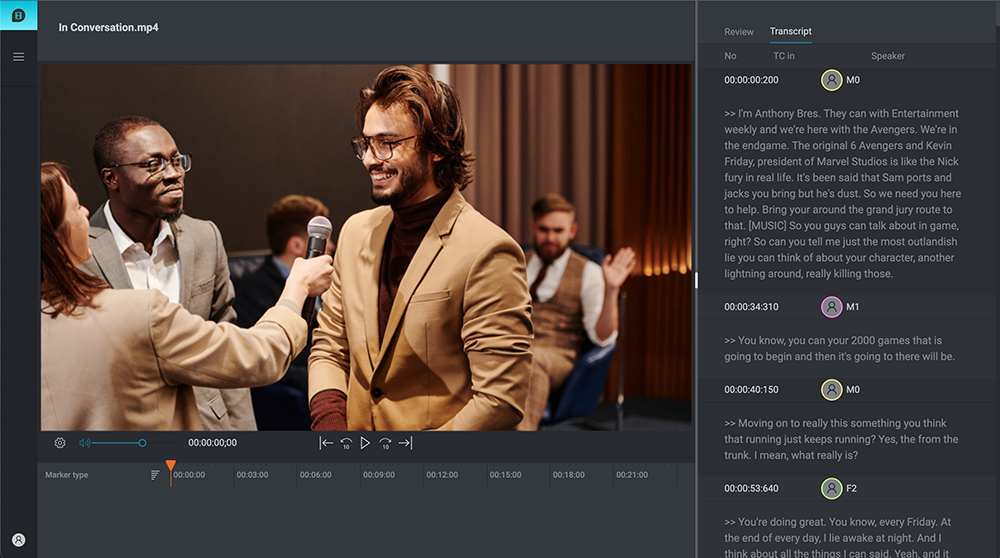
Producers can highlight interest points in transcriptions through EditShare One’s web-based UI, which editors can then import using the FLOW panel. Services, like AI speech-to-text transcriptions, can also be seen in the FLOW panel to speed up work even further. This automated process creates rough cuts or integrates selected clips into Adobe Premiere sequences, enhancing overall efficiency in the editing process.
Once the sequence or program is completed, the same simple user interface exports it as new material in the shared storage and drives it to other EditShare One users who need to see it.
The goal is to make it simple to create and expedite collaborative workflows, wherever the individuals are, by offering just the functionality and material each needs, at the time they need it. By simplifying everyone’s working environment, more time is available to concentrate on making great content.
Remote workflows have quickly become the norm across much of the post-production world. While bringing significant advantages in flexibility and the opportunity to collaborate globally, it also brings some significant challenges. Internet speeds, communication and leaks keep producers up at night. So let’s look at the top five most common challenges of remote post-production and some practical tips on how to overcome them.
Challenge #1: Uploading and downloading large files
Efficiently getting files to and from the cloud can be a significant challenge. Slow upload speeds, interrupted file transfers, hanging loading screens, and uncertain transfer completion times are just the beginning. Although numerous services are dedicated to file sharing, few are optimized for media professionals.
The consequences of a failed upload can mean the loss of hours. Who hasn’t seen an upload get halfway through and then it gets interrupted? Now, you have to start over again.
The first step to solid performance is ensuring your physical network is reliable. For instance, if you have cable internet, have the cable company inspect your network at the box outside the building, the splitters in that box, and the jacks in your home. Unterminated cable jacks can degrade the performance of your connection. Faulty splitters can introduce problems as well. Your ISP service person can test the performance of the signal at the jack coming out of the wall where your Gateway (modem/router combo) is connected.
Once you’ve ensured that the signal at the jack is solid, make sure your Gateway or modem is up-to-date. A DOCSIS 3.1 modem is capable of faster speeds than a DOCSIS 3.0 modem. If you rent your modem from your ISP, sometimes you can be eligible for a free upgrade on your modem. If you’ve had yours for a few years, this can significantly boost your network’s performance.
Hard-wire your network
A hard-wired connection is the next thing to consider. WiFi performance keeps getting faster but is still vulnerable to latency issues. As cloud technologies improve, editing apps can stream connections to editors. Even if you have a fast connection, you may not get performance if you are experiencing latency issues. Your internet “speed” measures the “bandwidth” or how much data can be sent simultaneously. The latency measures how fast it gets from the destination to you. By using a wired connection with Cat6 ethernet cable, or better, you reduce the traffic that can compete with your work. A good switch, cables, and ethernet adapter will ensure that your video files meet with the least amount of resistance from competing traffic in your home.
If you have family, and everyone hops on the network when they come home, do everyone a favor and let them know that if they are trying to game or video chat while you are uploading, it will slow everyone down. Many ISPs offer very fast download speeds but relatively modest upload speeds. (Like Xfinity 1200 Mbps down and 35 Mbps up). So a family member can watch a movie, and it won’t slow down your upload, but if they hop on FaceTime, they are uploading video data that will compete with your workflow.
But transfers can get interrupted with even the best setup. Some cloud services not optimized for video will make this an excruciating process. You’ll have to try to cancel an upload. That may or may not register. Then, you’ll have to begin the upload again. This results in you reaching back out to your client, informing them they must wait while a new transfer is completed.
MediaSilo monitors the speed and completion percentage of your upload and estimates how long it takes until the transfer is complete. Suppose your transfer is interrupted (maybe a Thunderbolt cable came unplugged from an otherwise solid connection). In that case, MediaSilo will pause the transfer and continue to look for the link to be re-established. Once a connection is live again, MediaSilo will pick up where it left off and complete the transfer.
Challenge #2: Keeping track of revisions
The second challenge that remote post-production pros face is versioning. An exported file is sent out for review, and comments come back in an email. This works for a version or two, but at a certain point, someone on the email chain or Slack channel gets left out of the loop, and people get confused about what is being referenced.
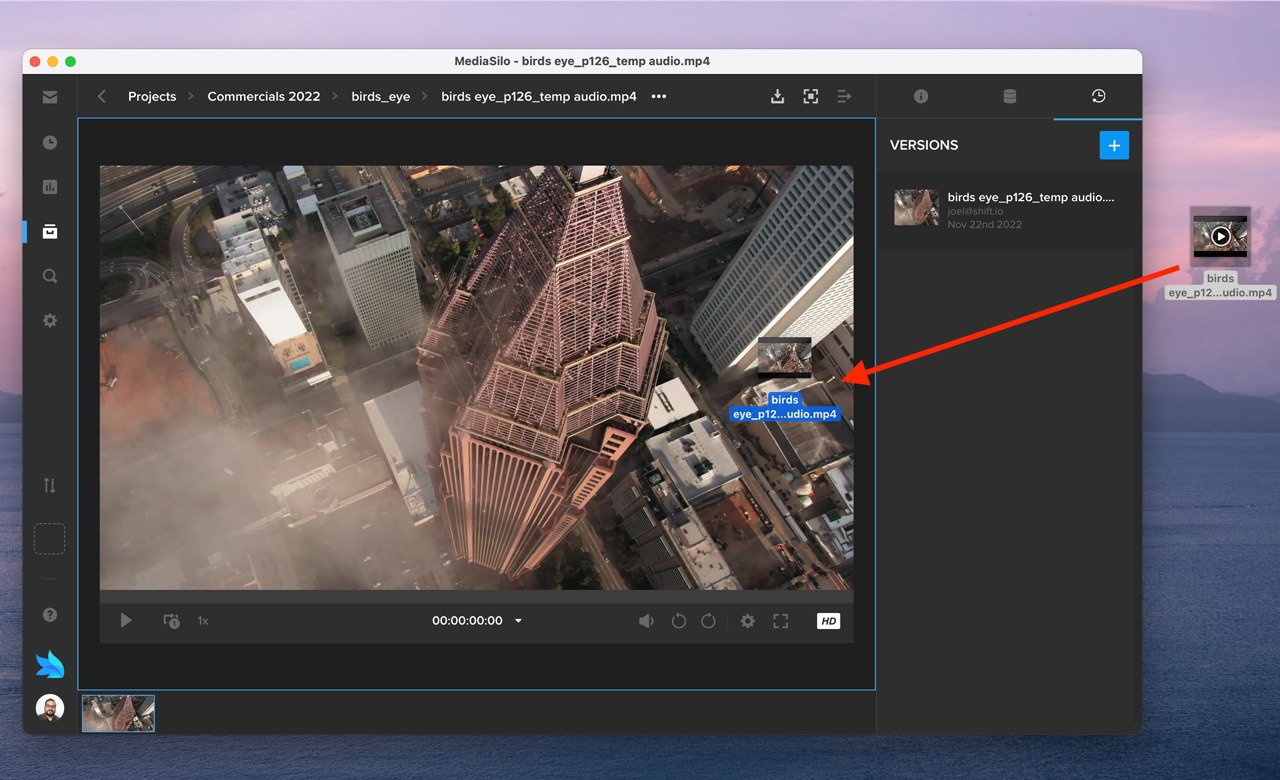
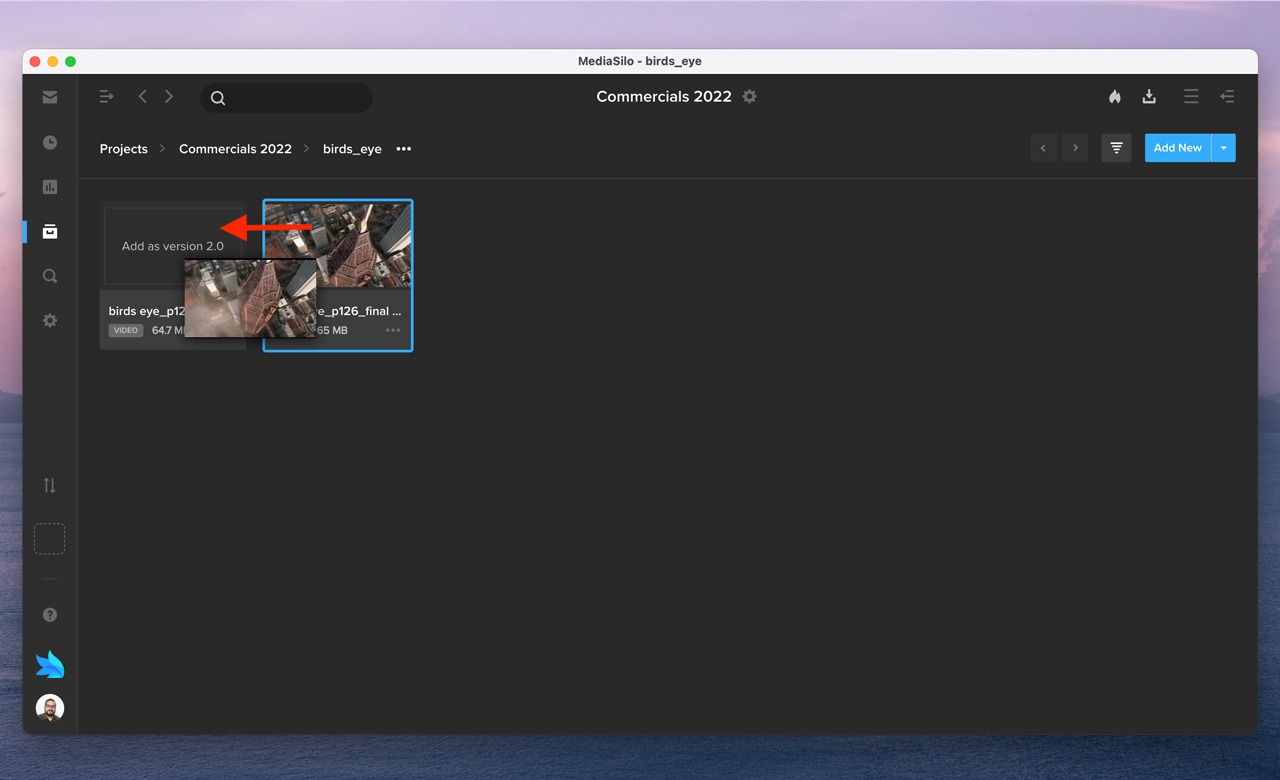
MediaSilo addresses the challenges of versioning with an easy-to-use drag-and-drop method of updating assets.
This method eliminates the uncertainty when you upload a new version to the cloud and wonder if it will update the old one. Often, the file names have incremented according to the version, and the duration may change. When you face this kind of uncertainty on a longer project, it means that you have to check the upload when it is completed and possibly manually version the asset so that your review links don’t need to be updated.
If the new version is in MediaSilo as a separate asset, just drag it over the old one, and you are all set.
Challenge #3: Communication
Communication can be tricky in an all-remote world. There are multiple communication channels, each with its own settings and notifications. It is challenging for clients and executives to know what has been covered already, what is “final,” and what is still a work in progress. Sometimes, you have different “classes” of reviewers. For instance, direct collaborators may want to call out small things, and executives may just want “the big picture.”
MediaSilo enables you to create different review links for the same asset so that viewers will only see the comments relevant to them.
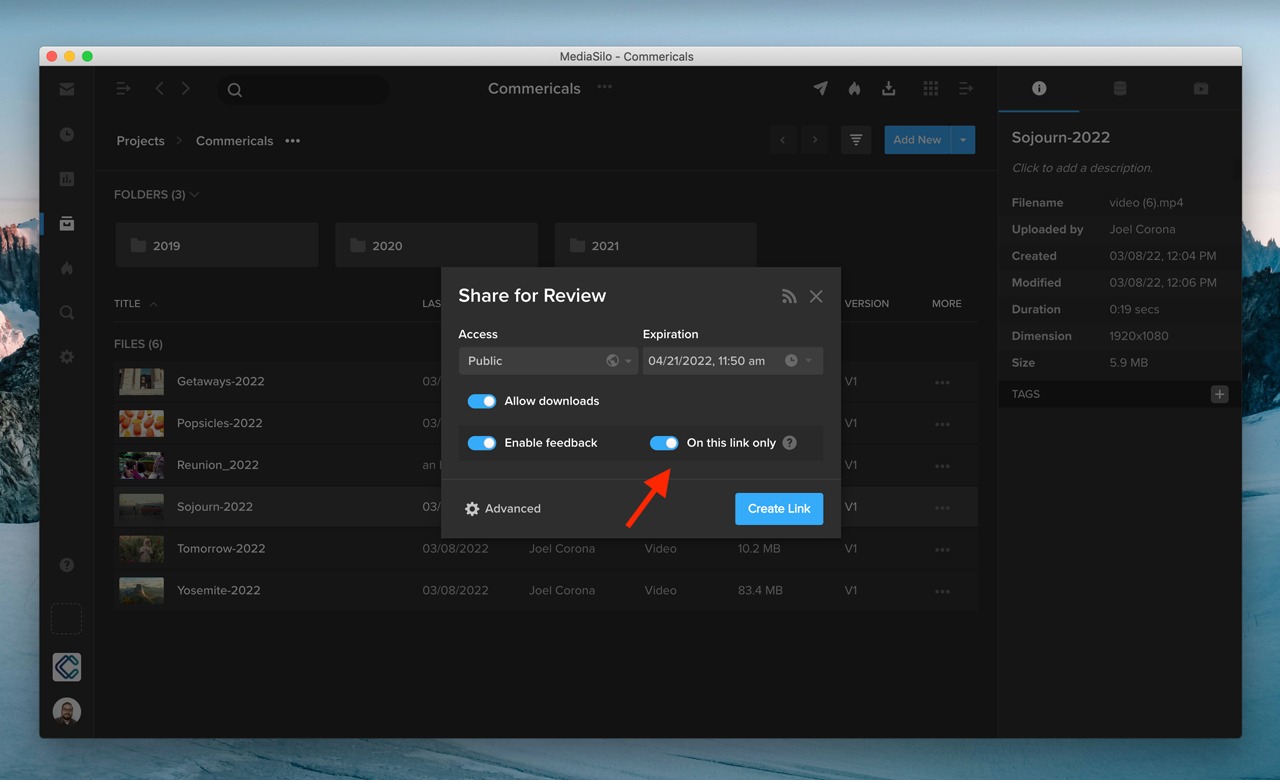
If your workflow requires a private review session, you can create a review link and turn on the toggle “On this link only.” This way, comments made in the review link are only visible to people with access to the review link, and comments made in the review link will not appear in your MediaSilo project when you enter Review Mode.
Reviewers can then comment on the assets according to timecode. They can even use the drawing tools to call things out visually. If your reviewers put their comments into the comment section, you can export those comments as well.
So whether you need to keep the commentary private or work together, MediaSilo’s advanced commenting functionality helps streamline communication.
Challenge #4: Visibility
Have you ever sent off a link and wondered, “Did they even watch it?” This question is crucial when submitting to film festivals or potential distributors. Without this feature, editors can feel in the dark about whether or not they can begin a new revision or if they should wait for additional viewers to watch the video.
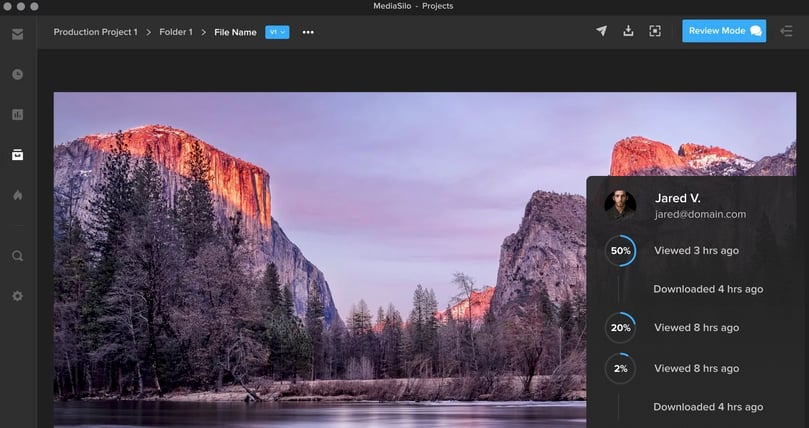
MediaSilo includes analytics for your assets. You can see if viewers watched the whole thing or if they dropped it off. This was a vital feature in the submission process of The Othrs‘ latest documentary, “Defiant,” which went on to become a TIFF Official Selection. They knew if all the key partners had viewed the film or if any stakeholders had yet to review it. The ability to tell not only who watched it but also when they viewed it and where they were viewing it from proved invaluable.
You can enjoy a broad overview of all of your assets, Spotlights or review links. You can see who downloaded the videos, and if they haven’t, you can see when their link will expire and nudge them to view the asset to ensure the project meets its deadline.
This insight helps resolve many unanswered questions in the review and approval process. Ultimately, this helps remote team members achieve visibility and transparency with each other.
Challenge #5: Security
In some ways, this challenge should be numero uno. A leak can spoil a film and jeopardize a project. Sharing a link and hoping for the best simply won’t cut it. New tools come on the market to circumvent older methods of DRM. And leakers can have private, personal agendas that don’t align with your team’s goals.
This problem is why MediaSilo implements a multi-prong security strategy. The MediaSilo platform is SOC 2 Type II certified and follows the Secure SDLC (Software Development Life Cycle). This ensures that every feature is built securely.
MediaSilo provides an array of tools to safeguard your assets with SafeStream. User permissions and classes help to limit the scope of your project’s exposure. Visual watermarks deter would-be leakers. Forensic watermarking enables you to track the source of leaks if they do happen. Administrators can implement security policies at an organizational level so editors don’t have to go through the hassle of turning watermarks on and off in their timelines.
Conclusion
The world of remote post-production is upon us. Producers who take advantage of the opportunities will see productivity gains and cost savings like never before. Tools like MediaSilo will help deliver assets and streamline communication workflows so deliverables can arrive on time and on budget.
MediaSiloallows for easy management of your media files, seamless collaboration for critical feedback, and out-of-the-box synchronization with your timeline for efficient changes. See how MediaSilo is powering modern post-production workflows with a 14-day free trial.
Reuben Evans is a director, an award-winning screenwriter, and a member of the Producers Guild of America. As the former executive producer at Faithlife TV, he produced and directed numerous documentaries and commercials. Reuben’s tools of choice are RED Cameras, Final Cut Pro, and DaVinci Resolve.