The Silent Threat to Hollywood: Why Media Storage Security Deserves Top Billing
In the high-stakes world of media and entertainment, where million-dollar productions rely on collaboration with users dotted in different locations, the last thing you need is a cybersecurity breach to derail your project. Whether it’s leaked scripts, stolen footage, or unauthorized access to sensitive or valuable files, the threat landscape is evolving—and your storage solution could be the weak link.
Meet EFS: the media-engineered file system that guards your assets with the precision and security of the crown jewels in Buckingham Palace. Here’s why it’s the ultimate gold standard in media protection.
Layers of Defense: It’s Not Just Storage, It’s a Fortress
When it comes to protecting your media, EFS doesn’t settle for basic folder-level locks. Instead, it builds a fortress around your content with granular control over users and permissions. Think of it as putting layer upon layer of virtual walls between your assets and potential threats. Only authorized users can access what they need—nothing more, nothing less.
And it’s not just about keeping the bad guys out; unique, permission-based media spaces ensure that even internal collaborators only see what’s relevant to them. No accidental “oops” moments. No prying eyes. Total peace of mind.
SOC 2 Compliance: Trust Backed by Certification
For those who need proof that EditShare EFS walks the talk, the platform is SOC 2 certified. This means it meets the highest standards for data security and operational integrity. Whether you’re a film studio, a post-production house, or a media broadcaster, this level of compliance ensures you’re working with a storage solution that doesn’t compromise on safeguarding your data.
Real-Time Auditing: Your All-Seeing Eye
Ever wonder who touched what, when, and where? With real-time auditing, you no longer have to. EditShare EFS keeps meticulous logs of every interaction with your media and makes it accessible in real time. Whether it’s an editor downloading a file or someone attempting unauthorized access, you’ll know about it instantly. It’s like having a 24/7 surveillance system tailored for your storage.
This not only deters malicious behavior but also helps you stay proactive in preventing potential breaches. If someone even dreams of messing with your content, you’ll know about it before they finish their coffee.
Granular Control: A Tailored Security Blueprint
EditShare EFS takes user management to the next level with its granular control features. You can define access rights down to the tiniest detail, ensuring that every user gets the exact level of permission they need. No more worrying about the intern accidentally stumbling upon sensitive pre-release footage or the marketing team accessing files meant for post-production.
By creating customized permission levels, you reduce the risk of accidental leaks and simplify workflows without compromising security.
What If They Break Through?
Even in the event that someone is Indian Jones and got through everything, EFS fully supports CrowdStrike deployments on its nodes, providing world-class threat detection and response. It’s an added shield against even the most sophisticated cyber threats.
Why It Matters
From financial losses to reputation damage, the cost of a breach is too high. EditShare EFS puts walls between your content and cyber threats, letting you create in confidence.
Don’t leave your media’s security to chance. Let EditShare EFS protect your creativity and keep your projects safe from prying eyes.
Short answer: No. At least not anytime soon. But let’s break it down before we start. And, no, AI didn’t write this!
The Rise of AI in Video Editing
AI tools like automated cuts and colour grading, have come a long way. They’re great at tasks that are repetitive or rule-based—like trimming dead air from a podcast or suggesting music that’s “epic, yet sad.” We can see the introduction of Adobe Firefly , letting editors add clips into their timeline
But let’s not kid ourselves: AI isn’t Spielberg. It’s more like a well-meaning intern. Sure, it can save you time on basic edits, but it’s not going to master storytelling, artistic creativity, or that gut feeling that makes a good story truly great.
What AI Can’t Do (well not yet anyway )
Craft Emotionally Driven Stories. AI can recognize patterns, but it can’t feel. It doesn’t know why a certain pause in dialogue creates tension or why a fade to black might leave the audience breathless.
Adapt to Creative Chaos. Video editors know the struggle: clients with last-minute changes and “artistic” feedback like, “Can you make it pop more?” AI doesn’t do well with vague directions or managing human drama.
Understanding Cultural Nuance. Editing is about more than splicing clips—it’s about connecting with an audience. At the end of the day, AI is just connecting you with data. You still need to give it meaning.
What Video Editors Should Embrace
AI isn’t here to replace you; it’s here to make your life easier. Think of it as your tireless assistant:
Need captions in 12 languages? AI’s got you.
Boring first pass on raw footage? Let AI tackle it while you grab a coffee.
Color matching across hundreds of clips? Done in minutes.
Use AI for the grunt work, and focus your energy on the creative magic that only you can bring.
AI, its good and powerful
AI is a powerful tool, but a tool is only as good as the person wielding it. Until machines develop intuition, emotion, and a sense of humor (which, let’s face it, isn’t likely), skilled video editors are safe.
So, no, AI isn’t coming for your job—it’s coming to help you with your deadlines and maybe leave work early. You’re still the master of the timeline. And this was written by an Editshare employee!
Brad Turner, CEO, EditShare
Big trade shows like NAB have a way of overwhelming the senses. Big booths, bold claims, bright lights, nonstop conversations. I usually come home with a hoarse voice and a need for a nap.
This year is no different, but I’m also coming home with something else: a renewed sense of energy and conviction that we’re on the right path at EditShare.
It wasn’t just about what we showed at the booth. What struck me most was what I heard. Over and over, from both partners and customers, the feedback was simple and consistent:
“You guys really listened.”
That feedback landed deeply with me. Because over the past year, we’ve made a deliberate shift here at EditShare. Not just in our product roadmap, but in how we gather and respond to input from the people who matter most.
Here are a few examples of what that looks like in practice – and what stood out to me most from this year’s show.
FLOW AI: Built From Real Workflows – Not Buzzwords
AI dominated the show floor this year. Some of it was exciting. A lot of it was still pretty vague.
At EditShare, we’ve done our best to stay grounded and pragmatic. Our approach to FLOW AI starts by solving simple, painful problems like searching archives, tagging footage, finding things like logos and extracting metadata that makes your content easier to work with.
What we showed at NAB is just the beginning of our journey into AI. We decided to forgo flashy solutions with voice commands and lifelike avatars for ones that simply make real workflows better: a producer watching their media library come to life because it was finally searchable.
“This makes our archive worth something again,” a booth visitor told me. That made my day.
We’ve focused on speed too. FLOW AI can now process video at 10% of real time, as in, a one-hour file is analyzed in six minutes. That puts teams closer to playback, closer to publishing, and closer to the moment. And its being powered by fast GPU engines
We’ve paired that speed with predictable pricing: a flat-rate annual license, so teams can budget without worrying about usage-based fees or confusing credit systems that are difficult to track.
AI is the hot topic, but most AI today doesn’t live up to the hype. Some tools miss faces, misidentify scenes, or fall apart without us pre-training on your content. That’s why we’re building FLOW AI to understand your media and the way your team talks about it, so it’s not just another feature, it’s a tool you can trust.
Automation: The Quiet Win That Saves Hours
AI may be the star right now in the world of video, but we believe automation is still the hidden hero.
We kept hearing from teams at NAB: there’s still too much time spent getting footage off drives, transcoded, and organized for editing. Hours each week (sometimes more) go into tasks like these tasks that shouldn’t require near this much manual effort.
Even a few simple automations (a great ~5 minute demo of some of our most popular automations can be found here) can give you most or all of that time back. During busy delivery periods, we’ve seen teams reclaim entire days out of their week, simply by automating the manual stuff and getting to the actual editing much faster.
That’s why we’ve made automation in FLOW easier to trigger, easier to configure, and easier to try. Now a creative can simply right click and trigger an Automation workflow.
MediaSilo: Simpler, Clearer, and Easier Than Ever To Get Started
MediaSilo has always had a strong foundation. But we suspected the value was buried behind one-size-fits-most tiering and sub-optimal positioning that we just couldn’t find the time to revisit.
But before making any product changes, we went deep with our happiest customers—teams who use MediaSilo every day and couldn’t imagine switching. We asked them about three things:
Feedback had to be intuitive and flexible whether in the app or via email/slack.
Simple pricing and strong integrations were what sealed the deal.
Armed with that clarity, we kept investing. Not only in positioning, but also in the product itself. Here are a few recent updates:
Bulk Download for Review Links – Download large batches of content, with full folder structure, even without a login. Faster, more reliable, no account required.
HQ Proxy Playback – Choose from multiple resolutions, from 720p to 8K, for faster streaming or higher-quality previews.
DaVinci Resolve Panel – Browse, import, and share media directly from inside Resolve. Feedback flows directly back into the edit.
More to come later this year. We’re making MediaSilo easier to adopt, easier to use, and better integrated into how post teams already work – without all the confusing gotcha pricing or “only with enterprise” feature-gating that other collaboration tools force you into.
When Times Get Tough, Make the Value Obvious
Despite our optimism, the video industry is still under pressure. The Devoncroft team shared some data at NAB that suggested a 10 point margin decrease in the largest content creators over the past 10 years. That kind of pressure isn’t reserved for the big guys. And in that kind of environment, every purchase is scrutinized. It isn’t enough anymore to sell something valuable. That value has to be obvious. In an environment like this one, it has to be unmissable.
In the never-ending work of pulling ourselves out of technical specs and trying to make that value clearer, I’ve been thinking a lot about the contrast between two hypothetical production teams: One still stuck doing things the old way. And one actually taking advantage of everything we’ve built.
How differently would those teams operate? What would it feel like to be part of each?
Really different, it turns out. Here’s a simple example.
The Old Way
New Way with EditShare
1. Getting Organized
Wait a day (or more) to download, organize, and prep files by hand
Trigger a FLOW automation to ingest, sort, QC, rename, and get files ready to edit automatically
2. Finding What You Need
Manually label clips, dig through folders, or rely on memory
FLOW AI makes media searchable right away—no tagging, no guessing, and trained on what you care about
3. Working Remotely
Ship drives overnight, sync footage manually, or bounce between tools to hack together a remote workflow
Generate proxies, collaborate in real time, and share in-progress work—all in one environment, from wherever you’re working
This is what “doing more with less” actually looks like.
With less waste in the system, you can bid on more projects, deliver edits faster, and keep your team from burning out or worse, looking around.
You’re not waiting a full day to download, transcode, and organize raw footage—you’re starting to select the same morning the shoot wraps.
You’re not tying up your lead editor answering emails about version 3_1_FINAL_FINAL.mov—you’re sending a MediaSilo link that lets the client leave timecoded feedback right in the player.
You’re not wondering if your assistant labeled that clip “INT_BTS_camB” or “Interview2_Greg”—FLOW AI tagged it with “Greg,” “backstage,” and “cinema camera B” the moment it hit storage.
You’re not setting alarms to check if files uploaded overnight you get a Slack ping when the automation finishes, and everything’s where it needs to be.
In a tighter market, these aren’t nice-to-haves. They’re what let your team take on more work without working more hours.
Why do I bring this up? Because after a few laps around the show floor, you start to notice something: if you walk fast enough past all the booths and screens, a lot of what’s being exhibited starts to look the same. Slick, dark-mode-everywhere UI. Big claims. Buzzword bingo.
That’s why I’ve been laser-focused leading up to this week on making the value in what we do obvious. I don’t want the life-improving magic in our products to get lost in the noise.
And because based on what we heard from customers and partners at NAB people who’ve seen both the before and after I’m more confident than ever that we’re on the right track.
A Moment That Stuck With Me
A quick shoutout: In the days before the show kicked off, I watched Adam Lewiston, our Global Pre-Sales Technical Manager, lead our booth’s technology setup and our final demo prep. He didn’t just manage our pre-sales logistics – he ran a bootcamp. Our teams drilled, recorded and re-recorded their demos until they were tight and consistent. That kind of leadership made a real difference. I know our customers and prospects noticed. I sure did. Great job, Adam.
Thanks for following along. Whether you’re recovering from NAB too, or just getting going with your own Q2, I hope you have a great week.
Brad
Want to learn more about the latest innovations released at NAB 2025?
The NAB Show 2025 is almost here! From April 6-9 at the Las Vegas Convention Center, thousands of professionals from the media, entertainment, and broadcasting sectors will gather to explore the latest technologies shaping the future of content creation, distribution, and management.
This year, EditShare brings a new level of innovation and excitement to NAB 2025. At booth SL4216, we’ll showcase the next generation of media storage solutions, AI tools that make your life easier, and cutting-edge collaboration tools designed to make your creative processes faster, more innovative, and more efficient than ever before.
Empowering Creative Workflows Through Intelligent Innovation
At EditShare, we’ve always been committed to empowering creative professionals with tools that enable collaboration, high-performance storage, and enhanced workflow automation. NAB 2025 will be no exception. We’re excited to unveil a range of new products and innovations that will redefine how media teams work, collaborate, and create, whether on-premise, in the cloud, or hybrid environments.
Speed, Scalability, and Performance
One of the standout features at this year’s NAB is the U.S. debut of our Ultimate Series media storage solutions. Following a successful launch at IBC 2024, the Ultimate Series offers cutting-edge technology designed for both boutique post-production studios and large-scale broadcast networks. With solutions like the EFS Ultimate 210, 310, 410, and the EFS Ultimate NL, EditShare is revolutionizing how production teams manage, store, and access their media assets.
From high-speed storage for smaller teams to robust systems capable of supporting intensive 4K, 8K, and VFX workflows, our Ultimate Series is built to meet the evolving needs of the media industry. Plus, with cost-effective solutions like the EFS Ultimate Field for on-location production and the EFS Ultimate NL for archiving, we’re making high-performance media workflows accessible to everyone, regardless of team size or budget.
AI-Powered Discovery
AI continues to be a transformative force in the media industry. At NAB 2025, EditShare will showcase how we incorporate AI to streamline workflows, enhance content discovery, and improve security. Our FLOW media asset management platform will demonstrate advanced AI features, including logo and facial detection.
Collaborating for the Future of Media
In addition to our AI-powered tools, we’re proud to showcase our direct integration with Lasergraphics’ film scanning technology. This partnership enables high-resolution film scans from 2K to 8K and beyond to be scanned, stored, and accessed with unprecedented speed. Visitors to our booth can see firsthand how our high-performance NVMe storage can support the next wave of digital film restoration and archival workflows.
But the innovation doesn’t stop there. At NAB 2025, we’ll highlight significant upgrades to MediaSilo, our cloud-based collaboration platform. With advanced security features, expanded deliverables, high-resolution proxies, and collaborative editorial review tools, MediaSilo continues to empower media teams to work efficiently no matter where they are in the world. Whether you’re working on scripts, casting shots, or finalizing edits, our platform ensures that all assets are secure and accessible.
The Excitement at NAB 2025: AI, Emerging Tech, and Networking Opportunities
NAB 2025 is set to be an exciting event packed with the latest innovations in AI, cloud workflows, and interactive spaces. Here’s a glimpse at what to expect:
AI Innovation Pavilion: This year’s show will feature an AI Innovation Pavilion, showcasing the latest AI tools and technologies. And the EditShare booth will demonstrate how AI is revolutionizing workflows in media production, from content creation to distribution and beyond.
Interactive Spaces: New interactive areas like the Startup Stage and Futures Park will allow you to explore emerging technologies and connect with industry leaders and innovators. EditShare will be part of the conversation, showcasing how AI is becoming integral to media workflows.
Hands-on Experiences: Get ready for hands-on demonstrations at NAB 2025, where you can experience firsthand how our media storage solutions and collaboration tools will streamline your workflows. Whether you’re looking for solutions for post-production, broadcast, or on-location production, we’ve got something for everyone.
The Shift to Cloud and Hybrid Workflows: As the industry continues to embrace cloud and hybrid solutions, EditShare is at the forefront, offering seamless integration between on-premise and cloud-based workflows. Our solutions provide the scalability, security, and cost-effectiveness you need to stay ahead of the curve in an increasingly digital world.
Why You Need to Visit EditShare at NAB 2025
NAB 2025 is the perfect opportunity to see how EditShare is shaping the future of media production. Whether you’re a small studio or a large-scale production facility, our innovations are designed to empower creative teams, enhance collaboration, and drive efficiency in your workflows.
Join us at booth SL4216, where we’ll offer live demonstrations of our latest storage solutions, AI-powered media management tools, and cutting-edge collaborative platforms. You’ll also have the chance to meet with our team to discuss your unique needs and discover how our products can help you work smarter, not harder.
Book a Meeting or Demo
NAB 2025 promises to be a game-changing event for the media industry, and we want to make sure you don’t miss out on the chance to experience EditShare’s innovations firsthand. To ensure you get the most out of your visit, we encourage you to pre-book a demo or meeting with us by clicking here. Our team will happily walk you through our solutions and discuss how they can transform your workflows.
See You in Las Vegas!
At NAB 2025, we’re not just showcasing products. We’re unveiling a vision for the future of media production. Whether you’re interested in our next-generation storage solutions, AI-driven workflow automation, or collaborative tools, you’ll find everything you need to accelerate your creative processes and push the boundaries of what’s possible.
Don’t miss your chance to be part of this exciting journey. We look forward to seeing you at booth SL4216 in the South Lower Hall!
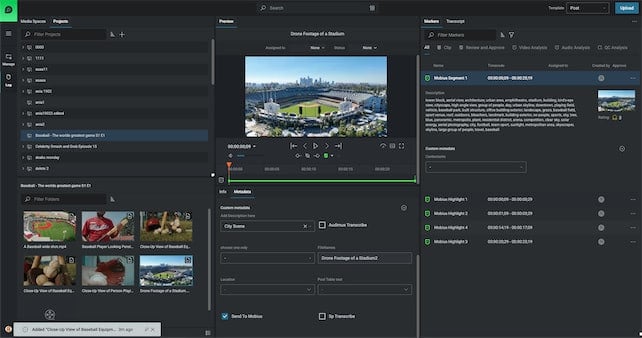
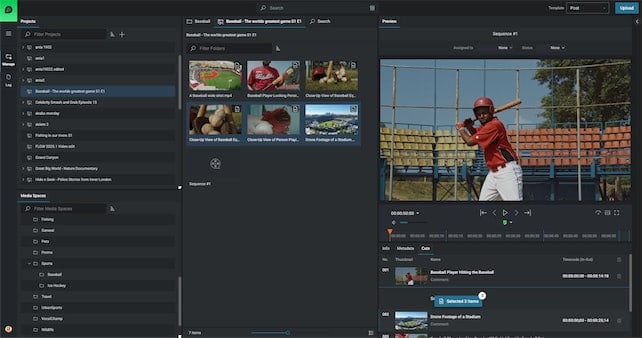
As the product manager for EditShare FLOW, I’m passionate about building tools that make your work easier today and help you stay ready for tomorrow. That’s why we’ve moved from traditional desktop apps to a more flexible web-based platform, and why we created EditShare One. It brings everything together in one place, making FLOW easier to use, more accessible, and ready to grow with you so you can spend less time worrying about tech and more time creating great content.
One of the primary motivations for this shift was improving accessibility and remote collaboration. With client applications, users were required to install and maintain software on their local machines, which created barriers for remote teams and slowed down collaboration. Traditional desktop applications struggled with RAM, CPU limitations, and the sheer number of files in a project. As projects grew, managing large datasets on machines we didn’t control made it hard to ensure consistent performance. A browser-based platform removes these limitations, allowing users to access their workflows from any device, anywhere, without the need for installations. It now means everything is powered from the FLOW Node, an environment that we can control.
Beyond accessibility, reducing IT overhead was another major factor. Client applications require frequent updates, manual deployment across different operating systems, and ongoing maintenance, which places a heavy burden on IT teams and on our development team. We are constantly testing against a new version of OS, an example is Apple’s latest OS revision which caught most by surprise.
A web-based platform eliminates these dependencies, ensuring that users always have access to the latest version without requiring complex installations or system compatibility checks. This not only streamlines internal operations but also reduces downtime and technical support costs for our customers.
Scalability was a big factor for us. Our old system was modular, but it still needed a lot of backend setup and relied heavily on the client’s machine. By moving to a web-based platform, we can now focus on building the core parts of FLOW in a way that’s much easier to scale. At NAB 2025, we’ll be showing off some of those key building blocks starting with our enhanced Organise module.
From a user experience standpoint, consolidating FLOW functionality into a single web-based UI creates a more streamlined workflow. Users will have a designated log in screen that’s tailored exclusively for them. Previously, users had to navigate between multiple FLOW applications for logging, browsing, editorial, media management and QC. Now, with a browser-based platform, we can offer a centralized, intuitive interface with a single pane of glass that integrates all essential tools in one place. This improves workflow efficiency, eliminates the steep learning curve, for different UI’s for different processes and streamlines the entire user experience.
Finally, future-proofing FLOW was a major strategic consideration. Being able to bolt on emerging technologies such as Video and Audio AI was a key win for the ecosystem, making it easier to integrate these types of future innovations.
Ultimately, this transition was driven by the need to create a more flexible, scalable, and user-friendly product that aligns with the evolving needs of the media industry. By shifting away from traditional client applications, we are enabling; better workflows, shorter learning curves, more powerful collaboration, lower operational overhead, and a future-ready technology stack that positions our users for long-term success. If you haven’t tried the new FLOW tools lately you should.
Let’s be honest, post-production used to be a nightmare.
Endless stacks of USB hard drives, painfully slow file transfers, off-line on-line workflows , relinking media and that constant sinking feeling when you can’t find the footage you need. Every editor, producer, and creative pro has been there, asking, “Where did I save that file?” or “Why is this transfer taking forever?” The whole process has been clunky, stressful, and way more work than it should be.
But here’s the good news: cloud-based storage is changing everything
Not just any cloud solution, but one that’s built specifically for media professionals. That’s where EditShare FLEX comes in. Unlike generic cloud storage, FLEX is designed to handle high-resolution media, multi-user collaboration, and even remote editing. If you’re still stuck using outdated storage methods, you’re making things harder on yourself. It’s time to upgrade your workflow and free up your creative energy
Is Your Workflow Slowing You Down? Here’s Why It Might Be Time for a Change
Moving to cloud storage isn’t just about making life easier, it’s about getting rid of the roadblocks that slow down your work. Here’s why sticking to traditional methods might be holding you back:
Searching for Files Shouldn’t Feel Like a Wild Goose Chase
When your media is scattered across multiple hard drives and local storage, finding the right file can feel like digging through a haystack. It’s frustrating, time consuming, and completely unnecessary.
With EditShare’s EFS, everything is in one place organized in mediaspaces, easy to find, and instantly accessible (subject to permissions!), whether you’re at the studio or working remotely. No more wasted time. Just stress-free editing
Waiting for transfers wastes time and money
Large file transfers have long been the bane of post-production workflows. Traditional FTP, email attachments, and even some basic cloud solutions simply aren’t designed for massive media files. EditShare FLOW automation optimizes your transfers, ensuring that large files are sent, received, and accessible.
Collaboration should be simple, not stressful
When multiple editors, VFX artists, and producers are working on the same project, versioning nightmares are all too common. Who has the latest cut? Did someone accidentally overwrite the master file? With EditShare’s cloud-enabled collaboration, everyone is working from a single, centralized source of truth, no confusion, no lost work, and no last-minute panic.
How EditShare Future-Proofs Your Workflow
With FLEX, powered by EditShare EFS and FLOW, you’re not just moving to the cloud—you’re upgrading every part of your post-production workflow. Here’s what that looks like in action:
Work from Anywhere Whether you’re in the studio, at home, or on set, your team has secure, real-time access to all media assets. No more waiting, no more limitations—just seamless collaboration.
Storage That Grows With You Forget about running out of space. FLEX cloud storage scales with your needs, so you’ll never have to scramble for extra storage again.
Collaboration FLEX integrates directly with Adobe Premiere Pro, DaVinci Resolve, and Avid Media Composer, letting you edit straight from the cloud without worrying about local storage.
Power When You Need It Spin up high-performance workstations whenever you need them and spin them down when you don’t, so you’re never paying for more than you use.
Smart, Secure, and Reliable Automatic backups, role-based permissions, and MediaSpace projects keep your files safe and accessible only to the right people.
With FLEX, you’re not just storing files, you’re streamlining your entire workflow and making post-production faster, easier, and more efficient.
The Industry is Moving Forward, Are You?
Sticking to outdated storage isn’t just frustrating, it’s slowing you down. Teams using cloud-based workflows work faster, collaborate better, and avoid unnecessary headaches.
With EditShare, you’re always ahead. No lost files, no long waits, no versioning chaos, just a smooth, efficient workflow.
The future of post-production is here. Ready to make the leap?
One thing I see a lot in my line of work is a lot of talented, creative, and passionate people being forced to do really menial tasks in order to start the edit or start the production. Right? A lot of MAM companies will promise you the world when it comes to automating away these menial tasks, but usually there’s a pretty hefty price tag and a lengthy professional services process to get through. One of EditShare’s most exciting products actually remedies that.
Let me show you three things you can automate today using FLOW Automation.
QC Quarantine Automation
This first one I like to call the QC quarantine. This automation allows you to set up a watch folder for an ingest path. Anything that hits that watch folder immediately gets sent over to a QC server, something like Baton or QScan.
If it passes, we copy it into the proper media folder, and then we set the metadata to show that it passed at a certain date and time. If it fails, we move it into a quarantine media space that’s only accessible by one user, in this case, patient zero.
We send a notification email to patient zero saying there are clips waiting for you in the quarantine folder. Patient zero can now manually look over these clips that failed QC and determine what to do next.
This cuts down significantly on the per asset QC time because rather than you having to manually upload them or upload them to the QC server, they already live on the EditShare and proxies are being generated in the background during this QC process. Plus, there’s no way for editors to accidentally use assets that failed the QC check.
Mezzanine Automation
The next automation is a mezzanine automation. Oftentimes, you’re gonna be working with footage from multiple different cameras as well as graphics packages. All of these are gonna be different codecs at varying bit rates, and it’s gonna make it really difficult for you as an admin or a media manager to predict how the system is going to handle X number of editors on the system. This works by immediately taking any assets that are dropped into the ingest folder and transcoding them into a house mezzanine codec.
This is usually a codec that is in line with your absolute highest res spec for output. Once that transcode is done, it takes the original footage and moves it up to a cloud archive so that you always have access to it. And it also preserves the original file path in case you’re using something like a Sony camera with a really important file path structure. The new transcoded footage goes to the media folder that the editors will access for their actual projects.
And if this transcode fails because of some exotic codec, it actually sends an email to IT or the admin of the EditShare server to take a look at it and see what went wrong.
Metadata Trigger Automation
This last one is great if you need to organize a package of assets to send off to a remote contractor somewhere to download and edit. It starts with a metadata trigger, so we can take all of the assets we wanna send and say push to MediaSilo. Once that’s triggered, it transcodes to an .mp4 that’s a little lighter weight and easier to transfer. Then it runs a metadata check to see if that asset is confidential or not.
If it is confidential, then it sends a notification email to your security team saying that someone tried to upload confidential assets. It also notifies the original uploader, although this is optional. If it’s a green light and there are no confidential assets, we push it up to MediaSilo, and then we update the metadata on the clip in FLOW to say this was uploaded to MediaSilo on this date and time.
As you can see, these three automations alone could save dozens of working hours on your team every week, and you can make and adjust these at your leisure rather than having to call someone like me.
Ensuring Your Pre-Release Content Gets Reviewed on Time
Building a Better Reviewer Experience
At Screeners.com, we believe that great content deserves timely coverage. Yet, for many creators, studios, and networks, one question consistently comes up:
“How can I be sure that the press actually watches and reviews my pre-release content on time?”
The truth is, getting the content into reviewers’ hands is only half the battle. The other half is making sure it stands out in a crowded queue of screeners, stays top-of-mind, and is easy to access and review before those crucial deadlines pass.
What We Heard: The Challenges Reviewers Face
As we dug into the challenges press reviewers face, three key pain points came up again and again:
1. “Sometimes I forget what’s expiring—I miss it, and that’s it.”
Challenge: Reviewers juggle multiple deadlines, often losing track of what’s expiring soon.
Impact: Missing the expiration window means missing coverage opportunities, undermining release strategies.
2. “I’m swamped. It’s hard to stay on top of what I’ve watched and what I haven’t.”
Challenge: With numerous screeners coming in, reviewers struggle to track progress and prioritize effectively.
Impact: Content gets lost in the shuffle, delaying or preventing reviews altogether.
3. “Some platforms are just clunky. If it’s hard to use, I’ll skip it.”
Challenge: Reviewers want to focus on content, not wrestle with a frustrating UI.
Impact: Clunky navigation reduces engagement and increases the chance content won’t get reviewed.
What We Built: Unveiling the Press Reviewer Dashboard
A successful screening experience starts with eliminating the obstacles that slow reviewers down. Instead of wasting time navigating clunky platforms or hunting for content, reviewers should be able to focus on what really matters—watching and critiquing films and shows. That’s why we created the Press Reviewer Dashboard, a re-designed review interface that simplifies the screening process from start to finish.
The new dashboard organizes content dynamically, surfacing what’s most relevant to each reviewer—whether it’s new screeners, in-progress titles, or expiring content that needs urgent attention. With an interface that feels familiar to industry-leading OTT platforms, the new dashboard ensures a smooth, intuitive experience. A streamlined navigation system makes it easy to find content without unnecessary clicks, while personalized watchlist functionality allows reviewers to effortlessly organize their workflows by saving the screeners they plan to watch to one place.
By eliminating the guesswork of what to watch next and making it effortless to keep up with deadlines, the Press Reviewer Dashboard transforms the pre-release screening process into a seamless experience. Below, we break down exactly how each challenge has been addressed and what makes this new experience different from the status quo.
The Ask
How it Shows Up Today
What We Built
I waste too much time searching for the content I have to review.
Reviewers spend valuable time navigating a fragmented landscape of screening links, emails, and various tools, making it difficult to efficiently surface and prioritize the content they need to review.
Personalized Dashboard:A redesigned reviewer interface familiar to industry-leading OTT platforms, surfacing relevant content faster reducing friction in the review process.
I keep losing track of my watch progress.
Reviewers rely on manual tracking methods (spreadsheets, notes) to keep track of what they’ve watched, increasing the risk of missed deadlines.
A Continue Watching section that allows reviewers to pick up where they left off and track their viewing history effortlessly, plus clear indication in the UI helps reviewers determine at-a-glance what they’ve started versus what needs to be reviewed.
I need to know when content’s expiring before it’s too late.
Reviewers often lose track of content expiration windows, leading to missed opportunities for timely coverage.
Ability to browse content by an Expiring Soon category that highlights content approaching its expiration date, helping reviewers manage their time effectively.
There’s no easy way to organize the content I need to watch.
Many platforms don’t allow reviewers to bookmark content, forcing them to search for titles repeatedly or rely on external tracking methods.
Add to Watchlist functionality allows reviewers to bookmark content for later, empowering them to organize their workflows efficiently.
Reviewing isn’t just watching—it’s choosing what matters, hitting deadlines, and keeping track of what’s next. The Press Reviewer Dashboard clears the path. See what’s expiring soon. Pick up where you left off. Save what you plan to watch—all in one place. No digging. No second-guessing. Just a faster way to get through what matters. The dashboard’s live: check it out.
Storage systems don’t fail overnight. They wear down, slow down, and eventually, they stop keeping up with your workflow. The tricky part is recognizing when that tipping point is near.
Maybe you’re noticing that issues are becoming more frequent. Maybe your team doesn’t trust the system enough to work at full speed. Or maybe you’re just hoping that nothing critical fails before you can budget for an upgrade.
The challenge isn’t just dealing with aging hardware—it’s knowing when “good enough” isn’t actually good enough anymore. So, how do you know it’s time for a refresh?
Regardless of which shared storage solution you use (EditShare’s or someone else’s), this is our take on the key signs to watch for, the questions you should be asking, and how to think about when it’s time to refresh your system.
What Happens to a Storage System After 5-7 Years?
It’s not just about age—it’s about workload. A production storage system isn’t just sitting there. It’s constantly reading, writing, rewriting, fragmenting, and filling up with massive files. And after 5-7 years, a few things start happening:
1. The Hardware Wears Down (And Becomes a Bigger Risk)
Storage systems aren’t built to last forever. Drives spin millions of times, SSDs wear out, and cooling fans run 24/7. Eventually:
Drives start failing. Even enterprise-grade HDDs have a finite lifespan, and after years of non-stop use, failure rates start to climb. The real risk isn’t just one drive failing—it’s multiple failures happening too close together, putting your media at risk.
RAID protection isn’t bulletproof. Most systems ship with RAID 6, which can tolerate two failed drives. But when a drive fails, it takes time to rebuild, and during that time, the system is vulnerable. If another drive fails mid-rebuild, data loss is a real possibility.
Rebuilds stress the system. The very process of recovering from a failed drive puts extra strain on the remaining disks, making cascading failures even more likely.
Think about it like a car that’s been idling for years without ever turning off. At some point, parts start wearing out. And the older it gets, the harder it is to find replacements. That brings us to the next issue…
2. Performance can potentially drop (Even If You Haven’t Noticed Yet)
At first, the slowdown is subtle. Then one day, you realize renders are taking twice as long. Here’s why:
File fragmentation increases. Video files aren’t small. Over time, data gets scattered across drives, making read/write speeds slower.
Capacity gets tighter. Running at 80-90% storage usage? That alone can slow performance by 50% or more.
New formats push old systems past their limits. Your storage was built for yesterday’s workflows. Today, it’s handling higher resolutions, heavier codecs, and larger files than it was ever designed for.
Software moves faster than hardware. Your system may technically still run, but much like a 7-year-old phone trying to run the latest OS, performance drops as software evolves beyond what your hardware was built to handle.
Bottom line: If your team is fighting dropped frames, sluggish exports, and unexpected slowdowns, your system isn’t keeping up.
3. You’re Probably Out of Support (And That’s a Risk You Don’t Want to Take)
Most storage systems have a support lifecycle. Once you’re past that window:
No more firmware updates. Security vulnerabilities pile up.
No guaranteed replacement parts. Older systems rely on components that may no longer be available.
No vendor support if things go sideways. At some point, you’re on your own.
And even if your system technically can run the latest software, newer features and updates are designed to perform best on newer hardware. The result? A system that once felt “screaming fast” starts feeling sluggish and outdated.
So How Do You Know It’s Time to Refresh?
It’s usually not one big thing—it’s a series of little frustrations that add up. Here’s what to watch for:
1. The Work Feels Slower
Video production isn’t just about skill – it’s about momentum. The best teams move fast – ideas flow, cuts come together, the energy is high. But old, slowing systems can easily kill momentum.
Like any form of electronic storage, media spaces can become overloaded, especially when they become a “dumping ground.” Millions of objects relegated to a project can make bootup, searching, and waiting for screens to load slower and more frustrating.
If your colorist spends more time fighting dropped frames than actually grading, your system is slowing you down.
If your render queue has turned into an overnight hostage situation, your system is slowing you down.
Unfortunately, this situation rarely improves on its own. Cameras aren’t getting less powerful. Files aren’t getting smaller. If your system is already limping, it’s not going to miraculously keep up with next year’s workflows.
2. When Downtime Becomes “Normal” (And the Bigger Problems You Don’t See)
Every production team has dealt with a crash at the worst possible moment. It happens. But when slowdowns, dropped frames, and storage bottlenecks stop being a rare annoyance and start feeling like part of the job, that’s when you have a real problem.
When your team saves after every small change because they don’t trust the system to hold up.
When “try restarting it” is the first response to any hiccup.
When a simple export means crossing fingers and hoping for the best.
3. When Your System Stops Fitting the Way You Work
It’s easy to think of a system refresh as a “nice to have”—until one day you realize your setup is actively making things harder instead of easier.
Your storage architecture was built for on-prem workflows, but half of your team is remote now.
Your editors keep running out of space because the system wasn’t designed for today’s file sizes.
Your infrastructure was optimized for HD, but you’re working in 4K and beyond—and it’s showing.
The Risk No One Talks About: Team Morale is Built on What You Tolerate
Nobody’s walking out the door just because you stretched your storage system another year. But every decision you make about your tech stack sends a message—whether you mean it to or not.
If the system is slow, unreliable, and frustrating—and everyone knows it—what does it say when leadership shrugs and moves on?
At the end of the day, you encourage what you tolerate.
Keep tolerating lag, breakdowns, and workarounds, and you’ll get more of them.
The only question is: How much longer are you willing to put up with it?
How has the transition gone since you came in as CEO?
Starting a new job is never easy, but it’s a lot easier when you’ve had the chance to know the business beforehand. Before stepping into this role, I worked closely with the EditShare team as a consultant, helping shape our strategy and getting to know many of our customers along the way. That experience gave me a deep appreciation for the challenges they face and how EditShare is uniquely positioned to help.
Now, as CEO, I’m not starting from scratch—it feels more like picking up where we left off. Those early conversations helped lay a strong foundation, and my job now is to build on that – to listen and to support the team as they do what they do best.
What excites you most about leading EditShare at this pivotal moment in the media and entertainment industry?
When I make big career decisions, I always look through three lenses: the market, the product, and the team.
The market: The demand for video content has never been greater. Whether creating a feature film, covering live sports, or streaming episodic content, video is the format of choice for nearly every audience. The stakes are high, and our customers’ work has never been more important.
The product: What excites me is how in-tune EditShare is with solving the frustrations creative teams face every day. The same inefficiencies I saw during my time at Harris—like wasted time and overcomplicated workflows—are still a problem, and EditShare has built tools to tackle them head-on.
The team: We have the right people to win in this market. My role as CEO isn’t about reinventing the wheel; it’s about helping us work a little more intentionally and consistently and focusing on listening to our customers.
How do you see EditShare evolving to meet the changing needs of our customers?
The way creative teams work is changing fast. Today, 80-90% of the teams we talk to engage in some form of remote work. They might be building editing teams across different cities or, like a few of our sports clients, editing on-site at the arena, then on the road, and then back at HQ.
That kind of flexibility demands fast, intuitive, and collaborative tools—and EditShare is already the natural choice for teams serious about remote workflows. When I look at our roadmap, I feel even more confident that we’re responding to this trend in the right way.
AI is another area where we see opportunities. Given it’s early, the challenge most teams face is figuring out where to start. We’re focusing on practical applications, like using AI to wrangle metadata. Automating tagging and organizing makes media more searchable and usable, freeing up time for teams to focus on what they do best.
What new innovations or product enhancements can customers look forward to under your leadership?
We’re doubling down on making remote collaboration feel natural—like everyone’s in the same room, even if they’re not. We’re working on giving editors real-time access to shared media, whether they’re in different cities, all together at HQ, on-site at a shoot, or working solo at home.
Another focus area is automation, especially for the front-end tasks that can bog teams down. If you’ve ever been frustrated by spending hours setting up folders, ingesting media, or organizing files before you can even start editing, you’re going to want to come see us at NAB this year. The things we can automate (and how we’re creatively applying AI to these problems) have me really excited.
How do you plan to foster deeper partnerships with media companies, post-production houses, and other key players?
I’ve been treating my first few months here as a “walkabout.” My goal has been to get out into the market, meet with as many customers and partners as possible, and listen. No big agenda. I just want to learn the truth about what’s working, what’s not, and where we can improve.
One thing I’m consistently hearing is that we need to do a better job sharing the success stories and workflows that others are using. There’s a lot of value in showing what’s possible and helping teams learn from each other. I think the word “community” is a little overused in the business world today, but it keeps coming up in our conversations as a team. And starting in 2025, our goal isn’t just to sell you technology – it’s to connect you to insights, ideas, and peers who can help you get better. You can expect more of that from us this year.
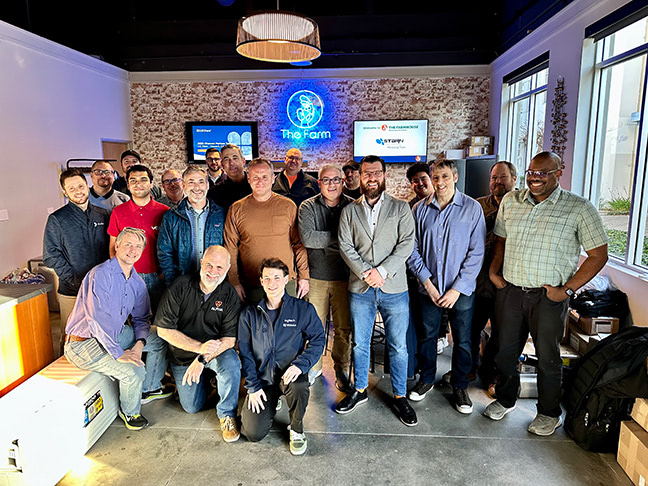
Brad with our California Channel Partners and Sales Team.
What do you see as the biggest challenges facing the media production industry today, and how is EditShare positioned to help overcome them?
One big challenge is complexity. Teams are under pressure to produce more, faster, and with fewer resources, and they often end up cobbling together tools and workflows that don’t always play well together. That’s where EditShare shines. We simplify the chaos. By bringing all your media into one place, connecting with a broad range of tools, and providing professional-grade reliability, we can free teams from all that troubleshooting and help them focus on creating.
Everyone’s talking about it, so I will, too: AI is both a challenge and an opportunity. Most teams don’t know where to start, and the key is to make it simple. We believe the best place to apply AI today is at the front end of the creative process, automating metadata tagging to make your media more searchable and usable. It’s a small change that has a big impact, and the customers we’ve helped take advantage of it are giving us great feedback.
Can you share a bit about your leadership philosophy and how it will shape EditShare’s company culture?
For me, leadership is about three things: listening, simplifying, and empowering. When people have clarity about where we’re going, why it matters, and what’s working that we can double down on, they do their best work. I believe my most important job is to provide and nurture that clarity.
Listening is the foundation. Whether it’s our customers or our team, I believe the best ideas come from understanding their challenges and opportunities. Simplifying comes next. It’s about cutting through the noise and keeping our focus on what really matters. Empowering follows naturally when people feel aligned and supported to execute.
At EditShare, I want us to build a culture where people feel free to innovate because they’re not weighed down by unnecessary red tape. And when we celebrate wins—whether it’s a big milestone or a small victory—it gives the team energy to keep going. Plus, let’s be honest, celebrating together is one of the best parts of the job.
What message do you have for long-time EditShare users and new customers alike?
To our long-time users: Thank you. You’ve been part of our journey every step of the way, and your trust has shaped EditShare into what it is today. We’re committed to continuing to make your workflows smoother and your creative process easier.
To new customers: Welcome. We’re excited to work with you and show you how EditShare can help you focus on what you do best: creating.
Whether you’ve been with us for years or are just starting out, our goal is simple: to be the partner you count on to help you do great work faster and with less hassle.