How to Pick the Best Post-Production Collaboration Tool for Your Team
In a time when production teams have to be comfortable collaborating remotely to meet tight deadlines and increasing customer expectations, scenarios like this can seem eerily familiar:
Your audio engineer is tasked with creating the final cut of your latest video project for a new client, working against a rapidly approaching deadline in their home office. When they look for the approved audio clip to add to the project, they can’t find it. They search Dropbox, hunt through their email, and try to contact team members via text, email, and Slack—all to no avail.
Now flip the script:
What if your team had one source of truth that helped each member of your team stay organized, collaborate, and share files, drafts, and communications, all with an intuitive, secure interface?
That’s what today’s industry-leading post-production collaboration tools are built to deliver.
So what are post-production collaboration tools, and how can they help your team?
What are post-production collaboration tools?
Simply put, post-production collaboration tools provide a centralized and secure place for your team to store, manage, and shape production assets.
Having “too many cooks in the kitchen” can be a hindrance in other industries. However, when it comes to creative projects that involve film, audio, and other visual arts, having as many experts in editing, sound, color, and other specialties as possible makes for even more impact.
Post-production tools are designed to help teams coordinate and integrate these perspectives and skill sets into the project. This is especially crucial now, with everyone in different work environments or even different time zones.
What can post-production tools offer your creative team?
At any given time, your creative team is juggling multiple campaigns with creative assets in various stages of completion. Add in the complexities of collaborating with teammates and customers worldwide, and the limits of email, chat, and video conferencing are quickly surpassed.
Post-production tools like MediaSilo provide the benefits of modern collaboration, secure storage, file sharing, and asset management solutions, all in one platform.
Utilize built-in tools to present content to both select and wide audiences.
Enhance integration with other creative software and applications to boost productivity.
The result is less time spent on inefficient workarounds and administrative tasks and more time delivering high quality content.
How can you pick the best post-production collaboration tools for your team’s needs?
Although every team and creative project is unique, there are design and collaboration best practices that are consistent across the industry and help teams boost their productivity.
So what are the features that should be at the top of your post-production collaboration tools must-have list?
You should seek a solution that:
Is designed for your industry, offering the roles, tools, and features your team needs (e.g., editing, branding, review, annotation) in a remote-friendly, intuitive interface.
Offers advanced file uploading and management (e.g., file tagging, metadata).
Take your post-production process to the next level.
Choosing a post-production platform isn’t easy, especially for teams still adjusting to remote work and cloud-based environments.
However, platforms like MediaSilo are designed to offer your team members new ways to share, collaborate, and grow their post-production workflows no matter where, when, and how they choose to do their best work. From offering a variety of file-sharing features to providing a source of truth without time-consuming workarounds, MediaSilo is trusted by some of the biggest names in entertainment and advertising.
If you and your team are ready to learn more about how MediaSilo can enhance your post-production workflow with additional security and productivity features, then we recommend you take a look at MediaSilo’s Guide to Post-Production.
Recognized for Cloud-Enabled Remote Editing and Project Management
Boston, MA – February 2, 2022–EditShare®, the technology leader that enables storytellers to create and manage collaborative media workflows, announced today that it has won a prestigious 2021 Emmy® Award for Technology and Engineering from the National Academy of Television Arts and Sciences (NATAS). The Technology & Engineering Emmy® Awards are awarded for developments and/or standardization involved in engineering technologies that either represent so extensive an improvement on existing methods or are so innovative in nature that they materially have affected television.
Stephen Tallamy, Chief Technology Officer for EditShare and an expert in cloud technology, comments, “It is fantastic to be recognized for EditShare’s ongoing innovation and a testament to our incredible engineering, product and support teams who go the extra mile to create solutions for the media industry.
“We have pioneered open solutions that allow our customers to realize powerful remote workflows using the creative tools and cloud services of their choice. Our integrations with leading editorial tools including Adobe® Premiere® Pro and DaVinci Resolve along with cloud-native storage management options such as AWS S3 and EBS, and robust open APIs ensure our customers can pivot quickly to take advantage of emerging technologies and new business opportunities that arise during the journey to the cloud.”
EditShare’s remote editing technology, which is a core part of the FLOW media management and EFSshared video storage solution, makes use of lower resolution proxy video files to enable post-production workflows, even when connectivity is weak and/or systems lack the power to support editing high resolution files. EditShare’s open environment supports a wide range of cloud providers and enables seamless integration of a diverse range of post-production tools within the remote editing workflow. EditShare customers can participate in the post-production process, regardless of where they are located and using the creative tool of their choice.
“We continue to see our customers embrace new and innovative ways of telling their stories but one thing that hasn’t changed is the desire for teams to collaborate,” states Conrad Clemson, CEO, EditShare. “Whether production happens in one place or is spread remotely around the world, EditShare offers world-class solutions to help customers create amazing content together. It is an honor to be recognized with this prestigious Emmy® Awardfor our ongoing investment in technology to simplify storytelling.”
EditShare will receive its Emmy® Award on Monday, April 25th, 2022 at the annual National Association of Broadcasters Show (NAB) in Las Vegas, NV.
About EditShare EditShare is a technology leader that enables collaborative media workflows on-premise, in the cloud, or in a hybrid configuration. With customer and partner success at the heart of EditShare’s core values, our open software solutions and robust APIs improve workflow collaboration and third-party integrations across the entire production chain, ensuring a world-class experience that is second to none. The high-performance software lineup includes media optimized shared storage management, archiving and backup, and media management, all supported with open APIs for extensible integration.
With remote work environments now more common, modern media management tools and technologies empower post-production teams by providing a flexible, secure way to work and collaborate across time zones and geographies.
To better understand today’s workflows, we are taking a closer look at each stage of the post-production process and how today’s tools support a distributed, often global, workforce.
In part three of the series, we explore the final post-production phase: delivering and distributing the content.
Workflow Stage 5: Delivery
Once the creative work is finished and all of the elements are in place and approved, the finished piece is ready for final touches and the transition into the distribution, sales, and marketing workflows.
Versioning
At this point in the post-production process, it may be necessary to create different versions to meet the specifications of the various end users and applications. An assistant editor, editor, or output specialist will conform and create generic masters and multiple versions based on the anticipated requirements. This can often require dozens of different versions and file sizes, all of which can be organized and tracked in an all-in-one media management tool, such as MediaSilo.
Archiving
Many hours of work go into creating video assets, so it is crucial to ensure the outputs and elements used in the piece are stored appropriately. Your archiving strategy should include everything—original camera footage, camera logs, XML files of metadata, sound elements, visual effects elements, graphics, and all versions of the masters.
A cataloging and naming convention and a versatile, robust storage platform are critical to being able to find assets later for revisions or to create future versions if needed.
Localization and Captioning
If a film, show, or ad is going to be shown in multiple regions or countries, the post-production team will often create different versions for each audience based on language, political climate, or accessibility. For example, the team may add dubbing or subtitles for non-U.S. audiences or closed captioning for audiences who are deaf or hard of hearing and viewing platforms that exhibit without sound.
Marketing Materials
In addition to the work itself, promotional materials are often generated that may include trailers and teasers; photographic assets; printed posters and artwork; and even tie-in promotional products, such as T-shirts, mugs, and hats.
Many of these materials are in the works throughout the post-production process, and they are often subject to versioning and team approvals, similar to the film. Centralizing storage and access to the marketing and promotional content and the associated stakeholder input ensures that marketing creates promo content from the latest version of the film.
Distribution and Traffic
When the finished work is ready for distribution, a traffic manager or broadcast business manager should oversee the process. The piece will likely need to be sent to multiple recipients, including networks, studios, theaters, and digital portals, each of which is likely to have its own preferred specifications.
Although remote production workflows are new to many people, distribution and traffic teams have been remotely coordinating delivery to end users long before the pandemic.
Although remote production workflows are new to many people, distribution and traffic teams have been remotely coordinating delivery to end users long before the pandemic. Media management tools let them deliver assets in the file size, format, or compression algorithm that is best suited to the client’s systems. These tools also help maintain file security at rest or in transit to protect proprietary content and intellectual property that might be attractive to overzealous fans, competitors, or hackers.
MediaSilo Supports Nontraditional Workflows
Today’s increasing use of remote collaboration makes nontraditional workflows almost mainstream. Because these new ways of working make designing workflows more challenging, flexibility is key to making sure work is done efficiently.
For example, time-consuming visual effects may have to get underway before the picture is locked. Or music may be composed before the shoot is even complete so that it can be played on set and the characters can react to it.
The key to managing a nontraditional workflow is organization. Without a well-synchronized team and a solid post-production structure, a huge amount of time, effort, and money will be wasted.
The MediaSilo platform was built for the flexibility and organization required by nontraditional workflows. It supports the creative team and provides ideal tools for keeping every team member up-to-date and working toward the same goal, even when the post-production situation is complicated.
MediaSilo provides robust solutions for managing, storing, versioning, and distributing all of your final assets and is a critical tool in the marketing of your project. It also helps to protect your intellectual property by ensuring it gets into only the right hands.
Start your free trial today and see how MediaSilo’s all-in-one media management platform empowers distributed post-production teams to deliver media content seamlessly and securely to marketing and sales teams, clients, and end users.
Once upon a time, post-production teams were colocated, working together in dark rooms staring at a screen. But new and innovative technology, and a global health crisis, have permanently changed our approach to post-production.
Today, it’s not unusual for key players to be sitting in a different country rather than a different room. Remote work environments and the production tools that support creative workflows have created a global talent pool and enabled successful collaboration across time zones and geographies.
Here, we continue to learn about post-production stages 3 and 4, video and audio finishing, and how an all-in-one media management solution streamlines the process from picture lock to final mix.
Workflow Stage 3: Video Finishing
The Online Edit or Conform
The online editing, or “conform,” step is when the original, full-size footage files are inserted into the final cut in place of the smaller, lower-quality proxies. This is the stage when visual effects are created and inserted into the sequence, replacing the placeholder graphics used in the rough cut.
Close collaboration between the offline editor and the finishing and online artists during this stage is critical. When working remotely, they will all need access to the same elements in order to transition accurately from locked rough cut to final online conform.
Visual Effects
Once the picture is locked, the final visual effects and CGI work will be completed by the VFX team. The creation of visual effects is a painstaking process that may require working on each frame of the footage individually.
Tiny details, such as shadows and lighting, can throw off the realism of an effect for even the most casual viewer.
Tiny details, such as shadows and lighting, can throw off the realism of an effect for even the most casual viewer. To ensure every effect is convincing, each visual effect or piece of CGI work will go through multiple rounds of revisions and approvals before being inserted into the online edit.
Graphics and Credits
The online phase of post-production is when the placeholder credits and title cards are swapped out, and real type treatments, fonts, and logos are designed and chosen and overall composition is determined for any graphic elements.
A separate company is often in charge of the titles and graphics. They will provide options of graphics to the entire team, and the team will give input, just as in the other phases of the cut. Once reviewed and approved, usually remotely, the finished elements will be placed into the final piece.
Color Grading
When the colorist and director collaborate during the color-grading phase, they can bring a whole new level of magic to the piece. Good color grading can bring out unseen details in dark scenes or add moodiness and depth to a scene that was overexposed.
At the end of the color-grading work, the team will view the project on monitors of all sizes and qualities to simulate the experience of viewers using a variety of devices. What might seem pleasantly dark and moody on one device may simply be impossible to see at all on another. So it’s usually a good idea to share color-corrected files with team members to view on as many screens as possible.
Workflow Stage 4: Audio Finishing
Scoring and Music
When the editor first starts composing the rough cut, temporary music is often used to give a sense of how the scene will feel with music in place. But once the picture is locked, the final music needs to be locked down too.
If original music is to be created, the composer will begin scoring the picture. This process often includes several rounds of compositions and revisions for each piece or scene, and tracking the versions and evolution of the score can be quite challenging. Team members may be able to visit the studio to hear the music as it’s being developed, but more often, they will access shared files remotely.
If an original music score isn’t used, the team will need to source an existing piece of music from a music library, artist, producer, or record label. As with the offline edit, it’s important to keep track of the score versions; the various edits that are used to demo different options of songs or tracks; and input from the editor, director, producers, and creative team.
Sound Design
In addition to the actual music in the piece, sound design is an important element in bringing a film, TV show, or commercial to life. While the natural production audio captured at the shoot often has the most realistic and natural sounds for the action taking place, filmmakers may need to add sound elements that were not captured on shoot day.
Choosing sounds is a creative endeavor, and having the team review and agree on them is an important part of the post-production process.
There are a number of ways that sound effects and sound design can be added to a film. The simplest is to use effects from a sound effects library. These are usually quite inexpensive and provide a wide range of options.
Sometimes, the perfect effect just doesn’t exist, or your requirements are too specific. In those cases, foley artists can create the unique sounds you need. Choosing sounds is a creative endeavor, and having the team review and agree on them is an important part of the post-production process.
Voice-over and Automated Dialogue Replacement
Voice-over recording happens during the final stages of post-production. Narration and voice-overs are done in tandem with the final mix to ensure the audio lines up with all the other elements of the cut.
Automated dialogue replacement (ADR) is done in a controlled studio environment, but unlike voice-overs, ADR also includes video playback so that actors can try to match dialogue to their own movements and timing of the shots being used. An automated system then helps insert the dialogue in a way that’s lined up as perfectly as possible with the action, so it is difficult to detect.
Final Mix
One of the final stages of finishing a film, episode, or commercial is the final sound mix. This process brings together all the audio elements and balances them so that they work well together.
The key members of the creative team will either attend the mix sessions or weigh in remotely. When working remotely, they can either be patched into the session in real time or use a remote online platform, such as MediaSilo, to help the team compare what was done to the mix with what the elements sounded like beforehand.
How MediaSilo Empowers Post-Production Audio and Video Teams
MediaSilo’s unified platform helps audio and video finishing teams manage all of the final elements of the project, including:
Music and sound design
Voice-over and ADR elements
Final mix assets
Camera source footage
Visual effects
Color-corrected footage
MediaSilo provides seamless collaboration and file sharing between post-production team members regardless of their location. MediaSilo provides a secure yet accessible platform for reviewing mix sessions, voice-over recording, ADR, and even testing final outputs on various platforms. It’s also an excellent platform for reviewing mix graphics and titles, VFX work, and color grading.
Start your free trial to experience firsthand how MediaSilo can help you stay ahead of the rapidly changing needs of your post-production audio and video finishing workflows.
Content production has undergone a sea change in recent years in ways that have impacted both innovation and workflow. In this new era of content creation where key players in the workflow may be scattered across different cities and time zones, production and postproduction have become more complex than ever.
To overcome this complexity and the inherent risk it adds to your projects, it’s time to take a longer view of your current workflows and embrace new approaches to managing assets, sharing works in progress, collaborating with stakeholders, and even selling your projects.
Let’s take a closer look at how post-production workflows are evolving to accommodate changes in how and where we work and the technology available to make it all run smoothly.
Workflow Stage 1: From Camera to Editing Bay
Getting the Dailies to the Editor
Although we no longer have to worry about actual physical cans of film or videotapes, there are still assets from the camera that have to be integrated into the post-production process. This requires obtaining the dailies, camera logs, and production notes from a shared storage platform or physical drive.
Keeping these assets where anyone on the team can review them is crucial in an era when remote workflows are often the norm. Ideally, all of the relevant files will be organized in one place, allowing project managers to add, revise, delete, and update documents as needed so that the entire team is always working from a single source of truth.
Reviewing Dailies
Once the dailies are collected and loaded in the system, the team can narrow down the footage into the best material and moments. Traditionally, the production team watched the dailies on set each day as they became available. But modern remote workflows now make it necessary for some team members to review the dailies from a variety of places and give their input without holding up the production and post-production delivery timelines.
Remote viewing of dailies has become increasingly popular as productions reconsider the need to have a large number of people on set at one time.
Remote viewing of dailies has become increasingly popular as productions reconsider the need to have a large number of people on set at one time. Everyone on the team being able to access the dailies as soon as they are available, whether on-set or remotely, means that input can happen while there’s still time to address any issues.
Logging and Digitizing Footage
After dailies have been viewed, the editing team starts preparing the footage for editing. This may involve creating smaller versions of the footage files for editing so that the offline editing system isn’t slowed down by huge file sizes. These smaller files, or proxies, are used by the offline editor until larger ones are required for finishing, visual effects, color correction, and mastering.
The assistant editor will usually be in charge of logging and digitizing all of the footage as the proxies are created and creating related databases, metadata collections, tags, naming conventions, and storage plans.
Workflow Stage 2: From Raw Footage to Rough Cut
Creating a Rough Cut
The rough cut, or offline edit, is where your show, commercial, or film becomes a story rather than just a sequence of shots. But before the rough cut is complete, it must be reviewed and commented on by multiple team members who are often in different locations.
After the first assembly is created by the editor, the next step is usually to bring in the director, who will work with the editor in creating a “director’s cut” version of the project for review. That collaboration can happen in person in the editing room or remotely by either posting work in progress or using a real-time screen-sharing system. Regardless of whether you are in person or not, all of the comments and input need to be collected and tracked so that revisions can be made efficiently.
Temporary and Placeholder Elements
The rough cut phase is also when temporary or placeholder graphics, sound elements, music, visual effects, and color correction are introduced to the cut for reference. The editor will often source the materials from font libraries, stock footage collections, music libraries, and sound effects catalogs. Other team members may also provide music samples for reference, graphics or copy to try out, or images for visual reference.
Many of the placeholder elements will have temporary visual or audio watermarks from the companies that own them. The watermarks prevent the files from being used in a final piece without official permission and are removed if the element is licensed for use in the final product.
Testing and Versioning
Managing the element selection process is a big part of post-production. As the different ideas are tried, the editor and assistant editor must keep track of all the versions as well as the elements for each option until the final ones are chosen.
Careful file organization, detailed database management, and a well-thought-out naming convention can make the process run more smoothly. Because there are almost always changes made after versioning, using a naming convention that incorporates dates, revision numbers, and sometimes even colors—instead of simply “final”—can help manage a project that has had a large number of changes made to it.
When all of the elements are in place and agreed upon in the rough cut, the cut is locked. This “picture lock” stage means that there will be no more changes made to the overall structure of the edit and that it’s time to move on to finishing.
How MediaSilo Simplifies Post-production
MediaSilo’s unified platform provides a seamless way for the whole team to collaborate during every step of the post-production process, wherever they may be. MediaSilo provides centralized file storage, frame-specific commenting, and intuitive tagging, so it’s easy to keep track of footage, compile input, and create a single, always-up-to-date version of the asset that is accessible to all.
Start your free trial to experience firsthand how MediaSilo can help you stay ahead of the rapidly changing needs of your post-production workflows.
Al Perry, VP of intellectual property protection at AMC Networks, has had a long-held desire to see an industry-wide screening platform that works well for everyone from press reviewers to PR teams while still remaining secure. His colleagues in the public relations team shared the same dream. Devin Johnson, SVP of Public Relations, AMC Networks, and his team in the press department successfully used an independently built press screening room platform that worked well for their team. But they weren’t sure they were serving critics to their utmost ability.
“The primary pain point was that journalists are asked to use a multitude of online press screening rooms — all with unique URLs, accounts, passwords, and interfaces,” says Johnson. “We wanted to showcase our content securely while delivering the best user experience for our media colleagues.” Johnson was aware of the positive feedback journalists were sharing for a new platform called Screeners.com, so he immediately sought out a demo.
The Solution
“I appreciated the offering’s user experience, presentation of content, and focus on security,” Johnson says of Screeners.com.
The AMC Networks team tested Screeners.com, using it to make several episodes of Blue Planet II available to reviewers and to help promote their buzzy prestige drama Killing Eve.
Product Adoption
The initial results were promising. While they weren’t quite an apples-to-apples comparison because the shows they rolled out both were generating media buzz, the press team did see an increase in user engagement versus their previous press screening room platform. “We saw positive posts on Twitter when we released the final episode of Killing Eve to journalists on Screeners.com,” says Johnson.
The platform was also well-liked by his colleagues. “The user template made the account upload seamless, and we are able to successfully keep track of who is using the platform,” says Johnson. “The interface is also simple, and episode and show upload has great quality control tools that make it easy to preview the content and its graphics before making live and sharing with users.”
To roll out Screeners.com more broadly across the entire organization, however, the platform needed to gain the blessing of Perry and his security team.
“The user template made the account upload seamless, and we are able to successfully keep track of who is using the platform. The interface is also simple, and episode and show upload has great quality control tools that make it easy to preview the content and its graphics before making live and sharing with users.”
Devin Johnson, SVP of Public Relations, AMC Networks
Perry was aware of the MediaSilo platform, which had passed muster with the security team at BBC Worldwide. “I have the impression MediaSilo with the Screeners platform is very much about creating a good client and end-user interface and experience,” says Perry. “That pleases me because that’s what the business is about: getting the content to the reviewers in a way that is user-friendly.”
But Perry wanted to ensure that Screeners.com was putting just as much emphasis on security as user experience, noting that convenience and cost are often the twin foes of content security. He wanted to avoid critics getting so frustrated with managing multiple screening platforms that they instead demand a screener DVD, which Perry calls “a nightmare from a security perspective.”
Security
Screeners.com uses on-demand watermarking technology as an added layer of protection, personalizing each piece of content with visible or forensic information specific to the journalist viewing it. “Watermarking is an effective deterrent,” says Perry. “I think when you can make it convenient, not costly in terms of resources or time or money, and make it dynamic, that’s a good thing.”
Perry looks at several criteria when evaluating and selecting new vendors. “First, I want to know that we have common goals, that we’re both aiming to provide the best platform, the best user experience, and to do it with the best available security,” he says. “Then I want to know that the vendor is bringing to it the resources to make it as much of a reality as it can be.” Perry acknowledges that, inevitably, things will go wrong in any relationship, despite best efforts to plan ahead. “I want to know that this partner I’ve engaged, they are going to be there with me as we deal with the problems that will inexorably arise,” he says.
His experience with the responsiveness of the team at Screeners.com along with the knowledge that others he respects in the industry had good things to say about the company, were enough to give Perry the confidence to move into the next stage of evaluation, which included an exhaustive third-party security assessment performed by Kroll.
“I was hearing that reviewers were clamoring for Screeners.com, which makes sense, because they are the end users. Then I started to hear from my colleagues in publicity that they wanted this because their reviewers wanted it. When we started looking into it, I thought maybe there’s a chance that this might get actually gain wide adoption and become close to an industry-wide platform, which is something that I’ve wanted for awhile.”
-Al Perry, VP of Intellectual Content Protection, AMC
Testing the Value
The first test for Screeners.com was to replicate a report that allows Perry to keep a close eye on unauthorized use of the platform. “I want to know if critic X for publication Y has logged in from two different states and two different countries in a 48-hour period on Z number of devices,” he says. “Then I can talk to publicity and discuss how we want to handle this.”
Critic and Reviewer Relationships
Besides cracking down on potential hackers, Screeners.com has allowed the AMC Networks public relations team to have better interactions with reviewers and critics. “We only want to contact journalists when necessary,” Johnson explains. “The user management tool confirms the receipt of the screeners link and if they have watched the content. This allows us to connect with journalists that we know are engaged with the content. In addition, it eliminates unnecessary guesswork and follow-up emails.”
AMC Networks looks forward to continuing to put Screeners.com through the paces. “A successful rollout is always ongoing, because every day you’re rolling it out to new users, with new use cases,” Perry explains. “But we’re cautiously optimistic that this will get us closer to the ideal of a win-win for end users, my colleagues, and the industry.”
Screeners.com by EditShare manages all aspects of video playback and security using state-of-the-art watermarking for delivery, combined with a comprehensive set of tools for creating, inviting, and updating a growing audience of reviewers. You can focus on nurturing press relationships, while we oversee the technology and ensure security.
Contact us to set up a demo of the industry’s premier virtual screening room platform.
Latest Improvements:
Safer collaboration, easier asset recordkeeping, and a few new commenting fixes – these are a few improvements you’ll find in the latest release of Shift.
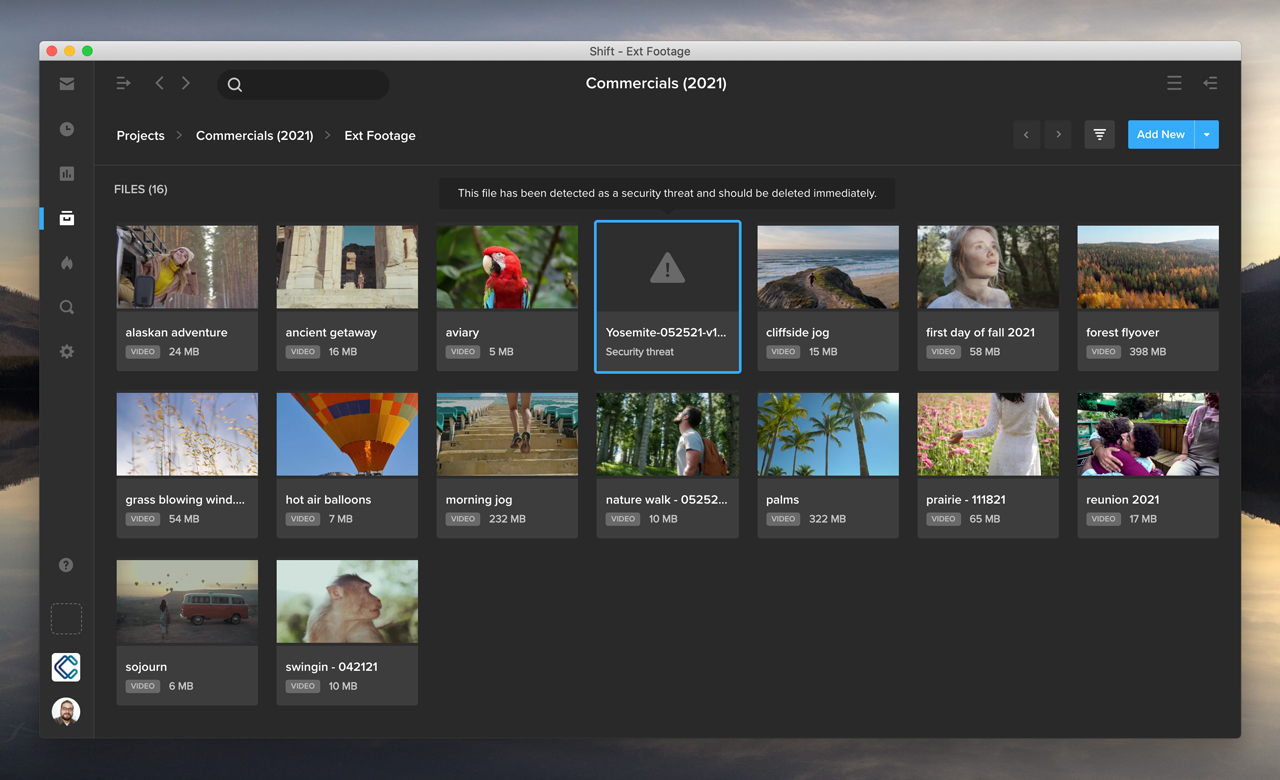
Eliminate risky files: Shift now performs an automatic scan for viruses whenever you upload files. If a security threat is detected, a warning message is displayed on your asset thumbnail, and users are prevented from opening, downloading, sharing, or interacting with the infected file in any way, except to delete it.The virus scanning happens automatically – behind the scenes during upload – eliminating extra steps in the quality control process. This prevents team members from inadvertently passing along a malicious file to others in the organization or to external reviewers and clients.
Additional Updates
Simplify recordkeeping: You can now export asset lists from both the Projects and Search Results pages. For example, you can search for assets matching a particular tag, click the Filter icon in the top right, and select Export to export your list of search results in a CSV or XLS file.
Never miss a comment: This release resolves an issue that displayed only the first ten Review Link comments in Review Mode if more than 10 comments were made.
Make comments easier to read: Users will now be able to add line breaks to their comments when commenting on static files such as documents and images.
We’ve been living in a “digital age” long enough to see our entire virtual ecosystem change, compound, and evolve – not just once, but over and over and over again. And it adds up.
A recent study by market intelligence firm IDC estimates that the sum of data generated globally by 2025 will exceed 175 zettabytes (175 trillion gigabytes). That’s a lot of ones and zeros, in the form of photos, videos, websites, music, audio files, documents, and so much more. And that number will just keep growing, each and every year.
The digital universe has evolved beyond the fringes of our lives. For many living and working in the modern age, the digital world is our life. We work, play, socialize, date, create, and share in a virtual space. It is our primary place for connection.
And not only for connection, but accumulation. Think about it: our events are captured online, our media is created online, our work projects are stored online. We rely so heavily on the storage of the virtual world to hold our most critical assets, to continually add more and more of them, and to recall them for us whenever we need them.
The IDC estimates that more than two-thirds of digital stored data is not readily searchable or available for access after initial use.
Online data asks the ultimate existential question: if you created a digital asset (be it video, photo, text, document, song, email, or otherwise) but you can’t find it, does it really exist at all?
Sadly, this is not a trick question — as the IDC estimates that more than two-thirds of digital stored data is not readily searchable or available for access after initial use.
Gone in a Flash
Imagine if two-thirds of the books on your shelves — *poof* — simply disappeared, or two-thirds of the photos from a lifetime of summer vacations vanished as soon as you put them away. You’d consider that an unacceptable amount of data loss. And it’s not because the items no longer exist – but simply because you don’t know how to find them again.
And that’s why storage is only half of the conversation. You don’t need something rightthis instant, so you put it away. But storage is only as good as its retrieval system. Otherwise, what’s the point of storage at all?
New Generation of Organization
There are two major schools of thought when it comes to digital asset management, structure, and retrieval — and these schools fall very squarely along organizational lines.
People who are accustomed to traditional operating systems often follow the folder hierarchy model. You put a file inside a folder, stick that folder into another folder, label it properly, and save it in the right drive. Want to find that file again? All you have to do is connect to the drive, navigate to the folder in a few clicks, and open the file. It’s easy! This group views asset retrieval as a logical path rather than a magic button.
But what about people who never were indoctrinated into files and folders (electronic or physical)? For these generations, the ability to search for something and simply find it is a basic expectation. There is no folder, no subfolder, no drive — the file just exists. Where? It doesn’t matter. It’s somewhere. And how do you find it? The same way you find anything else in the digital world, you search for it.
For the younger group, the question of somewhere wasn’t even relevant. The assets exist, period. You should be able to find anything with a few simple keystrokes.
This divergence has led to a great deal of frustration between college professors and their young students. The students didn’t understand the concept of folder structures because they never had to use them – but professors didn’t understand any other way to talk about it, because navigating to a file stored somewhere made logical sense to them. For the younger group, the question of somewhere wasn’t even relevant. The assets exist, period. You should be able to find anything with a few simple keystrokes.
We’ve all been in the unfortunate situation of interacting with a digital platform where the search functions simply do not work, and few things are more frustrating. Digital giants like Reddit and Slack have worked tirelessly in the past year to improve their search engines, and turn around their negative image as unsearchable platforms. Bad search can quickly kill a user experience, no matter how amazing the rest of the tool may be.
Just find it
For MediaSilo, finding the media assets you are looking for is one of the most important tasks a video team needs to tackle, and we take it seriously. Our professional cloud platform is designed with robust tools and settings that give you total control over the search process, ensuring that it’s effortless for your users – wherever on the search spectrum they may fall.
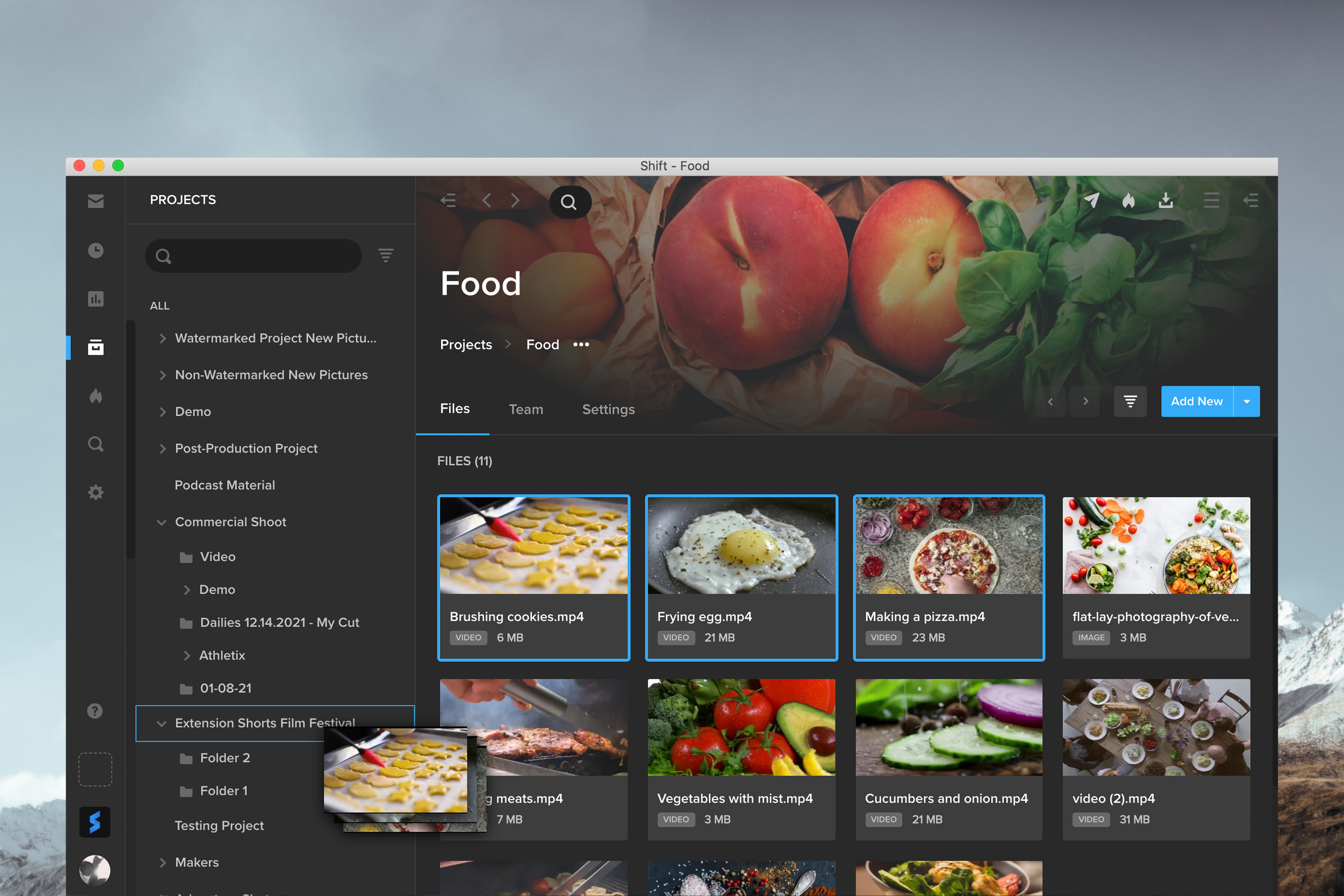
For folder navigators Are you more of a traditional thinker? Manage and organize your assets with ease within our standard Projects and Folders, where everything you are looking for is exactly where you left it. The project tree gives a visual representation of your organizational structure in one simple place, and allows you to move or copy individual assets or entire folders into new locations using basic drag-and-drop controls.
For freeform finders The latest updates in MediaSilo now streamline the search process even further to fulfill any query, with just a few keystrokes:
The search bar defaults to “Starts With” queries, to better deliver the files you are looking for.
Looking for something else? You can easily change this option to “Contains”, “Ends With”, or “Exact Match”
When searching for tags, toggle between “matches all” to see a specific set of criteria or “matches any” for a broader search field
Multi-select search parameters using an easy check-box list, or select “only” to hone in on one field
Toggle between “is” and “is not” queries to narrow your focus, for example “is in Project A” or “was not uploaded by Bob”
We’ve seen that search functions optimally when it’s an extension of the way people intuitively think and communicate, and have built our tools to make that process as streamlined as possible.
We’ve seen that search functions optimally when it’s an extension of the way people intuitively think and communicate, and have built our tools to make that process as streamlined as possible. Working on video projects with other collaborators in your group? MediaSilo is the all-in-one place to not only manage your important content, but also keep it secure, share it with your collaborators, and of course easily find all the assets you need without any hassle.
Keep them close
In this ever more complex digital world, don’t risk losing track of two-thirds of your important assets – especially if those are the foundation of your business, as it is for our customers. Whether you navigate to them logically, or find them intuitively, it’s time to embrace better searches as the next phase of digital organization.
Interested in giving our asset storage and search features a try? Sign up for a free 14-day trial of MediaSilo today!
EditShare Q4 FLOW and EFS Update – Capabilities at a Glance
FLOW High Availability FLOW’s high availability is achieved by giving its central database multiple points of redundancy to mitigate against hardware or network failures that would affect MAM client accessibility during active productions. Consistent with this, FLOW’s services are scalable and presented as multi-instance, redundant elements within the overall system.
FLOW Panel Enhancements – Adobe® Premiere® Pro and DaVinci Resolve EditShare’s NLE panel integrations bring the benefits of FLOW directly into Premiere Pro and DaVinci Resolves user interfaces, enabling users to access FLOW’s features without leaving the familiar NLE environment.
Users can now exchange FLOW sequences directly with Adobe Premiere Pro and Blackmagic Design DaVinci Resolve thanks to the new FLOW Cuts List sequence import function. Extended Metadata support lets team members add metadata information to sequences, including custom fields. This improves and enriches metadata associated with sequences. AirFLOW now shows sequence metadata in its user interface. Improved media relinking logic automatically imports and relinks Hi-Res source footage located within a project’s complex folder structure after completion of a proxy edit.
Support for Multiple Proxy Formats Per Clip In addition to standard streaming proxies, FLOW can now generate additional high quality ProRes Proxy and H.264 files. This simplifies relinking to complex clips with multichannel audio track layout in remote workflow scenarios.
Storage DNA Archive Support FLOW now fully supports the latest version of DNA Evolution by Storage DNA. Users can easily archive and restore FLOW assets from third-party LTO/LTFS and disk-based tiers.
In-App Messaging & Guides EditShare is building on the momentum of bringing better web-based user experiences to customers through the use of in-app guides and feedback messaging capabilities. As the company brings more and more features to the browser-based experience it is their aim to guide these users to the new capabilities and solicit feedback directly within EFS Control and FLOW.
EditShare Telemetry EditShare Telemetry makes it easy for administrators to share Audit and Monitor data with EditShare’s secure network operations center. Through Telemetry, EditShare can work with customers to ensure systems are running optimally through pro-active monitoring and event alerting. Please contact EditShare technical support or your account representative for more information and to participate in the trial program for this service.
EFS Control Maintenance Mode New controls allow maintenance users to manage files in certain media spaces while restricting other users to read-only access.
Active Directory Single Sign On (ADSSO) enhancements Multiple improvements to ADSSO to enhance enterprise-level user management.
In March, 2020, as COVID-19 hit, most game industry employees were sent home from the office. Companies scrambled to compensate for the loss of their central office spaces where workers could interact, ideate, and create together.
As the pandemic begins to diminish, it’s become clear that many workers – and even some employers – appreciate the benefits of working from home (WFH), while at the same time, still grappling with its challenges. A core challenge is the ability to maintain the culture and productivity altered by a remote or hybrid workforce.
Tools that seek to bridge physical and temporal distances between workers make remote work possible. But they also bring their own problems. According to Asana’s recent Anatomy of Work report, 60 percent of a person’s time at work is spent on “work about work” and not on skilled work. In other words, people are spending huge amounts of time on communications apps that don’t directly contribute to the worker’s actual function.
The report found that the average knowledge worker spends “103 hours in unnecessary meetings, 209 hours on duplicative work, and 352 hours talking about work.”
The games companies we spoke to invariably reported the same issues, with a tension growing between individual preferences for certain apps, how those apps were being used, and how much time and energy is going into unnecessary communications. Many reported confusion about which apps were best for the constant back-and-fro of creation and approval, as assets are shared, modified, and reshared.
In this report, we’ll dive into what the game industry has done to bridge this gap, some of the remaining issues leaders in the gaming industry face to balance productivity and culture, and tips on how to excel in the new hybrid world.
Disclaimer — We are grateful for the participation of the companies we spoke to, and their candid observations and insights. Their participation does not reflect any endorsement of MediaSilo.
Introduction
The game industry’s technical prowess and culture of innovation proved to be advantageous when the world faced lockdowns and other consequences of the pandemic. Mainly staffed by computer-sophisticates, game companies were able to continue their operations.
But video game companies also found many unexpected problems during COVID, often rooted in the game business’s cultural history, as well as the unique nature of video games as extremely complex artifacts of creation. A rising consumer demand for video game entertainment during the pandemic added pressure to unexpected pain points, as game companies failed to hit milestone targets, and release dates were shifted out of the most lucrative times of the year.
Gaming’s Cultural Singularity
All industries, including creative industries, were forced to cope with lockdowns. Many are now working their way into a future in which many workers are likely to opt for WFH, rather than attending an office every day, if practical and if offered the opportunity.
So why do the experiences of game companies differ from other similar businesses in the entertainment industry?
While it is certainly true that some games in the early years were made by individuals working from home, gaming’s creative culture rapidly morphed into an intensely in-person collaborative endeavor. In fact, game creation and promotion has traditionally relied heavily on multiple in-person teamwork.
Most game companies – whether developers, publishers or service providers – are formed by small teams of friends or colleagues who work closely together, constantly sharing each other’s work. Over-the-shoulder collaboration is central to how games are made.
When you read about the early days of a successful games company, the founders will almost always speak about how much time they spent together, bouncing ideas off one another, and critiquing each other’s work. They will invariably credit this approach to their success. Invariably, they seek to scale this dynamic as their employee base grows.
Any part of a game can be changed at any time during its development, right up to the game’s release, and even beyond (in the form of additional content, patches, modes etc). These alterations might range from a tiny, single sound effect, to the entirety of the lead character, to the very nature of the game itself. Sometimes, alterations can be made after feedback from early reviews to ensure the game delivers against massive expectations.
Venture capitalist Matthew Ball recently noted how much more content games companies offer compared with competitors in other entertainment industries. “Video games are a platform for multiplayer storytelling, rather than a linear narrative. Fortnite has only marginal changes each multi-month season, but the reliance on ‘your friends’ and unscripted narratives means that a player can spend dozens of hours satisfied. The Office is highly rewatchable, but over its nine-year run, it produced less than 75 hours of unique content. Game of Thrones ran for eight years and produced the same. ”
Late in their creation, mystery novels do not suddenly become comedies. Movies that make drastic late changes are assumed to be suffering from creative challenges, and expectations for commercial success are downgraded accordingly. But in games, radical and constant iteration is necessary to the process, and is viewed as financially advantageous.
Games are tactile. Their creators must touch them, in much the same way that a chef tastes a new dish.
Big changes must also be reflected in a game’s marketing, as emphases move from one innovation to another.
Games are tactile. Their creators must touch them, in much the same way that a chef tastes a new dish. Games are complicated amalgamations of processes and assets. But each ingredient can only be added by a specialist. All the other specialists are expected to ensure that any change works with their particular ingredient to the advantage of the whole. One change must necessarily lead to many other alterations.
In game development, iterations are a constant, and involve the agreement and participation of different people. From producers to gameplay designers, to artists and writers, to musicians and programmers, down to testers, this is often done in the moment, collaboratively.
Limitations of generic communications tools
Matt Casamassina is CEO of Rogue Games, a California-based publisher which employs around 20 people, most of whom he speaks to on a daily basis. His normal office routine is to do the rounds and check in on his team members, discussing the wide variety of development clients that the company handles. But when lockdown hit, he found himself having to use Slack as his primary conduit between himself and his staff.
While Slack is a useful tool, it is not a substitute for in-person communication. Many of the companies we spoke to said that its usefulness can be undermined when multiple channels are being created without much oversight, nested within one another, making navigation problematic.
Interested in seeing MediaSilo in action? Contact us to get started on a free 14-day trial today.
It is best understood as an asynchronous conversation. Casamassina learned this after fellow team members gently suggested to him that he was trying to use it as a live-chat device, and that he was too impatient and insistent for immediate responses.
“When you’re at home, sending an email or a slack out into the digital ether, I want a response right away. But sometimes I might not hear back for hours and I start to wonder, ‘hey, where’s my response?’.
“I learned that’s not good behavior from a leader. I’d worked in offices for a long time, and I was programmed for that environment. But those expectations don’t fit when you’re remote. I really had to address something that came across as me being unreasonable, while making sure that our workflow improved.
“So we talked with the team about how to create optimal communication practices, without too much rigidity. We put practices in place that allowed me to loosen up and unlearn those bad habits that I had to really grow out of. At the same time employees stepped up. We built a system together that everyone understands, and that has helped our workflow and our culture.”
Most of the companies we spoke to reported that their Slack usage has become more sophisticated and organized since lockdown, with a larger number of channels, generally serving hyper-specific purposes.
The future of feedback, approvals, and comments is likely to move away from generic solutions like Slack toward specific tools, like MediaSilo, which allows for on-screen annotations, frame-accurate comments, and one-click approvals for video and animated assets.
Most industries now make regular use of video meeting tools like Zoom, Microsoft Teams, Google Meet, and Skype, and Discord to gather ad hoc input throughout the creative process according to a company’s needs.
“I might sometimes be in a [virtual] meeting and I’ll take a screencap from Discord and transfer it into Slack,” said one. “We’re mixing and matching according to the needs of the moment.”
Zhenghua “Z” Yang is founder of Serenity Forge, a Colorado-based developer and publisher. “Our Discord server is a digital office space,” he explained. “Each person on our team has their own voice channel and when you’re working, it’s assumed that you’re on your channel, but if you’re not, that’s okay, it’s just like someone not being at their desk because they went out to get a sandwich or something.
“You can mute Discord, but if you’re there, anyone can pop into your channel and say ‘hey, what’s up … you know like … did you finish that one thing?’ And Kevin can quickly unmute and say ‘oh yeah I just finished it’, and then ‘okay, all right, cool. I’ll see you later’.
While these collaboration tools fill in some of the gaps, they are not without issues. Different functional teams have different needs and levels of adoption for collaboration tools, leading to a disjointed collaborative workflow.
“I might sometimes be in a [virtual] meeting and I’ll take a screencap from Discord and transfer it into Slack,” said one. “We’re mixing and matching according to the needs of the moment.”
Security Protocol Changes
Game companies are notoriously secretive, and for good reason. Releases are highly visible, competition is fierce, ideas are premium, and assets are valuable. Partnerships rely on discretion. Most of the companies we spoke to talked about how they invested a great deal of time and energy into making sure their security was able to withstand entire teams suddenly logging in from home. For some, it took months to get to a situation where they felt comfortable.
Christina Seelye is founder and CEO of California-based publisher Maximum Games, which employs around 50 people. “Making sure that everyone can get into the VPN [Virtual Private Network] properly was an early priority,” she said. “Cybersecurity issues are really important for us. When people are working from home, they all have their own challenges, and it’s essential to talk those over, individually.
MediaSilo works with some of the most sensitive pre-release content on Earth, so security is paramount. We emphasize security from content protection to protecting our client’s Personal Identifiable Information.
“Sometimes it’s just little stuff like people who might let their kids play on the computer, or who have roommates. What is the right thing to do when you’re in a Zoom call and talking about something that isn’t publicly disclosed? So we had to make sure that we were being really careful about understanding that confidentiality and security practices, which work fine in the office, work differently at home. Security has become a major priority over the past year.”
MediaSilo security director, Simon Lamprell, believes that security is crucial internally and externally. “We work with some of the most sensitive pre-release content on Earth, so security is paramount. We emphasize security from content protection to protecting our client’s Personal Identifiable Information (PII). Also, whenever we engage with a new vendor or third party we perform a full security assessment and review their protocols and practices around PII to ensure they meet our security standards.”
Protect and Share the Build
Part of game company security is managing the latest build, or version of a game, or of the various assets that make up the game. Allowing employees to access the most recent version of the game means they need very fast internet connections, while the company must ensure that the build is both easily accessible by the right people and protected from the wrong people.
Many companies use their own servers, or version-control cloud depository services like Perforce. Some use online retail portals like Steam, where they can upload new builds every day which are easily downloaded by team-members. Many use a combination of resources that make sure that every version of the build is protected.
“As a producer I can look at all the graphs and all the data points in the world, but the real progress is the game itself,” said Kerry Whalen, production manager at Piranha Games, which is best known for its Mechwarrior action games.
“We spend a lot of our time looking at the game and playing the game and talking about the version of the game that we’re working with. When lockdown hit, we tried to [play the game] via remote desktop, but that’s no good if you’re at home with a laptop on the kitchen table and a terrible internet connection.
“So we resolved that problem by putting our games on Steam. We set up all kinds of different beta branches and delivery systems so people can access anything securely, play it, and give their feedback.”
Control Meeting Madness
When they were forced into social separation, many companies overcompensated by instigating too many video meetings. Partly, this was driven by a well-meaning anxiety that employees might not be coping with isolation. Another reason cited by interviewees was a concern that, outside the milieu of the office, people might not all be on the same page. Information gaps might start to appear, hampering progress.
“We believe in the creative energy and the synergy of being physically together,” said EA Motive’s Patrik Klaus. “When we’re apart, we message each other when it’s needed. We’ve come a long way in getting better at that, but it remains a challenge to find the right cadence of meetings. Having a tool like Zoom is awesome, but Zoom fatigue is a real thing.”
Having a tool like Zoom is awesome, but Zoom fatigue is a real thing.
Zach Truscott at ArenaNet said: “We’re very used to having hallway conversations in the office, instead of meetings. But when you’re remote, they’re gone. So we set up meetings instead, and what we found is we went from a moderate amount of meetings to so many meetings that nobody was getting any work done. We were overbooking ourselves with meetings.”
Truscott said that the company is resolving the problem by creating working pods which have a responsibility to keep stakeholders informed, while minimizing the amount of time spent in meetings. This is leading to more efficient means of noting and disseminating action points.
“Communication is an important part of game development,” said Farah Coculuzzi, producer at Capy Games, a Canadian developer, currently enjoying success with mobile hit Grindstone. “We want to make sure that everyone has the capacity to do what they need to do [for work] and also to take care of their home life.”
“A big thing for us is the realization that stand-ups don’t always have to be at the same time every day. A few days of the week they’re in the mornings and a few days they’re in the afternoons. If someone regularly misses one or two because of other commitments, that’s just part of how we do things.”
Respect Camera Anxiety
On-screen meetings are now a normal part of office life, but some people dislike being on camera. This can cause friction between managers who want to literally see how their people are doing, and employees who are either naturally shy, or who wish to protect their own privacy.
Joel Burgees at Capy Games said: “One of the great things about Capy is we don’t have a lot of braggadocio and peacock energy in the studio. But we do have some really soft-spoken folks on the team who are introverted. They are mega-talented, big-brains-big-hearts types of people and it’s very rare that they will put their cameras on [during meetings].
“The people who are comfortable having their cameras on are more likely to be social and outgoing and it’s very easy to hear their ideas because they are broadcasting it.
I have to give people space to be heard, especially if they don’t want to be seen.
I have to be more proactive about making sure that the quiet people whose faces we can’t see are encouraged to speak, without feeling like they have to turn on their camera. I have to give people space to be heard, especially if they don’t want to be seen.”
Respecting each employee’s camera sensitivities while still wanting and respecting their feedback during creative sessions is something that can be solved asynchronously through shared collaboration platforms.
MediaSilo provides a simple review and approval process letting stakeholders provide feedback without the hustle and anxiety of live, camera-on sessions.
Meeting in the Middle
A constant refrain from our interviews was the sense that the last 18 months have been a sharp learning curve for everyone, and that business leaders were no more prepared for the shock of the pandemic than anyone else.
The lessons that have been learned did not come from managerial theorists, or from super-bosses, but from trial and error. Most important of all is that physical isolation has only intensified a growing sense in the game industry that companies that try to dictate policy to employees will likely find it difficult to maintain a healthy working culture, and will struggle to retain and to hire talent.
The lessons that have been learned did not come from managerial theorists, or from super-bosses, but from trial and error.
EA Motive’s Patrick Klaus summed up this thinking: “Our evolution during this time has been relatively organic, and I think we’ve succeeded because it was always super important for us to be listening to our teams, and being flexible in our approach.
“The situation needed a bottom-up approach and not a top-down approach. We talked. We listened and we figured the best way forward by meeting in the middle. One of the biggest things that I’ve seen is just an intense level of collaboration and communication at all levels.”
Electronic Arts employs more than 10,000 people around the world, while the Motive studio is around one hundred strong. Klaus said that this presents a challenge, but that a local approach is essential.
“We had some great support coming from the head office but we’ve also been empowered to make our own decisions and to create our own destiny in terms of how we do things. We have found guiding principles that are applied to the whole company but then there is a flexibility built in at a local level.”
Conclusions
In some industries, WFH is leading to anxiety that workers might take advantage of the situation, and decrease their commitment to work. In a competitive, passionate, creative industry like gaming, that is not an issue.
Those leaders we spoke to who are looking forward to “getting back to the office” are all working on plans to allow employees to work from home for either part, or all of the week. Creativity is at its peak in a person-to-person setting and it’s a simple fact that some people prefer to work in a social environment.
There is also a common notion that when a game is in its conceptual, brainstorming stage, stakeholders work better in-person. On the other hand, the specific productivity of content creation – art assets, programming, music, level design, trailers – can just as easily be done from home, if that’s the worker’s preference.
All that explains why gaming is likely to move to a hybrid model in the years ahead. How that happens will be a continuing evolution of best practices, and of useful tools.
Every interview in the report mentioned multiple tools that they were using more extensively when they were away from the office, than when they were in the office. Most of these are familiar to us all, such as Slack, Zoom, Microsoft Teams, Trello, Asana, and Google Docs. But there are plenty of other tools that are either especially suitable for the game industry, or are coming to the fore as particularly good for specific, essential tasks.
We at MediaSilo work with some of the biggest names in gaming to bring the power of visual feedback to life. MediaSilo brings together assets and minds for in-progress creative projects. For example, concept artists use MediaSilo as a place to manage and share files, and marketing teams collaborate and approve campaign assets on their way to promoting highly anticipated titles.
As evidenced in the feedback and insights provided throughout this report, bringing collaboration out of non-stop meetings and chat clients allows for a cleaner feedback loop where everyone can participate. Please contact us to see how MediaSilo can take your workflow to the next level.