MediaSilo Product Update: Access global search from Projects
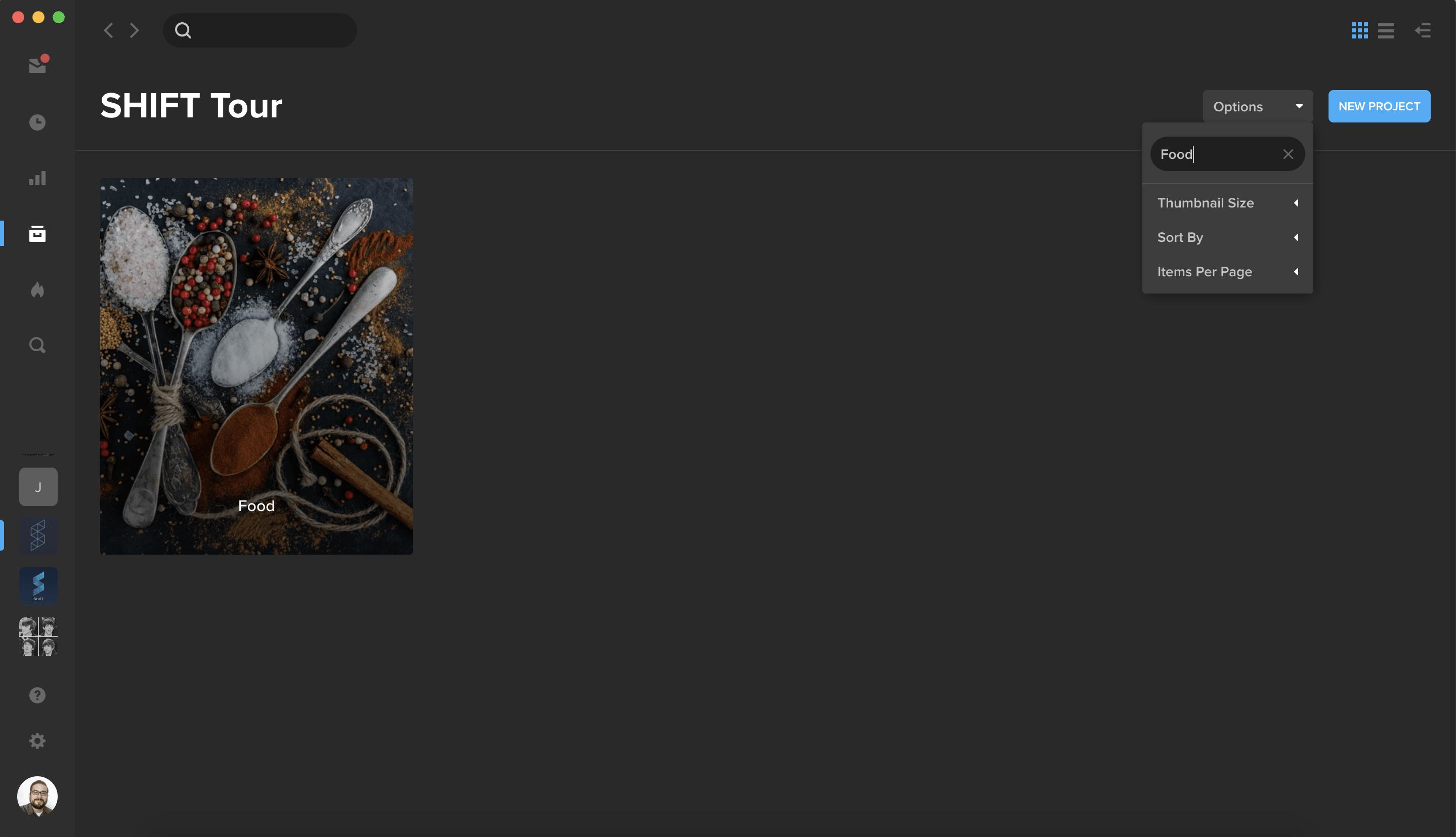
You can now access global search right from the Projects homepage. Use the search bar at the top of the page to search for assets by metadata, uploader, and other properties.
To quickly find a specific project, click the Options button and enter your project name in the “Filter by title” field.
Simplify your Spotlight workflow
You can now create a Spotlight presentation directly from the Spotlight homepage. Simply click on the Create New button and select Spotlight.
A new modal will guide you to choose your spotlight settings, browse our growing library of pre-made templates, or select one of your custom templates.
Add dynamic text to your Spotlight presentations
Spotlight presentations now support dynamic text that changes based on the content you are viewing.
To enable dynamic text, click on any text box and go to the new Dynamic Content tab in the properties panel on the right.
Use the dropdown menus to select the stage or video player that contains your content.
Choose the dynamic-text fields, such as Title or Description, that you wish to display alongside your content. Your audience will see the metadata values you have set in Projects.
General Improvements:
When you reopen the Media Browser panel in the Spotlight template editor, you are now redirected to the last folder you visited.
You can now resize additional panels, including the Layers panel and the Playlists panel.
Update Shared Links
You can now update an existing or new link from Reporting or Feed.
On the Reporting page, find your link and select Edit in its action menu. From Feed, select the gear icon in the bottom-right the link’s Feed card and select Edit Settings.
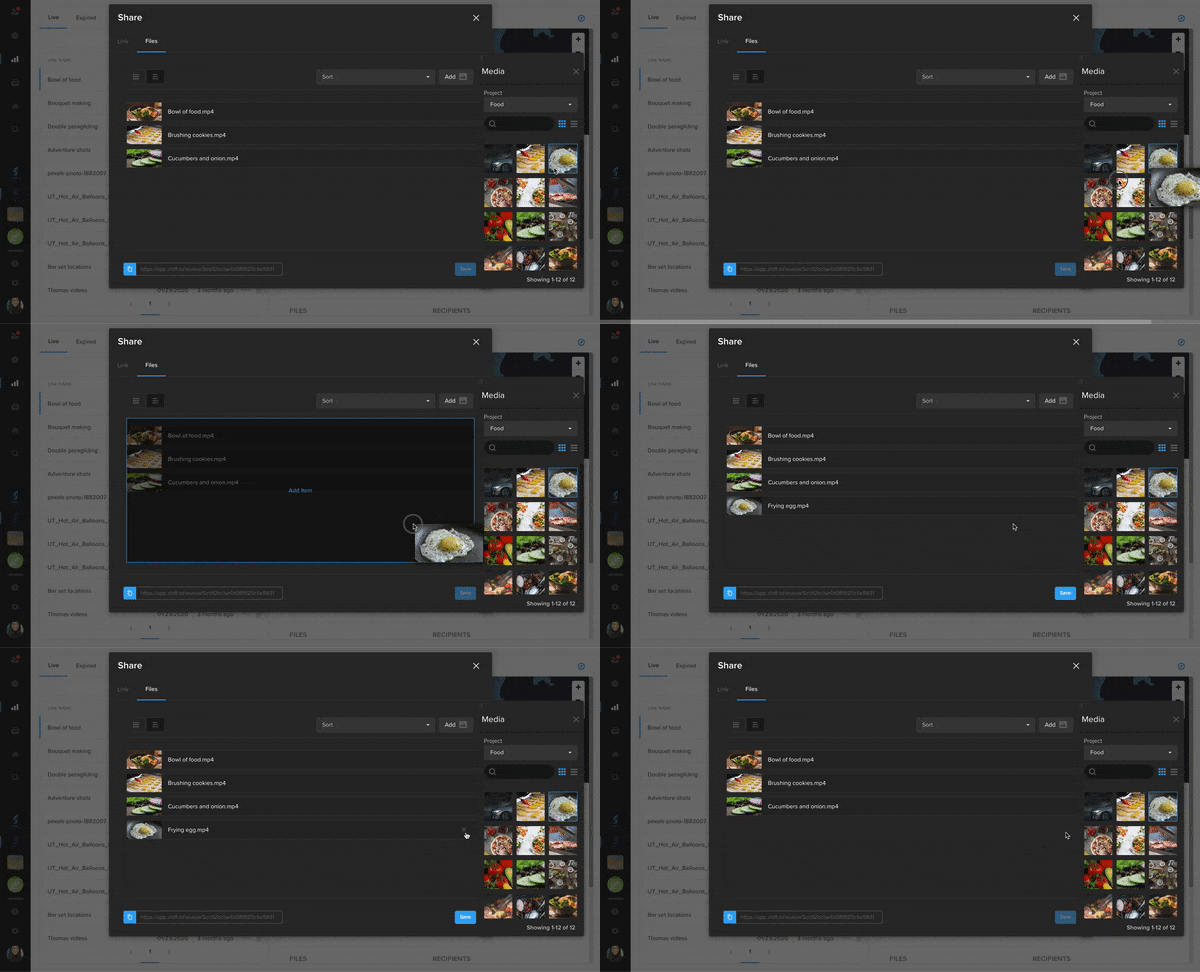
In the Share wizard, click the File tab and then select Add to open your projects and assets.
Drag and drop assets to add them to the link. To remove an asset from the link, hover it and click X.
Note that assets from a watermarked project cannot be added to a public share link.
You can now make changes to your sent links by adding or removing recipients from your private shares.
On the Reporting page, find your link and select Edit in its action menu. Or, from your Feed, click the gear icon along the bottom of the Feed card and select Edit Settings.
In the Share wizard, go to the People section and enter the workspace users you wish to add to the link. To remove a user from the link, hover over their name and click the X button. Removing a user will revoke their access to the link.
Click Save to apply your changes and send email notifications to the users you added.
With the SHIFT GO app for iOS and Android, you can now create folders and upload files directly from your phone. To start uploading, simply tap the plus button in the bottom-right corner of your project screen.
In addition to downloading files for offline viewing, you can now save files straight to your phone to use them with other mobile apps. On the Files page, find the file you need to download, tap the action menu next to it, and choose “Save to Device.”
Note: You can only save a file to your device if you have download permission on a project or a review link.
What I love about working with film production crews and teaching a film class are the highly collaborative relationships formed while working towards a common goal. The interactions between students and their professor when working on a major project are just as “passionate” as the discussions between the director and cinematographer when discussing the art of the shot.
I have been fortunate to experience this collaboration from multiple perspectives, having spent more than a decade working in post-production on documentary and non-fiction projects for television and theatrical release. And I continue to work in this field designing collaborative workflows for filmmakers and facilities as a senior sales engineer with EditShare in Los Angeles, CA. I also teach giant screen (IMAX) film production to the next generation of filmmakers at the USC School of Cinematic Arts – my alma mater.
Matt Scott with his students at USC School of Cinematic Arts.
Teaching Students Across the Street and Halfway Around the World
The collaborative relationship between teacher and film student is a core element of film school. From my perspective as a professor, the pandemic has created unique problems – students and teachers are struggling to collaborate across time zones and geographies. They are also experiencing difficulties accessing materials and resources. This impacts the ability to teach, access to real-world experiences and more importantly, the students’ ability to learn.
As we start the Fall 2020 school year, my students live as near as across the street to as far as across an ocean from our classroom. My colleagues and I are finding that many US-based students are staying local to their hometowns, and the overwhelming majority of international students are unable to return back to campus at all. With students spread around the world, some in countries with online access restrictions, we have extreme time zone differences that add another hurdle to collaborating in real time.
While sometimes the course work is independent, filmmaking, especially for juniors, seniors and grad students is a highly collaborative course of study with teams of students working day and night to create their projects. Compounding the challenges of connecting and collaborating is the lack of access to real-world experiences.
Opportunities for students to gain hands on experience have taken a major hit. In April through June of this year, production nearly evaporated. Dropping 98%, only 194 shoot days were recorded in Los Angeles vs. the 8,632 shoot days recorded during the same period in 2019. It was the lowest filming level on record. Of the few internships still available, most are remote, denying students both real-world experience and industry relationships they will need to succeed.
Then there is access to the material that we teach in class. Some of the media we rely on to convey the concepts of our lessons is not readily available via Netflix, Hulu or Amazon Prime, yet it’s an important component to the core curriculum.
So, as educators, how do we enable creative collaboration that exposes our students to real-world production, including access to the materials they need – when they are attending class from across the street to half-way around the world?
Options for Collaboration, Access, and Continuity
This is where I’m proud to be part of a company that has a solution for educators who are facing this problem.
For more than a decade, EditShare has been actively used in higher educational settings all over the world. It has given thousands of students real-world experiences in filmmaking, journalism, sports, and production. Its project sharing features let teachers collaborate on a deeper level with students, while useful admin tools and SSO integration manage hundreds of student profiles from a single dashboard with ease. And with the release of EFSv, our cloud-based solution, EditShare can virtualize an entire education focused post-production environment, allowing students to upload and share their raw or proxy media and collaboratively edit directly from the cloud, collapsing the distance that may be separating students from their peers and teachers.
EditShare’s cloud-based EFSv solution, which is runs in cloud infrastructures such as AWS, Google Cloud, Tencent Cloud, and other public cloud environments, enables instructors to securely store and share raw or proxy media in the cloud, providing students seamless access to footage from their team’s project, regardless of where in the world each student may be.
Where EditShare cloud-based solutions really help education is through its remote editing capabilities. It supports all industry NLEs, so no matter the toolset a student has access to, they can participate in any project. Everything, including project sharing, editing, and bin locking, is virtualized. As a teacher, I can easily spin up an entire virtual classroom in moments, with all the computing power needed to complete real-world projects in the cloud.
EFSv solutions also optimize the cost of editing in the cloud. EFSv puts high-resolution files into cost-effective object storage but makes those files appear as if they are on a normal mounted block storage file system. At the same time, EFSv provides the scalable high-performance block storage needed for low-latency access to proxy files and renders. Proxies are generated by our FLOW media management system. Both high-resolution and proxy versions are accessible at all times, streamlining the editing workflow while minimizing costs.
For institutions that do not want to put everything into the cloud – EditShare’s FLOW and AirFLOW media management applications enable students and instructors to securely access the university’s private on-premise storage. Students can log-in, access course materials, including films they need to review as well as share their own projects. Teachers can use FLOW to review student work and provide feedback on the next steps.
Many hybrid cloud + on premise workflows are also available. Most popular is storing raw footage locally on campus and sharing proxy media through the cloud.
Making Lectures Accessible…Globally
Another new challenge with distance learning has been teaching via video conference, and institutional mandates to record our classes for asynchronous learning or other requirements. This is a great idea, but as anyone who has actually watched a recording of their class will know, there’s plenty of class time taken up with minor admin – like attendance, 1:1 conversations with students and even some technical issues that don’t need to be or shouldn’t be replayed publicly. This is where FLOW’s integration with Zoom has become extremely useful. FLOW is now able to automatically download all angles of a class recording, including the shared desktop, plus it downloads the AI speech to text transcription as markers on your video. Now instructors can quickly edit out any material that’s not germain to the lesson either with FLOW Story or with the NLE of their choice. We can even cut our recordings down into pod size modules making it easy for our students to find specific sections or topics they wish to review.
It’s All About Being Flexible
There is light at the end of the tunnel. Productions will return, many already have, and we’ll get to collaborate in person once again. But many of the new habits we’ve adopted during this pandemic might be to be so efficient that in many ways, there is no going back to how it once was.
Either way, EditShare has the flexibility to offer the classroom of the future—whatever that will look like–the capabilities it will need.
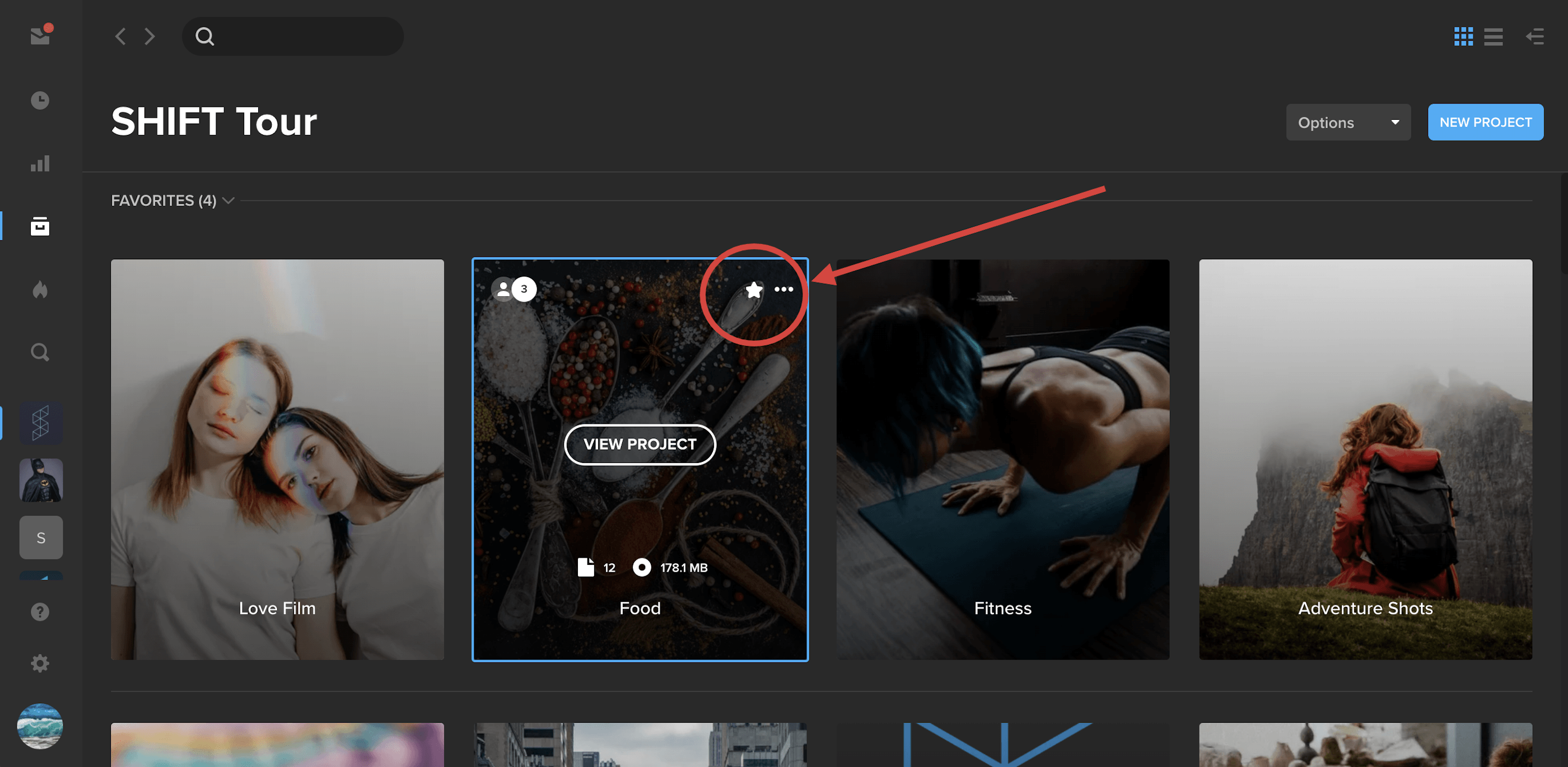
Pin your most important projects to the top of the screen by selecting them as Favorites.
Simply hover over a project tile and click the star icon. This will anchor the project to the top of the page under a new section called “Favorites.” To remove a project from your Favorites, simply click the star icon again.
Note: Project Favorites only apply to your account and not to other members on your workspace.
Spotlight Alignment Guides
In the Spotlight builder, you’ll now see visual alignment guides appear as you drag elements around the page. Line up your playlists, media players, and text on the page.
Download Watermarked Files in Spotlight
Authorized users can now download watermarked files in private shared Spotlight presentations.
In your project settings, turn on watermarking in the SafeStream tab. Then, create your static playlist and check Enable Download.
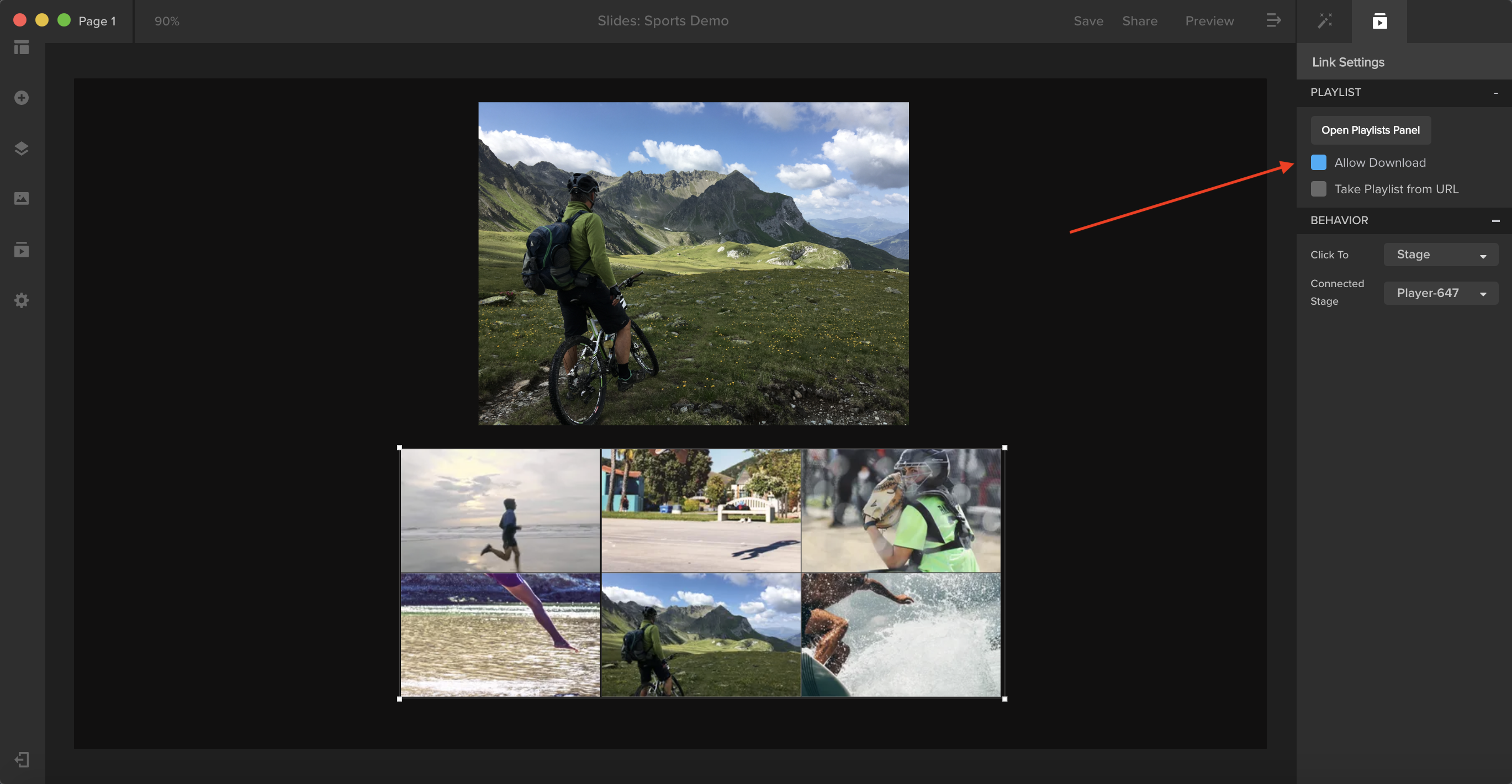
In the Spotlight builder, place your playlist onto the layout. With the content block selected, go to Link Settings in your right-side panel and check Allow Download.
Once you save and share the presentation, a download button will appear over your content.
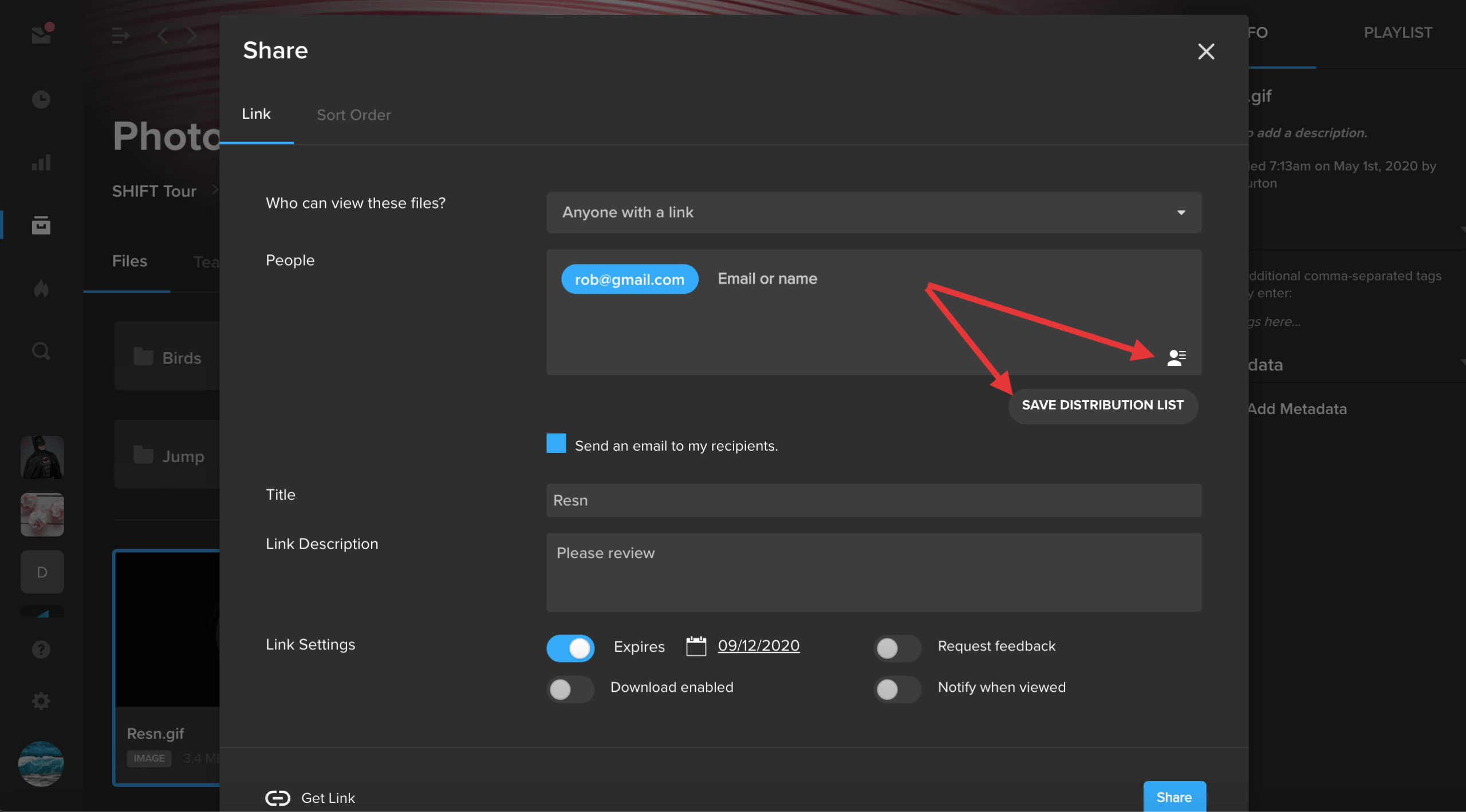
Distribution Lists are now available in the asset share wizard. With Distribution Lists, you can now save groups of users and non-users for quick sharing.
In the share wizard, enter your recipients and select “Save Distribution List.”
Click the icon in the bottom-right of the recipients box to manage and view the existing distribution lists on your workspace.
EditShare and MoovIT have formed a global alliance to deliver an integrated workflow solution with ‘under the hood’ administration and media management for Adobe enterprise workgroups. The workflow features EditShare’s EFS and FLOW for high speed shared storage and media management and MoovIT’s Helmut workgroup administration tools, designed specifically for Adobe Premiere Pro, After Effects, Media Encoder, and Audition.
The combination is unbeatable. Here’s why.
Adobe is often the default choice for content creators worldwide. But, what’s lacking is large scale workflow automation and management. EFS, FLOW, and Helmut, together coordinate and simplify the complexity of large-scale workflows, keeping Adobe professionals comfortable within their sphere of familiarity while boosting efficiency and providing tools for enterprise-level media orchestration.
The EFS shared storage and FLOW media management combination ensures assets are available in real-time for any large-scale workgroup collaboration. Across these enterprise workflows, there are many intricate steps that must be followed to optimize asset sharing and collaboration. However, real-world experience tells us that things don’t always happen by the book. Media can come from any location, in any unexpected or unapproved format. The assistant editor drops in some cool stock FX clips they found online but forgets to put them on the shared storage. The freelance editor is working on a different Adobe software version or OS up until delivery day. The editor chooses the wrong export settings or uploads the file to the wrong client.
Adobe users working in a collaborative production environment most likely experience one or more of these headaches. Software versions that are not compatible with each other, content that was not put in the correct folder, nor on the correct shared storage project, or in the right format and codec and so on. In smaller Adobe workgroups, this type of housekeeping can be managed manually. In larger workgroups, the day to day editing and VFX fragments are amplified. The bigger the group, the more manual clean up required until it becomes unstructured chaos that is unmanageable. In these situations, an additional layer of administration is needed – utilizing the Helmut tools in combination with EFS and FLOW.
Helmut offers customizable project templates that enable a facility to pre-determine the best in-house workflow and standardize those processes across all projects. Users can pre-determine elements such as storage locations, codecs, ingest and export presets, and project-based tiered storage workflows. For example, if an editor drags media directly from a downloads folder, Helmut will ensure it’s flipped to the appropriate codec and placed in the correct shared folder, making it available to all editors in the right format. No downtime – the editor can start working immediately. And for administrators and facilities management, have project-based control over storage locations, render nodes and archive systems from one user friendly dashboard.
The MoovIT and EditShare core technologies are tightly integrated via APIs to dramatically improve large-scale Adobe workflows. Working as a seamless technology solution, Helmut, together with EFS and FLOW creates the consistency necessary to be able to quickly scale workflows of any size. Helmut and FLOW maintain a continuous dialogue across all stages of the workflow, efficiently keeping assets and metadata connected with projects for an optimized, orchestrated media production environment.
And this combination is fully customizable.
FLOW is an open platform with a robust set of APIs that can deeply connect with the following Helmut capabilities to supercharge your workflow:
Automated Project Management & Format Standardization – Streamline workflow administration and file delivery specifications across workgroups using pre-set templates to standardize key project management elements such as scratch disk location, fps, raster size, directory structure and bin layout. Underlying conversion engine ensures Adobe project files, regardless of the version they were created in, are universally compatible.
Offload Rendering – Leveraging your existing infrastructure, Helmut can offload render intensive projects such as encoding and graphics.
Searchable Database – The missing link for many broadcasters and large media workgroups, Helmut will index projects including folder structures, metadata, assets and sequences into a searchable database with data visualised in a dashboard to easily identify and locate content.
Automated Administration Tasks – Create metadata driven rules to automate housekeeping functions such as delete, move, archive and manage projects and project-related assets.
The team at MoovIT have designed Helmut tools with simplicity in mind. Easy deployment with straightforward templates and under-the-hood file migration do the heavy lifting for you!
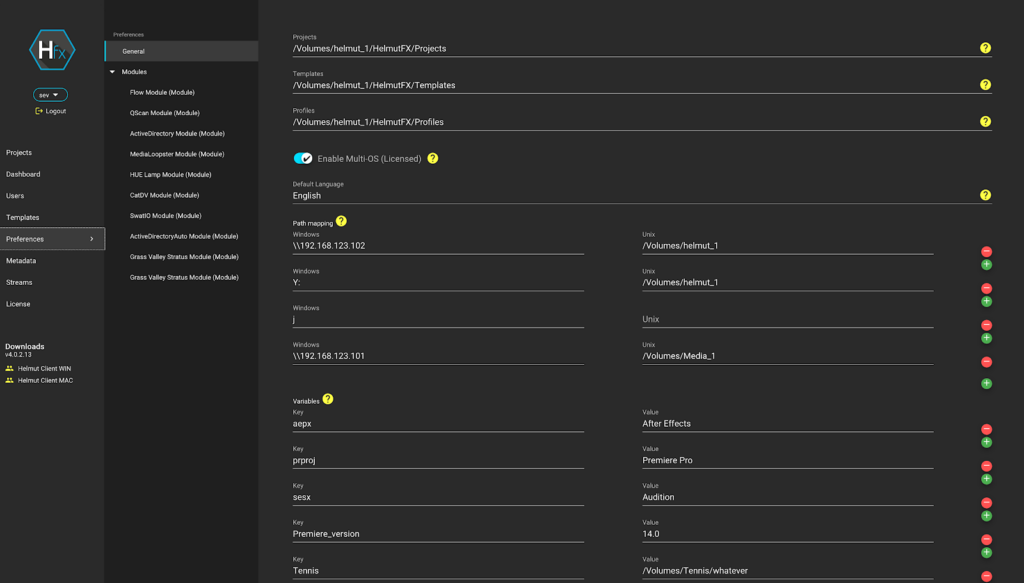
Helmut UI snapshot – configure permissions for users and projects
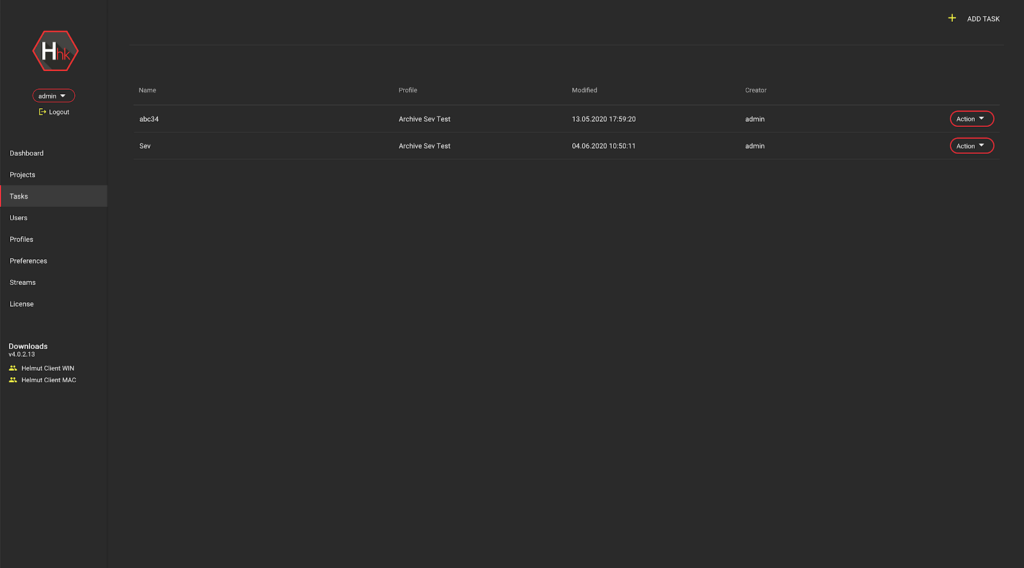
Helmut UI snapshot – organize your Adobe projects, content and folders for archive
Creatives are working at full steam, with deadlines getting shorter and projects becoming ever more complex. Various industry reports indicate that creatives spend up to 20% of their time on administrative tasks or one day a week. Eliminating administration bottlenecks and freeing creatives up from mundane tasks is what this winning combination offers. If you are in an Adobe workgroup and you need to collaborate on projects with multiple stakeholders, located on premise or dispersed across different locations, the powerful combination of Helmut, EFS, and FLOW can supercharge your Adobe workflow.
If you are interested in gaining back 20% of your time, reach out to our team today and get an in-depth demonstration.