The Administration interface has been updated to be more consistent with the rest of the app. In addition to the new dark theme, you’ll now be able to assign users to roles and projects even more easily with dropdown menus in the Add User and Edit User windows.

You don’t need me to tell you that 2020 was a year we’d rather have skipped. We didn’t have that option, so we’ve had to deal with it – just like our colleagues and friends across the industry. By staying true to our values and with the phenomenal talents of our team, we’ve been able to keep innovating and help our customers continue to create engaging and compelling stories.
#WinTogether
In addition to the pandemic, 2020 was a year characterized by tumultuous events and widespread unrest. But when I looked more closely, I found humility. It wasn’t always there, but when we all put others in our community first, it was amazing to see.
One of the things that I’ve seen is our team, our clients, and our partners really unite with a common goal: to emerge from these experiences with determination and an eye to the future. When I look back at 2020, I see collaboration with our partners and customers, showing and feeling empathy, and asking the question ”what can we do to win together” was the strongest and best thing we could have done. We listened, and, where we needed to, we evolved.
We made a strategic decision to accelerate and intensify our shift to the cloud
Fast Followers Cross the Chasm
Cloud innovation was not new to EditShare. In 2015, we introduced our first cloud solutions and in 2019 we embarked on a more aggressive investment in cloud. At that time, not everyone was ready. One customer even told me “you’ll take my content out of my house and into the cloud when hell freezes over”. But, 2020 validated our decision as the cloud quickly became a necessity for everyone. The market needed us to complete the journey and reinforce our cloud efforts as a strategic focus of the company. The pandemic was the catalyst for doubters to “cross the chasm” and become mass adopters. As existing cloud users were able to continue with their business of remote working and collaboration, the fast followers saw that it was time to make the jump.
Our overall feeling was to go back to our core values and tenets – flexibility, scalability and openness – and build a much broader solution. We designed seamless proxy editing and all the services around it. The cloud has enormous potential and we are just at the beginning. What we can do now is phenomenally useful, but the best is still to come.
No One Has a Monopoly on Innovation
As organizations are being forced by the circumstances to cooperate in the cloud, most are doing it because they want to, and that’s because it’s the best way.
The cloud is a fundamental shift in the computing paradigm. It has empowered buyers. It’s as far as you can get from the jaded approach of “Here’s my solution. Pay me some money and I’ll install it. Pay me some more money and I’ll upgrade it. Pay me still more money and I’ll make sure it keeps working”. The cloud changes this to a far more cooperative model, where multiple vendors open their products to integration, making it easier, not harder, to work with third parties. In this environment, it makes sense for there to be open standards; open APIs where integrations can happen as need and innovation dictate.
Nobody has a monopoly on innovation. Other vendors have products and services that can enhance our workflows. It means that customers can use the “best of breed” products in their workflows and still be confident that they’ll be supported and supportable into the future.
The cloud gets better because it’s always getting broader and wider. It encourages collaboration. It means that we can add our or another vendor’s services easily and without breaking anything. It means that we can issue upgrades every quarter and know that it’s not going to cause problems. Clients are always up to date. It’s a virtuous circle, where it’s in everybody’s interest to work together.
All Bets on Cloud
I’m seeing an upswing in the industry, even at this early stage. Spring is just around the corner. We don’t have the pandemic put to bed yet but – at last – there are some promising signs. By the middle of the year, we’ll be able to put what we’re learning right now into practice. For our customers this means savings and efficiency.
As the value of our clients’ content grows, so does the need for flexibility to cope with doing business in an era of dramatic and unexpected change. We’re on the side of anyone who is facing up to these challenges.
It would have been wrong to bet against Moore’s law. It was wrong to bet against the web. And now you should absolutely not bet against the cloud.
Ultimately, we give our clients flexibility, continuity and confidence. If you want to engage with our software, you can run it on any suitable hardware or you can take it with you into the cloud.
We’re going to take with us what we learned in 2020. Empathy with our customers – not a new thing, but number one going forward. And guiding customers towards the cloud. We’re there, ready for them: it is no longer a question of “if”, but “when”.

In 2020, we launched a video podcast series, Shift In Conversation. We now host two series — one for marketers and one for professionals in production — with a third coming soon dedicated to the advertising industry. Each week, we speak with creative professionals about how their work has changed in 2020 and what the future looks like for their industries, to share industry knowledge with our customers in Media & Entertainment, Marketing and Advertising.
Our host, filmmaker and Shift Media Marketing Manager Grace Amodeo, was inspired to start the podcast when COVID hit. “We needed to think about how to continue creating content that would reach our audiences. All of our customer events were cancelled, and much of the content we’d been working on had to be reimagined,” Grace said.
“The reach of video is enormous, and gives us the flexibility to share to so many new audiences beyond just our own customers.”
As a video-based platform, it made sense for us to create new video content for our audience. Grace noted, “The reach of video is enormous, and gives us the flexibility to share to so many new audiences beyond just our own customers. We quickly realized that our video interviews could also easily be re-published on audio podcasting platforms, to allow viewers to consume content however they liked.”
And thus our video podcast was born.
The Challenge: Project Management and Media Storage
The podcast is produced 100% virtually, with all interviews on Zoom. Unlike a traditional audio-only podcast, with a video podcast we needed to manage video, audio, and design files all at once.
As the podcast grew with more guests over time, the amount of files we were juggling quickly became overwhelming.
As the podcast grew with more guests over time, the amount of files we were juggling quickly became overwhelming. Grace remembers, “At first it was just the video file and a simple thumbnail, but we soon expanded into audio, written blog content, and a variety of social media deliverables. Each platform needed its own specific type of deliverable, multiplied by 20+ episodes (and counting). It’s a lot to keep track of.”
We needed a robust system that could handle project management, production and promotion, along with a way to securely store and organize content.
The Solution Part 1: Airtable for Project Planning
After trying out a few different tools, our team landed on Airtable to organize interviews, distribution, design, and marketing. We created a public Video Podcast Planner template that you can clone and use for free in Airtable. We created tables for all of the following work areas:
- Steps for booking a guest
- A production checklist for virtual interviews
- Post production deliverables
- A branding checklist
- Social media deliverables for sharing your content
We love the ability to visualize our spreadsheets with color-coded statuses and categories for each type of episode. You can even add emojis to quickly identify your tags!

Airtable’s Views feature allows us to quickly transform one sheet into multiple views, where we could visualize each episode with the guest thumbnail:

The calendar view is also handy, where we can easily transform due dates on a spreadsheet into a color-coded calendar view:

get your free template
Ready to start organizing your own podcast project? Clone our free Video Podcast Planner on Airtable to hit the ground running.
The Solution Part 2: MediaSilo for Media Management
Because the MediaSilo platform is designed to securely store and organize large amounts of media files, it’s the perfect solution for all of our podcast assets. In addition to our logo and promotional graphics for each channel, we have set design deliverables to promote each episode. These included a video thumbnail, article graphics, and social media graphics for Facebook, LinkedIn, and Instagram.
We decided to create dedicated folders for each speaker, so that as we are promoting a new episode each week, the marketing team knows exactly which folder to look for.

Because MediaSilo is optimized for video file storage, the app automatically captures all the file’s metadata, which you can surface in the metadata tab. This powerful feature is useful when checking the video settings for online publishing, where certain sizes and file types are often required.

Conclusion
Thanks to both MediaSilo and Airtable, we now have fine-tuned our process which enables us to produce several episodes each month. And the end result? Be sure to check out and subscribe to our video podcasts Marketing In Conversation and Production In Conversation. If you work in Advertising, stay tuned for our third channel dedicated to all things advertising coming in early 2021.
Want to try out MediaSilo and Airtable for your own video project? Sign up for an Airtable account here, and request a free 14-day trial of MediaSilo.

Our guest Charles Frank takes us through the personal journey of producing independent documentary content. Anyone with a camera and a story to tell can get started!
The following interview is an excerpt from our video series, Production – In Conversation. To watch the full interview and see more video content, click here. Or you can listen to the Shift In Conversation podcast here.
Charles Frank – Director and Partner – Voyager
Grace Amodeo – Marketing Manager – Shift Media
Grace: Tell us a little bit about yourself and the work you do with Voyager.
Charles:
I’m a documentary director. I do a variety of documentary work — branded documentaries, short-form personal films, and I just finished my first feature-length documentary. I’m a partner at Voyager, which is a production company that has a roster of directors that do broadcast commercials, branded documentaries, and original films.
(more…)

InSync PLUS is a full-service creative agency with deep roots in the film, television, streaming, lifestyle, and branding industries.
With more than 50 years of experience, InSync PLUS pushes artistic potential to develop compelling trailers, TV spots, and digital campaigns to support feature films and shows, including Ford v Ferrari, Jurassic World, and Goliath.
Its integrated, personalized approach to client services brings the agency into daily contact with designers, production, and advertising companies with the highest expectations for professionalism and security. To ensure these clients meet their business objectives, InSync PLUS takes a proactive approach to client satisfaction by embracing the unexpected, exploring the unusual, and always seeking out the most unique creative expression for its clients.
The partnership with MediaSilo—along with an emphasis on anticipating and exceeding client needs and looking beyond traditional secure sharing strategies—puts InSync PLUS in an ideal position to pivot its clients’ workflows quickly when the COVID-19 crisis hit.
New World, New Workflows
InSync PLUS was a long-time MediaSilo partner prior to the global health crisis—first as a Wiredrive user then upgrading to MediaSilo’s intuitive, highly secure platform in mid-2020. In the early days, its team of editors, producers, and creative directors was located on-premises and used Wiredrive alongside Aspera and Box to securely send and receive media using centralized storage and standard security policies.
Pre-COVID-19, a typical workflow included sending media links to studio executives for review and approval, then discussing feedback on a phone or Zoom call. But those traditional workflows had to evolve when the pandemic made remote work environments the industry standard.
According to InSync PLUS’s COO Patrick Esposito, one of the agency’s top priorities—before and during the pandemic—is ensuring that clients know their unreleased content remains safe at all times.
“The most important part of what we provide to our clients is the empathy and sympathy that we understand their needs,” Esposito said.
InSync PLUS clients were forced to upend workplace environments and embrace a brand-new way of working, which made supporting these values in the rapidly evolving production climate more critical than ever before.

How MediaSilo Helps InSync PLUS Support Evolving Client Needs
When the InSync PLUS team began using the MediaSilo platform for secure sharing in June 2020, they quickly discovered that it addressed their clients’ new challenges and use cases significantly better than Wiredrive.
MediaSilo’s upgraded experience provides a secure, end-to-end solution for InSync PLUS’s team and its clients in a few key ways:
Simple but Secure Login
When a new project begins, the InSync PLUS team adds clients as MediaSilo users so they can access works-in-progress. To maintain a secure environment, clients receive a customized login link to their ready-to-review content that provides an authentication layer without the need to remember yet another password.
Full Media Protection
Depending on the use case, someone on the InSync PLUS team will select a playlist of files or pick a project or folder to share. InSync PLUS grants clients access to these resources by adding the clients’ names as recipients and then sharing with them the unique link generated by the system.
Customizable User Permissions
MediaSilo’s user permission model gives InSync Plus administrators and project owners full security oversight. They can assign client users roles with permissions to view and download content within their respective projects, but only InSync PLUS team members can share, upload, and delete content.
Custom role capabilities allow InSync PLUS internal users to directly invite clients to one or more projects rather than sharing individual projects or folders as private links. This streamlines the client experience by centralizing access to all InSync PLUS projects in one location within MediaSilo.

Future-Proofing Secure Sharing with MediaSilo
When COVID-19 brought the entertainment industry to its knees, InSync PLUS stepped up to the challenge. Partnering with MediaSilo enabled the agency to operate at full capacity with a 100 percent remote team and stay focused on its clients’ needs during stressful, uncertain, rapidly changing times, including:
- Enforcing an elevated level of security for major studios and networks’ sensitive, pre-release content
- Providing a protected, centralized hub for clients to access ready-to-review work
- Quickly and smoothly adapting to an improved media-sharing workflow
Using MediaSilo, InSync PLUS will continue to build on its legacy and help its clients in the entertainment industry navigate the future with authentic, effective, and measurable integrated marketing campaigns.
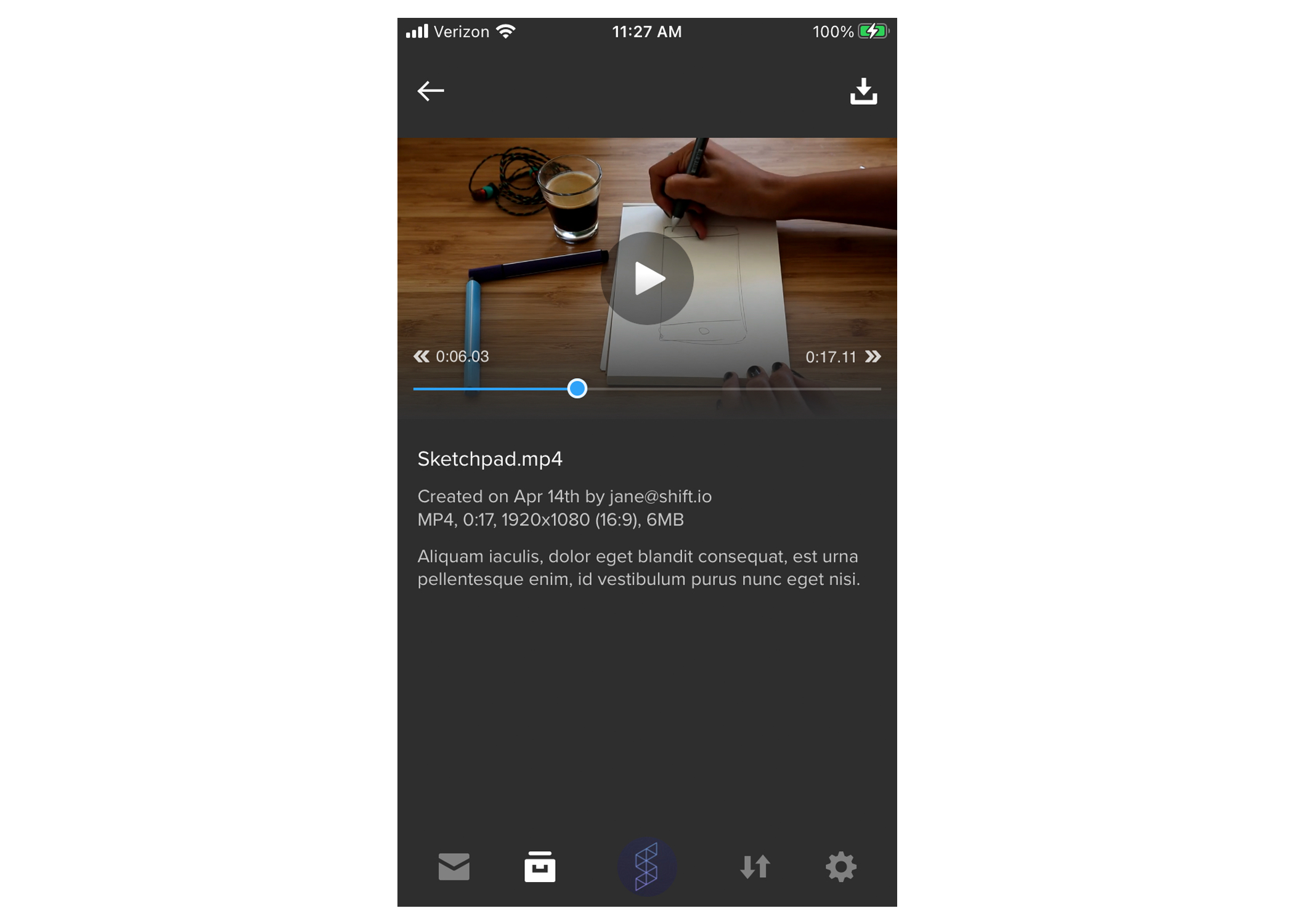
SHIFT GO now offers player controls for an improved mobile viewing experience. When playing a video, tap your screen to pause it and tap the play button to resume playback. Tap the arrows on either side of the progress bar to skip forward or backward by ten seconds, or scrub to a timecode using the progress bar.

When working on a creative project, your team needs to collaborate on all kinds of files, not only video. That’s why we’ve expanded review and approval functionality in MediaSilo to include comments, drawings, and text markup on image and document files. Your team can now collaborate on items like branding kits, contracts, video scripts, photography, digital marketing assets, and more. Our new review features support a variety of file types, including PDFs, Word documents, PowerPoints, and image files like JPG, PNG, and SVG.
View Mode vs. Review Mode
When you open a review link with documents and images, you’ll now see three viewing modes at the top of the file. “View” gives you a focused view-only experience, “Annotate” is where you’ll find text, boxes, and drawing options, and “Shapes” gives you more visual commenting options.
Did you know?
Invite recipients to leave comments on your own documents, images, and videos by selecting assets in your MediaSilo Projects and sharing them as a Review Link. Video review includes its own specialized set of features, including time-coded comments and markup. Learn more in our Sharing support article.
Image Review

On an image file, you can give detailed and visual feedback with any of the text, drawing, and shape tools. Format the size and color of text comments, and annotate a shape or drawing with a comment to it. You can always undo and redo your actions, or use the eraser tool to remove markings.
As the link sender, you’ll get email notifications when comments are left.
Document Review

In a document file, you’ll have the same feedback options, plus the ability to highlight and strike out text. For multi-page documents, open the left-side drawer to preview and navigate to different pages, just like in a PDF viewer. You can also use the search bar in the top-right to find specific words in the document.
Once you’re ready to approve a file, hit the thumbs-up icon in the top-right corner of the page. This will display a checkmark on your avatar and the file you approved.
Get Started
Ready to try these features? Simply send a link containing images and/or documents with the Request Feedback option toggled on, and your team can start reviewing today.
Are you new to MediaSilo? Request a free 14-day trial to level up your remote collaboration workflows.
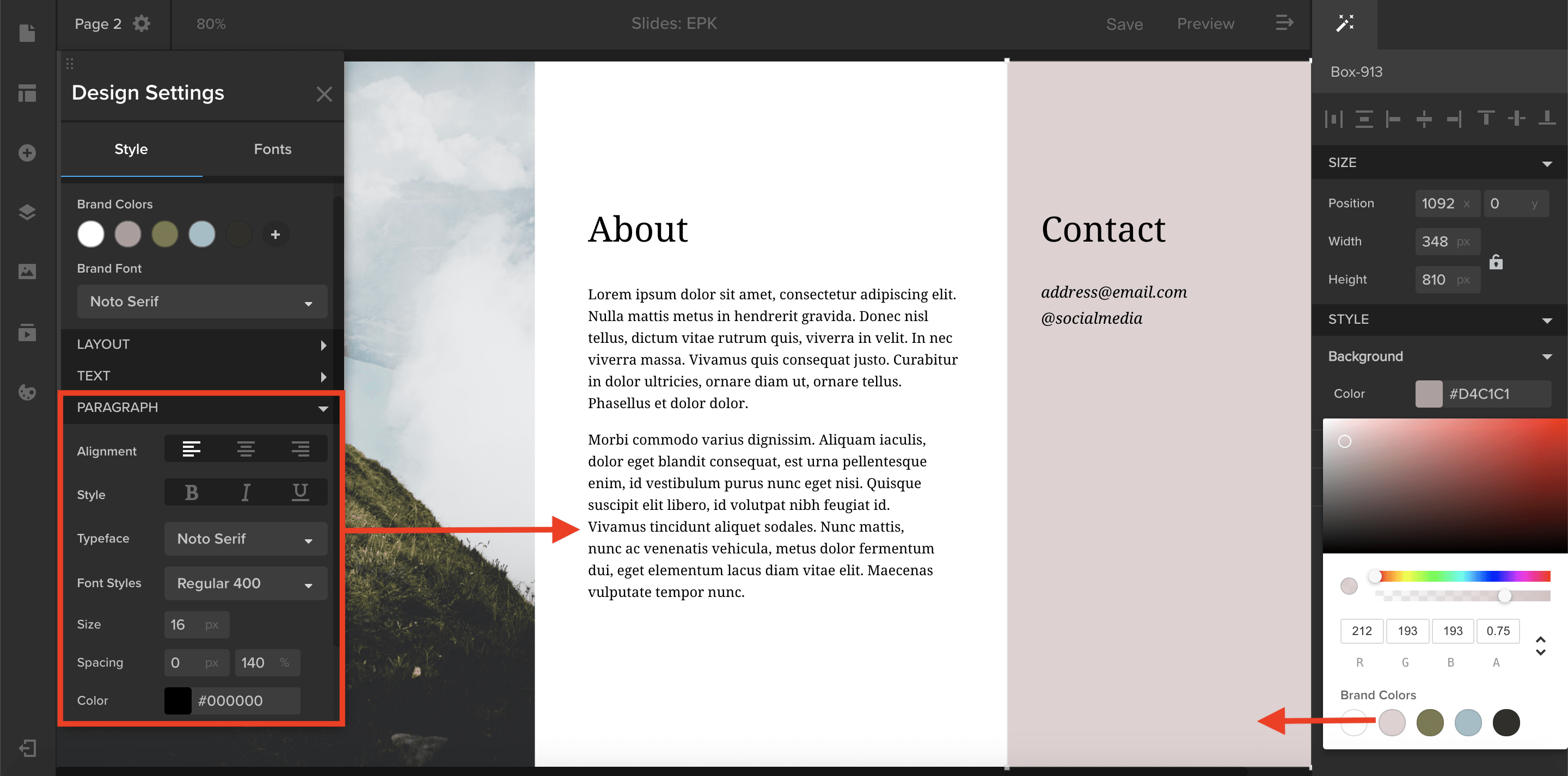
You can now create style presets under the Style tab in the Design Settings panel.
- In the Brand section of the Style tab, select a brand font to automatically apply to any new element added to your template. You can also select brand colors that will appear in your color picker any time you are changing an element’s color. Simply click on a color swatch to apply the brand color to your element.
- If you want to apply the same font and size to all of your paragraphs, select Paragraph and choose your desired font and size. These settings will be applied to all the new paragraphs you create and will override the brand front you have selected. Style presets can be applied to text elements as well as button, navigation, and search elements.