In 2020, we launched a video podcast series, Shift In Conversation. We now host two series — one for marketers and one for professionals in production — with a third coming soon dedicated to the advertising industry. Each week, we speak with creative professionals about how their work has changed in 2020 and what the future looks like for their industries, to share industry knowledge with our customers in Media & Entertainment, Marketing and Advertising.
Our host, filmmaker and Shift Media Marketing Manager Grace Amodeo, was inspired to start the podcast when COVID hit. “We needed to think about how to continue creating content that would reach our audiences. All of our customer events were cancelled, and much of the content we’d been working on had to be reimagined,” Grace said.
“The reach of video is enormous, and gives us the flexibility to share to so many new audiences beyond just our own customers.”
As a video-based platform, it made sense for us to create new video content for our audience. Grace noted, “The reach of video is enormous, and gives us the flexibility to share to so many new audiences beyond just our own customers. We quickly realized that our video interviews could also easily be re-published on audio podcasting platforms, to allow viewers to consume content however they liked.”
And thus our video podcast was born.
The Challenge: Project Management and Media Storage
The podcast is produced 100% virtually, with all interviews on Zoom. Unlike a traditional audio-only podcast, with a video podcast we needed to manage video, audio, and design files all at once.
As the podcast grew with more guests over time, the amount of files we were juggling quickly became overwhelming.
As the podcast grew with more guests over time, the amount of files we were juggling quickly became overwhelming. Grace remembers, “At first it was just the video file and a simple thumbnail, but we soon expanded into audio, written blog content, and a variety of social media deliverables. Each platform needed its own specific type of deliverable, multiplied by 20+ episodes (and counting). It’s a lot to keep track of.”
We needed a robust system that could handle project management, production and promotion, along with a way to securely store and organize content.
The Solution Part 1: Airtable for Project Planning
After trying out a few different tools, our team landed on Airtable to organize interviews, distribution, design, and marketing. We created a public Video Podcast Planner template that you can clone and use for free in Airtable. We created tables for all of the following work areas:
- Steps for booking a guest
- A production checklist for virtual interviews
- Post production deliverables
- A branding checklist
- Social media deliverables for sharing your content
We love the ability to visualize our spreadsheets with color-coded statuses and categories for each type of episode. You can even add emojis to quickly identify your tags!

Airtable’s Views feature allows us to quickly transform one sheet into multiple views, where we could visualize each episode with the guest thumbnail:

The calendar view is also handy, where we can easily transform due dates on a spreadsheet into a color-coded calendar view:

get your free template
Ready to start organizing your own podcast project? Clone our free Video Podcast Planner on Airtable to hit the ground running.
The Solution Part 2: MediaSilo for Media Management
Because the MediaSilo platform is designed to securely store and organize large amounts of media files, it’s the perfect solution for all of our podcast assets. In addition to our logo and promotional graphics for each channel, we have set design deliverables to promote each episode. These included a video thumbnail, article graphics, and social media graphics for Facebook, LinkedIn, and Instagram.
We decided to create dedicated folders for each speaker, so that as we are promoting a new episode each week, the marketing team knows exactly which folder to look for.

Because MediaSilo is optimized for video file storage, the app automatically captures all the file’s metadata, which you can surface in the metadata tab. This powerful feature is useful when checking the video settings for online publishing, where certain sizes and file types are often required.

Conclusion
Thanks to both MediaSilo and Airtable, we now have fine-tuned our process which enables us to produce several episodes each month. And the end result? Be sure to check out and subscribe to our video podcasts Marketing In Conversation and Production In Conversation. If you work in Advertising, stay tuned for our third channel dedicated to all things advertising coming in early 2021.
Want to try out MediaSilo and Airtable for your own video project? Sign up for an Airtable account here, and request a free 14-day trial of MediaSilo.
Our guest Charles Frank takes us through the personal journey of producing independent documentary content. Anyone with a camera and a story to tell can get started!
The following interview is an excerpt from our video series, Production – In Conversation. To watch the full interview and see more video content, click here. Or you can listen to the Shift In Conversation podcast here.
Charles Frank – Director and Partner – Voyager
Grace Amodeo – Marketing Manager – Shift Media
Grace: Tell us a little bit about yourself and the work you do with Voyager.
Charles:
I’m a documentary director. I do a variety of documentary work — branded documentaries, short-form personal films, and I just finished my first feature-length documentary. I’m a partner at Voyager, which is a production company that has a roster of directors that do broadcast commercials, branded documentaries, and original films.
(more…)

InSync PLUS is a full-service creative agency with deep roots in the film, television, streaming, lifestyle, and branding industries.
With more than 50 years of experience, InSync PLUS pushes artistic potential to develop compelling trailers, TV spots, and digital campaigns to support feature films and shows, including Ford v Ferrari, Jurassic World, and Goliath.
Its integrated, personalized approach to client services brings the agency into daily contact with designers, production, and advertising companies with the highest expectations for professionalism and security. To ensure these clients meet their business objectives, InSync PLUS takes a proactive approach to client satisfaction by embracing the unexpected, exploring the unusual, and always seeking out the most unique creative expression for its clients.
The partnership with MediaSilo—along with an emphasis on anticipating and exceeding client needs and looking beyond traditional secure sharing strategies—puts InSync PLUS in an ideal position to pivot its clients’ workflows quickly when the COVID-19 crisis hit.
New World, New Workflows
InSync PLUS was a long-time MediaSilo partner prior to the global health crisis—first as a Wiredrive user then upgrading to MediaSilo’s intuitive, highly secure platform in mid-2020. In the early days, its team of editors, producers, and creative directors was located on-premises and used Wiredrive alongside Aspera and Box to securely send and receive media using centralized storage and standard security policies.
Pre-COVID-19, a typical workflow included sending media links to studio executives for review and approval, then discussing feedback on a phone or Zoom call. But those traditional workflows had to evolve when the pandemic made remote work environments the industry standard.
According to InSync PLUS’s COO Patrick Esposito, one of the agency’s top priorities—before and during the pandemic—is ensuring that clients know their unreleased content remains safe at all times.
“The most important part of what we provide to our clients is the empathy and sympathy that we understand their needs,” Esposito said.
InSync PLUS clients were forced to upend workplace environments and embrace a brand-new way of working, which made supporting these values in the rapidly evolving production climate more critical than ever before.

How MediaSilo Helps InSync PLUS Support Evolving Client Needs
When the InSync PLUS team began using the MediaSilo platform for secure sharing in June 2020, they quickly discovered that it addressed their clients’ new challenges and use cases significantly better than Wiredrive.
MediaSilo’s upgraded experience provides a secure, end-to-end solution for InSync PLUS’s team and its clients in a few key ways:
Simple but Secure Login
When a new project begins, the InSync PLUS team adds clients as MediaSilo users so they can access works-in-progress. To maintain a secure environment, clients receive a customized login link to their ready-to-review content that provides an authentication layer without the need to remember yet another password.
Full Media Protection
Depending on the use case, someone on the InSync PLUS team will select a playlist of files or pick a project or folder to share. InSync PLUS grants clients access to these resources by adding the clients’ names as recipients and then sharing with them the unique link generated by the system.
Customizable User Permissions
MediaSilo’s user permission model gives InSync Plus administrators and project owners full security oversight. They can assign client users roles with permissions to view and download content within their respective projects, but only InSync PLUS team members can share, upload, and delete content.
Custom role capabilities allow InSync PLUS internal users to directly invite clients to one or more projects rather than sharing individual projects or folders as private links. This streamlines the client experience by centralizing access to all InSync PLUS projects in one location within MediaSilo.

Future-Proofing Secure Sharing with MediaSilo
When COVID-19 brought the entertainment industry to its knees, InSync PLUS stepped up to the challenge. Partnering with MediaSilo enabled the agency to operate at full capacity with a 100 percent remote team and stay focused on its clients’ needs during stressful, uncertain, rapidly changing times, including:
- Enforcing an elevated level of security for major studios and networks’ sensitive, pre-release content
- Providing a protected, centralized hub for clients to access ready-to-review work
- Quickly and smoothly adapting to an improved media-sharing workflow
Using MediaSilo, InSync PLUS will continue to build on its legacy and help its clients in the entertainment industry navigate the future with authentic, effective, and measurable integrated marketing campaigns.
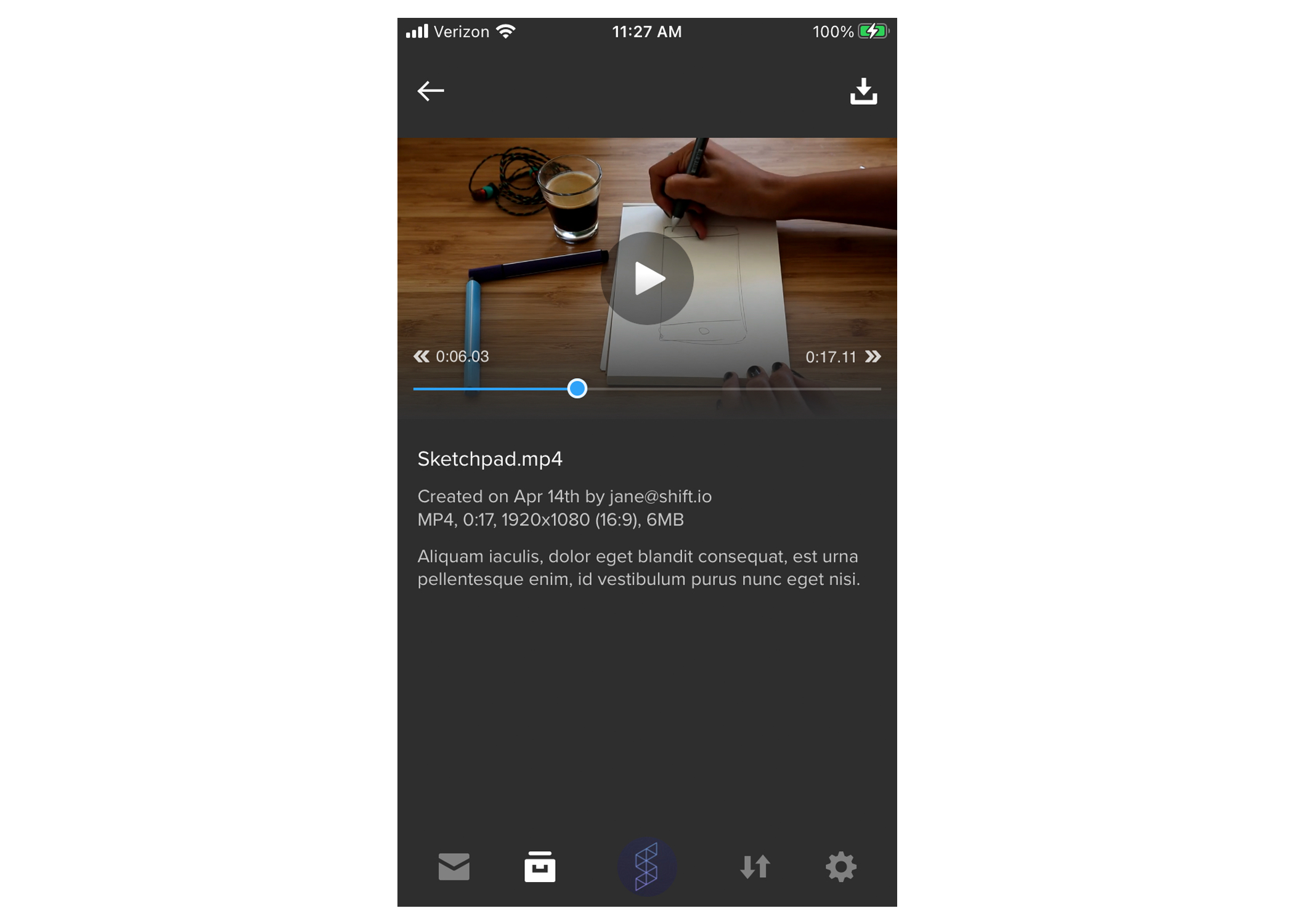
SHIFT GO now offers player controls for an improved mobile viewing experience. When playing a video, tap your screen to pause it and tap the play button to resume playback. Tap the arrows on either side of the progress bar to skip forward or backward by ten seconds, or scrub to a timecode using the progress bar.

When working on a creative project, your team needs to collaborate on all kinds of files, not only video. That’s why we’ve expanded review and approval functionality in MediaSilo to include comments, drawings, and text markup on image and document files. Your team can now collaborate on items like branding kits, contracts, video scripts, photography, digital marketing assets, and more. Our new review features support a variety of file types, including PDFs, Word documents, PowerPoints, and image files like JPG, PNG, and SVG.
View Mode vs. Review Mode
When you open a review link with documents and images, you’ll now see three viewing modes at the top of the file. “View” gives you a focused view-only experience, “Annotate” is where you’ll find text, boxes, and drawing options, and “Shapes” gives you more visual commenting options.
Did you know?
Invite recipients to leave comments on your own documents, images, and videos by selecting assets in your MediaSilo Projects and sharing them as a Review Link. Video review includes its own specialized set of features, including time-coded comments and markup. Learn more in our Sharing support article.
Image Review

On an image file, you can give detailed and visual feedback with any of the text, drawing, and shape tools. Format the size and color of text comments, and annotate a shape or drawing with a comment to it. You can always undo and redo your actions, or use the eraser tool to remove markings.
As the link sender, you’ll get email notifications when comments are left.
Document Review

In a document file, you’ll have the same feedback options, plus the ability to highlight and strike out text. For multi-page documents, open the left-side drawer to preview and navigate to different pages, just like in a PDF viewer. You can also use the search bar in the top-right to find specific words in the document.
Once you’re ready to approve a file, hit the thumbs-up icon in the top-right corner of the page. This will display a checkmark on your avatar and the file you approved.
Get Started
Ready to try these features? Simply send a link containing images and/or documents with the Request Feedback option toggled on, and your team can start reviewing today.
Are you new to MediaSilo? Request a free 14-day trial to level up your remote collaboration workflows.
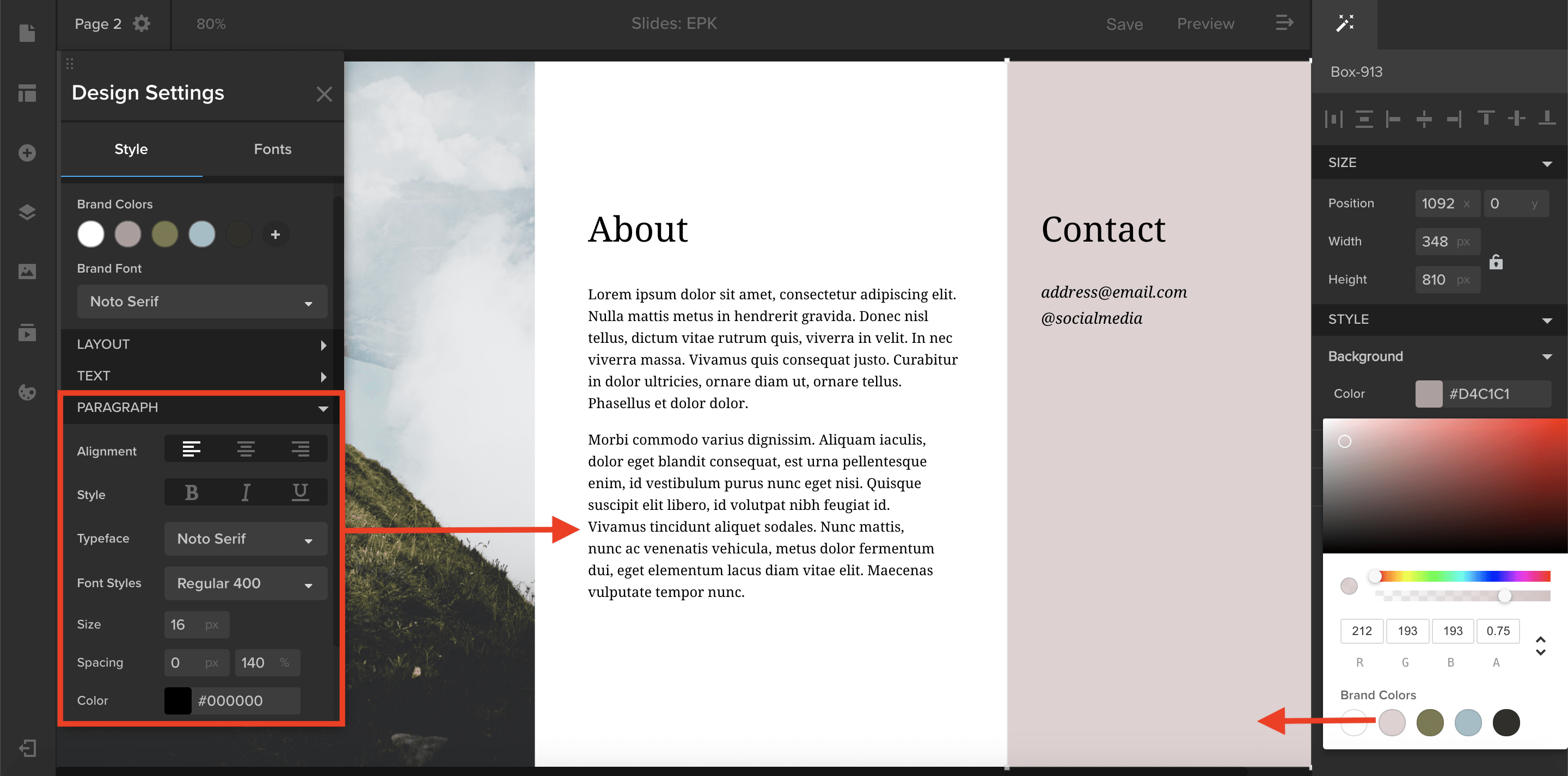
You can now create style presets under the Style tab in the Design Settings panel.
- In the Brand section of the Style tab, select a brand font to automatically apply to any new element added to your template. You can also select brand colors that will appear in your color picker any time you are changing an element’s color. Simply click on a color swatch to apply the brand color to your element.
- If you want to apply the same font and size to all of your paragraphs, select Paragraph and choose your desired font and size. These settings will be applied to all the new paragraphs you create and will override the brand front you have selected. Style presets can be applied to text elements as well as button, navigation, and search elements.
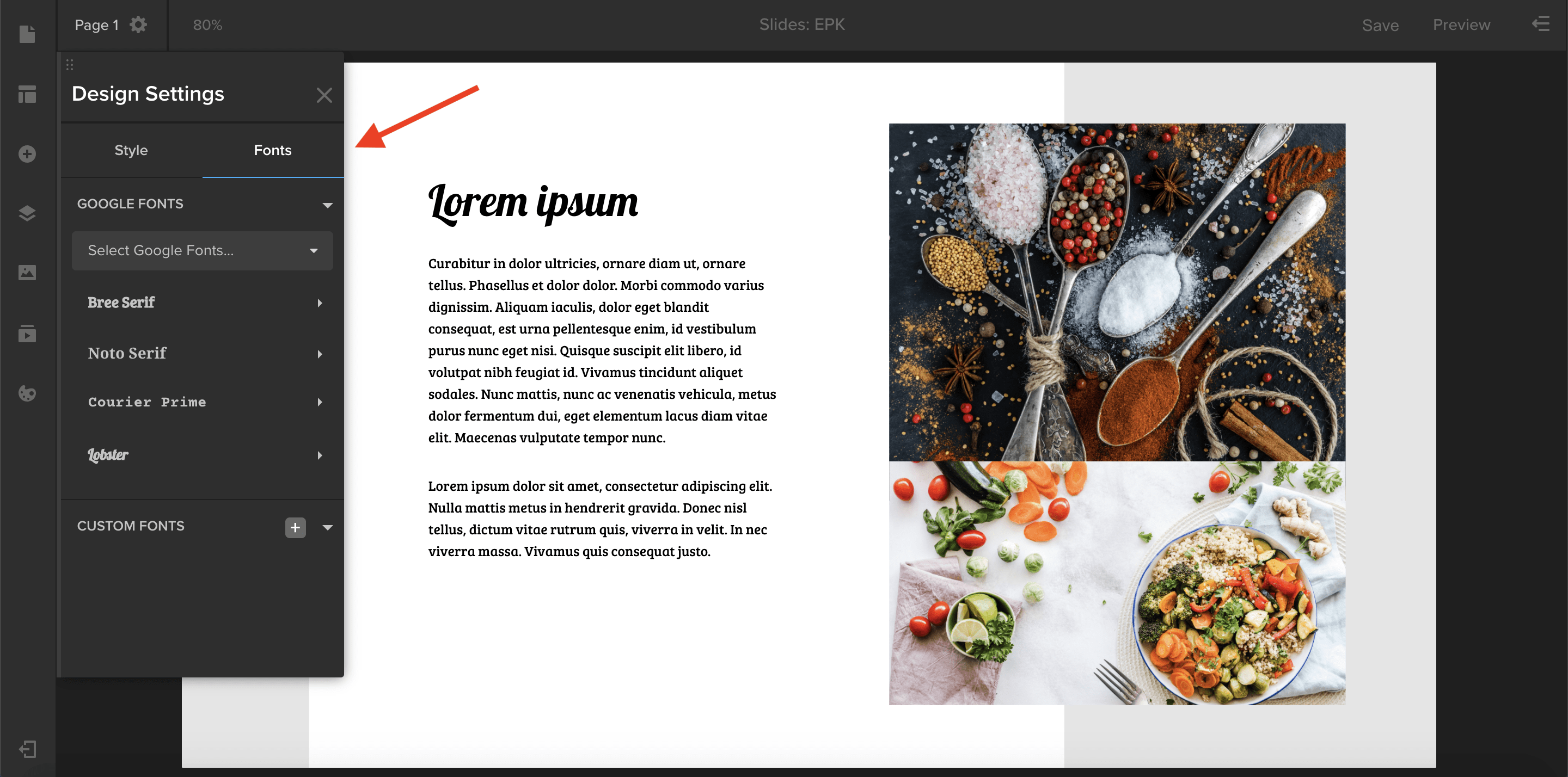
Spotlight now offers access to Google Fonts and allows you to upload your own custom font.
- To add more fonts to your template’s font library, open the Design Settings panel by clicking the palette icon in the left-hand toolbar. In the Fonts tab, select a font from the Google Fonts menu. Choose the font styles you want to use, such as Regular, Bold, or Italic. Click Add Fonts, and you are ready to apply the font to your text elements. Simply select a text element, and then choose your font from the properties panel in the right-hand drawer.
- To upload your own custom font, go to the bottom of the Design Settings panel, and click the plus button next to Custom Fonts. Select a .otf or .ttf file from your computer, and your custom font is ready to use in Spotlight.

Our Emmy-winning guest Gary Dollner takes us through his editing workflow, his creative philosophy, and the age-old questions of American vs British comedy styles.
The following interview is an excerpt from our video series, Production – In Conversation. To watch the full interview and see more video content, click here. Or you can listen to the Shift In Conversation podcast here.
Gary Dollner – Editor – Fleabag, Killing Eve, Veep
Grace Amodeo – Marketing Manager – Shift Media
Grace:
Tell us a little bit about yourself and your career.
Gary: I’ve been editing probably for about 25 years now, mostly in comedy. I sort of fell into comedy, but it’s a nice world to be in, the people are generally great and it’s nice to make people laugh. Career-wise there’s been no pattern, I’ve zigzagged all over the place. Recently things have been going quite well, probably coincided with meeting a certain Miss Phoebe Waller-Bridge. We’ve done some projects together that have just taken off.
Grace:
Tell me about your editing workflow, and how you go from raw footage to a finished cut.
Gary:
I’ve been lucky enough to work with some really brilliant assistant editors and they do all the hard work for me in many respects. When I come into the cutting room all the rushes are there, synched up and ready to go. So then it’s just a case of watching everything and starting to put the scene together. For years I used to watch everything without cutting anything, and I’d have big notebooks to make loads and loads of notes. I changed my work process a couple of years ago, jettisoned the notepad and started putting together selects reels while I was watching rushes and then construct the scene from that.
Grace:
Do you work scene-by-scene, or construct the edit chronologically?
Gary:
No, often directors shoot out of sequence anyway so you start on day one wherever they’ve shot on the first day and just go through it. What happens is you try and get a scene to the best it could possibly be, and then you put the scenes together. Of course the whole piece then has another dynamic, where you’d have rhythmic peaks and troughs within the scene they may have to be tinkered with because then they crash into the next scene.
Grace:
How many versions of an edit do you normally go through before it’s finalized?
Gary:
There isn’t a number. I’ve been really fortunate to work with some brilliant people over the years. I’ve got a 20-odd year working relationship with Armando Iannucci, and he’s got a pretty unique way of working. Often going back through projects in the past, there’d be so much material that was scripted but then there would be additional material that was improvised or semi-improvised on the day. So you can’t just refer to the script because there is all this other brilliant material. In order to get a handle on how to treat the material, I had to start making notes which is where that little system came from. I’d have to write them down or else I’d forget what they were. I developed a way of working that was very attentive, I had to watch everything because you never know where there might be one little nugget, one version that the performer would never replicate again. It’s so crucially important to watch all the material and know the material, because no one knows it better than you do. Further down the line a director will be reliant on you to remember every little bit. I never cease to be amazed at the impact of just changing certain lines, it just might be the finishing touch on a scene.
Grace:
Do you see a fundamental difference between editing for comedy and editing for drama?
Ultimately what we’re trying to do is manipulate the emotional reactions of the audience. So if you can make people laugh, the principles are quite similar in terms of making them cry.
Gary:
I don’t. And I happen to think I’m right about that, but unfortunately there’s a lot of people in the industry who disagree. People often get pigeonholed into certain boxes where they get stuck. My first big drama show was Killing Eve, and one of the things I was keen to preserve in the script were the comic beats within the story. For my money, I think it’s more difficult to cut comedy. With comedy you’ve got all of the story beats and the character traits and the narrative arcs that you’ve got to nail just like in any drama. But on top of that you have to get some laughs as well. Ultimately what we’re trying to do is manipulate the emotional reactions of the audience. So if you can make people laugh, the principles are quite similar in terms of making them cry. A lot of the comedies I’ve done in more recent times have tried to blur that line, which is an area I’ve always found really interesting because I don’t think it’s necessarily one or the other.
Grace:
When you have a script and actors and directors who are already adding so much comedy to a piece, how do you find additional layers of comedy in the edit?
Gary:
I think a lot of it is instinct, but there are certain principles that work in a comic setup in the same way it would work for a dramatic reveal. Essentially, the most important thing is what is going on in people’s faces, because they’ll tell you how funny they are when you watch them. I watch rushes back and if something makes me laugh it’s going in, it’s as simple as that. You start cherry picking from all the different takes, and all of a sudden you’ve got a bit that’s really funny from that take and a killer ending from that take and you join them all. But sometimes it’s not as straightforward as nicking all the best bits, because rhythmically it might be slightly out of kilter. You’re constantly massaging the rhythm of a delivery. The brilliant thing that really good performers bring to the party is that they might be sitting there not saying a word and they are absolutely adding value all of the time. It’s all going on in their face. I was blessed on Fleabag because they are all so good and they gave me an abundance of opportunities. And then that becomes a different problem in itself because now there is too much, so you have to start losing bits that you really like. If you can find the time to experiment, that’s when you can add comic value that wasn’t inherent in the script.
The brilliant thing that really good performers bring to the party is that they might be sitting there not saying a word and they are absolutely adding value all of the time.
Grace:
Do you edit differently depending on whether the show is American or British, or intended for either American or British audiences?
Gary:
I don’t think so. My attitude has always been, you have to react to the material. I rarely go into anything trying to impose a certain style because you’re going to set yourself up to fall. You have to react to the material, not the other way around. That’s always the nice thing about working on a new show, you can experiment and you’re finding its feel stylistically. I just finished doing a feature for Disney, a film called Godmothered, and I was working with a British director, Sharon Maguire. We never even mentioned the American audience, other than certain phrases in the script where there was some transatlantic miscommunication where Brits don’t understand certain Americanisms and vice versa. I don’t think stylistically there’s a major difference.
Grace:
What is it like to collaborate with a director on any given edit?
I rarely go into anything trying to impose a certain style because you’re going to set yourself up to fall. You have to react to the material, not the other way around.
Gary:
I think without exception, all directors I’ve worked with cannot wait to get into the edit. They just want to get their hands on the material. The ones who I have the best working relationships with are the people who don’t come in with really rigid ideas of how a scene has to be put together. There aren’t any major shocks because we send the director our cut scenes every Friday, so they have a sense of how everything is going to come together. The really fascinating process is once you’ve got a show or film actually assembled, it’s the microsurgery of zooming in on close details, nuanced performances, or certain looks. Tinkering with rhythms on a very sub-level becomes quite time-consuming, and you get absorbed into it.
Grace:
What is one of the biggest lessons you’ve learned in your career as an editor?
Gary:
There are no shortcuts. The most important thing is to watch all of the material. I would also say you have to hone certain diplomatic skills, because half the trick is being able to work a room. If you’ve got to sit quite close to someone for three, four, six, eight months you’ve got to be able to get on with them. It’s about how you deal with people as much as anything else. And the willingness to throw things up in the air and change things. Before I might have done my cut and thought that’s it, that’s the best I can do. If anyone came in and gave notes I would get quite frosty about it. But notes are either good or they’re bad, and you often have to go through the process to find out.
Our guest Michael Pirone has a knack for making even the most complicated pieces of software easy to understand in product and brand videos. Video marketing is not just for B2C anymore, short and sweet video content has arrived for B2B and SaaS markets!
The following interview is an excerpt from our video series, Marketing – In Conversation. To watch the full interview and see more video content, click here. Or you can listen to the Shift In Conversation podcast here.
Michael Pirone – Co-Founder & Director – Vidico
Grace Amodeo – Marketing Manager – Shift Media
Grace:
Tell us a little bit about yourself and Vidico.
Michael:
My name is Michael, I’m one of the co-founders at Vidico. Vidico is a video production company, we work with brands like Square, Spotify, DigitalOcean, and some few hundred tech startups all the way from seed stage to late stage too. We have a real knack for explainer videos, and communicating complexity in a way that’s easy to understand across both animation and live action filming.
Grace:
In video marketing, what is the difference between selling a product and selling a piece of technology?
Michael:
To look at communicating complexity in a way that’s easy to understand — what that means is taking quite a hard communications concept and simplifying it to the point where your addressable audience widens, so you can really maximize the potential of who your company is able to speak and sell to. In practice that involves taking the company pitch deck or a 10 minute talk with the CEO and turning it into a 60-90 second video that really clearly articulates the problem, the company providing the solution, and the hierarchy of benefits which is how your solution provides value. We have a real fundamental belief that technology has provided more opportunities for innovation. When you have a founding team that innovates, they essentially have to build for the future. This really leaves a large communications gap because people don’t know how your product provides value yet, until you articulate it well.
Grace:
When you get a brief for a new video project, how do you get started?
Michael:
Vidico has developed its own set of briefing forms for each content category we offer, so there might be one for animation and one for live action and so forth. That framework is where the companies place everything they want to to be said — the “what” of the video. Once we have those materials, that’s when the work comes under Vidico’s side and we land on three important areas. The first is perspective, from which perspective do we tell the story? If the user tells the story, you get more of an empathetic response. If the company tells the story, you take the stance of more of a domain expert so you get a response which is more calculated. Step two in the process is market profiling. So now that we’ve chosen who tells the story, what environment are they in and who are they speaking to? If you are able to land on both the storyteller and the environment you actually develop a market profile, which is really important. The other component is product, we need to articulate three to four pillars or truths of that product. Once we have perspective, market profile, and product, it’s really easy then to put yourself in a place where more rapid idea generation is able to work.
Once we have perspective, market profile, and product, it’s really easy then to put yourself in a place where more rapid idea generation is able to work.
Grace:
Tell me about the collaborative relationship between your team and the brand’s team.
Michael:
Vidico’s process is built in a way that we wouldn’t move from say a concept to a script or a script to a storyboard without the client signing off on each stage. While this may seem arduous, it’s important for a few reasons. It’s a lot easier for us to stay on brand that way, to the point where we’ve never had an issue at the end of the process where someone says that this is totally not what they signed up for. I’m also particularly proud of our team and our ability to break the mold. We work with a lot of tech companies, and sometimes you want to reach for that one tool that you have that you know is going to do the job for a particular brief that comes in. But one thing that we are really strong about is making sure that for each project the effort is super unique and that we involve the client in each stage of the process. There’s enough opportunity for them to insert their own unique company DNA into the project. We really like to try to aim for a collaborative and quite a democratic process.
Grace:
Do you think SaaS, tech, and B2B companies are producing more video content these past few years than they have been before, and if so why is that?
Michael:
I think it’s a firm “yes”. We’ve definitely seen more uptick across the board and it’s not just from seed SaaS companies and the new wave, it is the later stage SaaS companies too. If you think about Zoom, TikTok, and Netflix, they are really occupying the mind share of companies that we interact with on a daily basis in 2020. And they are fundamentally based around video content for your communications. Video based companies are an integral part of our digital lives, both on the consumer side and enterprise too. I think tech companies are better at spotting these trends, they are more data driven and can see these trends appear faster than anyone. Tech companies and SaaS companies are optimizers by nature. They understand how leveraged video can actually be once you have the asset, they quickly know how to multiply the efforts and to spread it across every channel. Another exciting area is localization, it’s getting a lot easier to speak to multiple audiences using video and have video localized at a fraction of the cost of the original project. For tech companies, which are really looking horizontally at what different international markets they can go into once they’ve proven out their own local markets, I think it’s another strong point of rationale as to why video content is being taken up.
Tech companies and SaaS companies are optimizers by nature. They understand how leveraged video can actually be once you have the asset, they quickly know how to multiply the efforts and to spread it across every channel.
Grace:
How have you managed to stay successful, and even grow, during the pandemic?
Michael:
We’ve grown around 25-30% this year, which I think is a pretty good result considering the pandemic and what was happening around us. In terms of how that was possible, two years ago we made the decision to create not only campaign work but other types of videos like case studies, testimonials, and shorter product videos. We expanded our portfolio of different content categories. Thank goodness that change was done because it really enabled us to keep working with these clients during this time. Even when there were restrictions on larger projects, we still had the flexibility and in some cases the velocity to really keep outputting content. The second reason is that 50-60% of what we do now is animation, so obviously that wasn’t impacted at all and kept going very strongly. That’s one of the benefits of being a production company that really does both, which is fairly atypical. The last thing is, if you just look broadly at tech during this time, it’s been remarkably resilient. So luckily we’re targeting this audience which had a high growth phase a couple of years ago, but is also really accelerating through this pandemic. The appetite for video from our target market didn’t really dry up and has continued to soar.
Even when there were restrictions on larger projects, we still had the flexibility and in some cases the velocity to really keep outputting content.
Grace:
As you create your own marketing plan for Vidico, what have you learned from the work you’ve done with your clients?
Michael:
Three or four months ago Vidico produced its first proper brand video where a number of team members spoke in an interview format, and we supplemented the interview footage with some really great scenes of our work. It was a really great experience. There was no real difference, believe it or not, with the process that we use with clients and the process we used on ourselves. It really forces you to simplify, it came down to establishing our hierarchy of benefits, succinctly summarizing our problem, making a killer one-liner to counter that problem, and leaving the audience with the next step. We really need to show the type of craft that goes into these videos, because there is a bit of a mismatch of expectations to how much work goes into videos. It’s a complex medium, there’s a lot of layers, so we wanted to tease that out and show the viewer all the different layers. We’re making more of them!
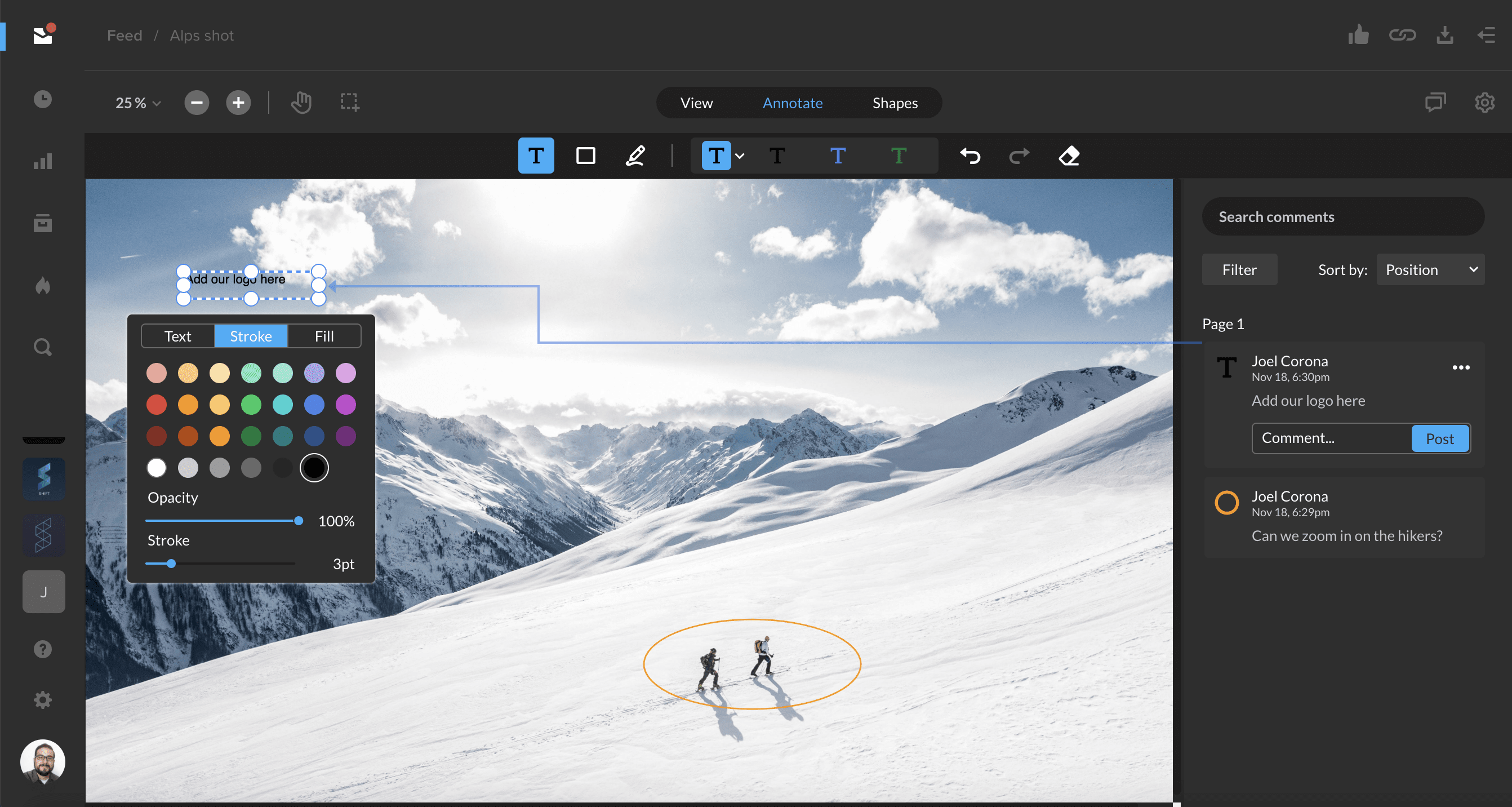
After sharing an image for review, you and your link recipients can now annotate images with comments, drawings, and shapes. Change the size, color, or style of these elements to customize your review experience.
Image review is supported for common image file types, including jpg, png, psd, and svg.
Learn more about image review in the Support article below.

Tagging assets is now easier with auto-suggested tags. To start tagging assets, select an asset and open the Info tab in the right-hand drawer. Click the blue ‘+’ button next to Tags to enter an edit mode where you can add or delete tags. To add tags, simply start typing, and existing tags in your workspace will be auto-suggested.