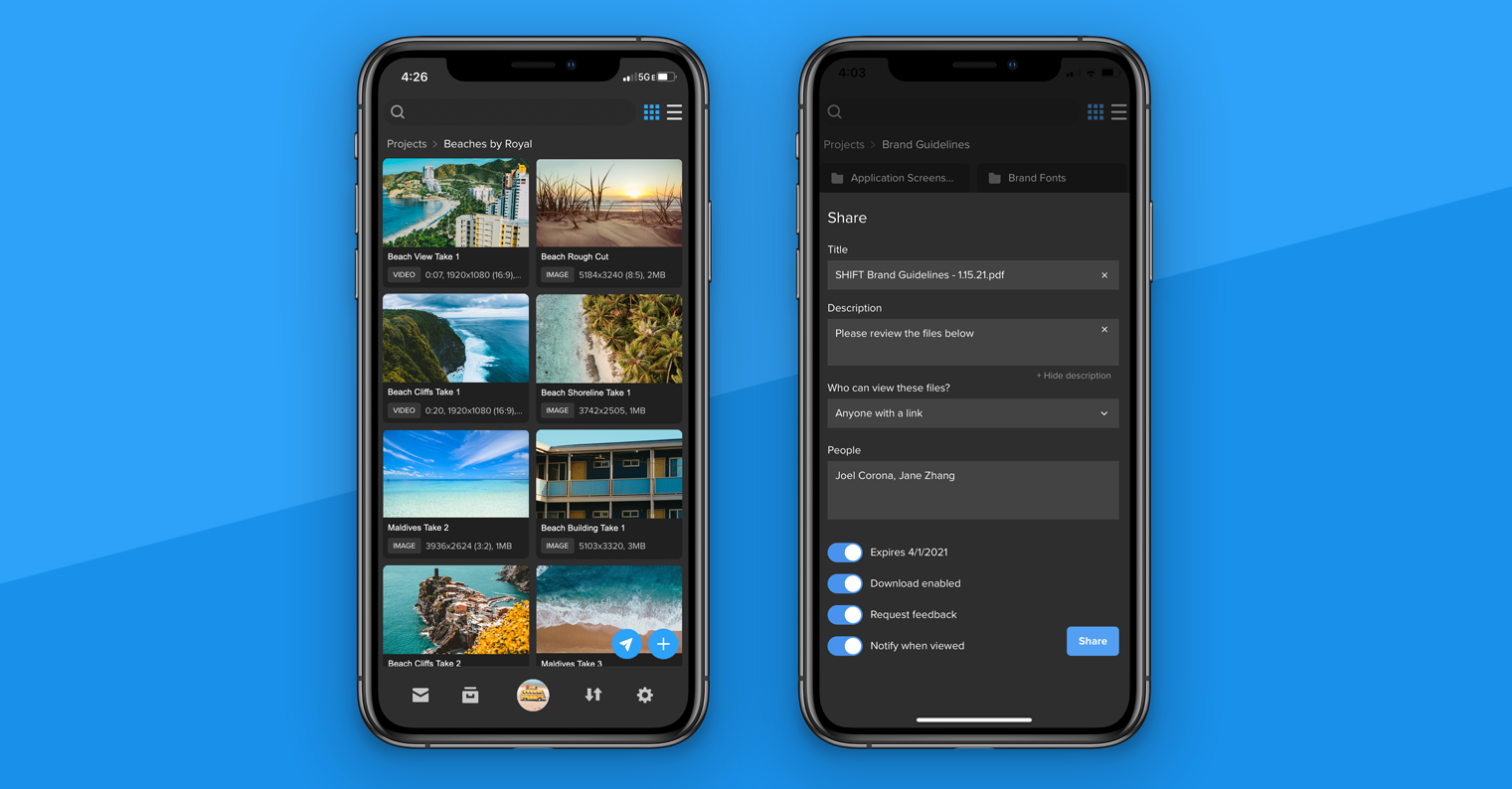
You can now share files directly from the SHIFT GO mobile app for iOS and Android devices.
- When you open a project or folder, tap the blue airplane icon in the bottom right corner.
- Select the assets you want to share. A blue checkmark appears on the assets you’ve selected.
- Once you’ve made your selection, tap the Share button again to view your review link settings. Enter your title and description, add your recipients, set an expiration date, and choose additional link settings.
- Tap Share when you are ready to send your review link.
To simply create a review link without entering recipients, leave the “People” section blank, and tap Share. Then, tap the Share Link button to send the review link using email, text, or other apps on your device.
To download SHIFT GO, navigate to get.shift.io/mobile on your mobile device.
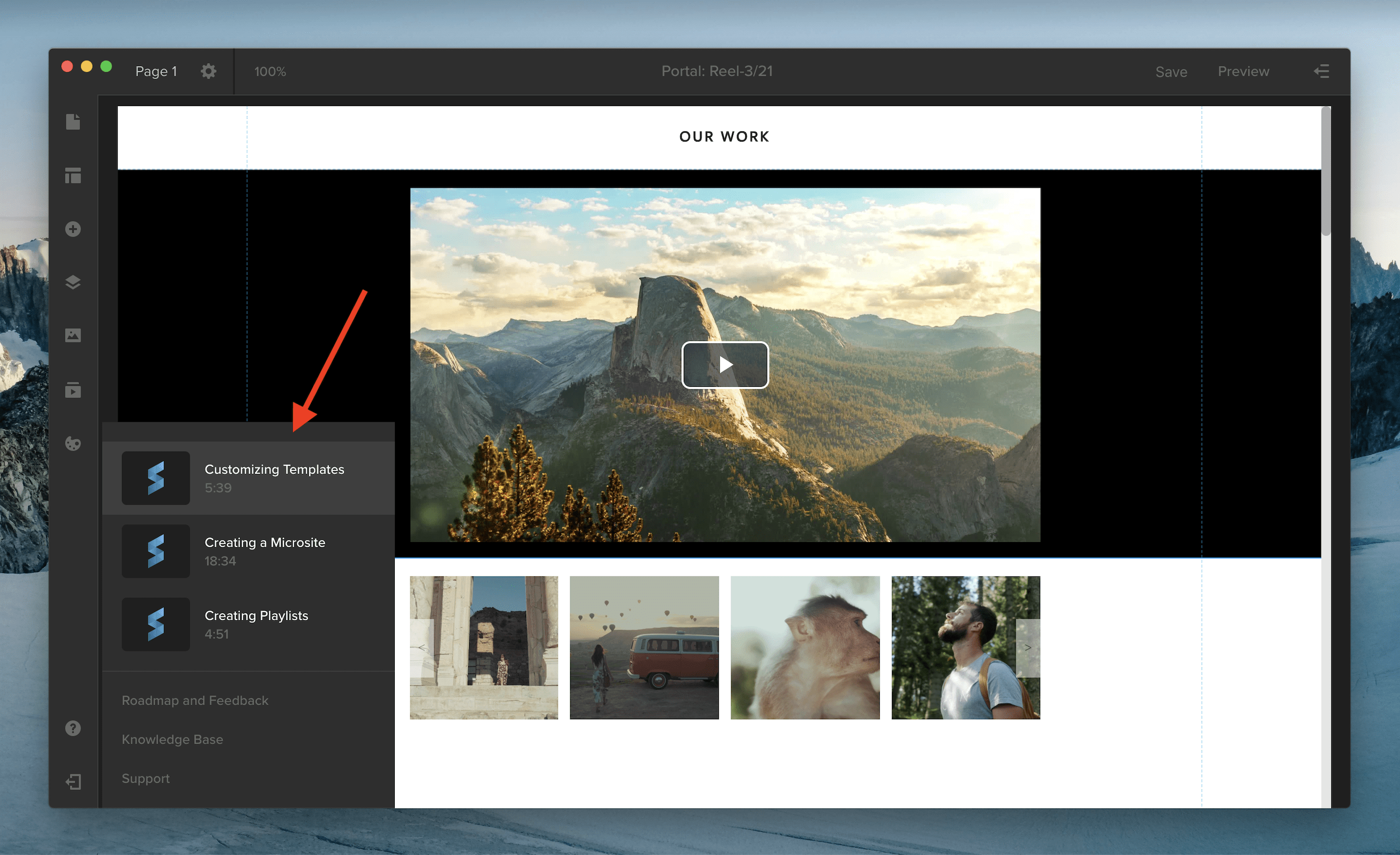
You can now access Spotlight video tutorials to learn more about creating playlists, customizing your template, and building your own microsite.
When you’re in the Spotlight editor, click the Help icon in your left-side navigation. Here, you’ll find links to three new videos on key Spotlight workflows.
Underneath, you can click “Roadmap and Feedback” to see what the Spotlight team is working on or to submit product feedback. Select “Knowledge Base” to access support articles and “Support” to chat with the Support team.
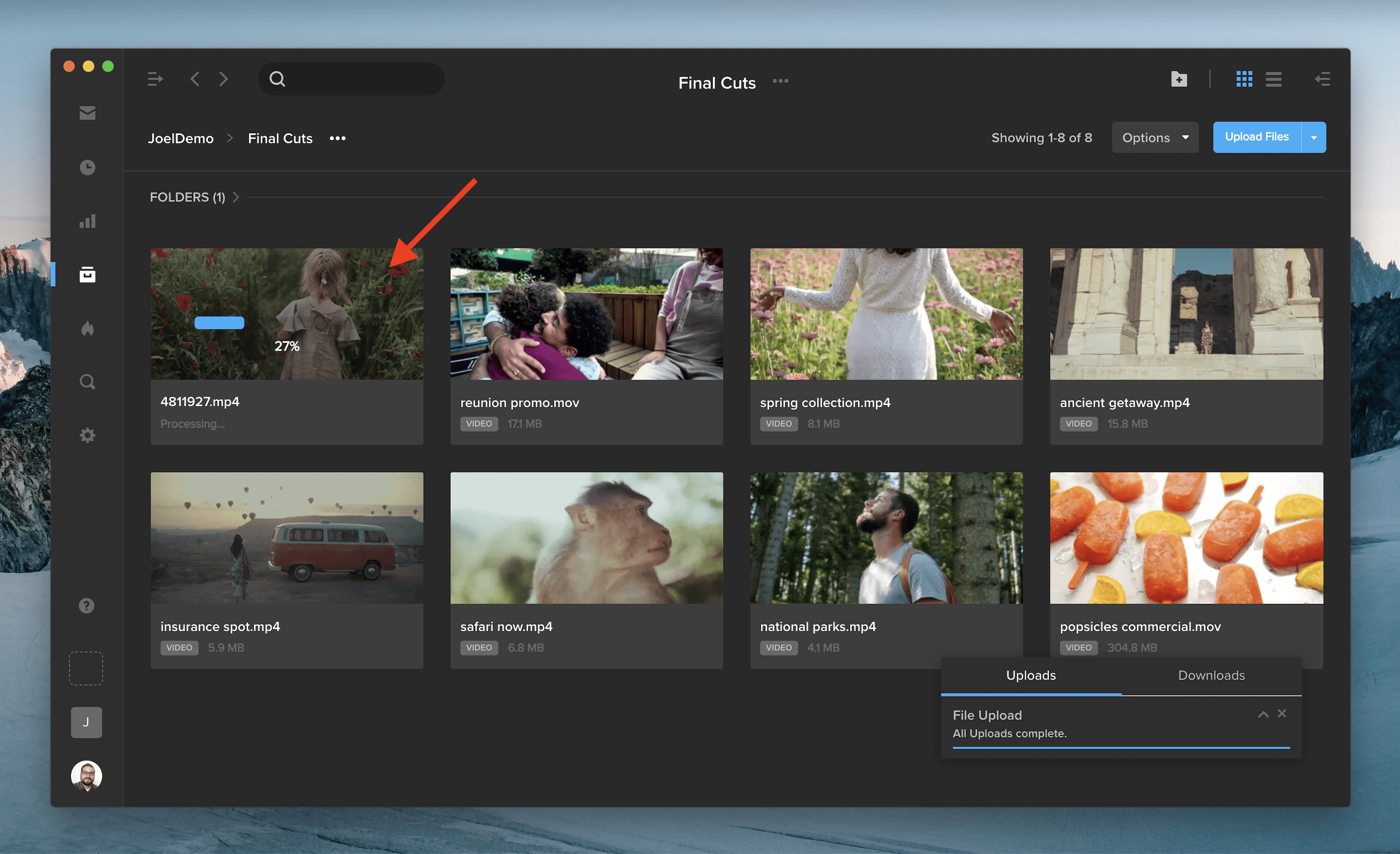
When you upload a video to SHIFT, the asset tile now features a progress bar and processing information, so you can keep track of your file’s progress as it is being processed. If you upload a video to a SafeStream-protected project, you can also see when the watermark is being prepared.
Producing, distributing, and sharing media assets and works-in-progress is complex during the best of times. As we collectively find our footing in the “new normal,” intuitive, flexible, and secure media management tools have become a business imperative.
Many teams struggle to manage content across disparate tool sets with different solutions for asset management, approvals, presentations, and distribution. This disconnected approach to managing media assets is not only cumbersome and inefficient, but it’s also incredibly insecure.
MediaSilo understands these challenges well, so we developed a solution that enables your team to create a branded, seamless, and secure production process all in one place.
Spotlight is a digital experience builder that is connected to all of your projects and assets in MediaSilo, whether you’re pitching your latest reel to a client, seeking buy-in for a new advertising campaign, or updating stakeholders on a project, Spotlight makes it easy to integrate, share, collaborate, and customize the experience all while staying on brand.
Here are four key ways MediaSilo is using Spotlight to reimagine media management for the new era:
1. Code-Free Customized Templates
Your MediaSilo account comes enabled with a collection of professionally designed templates ready for use. Customizing these templates to support branding is simple in Spotlight. Add your logo, brand colors, and fonts into your chosen templates, and your team has instant access to a library of templates where they can plug in company assets and publish or present custom branded reels, dailies, or microsites in minutes.
If off-the-rack templates aren’t for you, Spotlight supports a design-your-own template option for fully customized assets that are easy to deploy—no coding required.

2. Static and Dynamic Playlists
In today’s fast-paced production environments, there is no room for downtime. So, Spotlight’s powerful editor lets you build a client reel, design a brand-new microsite, or create an attention-grabbing presentation in minutes.
Using shareable playlists, you can group assets together into a reusable collection that can be inserted into any Spotlight presentation.
Playlists come in two varieties, and the type you use depends on where you are in the production process:
- Dynamic playlists: Creating a playlist from a project or folder allows the playlist to be automatically updated in real time when files are added or removed in a project or folder. This means you won’t have to resend links to clients to ensure they have the most current assets.
- Static playlists: These playlists house collections of assets that won’t be changed. Spotlight doesn’t update static playlists in real time, so they are primarily used for sharing finished work with clients.

3. Seamless Connection Between MediaSilo and Spotlight
You can easily pull media straight from your projects in MediaSilointo your Spotlight designs without having to download files or upload images between systems. Simply drag and drop media into the Spotlight editor, reorder as needed, and you are ready to hit play.

4. Secure Sharing with SafeStream
Whether you’re concerned about cyberattacks, intellectual property theft, or both, securing your workspace and assets is crucial. MediaSilo enabled Spotlight with high levels of security using proprietary technology and access management policies.
For example, if you need to share protected content with only a select group of team members, Spotlight provides multiple security options, such as restricting the audience that can view the asset, adding password protection, and making the content available only in the Spotlight workspace.
When you’re ready to share your finished work with the world, SafeStream watermarking will instantly secure your videos. SafeStream prevents content theft and misuse through personalized visible and forensic watermarks containing user data that can easily be traced.

Spotlight provides a secure, intuitive, all-in-one space to present, organize, and secure digital assets in MediaSilo making it easy for producers to transform their content into stunning visual experiences.
To learn more or get started with Spotlight today, dive into our Spotlight knowledge center and sign up for a free trial of MediaSilo.
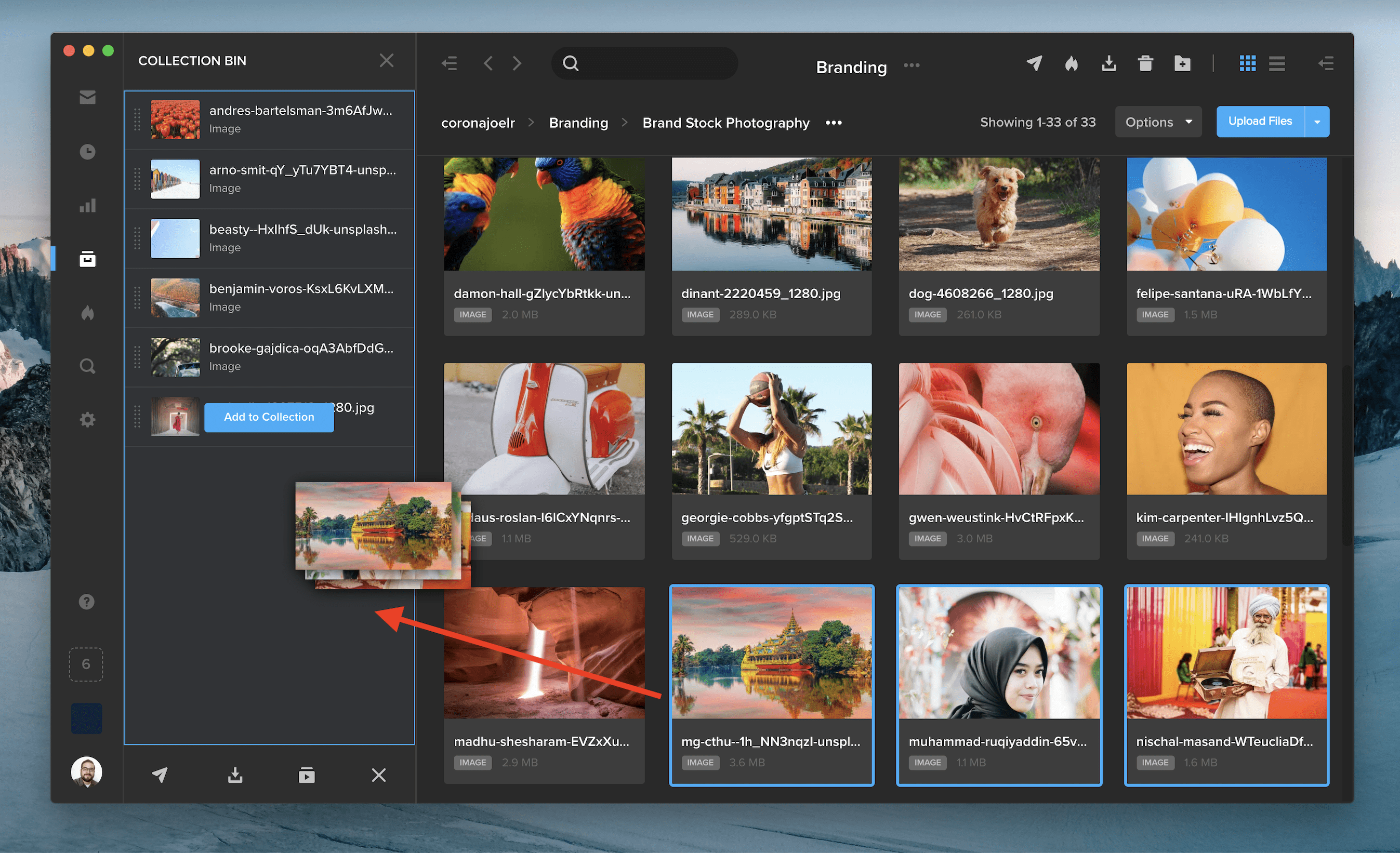
The collection bin lets you gather files from different projects, so you can easily share, download, or save them as a new playlist. You can add files to your collection bin in three ways:
- In the left-side navigation, click the empty box icon above your workspace logo to open the collection bin panel. Drag and drop your assets directly into the panel. The collection bin icon will update to display the number of assets currently in your bin, which can hold up to 250 assets.
- You can also drag and drop assets directly onto the collection bin icon in the left-side navigation.
- Right click on a file and select “Add to Bin.”
When you’re finished adding items to your bin, click the Share, Download, or Create Playlist button along the bottom of the collection bin panel. To bulk download assets, make sure you are using the SHIFT desktop app.
You can reorder items in your collection by clicking and dragging them. Hover over an asset and click the “X” button to remove an item from the bin. To clear your entire bin, click the “X” in the bottom right corner of the panel. Your bin is also cleared when you log out of SHIFT.

The actions you can perform in the collection bin are determined by your project-level permissions. If you do not have sharing permission on certain items in your collection bin, you’ll see an alert message in the panel and a red dot will indicate which assets you do not have permission to share.
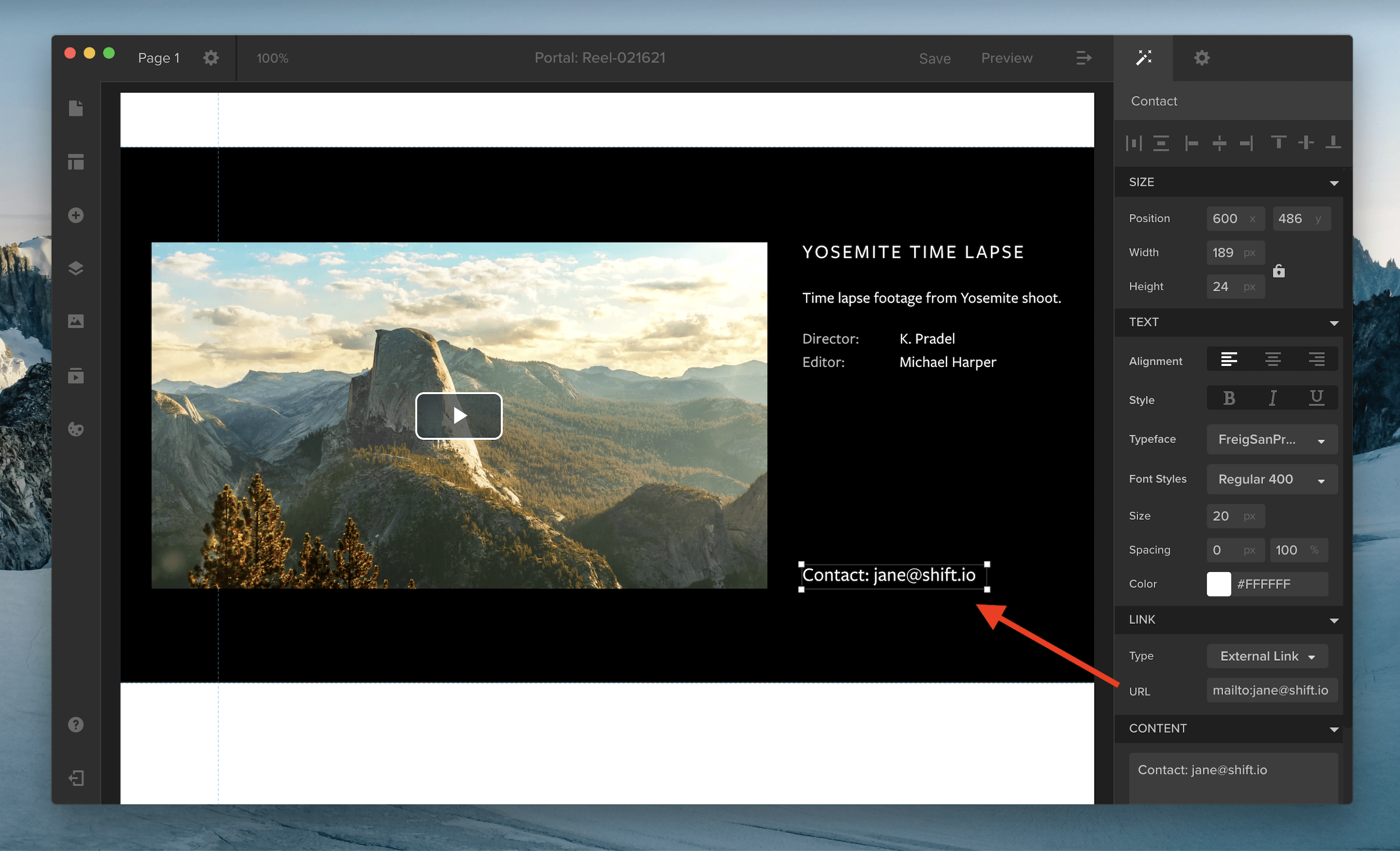
Spotlight now supports Mailto links that activate your default email client and open a new email window. To create a Mailto link, select a text element, and go to the Link section of the properties panel. Choose External Link as your link type. In the URL field, enter “mailto:” followed by the email address of your email recipient.

When you create and customize a new Spotlight, you may want to reuse the same template in future presentations. Now, you can save the template to your template library, so you can edit, clone, or reuse the template at any time. Just click Save along the top of the page, and select the Save as Template option.

In 2020 we launched our video podcast series Production in Conversation, in which we talked to professionals from across the video and content production industry about their work. Here, we’ve compiled for you some of the most impactful things we learned from all of our podcast guests about how they tackle their projects, advice for fellow creatives, and the visions they have for the future of the industry!
1. Representation matters
Amanda Sayeg — Independent Producer
The ability to see yourself in the media that is created is an invaluable aspect of film and video production, and that kind of representation goes beyond just what we see in front of the camera.
“Our job is to tell stories that represent our society. In order to tell the stories and in order to portray an accurate picture, we need to have diverse people behind the scenes. We’re slowly seeing diversity on camera, but it’s very important in order for the stories to be told right that we have representation behind the cameras too. Those are the people writing, those are the people crewing up, those are the people making decisions. There is so much more authenticity and truth when you not only see diverse actors on screen, but you have a whole crew of diverse people supporting that actor.”
2. Bring emotion to your editing
Gary Dollner — Editor
From “Fleabag” and “Killing Eve” to Disney’s new “Godmothered”, Gary knows his way around an edit. So is it harder to bring emotion to a comedy or a drama? He gives us the answer.
“For my money, I think it’s more difficult to cut comedy. With comedy you’ve got all of the story beats and the character traits and the narrative arcs that you’ve got to nail just like in any drama. But on top of that you have to get some laughs as well. Ultimately what we’re trying to do is manipulate the emotional reactions of the audience. So if you can make people laugh, the principles are quite similar in terms of making them cry.”
3. Collaboration and diplomacy
Gary also encourages editors to think about the relationships you have with your fellow collaborators, and the importance of open communication and humility.
“I would also say you have to hone certain diplomatic skills, because half the trick is being able to work a room. If you’ve got to sit quite close to someone for three, four, six, eight months you’ve got to be able to get on with them. It’s about how you deal with people as much as anything else. And the willingness to throw things up in the air and change things. Before I might have done my cut and thought that’s it, that’s the best I can do. If anyone came in and gave notes I would get quite frosty about it. But notes are either good or they’re bad, and you often have to go through the process to find out.“
4. Documentary editing
Wyatt Rogowski — Orwell Films
Editing for documentaries is an entirely different beast than what a narrative editor encounters. With so much footage to go through, it’s all about subtracting until you find exactly what you need.
“I like to say documentary editing is almost like having a sculpture. You start off with a big mound of clay and the first rough cut is just figuring out what the shape is. Then slowly as you keep going, you keep refining. You get to the point where you have your fine cut, and it’s like you can see the lines of the face. Then you get to the lock cut and it’s a beautiful sculpture, but it’s still plain. And then you get to the finishing process with color and sounds, and that’s where you do the paint and it looks beautiful.“
5. Working as part of a team
Avner Shiloah — Orwell Films
You aren’t always working by yourself, and sharing the job amongst a team of collaborators is all about serving a common goal, and leaving your ego at the door.
“The goal is always to make the best movie we can, it’s not about any one of us shining through – it’s about just serving the narrative. It’s also useful to have that sounding board of the other three editors, and be very honest with each other. It’s so helpful to the creative process to have people that you trust and who know what the process is. When you are the single editor working in a vacuum, sometimes it gets really difficult to know if you are on the right track.”
6. Stay adaptable
Jeff Beckerman — Rain the Growth Agency
Following such a tumultuous year, people working in production had to continue to find ways to bounce back. The good news is, they are really good at it.
“The one thing you can say about production in film and television is they’ve always figured out a way to adapt, sometimes better, sometimes worse. We’re all trying to adapt, work, and grow. Get production companies back working again, and agencies back on their feet and clients advertising. We’re all in this together, so the more we can all succeed the better.”

7. Hire the right people
Dustin Schultz — Union
Your project is only as good as the team that you build, and Dustin shared a few key attributes to look for when hiring your crew to give you the best chance of success in your creative projects.
“There’s a great author, Patrick Lencioni, who said — when hiring people, look for people who are humble, who are hungry, and who are smart. So what does that mean? Humble people are going to be putting others before themselves. They’re not doormats, but at base level they are courteous. A hungry person is not desperate, but they are very action-minded. They are going to jump in there. A smart person on a production is someone who studies their role, and is a constant student of their role. We’ve had great success applying these filters. If you’re seeing those qualities come through a person consistently, I think you end up with some winners.”
8. The proof is in the pudding
How do you know when you’ve hired the right people for your team? You’ll feel it in the work that you create, and have confidence in each person to be there exactly when you need them.
“It’s magical when that happens. You have those people who are anticipating needs, and getting them done. They feel empowered to go ahead and make decisions, you can hand off the micro-managing. To be a good leader, you have to be willing to pass off your anxieties to other people and say, I trust you with this worry of mine, and I know you will make it happen.”
9. Create the right environment
Charles Frank — Voyager
As the leader of a production team, it’s up to you to set the right tone and environment for your project. A great director should put everyone at ease, and enable the team to do the work they’ve set out to do.
“The biggest part of my job as a director is making the space comfortable for everyone — for the crew, the people that are there, and the subjects. They are having these strangers enter their homes, asking really personal questions that might be difficult. The majority of what I do is just to try to make people feel comfortable, and to be transparent about my intentions, who I am, and what I’m trying to do.”
10. Stay top-of-mind
Zach Avery — Actor
Production is a networking industry, and you never know when you’ll catch someone’s eye or be in the right place at the right time. Using an online presence to stay relevant is key to keeping the work coming!
“We’re living in a world where social media is king. So that makes it a little bit easier, for you to curate your social media pages to reflect the artist that you want to be. Everyone from directors, to producers, to other actors is constantly looking around and checking what everyone else is doing. As trailers or posters or any sort of creative piece comes out, I try to get that in front of everyone because it just keeps you relevant. It keeps people thinking about you and being curious about what you’re up to.”
Want to learn more from our production professionals? Check out these episodes and more on our Production in Conversation video podcast, and subscribe to be the first to hear about new episodes being released!

Our guests Leslie Fields-Cruz, Denise Greene, and Sophia Clark understand the power that video content has to change the hearts and minds of our society. With their recent work on a digital campaign to educate and engage the Black community in the 2020 election, they have harnessed the power of media for social good.
The following interview is an excerpt from our video series, Production – In Conversation. To watch the full interview and see more video content, click here. Or you can listen to the Shift In Conversation podcast here.
Leslie Fields-Cruz – Executive Director – Black Public Media
Denise Greene – Director of Program Initiatives – Black Public Media
Sophia Clark – Producer – “Be Heard” Campaign
Grace Amodeo – Marketing Manager – Shift Media
Grace:
Can you each introduce yourselves and the work that you do?
Leslie:
I’m the Executive Director of Black Public Media, and I’ve actually been with the company for 19 years. At Black Public Media, our focus is on the development and distribution of stories about the Black experience and making sure that we’re investing in talented Black media makers.
Denise:
I’m the Director of Programs and I oversee the initiatives that support filmmakers through training and funding. We also have a series called AfroPop, so we work on acquiring films for that series.
Sophia:
I’m a freelance producer. I work with a number of production companies, Color Farm Media included. Color Farm Media is a media company that was started by Ben Arnon and Erika Alexander. They started Color Farm Media to provide multimedia opportunities for underrepresented communities to connect the streets to the mainstream. I have had the opportunity to work with them on a few projects, including this one, where we got to collaborate with Black Public Media on a topic of the utmost importance and at a really pivotal time in our lives.
Grace:
Why is media, film, and video, such a powerful tool in our world today?
Denise:
It’s powerful from the filmmaker’s point of view because it allows stories to be told, very nuanced stories specific to communities. And from the audience’s level, it’s a platform where you can see yourself. It’s powerful because it’s nourishing, and it’s a chance to be heard and be seen and get your story out there.
Leslie:
I totally agree. When we look at the long history of film and television and radio and media in general, that has always had an impact on American lives. When you think back to Birth of a Nation and the impact that it had on the Black community, the negative impact that it had on the Black community. It also launched a lot of activism and campaigning to address the racism that was in that film. Fast forward to the Civil Rights era and the fact that you had journalists and newsrooms going out there and capturing the protestors being attacked, and the dogs, and the fire hoses, and everything else which again prompted people to respond because what they were seeing was outrageous. It was almost like we heard about it, but we didn’t actually believe it until we saw it. And then fast forward to right now with what happened with George Floyd, we’ve been sharing these stories but just that young woman capturing that moment and it being broadcast out to the world. And the response, the opportunity for us to see the activism that comes from that, that really connects the power of stories.
I think media is the great equalizer. You go in and you have a voice because you have the confidence and the bravery to put yourself out there.
Sophia:
I think media is the great equalizer. You go in and you have a voice because you have the confidence and the bravery to put yourself out there. I know for me personally, I decided to go to film school and be a part of the media community, for lack of a better word, because it was one of the few places where I felt like I could be myself and say what I needed to say. Because that wasn’t being reflected back to me in the history books, it wasn’t being reflected back to me in the institutions that I was learning in. And I just wanted to make sure that I was able to reach others, by connecting with myself.
Grace:
What are your experiences with media as activism, or media being used by activists?
Sophia:
I don’t know how you can be an activist right now without engaging in social media. It is the cheapest, easiest way to reach a wide audience. And I mention the financial aspect because when you think about how expensive campaigns are, they are expensive, but reaching someone on social media allows people with limited means to really be heard and be seen. So just from a democratic level, that’s hugely important. But because social media is so accessible, what you end up having is a bunch of noise and how do you stand out in that? I think one of the reasons why the “Be Heard” campaign was successful is because it had a really specific audience. We were able to partner up with celebrities and social media influencers that we knew our community cared about, respected, and most importantly trusted.
Grace:
Tell me about the “Be Heard” campaign, and how it got started.
Leslie:
It was at the Sundance Film Festival, and Whitney Dow was working with Erika Alexander and Ben Arnon at Color Farm Media on a project about reparations. At the same time I had been talking to Denise about how I wanted us to make some short content to push out in the Fall to encourage or engage people in our democracy. And so in the subsequent conversations with Whitney and Erika and Ben, we landed on them helping us produce the shorts.
Denise:
We knew we wanted to do something around elections. The “get out the vote” campaign has always stuck, but we wanted to add an extra layer of conversation. This is our chance to have people engage and talk with each other. So the project that Color Farm Media was working on around reparations was one of the subjects that we wanted to highlight when we were talking about preparing for the election. And luckily we had the brilliance of the Color Farm Media team who has already done a digital-first campaign, which is new territory for us.
Sophia:
So Erika Alexander and Whitney Dow were really the creative minds behind the campaign. As a creative team, we felt like we should mirror the times we are in now, with Zoom-like conversations. We partnered people like Jehmu Greene and Shermichael Singleton, two opposite ends of the spectrum in some senses, talking about what they care about. They don’t always agree, but there was a mutual understanding that the most important thing that they could do is to vote and hold our leaders accountable. And the execution of it was a mirror of the time we’re in with two people screen-to-screen, not face-to-face, talking to each other and hopefully ending up on a note that made us feel heard and unified.
They don’t always agree, but there was a mutual understanding that the most important thing that they could do is to vote and hold our leaders accountable.
Grace:
How did you decide on this format as the best option for this campaign?
Sophia:
We had to reach a lot of people, and people’s attention spans are about 30 seconds. So what can we synthesize? If I had the rights to put up some of the full conversations I would, because honestly I think people would listen to a whole 30 or 45 minutes of the things that we did with these people. We also knew that we had to make it in an age of fake news, and phony ads about where to vote, and all the other lies that are supported by politicians. We knew we had to say something super clear, action-oriented, that pointed to a resource that people valued. Where to go to vote, who is running in your local elections, what these large phrases like “reparations” mean for the 2020 election, the importance of local officials and things like that. That’s why they were cut down and synthesized, because we wanted people to be able to do something with all the information that they were learning.
Grace:
How did you get the guests and celebrities involved in the campaign?
Sophia:
There is such a wealth of smart Black people who are in media, there’s no shortage of people to talk to. I’m grateful that Black Public Media was helping us really define the goals and the topics, and the first thing was who are the people that are already engaged with Black Public Media and who are the people that that audience seems to care about? We created a list and whittled it down based on the topics we agreed upon, who we felt might work best for the platform, who had the availability, and who was willing to go on this tech journey of remote production with us.
Denise:
And to add to that, we are public media. We want to make sure that this was a conversation that didn’t lean in any particular direction. We wanted to have that range of voices, and one of our goals was to expand our community. So we were looking at, as Sophia was saying, who are the voices that appeal to different parts of the community, different parts of the country, different age ranges and all those different factors. We wanted to make sure that we have that diversity in the voices, and I think we got that.
Grace:
How does the “Be Heard” campaign fit into the larger goals of Black Public Media, and how did you measure the success of the campaign?
Did we want people to go to our website? Do we want them to take a certain action? We really had to spell out those goals further than just to get the word out there.
Denise:
Those were the hardest meetings in the beginning, and they were hard because we knew where we wanted the conversations to go and that we wanted people to engage around certain topics. So the goal was to engage, but then the creative team started asking questions — especially with this being a digital-first campaign. Did we want people to go to our website? Do we want them to take a certain action? We really had to spell out those goals further than just to get the word out there. Our first leaning was to get people to our website, and from there they would engage and we would get them information about polling, how to find your polling site, and things that were helpful in the voting process. There was also a strategy built in where we created different lengths of videos, and we could see how people were responding to different lengths. The goal of getting people to the website was good and I think we achieved that, but there are also certain videos where people will watch longer pieces like the reparations one. I think our goal shifted and expanded from when we first talked about it.
Leslie:
We work in public media, so we often work with PBS, Independent Lens, POV American Documentary. The projects that we fund are picked up and they are broadcast or streamed. One of the goals that I felt we achieved was, if we’re focusing on a digital-first campaign what does that mean for public media? The way I see it, public media is everywhere. Public media is where the public resides, and if there’s always a focus of trying to bring them in to watch at a certain time with only one place to watch it, then we’re missing out on so much of the public. Right now public media is struggling to reach younger and more diverse audiences. So it was really, really important that if we are going to launch or distribute content that is encouraging people to participate in our democracy, then we have to make sure that we’re going to where they are. We can’t always rely on them to come to us.
Grace:
In this new wave of video and media as activism, is video the only way forward for activists now? Will the two always be linked?
Denise:
It’s never been divorced, media and activism. Never. I think Leslie touched on that when she gave a little bit of the history and the thread that we still see today. You can’t talk about activism without media as a tool.
It’s never been divorced, media and activism. Never. You can’t talk about activism without media as a tool.
Leslie:
I think that artists use their medium of preference in order to engage people in conversation. As media makers, as filmmakers, as content creators — this is our tool of choice. And it is one of the most powerful tools, but I do think that we have to approach it with a sense of responsibility. As we’ve seen, when it is wielded irresponsibly, it affects hundreds and thousands of people. We’re witnessing it right now. There are many people who are not with us today because the media was wielded irresponsibly in informing the public. And so I think with this powerful medium comes a lot of responsibility on our part to ensure that we are sharing content, sharing stories, that will not harm, that will inform, that will educate, and hopefully help push people to create a better world for all of us and not just for a few of us.

Our guest Diana Smith is a marketer focused on non-profit organizations and the communities they serve. We discuss how “traditional” marketing tactics might change for this very specific audience, and how to measure their success.
The following interview is an excerpt from our video series, Marketing – In Conversation. To watch the full interview and see more video content, click here. Or you can listen to the Shift In Conversation podcast here.
Diana Smith – Director of Product Marketing and Brand – Twilio.org
Grace Amodeo – Marketing Manager – Shift Media
Grace:
Tell us a little bit about yourself and the work that you do.
Diana:
I’m Diana, and currently I am the Director of Product Marketing and Brand for Twilio.org, which is Twilio’s social impact division. If you’re not familiar with Twilio, we’re what we call a customer engagement platform. We help organizations send out text messages, phone calls, video calls, and to help them connect with their customers and the people that they serve. The classic example many people think about is if your delivery driver shows up to your house and you get a text message that they’re there, that’s probably powered by Twilio. In similar instances there’s many relevant use cases for non-profits. Think about a Meals on Wheels scenario, the same exact type of use case would be useful. My responsibility is to grow the total number of non-profits that are using Twilio, and also to tell their amazing stories to help increase brand affinity for the company overall.
Grace:
Why did Twilio as a company feel that it was important to start a .org division and do this type of work with non-profits?
Diana:
Twilio is a really amazing company. And one of the reasons I chose to come work for Twilio is that from a very early stage, Twilio was investing in social impact. They took what’s called the 1% Pledge even before the company went public, which was kind of the first focus on social impact. And for those that aren’t familiar, the 1% Pledge is essentially pledging 1% of your equity and/or product and/or people’s time as a company to do social good. And very few companies actually do that before they go public. So Twilio is a leader in that space and over time grew out a team that I’m on now called Twilio.org. Twilio.org is actually a business unit within Twilio and our leader, the Chief Social Impact Officer Erin Reilly, reports directly into the CEO. There are other organizations who have impact divisions that are separate. At Twilio, because our product is so relevant for non-profits, we felt that threading it into the main business was actually the best way we could create impact.
Grace:
Is there an ideal type of non-profit that you are looking for who would benefit from using Twilio?
Diana:
It’s been so fascinating to me that there actually are a lot of different types of non-profit customers. We have anywhere from big global NGOs, for example the International Rescue Committee which focuses on refugee issues and humanitarian aid. They use Twilio to help connect people fleeing violence in El Salvador, for example, with someone who can give them information on where a safe house is, how to apply for asylum, those kinds of things. We also have what I’d call social enterprises or tech non-profits. And those organizations, their revenue stream actually contributes to social impact organizations. One of my favorite ones is Kinvolved, which helps communicate with parents in many different languages over SMS to help their kids stay involved in school and up-to-date on their latest assignments. Upsolve is an interesting one as well, where they make it easier for you to apply for bankruptcy. And then we have some small mom-and-pop non-profits as well. We don’t see as many, but there are lots of churches who engage with their congregation over SMS. There’s lots of non-profits out there that you may not think about.
Grace:
Are use cases the same between your regular Twilio customers and your non-profit customers?
How the non-profits are measuring success is in impact, how many people they’ve been able to help, and the quality of help they’ve been able to provide.
Diana:
What’s different is usually the outcome they are trying to drive. So in a corporate customer, they’re trying to drive customer loyalty, make more money, driving revenue. In the non-profit world, it’s just a little bit different. They are trying to engage donors to participate more and donate more, or get volunteers to sign up for events. A lot of it is around usage in their actual programs, so how do they get more folks to join for counseling sessions, for example. How the non-profits are measuring success is in impact, how many people they’ve been able to help, and the quality of help they’ve been able to provide. At the end of the day, the use cases are quite similar. So when you think about appointment reminders, any nail salon or hair salon needs appointment reminders, but we also work with organizations like City Harvest which is one of the biggest food donors in New York City. They enable folks to schedule an SMS appointment to come pick up their food, so they don’t have to wait outside in a long line of people. One of our big products is called Twilio Flex, which is when you call up someone like your bank and get routed through the menu to get connected to the right person. That technology is really relevant for a lot of non-profits as well. One of our customers, United Way, is using the same call center technology to help answer questions about how to apply for unemployment, or how to get tested for COVID.
Grace:
How do you target and outreach to new non-profit organizations who might benefit from using Twilio?
Diana:
It’s kind of like any marketing where you start to think about where do these folks congregate, what do they read online? And a lot of the way that we’ve been focusing on getting in front of net-new audiences who hadn’t heard about Twilio is through partner networks. Working with them, sponsoring content together, attending events. We also do a lot of work in telling our customer stories, how do we tell the stories of these amazing groups and find the right channels to get those in front of their peers. We also have what we call the Impact Fund where we give donations to grants and make investments in organizations. By promoting that and making sure that all of the partner networks understand that there is this opportunity, it helps us with awareness. And sometimes we do get folks who come through what I would call the regular marketing funnel, where they are just searching for an SMS solution or a video API and they find Twilio that way.
Grace:
Once you’ve identified a new target or organization, does the actual marketing content differ from what we would consider “traditional” marketing?
In the typical B2B marketing world you’re talking about companies and customers and return on investment. And none of those words resonate with a non-profit.
Diana:
I think it’s really about the language. In the typical B2B marketing world you’re talking about companies and customers and return on investment. And none of those words resonate with a non-profit. They have the people they serve, their community, their donors. They are an organization, not a business or a company. So you have to be really clear about the language. The other thing that’s really important is to pay attention to experts, because we are not the experts on this. Each issue area that we talk about, where we’re working with an organization on climate change or racial justice or Trans Lifeline, in every issue area there is so much nuance in the best way to talk about things. How do you make sure that you’re really putting the people, whoever is communicating with these non-profits, in a place of empowerment. It’s not about “helping these poor people”, the non-profits and the people that they serve are on equal footing. I think that’s really easy to miss if you’re not used to marketing in this space. It’s also more of a soft sell, it’s about building a long-term partnership and the non-profits want to know that you’re invested in their long-term success. They have a bullshit meter, if you’re just trying to do this to make your company look good or you don’t really care, they’re going to be able to tell. One thing that is unique to a non-profit, for example, is revenue stream. Funders are really important to how many non-profits work and that is where their revenue stream is. So the product that they sell to their funders is their impact. How many people they’ve been able to help. So when you’re talking to a new non-profit customer you need to ask where they are getting their funding, what is most important to their funders, what impact metrics are they trying to hit this year. It’s a totally different conversation then how you would frame it to a for-profit business.
Grace:
What are your measures of success for your non-profit customers?
Our number one measure of success is the number of people that we help on Twilio.org, it’s totally focused on impact.
Diana:
Our number one measure of success is the number of people that we help on Twilio.org, it’s totally focused on impact. If I’m Trans Lifeline and I had a call with one anonymous phone number, that is one person helped. That’s our North Star metric on Twilio.org. We’re hoping to get to a billion people helped over the next few years, we’re around 200 million right now which is pretty amazing. We do also look at revenue, because Twilio is a usage-based product so more revenue equals more impact. It means more of those conversations, more of those messages, more of those people getting connected. I will say that we are not looking at revenue in terms of how much can we squeeze out of these non-profits, that’s definitely not the approach. We’re really thoughtful with our pricing and making sure that it’s closer to the margins that we’re creating.
Grace:
Do you have an example of a success story you can share with us?
Diana:
I am really excited about Trans Lifeline. So Trans Lifeline is the only peer to peer support mental health crisis line for trans people staffed by trans people, which is really amazing. What I love about the Trans Lifeline story is that they wanted to make sure that their hotline could be anonymous, and with Twilio they were able to build that anonymity into the system. You don’t know who those folks are but you’re able to connect the calls. And to me, being able to connect folks who want to talk to someone who really understands, I think Trans Lifeline is an amazing example of an organization who is using communications to actually save people’s lives.
Grace:
For an organization or employee who is inspired by this work, what is a good way for them to get themselves or their company more involved with giving back?
Diana:
I think WePledge.org is a good place to start. You can do WePledge without even offering any matching, or you can invest the amount that makes sense for your business. Also taking the 1% Pledge is the first step that many organizations do. What I would really recommend is thinking about what are your company values and mission, what is your product and what do you really have to contribute that can extend into social impact. In Twilio’s case, that’s our product. If you’re a data company, maybe focusing on data privacy and data ethics. If you’re a retail company, environmentally friendly packaging and shipping is a really easy place to start. Think about what is connected to your organization and just start with some baby steps.
In the Elements panel in Spotlight, you’ll see a new Tabs element, which consolidates multiple playlists into one gallery.
- Click the Tabs element to add tabs and a gallery to the page.
- By default, each tab will display stock photos. Open the Playlists panel and drag your desired playlists onto the gallery.
- Your playlist name will appear as the new tab name. Click a tab to see that playlist.

To customize your tabs, click the tabs on the page and open the properties drawer on the right. Here, you can choose between a horizontal or vertical layout, change your font, and adjust the text and background colors for all three selection states — default, hover, and selected.
To remove a tab or to choose a different playlist, click the gear icon at the top of the properties drawer. Hover over your list of tabs, and click the trash icon to remove a tab, or the pencil icon to edit the tab name or swap in a different playlist. You can also add tabs by clicking the blue plus icon.