Small Scale or Large Scale: How EFS Protects Your Media
Every production team, whether a small workgroup or a global facility, needs storage that keeps media safe and available. The kind of protection you need depends on scale. That’s why EditShare EFS uses two layers of redundancy:
RAID 6 inside each node for intra-drive-level protection in smaller setups
XOR parity distributes data and parity blocks across multiple nodes, enabling recovery from the complete failure of a single node
This approach ensures you get the right balance of efficiency, performance, and resilience at any size.
Protection for Small Teams: RAID 6
On a single node, EFS uses RAID 6. This means your system can survive two drive failures in that node without losing access to your media. For many small teams, that’s enough resilience to keep projects moving while drives are swapped out.
Protection for Large Teams: XOR Across Nodes
When you grow into three or more nodes, EFS adds cluster-level protection. This is where XOR parity comes in.
XOR (short for Exclusive OR) is the math behind parity. It works by comparing blocks of data across drives and recording a checksum. If one drive or even an entire node is lost, the system can rebuild the missing data by recalculating it from the remaining blocks.
In EFS, this means:
The cluster can tolerate the failure of a full node, in an EFS 310 deployment up to 16 drives, without taking your media offline.
Your system doesn’t lose a heartbeat, nor does it lose bandwidth, as we have calculated that level of protection into the bandwidth numbers we provide you.
Recovery is faster than with traditional RAID because data and parity are spread across multiple nodes, reducing stress on any single drive.
Why Not Mirroring?
Mirroring works by duplicating everything, which is simple but expensive, you lose half your storage capacity to redundancy. At the Petabyte scale, that cost adds up quickly. EFS gives you stronger protection without wasting space.
Bottom Line
For small systems, RAID 6 keeps your media safe at the drive level. As you scale, XOR parity across nodes takes protection further, guarding against node failures while maintaining performance and efficiency.
With EFS, you don’t have to rethink storage as you grow; resilience and linear bandwidth scale with you.
RAID 6 protects data at the drive level within a single node, allowing up to two drives to fail without data loss. XOR parity works at the cluster level, distributing data and parity across multiple nodes so that even if an entire node fails, media remains online and accessible.
If you’re a smaller team running a single EFS node, RAID 6 is usually enough. Once you scale to three or more nodes, XOR parity provides additional protection against full-node failures, which becomes critical at larger sizes.
No. EFS factors XOR parity into its bandwidth calculations. You get the published performance numbers with parity protection included, so your throughput stays consistent even under protection.
Traditional RAID puts stress on a limited number of drives during rebuilds, which can be slow. EFS spreads data and parity across multiple nodes, so recovery is faster and less taxing on any single drive.
Mirroring duplicates all data, which is simple but highly inefficient. It cuts usable capacity in half, which is costly at petabyte scale. EFS provides strong protection without wasting storage.
In a cluster with three or more nodes, the system stays online and maintains bandwidth. Media remains available, and the missing data is rebuilt automatically from parity.
Yes. As you add nodes, EFS automatically extends resilience and scales bandwidth. You don’t have to redesign your setup or rethink protection as your needs increase.
IBC 2025 was an incredible event, not only for EditShare, but for the entire media and entertainment industry. This year, we showcased innovations that are redefining what’s possible for creators working in a fast-paced, content-hungry world.
The industry is rapidly evolving. With growing demands for 4K, 8K, and file-per-frame workflows, and the continued shift to remote and distributed production, media teams need solutions that deliver speed, scalability, and security without compromise. At EditShare, we’re meeting those challenges head-on.
Our 2025.2.0 release is a major leap forward. Here’s what stood out at IBC:
Smarter Workflows with AI
We’ve embedded cutting-edge AI capabilities into FLOW, transforming content management and automation. These tools allow teams to organize, search, and process media faster than ever, freeing up time for creativity.
Global Collaboration Made Simple
The new ‘Send To Site’ feature in FLOW enables secure, high-speed media transfers across locations, perfect for hybrid and multi-site productions.
And with the MediaSilo + Louper.io integration for synchronized global content review, teams can collaborate in real time from anywhere in the world.
Next-Generation Storage Performance
We introduced high-performance NVMe storage solutions, including a brand-new 24-drive NVMe node, delivering unparalleled speed for demanding workflows.
Our expanded EFS storage family now offers cost-effective NVMe options and hybrid systems that blend HDD and NVMe, giving customers ultimate flexibility and performance.
Security and Reliability at the Core
Security remains a top priority. We’ve rolled out enhanced forensic watermarking and geo-restrictions, ensuring content is protected at every stage. Plus, our advanced disaster recovery tools provide peace of mind with robust data protection and restoration.
Seamless Creative Integrations
Finally, we unveiled new integrations, including a DaVinci Resolve panel, designed to keep editors in their flow while working on shared projects.
These advancements aren’t just about technology, but about empowering creators to work smarter, faster, and more securely, no matter where they are.
At EditShare, our mission is simple: to give media professionals the tools to thrive in a rapidly changing landscape. The excitement and feedback from IBC 2025 reaffirm that we’re on the right path.
If you didn’t get a chance to see these innovations in person, explore them now on our website. Together, let’s push the boundaries of what’s possible in media production.
Interra Systems’ BATON is the premier AI/ML-enabled automated audio and video QC platform, designed for today’s content-heavy workflows. For teams handling media asset management systems, BATON integrates seamlessly with EditShare FLOW and EFS shared storage, creating a powerful combination for hybrid production teams.
As the leading solution for file-based video QC, BATON ensures your content meets the highest technical and creative standards. Paired with FLOW’s production asset management system, you gain a fully automated process for workflow automation in media teams, reducing errors, saving time, and maintaining consistency across your entire video pipeline.
Why Use BATON QC with FLOW?
Automated QC using BATON means every piece of archived content passes through an in-depth, AI-powered quality check. BATON not only guarantees technical compliance but also detects complex issues like:
Tape hits
Audio wow and flutter
Frozen frames caused by digitization errors
By integrating with FLOW, you eliminate manual QC steps and streamline review processes across your video asset management system.
What We Support:
QC a Clip – Detect pass or fail based on BATON templates
Generate Detailed PDF Reports – Linked directly to QC tasks
Seamless Integration – Send and organize QC data within FLOW MAM
Organize and access reports within your video asset management system
Optimized for Hybrid Teams
Perfect for remote video editing workflows
FAQs: FLOW + BATON QC
1. How does FLOW integrate with BATON QC? FLOW uses workflow automation for media teams to send files directly to BATON for testing. Once QC is complete, FLOW retrieves the results and organizes them in the project’s MediaSpace.
2. Can I use BATON QC with remote video editing teams? Yes. BATON QC works seamlessly with FLOW’s hybrid production MAM, allowing distributed teams to ensure every file meets QC standards before delivery.
3. Why is automated QC important for post-production? Automated QC eliminates human error, speeds up the review process, and ensures technical compliance. Combined with FLOW’s production asset management system, it creates a more efficient and reliable media workflow.
4. Does FLOW support other QC tools besides BATON? Yes, FLOW supports multiple third-party integrations, and BATON QC provides a robust option based on your workflow requirements.
Learn more about BATON QC with FLOW and how it streamlines media asset management for video teams:
Whether you’re working on a high-profile project, collaborating with a large team remotely, or need to impress your client, you need tools that make sharing content fast, secure, and insightful. That’s where MediaSilo, the industry-leading cloud-based video feedback tool, comes in.
MediaSilo helps teams streamline video review and approval workflows, organize projects, and ensure secure collaboration for post-production. Here are three powerful features that will save you time, keep your links updated, and give you the visibility you need to stay in control.
1. Use Distribution Lists for Faster Sharing
Do you often share video content with the same group of people? Instead of typing email addresses one by one, take advantage of MediaSilo’s distribution lists.
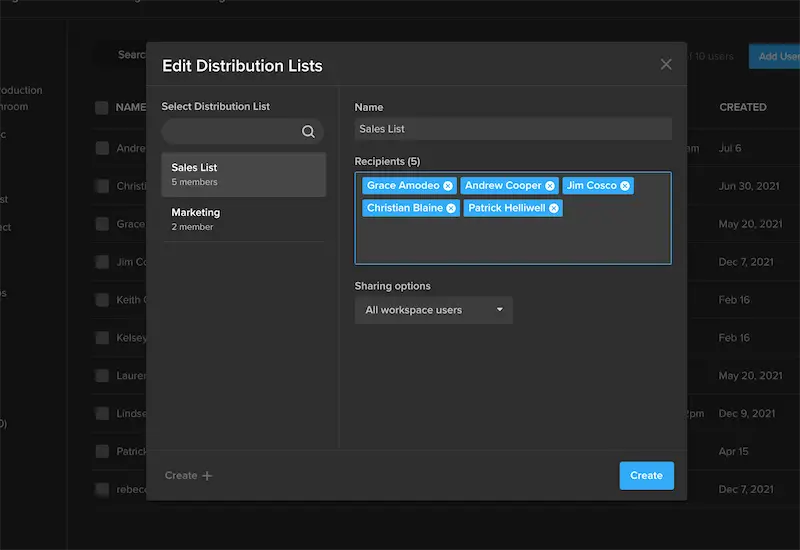
This feature allows you to save groups of users and non-users for quick sharing. Simply enter your recipients in the Share wizard and select “Save Distribution List.” Anytime you need to share files with that group, just select the list from your workspace.
2. Add or Remove Files from Sent Links (Without Resending)
Need to update a sent link with new files or remove outdated ones? MediaSilo makes it easy to organize video teams and reviewers online without creating a new link every time.
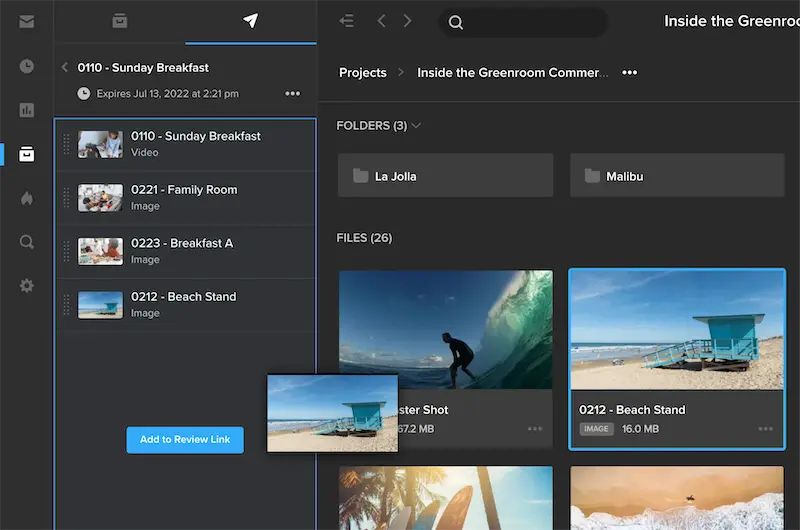
Here’s how to do it in three simple steps:
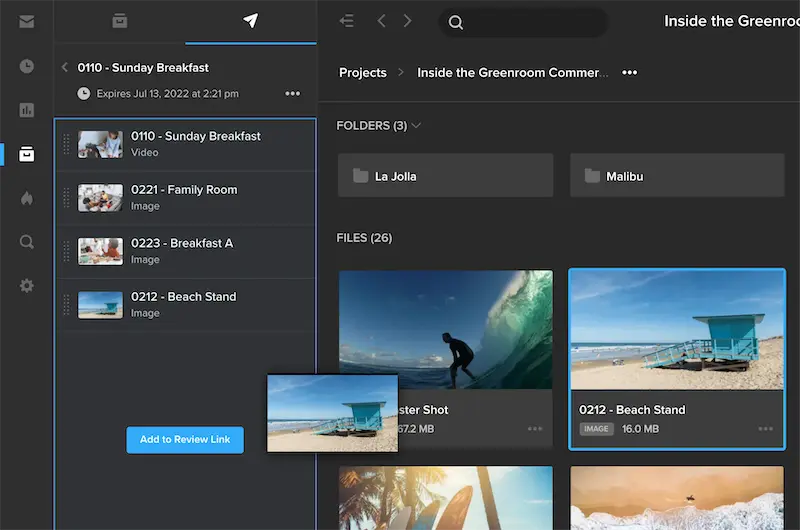
Navigate to any Project and open the left-side panel to access Sent Links.
Open the link you want to edit and view the files inside.
Drag new files from your Projects, remove files by clicking the “x” icon, or re-order files directly in this panel.
Pro Tip: Assets from a watermarked project cannot be added to a public share link. Learn more about the Insights panel in this short video.
3. Track Engagement with Viewer Progress Bars in Insights
Sharing is only half the job. Knowing what happens next is just as critical. With MediaSilo Insights, you can see exactly who viewed your link, what files they engaged with, and how much progress they’ve made.
Navigate to your Insights dashboard to access all engagement data in real time:
See individual viewer progress on each asset
Track activity across video review and approval software
Access geo-location maps and breakdowns by viewer or file
When someone says “I’ve seen it,” you’ll know for sure.
How MediaSilo Improves Your Sharing Workflow
Your Needs
Other Tools Give You…
MediaSilo Give You…
Fast, secure video sharing with repeat collaborators
Manual email entry every time you share
Distribution Lists to save and reuse recipient groups
Flexibility to update links without resending
Requires creating new links for every update
Editable links so you can add/remove files anytime
Insight into viewer engagement and approval progress
Limited analytics (basic view counts)
Media review workflow management with real-time activity tracking in Insights
With these features, MediaSilo isn’t just about sending files, it’s about managing the entire video collaboration and review process with clarity and control.
FAQs: MediaSilo Sharing and Insights
Q1: How does MediaSilo help with video review and approval workflows? MediaSilo simplifies video review and approval software processes by centralizing comments, approvals, and analytics in one platform. Teams can securely share, review, and track progress without juggling multiple tools.
Q2: Can I use MediaSilo for remote video collaboration?
Yes. MediaSilo is a cloud-based video feedback tool designed for remote teams. It enables secure collaboration for post-production, allowing stakeholders to review and approve assets from anywhere.
Q3: How do Insights improve media review workflow management?
Insights provide real-time data on viewer engagement, including who viewed, downloaded, or approved assets. This makes media review workflow management more efficient by reducing guesswork and improving accountability.
Q4: Is MediaSilo secure for client-facing projects?
Absolutely. MediaSilo offers enterprise-grade security, ensuring your projects remain protected while enabling organized video teams and reviewers online for smooth collaboration.
Q5: What makes MediaSilo the best choice for creative teams?
Unlike basic file-sharing tools, MediaSilo combines video review and approval software, collaboration tools, and workflow analytics into one platform, ideal for creative teams working on tight deadlines.
In creative production, sending work out for review is routine, but the activity that follows is what really drives a project forward. Because once you hit send, your next steps depend on a few key questions:
Did the right people review the content?
Which assets got the most attention?
Who downloaded, commented on, or approved which assets, and when?
Too often, this visibility is missing. You send the latest cut to your team, the deadline is days away, and every round of feedback matters. But hours pass, then days, and you still don’t know if anyone has looked at it.
Without answers, deadlines slip, assets sit untouched, and decisions get made without knowing if the right people have seen the right materials. Most review platforms don’t help much; they might show basic view counts, but not who viewed what, when, or for how long, and even that limited data is often scattered across multiple places.
When Visibility Breaks Down
This lack of visibility leads to:
Wasted time: Manually following up with reviewers just to confirm basic activity.
Missed opportunities: Not realizing a key stakeholder never opened the link before a deadline.
Reduced accountability: No clear audit trail of downloads, comments, or approvals tied to specific viewers and assets.
When these gaps compound, projects stall, feedback loops slow, and the team’s ability to make confident, data-informed decisions suffers. In high-stakes creative workflows, that’s not a risk you can afford.
How MediaSilo Solves This with Insights
At MediaSilo, we believe you should be able to see the full story of your share. Every view, comment, download, and approval is a chapter in that story, and it shouldn’t take multiple tools or guesswork to piece it together.
That’s why we built Insights: to give you a complete, real-time picture of activity, so you always know exactly how your content is being received.
The Ask
Other Platforms Give You…
MediaSilo Gives You…
I need a clear way to see all activity on my shared content, without having to manually search across multiple links and files to piece the information together.
Most platforms offer surface-level analytics, showing only total views without revealing exactly who engaged or what actions they took.
A centralized Insights dashboard that consolidates all engagement data in one place, with the ability to drill into asset histories and viewer actions for a complete view of activity.
I need to track all my shared content in one place, not just the links I’ve created.
In many tools, you can only see the shares you personally created, leaving administrators in the dark about other team activity.
Admin visibility into every link created in your workspace by any user, ensuring complete oversight across all projects.
I need a quick way to match viewers with the assets they’ve engaged with.
Without cross-referencing, it’s hard to tell which viewer saw which assets, especially when they’re spread across multiple links or presentations.
Easily switch between “Viewers” and “Assets”: click a viewer to see every asset they’ve engaged with, or click an asset to see everyone who’s viewed, downloaded, or approved it.
I want to know where an asset has been shared and how it’s performing across all links.
Many platforms can’t trace a single file across multiple share points, limiting performance insights.
Asset-centric reporting shows every share link containing that file, plus the full list of viewers and their engagement history.
With Insights, you can stop guessing and start knowing. In fast-moving workflows, a clear, actionable view into who did what, when – from views to downloads to approvals – is the difference between a smooth, confident delivery and a chaotic follow-up scramble.
Every share link becomes a measurable touchpoint. Instead of chasing updates, you’ll have:
A clear record of every viewer’s activity.
Instant visibility into asset performance across links.
Full workspace oversight for administrators.
The right video review and approval software should do more than collect comments; it should provide analytics across the entire feedback process. That data is what connects media review workflow management, giving teams the clarity they need to stay aligned and keep work moving.
MediaSilo’s Insights feature makes this possible by turning feedback into clear data on who engaged, how, and when – all in one place. With that visibility, you can cut down on guesswork, make faster decisions, and focus your time on the work that matters most.
1. What is MediaSilo Insights? MediaSilo Insights is a feature within our video review and approval software that gives you a real-time view of engagement across all your shared content. It shows who viewed, commented, downloaded, or approved your media, ensuring full transparency and accountability.
2. How does MediaSilo improve media review workflow management? By consolidating all engagement data in one dashboard, MediaSilo eliminates the need for manual tracking. You can see exactly which assets were reviewed, by whom, and when—streamlining your video review workflow and reducing delays.
3. Is MediaSilo secure for sharing sensitive post-production content? Yes. MediaSilo is built for secure collaboration for post-production, offering watermarking, expiring links, and enterprise-grade encryption to keep your media safe during the review process.
4. Can MediaSilo handle large, high-resolution video files? Absolutely. MediaSilo supports large files, making it ideal for creative teams working with 4K or even higher-resolution media. It’s designed for modern video workflows that demand both performance and security.
In our modern media landscape, production teams are pushed to create more content than ever, often from remote or unpredictable environments. Whether you’re producing breaking news, a documentary in the field, or a high-stakes sports broadcast, the expectation is the same: immediate access to footage, real-time collaboration, and secure off-site editing.
Unfortunately, traditional workflows can’t keep up. Media often has to return to base before editing can start, connections are slow and unreliable, and teams end up working in silos, delaying production and driving up costs.
That’s where EditShare comes in. Our production asset management system is designed for hybrid and fully remote teams, giving you the tools to move files, metadata, and projects between locations without friction.
Why Remote Video Workflows Fail, and How EditShare Fixes Them
For many media organizations, outdated post-production setups make remote editing almost impossible. Large files are difficult to transfer securely, collaboration tools are siloed, and metadata often gets lost in the process. EditShare’s approach solves these issues with integrated shared storage, MAM, and automation in a single ecosystem.
EditShare Tools That Power Remote and Hybrid Production
EditShare combines three powerful tools to deliver a remote video production workflow that just works:
FLOW Automation – intelligent workflow automation for media teams that speeds delivery from the field to the edit suite.
Together, they form a video asset management workflow that’s fast, secure, and built for collaboration.
Ultimate EFS Field Unit: Portable Shared Storage Anywhere
Think of the Ultimate EFS Field Unit as a mobile post-production hub. You can set it up in minutes, collaborate with multiple users on-site, and add metadata right after capture. It’s built to handle demanding formats and workflows wherever you’re working.
Why it matters: You don’t have to wait until you’re back in the office to start work. The footage is ready to view with proxies right away, so you can add metadata, tags, and markers. All available in a portable unit with tools you know and love at base, but available on the road.
Connecting to your shared storage from the field has never been easier. With ZeroTier VPN integration, you get a fast, secure link between your field unit and your main facility, without the complexity of traditional VPNs. That means remote video editing tools that let your team keep working, even from the middle of nowhere.
Why it matters: Enable secure, high-speed remote access allowing teams to collaborate seamlessly from anywhere as if they were on the same local network.
FLOW Automation: Workflow Automation for Media Teams
FLOW Automation is where the magic of customizable automated workflows for media teams comes to life. With its “Send to Site” feature, you can:
Send raw media, proxies, and metadata back to HQ
Include searchable tags, markers, and subclips
Trigger transfers with a watch folder, an event, or even a right-click
Why it matters: Editors at your main facility don’t have to wait for physical drives to arrive, they can start cutting as soon as the media is transferred with proxies and markers already in place. No waiting, no duplicated work. Learn more about FLOW’s intelligent automation tools.
Step-by-Step Remote Video Editing Workflow
Capture media in the field with the Ultimate EFS Field Unit.
Create proxies and metadata (markers, subclips, comments) on-site.
Connect securely using ZeroTier VPN.
Send assets to HQ with FLOW Automation’s “Send to Site.”
Begin editing instantly with all your metadata in place.
Why EditShare offers the Best Media Asset Management Software for Video Teams
Portable Shared Storage – Edit anytime, anywhere.
Powerful Automation – Eliminate manual steps.
Real-Time Collaboration – Keep remote and in-studio teams in sync.
Secure Remote Access – Protect your content without slowing you down.
Scalable Workflows – Ideal for indie shoots and enterprise-level production alike.
If you’re looking for a PAM for hybrid production teams that balances speed, security, and simplicity, EditShare is built for you. You can also explore our shared video storage solutions for even more flexibility.
From documentaries and news to sports and reality TV, EditShare empowers your team to work faster, safer, and smarter, no matter where your story takes you.
Ready to build your own killer remote workflow? Contact EditShare to learn how our tools can transform your remote and hybrid production workflows.
Sports production is fast-paced, high-pressure, and increasingly global. Games are streamed live to millions, highlight reels are clipped and distributed within minutes, and behind-the-scenes footage is rapidly repackaged for social media.
All of this content, often shot from multiple cameras and stored in a variety of formats, needs to be:
Captured in real-time
Cataloged with rich, searchable metadata
Archived securely for long-term preservation
Accessible instantly to editors, producers, and partners
Ready for monetization
Traditional archive systems can’t keep pace with these demands. That’s where a purpose-built sports content management system comes in.
What Makes a Good Video Asset Management System for Sports Broadcasters?
A top-tier archival management system should be able to ingest large volumes of video from multiple sources (think live feeds, OB trucks, and remote cameras) without requiring manual intervention.
EditShare’s FLOW automation simplifies this process by enabling rule-based ingest and transcoding, allowing assets to be archived, transcoded, and organized as they arrive. Making workflow automation for media teams effortless.
2. Metadata Management for Easy Searchability
The value of an archive depends on your ability to find and reuse content fast. Metadata tagging with support for custom fields, and AI-assisted tagging ensures editors can instantly surface the right clip from a decade ago or last night’s match.
FLOW, EditShare’s media asset management platform, enables granular metadata tagging, including player names, match types, and sponsors, all of which are searchable across your global archive. Editors no longer waste time digging through drives or folders. Instead, they can retrieve assets instantly and begin cutting new content, whether it’s for social, broadcast, or sponsor use.
3. Scalable Storage Options
Archiving high-resolution video, especially in 4K or HDR formats, requires serious storage. EditShare’s EFS shared video storage integrates seamlessly with LTO tape libraries and public cloud services, providing tiered storage for active projects, nearline access, and deep archive, all while keeping costs in check.
4. Real-Time Access and Collaboration
Whether you’re clipping highlights mid-game or assembling a retrospective docuseries, instant access to content is key. EditShare’s hybrid architecture allows real-time collaboration, with remote video editing tools, allowing for secure, direct access to content from anywhere in the world.
This is critical for:
Creating highlight reels during live broadcasts
Distributing footage to press and media partners
Enabling in-game social media engagement
Building post-game analysis packages
Cut on Adobe Premiere Pro or DaVinci Resolve? No problem! FLOW integrates with your existing tools, allowing your team to stay agile without learning new platforms.
In the event of hardware failure or disaster, your archive is protected by redundant backups and replication options.
Monetizing Your Sports Archive
A well-managed sports video archive is more than a historical record; it’s a revenue-generating asset.
Here’s how sports organizations are leveraging their archives:
Licensing historical footage to broadcasters, documentaries, and brands
Creating original content like retrospectives, player profiles, and social shorts
Powering fan engagement with nostalgic content or “on this day” campaigns
Selling direct-to-consumer access to archival content via OTT platforms
With EditShare’s production asset management system, your archive isn’t just preserved, it’s monetized.
Real Use Case: Managing a Global Sports Archive
For sports organizations managing footage from hundreds of events per year, like the New York Islanders, EditShare provides a unified, centralized system that handles automated ingest, metadata management, and tiered storage. Remote producers in different regions can log in to the system, access footage, create clips, and publish them to broadcast or social media, all from a single platform.
With support for multi-language metadata, the archive is accessible to international teams, streamlining global collaboration and boosting content reuse.
Why EditShare?
EditShare is designed to meet the specific needs of sports content creators, whether you’re running a league archive, producing live events, or monetizing your back catalog.
A path to turn archival content into a revenue driver
Get Started Today
Ready to take control of your sports archive? Whether you’re looking to streamline ingest, enable global collaboration, or monetize your existing content library, EditShare can help.
Book a demo to see how EditShare works for sports organizations
Or read more about our storage and asset management tools for sports broadcasters
In the world of media production, high-end finishing workflows for 4K, 6K, and 8K projects demand more than just speed; they require intelligent, collaborative infrastructure designed for creative professionals. Whether you’re a VFX artist refining complex effects, a colorist grading cinematic visuals, or an editor working on file-per-frame formats like DPX and OpenEXR, your video editing storage solution must keep up.
EditShare EFS NVMe rises to that challenge. Built on a media-optimized file system and designed from the ground up for collaborative video storage, EFS NVMe delivers exceptional throughput, scalability, and real-time performance.
Here’s why its NVMe-based architecture, integrated with the award-winning EditShare File System (EFS), stands out as the best shared storage for video editors tackling today’s most demanding finishing tasks.
The Power of NVMe Architecture in Shared Video Storage
High-resolution finishing workflows, especially in VFX, DI, and color grading, deal with massive data rates and layered files. Traditional HDDs and even SSDs often fall short. NVMe (Non-Volatile Memory Express) changes the game with speeds exceeding 20GB/s per node and ultra-low latency.
EditShare’s EFS NVMe leverages this performance to support formats like DPX, DNxHR 444, and ProRes 4444 with smooth multi-layer playback and immediate access to large media assets. With 24 enterprise-grade NVMe drives per node, ranging from 2TB to 16TB each, EFS NVMe offers robust bandwidth that allows multiple users to work simultaneously without bottlenecks—making it ideal for post production shared storage needs.
EFS: The Heart of EditShare’s Media Storage Software
What sets EFS NVMe apart isn’t just hardware, it’s the EditShare File System, a clustered, parallel file system tailored for media. Unlike conventional NAS solutions relying on SMB or NFS, EFS uses native clients for Mac, Windows, and Linux. This enables workstations to pull over 10GB/s of data directly, perfect for file-per-frame formats in 4K+ resolution.
With technologies like SwiftRead, EFS intelligently routes data from the fastest available node in the cluster, maintaining uninterrupted performance even under heavy load. Its built-in Quality of Service (QoS) ensures playback remains fluid, even during concurrent tasks like transcoding, backups, or large media transfers. This is media storage software that’s built with creativity in mind.
Seamless Integration with the EditShare Ecosystem
EFS NVMe is part of a broader EditShare ecosystem that supports every stage of the media lifecycle. Tight integration with FLOW and MediaSilo makes this collaborative video storage platform even more powerful:
FLOW MAM automates proxy creation, AI metadata tagging, and scene detection, accelerating prep work and reducing time to edit. Editors and VFX teams benefit from lightweight proxies and instant access to high-res assets, ensuring smoother handoffs between Adobe Premiere Pro, DaVinci Resolve, and Avid Media Composer.
MediaSilo, a secure video review and approval platform, adds forensic watermarking and timestamped feedback features. It’s a vital layer for keeping sensitive finishing work secure while enabling remote collaboration with producers and clients.
Scalable, Flexible, and Built for Collaboration
EFS NVMe scales from 32TB to 20+ PB in a single namespace. Whether you’re building a boutique studio or scaling a global operation, it’s the shared video storage platform that grows with you.
Add more nodes to expand your cluster or deploy EFS Field, a portable NVMe unit with up to 64TB for on-set finishing. Combined with tools like SwiftLink and SwiftSync for secure remote access and daily syncs, EditShare enables hybrid workflows that keep creative teams connected across locations.
Why EFS is the Best Shared Storage for Video Editors
EFS NVMe is more than fast, it’s intelligent, secure, and optimized for collaboration. Here’s how it redefines video editing storage solutions:
Unmatched Throughput: Over 20GB/s of aggregate bandwidth powers real-time playback of uncompressed 4K and 8K footage.
Collaborative Efficiency: Native EFS clients and SwiftRead ensure multiple users can edit, grade, and render simultaneously without interruption.
Rock-Solid Reliability: Dual metadata controllers, RAID-1 OS drives, and real-time analytics via Guardian deliver high availability and visibility.
Security at Every Step: MediaSilo’s watermarking, access controls, and audit logging protect valuable IP in high-stakes projects.
Cost-Effective Scalability: Energy-efficient NVMe drives and flexible configurations make high-performance finishing accessible for any size facility.
Real-World Performance: EFS NVMe in Action
At Leeds Trinity University, an upgrade to EFS NVMe enabled the media department to handle multiple high-resolution streams with ease.
According to Mark Willett, Media Facilities Manager, “The recent classification by The Guardian as the No. 1 University in the UK for Journalism is in large part due to the wonderful facilities we provide, of which EditShare is central.”
In another deployment, EFS NVMe powers Lasergraphics film scanners, ingesting 5K 16-bit DPX files at 30fps while simultaneously supporting 8K DPX grading in DaVinci Resolve. Proof that EditShare can handle the pressure of even the most demanding media workflows.
Choose EFS NVMe for Your Finishing Pipeline
If you’re looking for the best shared storage for video editors handling complex finishing projects, look no further. EditShare’s EFS NVMe combines the speed of NVMe with the intelligence of media-specific software and the flexibility of a collaborative video storage platform. From ingest to delivery, your team stays focused on creativity, not IT headaches.
For media teams managing massive files, tight deadlines, and fast-paced collaborative workflows, generic file servers just don’t cut it. What you need is shared video storage designed specifically for video production and post workflows.
In this article, we’ll explore how media-optimized storage differs from standard IT storage, and why making the switch can be a game-changer for creative teams.
The Key Differences Between Generic and Media-Optimized Storage
1. Bandwidth Over IOPS: Why Consistent Throughput Matters
Generic Storage: IT systems like databases and email servers are built for high IOPS (Input Output Operations Per Second). That’s fine for tiny, frequent operations like processing emails or database requests, but it fails under the sustained demands of high-bitrate video playback.
Media Storage:Shared video storage is optimized for high-bandwidth, low-latency transfers. It ensures reliable performance even during multi-stream 4K or 8K editing, no frame drops, no playback freezes, just uncomplicated real-time editing. This is essential for collaborative editing for Adobe Premiere Pro and DaVinci Resolve workflows.
Why it matters: Scrubbing through 8K RAW footage during a live client session? You need throughput, not IOPS. Media storage delivers performance you can count on.
2. File Management Tools That Actually Work for Video
Generic Storage: File services like Google Drive or Dropbox lack the intelligence to handle media workflows. Version control is clunky. Metadata is manual. Integrations with creative tools? Limited or nonexistent.
Media Storage: Media storage platforms include production asset management tools that allow smart versioning, automated metadata tagging, and seamless integration with NLEs like Adobe Premiere Pro, Avid, and DaVinci Resolve.
Why it matters: With advanced video review and approval software built into the workflow, your team stops wasting time searching for files and starts focusing on creativity.
3. Scaling Without Downtime or Drama
Generic IT Storage: Scaling often means downtime, migrations, and complex reconfigurations, aka production nightmares.
Media Storage: Media storage for remote post production teams scales. Add new nodes, expand bandwidth, or enable remote collaboration all without interrupting ongoing projects.
Picture this: You’re in post on a global ad campaign. An editor scrubs through 8K timelines smoothly. Your colorist joins remotely to adjust the grade. The client reviews and approves clips in real time using your video review and approval software. Meanwhile, a new storage node is added overnight without downtime. That’s what the best shared storage for video editing teams enables.
Delays in post-production workflows can cost thousands per day in idle talent, missed deadlines, and rework. Investing in shared video storage prevents bottlenecks, protects your schedule, and supports real-time collaboration for every team member no matter where they are.
Why Media Teams Deserve Better
Media professionals shouldn’t have to wrestle with tech built for spreadsheets and PDFs. You need:
Shared video storage tailored to high-res workflows
EditShare’s EFS, FLOW and Mediasilo solutions combine high-performance shared storage with powerful workflow tools, purpose built for post production.
Introduction
Accidental leaks of pre-release content can lead to significant financial losses and reputational damage. For professionals in film, television, and corporate video production, safeguarding sensitive material is paramount. EditShare’s SafeStream technology provides a robust solution to prevent unauthorized distribution and trace leaks back to their source, making it a trusted and secure video sharing solution for modern workflows.
What Is SafeStream?
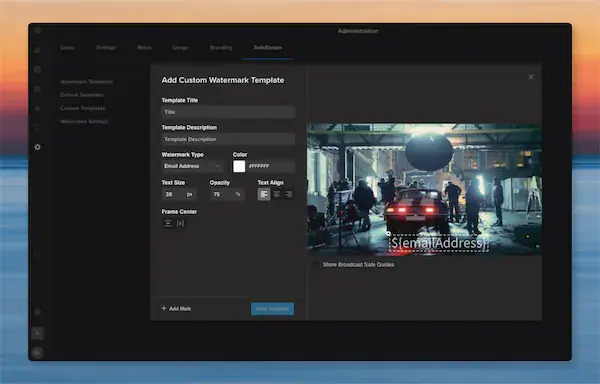
SafeStream is a real-time video watermarking technology that embeds both visible and invisible (forensic) watermarks into video content, ensuring each copy is uniquely traceable. This dual-layered approach not only deters unauthorized sharing but also facilitates accountability by identifying the source of any leaks. It’s ideal for use as a watermarked video sharing platform or video DRM platform for media screeners.
How SafeStream Works
Visible Watermarks
Visible watermarks display user-specific information directly on the video, such as the viewer’s name or email address. This personalization discourages recipients from sharing the content, as they know it can be traced back to them.
Forensic Watermarks
Forensic watermarks are invisible markers embedded within the video file. They allow content owners to trace the origin of a leak without altering the viewing experience. This is particularly useful when visible watermarks are not feasible and when using an embargoed content distribution tool is critical.
Benefits of Using SafeStream
Leak Deterrence: Personalized watermarks make recipients think twice before sharing unauthorized content.
Traceability: In the event of a leak, forensic watermarks help identify the source quickly with detailed audit trails for shared media.
Compliance: Ensures adherence to industry standards and legal requirements for content security.
Integration: Seamlessly integrates with existing workflows in film, television, and corporate environments.
Implementing SafeStream in Your Workflow
Integrating SafeStream into your post-production process is straightforward. It can be applied during content review stages, internal screenings, or when sharing with external stakeholders. By embedding watermarks at these critical points, you maintain control over your content throughout its lifecycle.
Conclusion
Accidental leaks can have devastating consequences for media professionals. SafeStream offers a proactive approach to content security, combining visible and forensic watermarking to deter unauthorized sharing and effectively trace leaks. By incorporating SafeStream into your workflow, you protect your content, your reputation, and your career with a best-in-class secure video sharing solution.
Ready to elevate your content security? Discover how SafeStream can protect your valuable assets, visit our website and schedule a demo today: