Video Post Production Software That Eliminates the Grunt Work

lp-Post-Production-Workflow-Software

Video Post Production Software That Eliminates the Grunt Work.

Automate Your Post Production Workflow
– From Ingest to Timeline

Request a Demo

Built for Teams Where Post Production Is a Bottleneck, Not a Department

Right Now, Your Editors Spend More Time on Ops Than on Editing.

Your team shot it. You ingested it. And now nobody can start cutting because the transcode queue is backed up, proxies haven’t been generated, and files are sitting in the wrong folder. Every manual step between camera card and timeline is time your editors don’t spend editing.

Manual steps, stacked bottlenecks, and hoping the folder structure holds

X icon

Transcoding runs as a separate step after ingest. Someone has to manually trigger it.

X icon

Proxy creation is a second manual process. Remote editors wait.

X icon

Files land wherever the camera op or DIT decided to put them.

X icon

Search means remembering file names, dates, or asking whoever was on set.

X icon

AI tools exist but they’re separate systems with separate logins and no connection to your timeline.

Every file processed the moment it hits your server. No manual work required.

Ingest triggers transcoding automatically. Proxies generate in parallel.

FLOW routes files by rules you set once. Media arrives organized.

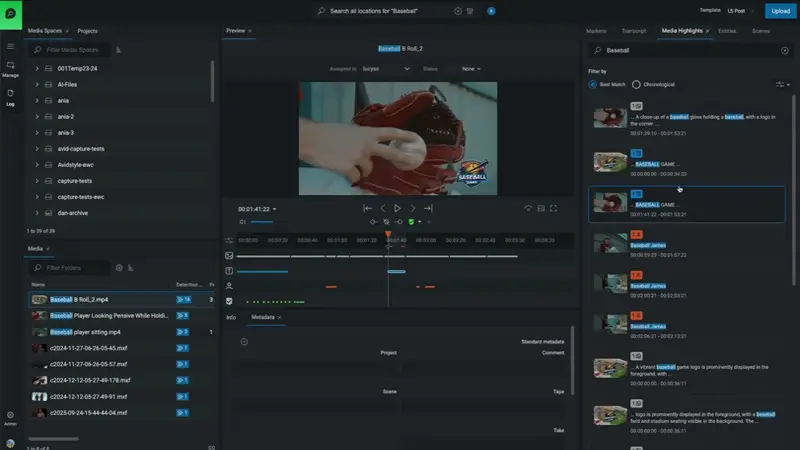
AI tags every asset on ingest: speech-to-text, face detection, shot type.

Search your entire library by what’s in the footage, not where it was filed.

Native Premiere Pro, Avid, and DaVinci Resolve integration. No round-tripping.

State-of-the-art Facility in Central London Relies on EditShare for Storage and Media Management

Media Prima Redefines Newsroom Efficiency with Integrated Workflow Solution

Last Cut Media Increases EditShare Footprint to Streamline Production

Six Things FLOW Handles Before Your Editor Opens a Timeline

FLOW runs automatically on every file you ingest. Minimal configuration, no manual passes, and no third-party data exposure. Everything runs on your server.

Automated Transcoding

Proxy Generation

On-Screen Text

Face Detection

Shot Detection

Rules-Based Routing

WHY IT MATTERS

Your footage stays on your server. No cloud dependency, no third-party data exposure.

FLOW runs entirely on your EditShare hardware. No media leaves your network unless you choose to send it.

All AI processing happens locally. No footage uploaded to external services.

Role-based permissions control who sees what at the project, folder, and file level.

Full audit trail of every file access and action.

Learn More

AI video workflow

Scaling Production with FLOW Automation

Read the Blog

FLOW AI

Your Workflow, Supercharged with FLOW AI from EditShare

See A Short Demo

Stop the Chaos: Why Your Production Workflow Needs a “Brain” in 2026

Check out the White Paper