What's New in FLOW? Watch the Webinar to Find Out!
Looking for new ways to streamline your media workflows and get more done in less time? The latest FLOW media management update, FLOW 25.1.0, is packed with powerful updates designed to simplify your day-to-day, and now you can see it all in action.
In our latest webinar, Unlocking the Power of FLOW 25.1.0, EditShare’s Senior Product Manager Lucy Seaborne teams up with Global Pre-Sales Technical Manager Adam Lewiston to walk you through the latest features, enhancements, and real-world use cases for this exciting new release.
Whether you’re managing fast-turnaround productions or large-scale archival workflows, FLOW 25.1.0 delivers smarter ways to organize, automate, and collaborate.
Watch the webinar replay to learn:
✅ What’s new in FLOW 25.1.0, including UI improvements, workflow automations, and more
✅ How the latest updates can drive efficiency across your team
✅ Best practices for getting the most out of FLOW, straight from the experts who helped build it
Don’t miss your chance to get up to speed with everything the new release has to offer.
Access the webinar replay now(Free with registration)
Tape isn’t dead! While everyone’s out there singing the praises of cloud storage and trying not to choke on their monthly invoices, tape just keeps doing its thing: Reliable, Affordable, and Built for the long haul. Now we’ve got LTO 10, which is a huge upgrade.
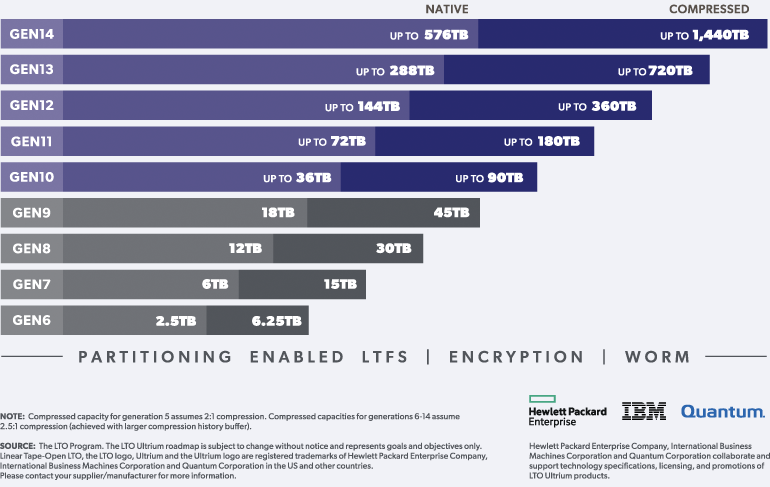
Roadmap: 36 TB Raw Capacity
The roadmap states that LTO 10 will double the raw capacity of LTO 9. If you’re dealing with 4K or 8K RAW footage or just have a mountain of footage that needs to be stored safely and long-term, that’s a big advancement. Fewer cartridges to manage. Less rack space and less shuffling around in the archive room. You will often see larger capacities being discussed, but that’s compressed, which is fine for CRMs or transactional data, but we can’t compress media. So we always work on the raw capacity. You will notice in the image below how it shows two sizes for LTO 10: compressed and raw. We are hearing that the LTO may be capped at 30TB at 400MB/s transfer speed. It’s early days, but we shall see how it pans out.
EditShare ARK and LTO 10 A Perfect Match
Here’s the good news: EditShare ARK will support LTO 10. There’s no need to change how your team works. Everything just runs like it always has, except now your shelves fill up a whole lot slower. That means you’re ready for whatever next-gen content you’re producing, whether that’s episodic 8K delivery, remastering old content in HDR or just trying not to get buried in files.
Now, if you have an existing LTO legacy deployment, let’s say LTO 4, you will need to migrate those tapes back to EFS, deploy a new LTO 10 tape device, and then re-archive them. But you get more than 10 tapes now condensed into one!
Compatibility
Let’s talk about the one weird anomaly. IBM’s datasheet for LTO 10 only says, “IBM LTO 10-tape drive can read and write to LTO Ultrium 10 cartridges.” They don’t mention backward compatibility at all. There is no promise that LTO 10 drives will read LTO 9 or anything older. That’s a break from how LTO has worked for years, where each new gen could usually read two generations back. If you’ve got a mountain of older tapes, you’ll either need to keep older drives around or run a migration strategy. But honestly, that’s just part of managing any archive.
LTO Still Makes Sense for Media Teams
Storage needs in media and entertainment are not shrinking. 8K VFX dailies, every project is bigger than the last. So when you get a format that gives you 36 TB per tape and runs for decades without a subscription attached, that’s worth paying attention to. Tape is a cost-effective long-term archival medium, complemented by our large. Adding EditShare ARK, which compliments FLOW asset management, means every asset that gets archived and FLOW knows its location. It keeps a proxy of that archived file always online, meaning you get a representation of that high-resolution file immediately. Its streamlined initiative and most important, fast.
Final Word
Is LTO 10 perfect? Not quite. The missing backward compatibility might be a pain. But if you’re starting fresh, building new archives, or just want to stop adding shelves every quarter, LTO 10 is the biggest leap we’ve had in years.
Best Practices for Organizing Teams and Reviewers in MediaSilo
When you’re managing video review workflows across multiple projects, the way you structure access to your content matters just as much as the content itself.
Too often, creative teams wrestle with outdated permission systems that force them to duplicate users, manually reassign roles, or rely on blanket access levels that don’t reflect the nuances of their team. That’s why in MediaSilo, flexible user management isn’t just a feature, it’s foundational.
Here’s how to organize your workspace and projects for clarity, security, and efficiency.
Step 1: Understand the Difference Between User Types and Roles
MediaSilo uses a two-tier system for managing people:
User Type controls what a person can do at the workspace level
User Role defines their permissions within a specific project
There are three user typesin MediaSilo:
Administrator: Full workspace access: user creation, security settings, billing, etc.
Manager: Can create/manage their own projects and invite users to the projects they manage (but not edit workspace settings or create new custom roles).
User: Can only access projects they’ve been assigned to and can only take actions defined by their project role.
Best Practice: Assign workspace-level roles conservatively. Most collaborators only need project-level access.
Step 2: Use Project Roles to Tailor Access
Once a user is added to a project, you can choose from predefined roles or create custom roles with granular permissions. This lets you match access to the actual work someone needs to do.
Best Practice: For external vendors or freelancers, start with a limited built-in role like Uploader, then build a custom role if they need more access over time.
Step 3: Assign One User, Multiple Roles – Without Duplicates
One of MediaSilo’s most powerful and unique features is that a single user can be assigned different roles across multiple projects, without being re-invited or duplicated.
That means:
A PR rep can be a Public Collaborator on your finished marketing campaign project
The same person can be a view-only User on an in-progress sizzle reel
Your video editor can be an Asset Manager on one series and a Uploaderon another, depending on their level of involvement
Best Practice: Take advantage of this flexibility to avoid over-permissioning. No need to clone or re-invite the same user across projects – just assign the right role per project.
Step 4: Group Your Projects by Function or Campaign
Whether you’re managing episodic content, branded campaigns, or FYC rollouts, it helps to mirror your real-world workflow inside MediaSilo. Organize projects based on:
Client
Production phase
Distribution window (e.g. “Internal Cuts,” “For Review,” “Press Screeners”)
Then assign reviewers only to the projects relevant to them.
Best Practice: Resist the urge to dump everything into one project with a long access list. Smaller, clearly scoped projects make permissioning cleaner and reduce confusion for collaborators.
Step 5: Audit Access and Adjust As Needed
As projects evolve, so do roles. MediaSilo makes it easy to:
Promote a viewer to a collaborator
Revoke external sharing
Grant download rights temporarily
Restrict access without removing someone entirely
Best Practice: Set recurring calendar reminders to audit access for active projects – especially when screeners are shared externally.
Final Thought
Your MediaSilo workspace is more than just a holding pen for content; it’s the foundation of your review and approval pipeline. When your teams and reviewers are organized with the right level of access at every stage, you can move faster, collaborate better, and reduce risk across the board.
With MediaSilo’s flexible user types, project-specific roles, and customizable permissions, you can fine-tune access without the hassle, so the right people always have the right permissions, right when they need them.
Ready to Get Projects Approved Faster? Start your free 14-day Trial today.
The way creative teams review and approve video content hasn’t kept up with the speed and complexity of modern production. What was once a straightforward process to send a cut, get feedback, make changes has turned into something much messier. More stakeholders. Tighter timelines. Higher expectations for security and speed. And yet, many of the tools teams rely on still reflect an outdated reality.
After speaking with dozens of post-production professionals, editors, and creative teams, one clear theme emerged. Review and approval is one of the biggest bottlenecks in modern video production. Not because it’s inherently complex, but because the tools meant to support it often create as many problems as they solve.
The Three Jobs of Review & Approve
At its core, every review and approval workflow exists to do three things:
Make sharing easy and reliable. Creators need to distribute content quickly, without worrying about slow uploads, playback issues, or access problems.
Ensure control and security. Teams need to know who has access, who has seen what, and ensure that sensitive content stays protected from leaks or unauthorized distribution.
Gather feedback efficiently. The review process should capture input in a way that’s structured, clear, and actually moves the project forward.
When these jobs are done well, creative teams stay focused on the work instead of fighting the process. When they break down, frustration sets in, deadlines slip, and teams resort to workarounds that only make things worse.
Job 1: Make Sharing Easy and Reliable
At its best: Content reaches the right people without login friction, playback issues, or speed bumps. Sharing and access happen without unnecessary delays.
At its worst: The simple act of sharing a video turns into a technical problem. Uploads stall, links break, playback stutters, and creatives become the de facto IT support for their own projects.
How this job actually gets done:
Despite all the emphasis on software tools that capture feedback and share iterations, this job (simply getting your content into the hands of external collaborators) is the foundation. If you can’t do this (without problems, snags, or turning yourself into the IT handyman who unsticks the process), everything else stops.
Speed and reliability matter more than a slick interface. If the tool creates friction in sharing, teams will revert to email and cloud storage workarounds.
Where tools fall short:
Slow load times and buffering kill momentum. If a video stutters or fails to load, reviewers disengage and feedback slows down.
Uploads and downloads take too long. One team told us they nearly missed a live event deadline because their existing platform locked them out of a critical file at the last minute.
Playback isn’t universal. Teams need their content to work across desktop, mobile, and bad WiFi connection without needing re-exports at different quality levels.
Job 2: Ensure Control and Security
At its best: The team knows exactly who has access to what, security settings are intuitive, and no one loses sleep over leaks or unauthorized sharing.
At its worst: Review links get passed around unchecked, high-value content ends up in the wrong hands, and teams don’t know if their work-in-progress has been accessed by the right people.
How this job actually gets done:
Security is about confidence. Teams need to know that once they share a file, it won’t be accessed by the wrong people or left exposed by default settings.
Granular control over who can view, download, and share files matters just as much as how fast a video loads. Teams want default settings that ensure security without extra steps, easy ways to manage permissions on the fly, and real-time visibility into who has accessed what.
Control can also mean visibility – for instance, one customer we talked to deals with over 100+ external distribution partners that get sent dozens of assets before a live telecast. Being able to accurately track who has viewed the assets (and who hasn’t) is vital for getting ahead of broadcast issues (and ensuring SLAs are met).
Review links that get forwarded too easily. If content can be accessed by “anyone with the link,” teams lose control over who sees their work-in-progress.
Limited visibility into who’s watched what. Teams need better insight into whether the right people have accessed their content, not just vague view counts.
Job 3: Gather Feedback Efficiently
At its best: Feedback flows naturally, whether it happens inside the platform or elsewhere. Every note is clear, relevant, and easy to act on.
At its worst: Comments are scattered across emails, Slack messages, and spreadsheets. Reviewers hesitate to leave feedback because the process is too rigid or clunky.
How this job actually gets done:
Some feedback will always be gathered outside the platform. The higher the seniority of the external stakeholder, the less likely they are to leave comments “in the app.”
Tools that force a single, rigid review workflow create more problems than they solve. The platforms that embrace flexibility—acknowledging that there is no universal best workflow—stand to win.
Where tools fall short:
Logins create friction. External clients and executives don’t want to create an account just to leave a comment, so they default to email.
Feedback tracking is inconsistent. Some tools don’t let reviewers easily pinpoint exact sections of a video, leading to vague, hard-to-follow notes.
Too much structure slows things down. Teams bypass formal review tools because rigid workflows add unnecessary steps when they just need quick input.
What’s Next for Review & Approve Tools?
The next generation of review & approve workflows won’t just replicate existing processes with better UI. They’ll solve the deeper inefficiencies that frustrate teams today. Based on what we’re hearing, here’s where things are headed:
Security as a default, not a luxury. Teams shouldn’t have to pay extra just to know who’s watching their content or to ensure content doesn’t get into the wrong hands.
Feedback that works flexibly inside the app and beyond. The best tools acknowledge that review workflows happen across multiple channels and make it easy to consolidate input.
More automation that keeps things moving. Teams need tools that don’t just store feedback but actively help progress a project, whether through automated notifications, approval workflows, or smart routing of tasks.
Final Thoughts
After so many conversations with creative teams, one thing is clear: review and approval isn’t just about technology it’s about how work actually gets done. The best tools make sure the parts of the workflow that “just have to work” don’t even need to be thought about, and they acknowledge that different teams get feedback on their work in different ways.
The future of review and approval isn’t about adding more features—it’s about removing friction. The teams getting this right aren’t just adopting new tools; they’re embracing smarter, simpler workflows that help them move faster, stay secure, and focus on the work that matters.
Creative teams using MediaSilo can share, review, and get feedback on their content without friction, ensuring their work reaches the right people, stays secure, and moves forward without unnecessary delays.
Let’s be honest, unstructured media management is a mess. Hard drives sometimes get stacked like a game of Jenga, file names that might as well be written in a different language, and the ever dreaded moment when you realize the footage you need now is… somewhere. That’s not a workflow. That’s an obstacle course. And it’s slowing you down.
Adobe Insights: Creatives are wasting time
In a recent Adobe Transform Content Creation white paper, the research indicated that creative professionals often spend a significant portion of their workweek on repetitive tasks, including organizing content. Specifically, four out of ten creatives dedicate more than half of their workweek to such activities. That is a staggering number. Creatives are talented but they are expensive. You don’t want them spending that amount of time organizing content.
Meet FLOW: The digital glue of your workflow
If your creative process feels like herding cats, FLOW Media Management is the solution you didn’t know you needed. Whether your assets are on-premise, in the cloud, or anywhere in between, FLOW brings order to the chaos.
How FLOW makes your life easier
Capture easily. Ingest media, live or file based, no matter where you’re working.
Index like a pro. No more “final_version_v3_actualfinal.mp4.” FLOW automatically tags and organizes everything and can even change the name to something you will remember.
Manage without the chaos. Say goodbye to misplaced files and hello to a single source of truth in EFS. Projects based on Mediaspaces, what a novel idea
Move media smoothly. Transfer files without needing a UPS truck to ship a portable hard drive.
Share without fear. Collaborate instantly, securely, and without versioning nightmares.
Anywhere, Anytime, Total Control
FLOW isn’t just a tool, it’s the digital glue that holds your workflow together. Whether you’re editing from a high-end post suite or editing off your kitchen table, just like covid times, FLOW keeps everything connected so you can focus on creating, not searching.
The Final Word
Not using FLOW is like editing with boxing gloves on – unnecessary, frustrating, and painfully annoying. Creative teams that embrace proper media management are faster, more efficient, and definitely less stressed.
Talk to the EditShare team today and transform the way you work.
Why Timely and Efficient Content Review Matters For creators, studios, and networks, securing early reviews for pre-release video content is crucial for building buzz and setting up a successful release. However, one of the biggest challenges in this process is making sure your content reaches the right reviewers and is actually watched in a timely manner. Without an efficient system in place, pre-release content risks getting lost in cluttered workflows, leading to missed deadlines, fewer reviews, and ultimately, less exposure for your film or show.
Press reviewers often get bogged down juggling multiple logins across different screening platforms, slowing them down and delaying coverage. That friction can undercut your release strategy. Screeners.com streamlines the process by centralizing all your pre-release content in one secure, easy-to-access dashboard, making it faster for reviewers to watch and easier for you to stay on schedule.
How Can You Ensure Reviewers Watch and Cover Your Content? One of the most common concerns content owners have is: How can I make sure my pre-release content gets seen and reviewed on time?
The key is to provide an intuitive, efficient platform that helps reviewers:
Quickly find and access new and relevant content.
Track what they’ve watched and what still needs to be reviewed.
Organize their workflow around deadlines and publishing schedules.
Navigate an intuitive interface that keeps their focus on reviewing rather than troubleshooting.
What to Look for in a Screening Platform When selecting a platform to share your pre-release content, ask yourself:
Does it make it easy for reviewers to find and access my content?
Does it help reviewers track their progress and stay on top of deadlines?
Does it provide strong security features like DRM and watermarking?
Is the user experience seamless, encouraging more engagement?
The Press Reviewer Dashboard is designed with these needs in mind, ensuring that your content is seen, reviewed, and covered on time.
How the Press Reviewer Dashboard Helps Your Content Get Reviewed The Screeners.com Press Reviewer Dashboard is designed for a seamless reviewer experience, making it easier for them to engage with your content in a timely manner. Here’s how it benefits you:
A Personalized Homepage: Categorizes content by What’s New, Continue Watching, Expiring Soon, and Watchlist—ensuring it stays top-of-mind for reviewers.
‘Add to Watchlist’ Functionality: By saving your content to their Watchlists, reviewers can prioritize it in their workflow and ensure it doesn’t get lost.
Clear Tracking of Watched vs. Unwatched Content: Clear indication of watch progress in our UI helps reviewers determine at a glance what they’ve watched versus what they need to complete.
Fast, Intuitive Navigation: A sleek, modern interface keeps reviewers focused on the content, making it easier for them to engage with your material.
Why Screeners is the Right Choice for Content Owners By modernizing the reviewer experience, Screeners makes it easier for press professionals to engage with your content, stay organized, and meet their deadlines. With a platform that prioritizes efficiency and usability, you can be confident that your pre-release materials will get the attention they deserve.
Ready to ensure your content gets reviewed on time? Try the Press Reviewer Dashboard and experience the difference.
When it comes to protecting your work, collaborators, and clients, security is a top priority. As a MediaSilo customer, you’re already working within a platform designed to keep your media assets safe. But how you log in and the security around that process matters as much as how your files are stored.
And what about your external collaborators? Are they taking security as seriously as you do? Because they can also access your files. Building a moat around your files does no good if you’re handing out kayaks to everyone.
Let’s break down the differences between SMS authentication and Multi-Factor Authentication (MFA) and why MFA provides a significantly higher level of protection.
What Is SMS Authentication?
SMS authentication is a two-factor authentication (2FA) that sends a verification code to your phone via text message. You enter your username and password as usual, then input the code sent via SMS to complete your login.
While this may seem secure, it relies on a single device (your phone) and a vulnerable communication channel (SMS). That opens the door to various risks, especially if attackers specifically target your credentials.
What Is Multi-Factor Authentication (MFA)?
MFA goes a step further by using two or more different types of factors to verify your identity:
Something you know
Using a password and a QR code scan for verification. The QR code, when scanned by a designated authenticator app, provides the app with the information to generate a one-time code. This code and the password are used to access the account.
Something you have
Using a password with a YubiKey for authentication typically involves a two-factor approach where you enter your password and then use your YubiKey to provide a second factor. This enhances security by requiring a known password and physical possession to access an account.
Something you are
A password with fingerprint or facial recognition is a specific, often highly secure, approach that differs from other MFA methods. This combination leverages “something you know” (password) with “something you are” (biometrics), offering strong protection.
For example, logging in with your password and confirming your identity with an app like Google Authenticator or Authy is a common MFA setup. The key difference is how securely the second factor is delivered and verified, demonstratingthe surface area of a potential attack.
Why MFA Is More Secure Than SMS
Simply put, QR Codes and Authenticator Apps Outperform Text-Based Codes. While both SMS and MFA require a second step beyond your password, MFA offers better protection because:
SMS can be intercepted. Some SMS services do not require a verified phone number, which leaves you incredibly vulnerable. Other times, SMS Attackers can use social engineering to trick your mobile carrier into transferring your number to a new SIM card (a tactic called SIM swapping).
SIM swapping is when a hacker tricks your mobile carrier into transferring your phone number to a SIM card they control—giving them access to your calls, texts, and SMS-based 2FA codes.
Victims often suddenly lose cell service and then watch helplessly as their accounts are hijacked in real time.
Messages can be spoofed or redirected. SMS messages can be intercepted over insecure networks or through malicious apps.
SMS spoofing or redirection is when an attacker makes messages appear to come from a trusted source—or secretly intercepts them—often by exploiting flaws in mobile networks or tricking systems.
Victims might receive fake login codes or never see real ones, leaving them confused or unaware as attackers access their accounts.
Phones can be lost or stolen. SMS authentication becomes ineffective if someone gains physical access to your phone and it’s not adequately secured.
If someone gets physical access to your phone and it’s not locked or encrypted, they can read your SMS messages (including authentication codes) without needing to hack anything.
It can feel like a silent breach, where access is granted simply because your phone was left unprotected.
In contrast, MFA tools like authenticator apps or physical security keys are tied to your device and require an additional unlock or biometric verification, making them much more difficult to compromise.
Benefits of MFA for MediaSilo Users
For professionals working with high-value, pre-release, or confidential content, MFA offers:
Stronger protection for your media assets
Reduced risk of unauthorized access
Compliance with industry and studio security standards
Stronger verification for internal and external collaborators gives you peace of mind
Bottom Line: SMS Is Better Than Nothing, but MFA is the Gold Standard
SMS authentication can provide a basic layer of protection, but it’s not foolproof. As phishing attacks, SIM swapping, and other credential-based threats continue to rise, relying on SMS alone is no longer enough, as it gives attackers too many paths to bypass security. With only a phone number and some clever tactics, bad actors can slip past this layer of protection.
Multi-factor authentication is tied to your device and doesn’t rely on your carrier or insecure channels like SMS.That’s why MediaSilo strongly encourages enabling MFA using an authenticator app or hardware token. It’s a simple step that makes a big difference—keeping your content secure and your team confident that your creative work stays exactly where it should: in the right hands.
Need help setting up MFA on your MediaSilo account?
If you work or want to work in video production, post-production, or broadcast, you’ve likely heard the term codec thrown around in conversations about files, formats, storage, or delivery. Understanding what a codec is and how it affects your workflow is essential in modern media environments.
So, what exactly is a codec?
A codec is a tool that compresses and decompresses digital video (or audio) files. It plays a crucial role in behind-the-scenes TV work, helping your systems handle high-quality, high-resolution content efficiently. When you record or edit video, those files can get very large, especially with today’s high resolutions (like 4K or 8K), high frame rates (like 60fps or 120fps), and deep color bit-depth (10-bit, 12-bit, etc.). Codecs help manage those large files so they’re easier to Store, Transfer, Edit and Deliver.
Without codecs, even a few minutes of RAW footage could take up massive amounts of space and potentially overwhelm your hardware.
Why It Matters to You
Understanding codecs isn’t just something for your tech team or engineers to worry about; it has a direct and noticeable impact on your day-to-day workflow. The codec you choose influences how quickly you can edit on your workstation, how much storage you’ll need on your EFS system, and how efficiently you can move or import media files across the network. It can also determine whether your final deliverable meets broadcast (IMF, DPP, AS11, etc.) specifications and how smoothly your playback and review sessions run.
Using the wrong codec can create unexpected delays, playback glitches, or slow file transfers that disrupt your timeline. On the other hand, the proper codec choice can simplify your entire process, helping your team work faster, collaborate better, and stay focused on creativity.
Whether you’re editing with ProRes, delivering with H.264, or working with RAW formats for maximum flexibility in post, understanding what each codec does and when to use it is essential for a productive, professional media workflow.
Codec Example
Common Use
Benefit
ProRes, DNxHD
Editing and finishing
Maintains quality, easy to edit
H.264, H.265
Web, streaming, delivery
Small file size, widely supported
XDCAM, AVC-Intra
Broadcast environments
Standardized for playout
RAW, BRAW, R3D
High-end camera capture
Maximum flexibility for grading
These are just examples of codecs; each production has its own needs.
Choosing the correct codec affects editing speed, EFS production storage requirements, file sharing, and final deliverables.
Video files are growing in size faster than ever, and codecs are evolving to keep up. One major reason is the rise in resolution. We’re no longer just working in HD but in 4K, 6K, and even 8K. These higher resolutions mean more pixels per frame, translating into significantly more data.
At the same time, frame rates are increasing. Where 24 or 30 frames per second were once the norm, many projects now demand 60fps, 120fps, or even higher, especially for sports, slow-motion, or high-end cinematic content. More frames per second means more data to process and store.
Bit depth has also increased. Modern workflows often rely on 10-bit or 12-bit video, which provides richer color and greater dynamic range. This added precision is a massive benefit for color grading and visual effects, but it also means each frame carries more information.
Beyond the visual aspects, today’s codecs often include more embedded data from multichannel audio and HDR metadata to camera-specific information, adding further weight to each file.
Even though codecs are designed to compress all this data efficiently, the sheer volume of content in modern media means that video files are still much larger than they used to be. This growing size directly impacts storage, network performance, and workflow speed, making it more important than ever to choose the correct codec for your production needs.
What This Means for Your Workflow
You’ll need more EFS storage space and faster network speeds to keep up.
Editing systems must be able to handle ultra-high-resolution codecs in real time.
Proxy workflows (working with lighter versions of your media) are becoming more common.
EFS Shared storage and collaboration tools must be designed to support the increase in the size and complexity of this media.
Codecs are at the heart of every video production. Whether you’re shooting, editing, storing, or delivering content, your chosen codec is critical in how efficiently your workflow runs.
They manage the balance between quality, performance, and storage, and as video standards evolve with higher resolutions, frame rates, and color depth, codecs carry more data than ever before.
Understanding how codecs work and how they impact your system performance, network load, and storage requirements is no longer optional; it’s essential. The correct codec can mean the difference between a smooth, real-time edit and a frustrating, lag-filled experience.
Whether you’re delivering files to broadcast, streaming content to digital platforms, archiving large volumes of high-res footage, or cutting a feature film with layered effects and grading…
Your codec choices will influence how well your tools and teams perform.
If you’re unsure which codec is best for your setup or how to plan your storage and infrastructure around it, our team is here to help. We’ll help you decode the details so you can focus on creating.
New Enhancements in EditShare One
The latest FLOW release, version 2025.1.0, delivers powerful new capabilities to media managers, streamlining workflows and making asset management more intuitive than ever. With enhanced scanning, uploading, and automation tools, EditShare One Organize simplifies complex tasks, saving time and improving efficiency. Let’s explore how these new features empower media professionals.
FLOW’s extensive range of applications often left users confused about which tools to use and how to install and maintain them. This limited user accessibility and acceptance and its why we created EditShare One. A simple browser based Interface that enables all users to access all of FLOW’s powerful tools for a variation of different workflows.
Time-consuming, manual processes are a thing of the past. FLOW Automation eliminates repetitive tasks like tagging, transcoding, and file delivery, allowing media teams to focus on creative work.
What’s New?
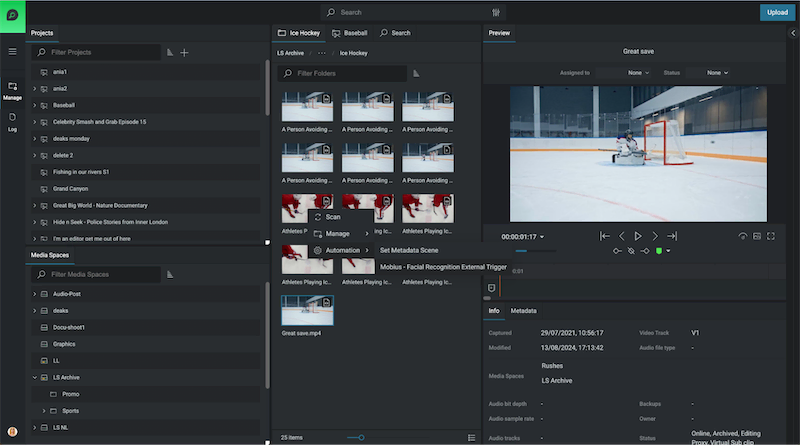
Right-Click Automations: Users can now trigger automation workflows directly from the Organize module, applying them to single or multiple assets with ease.
Automate across Projects or Media Spaces: Automate processes across entire projects, reducing manual steps and ensuring consistency.
Simplified Access to Templates: View only available automation workflows by asset type. Only relevant templates are displayed, keeping the interface clutter-free.
With these improvements, EditShare One is faster, easier, and more accessible—allowing teams to move media seamlessly through their production pipeline.
Keep Your Media Database Up to Date
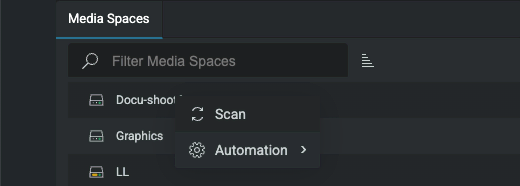
Scan Assets Directly from EditShare One
Keeping track of media assets is crucial for efficient project management. The new scanning functionality enables users to update the FLOW database effortlessly—without leaving the Organize module.
How It Helps
On-Demand Scans: Update media metadata and add new assets to the database anytime.
Two Scan Modes:
Quick Scan – Ideal for detecting and adding newly created or modified files.
Normal Scan – Updates metadata for all new and modified files, keeping asset details current.
Direct Access in Organize: No need to navigate to FLOW Control for scans—everything is accessible where you work.
This feature ensures your database remains accurate and up to date, improving searchability and media organization.
Upload Files Faster, Smarter, and with Greater Control
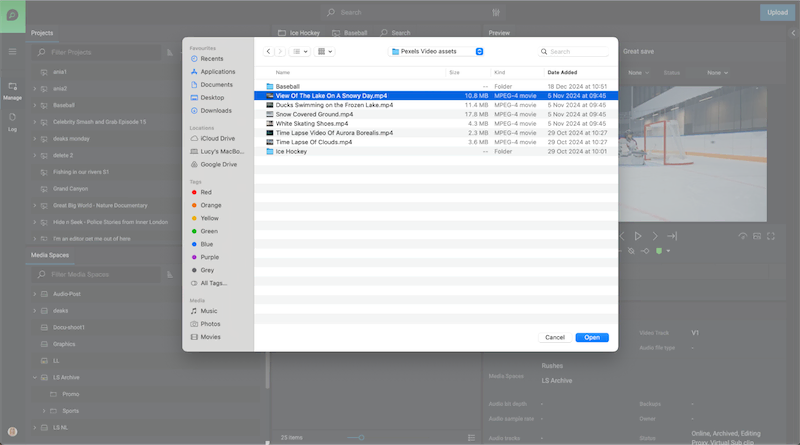
Enhanced Upload Capabilities
Managing late arriving assets can be challenging, but the improved Upload function simplifies the process, giving users more control over their media.
Key Benefits
Batch Uploading: Add multiple assets at once, reducing downtime between uploads.
Advanced Metadata Options:
Prevent duplicate uploads with the Fail if asset already exists option.
Generate streaming proxies during upload.
Apply custom metadata tailored to your workflow including metadata triggers to automate workflows.
Global Ignore List: Admins can restrict unwanted file types, preventing unnecessary clutter in the system.
With these enhancements, uploading assets is more efficient and customizable than ever before.
Navigate and Manage Assets More Intuitively
Flexible layouts
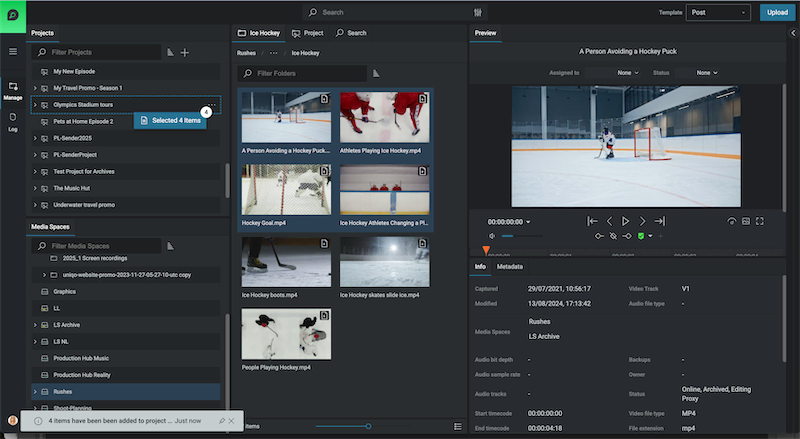
Media professionals need a fast, streamlined way to organize and move assets. The new Flexible layouts in EditShare One – Organize, introduces a more intuitive layout designed for seamless asset handling
Why It Matters
Customizable Interface: Show or hide panels to tailor the workspace to your needs.
Multi-Select Dragging: Select multiple assets using keyboard shortcuts and move them together effortlessly with fewer clicks.
New Manage Viewpoint: Complimentary to the Log Viewpoint, the new Manage view stacks panels vertically providing simultaneous visibility of Media Spaces and Projects. Each view point can be utilized to maximise the layout specific to the task in hand from managing media to logging
Enhanced Searchability:
A new Results Panel categorizes assets into three tabs: Media Space, Project, and Latest Search Results.
Tabs remain visible even when navigating, eliminating redundant searches.
Breadcrumbs have been relocated for clearer navigation paths.
This update dramatically improves efficiency, making it easier to organize and access media in large-scale projects.
Performance Enhancements for Large-Scale Workflows
As more teams scale up operations, FLOW’s automation engine has been optimized for handling multiple workflows daily. A new Status View provides real-time insights into automation performance, allowing administrators to monitor system activity at a glance.
Get Started with FLOW Today
The FLOW 2025.1.0 release redefines how media professionals manage assets—offering automation, improved navigation, and more control over media workflows. Whether you’re handling high-volume uploads, triggering automated tasks, or optimizing media organization, EditShare One Organize ensures your team works smarter, not harder.
In the high-stakes world of media and entertainment, where million-dollar productions rely on collaboration with users dotted in different locations, the last thing you need is a cybersecurity breach to derail your project. Whether it’s leaked scripts, stolen footage, or unauthorized access to sensitive or valuable files, the threat landscape is evolving—and your storage solution could be the weak link.
Meet EFS: the media-engineered file system that guards your assets with the precision and security of the crown jewels in Buckingham Palace. Here’s why it’s the ultimate gold standard in media protection.
Layers of Defense: It’s Not Just Storage, It’s a Fortress
When it comes to protecting your media, EFS doesn’t settle for basic folder-level locks. Instead, it builds a fortress around your content with granular control over users and permissions. Think of it as putting layer upon layer of virtual walls between your assets and potential threats. Only authorized users can access what they need—nothing more, nothing less.
And it’s not just about keeping the bad guys out; unique, permission-based media spaces ensure that even internal collaborators only see what’s relevant to them. No accidental “oops” moments. No prying eyes. Total peace of mind.
SOC 2 Compliance: Trust Backed by Certification
For those who need proof that EditShare EFS walks the talk, the platform is SOC 2 certified. This means it meets the highest standards for data security and operational integrity. Whether you’re a film studio, a post-production house, or a media broadcaster, this level of compliance ensures you’re working with a storage solution that doesn’t compromise on safeguarding your data.
Real-Time Auditing: Your All-Seeing Eye
Ever wonder who touched what, when, and where? With real-time auditing, you no longer have to. EditShare EFS keeps meticulous logs of every interaction with your media and makes it accessible in real time. Whether it’s an editor downloading a file or someone attempting unauthorized access, you’ll know about it instantly. It’s like having a 24/7 surveillance system tailored for your storage.
This not only deters malicious behavior but also helps you stay proactive in preventing potential breaches. If someone even dreams of messing with your content, you’ll know about it before they finish their coffee.
Granular Control: A Tailored Security Blueprint
EditShare EFS takes user management to the next level with its granular control features. You can define access rights down to the tiniest detail, ensuring that every user gets the exact level of permission they need. No more worrying about the intern accidentally stumbling upon sensitive pre-release footage or the marketing team accessing files meant for post-production.
By creating customized permission levels, you reduce the risk of accidental leaks and simplify workflows without compromising security.
What If They Break Through?
Even in the event that someone is Indian Jones and got through everything, EFS fully supports CrowdStrike deployments on its nodes, providing world-class threat detection and response. It’s an added shield against even the most sophisticated cyber threats.
Why It Matters
From financial losses to reputation damage, the cost of a breach is too high. EditShare EFS puts walls between your content and cyber threats, letting you create in confidence.
Don’t leave your media’s security to chance. Let EditShare EFS protect your creativity and keep your projects safe from prying eyes.