Taking the ‘Complex’ Out of Complex Tech with Michael Pirone
Our guest Michael Pirone has a knack for making even the most complicated pieces of software easy to understand in product and brand videos. Video marketing is not just for B2C anymore, short and sweet video content has arrived for B2B and SaaS markets!
The following interview is an excerpt from our video series, Marketing – In Conversation. To watch the full interview and see more video content, click here. Or you can listen to the Shift In Conversation podcast here.
Michael Pirone – Co-Founder & Director – Vidico Grace Amodeo – Marketing Manager – Shift Media
Grace: Tell us a little bit about yourself and Vidico.
Michael: My name is Michael, I’m one of the co-founders at Vidico. Vidico is a video production company, we work with brands like Square, Spotify, DigitalOcean, and some few hundred tech startups all the way from seed stage to late stage too. We have a real knack for explainer videos, and communicating complexity in a way that’s easy to understand across both animation and live action filming.
Grace: In video marketing, what is the difference between selling a product and selling a piece of technology?
Michael: To look at communicating complexity in a way that’s easy to understand — what that means is taking quite a hard communications concept and simplifying it to the point where your addressable audience widens, so you can really maximize the potential of who your company is able to speak and sell to. In practice that involves taking the company pitch deck or a 10 minute talk with the CEO and turning it into a 60-90 second video that really clearly articulates the problem, the company providing the solution, and the hierarchy of benefits which is how your solution provides value. We have a real fundamental belief that technology has provided more opportunities for innovation. When you have a founding team that innovates, they essentially have to build for the future. This really leaves a large communications gap because people don’t know how your product provides value yet, until you articulate it well.
Grace: When you get a brief for a new video project, how do you get started?
Michael: Vidico has developed its own set of briefing forms for each content category we offer, so there might be one for animation and one for live action and so forth. That framework is where the companies place everything they want to to be said — the “what” of the video. Once we have those materials, that’s when the work comes under Vidico’s side and we land on three important areas. The first is perspective, from which perspective do we tell the story? If the user tells the story, you get more of an empathetic response. If the company tells the story, you take the stance of more of a domain expert so you get a response which is more calculated. Step two in the process is market profiling. So now that we’ve chosen who tells the story, what environment are they in and who are they speaking to? If you are able to land on both the storyteller and the environment you actually develop a market profile, which is really important. The other component is product, we need to articulate three to four pillars or truths of that product. Once we have perspective, market profile, and product, it’s really easy then to put yourself in a place where more rapid idea generation is able to work.
Once we have perspective, market profile, and product, it’s really easy then to put yourself in a place where more rapid idea generation is able to work.
Grace: Tell me about the collaborative relationship between your team and the brand’s team.
Michael: Vidico’s process is built in a way that we wouldn’t move from say a concept to a script or a script to a storyboard without the client signing off on each stage. While this may seem arduous, it’s important for a few reasons. It’s a lot easier for us to stay on brand that way, to the point where we’ve never had an issue at the end of the process where someone says that this is totally not what they signed up for. I’m also particularly proud of our team and our ability to break the mold. We work with a lot of tech companies, and sometimes you want to reach for that one tool that you have that you know is going to do the job for a particular brief that comes in. But one thing that we are really strong about is making sure that for each project the effort is super unique and that we involve the client in each stage of the process. There’s enough opportunity for them to insert their own unique company DNA into the project. We really like to try to aim for a collaborative and quite a democratic process.
Grace: Do you think SaaS, tech, and B2B companies are producing more video content these past few years than they have been before, and if so why is that?
Michael: I think it’s a firm “yes”. We’ve definitely seen more uptick across the board and it’s not just from seed SaaS companies and the new wave, it is the later stage SaaS companies too. If you think about Zoom, TikTok, and Netflix, they are really occupying the mind share of companies that we interact with on a daily basis in 2020. And they are fundamentally based around video content for your communications. Video based companies are an integral part of our digital lives, both on the consumer side and enterprise too. I think tech companies are better at spotting these trends, they are more data driven and can see these trends appear faster than anyone. Tech companies and SaaS companies are optimizers by nature. They understand how leveraged video can actually be once you have the asset, they quickly know how to multiply the efforts and to spread it across every channel.Another exciting area is localization, it’s getting a lot easier to speak to multiple audiences using video and have video localized at a fraction of the cost of the original project. For tech companies, which are really looking horizontally at what different international markets they can go into once they’ve proven out their own local markets, I think it’s another strong point of rationale as to why video content is being taken up.
Tech companies and SaaS companies are optimizers by nature. They understand how leveraged video can actually be once you have the asset, they quickly know how to multiply the efforts and to spread it across every channel.
Grace: How have you managed to stay successful, and even grow, during the pandemic?
Michael: We’ve grown around 25-30% this year, which I think is a pretty good result considering the pandemic and what was happening around us. In terms of how that was possible, two years ago we made the decision to create not only campaign work but other types of videos like case studies, testimonials, and shorter product videos. We expanded our portfolio of different content categories. Thank goodness that change was done because it really enabled us to keep working with these clients during this time. Even when there were restrictions on larger projects, we still had the flexibility and in some cases the velocity to really keep outputting content. The second reason is that 50-60% of what we do now is animation, so obviously that wasn’t impacted at all and kept going very strongly. That’s one of the benefits of being a production company that really does both, which is fairly atypical. The last thing is, if you just look broadly at tech during this time, it’s been remarkably resilient. So luckily we’re targeting this audience which had a high growth phase a couple of years ago, but is also really accelerating through this pandemic. The appetite for video from our target market didn’t really dry up and has continued to soar.
Even when there were restrictions on larger projects, we still had the flexibility and in some cases the velocity to really keep outputting content.
Grace: As you create your own marketing plan for Vidico, what have you learned from the work you’ve done with your clients?
Michael: Three or four months ago Vidico produced its first proper brand video where a number of team members spoke in an interview format, and we supplemented the interview footage with some really great scenes of our work. It was a really great experience. There was no real difference, believe it or not, with the process that we use with clients and the process we used on ourselves. It really forces you to simplify, it came down to establishing our hierarchy of benefits, succinctly summarizing our problem, making a killer one-liner to counter that problem, and leaving the audience with the next step. We really need to show the type of craft that goes into these videos, because there is a bit of a mismatch of expectations to how much work goes into videos. It’s a complex medium, there’s a lot of layers, so we wanted to tease that out and show the viewer all the different layers. We’re making more of them!
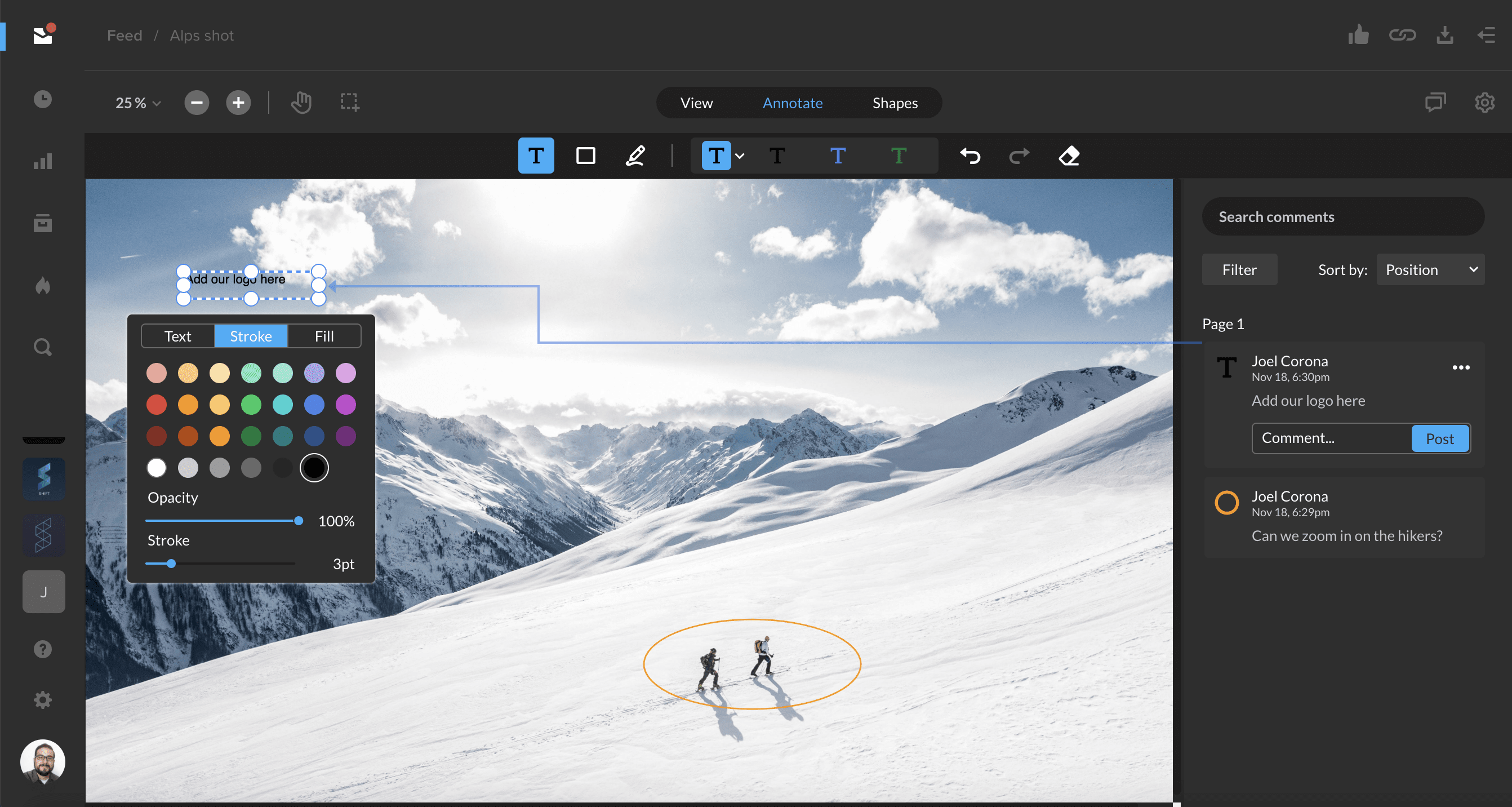
After sharing an image for review, you and your link recipients can now annotate images with comments, drawings, and shapes. Change the size, color, or style of these elements to customize your review experience.
Image review is supported for common image file types, including jpg, png, psd, and svg.
Learn more about image review in the Support article below.
Tagging assets is now easier with auto-suggested tags. To start tagging assets, select an asset and open the Info tab in the right-hand drawer. Click the blue ‘+’ button next to Tags to enter an edit mode where you can add or delete tags. To add tags, simply start typing, and existing tags in your workspace will be auto-suggested.
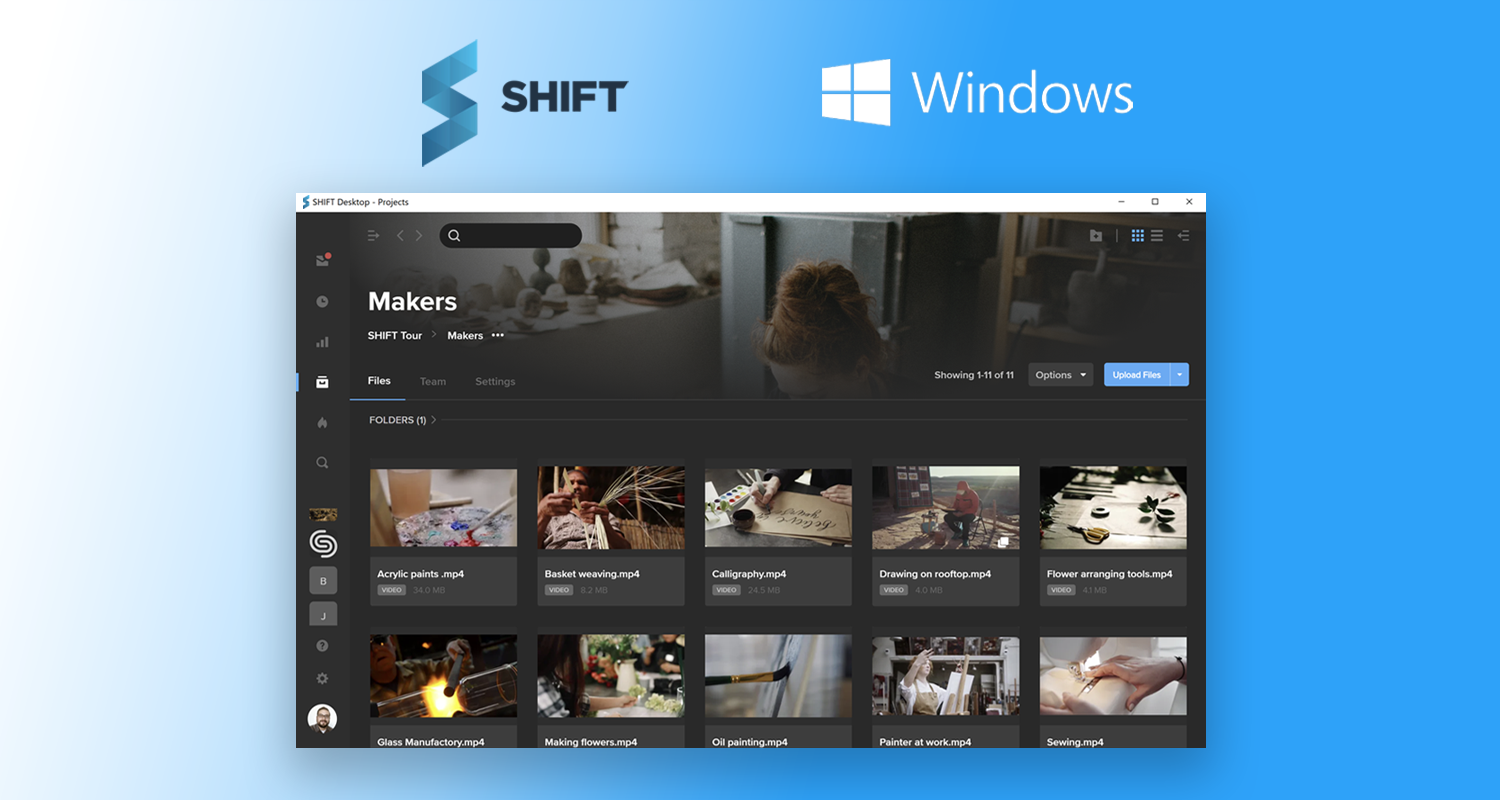
You can now download the SHIFT desktop app on your Windows computer for the full SHIFT experience. From uploading assets to sharing links for review and approval, you can access every SHIFT feature from the desktop app.
In addition to the features available on the browser version of SHIFT, the desktop app also offers bulk download functionality, desktop notifications, and greater speed.
DaVinci Resolve’s journey
Just eleven years ago, when DaVinci Resolve was hardware-based and usually found in the plush and rarified grading suites of only the top level post production houses, there were around a hundred installations. It was expensive. But if you could afford it, or sometimes even if you couldn’t, it brought an extraordinary level of capability to its users.
Today, in a world that would have seemed unimaginable back then, DaVinci Resolve has more than 2M users, and has grown into one of the most fully featured applications in post production.
The last decade has changed technology and entertainment far beyond what anyone would have predicted, and on top of that, everyone is currently dealing with the consequences of a global pandemic. We’ve all had to innovate, so much so that new ways of working that might have taken years before have now been planned and implemented in just a few weeks.
In the new COVID world, remote working and collaboration are no longer “nice to have” but completely essential. At the same time, the amount of video content across the planet is showing explosive growth. When you put these factors together, they point inexorably to a need for a solution like FLOW, which is built on scalable distributed technology stack and optimized for media at every level.
DaVinci Resolve is a super-powerful application in itself but it was never designed to sit at the center of a global, interconnected digital media ecosystem. FLOW’s new integration with DaVinci Resolve Studio brings users into a new world of searchable media, remote working, and format flexibility.
Seamless workflow integration with FLOW
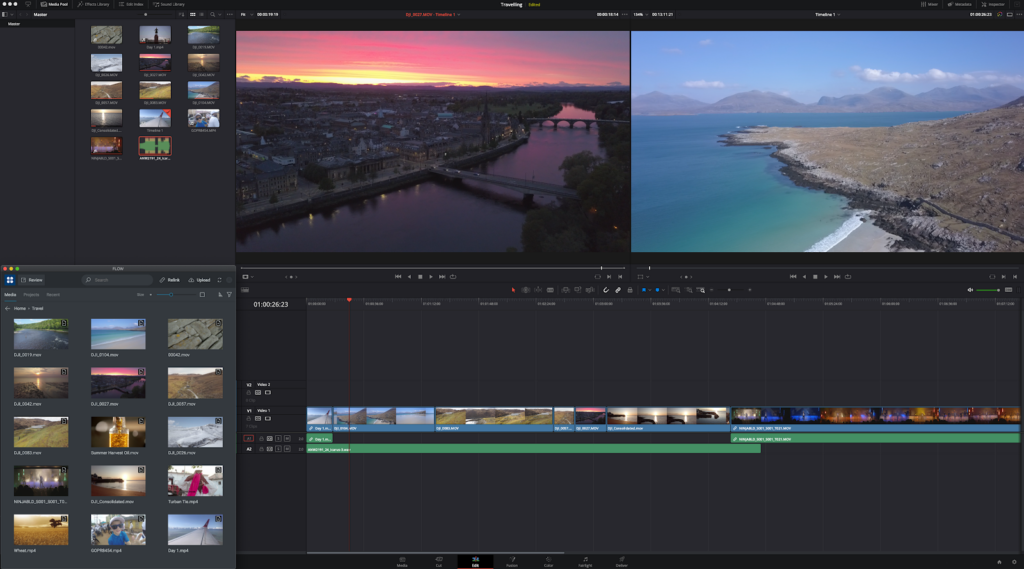
The FLOW workflow integration with Resolve 17 enables users to find digital assets fast
Blackmagic Design has cleverly engineered modern versions of DaVinci Resolve Studio to be open to integration with other software, not just through conventional plugins, but through workflows that are completely dynamic and highly functional.
As a result of close collaboration between EditShare and Blackmagic Design, FLOW is now available to DaVinci Resolve Studio users as a workflow integration. It brings all the enterprise power of FLOW’s search and media management right into the heart of the DaVinci Resolve Studio.
For DaVinci Resolve Studio users, it’s business as usual, working inside a familiar environment with nothing to learn except new and good stuff. Resolve creatives will find immediate and dynamic connection to their media on a shared and collaborative storage system. Crucially, DaVinci Resolve Studio users can stay in their comfortable and productive zone within the Resolve user interface. The moment they want to find media – or export it into the FLOW system – they can use the integration to manage that task.
Imagine the difference between having to find media locally based on a complicated and convoluted file structure and, instead, searching within Resolve Studio via the integration with FLOW for media that’s anywhere within the FLOW media management ecosystem.
Demo of FLOW integration with DaVinci Resolve Studio
Remote possibilities, ultra high resolution potential
FLOW doesn’t mind whether you’re working with full resolution media, mezzanine codecs, or proxy-level content. But for remote work, it’s likely that you’ll want to work with media files that are bandwidth-friendly. Also, for ultra high resolution codecs you may find it easier to work in a lightweight proxy to put less strain on your system”.
FLOW doesn’t lock remote workers into any particular format. In fact, if you have already downloaded media, FLOW allows you to toggle between multiple formats – Mezzanine and Proxy for example.
It also allows you to work inside DaVinci Resolve Studio with ultra-efficient formats that were not previously supported, such as H.264/MP4. FLOW’s import manager lets you choose all available formats and resolutions.
And of course, range markers and large amounts of metadata are preserved when material is imported to or exported from DaVinci Resolve Studio via the FLOW integration.
Let FLOW do the heavy lifting
There are many tasks, like rendering, that you can offload from your local DaVinci Resolve Studio workstation to the FLOW ecosystem. It’s like having all the power of the cloud, with the look and feel of your familiar working environment.
Seamless Proxy workflows With FLOW Automation providing the data wrangling service, Resolve users can now choose two different codecs, such as a mezzanine format and the UHD finished version to connect to concurrently. Work on a low powered laptop, cut using the mezzanine format, simply hit toggle to replace with UHD content, all on premise or in the cloud. It eases the burden on DaVinci Resolve Studio users and improves the workflow
The reviews are in: Integrated Review and approval process, directly from the DaVinci Resolve Studio timeline, thanks to AirFLOW
The bidirectional nature of the communication between FLOW and DaVinci Resolve Studio means that it’s a near-perfect tool for having your work reviewed and approved remotely. You’ll be able to grade in Resolve, upload a version for review via AirFLOW, get instant feedback from producers, creatives or directors and then bring it efficiently back into resolve with all remote comments appearing as notes on the resolve timeline, enabling you to fix issues at that exact moment.
As technology gets better, it gets simpler
Underneath the apparent simplicity of the FLOW integration with Resolve Studio, there’s some advanced technology at work. Years of experience, development and feedback from customers have allowed FLOW to evolve into an advanced ecosystem of media management functionality that scales across size and location. Behind the scenes, there’s a plethora of configurable options. On the surface, there’s a sharp, focused, uncluttered, familiar user experience.
Blackmagic Design and EditShare work in different fields, each to a high level of excellence. The openness of Blackmagic Design to this integration project has resulted in a massive increase in functionality for DaVinci Resolve Studio users, and has allowed FLOW to bring the benefits of enterprise-strength media management to right within the DaVinci Resolve Studio user experience.
Our guest Dustin Schultz talks all things team-building for your next video production. Bringing together the right kinds of people in the right roles is key for a successful on-set experience.
The following interview is an excerpt from our video series, Production – In Conversation. To watch the full interview and see more video content, click here. Or you can listen to the Shift In Conversation podcast here.
Dustin Schultz – Executive Producer – Union Grace Amodeo – Marketing Manager – Shift Media
Grace: Tell us about yourself and about Union.
Dustin: I’m a husband to my beautiful wife, Rochelle. As of five months ago, I am the father to two newborn twin girls. Ten years ago I started a video production studio kind of by accident, and it came to be known as Union. Union is the secret weapon for connection and clarity in content marketing. We’re a video-first agency, and most of our work is with the brands directly. We like to say, it’s not good to play a concert for an empty stadium. And so if we can think about where your video is going to end up and make sure that the right people are seeing it, then you’re going to end up winning with it.
Grace: When you’re getting ready to staff up for any given production, what is your first step? Where do you start?
Dustin: Often we bring in a lot of our higher level, above-the-line people even before a project is awarded. We’ll bring in our producers and directors and we’ll do what we call our “Creative 30”, which is a 30 minute spaghetti against the wall, no holds barred creative session. Nothing is off the table. This is a chance for our upper level team to come in and have a voice even before we do our final pitch for a project. We definitely have a top tier of highly trusted producers, directors, and DPs that we get involved off the top. And part of the trust that we’ve given to them is that they pull in the people they trust below them, and the people that those people trust below them. It becomes this cascade effect of networks.
Grace: On the highest level, what kind of people are you looking for when you are building a production team?
There’s a great author, Patrick Lencioni, who said — when hiring people, look for people who are humble, who are hungry, and who are smart . . . If you’re seeing those qualities come through a person consistently, I think you end up with some winners.
Dustin: There’s a great author, Patrick Lencioni, who said — when hiring people, look for people who are humble, who are hungry, and who are smart. So what does that mean? Humble people are going to be putting others before themselves. They’re not doormats, but at base level they are courteous. A hungry person is not desperate, but they are very action-minded. They are going to jump in there. A smart person on a production is someone who studies their role, and is a constant student of their role. We’ve had great success applying these filters. If you’re seeing those qualities come through a person consistently, I think you end up with some winners.
Grace: How important is it that you are hiring people that you have worked with before vs someone who is unknown?
Dustin: I do really like a good mix. Within your top level people, your director, DP, even maybe your camera operator or audio engineer, it’s important that most of those people you’ve been on set with multiple times before. The tone of the project can only be set if the majority of those people are known versus wild cards. Having a group of “known”s to help set that tone is really, really key. I’m also fine with people being one or two degrees away from a person that I trust. And that comes back to extending that trust, I trust you to do a good job and I also trust your judgement on the person below you.
Grace: Talk to me about the balance between hiring someone who is really great at their job vs someone who is really great to have on set. Where is that line for you?
Dustin: If you’re really good at your role, part of your role is being a team player. We have had total jerks on set, someone for example whose job it was to help make beautiful images. It was a bad experience across the board, and even though they did make beautiful images we vowed to never hire that person again. Within production circles it is so easy to get blackballed for attitude. It’s a dangerous game to play. On the other hand we’ve hired people who are just great to be around, but you end up doing way more than you should be doing to help them. And as a producer or a leader you have a level of responsibility to have hard and honest conversations with people. A good producer can pull someone aside to let them know how they are coming across to other people, and the ability to have that conversation is not just for their betterment but the betterment of the industry.
A good producer can pull someone aside to let them know how they are coming across to other people, and the ability to have that conversation is not just for their betterment but the betterment of the industry.
Grace: When you are hiring for on-set roles, do you consider not only how two people might get along but also how the various roles will all have to work with each other?
Dustin: Absolutely I do. Especially in today’s age, production scales so much in terms of number of people on set. When it comes to person-to-person relationships, I think we’ve done a really good job of finding people that are just, in general, great to get along with. So whether you have three of them or thirty of them on set, it doesn’t become a concern. When it comes to the connection between the roles, I think it comes down to communication and code books, for lack of a better term. If I am a director and I’m trying to communicate something to my DP, is what I am saying clear to them? Do they come from a different background where the terminology I’m using doesn’t line up in the same way as it did for them? That’s why we try to bring those top-of-the-line people in pretty early on to be a part of the creative conversation.
Grace:
What would you say is the percentage of new faces vs usual team members on most of your sets?
Dustin: On every set we definitely have new faces, especially at the production assistant level. Part of it is geography based, if the job is in a market that we haven’t worked in a lot then we’re going to send some of our top-tier people, but we’re probably going to also have gaffers and grips and lots of folks that we’ve never worked with. And things get a little bit riskier there. When we’re close to home then most of the time we’re going to pull together that same team, but availability says not everybody is going to be able to be there. So you’re going to end up with maybe 75% people that you’ve worked with in the past, who then use their referrals and their networks to pull in those other people. You can’t be so reliant on that one person being available, if you have most of your team together and a couple of new faces then you have the opportunity to learn who those people are and build trust with them and vice versa. Within verticals of production, we’ll sometimes do pre-interviews with folks even when there’s not a project yet. We interview dozens of people so we can really find the people that we work well with, for those desperate moments when your normal team is not available.
Grace: What does it feel like when you’ve done everything right and you really have that A-team on a production with you?
It’s magical when that happens. You have those people who are anticipating needs, and getting them done. They feel empowered to go ahead and make decisions, you can hand off the micro-managing.
Dustin: It feels like it’s your birthday or Christmas morning and someone happened to see your list ahead of time, but you didn’t share it with anybody. You open a present and you’re like, “Wait, how did you know?”. It’s when you write every email where you tell them that you were thinking about getting something done, and they already thought about it and already did it for you. There’s been a lot of projects like that for us. It’s little things, like when you have to do a company move within the same building that wasn’t expected. And the producer had the PAs move craft services from one floor to the other, so suddenly you walk into the barren new room and the coffee you need is already up there. It’s magical when that happens. You have those people who are anticipating needs, and getting them done. They feel empowered to go ahead and make decisions, you can hand off the micro-managing. To be a good leader, you have to be willing to pass off your anxieties to other people and say, “I trust you with this worry of mine, and I know you will make it happen”.
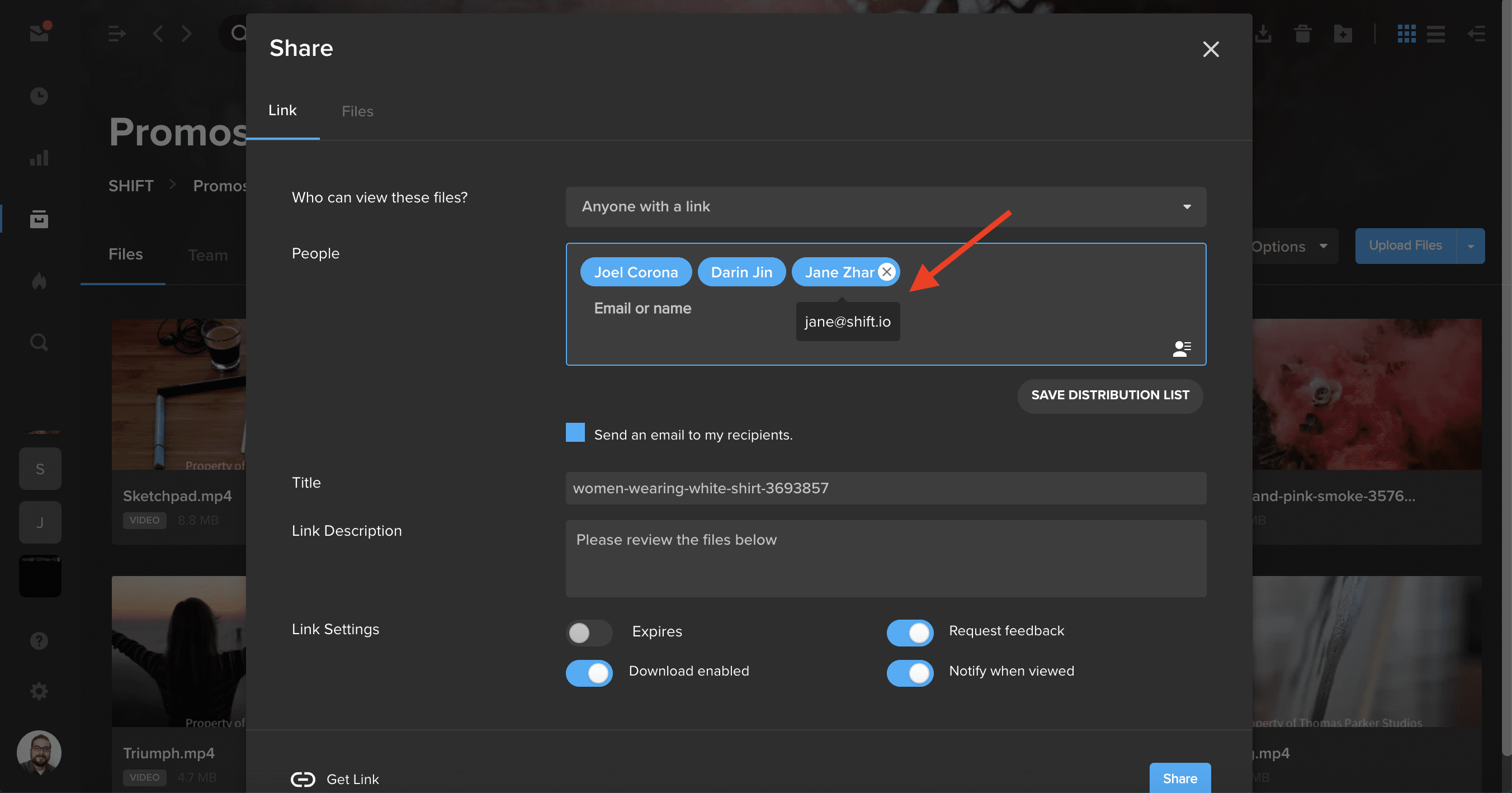
When sending or editing a review link, you can now see the email address associated with a user’s name. Simply hover over a user’s name to view their email address at a glance.
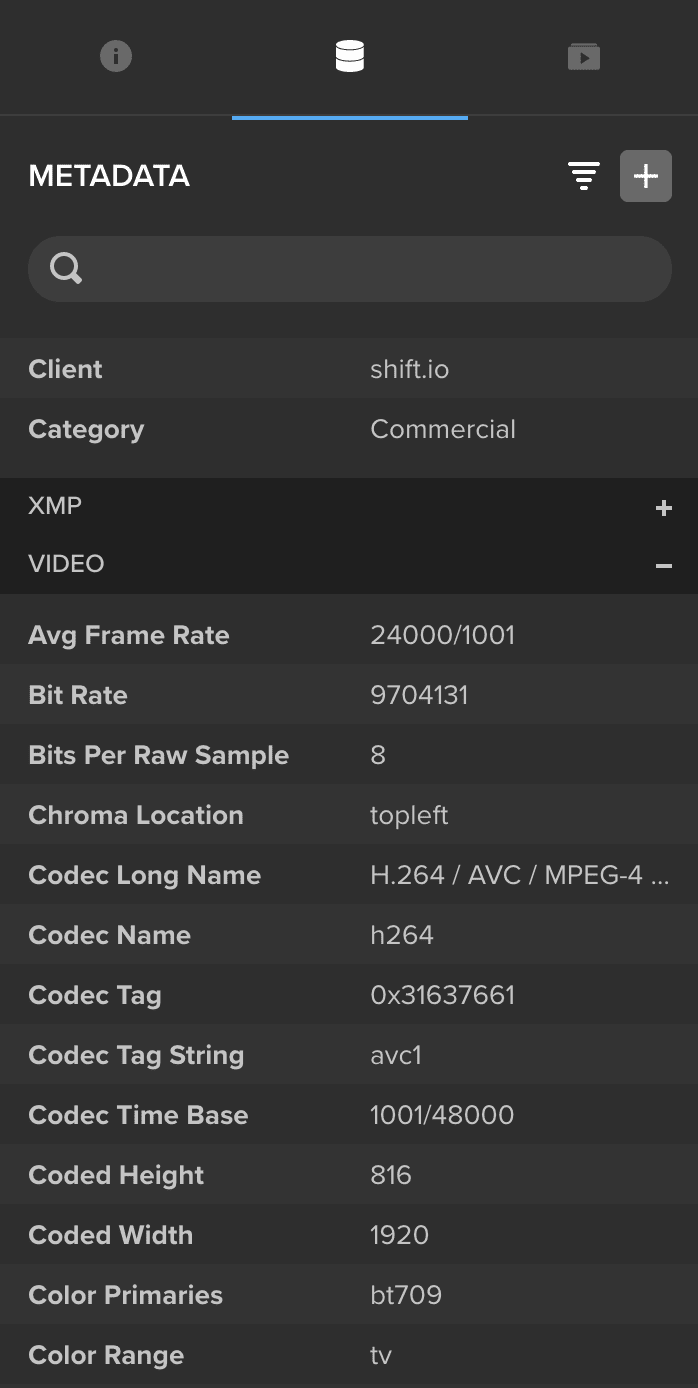
When you upload a new video file, SHIFT now collects and displays additional metadata in the General and Video sections of the Metadata tab of the right-side drawer in Projects. Use the search bar at the top of the drawer to quickly find the metadata you are looking for.
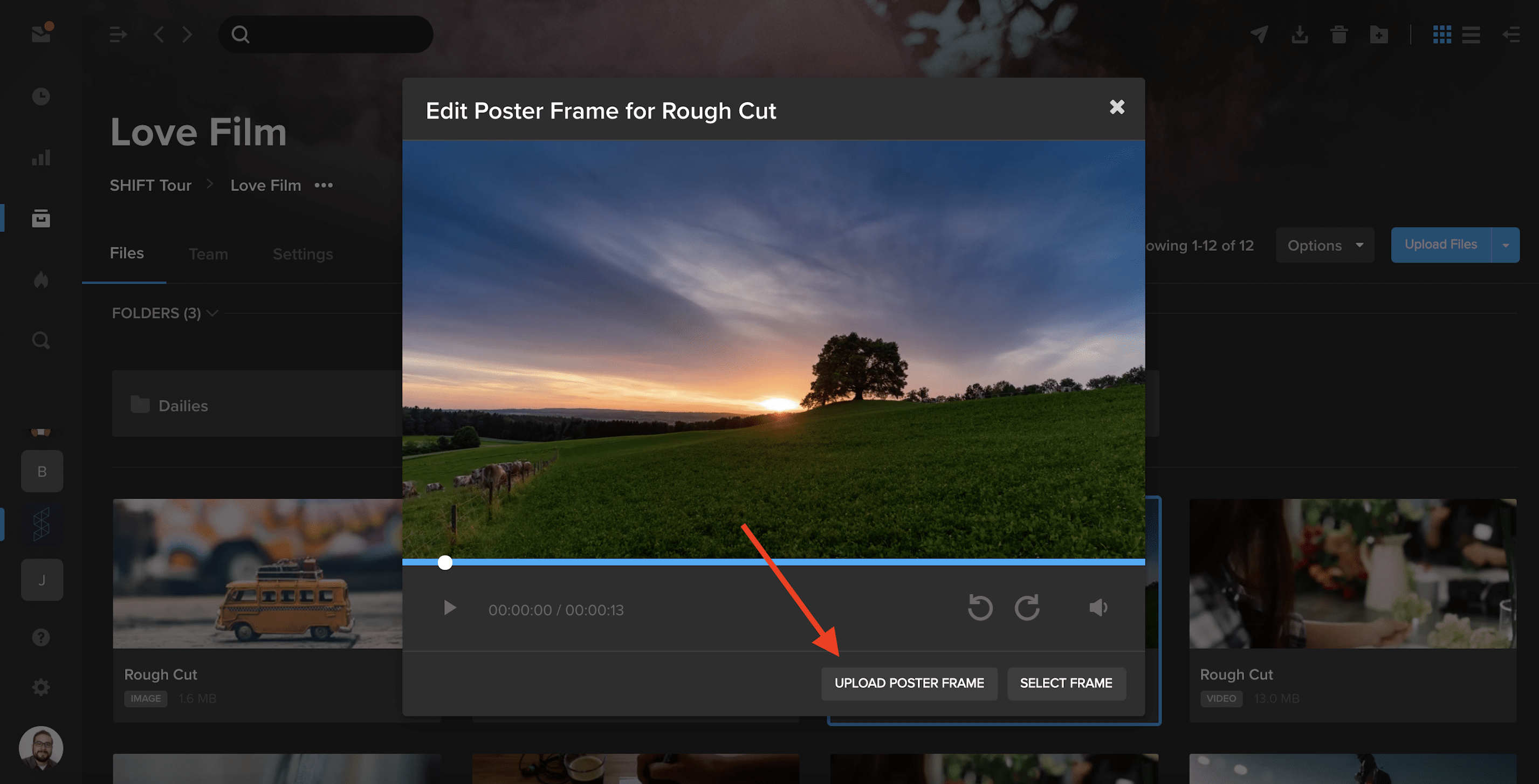
You can now use our Poster Frame tool to upload custom images as your video thumbnails.
In a project where you have editing permission, select the three dots in the bottom-right of a video asset tile to open the action menu. Choose Advanced, and then select Edit Poster Frame.
In addition to selecting a frame as your thumbnail, you can now click Upload Poster Frame and choose a .jpg from your computer to display as your video thumbnail.
Our guest Alex Minor talks through how to get started with video at your company, and why it’s so important, no matter your industry.
The following interview is an excerpt from our video series, Marketing – In Conversation. To watch the full interview and see more video content, click here. Or you can listen to the Shift In Conversation podcast here.
Alex Minor – Video Marketing Strategist – Eye AM Media Grace Amodeo – Marketing Manager – Shift Media
Grace: Tell us about yourself, and how you got interested in marketing and video production.
Alex: I started out as a musician growing up. Music led me into going to school in Florida, a school called Full Sail which focuses on various forms of digital media, movies, video games, and audio. I eventually started freelancing in the corporate audio visual market as an audio guy, but I saw there was way more opportunity on the video side of things. I eventually bought some of my own equipment and started shooting my own stuff. I worked on indie films and some documentary shorts, and that really felt right to me. Learning people’s stories and helping them showcase that. And somewhere along the line the concept of video for business came up, and it was just like documentary filmmaking of another sort.
Grace: Tell us a little more about your company, Eye AM Media.
I feel a kinship with the smaller business owners, the ones that don’t have endless gobs of money to throw at the marketplace, because I feel like I can really make a difference there.
Alex: We’re a video marketing agency. Most of our clients are either coaches, consultants, or small business owners in the Orlando area. I really like working with the decision maker of the company, I’m not really trying to service humongous brands. I feel a kinship with the smaller business owners, the ones that don’t have endless gobs of money to throw at the marketplace, because I feel like I can really make a difference there. I can really make an impact. And that’s what I want to do at the end of the day, I want to help people grow their brands, change their lives, and help them help more people.
Grace: Why should all brands be adding video into their marketing strategy?
Alex: Because if they’re not, they’re already behind. Video marketing or commercials used to be only for the biggest brands, for the people with all the money. That used to be because the barrier of entry was really, really high. These days, the barrier is gone. The internet has become the great equalizer. You don’t need broadcast television, you’ve got multiple channels that are completely under your control where you can put video content. Most of us are walking around with a small creative studio in our pocket.
These days, the barrier is gone. The internet has become the great equalizer. You don’t need broadcast television, you’ve got multiple channels that are completely under your control where you can put video content.
Grace: How do you decide what type of video is best for each brand?
Alex: The two main types of content that businesses should be cognizant of are macro content and micro content. Macro content is the stuff you want to call somebody like me for. That’s going to be your highly produced, maybe scripted out, very intentional videos that are supposed to last for several years. They represent your brand in the most epic way possible. But keep in mind that the content shouldn’t be all about you, that content should be focused on your customers, their needs, and the type of change that you can make in their lives. Yes, you’re going to sneak in your products and services, but the main point of the conversation in all of that content should be your customer, it’s really about what’s in it for them. Micro content is the stuff that usually ends up on social media. It’s the top of funnel content, the stuff that keeps you top of mind. Stuff that’s going to be showing people that you’re human, bringing them into the business, giving them good advice. It’s not only going to showcase your expertise, but empower them at the same time. You don’t have to shoot it with a legit camera and have the gorgeous lighting. The message is what’s the most important thing.
Grace: What are some of the questions you ask as a marketer before you get started on a video project?
Alex: The first thing that I need to know is why they think they need video content. Why now? Why do you think it’s going to work for your purpose, and what is that purpose? That’s going to inform all the choices that we make. I also have to understand what your business is, and how it works. How have you been acquiring customers before, and how do you want to be acquiring customers now? What is the action that you’re hoping people will take once they see the content? Those conversations can lead in different places. And it might turn out that you don’t need the thing that you think you need.
Grace: You also offer something called the “video business card”, what is that?
Alex: The video business card is a multifaceted tool. A lot of people might call this your “about us” video or your “brand” video, your brand story. I don’t like to call it those things because the mistake I see in so many of these videos is that the point of view is very selfish. It’s about us, who we are, what we’ve accomplished. Everything in a video business card should be about the client, it’s about the customer. It’s about the change that you make in people’s lives. It’s about the service and why you do the service. What’s your personal motivation? I work mostly with smaller businesses, individuals who are growing a brand, people who tend to have very close relationships with the people they serve. People want to do business with people, and the video business card does a great job of humanizing you, making you real to somebody, and giving them all the tools and information they need to make 90% of their decision before they even meet with you.
People want to do business with people, and the video business card does a great job of humanizing you, making you real to somebody, and giving them all the tools and information they need to make 90% of their decision before they even meet with you.
Grace: Talk me through the distribution strategy for a marketing video. What is the difference between all the available channels, and which one is best for a business?
Alex: It’s about knowing your audience, and knowing where they live. If your target audience is over 30-35 years old, they’re probably on Facebook in some capacity. If you’re targeting early twenties or late teens, then they’re probably on TikTok and Instagram, maybe Snapchat. Everybody in the world is on YouTube, but is YouTube a good place for your business? It really depends on what kind of content you’re trying to put on YouTube. If all you’re trying to do is make sales videos, don’t bother with YouTube, because you’re not going to get any traction there. But if you want to actually inform and educate your customers, or have your videos be a resource that people can find over a long period of time, then YouTube might be the spot for you. Maybe your content doesn’t necessarily live on YouTube, but your commercials do.
Grace: Do businesses always have to allocate budget for an outreach strategy, or is there a way to do it organically?
Alex: It depends on your larger strategy. If Facebook is going to be your vehicle of choice and you don’t want to spend time growing a Facebook community or audience like that, then yes you probably need to put money behind your content. Organic reach on Facebook is pretty much dead, people are not on Facebook to look at businesses. If you think you’re just going to post content to your Facebook business page and it’s going to get seen by tons of people, you’re crazy. Unless you already have a humongous audience that are super fans, then maybe you don’t need to pay a lot of money. But even Facebook is trying its best to make it so that you finally give in, and start to pay. And my last piece of advice to anyone in the audience is that if you are a business owner and you’re not on LinkedIn, you should be!
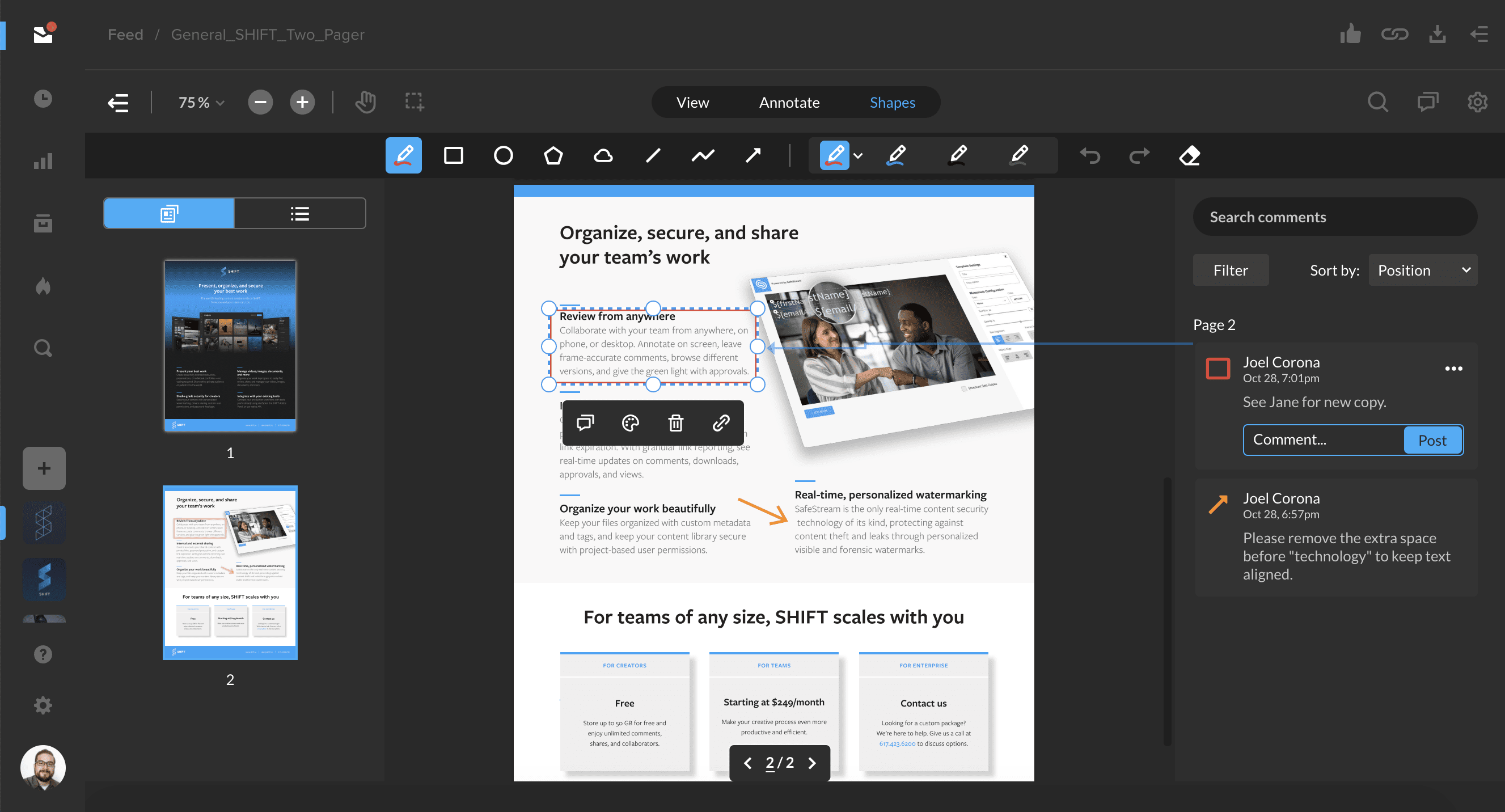
SHIFT now offers review and approval for document files! After sharing a document for review, you and your recipients can now annotate pages with comments, drawings, and a variety of customizable shapes.
Document review is supported for common file types, including PDF, Word Document (doc, docx), PowerPoint (ppt), and Rich Text Format (rtf) files.
Click below to learn all about document review functionality in SHIFT.
You’ll now be able to quickly search through your file metadata on the right-hand side of the Projects screen. With an asset selected, click the filter icon next to the “+” button to display the metadata search bar. Enter a search term to find custom metadata or metadata that is automatically extracted when you upload a file, such as bit rate and codec information.
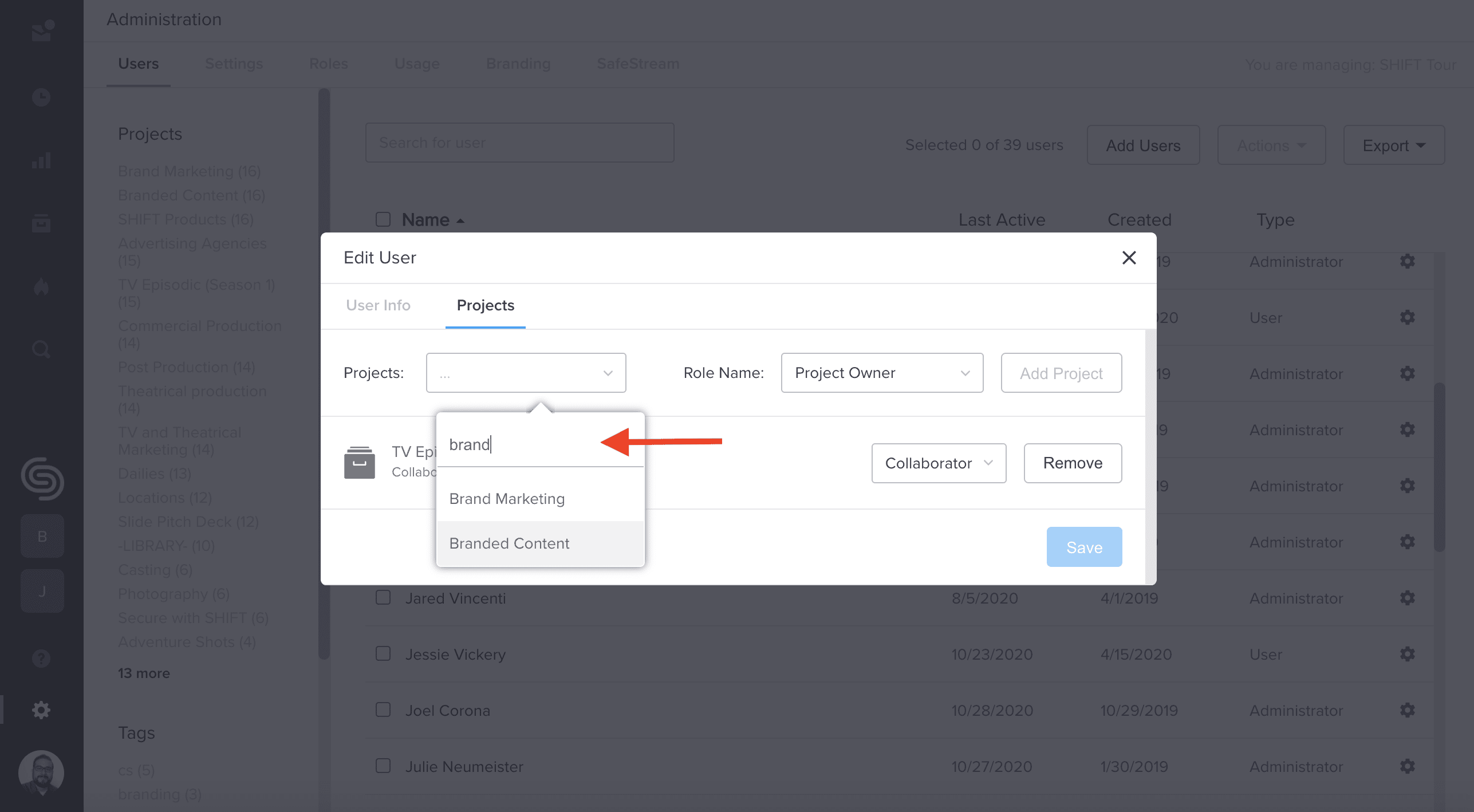
In addition, you can now search for projects in Administration. When assigning projects to new or existing users, you can now use the search bar to easily find specific projects.