What's New in FLOW? Watch the Webinar to Find Out!
Looking for new ways to streamline your media workflows and get more done in less time? The latest FLOW media management update, FLOW 25.1.0, is packed with powerful updates designed to simplify your day-to-day, and now you can see it all in action.
In our latest webinar, Unlocking the Power of FLOW 25.1.0, EditShare’s Senior Product Manager Lucy Seaborne teams up with Global Pre-Sales Technical Manager Adam Lewiston to walk you through the latest features, enhancements, and real-world use cases for this exciting new release.
Whether you’re managing fast-turnaround productions or large-scale archival workflows, FLOW 25.1.0 delivers smarter ways to organize, automate, and collaborate.
Watch the webinar replay to learn:
✅ What’s new in FLOW 25.1.0, including UI improvements, workflow automations, and more
✅ How the latest updates can drive efficiency across your team
✅ Best practices for getting the most out of FLOW, straight from the experts who helped build it
Don’t miss your chance to get up to speed with everything the new release has to offer.
Access the webinar replay now(Free with registration)
The latest FLOW release, version 2025.1.0, delivers powerful new capabilities to media managers, streamlining workflows and making asset management more intuitive than ever. With enhanced scanning, uploading, and automation tools, EditShare One Organize simplifies complex tasks, saving time and improving efficiency. Let’s explore how these new features empower media professionals.
FLOW’s extensive range of applications often left users confused about which tools to use and how to install and maintain them. This limited user accessibility and acceptance and its why we created EditShare One. A simple browser based Interface that enables all users to access all of FLOW’s powerful tools for a variation of different workflows.
Time-consuming, manual processes are a thing of the past. FLOW Automation eliminates repetitive tasks like tagging, transcoding, and file delivery, allowing media teams to focus on creative work.
What’s New?
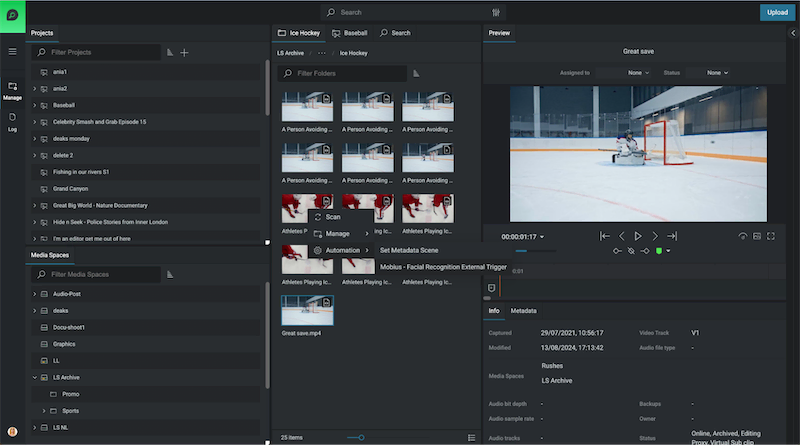
Right-Click Automations: Users can now trigger automation workflows directly from the Organize module, applying them to single or multiple assets with ease.
Automate across Projects or Media Spaces: Automate processes across entire projects, reducing manual steps and ensuring consistency.
Simplified Access to Templates: View only available automation workflows by asset type. Only relevant templates are displayed, keeping the interface clutter-free.
With these improvements, EditShare One is faster, easier, and more accessible—allowing teams to move media seamlessly through their production pipeline.
Keep Your Media Database Up to Date
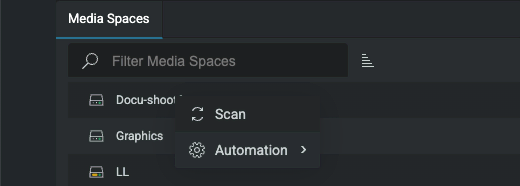
Scan Assets Directly from EditShare One
Keeping track of media assets is crucial for efficient project management. The new scanning functionality enables users to update the FLOW database effortlessly—without leaving the Organize module.
How It Helps
On-Demand Scans: Update media metadata and add new assets to the database anytime.
Two Scan Modes:
Quick Scan – Ideal for detecting and adding newly created or modified files.
Normal Scan – Updates metadata for all new and modified files, keeping asset details current.
Direct Access in Organize: No need to navigate to FLOW Control for scans—everything is accessible where you work.
This feature ensures your database remains accurate and up to date, improving searchability and media organization.
Upload Files Faster, Smarter, and with Greater Control
Enhanced Upload Capabilities
Managing late arriving assets can be challenging, but the improved Upload function simplifies the process, giving users more control over their media.
Key Benefits
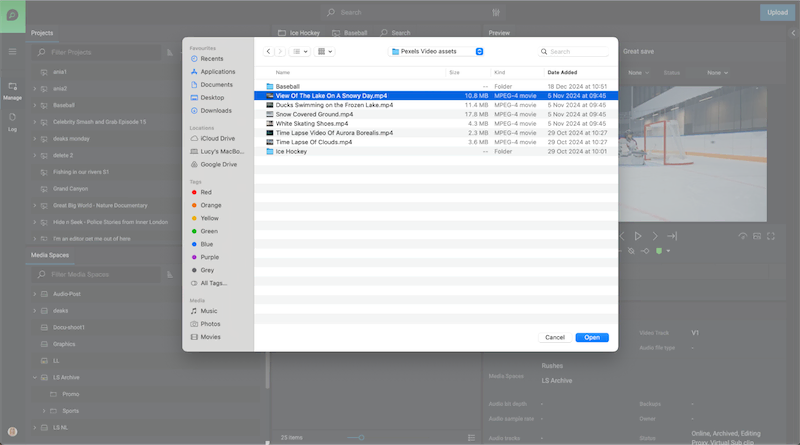
Batch Uploading: Add multiple assets at once, reducing downtime between uploads.
Advanced Metadata Options:
Prevent duplicate uploads with the Fail if asset already exists option.
Generate streaming proxies during upload.
Apply custom metadata tailored to your workflow including metadata triggers to automate workflows.
Global Ignore List: Admins can restrict unwanted file types, preventing unnecessary clutter in the system.
With these enhancements, uploading assets is more efficient and customizable than ever before.
Navigate and Manage Assets More Intuitively
Flexible layouts
Media professionals need a fast, streamlined way to organize and move assets. The new Flexible layouts in EditShare One – Organize, introduces a more intuitive layout designed for seamless asset handling
Why It Matters
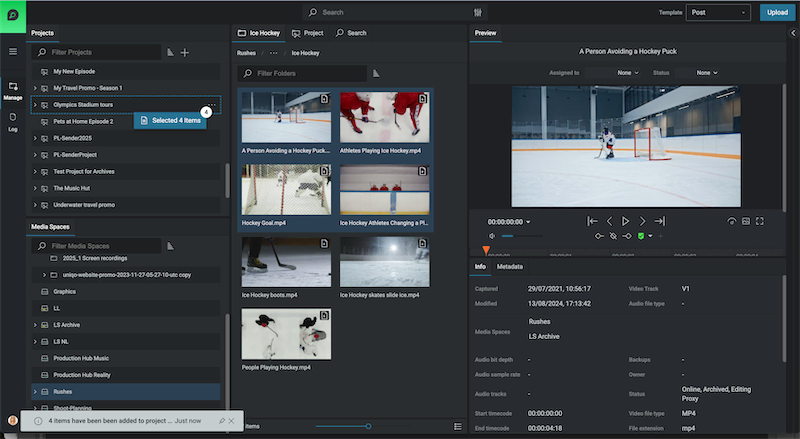
Customizable Interface: Show or hide panels to tailor the workspace to your needs.
Multi-Select Dragging: Select multiple assets using keyboard shortcuts and move them together effortlessly with fewer clicks.
New Manage Viewpoint: Complimentary to the Log Viewpoint, the new Manage view stacks panels vertically providing simultaneous visibility of Media Spaces and Projects. Each view point can be utilized to maximise the layout specific to the task in hand from managing media to logging
Enhanced Searchability:
A new Results Panel categorizes assets into three tabs: Media Space, Project, and Latest Search Results.
Tabs remain visible even when navigating, eliminating redundant searches.
Breadcrumbs have been relocated for clearer navigation paths.
This update dramatically improves efficiency, making it easier to organize and access media in large-scale projects.
Performance Enhancements for Large-Scale Workflows
As more teams scale up operations, FLOW’s automation engine has been optimized for handling multiple workflows daily. A new Status View provides real-time insights into automation performance, allowing administrators to monitor system activity at a glance.
Get Started with FLOW Today
The FLOW 2025.1.0 release redefines how media professionals manage assets—offering automation, improved navigation, and more control over media workflows. Whether you’re handling high-volume uploads, triggering automated tasks, or optimizing media organization, EditShare One Organize ensures your team works smarter, not harder.
One thing I see a lot in my line of work is a lot of talented, creative, and passionate people being forced to do really menial tasks in order to start the edit or start the production. Right? A lot of MAM companies will promise you the world when it comes to automating away these menial tasks, but usually there’s a pretty hefty price tag and a lengthy professional services process to get through. One of EditShare’s most exciting products actually remedies that.
Let me show you three things you can automate today using FLOW Automation.
QC Quarantine Automation
This first one I like to call the QC quarantine. This automation allows you to set up a watch folder for an ingest path. Anything that hits that watch folder immediately gets sent over to a QC server, something like Baton or QScan.
If it passes, we copy it into the proper media folder, and then we set the metadata to show that it passed at a certain date and time. If it fails, we move it into a quarantine media space that’s only accessible by one user, in this case, patient zero.
We send a notification email to patient zero saying there are clips waiting for you in the quarantine folder. Patient zero can now manually look over these clips that failed QC and determine what to do next.
This cuts down significantly on the per asset QC time because rather than you having to manually upload them or upload them to the QC server, they already live on the EditShare and proxies are being generated in the background during this QC process. Plus, there’s no way for editors to accidentally use assets that failed the QC check.
Mezzanine Automation
The next automation is a mezzanine automation. Oftentimes, you’re gonna be working with footage from multiple different cameras as well as graphics packages. All of these are gonna be different codecs at varying bit rates, and it’s gonna make it really difficult for you as an admin or a media manager to predict how the system is going to handle X number of editors on the system. This works by immediately taking any assets that are dropped into the ingest folder and transcoding them into a house mezzanine codec.
This is usually a codec that is in line with your absolute highest res spec for output. Once that transcode is done, it takes the original footage and moves it up to a cloud archive so that you always have access to it. And it also preserves the original file path in case you’re using something like a Sony camera with a really important file path structure. The new transcoded footage goes to the media folder that the editors will access for their actual projects.
And if this transcode fails because of some exotic codec, it actually sends an email to IT or the admin of the EditShare server to take a look at it and see what went wrong.
Metadata Trigger Automation
This last one is great if you need to organize a package of assets to send off to a remote contractor somewhere to download and edit. It starts with a metadata trigger, so we can take all of the assets we wanna send and say push to MediaSilo. Once that’s triggered, it transcodes to an .mp4 that’s a little lighter weight and easier to transfer. Then it runs a metadata check to see if that asset is confidential or not.
If it is confidential, then it sends a notification email to your security team saying that someone tried to upload confidential assets. It also notifies the original uploader, although this is optional. If it’s a green light and there are no confidential assets, we push it up to MediaSilo, and then we update the metadata on the clip in FLOW to say this was uploaded to MediaSilo on this date and time.
As you can see, these three automations alone could save dozens of working hours on your team every week, and you can make and adjust these at your leisure rather than having to call someone like me.
Part 4 of a 5 Part Series introducing EditShare’s FLOW Asset Management and Remote Video Collaboration.
FLOW Automation adds an additional layer of intelligence to your FLOW media management system. Automation can orchestrate workflows and remove human repetitive tasks like copying, moving, deleting, transcoding and organizing projects or media spaces. Simple or complex processes can be triggered at regular times of day or week or based on user actions. Automation also provides an on ramp to the cloud.
Key Features
Build extensible workflows for every project Orchestrate tasks such as transcoding, support for over 550 deliverables Deliver backups to the cloud QC and deliver content to any location Full open source API for integration with solutions such as AI Optimize efficiency and limit downtime by offloading tasks to dedicated worker nodes