EditShare 2026.3.0 expands FLOW AI language support and adds S3 Object Storage access to EFS Media Spaces
EditShare 2026.3.0 is now available, expanding FLOW AI to 13 languages, adding S3-based object storage access to EFS Media Spaces, and introducing improvements across search, automation, archive and metadata workflows.
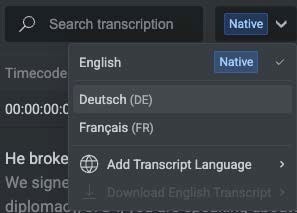
Language selector in the Transcript tab
FLOW AI now supports 13 languages
FLOW AI can now index and search Scenes, Transcripts and Media Highlights in English, Catalan, Croatian, Czech, Danish, Dutch, French, German, Greek, Italian, Portuguese, Spanish and Turkish.
Teams working across international productions or multilingual archives can now extend FLOW AI search and discovery to much more of the content they work with.
EFS Media Spaces gain S3-compatible access
The other major development in 2026.3.0 is a new way for applications to access media stored on EFS.
EFS Media Spaces can now be made available to S3-compatible applications using the industry-standard S3 protocol. Those applications gain access to the same Media Spaces that editors already work with through native EFS or SMB access, opening EFS content to a wider range of S3-compatible workflows without changing how editors work with that media day to day.
The new S3 access also supports EditShare’s broader hybrid workflow direction, including MediaSilo Media Drives, which will connect MediaSilo with content held on EFS and other supported S3-compatible storage.
Find the right content and put it to work
2026.3.0 also builds on the EditShare One capabilities introduced in the previous release. Search in EditShare One, EditShare’s unified interface for working with FLOW media, has been enhanced with several improvements for finding and organizing content. You can now sort any column of results including AI detection’s, to quickly rank assets by the number of detected Scenes, People, Logos, OCR results, or total detection points.
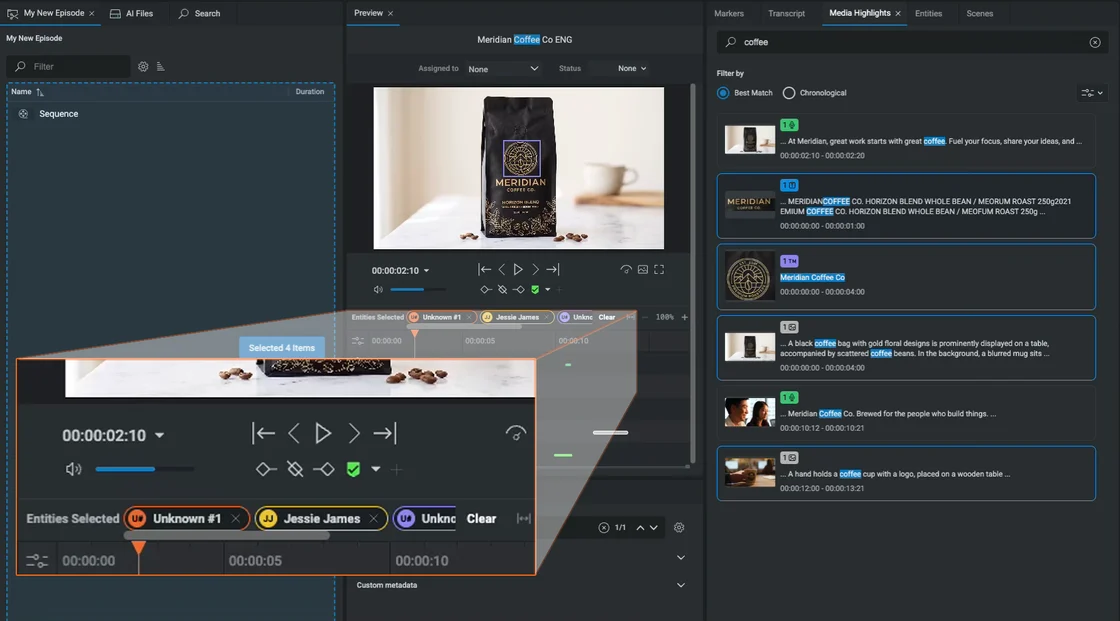
Colour coded entity display
Entity management has also been improved. People and logos are now color-coded, with bounding boxes in matching colors, so they’re quicker to find. Unknown people and logos can be identified directly from the Entities panel using reference images taken from within the asset, so users no longer have to upload images separately.
Users can now select multiple Media Highlights, Scenes, Entities and markers and drag them directly into Projects, Bins or Sequences, reducing the steps between finding a useful moment and organizing it for editorial use.
Export AI transcripts and restore only the media you need
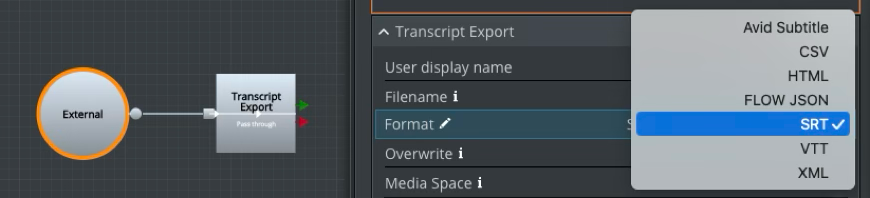
Transcript export
FLOW Automation gains several useful additions in 2026.3.0. A new Transcript Export task lets teams export FLOW AI-generated transcripts in formats including Avid Subtitle, CSV, SRT, VTT and XML, making AI-generated transcript data easier to use elsewhere in the production workflow.
Archive restores can now be much more targeted with supported DIVA and Spectra integrations. Editors and archivists can mark In and Out points on a proxy, or assemble a sequence, and restore only the required portion of archived high-resolution media rather than the complete file. This reduces the amount of media that needs to be brought back from large archives when only a section is required.
Bring existing metadata into FLOW
FLOW now supports more ways to bring information created elsewhere into the workflow.
CSV and Avid Log Exchange sidecar files can be imported as asset markers during media scans, bringing logging information, shot notes and timecoded comments into FLOW alongside the media. Matching JSON sidecar files can also apply clip metadata, custom fields and marker tracks automatically as media is scanned in, so metadata that already exists doesn’t need to be recreated by hand.
More in EditShare 2026.3.0
The release also includes a range of practical improvements to EditShare One, including the ability to export metadata to CSV, download individual assets, rename assets and bins and create folders during upload.
There are also Ark administration and reliability improvements as part of the release.
Taken together, EditShare 2026.3.0 expands where FLOW AI can be used, creates new ways for applications to work with content stored on EFS, and removes more of the repetitive steps involved in finding, handling and using media.
Brad Turner, CEO of EditShare, reflects on the conversations that stood out at IBC 2026, from practical AI and hybrid production to cost, security and the changing way teams access media.
One of the things I like most about IBC is that you very quickly get into real conversations with customers, partners and other vendors about what is actually changing in the industry.
You spend a few days talking to people, and you start to hear the same questions coming up. This year, a lot of those questions were about AI, but not in the way they were a year or two ago. People are still interested in what AI can do. What has changed is that they now want to know where it genuinely saves time, what it costs, where their content has to go, and whether it actually makes their workflow easier.
That is a much more practical conversation.
AI has to solve a real problem
At EditShare, we have taken a fairly practical approach to AI.
With FLOW AI, the aim is to help people get through huge volumes of media faster. If you have thousands of hours of content, you should be able to search transcripts, on-screen text, people, logos and scenes and get to the material you need without somebody having to manually tag everything first. Practical, cost controlled AI has a real business case: reduce search time and potentially monetize content better.
That is the kind of AI people understood immediately at IBC because the problem is obvious.
The on-prem processing part of that story also got a lot of attention. Not every organisation wants to send all of its media to the cloud for AI processing, particularly when you start talking about security, governance and potentially very large usage bills.
There was also a lot of talk at the show about what comes next, particularly agentic AI and natural-language interfaces.I think that is going to be interesting. We are going to see more people interacting with production systems by asking for what they need rather than using the native UI. Is a traditional asset management system dead? If you mean a traditional system with strict media governance, highly structured permission based workflows, and manual metadata: yes it’s been dead in all but a few markets for years. It lives on in parts of Europe and the Middle East, especially in government owned or sponsored broadcasters. But we are betting on the part of the market that wants fast and flexible workflows.
Hybrid storage and workflow is the new normal
The other thing that came up a lot was where content actually lives. For most media companies today, the answer is not one place. You might have production media on shared storage, older content in an archive, material in cloud or object storage, and people working remotely who still need access to all of it. That is normal now.
I don’t think the answer is to tell customers they have to move everything into one environment or have to index it all with a system of record. The better question is how you let people get to the content they need, wherever it happens to be. That is why I was pleased with the response to MediaSilo Media Drives at the show (and we won a TVB Europe “Best in Show” Award).
The idea behind it is pretty straightforward. You can browse, search and preview media on supported S3-compatible storage, and then bring selected content into MediaSilo or our on premise EFS system. Then do something with it, whether its edit the footage or send it somewhere for review or final delivery. AND, as I mentioned, we do it without forcing you to wait while we index the content and create proxies unlike other heavy weight asset management solutions.
You are moving what you need, when you need it, rather than copying everything around as a matter of course. That feels much closer to the way people really want to work in today’s world..
Cost is becoming a bigger part of the conversation
We also had a lot of conversations about overall cost and hardware cost in particular.
There is a huge amount of investment going into AI infrastructure right now, and that is putting pressure on the wider hardware market. At the same time, nobody in media is being given a blank cheque to keep adding servers, applications and infrastructure. Customers are looking pretty hard at what they actually need.
That thinking is behind the new all-in-one EFS configurations we showed at IBC. On EFS 310 and EFS 410, we can now bring the shared storage, FLOW and the GPU processing needed for FLOW AI into the same system.
For some customers, that means they don’t need another server to start using AI-assisted media discovery. For others, cloud will be the better answer.
There isn’t one architecture that’s right for everybody. What matters is giving people options and letting them make that decision based on the way they work and what makes financial sense.
Openness matters
Choice came up in a lot of conversations as well.
Media companies already have a lot invested in their editing systems, storage, cloud services and other production tools. They should not have to throw all of that away because one part of the workflow changes. That is why openness continues to matter to us.
EditShare has always had a well documented API to allow customers to integrate with our systems. We do have an integrated ecosystem with our ARK archive product (which some customers love, but not everyone). Recently we decided to embrace third party on premise archive products like Spectra, Diva, and Kumulate. We now support archive and restore workflows from within FLOW and can search these archives using FLOW AI.
What I came away thinking
IBC is always useful because you get a pretty good sense of which ideas are getting traction and which ones are mostly noise.
For me, the direction is becoming clearer. People want AI that does something useful. They want easier access to media without constantly moving and duplicating it. They want the freedom to choose between on-prem, cloud and hybrid depending on the job. And they want technology that works with the production environment they already have.
The opportunity for our industry is to keep adding capability while making it easier for people to put that capability to work.
Estimated reading time: 5 minutes
Creative teams do not necessarily need another AI tool. They need fewer manual steps around the content they are already producing.
That was one of the central themes of our recent MediaSilo AI webinar, where the EditShare product team explored how AI can remove some of the everyday friction around finding, transcribing, captioning and reviewing media, before demonstrating the technology live.
Finding the right moment in a growing library is one challenge. Creating transcripts and captions is another. Then there is the work of getting content securely in front of reviewers, often across companies, locations and time zones.
MediaSilo AI brings more of those jobs into the same environment teams already use to organise, review and share media. Here, we’ve pulled together some of the key takeaways from the webinar, with highlights from the discussion and demonstration along the way.
Captioning and transcripts without another workflow
For many creative teams, transcription and captioning are simply part of getting content ready for review, accessibility and delivery. But that can still mean sending media to a separate provider, waiting for the results and bringing another file back into the production workflow.
MediaSilo AI brings transcription and captioning directly into MediaSilo. Once media is AI-indexed, users can work with a searchable transcript alongside the asset. Clicking a line of dialogue takes them directly to the corresponding moment in the video, while dialogue captions can be downloaded as an SRT file for use elsewhere in the workflow.
That makes the transcript useful well beyond the initial transcription task. If you remember what someone said but not which project, file or scene it came from, the dialogue itself becomes another route back to the content.
Subtitles can also help keep review moving. In the webinar, the team showed how captions can support review when listening to audio is impractical, helping distributed stakeholders keep working wherever they happen to be.
There is a wider workflow benefit too. As the webinar discussion highlighted, many production teams already rely on separate transcription and captioning services. Bringing that process into MediaSilo can reduce additional hand-offs and waiting time while keeping the content within the existing MediaSilo workflow.
Find what nobody tagged
Transcripts are only one way into an asset. Sometimes you remember a person. A sponsor logo. Some text that appeared on screen. Or something less structured, such as a particular type of shot. Traditionally, finding that content depends heavily on filenames, folders and whatever metadata somebody had time to enter when the media was created. MediaSilo AI analyses the content itself.
During the live demonstration, the team looked for a shot of a swimmer diving into water. Instead of searching for a filename or manually applied tag, they simply described what they wanted. MediaSilo returned relevant assets from across the library and showed where matches had been detected. Opening a result revealed Media Highlights within the file, including matches based on dialogue, on-screen text, people, brands and visual scenes. A visual heat map also showed where those relevant moments appeared throughout the asset, allowing the user to jump directly to the required point rather than scrub through the entire file.
The same approach can be used for known people and brands, or for more descriptive visual searches where no useful metadata exists. In the webinar, for example, a search for “two swimmers” moved directly to a matching scene. Together, that creates several ways to find content based on what you actually remember: what was said, who or what appeared on screen, what text appeared within the frame, or what the scene looked like.
The result is less dependence on perfect manual tagging and less time spent hunting through folders and files.
Secure AI without watching the meter
For media organisations, introducing AI also raises two very practical questions: where is the content being processed, and what is it going to cost?
MediaSilo AI has been designed so that media does not need to be sent to a separate third-party AI provider for analysis. During the webinar, Simon Lamprell explained that the data does not leave the MediaSilo platform for that processing. That is particularly relevant for organisations working with pre-release, client-owned or otherwise sensitive media, where adding another external service to the workflow can introduce additional security concerns.
The commercial model is designed to be predictable too. Rather than charging according to the number of searches performed, minutes processed or AI tokens consumed, MediaSilo AI uses a per-user model. It is included in current Enterprise plans and available as an add-on to MediaSilo Pro.
AI can also be enabled for previously uploaded content, so its value is not limited to media added after the feature is switched on. Existing libraries can be indexed to make previously untagged material easier to rediscover.
MediaSilo is becoming more than a review destination
The webinar finished by looking beyond AI to the broader direction of MediaSilo. Production environments are increasingly hybrid. Media may sit on shared storage within a facility, in cloud object storage, in collaboration platforms or across several locations at the same time. Rather than forcing all of that media into one place, the direction for MediaSilo is to make it easier for creative teams to work across those environments.
The team previewed Media Drives, including planned integration between MediaSilo and EditShare EFS storage. This new technology will allow users to access on-premises media through MediaSilo, browse and view content, and move selected assets between on-premises and cloud environments when they are ready for sharing, review or other MediaSilo workflows.
It is part of a broader move towards positioning MediaSilo as a media hub connecting cloud collaboration with the storage and production environments where content already lives.
How real-time metadata updates expose handoff failures before a missed deadline does
Learn to diagnose the seven warning signals that reveal systemic breakdowns between production and post. This guide shows how real-time metadata updates and media asset management replace guesswork with visibility.
The Real Cost of Mislabeled Production Footage
Every production team has experienced the problem: a shuttle drive arrives in post containing folders organized by shoot day and camera card, but the camera reports, clip metadata and folder contents don’t line up. The problem is rarely one careless crew member. It’s usually a gap between how footage is captured and organized on set and how it needs to be identified, searched and used in post.
Mislabeled production footage is not a storage problem or a naming-convention problem. It is a visibility problem. When real-time metadata updates stop flowing between production and post, every downstream decision (pulling selects, conforming timelines, delivering to distributors) relies on memory, guesswork, or expensive re-shoots. The cost compounds quietly until a deadline exposes it all at once.
This is the gap that a properly configured media asset management platform is built to close, yet most production teams still treat handoff failures as isolated human errors rather than diagnosable patterns with clear warning signals.
What This List Covers (and What It Doesn’t)
This guide is for line producers, DITs, and post supervisors who manage the handoff between set and edit. If you have ever spent hours hunting for a specific take across scattered drives, or discovered that an entire day’s footage was logged under the wrong project code, these signals will be familiar.
This is not a checklist of folder-naming best practices. Those exist everywhere and solve the surface symptom. Instead, we examine seven diagnostic patterns: the metadata signals that reveal a handoff is failing before the deadline does. Each signal points to a structural weakness that naming conventions alone cannot fix.
How We Selected These Seven Signals
Each signal was chosen based on three criteria: it appears across multiple production types (episodic, commercial, live event), it is detectable through metadata or asset-management telemetry rather than manual audit, and it correlates with measurable downstream cost (re-edits, missed deliveries, or duplicated work). Signals that only apply to a single NLE or camera system were excluded.
Seven Signs Your Production-to-Post Handoff Is Costing You Footage
1. Clip Counts Don’t Match Camera Reports
When the number of clips ingested into your media asset management system does not match the camera report from set, something may have been lost, duplicated or incorrectly transferred. This is one of the earliest and most objective signs of a handoff problem, yet many teams only investigate after an editor reports a missing shot. Some organisations build automated checks into their ingest workflows, while others reconcile the camera report and ingested assets manually. The important point is that the check happens before editorial begins.
2. Timecode Gaps Appear in Assembled Timelines
Timecode is the backbone of the online conform. When gaps appear in a timeline that should be continuous, it signals that metadata was stripped or overwritten during transcode, or that source files were re-wrapped without preserving original timecode. This is not an editing mistake; it is a metadata integrity failure at the handoff layer. Editors often discover it only when they attempt to online or colour-grade, by which point the cost is a time lost in the conform. Real-time metadata validation during ingest and transcode can surface timecode discontinuities the moment they occur. Validate timecode continuity as part of your QC pass at ingest, and flag any file where embedded timecode does not align with the camera report’s expected range for that roll or card.
3. Duplicate Filenames Across Different Shoot Days
Most cameras reset their clip numbering with each new card. Without a metadata enrichment layer that appends shoot day, camera ID, and scene information at the point of capture or ingest, you end up with dozens of files named “A001_C001” that refer to completely different content. This is the single most common cause of footage being overwritten or misattributed in post. The legacy fix, a naming convention document distributed to every DIT and camera assistant, depends entirely on consistent human compliance. The structural fix is automated metadata tagging at ingest that appends contextual identifiers regardless of the original filename, and a MAM that can detect duplicate filenames across distributed storage before they collide. Audit your current ingest pipeline for any step where files retain camera-default names without enrichment. If duplicates are only caught when an editor opens the wrong clip, the detection point is too late..
4. Audio and Video Assets Cannot Be Matched Reliably
Dual-system sound is standard on many narrative and commercial shoots. When timecode, scene, take or audio file metadata is missing or inconsistent, assistant editors may struggle to identify and sync the correct audio and video files in the NLE. Across a feature or series, that can add hours or even days of manual work. If files can only be matched by opening them individually or relying on someone’s memory, the production-to-post handoff is not preserving enough useful metadata.
5. Proxy Files Exist but Cannot Be Traced to Full-Resolution Sources
Proxy workflows accelerate editing, but they create a dangerous dependency: if the proxy cannot be reliably traced back to its full-resolution source through metadata, the online or finishing stage breaks. This signal often hides until delivery, when a colourist or online editor discovers that proxy-to-source links are broken for an entire reel. EditShare FLOW preserves source-to-proxy relationships across distributed storage environments, ensuring that editorial decisions made on proxies always resolve back to camera-original media. When lineage tracking is absent, teams resort to manual spreadsheets that drift out of sync within hours. Run a lineage audit on your most recent project: select ten proxy clips at random and verify that each one resolves to its full-resolution source through system metadata, not folder structure or filename matching.
6. No One Can See Which Assets Are Ready for Editorial
When ingest, proxy creation and QC status are tracked in spreadsheets, emails or chat messages, production and post lose a shared view of what is ready and what still needs attention. Editors may begin work with incomplete media, request files that are already being processed or spend time trying to establish whether an apparently missing asset is still transferring or was never delivered. A media asset management system can provide a central view of assets and their associated workflow metadata, helping teams identify what has arrived, what has been processed and what still requires action. If someone has to ask around to find out whether a shoot day is ready for editorial, the handoff lacks reliable visibility.
7. Footage from External Vendors Arrives Without Searchable Metadata
Productions increasingly involve footage from multiple vendors: second units, drone operators, stock houses, user-generated content. When this material arrives as bare media files with no embedded or sidecar metadata, it becomes invisible to your asset management system. It exists on a drive somewhere, but no one can find it without knowing exactly where to look. The most resilient workflows apply automated metadata extraction at the point of ingest, regardless of source. EditShare FLOW supports automated metadata enrichment on all incoming media, including AI-driven scene detection and automated tagging, so vendor footage is indexed and searchable the moment it lands in shared storage rather than sitting in a corner drive that editors avoid. Establish a vendor ingest protocol that requires minimum metadata fields (project code, shoot date, content description) and automates the rest.
The Pattern Beneath the Signals
These seven signals share a common root: metadata loss or degradation at transition points. Every time footage moves from one system, person, or stage to another (card to shuttle drive, DIT station to shared storage, production to post), metadata is at risk of being stripped, overwritten, or simply never created.
The deeper pattern is that handoff failures are cumulative, not isolated. A missing camera ID at ingest (Signal 3) makes audio syncing harder (Signal 4), which delays proxy creation (Signal 5), which obscures version lineage (Signal 6). Fixing any single signal in isolation provides temporary relief. Fixing the metadata layer that connects them creates durable workflow continuity.
The shift required is from reactive (“we will fix it in post”) to diagnostic (“we will detect it at ingest”). This reframe moves the cost from the most expensive phase (editorial and finishing) to the least expensive one: ingest and QC.
Where to Start: Constraints and Priorities
You do not need to address all seven signals simultaneously. Start with the one that has caused the most recent, most expensive failure. For most teams, that is Signal 3 (duplicate filenames) or Signal 5 (broken proxy-to-source links), because these tend to surface at the worst possible moment: during delivery.
If your budget allows only one infrastructure change, invest in automated metadata enrichment at ingest. This single improvement addresses Signals 1, 3, 4, and 7 directly and reduces the severity of the remaining three. Pair it with a weekly metadata audit (15 minutes, not hours) and you will catch drift before it becomes a crisis.
The goal is not perfection. It is early detection. Every signal you can surface before editorial begins is a signal that costs you minutes instead of days.
Frequently Asked Questions
What is real-time metadata discovery in the context of media production? Real-time metadata discovery refers to the continuous, automated process of identifying, extracting, and updating metadata across media assets as they move through a production pipeline. Unlike static metadata entered manually at one point, real-time discovery detects changes as they happen (new clips ingested, timecode shifts, broken proxy links) and surfaces those changes to the team without requiring manual audits.
Why is real-time metadata visibility important for production-to-post handoffs? Real-time metadata updates ensure that discrepancies (missing clips, duplicate filenames, stripped timecode) are detected at the moment they occur rather than days later during editorial. This shifts the cost of fixing errors from the most expensive phase (post-production) to the least expensive one (ingest and QC), preventing deadline-driven crises.
How does media asset management differ from simple file search? File search requires you to know what you are looking for and where it might be stored. A MAM like EditShare FLOW indexes metadata across distributed storage (local drives, NAS, cloud) and surfaces assets based on their attributes: shoot date, camera ID, scene number, timecode range. It finds footage you did not know was missing.
When should a production team implement a media asset management platform? The ideal time is before principal photography begins, during pipeline setup. However, teams can adopt a MAM mid-production by running a metadata audit on existing assets and applying automated enrichment to all new ingests going forward. The key is to start before a delivery deadline forces the issue.
Can naming conventions alone prevent mislabeled footage? Naming conventions help but are insufficient on their own. They depend on consistent human compliance across every crew member, vendor, and transfer point. Automated metadata extraction and enrichment at ingest provide a structural safety net that works regardless of whether the naming convention was followed on set.
Estimated reading time: 10 minutes
What is the first step to diagnosing a broken production-to-post handoff? Run a clip-count reconciliation: compare the number of clips in your camera reports against the number of assets ingested into your media management system. If the numbers do not match, you have a quantifiable gap that points to the specific stage where footage was lost, duplicated, or merged.
You know the clip exists. You shot it, or someone did. It’s somewhere in the archive, behind metadata that was never fully logged, on a project whose lead has since moved on. You’re going to spend the next hour looking for it, or possibly the next day.
This is not a storage problem. Media teams have storage. It’s a discoverability problem, and it has a measurable cost.
Assistant editors, and asset managers spend an average of 55% of their working time on tasks that have nothing to do with creative work: searching, logging, syncing, and preparing material before it reaches the edit. For a team working a normal production year, that translates to roughly three to four weeks spent looking for things that already exist.
FLOW AI is EditShare’s response to that problem. It is an analytical AI module built directly into FLOW, EditShare’s media asset management platform, and it is designed to make the gap between finding and delivering footage short enough to matter.
Not All AI in Media Is the Same
When people talk about AI in media and entertainment, they are not always talking about the same thing. Generative AI, the category that draws the most headlines, creates video, audio, and images from scratch. Editorial assist tools, integrated into applications like Adobe Premiere Pro and DaVinci Resolve, handle cleanup tasks: background removal, audio enhancement, object removal. Rough-cut tools attempt to identify story beats in unscripted material and assemble editable sequences for the editor to work from.
FLOW AI sits in a fourth category: analytical AI. It does not generate content. It does not make editorial decisions. It understands the footage you already have, indexes it thoroughly on ingest, and makes it searchable in ways that manual logging rarely achieves in practice.
This is the least visually dramatic of the four categories. It is also the one with the most direct path to a justifiable business case.
Why Integration Is the Design Choice That Matters
EditShare has attempted AI-assisted media analysis before, and the earlier version did not find traction. The approach at the time required bundling media files and sending them to an external service for processing, a workflow that introduced delays of one to two times the running length of each file, raised security concerns around unreleased content, and delivered results into a separate interface disconnected from the environment where editors, producers, and asset managers actually worked.
The lesson was straightforward: AI only works in a media workflow when it fits the way media teams work.
FLOW AI is built on three principles that came directly from that experience.
In-place Processing
Analysis happens on premise. Media files do not leave the facility. For a 60-minute asset, the current processing time is approximately 10 minutes, a significant improvement over the two hours required when files had to travel off-site. The original media stays where it is; only the index is built and stored.
Integrated workflow
Search results, detected moments, and analysis data surface inside FLOW, the same interface where teams already manage their media, create subclips, build sequences, and route material for review. If AI results live in a separate application, teams have another system to check and another place where work gets disconnected. FLOW AI is designed so that finding a clip and doing something with it are steps in the same session, not steps in two different tools.
Predictable Pricing
FLOW AI is licensed on an annual basis. Once the AI server is in place and the module is licensed, teams can run analysis across as much material as the hardware supports without accumulating per-query costs. The ability to control AI spend, rather than discovering at the end of the quarter what the meter has accumulated, was one of the clearest pieces of feedback EditShare gathered while developing the product.
What FLOW AI Detects
On ingest, FLOW AI analyses footage and builds an index of what it finds: objects and scenes, faces, on-screen text, speech and audio events, and logos. That index is what makes subsequent searches fast; the hard work happens once, at ingest, so that retrieval is near-instant.
Search is semantic rather than literal. If an editor searches for “sparks,” the system returns footage containing relevant material even if the original logging used a different language or no language at all. The analysis of the actual frames provides the metadata when manual tagging never did.
Face recognition works across all appearances in the footage and distinguishes between a person’s face on camera and their name appearing as on-screen text in a credit sequence, two different detection types that can be toggled independently during review.
Logo recognition is trained from a single reference image. The system identifies every frame where that logo appears as a graphic, and separately recognises the associated vehicle or object in context (its make, model, and the conditions it appears in) without relying on the logo graphic being visible. Search terms like “SUV” or “Cherokee” will surface the same content because the scene description captures what the system understood, not just what was tagged.
Adding a new recognition target (a logo, a face, a brand name) does not require reprocessing archived material. The initial index has already flagged unknown logos and faces. Assigning an identity applies across all previously indexed content immediately.
Transcription is included. The current release supports 12 languages, with audio detections surfaced as media highlights alongside visual results in the same timeline view.
From Search to Delivery
The practical value shows up in the gap between finding and delivering.
In a post-production scenario: a facility is cutting a trailer from a feature film and needs two things, a sparks sequence and footage of the lead actor. Both searches return results in seconds. Detected moments appear as media highlights linked directly to the relevant frames in the source material. Those highlights drag into a bin as subclips, with no manual in and out points required. A rough assembly sequence is ready to hand off to the editorial department, or send to MediaSilo for client review, in the time it would previously have taken just to locate the first clip.
In a brand partnership scenario: a search for a sponsor’s name returns trademark detections (frames where the logo appears as a graphic) alongside scene detections describing the vehicle in context. The completed sequence can be assigned directly to a colleague inside EditShare One, with review notes appearing as timeline markers on specific clips. The full loop from detection to internal review runs inside FLOW, without an email chain or a shared spreadsheet tracking who has seen what.
Cut-downs that previously required a day of manual logging and timecode notes can now be assembled in minutes. At the scale of a production schedule, that compression changes what is economically worth making, and opens the door to treating AI-assisted editorial prep as a billable service.
Available Now
FLOW AI was released on 1 July 2026 as part of FLOW 26.2. It is an additional module requiring a FLOW license, a separate FLOW AI license, and a dedicated AI server with GPU. An introductory promotion on the AI server is currently available.
FLOW 26.2 also includes drag-and-drop workflow improvements, enhanced metadata display, and zoom controls. A FLOW panel for Adobe Premiere Pro and DaVinci Resolve, bringing the same AI search and media highlights into the NLE environment, is in development and expected later in 2026.
If you want to explore what FLOW AI could do for your facility or team, speak to your EditShare regional sales manager or book a demonstration.
A practical approach to using metadata, AI and automation to increase content output and get more value from every production
Sports media teams create enormous volumes of footage. Live match feeds, interviews, press conferences, training sessions, behind-the-scenes material, social clips and years of archive content all need to be captured, managed and made available to production teams.
Storing that media is only part of the challenge. Its value depends on whether people can find the right moment when they need it!
A filename and recording date may tell an editor where a clip came from. They rarely identify which player appears, what was said in an interview, where a sponsor logo is visible or when a decisive moment happens within a two-hour recording. Without richer metadata, editors and producers are forced to search through folders, scrub long recordings or ask the person who happens to remember where the footage was stored. That slows down production at the point when speed matters most. Metadata enrichment creates more ways to find and reuse media. Structured production information provides the essential context, while analytical AI identifies details within the pictures and audio. Together, they turn a growing collection of files into a searchable production library.
The business case for searchable sports media
Poor search creates a production bottleneck. Every minute an editor spends looking through footage is time that could have been used to create a highlight, social clip, sponsor edit or programme segment. During and immediately after a live event, even a short delay can mean missing the window when audience interest is at its highest. The impact grows with the size of the archive. Valuable footage may be stored and protected, but it remains difficult to use unless someone knows the correct season, production, filename or folder. Teams become dependent on a small number of people with detailed knowledge of the library, while remote staff, new employees and external collaborators struggle to locate the same material.
Making media searchable can improve several areas of the operation. Editors can reach relevant moments without manually reviewing complete recordings, which means faster turnaround and greater output from the same team. Historic footage becomes easier to reuse for documentaries, player profiles, anniversaries, licensing and fan engagement. Production and commercial teams can find content containing particular logos or brands without relying on institutional knowledge, or on the one person who remembers which folder it was filed under. And because analysis remains part of the existing FLOW environment, it does not require a separate collection of third-party AI services and custom integrations.
The objective is not to generate more metadata for its own sake. It is to remove the delay between capturing an important moment and turning it into content that can be published, shared, licensed or reused.
Here are six practical steps for building a more searchable sports media library:
1. Start with the searches your team actually performs
Before changing metadata fields or introducing AI, identify what users regularly need to find.
Speak to producers, editors, social teams, archivists and commercial teams. Ask them for examples of recent searches that took too long, returned too many results or depended on someone remembering where a clip was stored. Typical searches might include a specific player, coach or presenter; a goal, save, penalty or celebration; a post-match interview or press conference; crowd shots and stadium atmosphere; footage containing a sponsor’s branding; historic material from a particular fixture; an interview containing a specific phrase or subject; or content cleared for a particular platform, territory or partner.
These examples should shape your metadata strategy. Trying to describe every detail of every asset will create more work than value. Focus on the information that helps people find, understand and reuse media within real production workflows.
2. Capture essential production context consistently
Some information is best recorded as structured metadata because it cannot be reliably inferred from the video or audio alone. For sports media, this may include the competition, season, fixture or event, home and away teams, recording date, venue, content type, language, rights and usage restrictions, and approval status.
Keep the number of mandatory fields manageable. Long forms slow down ingest during live production and encourage users to enter incomplete or inconsistent information. Controlled values can improve consistency, a dropdown list for competitions, teams and content types prevents variations such as “Manchester United”, “Man Utd” and “MUFC” from becoming separate search terms.
Free-text descriptions still have a role, particularly when a producer needs to explain the editorial relevance of a clip. The core production information should remain standardized across the library, creating a reliable foundation that can be expanded through automated analysis.
3. Use FLOW AI to make the content inside each file searchable
Structured metadata explains where media came from and how it may be used. FLOW AI adds information found within the media itself.
As footage is ingested, FLOW AI works analytically to identify what is already present in the pictures and audio, it does not generate new footage or descriptions that could introduce invented details. Capabilities include:
Spoken words: Speech-to-text turns commentary, interviews and press conferences into searchable transcripts.
On-screen text: Optical character recognition (OCR) identifies visible information such as scoreboards, lower thirds, player names and signage.
Faces and people: Face detection provides another route to locating appearances across different clips and productions. Accuracy improves as detected identities are confirmed and associated with known individuals from your roster.
Logos and brands: Logo detection helps teams find sponsor appearances and relevant branded content.
Scenes and visual elements: Scene analysis helps users navigate long recordings and reach relevant shots more quickly.
These capabilities create multiple search paths into the same media. An editor may find a clip through a player’s face, a name displayed on screen or a phrase spoken in the commentary. A commercial producer may search for a sponsor logo. An archivist may use the transcript to locate an interview covering a particular topic.
Critically, all analysis runs within the customer’s own EditShare environment. Valuable media does not leave your infrastructure for processing by an external AI platform. For sports organizations managing commercially sensitive footage, broadcast rights and sponsor agreements, that distinction matters. It means you retain full control of your content, your data and how your library is handled, without having to evaluate the security practices of third-party AI providers or negotiate separate data processing terms.
4. Combine automated analysis with human editorial knowledge
AI can identify what appears in the picture and what is being said. Human users provide the editorial and operational context.
A producer, logger or archivist may still need to record why a moment is significant, whether the footage is approved for external use, which campaign or deliverable it belongs to, whether it contains sensitive or restricted material, which platforms or territories may use it, and whether a clip is a final version or work in progress.
For example, FLOW AI may identify a player, a visible scoreboard and a sponsor logo. A producer can add that the clip contains the winning goal, is cleared for social use and has been selected for a particular campaign. This combination creates stronger metadata than either method could provide independently, automated analysis handles volume and repetition, while human input adds meaning, rights information and editorial judgement.
Teams should also review and refine AI-generated information as part of their normal workflow. When an unidentified person or logo is named in FLOW AI, that identity can be applied retrospectively wherever the same person appears, without requiring the original media to be processed again. The library becomes more useful as teams continue working with it.
5. Connect search directly to production
Metadata creates value when editors and producers can use it within their everyday workflow. Finding a clip in one system, downloading it and manually moving it into another creates unnecessary steps and additional copies of the media.
FLOW provides a centralized environment for searching, reviewing and organizing content across connected production storage and archive tiers. Once users find the material they need, they can bring selected media directly into Adobe Premiere Pro, Avid Media Composer, DaVinci Resolve or other creative tools, without leaving the FLOW environment or creating duplicate files.
This is particularly important for sports organizations with distributed production teams. A producer at the venue, an editor at the main facility, a remote social team and an archivist working with previous seasons should all be able to access the same media and metadata, without needing separate copies, different folder structures or individual knowledge of where each asset is stored. Better access helps teams work in parallel and reduces the delay between ingest, discovery and editing.
6. Use metadata to drive the next action and bring your archive back into production
Search is one benefit of better metadata. The same information can also help move content through production automatically, and restore dormant archive footage to active use.
FLOW Automation uses workflow rules, metadata changes, system events and user actions to initiate repeatable processes. A completed match production can be moved from high-performance production storage to a nearline tier while remaining fully searchable through FLOW. An approved interview can be added to a social production project automatically. Historic footage selected for a documentary can trigger the required restore and proxy processes without manual intervention. Other common automation points include transcoding into required formats, delivering content to an output location, and notifying users when a process has completed.
You don’t need to process everything at once, starting with the current season, high-profile players and upcoming events gives you quick wins to build the internal case before expanding.
This approach also helps build the internal business case. It is easier to demonstrate the value of a searchable archive when the first phase focuses on media teams already need and can put back into production quickly.
Measuring the impact
The number of populated metadata fields is not the most important measure of success. The real question is whether people can find and use media faster.
Useful indicators include the average time required to locate a requested clip, time from ingest to the first published edit, the number of clips produced during and after each event, the percentage of new content using archive footage, and the volume of sponsor or commercial requests fulfilled. Reviewing unsuccessful searches, where users repeatedly search for terms not represented in the metadata, can be particularly valuable, as those patterns should inform updates to the controlled vocabulary, logging process, or the brands and individuals registered within FLOW AI.
The system should continue improving as production requirements change, new players and sponsors are introduced and the archive grows.
Turn stored footage into an active media library
Sports organizations invest heavily in capturing content. The return on that investment depends on how easily the footage can be found and reused.
Structured metadata provides reliable production context. FLOW AI makes the people, brands, words, text and visual information within the media searchable, all processed within your own environment, with no content leaving your infrastructure. Human users add editorial meaning and rights information. FLOW Automation uses that intelligence to move content through the next stage of production.
Together, these capabilities help teams reduce time spent searching, increase content output and make more effective use of valuable archive media. Instead of behaving like a collection of stored files, the sports library becomes an active production resource that grows more useful over time.
Whether you’re producing feature films, episodic television, sports content, news, or branded media, security expectations have never been higher.
Content is now shared across distributed teams, remote editors, external reviewers, freelancers, and production partners around the world. At the same time, studios, broadcasters, streamers, and content owners are demanding greater assurance that valuable media assets remain protected throughout the entire production process.
Security is no longer something that sits at the edge of the workflow. It must be embedded throughout it.
What Is TPN Gold Shield?
The Trusted Partner Network (TPN), powered by the Motion Picture Association (MPA), provides one of the most widely recognized security frameworks in the media and entertainment industry.
TPN helps content owners evaluate whether vendors, facilities, and technology providers have implemented the controls needed to protect sensitive media throughout production and post-production workflows.
EditShare is currently listed in the TPN Global Registry as a TPN Blue Shield member. Gold Shield status represents the next step, involving a comprehensive independent assessment of security controls against recognized industry frameworks and best practices.
For customers, it provides additional confidence that the systems and workflows they rely on have been independently evaluated against the standards expected by many of the world’s leading content creators and distributors.
Security Is More Than a Single Product
Too often, security is viewed as a single feature or a standalone system.
In reality, media security depends on every stage of the workflow working together. Protecting content requires visibility, control, accountability, and secure collaboration from ingest through to final delivery.
At EditShare, we approach security as a layered strategy spanning storage, asset management, auditing, review, and external sharing.
While the TPN Gold Shield assessment applies specifically to EditShare’s MediaSilo and Screeners.com, security is a core principle across the wider EditShare portfolio. From storage and asset management through to review, approval, and external sharing, we believe security should be embedded throughout the entire media workflow. That’s why products across the EditShare ecosystem incorporate controls designed to help organizations protect content, manage access, and maintain visibility into how media is being used.
The EditShare Security Layers
Layer
Solution
Key Security Feature
Internal Control
EFS & FLOW
Enforces the Principle of Least Privilege, ensuring only authorized users have access to specific projects
Real-Time Visibility
EFS Auditing
A forensic-grade “5Ws Dashboard” (Who, What, Which File, When, Where) that can trace suspicious activity in seconds
External Armor
MediaSilo & Screeners
Features invisible forensic watermarking that survives screen recordings and re-encodes
Protecting Content Without Slowing Creativity
The challenge for modern media organizations is balancing strong security with creative productivity.
Editors, producers, colorists, journalists, and content teams need immediate access to the assets they work with every day. Security controls should support those workflows, not create unnecessary friction.
That’s why EditShare focuses on providing security capabilities that integrate directly into the tools and workflows teams already use. From granular access controls and audit trails to secure review and approval workflows, our goal is to help customers protect valuable content while maintaining the speed and flexibility modern productions demand.
Whether content is stored on-premises, accessed remotely, reviewed by external stakeholders, or shared across multiple teams, security should remain consistent, visible, and manageable throughout the entire workflow.
Looking Ahead
As we complete the final stages of the TPN Gold Shield assessment, we see this milestone as part of a much broader commitment to security, transparency, and customer trust.
Media workflows continue to evolve. Teams are becoming more distributed, content volumes continue to grow, and the importance of protecting valuable intellectual property has never been greater.
Our focus remains the same: helping media organizations build secure, collaborative workflows that enable creativity without compromise.
We look forward to sharing further updates on our TPN Gold Shield certification in the near future.
Why treating recorded sermons as disposable content is the most expensive habit in modern ministry
Learn why sermon archives are living media assets, not cold storage. This piece reframes content lifecycle management for churches and shows how unsurfaced recordings cost ministries the reach they already earned.
TL;DR
Sermons are raw material, not finished products – A single 35-minute message contains dozens of clips, quotes, audiograms, and written pieces that most ministries never extract.
“Post and pray” is a compounding loss – Every week that a recording sits untagged and unsearchable, your ministry loses reach from work the pastor already completed.
Think library, not archive – Archives organize by date; libraries organize by meaning. Shifting to a library mindset turns your back catalog into your most powerful content engine.
Systems matter more than staff size – Asset management and media workflow tools let small teams repurpose at scale without burning out, reducing manual content maintenance by up to 30%.
Your Best Sermon This Year Already Happened. Nobody Can Find It.
Somewhere on a hard drive, a thumb drive, or a forgotten Dropbox folder sits a message that moved people to tears, to action, to faith. It was recorded, uploaded to YouTube or Facebook Live, and never touched again.
That sermon is not old content. It is a dormant asset. The problem is not a lack of creativity; it is that most churches treat their richest media like disposable packaging because their live production and post-production workflows are disconnected.
The “Post and Pray” Habit
Here is the dominant workflow in most houses of worship: Sunday happens, the sermon gets recorded, someone uploads it by Monday afternoon, and the team moves on to next week.
Maybe a quote graphic goes out on Instagram. Maybe not. The recording lives on a YouTube channel with inconsistent titles and no metadata worth mentioning.
This approach made sense when “online ministry” meant a podcast RSS feed and a Vimeo embed on the church website. Bandwidth was limited, teams were smaller, and the expectation was that Sunday’s message served Sunday’s audience. But the landscape has shifted dramatically. Congregations are hybrid. Seekers discover churches through short clips, not service times.
This “post-and-pray” model is a relic. Today, seekers discover churches through short clips on social media, not full-length service streams. When content lives on disconnected drives without searchable metadata, the ministry is essentially starting from scratch every Monday.
The Sermon Is Not the Product. It Is the Raw Material.
A 35-minute message is the starting point of a content lifecycle. It contains short-form video, podcast episodes, and social threads. However, extracting these requires a “media backbone”—a way to ingest live services directly into a shared environment so the creative team can start clipping moments immediately.
What a Content Lifecycle Actually Looks Like
When a ministry stops treating recordings as static files and starts treating them as “living media,” the workflow changes:
Ingest: Using tools like NDI or SDI ingest, the service is captured directly to centralized storage (EFS), eliminating manual card transfers.
AI Enrichment: FLOW’s analytical AI automatically transcribes the sermon and tags key speakers, making years of archives instantly searchable by topic or scripture.
Collaboration: Even if your editors are volunteers working from home, they can use MediaSilo to review, approve, and share clips securely without downloading massive files.
Archive: Instead of a “closet” of hard drives, an ARK system creates a long-term library on LTO or S3 cloud storage that remains searchable for future use.
The Cost of Leaving Your Library Buried
Every week a sermon sits untagged, a ministry pays an opportunity cost. The pastor already did the hardest work: studying and delivering the message. For a church media team, the difference between “we have 200 recordings” and “we have a searchable, clip-ready library” is the difference between burnout and sustainability.
Organizations leveraging autonomous asset management are reducing manual content maintenance by up to 30%. For a volunteer-heavy team, that margin is the difference between reaching a global audience and just supporting a single Sunday.
The reframe is simple but it changes everything: an archive is where content goes to rest. A library is where content waits to be useful again. Archives are organized by date. Libraries are organized by meaning, by theme, by need. When you shift from an archive mindset to a library mindset, you stop asking “what do we post this week?” and start asking “what do we already have that speaks to this moment?” That single question transforms a reactive content strategy into a proactive one, and it turns your back catalog into your most powerful publishing tool.
The Sermon Already Did the Hard Part
We are not arguing that every church needs a Hollywood post-production pipeline. We are arguing that the content most ministries are desperately trying to create from scratch already exists in their recordings. The message has been delivered. The moment was captured. The only question is whether your systems allow you to give that moment a second life, a third, a fiftieth.
Build the library. Surface the sermon. Let Sunday’s message work all week long.
Frequently Asked Questions
How does production asset management help a small church media team?
A DAM system like FLOW organizes recordings with searchable metadata and AI tagging so a small team can locate and repurpose any message in minutes. It turns a chaotic folder of files into a structured content engine.
How do I handle remote volunteers?
Tools like MediaSilo allow distributed teams to collaborate, review, and approve content from anywhere, ensuring that your best creative talent can contribute regardless of their physical location.
What is the best way to preserve old sermons?
Move away from “cold storage” on individual hard drives. A tiered archive strategy (like EditShare ARK) uses LTO or cloud storage to keep assets protected and searchable for decades.
When is the best time to repurpose a sermon?
Immediately after delivery for timely clips and social posts, and then continuously as themes recur throughout the liturgical calendar, current events, or seasonal series. The best repurposing strategies treat every sermon as perpetually relevant, not just fresh for one week.
When managing expensive and sensitive in-progress video projects, production teams need to know their data is secure without sacrificing efficiency. EditShare built MediaSilo with the actual production process in mind, adhering to the core philosophy that security should enable, rather than hinder creativity.
MediaSilo provides an array of flexible security features that allow customers to implement and maintain the exact controls their specific workflows require. Here is a deep dive into the powerful security features MediaSilo uses to protect your content.
1. Project Access and Authentication
The first line of defense for any sensitive media asset is ensuring that only authorized individuals can get into the platform. MediaSilo supports multiple secure login methodologies that can be customized based on the user’s relationship with your company:
Multi-Factor Authentication (MFA): Adds an extra layer of security to the login process requiring an authentication code to be entered for access.
Magic Links: A more secure login workflow than the traditional username and password combination. Enter your email address and, if it is registered with the platform, a magic link will be sent to your inbox. Simply open the email and click on the link to be logged in.
Single Sign-On (SSO): Ideal for managing your internal employees.
2. Permission Based Roles for Custom Workflows
MediaSilo utilizes granular permission based roles that allow you to fine-tune exactly what users can see and do. This enables highly specialized workflows. For example, a user out in the field can be assigned an “upload-only” permission, allowing them to send footage to a project without even being able to view the files they just uploaded.
Meanwhile, other collaborators can be given specific permissions to only view, interact with, or send content. The platform’s permissions are so precise that you can host multiple clients within the exact same workspace without them ever knowing the others are there.
3. Advanced Asset Protection: Visual and Forensic Watermarking
To prevent piracy and unauthorized sharing, MediaSilo provides two powerful forms of watermarking for your content:
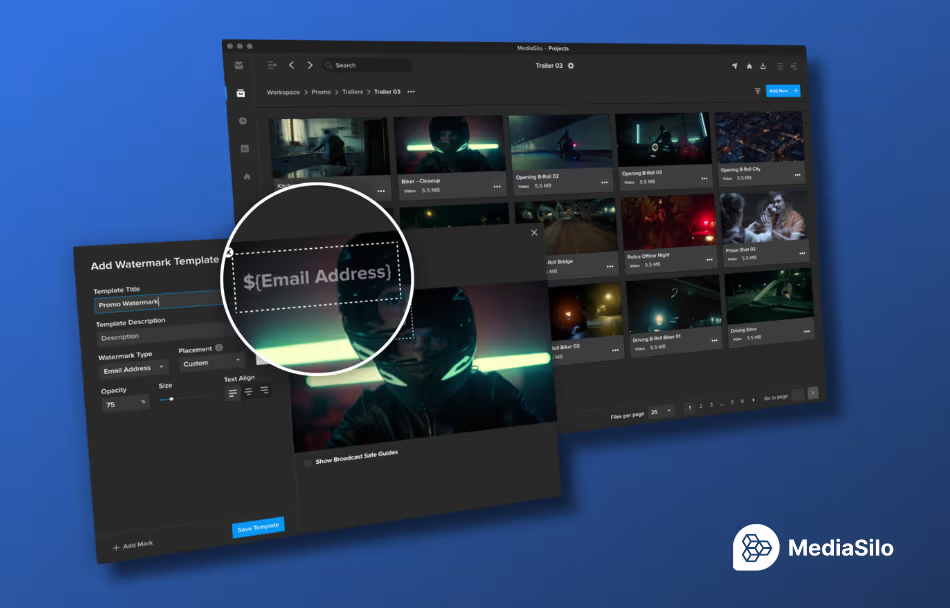
Visual Watermarking: This acts as a powerful visual deterrent for leaks and copying. As a user watches a video, MediaSilo can embed customizable text or images directly into the real-time video stream. You can choose to burn in the viewer’s name, email address, IP address, and the exact date of viewing.
Forensic Watermarking: Taking asset protection to the next level, this feature places an invisible fingerprint over the content. Even if a user attempts to bypass security by recording their computer screen with a smartphone or manipulating the file data, MediaSilo can still extract the hidden identifier from as little as 20 seconds of video. If a leak occurs, this fingerprint will trace the file back to the exact person, date, and time the content was wrongfully shared.
4. Insights and Analytics
The vast majority of media leaks do not occur due to malicious hacks. They happen when people with legitimate access share content when they aren’t supposed to. MediaSilo combats this by providing detailed insights and analytics.
Administrators can monitor exact engagement metrics, tracking who is watching, when they watch, and for how long. From a security standpoint, this allows you to immediately spot anomalies, such as a single account watching a video from multiple geographic locations at the same time. Catching this behavior allows you to identify unauthorized credential sharing and shut down problems early.
Conclusion
By offering flexible secure authentication, granular role based permissions, unbreakable watermarks, and analytics, MediaSilo delivers peace of mind while actively enhancing creative workflows!
To explore these workflows in action, users can request a security deep dive to see exactly how MediaSilo can be tailored to their next media project
NAB 2026 felt like a turning point for the industry. While previous years were defined by curiosity and a bit of “AI-mania,” this year the floor was dominated by a demand for operational maturity and practical integration. Our CEO, Brad Turner, and VP of Engineering and Global Service Assurance, Lon Barrett, recently sat down to recap their four days on the floor and discuss the core technical and strategic takeaways that will define the trajectory of media operations this year.
Following the conversations at the booth, it is clear the industry has moved past the “if” of AI adoption and is now focused on the “how” of practical, high-scale implementation.
1. Moving Toward Analytical Utility
While generative AI continues to capture headlines, the consensus among post-production professionals has shifted toward analytical AI. The “practical” side of the technology (speech-to-text, facial detection, logo identification, and shot detection) is where the real efficiency gains are found.
In professional media and entertainment, creatives often view AI with skepticism, fearing it may replace human judgment. However, our approach focuses on AI as a supportive layer that handles the heavy lifting of logging and metadata enrichment. By extracting data from unstructured video (e.g., identifying a specific church in a scene or the weather conditions of a shoot), we enable a natural, semantic search experience that lets editors find assets by memory rather than rigid file-naming conventions.
2. Infrastructure for the Content Creator Economy
One of the most visible shifts at NAB 2026 was the demographic of the attendees. While international travel may have skewed total scans, the floor was dominated by individual creators and mid-tier production teams born out of the YouTube explosion.
These creators are looking for a sustainable path to grow their technical infrastructure. Our strategy centers on providing a clear migration path: starting with cloud-first tools like MediaSilo for high-speed editorial review and collaboration, and eventually transitioning to high-speed, on-premise storage as their libraries scale. For many, the goal is to find a predictable environment that balances the performance of local hardware with the accessibility of the cloud.
3. The Economics of Hybrid Workflows: Cloud Repatriation and TCO
The debate between cloud and on-premise storage has matured into a sophisticated discussion about Total Cost of Ownershipand ROI. While “cloud for convenience” remains the standard for remote editing and file sharing, we are seeing a significant trend toward cloud repatriation.
As users become more educated on the long-term costs of storing petabytes of “cold” data in the cloud, they are looking for a landing spot for their mass storage that doesn’t carry a monthly penalty. On-premise storage continues to gain density, making it a more cost-effective choice for large-scale archives. However, the aggregate usage of the cloud continues to grow, not necessarily as a replacement for on-premise, but as a host for specific workflow infrastructures and apps.
4. The Shift in Vendor Responsibility
For too long, technology vendors in the media space have ignored the financial complexities their customers face. With the explosion of the ecosystem, from lightweight cloud editors to specific AI plugins, the sheer number of tools can be overwhelming. Our responsibility is to help teams navigate this environment by providing integrated solutions that reduce friction.
Whether it’s building FLOW AI as a native engine to avoid multi-vendor complexity or ensuring our tools play well with third-party NLEs like Adobe Premiere and DaVinci Resolve Studio, the focus is on a sustainable, high-performance ecosystem.
EditShare is committed to building AI that works in real media operations, not just for the NAB stage. Thank you to everyone who stopped by the booth this year. If you missed us, reach out for more info on our latest product offerings, including FLOW AI, MediaSilo AI, and storage solutions for companies and industries of all sizes.