





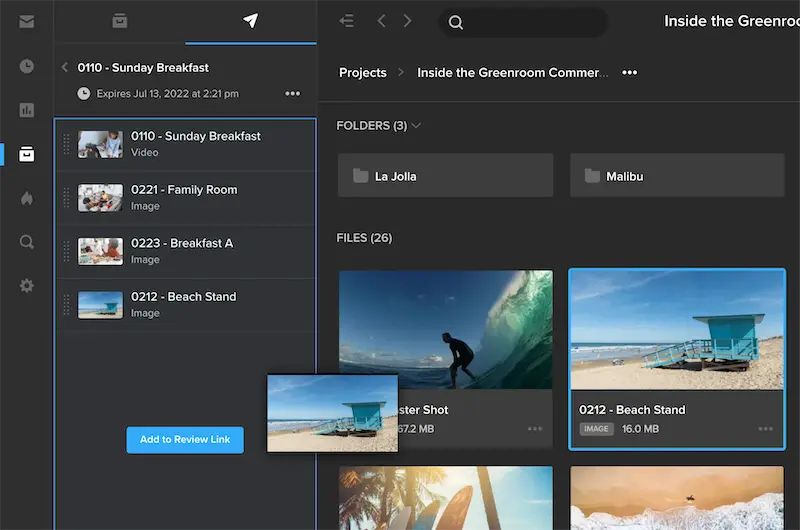
Whether you’re working on a high-profile project, collaborating with a large team remotely, or need to impress your client, you need tools that make sharing content fast, secure, and insightful. That’s where MediaSilo, the industry-leading cloud-based video feedback tool, comes in.
MediaSilo helps teams streamline video review and approval workflows, organize projects, and ensure secure collaboration for post-production. Here are three powerful features that will save you time, keep your links updated, and give you the visibility you need to stay in control.
1. Use Distribution Lists for Faster Sharing
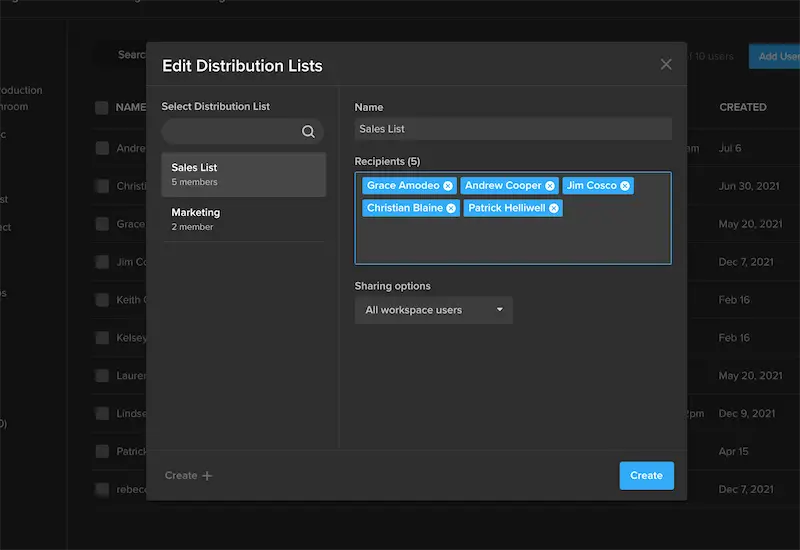
Do you often share video content with the same group of people? Instead of typing email addresses one by one, take advantage of MediaSilo’s distribution lists.
This feature allows you to save groups of users and non-users for quick sharing. Simply enter your recipients in the Share wizard and select “Save Distribution List.” Anytime you need to share files with that group, just select the list from your workspace.
2. Add or Remove Files from Sent Links (Without Resending)
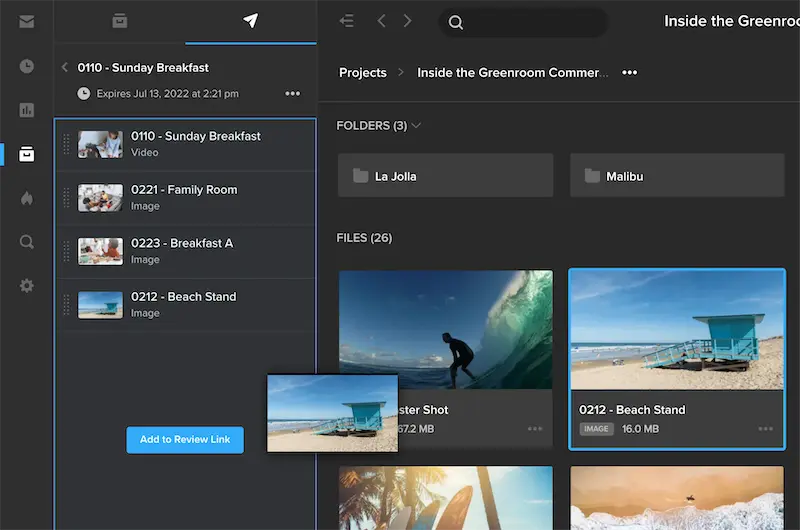
Need to update a sent link with new files or remove outdated ones? MediaSilo makes it easy to organize video teams and reviewers online without creating a new link every time.
Here’s how to do it in three simple steps:
- Navigate to any Project and open the left-side panel to access Sent Links.
- Open the link you want to edit and view the files inside.
- Drag new files from your Projects, remove files by clicking the “x” icon, or re-order files directly in this panel.
Pro Tip: Assets from a watermarked project cannot be added to a public share link. Learn more about the Insights panel in this short video.
3. Track Engagement with Viewer Progress Bars in Insights

Sharing is only half the job. Knowing what happens next is just as critical. With MediaSilo Insights, you can see exactly who viewed your link, what files they engaged with, and how much progress they’ve made.
Navigate to your Insights dashboard to access all engagement data in real time:
- See individual viewer progress on each asset
- Track activity across video review and approval software
- Access geo-location maps and breakdowns by viewer or file
When someone says “I’ve seen it,” you’ll know for sure.
How MediaSilo Improves Your Sharing Workflow
|
Your Needs |
Other Tools Give You… |
MediaSilo Give You… |
|
Fast, secure video sharing with repeat collaborators |
Manual email entry every time you share |
Distribution Lists to save and reuse recipient groups |
|
Flexibility to update links without resending |
Requires creating new links for every update |
Editable links so you can add/remove files anytime |
|
Insight into viewer engagement and approval progress |
Limited analytics (basic view counts) |
Media review workflow management with real-time activity tracking in Insights |
With these features, MediaSilo isn’t just about sending files, it’s about managing the entire video collaboration and review process with clarity and control.
FAQs: MediaSilo Sharing and Insights
Q1: How does MediaSilo help with video review and approval workflows?
MediaSilo simplifies video review and approval software processes by centralizing comments, approvals, and analytics in one platform. Teams can securely share, review, and track progress without juggling multiple tools.
Q2: Can I use MediaSilo for remote video collaboration?
Yes. MediaSilo is a cloud-based video feedback tool designed for remote teams. It enables secure collaboration for post-production, allowing stakeholders to review and approve assets from anywhere.
Q3: How do Insights improve media review workflow management?
Insights provide real-time data on viewer engagement, including who viewed, downloaded, or approved assets. This makes media review workflow management more efficient by reducing guesswork and improving accountability.
Q4: Is MediaSilo secure for client-facing projects?
Absolutely. MediaSilo offers enterprise-grade security, ensuring your projects remain protected while enabling organized video teams and reviewers online for smooth collaboration.
Q5: What makes MediaSilo the best choice for creative teams?
Unlike basic file-sharing tools, MediaSilo combines video review and approval software, collaboration tools, and workflow analytics into one platform, ideal for creative teams working on tight deadlines.

