The way creative teams review and approve video content hasn’t kept up with the speed and complexity of modern production. What was once a straightforward process to send a cut, get feedback, make changes has turned into something much messier. More stakeholders. Tighter timelines. Higher expectations for security and speed. And yet, many of the tools teams rely on still reflect an outdated reality.
After speaking with dozens of post-production professionals, editors, and creative teams, one clear theme emerged. Review and approval is one of the biggest bottlenecks in modern video production. Not because it’s inherently complex, but because the tools meant to support it often create as many problems as they solve.
The Three Jobs of Review & Approve
At its core, every review and approval workflow exists to do three things:
Make sharing easy and reliable. Creators need to distribute content quickly, without worrying about slow uploads, playback issues, or access problems.
Ensure control and security. Teams need to know who has access, who has seen what, and ensure that sensitive content stays protected from leaks or unauthorized distribution.
Gather feedback efficiently. The review process should capture input in a way that’s structured, clear, and actually moves the project forward.
When these jobs are done well, creative teams stay focused on the work instead of fighting the process. When they break down, frustration sets in, deadlines slip, and teams resort to workarounds that only make things worse.
Job 1: Make Sharing Easy and Reliable
At its best: Content reaches the right people without login friction, playback issues, or speed bumps. Sharing and access happen without unnecessary delays.
At its worst: The simple act of sharing a video turns into a technical problem. Uploads stall, links break, playback stutters, and creatives become the de facto IT support for their own projects.
How this job actually gets done:
Despite all the emphasis on software tools that capture feedback and share iterations, this job (simply getting your content into the hands of external collaborators) is the foundation. If you can’t do this (without problems, snags, or turning yourself into the IT handyman who unsticks the process), everything else stops.
Speed and reliability matter more than a slick interface. If the tool creates friction in sharing, teams will revert to email and cloud storage workarounds.
Where tools fall short:
Slow load times and buffering kill momentum. If a video stutters or fails to load, reviewers disengage and feedback slows down.
Uploads and downloads take too long. One team told us they nearly missed a live event deadline because their existing platform locked them out of a critical file at the last minute.
Playback isn’t universal. Teams need their content to work across desktop, mobile, and bad WiFi connection without needing re-exports at different quality levels.
Job 2: Ensure Control and Security
At its best: The team knows exactly who has access to what, security settings are intuitive, and no one loses sleep over leaks or unauthorized sharing.
At its worst: Review links get passed around unchecked, high-value content ends up in the wrong hands, and teams don’t know if their work-in-progress has been accessed by the right people.
How this job actually gets done:
Security is about confidence. Teams need to know that once they share a file, it won’t be accessed by the wrong people or left exposed by default settings.
Granular control over who can view, download, and share files matters just as much as how fast a video loads. Teams want default settings that ensure security without extra steps, easy ways to manage permissions on the fly, and real-time visibility into who has accessed what.
Control can also mean visibility – for instance, one customer we talked to deals with over 100+ external distribution partners that get sent dozens of assets before a live telecast. Being able to accurately track who has viewed the assets (and who hasn’t) is vital for getting ahead of broadcast issues (and ensuring SLAs are met).
Review links that get forwarded too easily. If content can be accessed by “anyone with the link,” teams lose control over who sees their work-in-progress.
Limited visibility into who’s watched what. Teams need better insight into whether the right people have accessed their content, not just vague view counts.
Job 3: Gather Feedback Efficiently
At its best: Feedback flows naturally, whether it happens inside the platform or elsewhere. Every note is clear, relevant, and easy to act on.
At its worst: Comments are scattered across emails, Slack messages, and spreadsheets. Reviewers hesitate to leave feedback because the process is too rigid or clunky.
How this job actually gets done:
Some feedback will always be gathered outside the platform. The higher the seniority of the external stakeholder, the less likely they are to leave comments “in the app.”
Tools that force a single, rigid review workflow create more problems than they solve. The platforms that embrace flexibility—acknowledging that there is no universal best workflow—stand to win.
Where tools fall short:
Logins create friction. External clients and executives don’t want to create an account just to leave a comment, so they default to email.
Feedback tracking is inconsistent. Some tools don’t let reviewers easily pinpoint exact sections of a video, leading to vague, hard-to-follow notes.
Too much structure slows things down. Teams bypass formal review tools because rigid workflows add unnecessary steps when they just need quick input.
What’s Next for Review & Approve Tools?
The next generation of review & approve workflows won’t just replicate existing processes with better UI. They’ll solve the deeper inefficiencies that frustrate teams today. Based on what we’re hearing, here’s where things are headed:
Security as a default, not a luxury. Teams shouldn’t have to pay extra just to know who’s watching their content or to ensure content doesn’t get into the wrong hands.
Feedback that works flexibly inside the app and beyond. The best tools acknowledge that review workflows happen across multiple channels and make it easy to consolidate input.
More automation that keeps things moving. Teams need tools that don’t just store feedback but actively help progress a project, whether through automated notifications, approval workflows, or smart routing of tasks.
Final Thoughts
After so many conversations with creative teams, one thing is clear: review and approval isn’t just about technology it’s about how work actually gets done. The best tools make sure the parts of the workflow that “just have to work” don’t even need to be thought about, and they acknowledge that different teams get feedback on their work in different ways.
The future of review and approval isn’t about adding more features—it’s about removing friction. The teams getting this right aren’t just adopting new tools; they’re embracing smarter, simpler workflows that help them move faster, stay secure, and focus on the work that matters.
Creative teams using MediaSilo can share, review, and get feedback on their content without friction, ensuring their work reaches the right people, stays secure, and moves forward without unnecessary delays.
The latest FLOW release, version 2025.1.0, delivers powerful new capabilities to media managers, streamlining workflows and making asset management more intuitive than ever. With enhanced scanning, uploading, and automation tools, EditShare One Organize simplifies complex tasks, saving time and improving efficiency. Let’s explore how these new features empower media professionals.
FLOW’s extensive range of applications often left users confused about which tools to use and how to install and maintain them. This limited user accessibility and acceptance and its why we created EditShare One. A simple browser based Interface that enables all users to access all of FLOW’s powerful tools for a variation of different workflows.
Time-consuming, manual processes are a thing of the past. FLOW Automation eliminates repetitive tasks like tagging, transcoding, and file delivery, allowing media teams to focus on creative work.
What’s New?
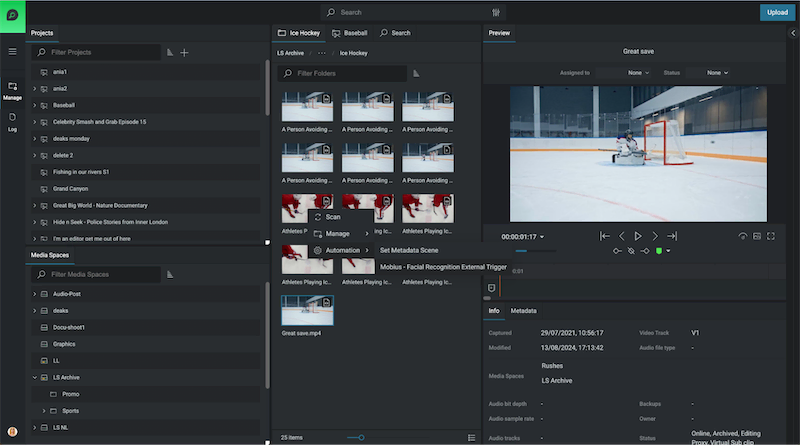
Right-Click Automations: Users can now trigger automation workflows directly from the Organize module, applying them to single or multiple assets with ease.
Automate across Projects or Media Spaces: Automate processes across entire projects, reducing manual steps and ensuring consistency.
Simplified Access to Templates: View only available automation workflows by asset type. Only relevant templates are displayed, keeping the interface clutter-free.
With these improvements, EditShare One is faster, easier, and more accessible—allowing teams to move media seamlessly through their production pipeline.
Keep Your Media Database Up to Date
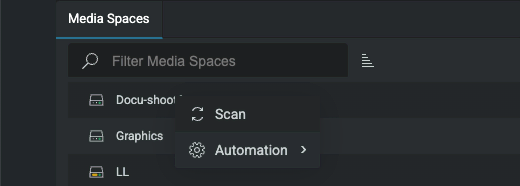
Scan Assets Directly from EditShare One
Keeping track of media assets is crucial for efficient project management. The new scanning functionality enables users to update the FLOW database effortlessly—without leaving the Organize module.
How It Helps
On-Demand Scans: Update media metadata and add new assets to the database anytime.
Two Scan Modes:
Quick Scan – Ideal for detecting and adding newly created or modified files.
Normal Scan – Updates metadata for all new and modified files, keeping asset details current.
Direct Access in Organize: No need to navigate to FLOW Control for scans—everything is accessible where you work.
This feature ensures your database remains accurate and up to date, improving searchability and media organization.
Upload Files Faster, Smarter, and with Greater Control
Enhanced Upload Capabilities
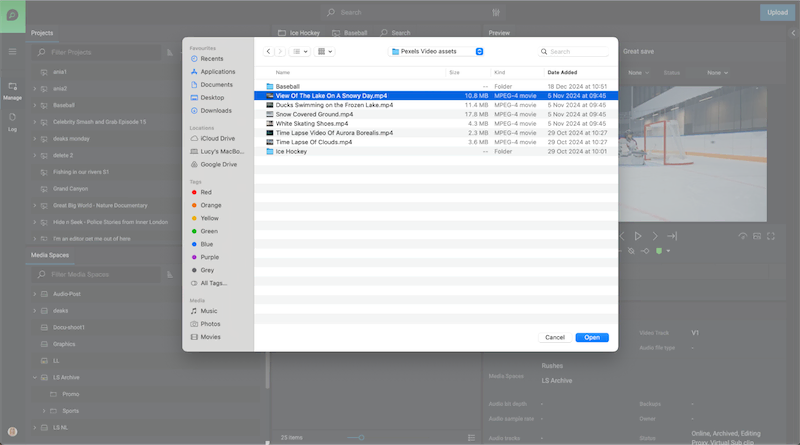
Managing late arriving assets can be challenging, but the improved Upload function simplifies the process, giving users more control over their media.
Key Benefits
Batch Uploading: Add multiple assets at once, reducing downtime between uploads.
Advanced Metadata Options:
Prevent duplicate uploads with the Fail if asset already exists option.
Generate streaming proxies during upload.
Apply custom metadata tailored to your workflow including metadata triggers to automate workflows.
Global Ignore List: Admins can restrict unwanted file types, preventing unnecessary clutter in the system.
With these enhancements, uploading assets is more efficient and customizable than ever before.
Navigate and Manage Assets More Intuitively
Flexible layouts
Media professionals need a fast, streamlined way to organize and move assets. The new Flexible layouts in EditShare One – Organize, introduces a more intuitive layout designed for seamless asset handling
Why It Matters
Customizable Interface: Show or hide panels to tailor the workspace to your needs.
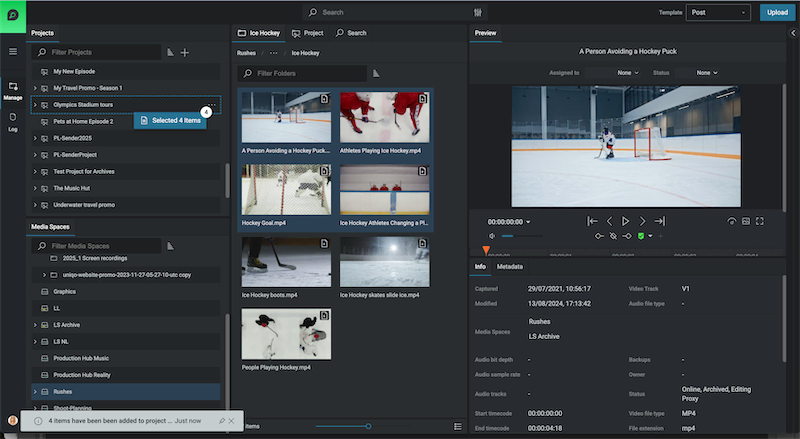
Multi-Select Dragging: Select multiple assets using keyboard shortcuts and move them together effortlessly with fewer clicks.
New Manage Viewpoint: Complimentary to the Log Viewpoint, the new Manage view stacks panels vertically providing simultaneous visibility of Media Spaces and Projects. Each view point can be utilized to maximise the layout specific to the task in hand from managing media to logging
Enhanced Searchability:
A new Results Panel categorizes assets into three tabs: Media Space, Project, and Latest Search Results.
Tabs remain visible even when navigating, eliminating redundant searches.
Breadcrumbs have been relocated for clearer navigation paths.
This update dramatically improves efficiency, making it easier to organize and access media in large-scale projects.
Performance Enhancements for Large-Scale Workflows
As more teams scale up operations, FLOW’s automation engine has been optimized for handling multiple workflows daily. A new Status View provides real-time insights into automation performance, allowing administrators to monitor system activity at a glance.
Get Started with FLOW Today
The FLOW 2025.1.0 release redefines how media professionals manage assets—offering automation, improved navigation, and more control over media workflows. Whether you’re handling high-volume uploads, triggering automated tasks, or optimizing media organization, EditShare One Organize ensures your team works smarter, not harder.
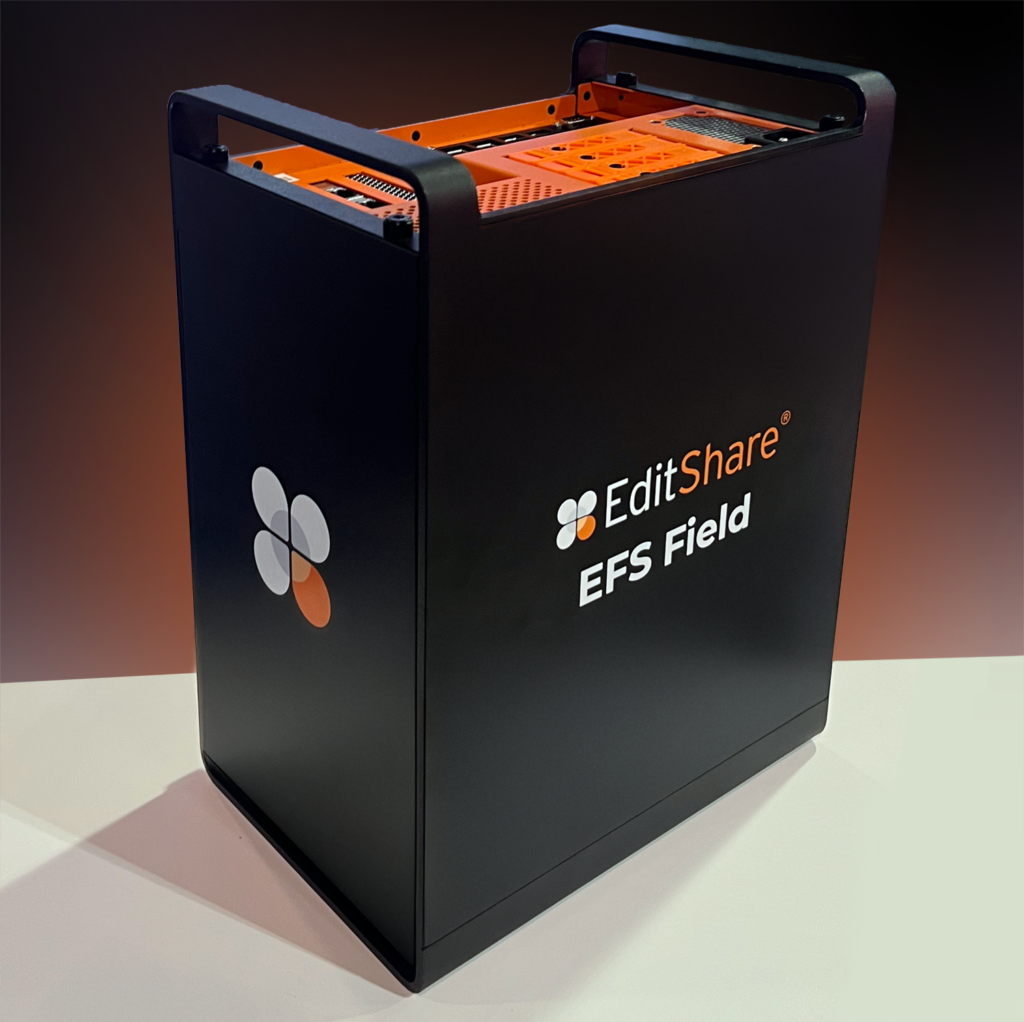
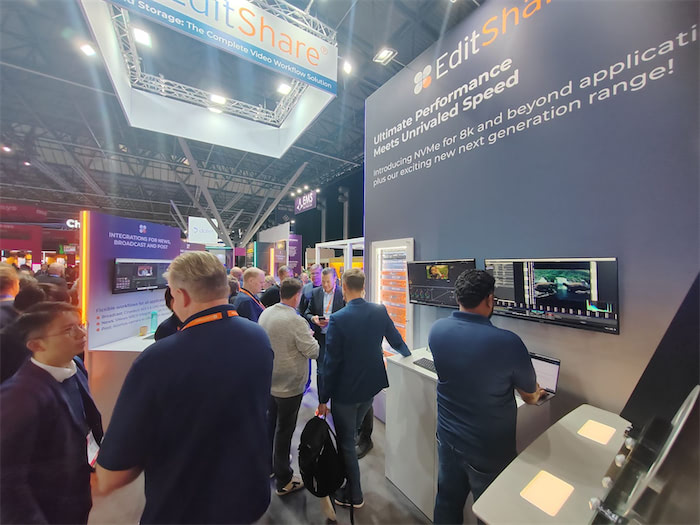
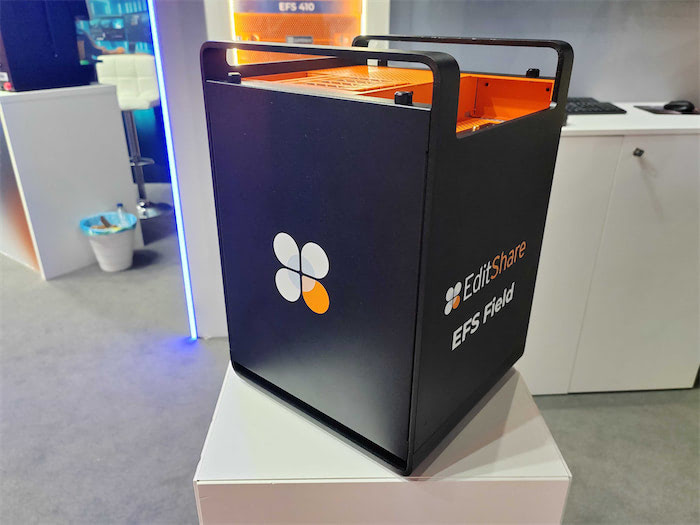
Boston, MA – 1st May 2025 — EditShare®, a global leader in collaborative media workflow solutions, will unveil its latest advancements at CABSAT 2025, delivering a new standard for performance, scalability, and intelligence across creative production environments. Live demonstrations at Booth S1-D20 will spotlight the newUltimate EFS Field, a revolutionary, portable NVMe-based storage platform engineered to provide production-proven performance and simple multi-site collaboration from on-set to the studio.
Headlining the showcase is the Middle East debut of FLOW AI, powered by FLOW Ultimate GPU engines. Built as a multimodal intelligence engine, FLOW AI transforms media workflows with state-of-the-art capabilities including multi-language speech-to-text (STT) transcription, scene detection, facial recognition, logo detection, and advanced OCR (optical character recognition). By combining high-speed asset management with intelligent automation and accelerated smart tagging, FLOW AI arms creative teams to find, organize, and deliver content faster, smarter, and at a global scale, obliterating old production bottlenecks and setting a new standard for speed, precision, and domination in modern media
For asset management, the new FLOW Core Unlimited licensing model removes seat restrictions, allowing media organizations to onboard users instantly and scale operations on demand. From boutique studios to global production houses, FLOW Core delivers true operational flexibility and scalability without limits
In addition to these headliners, EditShare will highlight:
An advanced newsroom workflow integration with leading NRCS vendor Octopus, delivering fast-turnaround, collaborative journalism for modern news teams.
All EFS nodes now feature multi-channel Live NDI support, enabling real-time, high-performance live production.
The stunning All-in-One 410, redefining compact storage with up to 600TB of raw capacity per node ideal for facilities demanding big performance in tight spaces.
The debut of expanded storage capacities across the entire EditShare solution portfolio, providing even greater flexibility for high-volume, high-performance environments.
“At CABSAT 2025, we’re bringing the full force of EditShare innovation,” said Tara Montford, Co-Founder and EVP of Sales at EditShare. “From blazing-fast performance to limitless scalability and smart automation, we’re empowering creative teams to tell bigger, bolder stories faster and from anywhere.”
EditShare staff will be on hand at CABSAT to talk about all of the latest enhancements, find out more on stand S1-D20 at CABSAT, or click here to get in touch.
About EditShare
EditShare is an Emmy Award-winning technology leader empowering storytellers with collaborative media workflows designed for on-premise, cloud, and hybrid environments. Its scalable storage and collaboration solutions support media businesses at every stage of video production, from storyboard to screen.
With an open architecture, EditShare fosters workflow collaboration, third-party integrations, and content sharing across the entire production chain. Its high-performance, high-availability design meets the rigorous demands of media storage, management, and delivery. The comprehensive suite includes multi-tiered content storage for production and post-production, innovative asset and workflow management tools, specialized features for content review, secure preview of pre-release materials, and the creation of customized branded pitch reels, ensuring a seamless and secure media production process.
In the high-stakes world of media and entertainment, where million-dollar productions rely on collaboration with users dotted in different locations, the last thing you need is a cybersecurity breach to derail your project. Whether it’s leaked scripts, stolen footage, or unauthorized access to sensitive or valuable files, the threat landscape is evolving—and your storage solution could be the weak link.
Meet EFS: the media-engineered file system that guards your assets with the precision and security of the crown jewels in Buckingham Palace. Here’s why it’s the ultimate gold standard in media protection.
Layers of Defense: It’s Not Just Storage, It’s a Fortress
When it comes to protecting your media, EFS doesn’t settle for basic folder-level locks. Instead, it builds a fortress around your content with granular control over users and permissions. Think of it as putting layer upon layer of virtual walls between your assets and potential threats. Only authorized users can access what they need—nothing more, nothing less.
And it’s not just about keeping the bad guys out; unique, permission-based media spaces ensure that even internal collaborators only see what’s relevant to them. No accidental “oops” moments. No prying eyes. Total peace of mind.
SOC 2 Compliance: Trust Backed by Certification
For those who need proof that EditShare EFS walks the talk, the platform is SOC 2 certified. This means it meets the highest standards for data security and operational integrity. Whether you’re a film studio, a post-production house, or a media broadcaster, this level of compliance ensures you’re working with a storage solution that doesn’t compromise on safeguarding your data.
Real-Time Auditing: Your All-Seeing Eye
Ever wonder who touched what, when, and where? With real-time auditing, you no longer have to. EditShare EFS keeps meticulous logs of every interaction with your media and makes it accessible in real time. Whether it’s an editor downloading a file or someone attempting unauthorized access, you’ll know about it instantly. It’s like having a 24/7 surveillance system tailored for your storage.
This not only deters malicious behavior but also helps you stay proactive in preventing potential breaches. If someone even dreams of messing with your content, you’ll know about it before they finish their coffee.
Granular Control: A Tailored Security Blueprint
EditShare EFS takes user management to the next level with its granular control features. You can define access rights down to the tiniest detail, ensuring that every user gets the exact level of permission they need. No more worrying about the intern accidentally stumbling upon sensitive pre-release footage or the marketing team accessing files meant for post-production.
By creating customized permission levels, you reduce the risk of accidental leaks and simplify workflows without compromising security.
What If They Break Through?
Even in the event that someone is Indian Jones and got through everything, EFS fully supports CrowdStrike deployments on its nodes, providing world-class threat detection and response. It’s an added shield against even the most sophisticated cyber threats.
Why It Matters
From financial losses to reputation damage, the cost of a breach is too high. EditShare EFS puts walls between your content and cyber threats, letting you create in confidence.
Don’t leave your media’s security to chance. Let EditShare EFS protect your creativity and keep your projects safe from prying eyes.
Big trade shows like NAB have a way of overwhelming the senses. Big booths, bold claims, bright lights, nonstop conversations. I usually come home with a hoarse voice and a need for a nap.
This year is no different, but I’m also coming home with something else: a renewed sense of energy and conviction that we’re on the right path at EditShare.
It wasn’t just about what we showed at the booth. What struck me most was what I heard. Over and over, from both partners and customers, the feedback was simple and consistent:
“You guys really listened.”
That feedback landed deeply with me. Because over the past year, we’ve made a deliberate shift here at EditShare. Not just in our product roadmap, but in how we gather and respond to input from the people who matter most.
Here are a few examples of what that looks like in practice – and what stood out to me most from this year’s show.
FLOW AI: Built From Real Workflows – Not Buzzwords
AI dominated the show floor this year. Some of it was exciting. A lot of it was still pretty vague.
At EditShare, we’ve done our best to stay grounded and pragmatic. Our approach to FLOW AI starts by solving simple, painful problems like searching archives, tagging footage, finding things like logos and extracting metadata that makes your content easier to work with.
What we showed at NAB is just the beginning of our journey into AI. We decided to forgo flashy solutions with voice commands and lifelike avatars for ones that simply make real workflows better: a producer watching their media library come to life because it was finally searchable.
“This makes our archive worth something again,” a booth visitor told me. That made my day.
We’ve focused on speed too. FLOW AI can now process video at 10% of real time, as in, a one-hour file is analyzed in six minutes. That puts teams closer to playback, closer to publishing, and closer to the moment. And its being powered by fast GPU engines
We’ve paired that speed with predictable pricing: a flat-rate annual license, so teams can budget without worrying about usage-based fees or confusing credit systems that are difficult to track.
AI is the hot topic, but most AI today doesn’t live up to the hype. Some tools miss faces, misidentify scenes, or fall apart without us pre-training on your content. That’s why we’re building FLOW AI to understand your media and the way your team talks about it, so it’s not just another feature, it’s a tool you can trust.
Automation: The Quiet Win That Saves Hours
AI may be the star right now in the world of video, but we believe automation is still the hidden hero.
We kept hearing from teams at NAB: there’s still too much time spent getting footage off drives, transcoded, and organized for editing. Hours each week (sometimes more) go into tasks like these tasks that shouldn’t require near this much manual effort.
Even a few simple automations (a great ~5 minute demo of some of our most popular automations can be found here) can give you most or all of that time back. During busy delivery periods, we’ve seen teams reclaim entire days out of their week, simply by automating the manual stuff and getting to the actual editing much faster.
That’s why we’ve made automation in FLOW easier to trigger, easier to configure, and easier to try. Now a creative can simply right click and trigger an Automation workflow.
MediaSilo: Simpler, Clearer, and Easier Than Ever To Get Started
MediaSilo has always had a strong foundation. But we suspected the value was buried behind one-size-fits-most tiering and sub-optimal positioning that we just couldn’t find the time to revisit.
But before making any product changes, we went deep with our happiest customers—teams who use MediaSilo every day and couldn’t imagine switching. We asked them about three things:
Feedback had to be intuitive and flexible whether in the app or via email/slack.
Simple pricing and strong integrations were what sealed the deal.
Armed with that clarity, we kept investing. Not only in positioning, but also in the product itself. Here are a few recent updates:
Bulk Download for Review Links – Download large batches of content, with full folder structure, even without a login. Faster, more reliable, no account required.
HQ Proxy Playback – Choose from multiple resolutions, from 720p to 8K, for faster streaming or higher-quality previews.
DaVinci Resolve Panel – Browse, import, and share media directly from inside Resolve. Feedback flows directly back into the edit.
More to come later this year. We’re making MediaSilo easier to adopt, easier to use, and better integrated into how post teams already work – without all the confusing gotcha pricing or “only with enterprise” feature-gating that other collaboration tools force you into.
When Times Get Tough, Make the Value Obvious
Despite our optimism, the video industry is still under pressure. The Devoncroft team shared some data at NAB that suggested a 10 point margin decrease in the largest content creators over the past 10 years. That kind of pressure isn’t reserved for the big guys. And in that kind of environment, every purchase is scrutinized. It isn’t enough anymore to sell something valuable. That value has to be obvious. In an environment like this one, it has to be unmissable.
In the never-ending work of pulling ourselves out of technical specs and trying to make that value clearer, I’ve been thinking a lot about the contrast between two hypothetical production teams: One still stuck doing things the old way. And one actually taking advantage of everything we’ve built.
How differently would those teams operate? What would it feel like to be part of each?
Really different, it turns out. Here’s a simple example.
The Old Way
New Way with EditShare
1. Getting Organized
Wait a day (or more) to download, organize, and prep files by hand
Trigger a FLOW automation to ingest, sort, QC, rename, and get files ready to edit automatically
2. Finding What You Need
Manually label clips, dig through folders, or rely on memory
FLOW AI makes media searchable right away—no tagging, no guessing, and trained on what you care about
3. Working Remotely
Ship drives overnight, sync footage manually, or bounce between tools to hack together a remote workflow
Generate proxies, collaborate in real time, and share in-progress work—all in one environment, from wherever you’re working
This is what “doing more with less” actually looks like.
With less waste in the system, you can bid on more projects, deliver edits faster, and keep your team from burning out or worse, looking around.
You’re not waiting a full day to download, transcode, and organize raw footage—you’re starting to select the same morning the shoot wraps.
You’re not tying up your lead editor answering emails about version 3_1_FINAL_FINAL.mov—you’re sending a MediaSilo link that lets the client leave timecoded feedback right in the player.
You’re not wondering if your assistant labeled that clip “INT_BTS_camB” or “Interview2_Greg”—FLOW AI tagged it with “Greg,” “backstage,” and “cinema camera B” the moment it hit storage.
You’re not setting alarms to check if files uploaded overnight you get a Slack ping when the automation finishes, and everything’s where it needs to be.
In a tighter market, these aren’t nice-to-haves. They’re what let your team take on more work without working more hours.
Why do I bring this up? Because after a few laps around the show floor, you start to notice something: if you walk fast enough past all the booths and screens, a lot of what’s being exhibited starts to look the same. Slick, dark-mode-everywhere UI. Big claims. Buzzword bingo.
That’s why I’ve been laser-focused leading up to this week on making the value in what we do obvious. I don’t want the life-improving magic in our products to get lost in the noise.
And because based on what we heard from customers and partners at NAB people who’ve seen both the before and after I’m more confident than ever that we’re on the right track.
A Moment That Stuck With Me
A quick shoutout: In the days before the show kicked off, I watched Adam Lewiston, our Global Pre-Sales Technical Manager, lead our booth’s technology setup and our final demo prep. He didn’t just manage our pre-sales logistics – he ran a bootcamp. Our teams drilled, recorded and re-recorded their demos until they were tight and consistent. That kind of leadership made a real difference. I know our customers and prospects noticed. I sure did. Great job, Adam.
Thanks for following along. Whether you’re recovering from NAB too, or just getting going with your own Q2, I hope you have a great week.
Brad
Want to learn more about the latest innovations released at NAB 2025?
One thing I see a lot in my line of work is a lot of talented, creative, and passionate people being forced to do really menial tasks in order to start the edit or start the production. Right? A lot of MAM companies will promise you the world when it comes to automating away these menial tasks, but usually there’s a pretty hefty price tag and a lengthy professional services process to get through. One of EditShare’s most exciting products actually remedies that.
Let me show you three things you can automate today using FLOW Automation.
QC Quarantine Automation
This first one I like to call the QC quarantine. This automation allows you to set up a watch folder for an ingest path. Anything that hits that watch folder immediately gets sent over to a QC server, something like Baton or QScan.
If it passes, we copy it into the proper media folder, and then we set the metadata to show that it passed at a certain date and time. If it fails, we move it into a quarantine media space that’s only accessible by one user, in this case, patient zero.
We send a notification email to patient zero saying there are clips waiting for you in the quarantine folder. Patient zero can now manually look over these clips that failed QC and determine what to do next.
This cuts down significantly on the per asset QC time because rather than you having to manually upload them or upload them to the QC server, they already live on the EditShare and proxies are being generated in the background during this QC process. Plus, there’s no way for editors to accidentally use assets that failed the QC check.
Mezzanine Automation
The next automation is a mezzanine automation. Oftentimes, you’re gonna be working with footage from multiple different cameras as well as graphics packages. All of these are gonna be different codecs at varying bit rates, and it’s gonna make it really difficult for you as an admin or a media manager to predict how the system is going to handle X number of editors on the system. This works by immediately taking any assets that are dropped into the ingest folder and transcoding them into a house mezzanine codec.
This is usually a codec that is in line with your absolute highest res spec for output. Once that transcode is done, it takes the original footage and moves it up to a cloud archive so that you always have access to it. And it also preserves the original file path in case you’re using something like a Sony camera with a really important file path structure. The new transcoded footage goes to the media folder that the editors will access for their actual projects.
And if this transcode fails because of some exotic codec, it actually sends an email to IT or the admin of the EditShare server to take a look at it and see what went wrong.
Metadata Trigger Automation
This last one is great if you need to organize a package of assets to send off to a remote contractor somewhere to download and edit. It starts with a metadata trigger, so we can take all of the assets we wanna send and say push to MediaSilo. Once that’s triggered, it transcodes to an .mp4 that’s a little lighter weight and easier to transfer. Then it runs a metadata check to see if that asset is confidential or not.
If it is confidential, then it sends a notification email to your security team saying that someone tried to upload confidential assets. It also notifies the original uploader, although this is optional. If it’s a green light and there are no confidential assets, we push it up to MediaSilo, and then we update the metadata on the clip in FLOW to say this was uploaded to MediaSilo on this date and time.
As you can see, these three automations alone could save dozens of working hours on your team every week, and you can make and adjust these at your leisure rather than having to call someone like me.
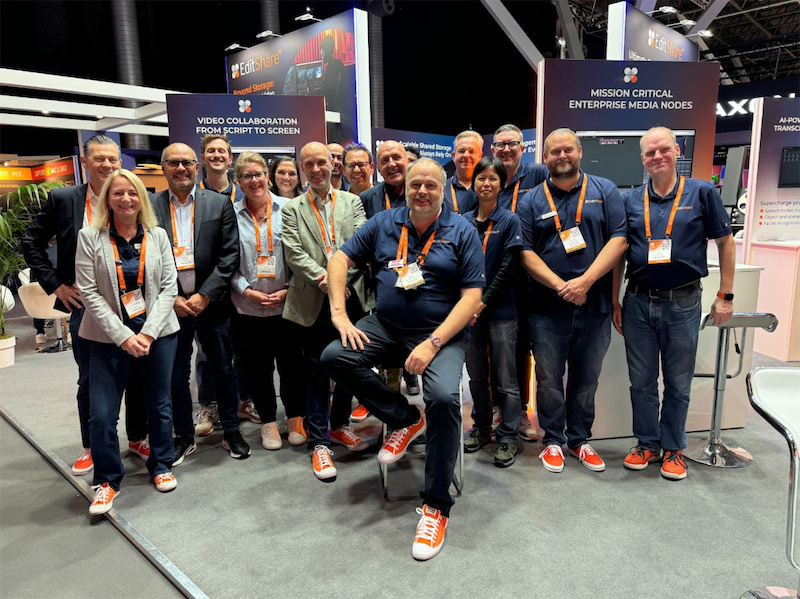
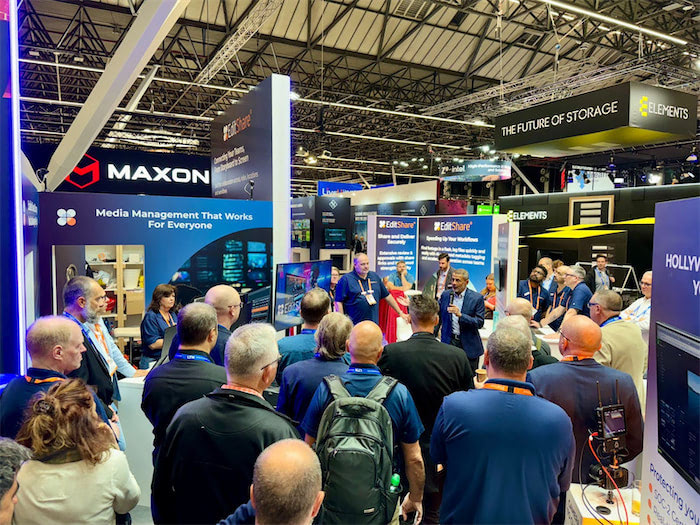
That’s a wrap on another successful year in Amsterdam at IBC, the show that always brings game-changing innovation to the industry. Hall 7 was the exciting place to be. Pulling off a show of this size takes effort, and our team did an excellent job setting up the booth with eye-catching workflows . We couldn’t be more grateful to them, because it allows us to connect with creative professionals and have workflow discussions with so many customers and partners. This year marked our 20th year exhibiting at IBC, a milestone that reflects two decades of bringing innovation to the M&E industry—many of which have since become integral to mainstream workflows. 2024 was no different, as we continue to push the boundaries of technology and shape the future of production. It also allowed us to introduce our latest product innovations – the all new EFS Ultimate Series and EFS Field Unit.
Here’s a look back at some exciting highlights from this year’s show.
AI Still Dominates the Conversation, but Remote Workflows Are Redefining Collaboration
As more companies adopt generative AI, it continues to dominate discussions at industry events. While the full impact of AI and machine learning in the creative process is still emerging, many see these tools as ways to explore new ideas, techniques, and styles. Some view AI as a radical shift in creative technology, while others see it as an efficient way to speed up their work. As one keynote speaker noted, “AI may generate an image, but it’s people who are guiding the tools.”
At the same time, the rise of remote workflows is reshaping how media is produced. Cloud-based tools like MediaSilo and technology like our own Swiftlink are allowing teams to work together across distances, transforming post-production, editing, and even live broadcasts into remote-friendly processes. This shift enables greater flexibility, faster response times, and lower costs, creating a more agile industry.
Unveiling our latest portfolio of storage nodes sparked lively conversations at the booth this year. Designed to streamline workflows and reduce the cost of shared collaborative storage, the Ultimate Series offers 2U, 3U, and 4U form factors, along with an exciting new addition: a portable field unit that delivers unparalleled flexibility for on-set and remote production.
The Ultimate Field portable unit, built on cutting-edge NVMe architecture, provides exceptional bandwidth for on-location work. Featuring integrated SwiftSync technology, it ensures the secure, high-speed transfer of media, allowing teams to instantly send dailies to global facilities for faster collaboration. Whether for boutique post-production houses or national broadcasters, the Ultimate Series enables users to work faster, more efficiently, and from anywhere.
Security was a big discussion at the show and protecting sensitive or valuable content is critical. EditShare is fully aligned with TPN (Trusted Partner Network) security protocols, ensuring compliance with industry-leading standards. Our solutions provide robust real time auditing , secure access controls, and reliable data protection to safeguard media assets throughout the production and post-production process.
Pushing the Boundaries of What’s Possible
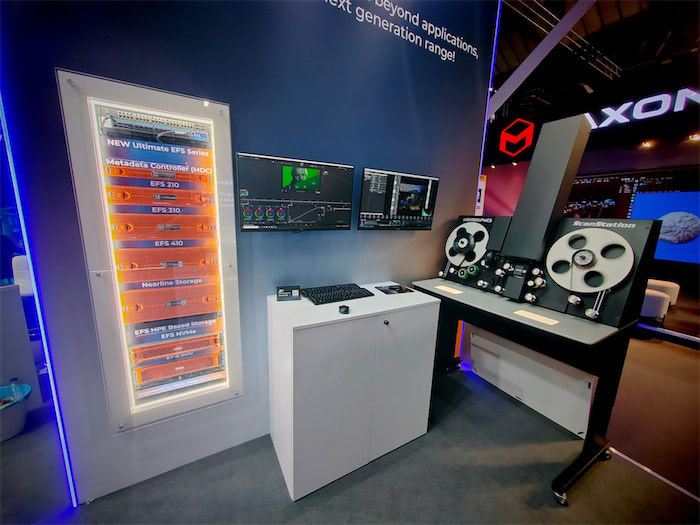
We wanted to showcase what is possible and set up an entire film restoration and archive workflow on the booth. We demoed an NVMe node connected to a gorgeous Lasergraphics Film Scanner, showcasing its ability to capture into an EFS mediaspace concurrently in stunning 5K DPX 4K 16-bit, 4K DPX 10-bit all at 30fps and concurrently playing back within Resolve at 8K 16-bit DPX— pushing the boundaries of high-resolution film restoration and archiving. This was showing what is possible. We still had so much more bandwidth left and this was all being produced on a single 2U Node.
“From the beginning, our mission has been to equip media professionals with practical, powerful, and cost-effective tools,” said Tara Montford, Co-Founder and EVP of Sales at EditShare. “The innovations we’re launching at IBC give users more power, speed, and capacity without sacrificing security—all at a price point that’s truly groundbreaking.
“With these advances, we’re delivering a revolution in content and workflow management that empowers the creative industry to do what they do best: tell great stories,” Montford added.
Got any questions, reach out to us right here, we are happy to talk workflow with anyone that wants to!
Evolution of remote workflows, asset management and approvals
Boston, MA, 2 September 2024 — EditShare, the technology leader that enables storytellers to create and manage collaborative workflows at every stage from storyboard to screening, will show valuable gains in practical productivity thanks to significant new hardware developments and software releases at IBC2024. The enhancements are all driven by the practical experiences of users worldwide, seeking to make their operations even more swift and secure.
Our next-generation EFS storage nodes, powered by the latest HPE Gen11 servers and our advanced NVMe node, set a new standard in performance and efficiency. With over 18GB/s aggregate throughput, this system delivers unmatched performance with unrivalled scalability. Combined with our powerful FLOW workflow engines, it provides creative teams with an efficient platform for UHD editorial and finishing, complex workflows, and multi-site collaboration, ensuring better results and enhanced productivity in every project.
Central to everything in the EditShare environment is FLOW, the asset management software which defines workflows and workgroups. IBC2024 sees FLOW adding native support for codecs which are critical for high quality production. These include Avid DNxHR and Sony X-OCN at resolutions up to 8k. Working directly with CineAlta files, for example, simplifies and speeds the process of creating dailies as well as smoothing workflows for cinematic projects.
FLOW provides workflow orchestration as well as asset management, and FLOW 24.2 enhances the Organize module. This ensures users can create projects, and bins efficiently. By logging in from any secure web browser, users can streamline workflows and collaborate most effectively.
Widely used for review and approvals of work in progress, EditShare MediaSilo also sees enhancements, including support for Ultra HD proxies. With better quality visuals, collaborators are empowered to make more detailed feedback and faster project approvals. The new Bulk Download feature accelerates the process of delivering vast amounts of content to clients. “We talk to post-production professionals all the time, and we understand what is really important in today’s market,” said Tara Montford, Co-Founder and EVP sales at EditShare. “The message coming over loud and strong is that they want to use their preferred creative tools and formats, but within an environment that gives them real speed and security, to deliver completed projects against tight deadlines without compromising quality. The system enhancements we are introducing at IBC this year speak directly to that need.”
Also aimed at speed and simplicity, the latest version of EFS, the media aware File System from Editshare, brings a new way to upgrade across the technology stack. An intelligent Orchestrator tool now automates system upgrades, ensuring every step is executed correctly at the determined time, even across multiple sites. With an intuitive, web-based user interface, this is another essential element in bringing efficiency and reliability to storage management.
All these new software releases will be demonstrated alongside the latest in hardware developments on stand 7.A35 at IBC24. To book time with us at the show please click here
About EditShare
EditShare is an Emmy Award-winning technology leader, supporting storytellers through collaborative media workflows across on-premise, cloud and hybrid architectures. It offers scalable storage and collaboration for media businesses and at every stage of the video production process from storyboarding to screening.
The software is inherently open, encouraging workflow collaboration, third-party integrations and content sharing across the entire production chain. Where required, the software is backed by high performance, high availability designed specifically for the demands of media storage, management and delivery. The comprehensive offering covers multi-level content storage for production and post, along with innovative asset and workflow management software, plus specialized and highly valued tools for content review and distribution, the creation of customized and branded pitch reels, and secure preview of high-value pre-release content.
Press Contact Katharine Guy katharine.guy@editshare.com
Remote production workflows for video editing are getting a lot of attention. The technology for remote production kept improving, but the pandemic really sped development up. Within the first week of the pandemic, the video team I led started deploying remote workflows. The technology was almost there then, but within weeks, we got it dialed in.
The biggest challenge our team faced was latency. We learned that every link in the chain matters (Including open ports on cable internet coax splitters outside of your house! As crazy as that sounds.) Remote post-production workflow development accelerated to meet the challenge. The basics of addressing latency, permissions, and cloud-based proxy workflows have been addressed. So the next question is, “How do you scale it?”
What is remote post-production and cloud-based production?
Traditionally, an entire post-production team would be together in a “post-house.” Editors, colorists, and sound could work together on a centralized server known as a SAN. Cloud-based workflows move the storage to a cloud service provider instead of a local centralized server. This allows for post-production members to be distributed throughout the nation or the globe.
Why is scaling workflows important for post-production?
Post-production teams need to be able to scale to deliver multiple projects for multiple clients. If a team relies on shipping hard drives back and forth in the mail, there is only so fast you can deliver your work to clients.
On-set technology has also improved. New Camera to Cloud technologies have been released like the Atomos + MediaSilo integration where footage is delivered right into MediaSilo from an on-board monitor/recorder.
Understanding workflows in production workflow
Now that you don’t have to wait for footage to be brought back to base to start editing, why not have a distributed post-production team? Editors can get right to work with low-resolution proxies as soon as they are uploaded to the cloud. Another advantage of cloud-based post-production is that editing teams worldwide can work in shifts.
There are a couple of kinds of remote workflows. On one end of the spectrum is ingesting everything to the cloud. This requires a significant amount of bandwidth if you are putting raw camera files onto a cloud storage provider. You need to make sure that your upload speed isn’t a bottleneck that negates the efficiencies of remote post-production.
Another approach is hybrid. In this remote video workflow, you can keep your raw files local and upload proxy files to a cloud storage provider. Project files can also be synced to the cloud so that editors can check in and out projects without stepping on each other toes.
Key factors for scalability
Cloud-based services for remote video editing workflows allocate a specific amount of storage to an account. This could range from 3TB – 10TB for starters. Users can add additional storage as they need it. It is worth thinking through how much “active” storage your team needs at any one time. If you have 3 editors who work with projects from 2-3TB each, 10TB would be a good amount to have in your “active” cloud storage.
If your team is just using the cloud for proxies, you could probably accomplish the same amount of editing with 4TB of cloud storage. However, when you are ready to finish the final files, you’ll want to conform back to your raw camera files. If that is happening where you keep your raw files, then you are all set. If the person doing the color grade is remote, you might need to ship them an SSD. This is the limitation of a hybrid/proxy remote workflow. There is enough available storage and bandwidth for working with proxy files, but not RAW.
Another challenge to scalable video production is having the right space for building a stock video library. Many clients want to accumulate footage that can be reused in multiple videos.
Using cloud-based tools & software to scale workflows
One solution to the challenge of needing space for active projects and space for “stock” footage is to use a review and approval application, like MediaSilo, as a cloud-based asset manager for finished assets. These could be stock video clips, or they could be graphic assets, or project files for After Effects, Photoshop or Illustrator project files (I know of an insurance company that does this). Review and approval tools are good places for frequently accessed files because they are easily searchable, and you don’t have to worry about permitting external users to access the primary “active” video storage.
Managing post-production assets in the cloud
If you are running a remote post-production workflow, you will learn quickly that the file management tools in Google Drive or Dropbox aren’t designed for media production. That’s why EditShare FLEX. Its a suite of tools to facilitate your entire cloud-based post-production workflow.
Cloud-based media management tools will help you to view assets while they reside on the cloud service without downloading them to your local machine. You can search your assets, make notes, create proxies, and organize projects.
Getting files to the cloud efficiently takes more than just a fat pipe from your ISP. Technologies from companies like Data Expedition optimize uploads to maximize your bandwidth.
Another area to consider is data archival. Many teams have used LTO tape as a long-term storage solution. However, using LTO also means barriers to retrieving old footage. A smart cloud-storage strategy (like one using FLEX Cloud Sync) employs cloud-based archival solutions to store older projects on less expensive storage tiers.
Editing from the cloud
Once all your footage is in the cloud (whether raw or proxy), it is time to edit. Most remote editors download the proxies to local storage and start editing with their powerful computers. But there are a couple of other options.
Technologies like EditShare FLEX Cloud Edit and Cloud Edit+ enable users to log into a remote server and edit with their favorite NLE without having to download footage locally. The NLE runs on a remote server but behaves as responsively as a locally installed copy. This wizardry is accomplished through technology like HP Teradici PCoIP (it just rolls off the tongue, doesn’t it?). Your local machine is essentially just a window into a responsive remote workstation.
Another approach allows editors to access on-prem storage as efficiently as cloud storage. EditShare Swift Link delivers this for EditShare FLOW users. Swift Link ensures latency is addressed for remote editors and that their editing experience is optimized for the network conditions between their workstation and your on-prem storage.
Automation in the cloud
If you are evaluating a cloud-based remote post-production, don’t forget about transcoding and quality control workflows. If you are accustomed to a local workflow, you probably don’t give a second thought to batch transcoding a bunch of clips from a mezzanine codec like ProRes to a delivery codec like h.264. However, if that transcode takes place on a local client and the ProRes files are on a server, you’d have to download the ProRes files, transcode locally, and then upload the h.264 versions.
If your cloud service provides the ability to automate transcodes in the cloud you can eliminate the upload and download times. Its even better if you can setting up multiple steps and rules so that the work of transcoding for various deliverables is automated. With the right tools, QC can also be done in the cloud as well.
Scaling for remote production
Cloud-based workflows scale easily because additional resources can be added instantly. Scaling on-prem hardware solutions does take more planning, but if you make a good plan, it isn’t hard to add a unit to your local storage.
If you need higher performance, consider all NVMe shared storage. NVMe storage eliminates the bottlenecks of spinning disk storage. It is more expensive, but it also consumes less power and
Recent trends in remote production
It is helpful to know that post-production standards are moving to the cloud. Today’s cutting-edge products are the result of years of careful planning and a deliberate industry-wide plan to take advantage of cloud-based post-production workflows.
Choosing to deploy remote video workflows now means your team will be prepared for all the latest technological advancements that are coming along every day.
Conclusion
The time has finally arrived for scaling remote production workflows. Teams have options between hybrid and cloud-based workflows. Cameras and recorders can send files straight to the cloud. Media asset management apps can be deployed in the cloud. Remote cloud-based workstations can be accessed anywhere in the world. Solutions for archival, transcoding, QC and review/approval now integrate with each other. All the pieces are now in place to create efficient remote post-production teams.
EditShare, paired with MediaSilo, offers a complete solution that incorporates the latest technologies with the flexibility of your choice of hybrid or fully cloud-based workflows.
What do you think of remote video production workflows? If you have questions about the right setup for your team, send us a message!
The variety of editing that goes on at a broadcaster would amaze you. There are promos, documentaries, news stories, specials and more. Some projects take weeks, and some projects take hours. The technical infrastructure is imposing, but it’s also mobile. Add to that a changing landscape of viewers’ tastes, outside consultants and inside pressures.
To get an inside look at the world of broadcast video editing, we interviewed Gregg Ginnell, former senior editor and post-production supervisor at the CBS affiliate Kiro 7 in Seattle, WA. He’s had a career spanning more than two decades and was keen to share his insights.
Meet a broadcast editor
“I worked in broadcast for a large number of years. I did a lot of documentaries. I did a lot of promotion. I didn’t do a lot of news,” relates Grinnell. “I did do news for a couple of years after leaving Kiro when I worked for Al Jazeera America. That was a completely different news experience.” When an interview opens with that breath of experience, you know that you are going to get some interesting insights into the world of video editing for broadcast.
Video editing for film, corporate and broadcast is all storytelling. But Gregg pointed out that there’s a vast difference between a “three-and-a-half minute story” and a “six-shot” news segment. While working at Kiro, the work got split up between team members who were good with quickly putting together a series of shots and moving on and those who spent days crafting a story.
He related a story of a colleague comparing the cutting of short segments to “making sandwiches.” That kind of edit had to be put together quickly to meet deadlines. Gregg focused on pieces that involved interviews and promotional spots for the station.
Film vs broadcast editing
I asked Gregg what the biggest difference was in the mindset of an editor working on a film vs. one working in broadcasting. His reply was, “Consultants.”
I didn’t expect that answer. He explained that every 12-18 months, a consultant would be brought into the station to give their perspective on trends in broadcast and how to gain market share. Each time, there was a different person, but they were all from the same firm. Sometimes their guidance would directly contradict each other or go back and forth between recommending a trend, advising against it, and then recommending it again.
Gregg shared that the advice of one consultant was to focus on the local news talent for their promo spots. So they went out and shot footage and tied that in with graphics to create a personal connection between the talent and the audience. Eighteen months later, another consultant from the same firm came in. This person advised that they need to drop the focus on talent and emphasize the news itself. Gregg’s team went to work on the new direction and crafted a whole new set of promos.
A year or so went by, and, you guessed it, the next consultant from the firm said to highlight the talent. At this point, Gregg’s team showed them the promo package from the prior campaign and simply asked, “Like this?”
Running decisions through the lens of outside consultants also led to feedback around everything from how many shots should be in a story to the content of the promotional packages. This dynamic leads to a balancing act for broadcast editors between their instincts on telling a story and outside feedback based on market research.
For instance, a story might go off for review, and the feedback would come back as “We love this story, but your shot count is too low.” Gregg recalled thinking, “Well, actually, it has just the right number of shots.” But at the end of the day, you do your best work and try to balance those competing interests.
This is in contrast to the work that Gregg did for the broadcaster Al-Jazeera America. In his experience, they deferred to the editor to determine the dynamics of the edit, even if it meant a piece was a few seconds longer than initially planned.
Editing three-and-a-half-minute packages that took the editor’s lead feels more like a documentary filmmaker’s approach than working in a typical newsroom.
Grinnell made an interesting comparison between documentary and news editors, saying, “I love news editors. I can’t do their job. I’m a little too frenetic. But I know news editors who became documentary editors. I don’t know any documentary editors who became news editors.”
It appears that once you’ve had a chance to tell long form stories, you just keep coming back for more.
Promo Editing
Gregg spent much of his time crafting “promos.” These spots air during commercial breaks and promote the news programming of the local station.
A lot more effort goes into editing promos than your evening news stories. This demonstrates the broad spectrum of talent that needs to be brought to the table at your local broadcaster. Some editors need to be fast. Gregg mentioned an editor who cut 62 packages in eight hours!
On the flip side, Gregg would spend half a day dialing in the color grade for a single promo spot. The message, visuals, motion graphics and sound would all be coordinated to reinforce the brand message for that season.
That difference in editing jobs perfectly illustrates Gregg’s comparison of editing a documentary vs a last-minute promo. He went on to describe it, “If I’m working on a documentary, I’m working directly with the producer, and we’re working every day together, and we are creating it from whole cloth. And that is a completely different experience than how [if] somebody comes in and drops a script down and going, [and says] ‘we got to promote this thing and we got to do it in the next two hours.’ And those are all really different, almost different jobs.”
Learning to shoot helps you edit better
As an editor, you are always looking to grow your storytelling skills. Gregg related, “I’ve always told everybody that I didn’t become a good editor until I became a better shooter. Go out and have to shoot your own stuff, and [when] you get back into the bay, there’s no one else you can blame.”
Many shooters who started off as editors develop strong skills as interviewers. “Where you’re sitting there listening and you go,” Gregg recounted, “Oh, my story’s changing now! There’s nothing I love more than editing in my head.”
You can see from Gregg’s career how the disciplines of editing, shooting and interviewing all work together in the head of the filmmaker to produce a better story. It’s a good reminder that in this age of specialization, there’s still value in combining the skills of a generalist with an area of specialization.
Working remotely
Working remotely was a shock to many industries, but post-production had already laid in place much of the infrastructure to go remote. This preparation allowed editors to remote into their AVID workstations from home and crank out edits. Google docs, Slack and Zoom provided other means for collaboration. Broadcasters all over the world also began to use advanced tools like MediaSilo.com for review/approval, tracking versions and managing assets. These tools combined to really remake the landscape of post-production.
Gregg shared about a campaign he edited for an app that focused on the footwear market. The shooters were in NYC, the graphic designer was in Utah, motion graphics were in California, and he was editing from Seattle. With the proliferation of mobile video capture and distributed teams, we’re going to see more and more of this kind of collaboration.
But along with the ability to work from anywhere comes the importance of security. MediaSilo helps broadcasters secure their assets with SafeStream technology. SafeStream enables visible watermarks and invisible forensic watermarking so that you can track any leaks back to their source.
Conclusion
Getting to know this legendary Seattle broadcast editor, Gregg Grinnell, was an honor. He has a passion for editing that is still burning strong after decades in the business.
Grinnell’s experiences remind us that being an editor is an act of service. Sometimes, you serve a client, a consultant, or a director, but you always serve the story.
It’s inspiring to see how even though consultants come and go and technology changes, the need for crafting compelling stories only increases. It causes us to ask ourselves, “How will I adapt to a shifting landscape? What core skills can I continue to develop that will remain relevant no matter what the future holds?” Those questions will help editors remain sharp and stay in demand in this ever-changing landscape.