Most shared storage problems don't show up in the demo. They show up three weeks into a big project, when multiple editors are cutting, an assistant is ingesting the day's rushes and a render is writing back to the same volume. Playback starts to stutter, and the bandwidth figure that sold the system suddenly seems to describe a different machine.
Comparing professional shared storage is harder than it looks. Most vendors promise high performance, collaborative editing and scalability. The real differences sit in how each system handles your applications, your workflows and the requirements you'll have in three years' time.
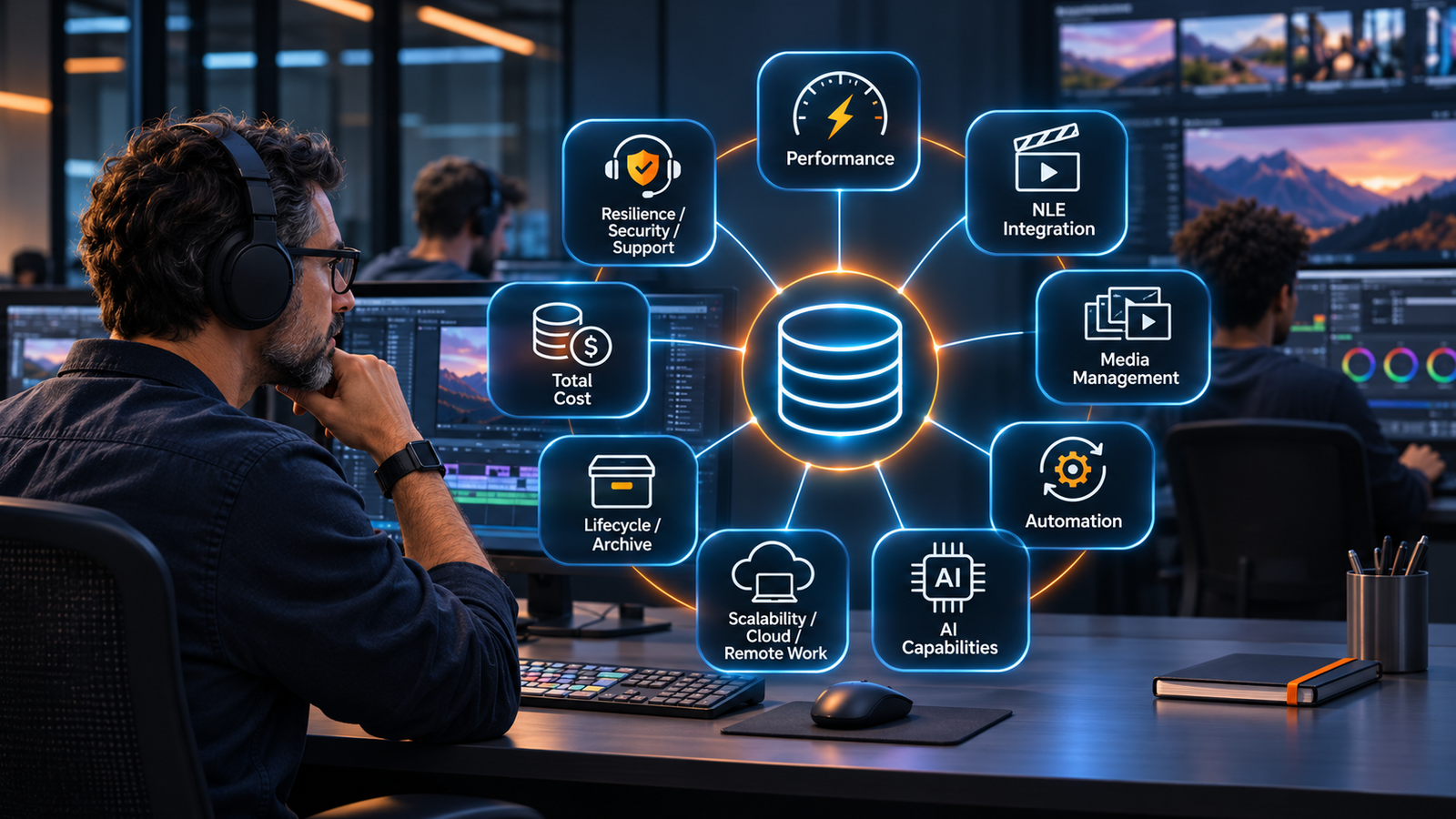
Whether you're equipping a new post facility, replacing an existing system or expanding production, here are nine areas to evaluate and the questions worth asking before you commit.
1. Test performance against your real workload
A system's real-world performance depends on the number of concurrent users, media formats, codecs, resolutions, network connectivity and the mix of read and write operations. A team cutting compressed 4K needs something very different from a finishing suite working with uncompressed or RAW media, or a newsroom running several ingest streams at once.
Headline throughput is a starting point. Ask for figures that reflect what your facility actually does.
Questions to ask your vendor:
- What performance can we expect with our actual media formats and number of concurrent editors?
- How does the system hold up when editing, ingest and rendering run at the same time?
- Was the quoted bandwidth measured under realistic production conditions?
- Can we add performance later without replacing the system?
What to look for: Performance figures quoted for your formats and stream counts, with a configuration sized to match.
2. Make sure storage supports every NLE you use
Many facilities run more than one editing platform: Avid Media Composer or Adobe Premiere Pro for editing and DaVinci Resolve for grading and finishing for example. Your storage shouldn't decide which of those your team can use.
Supporting several NLEs takes more than giving them access to the same files. Each application handles project sharing, media databases, permissions and collaboration differently. Media Composer teams typically depend on project sharing and bin locking, while Premiere Pro Productions has its own requirements for how shared projects are stored and locked. Check which of these workflows a vendor supports, and whether any of them need additional licenses or infrastructure.
Questions to ask your vendor:
- Which NLEs and application versions are officially supported?
- How are collaborative editing, project sharing and locking handled?
- Are additional application licenses required for particular workflows?
- Can editors using different applications access shared media without duplicating it?
- What happens if we introduce another editing platform?
3. Know the difference between storage and media asset management
Putting media on shared storage centralizes it. It doesn't make it easy to find.
As libraries grow, editors, assistants and producers need to locate footage, review it, add metadata and prepare it for the edit without opening an NLE. Many storage systems offer some form of media management, but the depth varies widely. At one end sit file browsing, previews and tags. At the other is production asset management (PAM), which ties media organization to ingest, metadata, editing, automation and archive.
The gap matters more as your team grows. For a handful of editors on one project, basic browsing may be enough. Across dozens of projects and a shared library, it rarely is.
Questions to ask your vendor:
- Can users search, preview and organize media without opening an editing application?
- How is metadata captured and maintained throughout production?
- Can users search across multiple projects and media libraries?
- Does the system support advanced media discovery, including transcripts and visual analysis?
- How does media management connect with ingest, editing and archive workflows?
4. Find out what "automation" actually means
Ingest, transcoding, quality control, media movement and archiving happen every day in most facilities, and much of that work follows the same steps each time. That makes it a strong candidate for automation.
The word covers a lot of ground, though. Some platforms offer predefined actions or simple scheduled processes. Others let you build multi-step workflows triggered by events, metadata or specific production rules. Before comparing vendors, list the repetitive tasks your team handles each week and check how many of them each system could take over.
Questions to ask your vendor:
- Can workflows start automatically when new media arrives?
- Can we build multi-step processes involving transcoding, metadata, quality control and archiving?
- Can workflows be customized without extensive development?
- Can automation connect with external systems and services?
- How are errors, failed tasks and workflow status reported?
What to look for: Workflows your team can configure itself, triggered by real production events, with clear reporting when something fails.
5. Judge AI on where and how it runs
AI-assisted media discovery is most valuable to teams managing large volumes of content. Speech-to-text transcription, face detection, logo recognition, on-screen text recognition and scene analysis let people find material without reviewing every file by hand.
Most vendors can now produce a list of AI features. The more telling questions are where media is processed, how the results feed into everyday workflows and how the technology is priced. For organizations handling confidential or embargoed material, whether content leaves your environment for a third-party cloud service can settle the decision on its own.
Questions to ask your vendor:
- Which AI-assisted analysis capabilities are available?
- Where is media processed, and does it leave our environment?
- Can AI-generated metadata be searched and used within production workflows?
- Can analysis run automatically as part of ingest?
- Are there processing limits, additional licenses or usage-based charges?
What to look for: AI results that are searchable inside your production workflow, processing that meets your security requirements and costs you can forecast.
6. Plan for growth, cloud and remote work
The configuration that suits your facility today may not suit it in three or five years. Higher resolutions, larger projects, more editors and distributed teams all change what you need.
The storage technology matters here. HDD provides economical capacity for many media workloads, NVMe delivers high performance for demanding applications, and mixed HDD and NVMe configurations balance the two. Remote and multisite production adds another layer: extending access to editors working elsewhere, moving selected media between sites or keeping locations in sync.
Cloud storage widens the options further. Many facilities keep active media on prem and use the cloud for offsite backup, long-term archive or disaster recovery, which can also mean retiring an LTO library. Others run editing environments in the cloud for remote teams or short-term projects. The decisions that matter are which media lives where, how it moves between locations and what retrieval and egress charges add up to over time.
Questions to ask your vendor:
- Can we expand capacity without replacing the existing infrastructure?
- Can we increase performance as our workload grows?
- Are HDD, NVMe and mixed HDD/NVMe configurations available?
- How does the system support remote editors and multiple production sites?
- How does the system work with cloud storage for backup, archive or remote editing, and what egress or retrieval charges apply?
- What additional hardware or software is required as we expand?
7. Plan storage for the whole media lifecycle
Most of the media on a facility's storage isn't being edited right now. Finished projects, past seasons and reusable footage often take up more space than active work, and keeping all of it on high-performance storage is an expensive way to hold material nobody is touching.
A tiered approach gives each kind of media the right home. Online storage, on HDD or NVMe, holds active projects. Nearline storage keeps recent or reusable media accessible at a lower cost per terabyte. Archive, whether LTO, object storage or cloud, holds finished work for the long term.
Tiers only help if media moves between them reliably and stays findable once it does. Check whether movement is manual or driven by policy, whether archived material can still be searched through the media management layer, and how quickly it comes back when a project is revived or a producer needs old footage for a new piece.
Questions to ask your vendor:
- Does the vendor offer nearline storage, and how does it connect to online storage?
- Can media move between tiers automatically, based on age, project status or metadata?
- Can users search archived content and request restores without IT involvement?
- Which archive targets are supported, such as LTO, object storage and cloud?
- How long does a typical restore take, and what does it cost?
8. Compare the total cost of ownership
Two systems with similar hardware quotes can end up costing very different amounts. Software licensing, expansion requirements, maintenance and the extra components needed for a complete production workflow all add up.
One vendor may include basic media management while another sells advanced functionality as separate modules. Some license specific collaborative editing capabilities separately. The fair comparison is the full configuration your team needs, priced over five years.
Questions to ask your vendor:
- What is included in the initial configuration?
- Are media management, automation or AI capabilities licensed separately?
- Are there user-based or usage-based charges?
- What additional costs should we expect when expanding capacity or performance?
- Are there licensing dependencies associated with our editing applications?
- What are the estimated support, maintenance and operating costs over five years?
9. Check resilience, security and support early
When shared storage goes down, editing stops and delivery dates slip. Resilience belongs in the evaluation from the first conversation.
Look at how the system protects media, handles hardware failures and supports recovery. Review user permissions, monitoring, audit capabilities and how the platform connects with backup and archive. Then find out what support looks like at 2 a.m. the night before a delivery, because in broadcast and post-production that is when it gets tested.
Questions to ask your vendor:
- How is media protected against drive or hardware failures?
- What happens to active workflows if a component fails?
- What monitoring, audit and administrative capabilities are available?
- How are backup, archive and recovery processes supported?
- What service-level agreements and technical support options are available?
What to look for: Proven data protection, administrative controls that fit your team and a support model that matches the deadlines you work to.
Shared storage vendor scorecard
Use this grid to score each shortlisted vendor from 1 to 5 against your own requirements.
Then ask your shortlisted vendors to walk through how their system would handle your specific formats, applications and daily workflows. The answers to detailed, workflow-specific questions reveal far more than a specification sheet.
Making the right decision
The real test of shared storage is the week your workload peaks: the most editors, the heaviest formats and the tightest deadline. A system chosen on capacity and headline bandwidth can pass the demo and struggle that week. One chosen on how it handles your editing applications, media management, automation and five-year costs is far more likely to hold up.
Explore shared storage built for media production
EditShare EFS provides high-performance shared storage designed for professional media production, with HDD, NVMe and hybrid HDD/NVMe options to suit different workloads and budgets.
Combined with FLOW production asset management, workflow automation and optional FLOW AI capabilities, EditShare brings storage and media workflows together so teams can organize, manage and access content throughout production.
Whether you're supporting a single editing facility or a distributed production environment, EditShare can help you design a storage architecture around your team's requirements, on premises, in the cloud or as a hybrid of both.